monitでFirefoxを監視してみた

       吉田@板橋
         2012/07/18
      第二回監視ツール勉強会
自己紹介
• どこにでも居るIT系一般人
• Twitter : @koedoyoshida
• 参加コミュニティ:
  – KoedoLUG
  – 東京エリアDebian勉強会等
本題
• 私物リモートのWeb環境の管理
 – 定期的なアクセス
 – 死活監視
 – イベント発生時の通知
環境
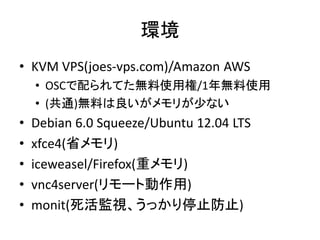
• KVM VPS(joes-vps.com)/Amazon AWS
    • OSCで配られてた無料使用権/1年無料使用
    • (共通)無料は良いがメモリが少ない
•   Debian 6.0 Squeeze/Ubuntu 12.04 LTS
•   xfce4(省メモリ)
•   iceweasel/Firefox(重メモリ)
•   vnc4server(リモート動作用)
•   monit(死活監視、うっかり停止防止)
構築
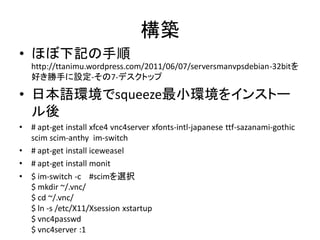
• ほぼ下記の手順
    http://ttanimu.wordpress.com/2011/06/07/serversmanvpsdebian-32bitを
    好き勝手に設定-その7-デスクトップ

• 日本語環境でsqueeze最小環境をインストー
  ル後
•   # apt-get install xfce4 vnc4server xfonts-intl-japanese ttf-sazanami-gothic
    scim scim-anthy im-switch
•   # apt-get install iceweasel
•   # apt-get install monit
•   $ im-switch -c #scimを選択
    $ mkdir ~/.vnc/
    $ cd ~/.vnc/
    $ ln -s /etc/X11/Xsession xstartup
    $ vnc4passwd
    $ vnc4server :1
接続
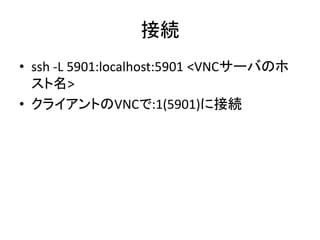
• ssh -L 5901:localhost:5901 <VNCサーバのホ
  スト名>
• クライアントのVNCで:1(5901)に接続
monit基本設定
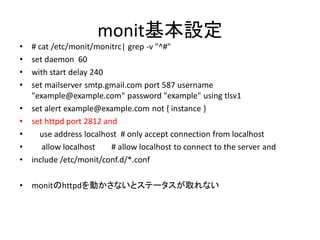
•   # cat /etc/monit/monitrc| grep -v "^#"
•   set daemon 60
•   with start delay 240
•   set mailserver smtp.gmail.com port 587 username
    "example@example.com" password "example" using tlsv1
•   set alert example@example.com not { instance }
•   set httpd port 2812 and
•     use address localhost # only accept connection from localhost
•      allow localhost    # allow localhost to connect to the server and
•   include /etc/monit/conf.d/*.conf

•   monitのhttpdを動かさないとステータスが取れない
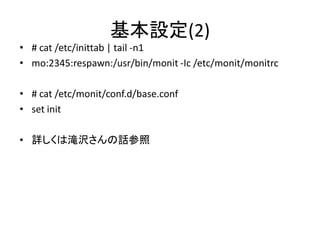
基本設定(2)
• # cat /etc/inittab | tail -n1
• mo:2345:respawn:/usr/bin/monit -Ic /etc/monit/monitrc

• # cat /etc/monit/conf.d/base.conf
• set init

• 詳しくは滝沢さんの話参照
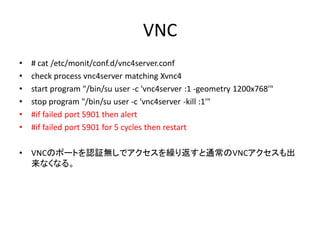
VNC
•   # cat /etc/monit/conf.d/vnc4server.conf
•   check process vnc4server matching Xvnc4
•   start program "/bin/su user -c 'vnc4server :1 -geometry 1200x768'"
•   stop program "/bin/su user -c 'vnc4server -kill :1'"
•   #if failed port 5901 then alert
•   #if failed port 5901 for 5 cycles then restart

•   VNCのポートを認証無しでアクセスを繰り返すと通常のVNCアクセスも出
    来なくなる。
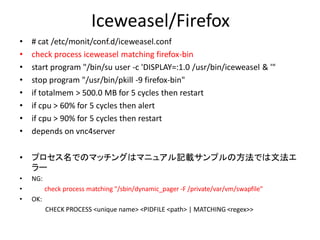
Iceweasel/Firefox
•   # cat /etc/monit/conf.d/iceweasel.conf
•   check process iceweasel matching firefox-bin
•   start program "/bin/su user -c 'DISPLAY=:1.0 /usr/bin/iceweasel & '"
•   stop program "/usr/bin/pkill -9 firefox-bin"
•   if totalmem > 500.0 MB for 5 cycles then restart
•   if cpu > 60% for 5 cycles then alert
•   if cpu > 90% for 5 cycles then restart
•   depends on vnc4server

•   プロセス名でのマッチングはマニュアル記載サンプルの方法では文法エ
    ラー
•   NG:
•         check process matching "/sbin/dynamic_pager -F /private/var/vm/swapfile"
•   OK:
          CHECK PROCESS <unique name> <PIDFILE <path> | MATCHING <regex>>
Process 'vnc4server'
                             monit status コマンド                       •   Process 'iceweasel'
 status                 Running                                      •    status              Running
 monitoring status           Monitored
 pid                   9360                                          •    monitoring status          Monitored
 parent pid               1                                          •    pid                3639
 uptime                  65d 6h 51m                                  •    parent pid             1
 children               0
 memory kilobytes              23284                                 •    uptime               11m
 memory kilobytes total         23284                                •    children             0
 memory percent                4.5%                                  •    memory kilobytes           73596
 memory percent total           4.5%
 cpu percent               0.0%                                      •    memory kilobytes total        73596
 cpu percent total           0.0%                                    •    memory percent             14.4%
 data collected             Thu, 19 Jul 2012 00:30:40                •    memory percent total          14.4%
Process 'sshd'
                                                                     •    cpu percent             0.0%
 status                 Running                                      •    cpu percent total         0.0%
 monitoring status           Monitored                               •    data collected           Thu, 19 Jul 2012 00:30:40
 pid                   11381
 parent pid               1
 uptime                  20d 6h 40m                                  •   System 'system_joesvps.dip.jp'
 children               11                                           •    status              Running
 memory kilobytes              332
                                                                     •    monitoring status         Monitored
 memory kilobytes total         39288
 memory percent                0.0%                                  •    load average           [0.51] [0.28] [0.36]
 memory percent total           7.7%                                 •    cpu                0.0%us 0.0%sy 0.0%wa
 cpu percent               0.0%
                                                                     •    memory usage             190004 kB [37.3%]
 cpu percent total           0.0%
 port response time           0.062s to localhost:22 [SSH via TCP]   •    swap usage             48892 kB [3.3%]
 data collected             Thu, 19 Jul 2012 09:30:40                •    data collected         Thu, 19 Jul 2012 00:30:40


 上記のような出力が得られる monitのhttpdの動作が必要(前述)
 # monit status

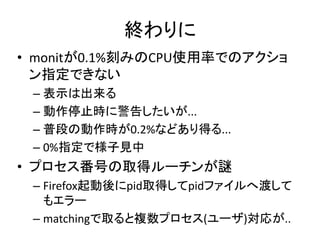
終わりに
• monitが0.1%刻みのCPU使用率でのアクショ
  ン指定できない
 – 表示は出来る
 – 動作停止時に警告したいが...
 – 普段の動作時が0.2%などあり得る...
 – 0%指定で様子見中
• プロセス番号の取得ルーチンが謎
 – Firefox起動後にpid取得してpidファイルへ渡して
   もエラー
 – matchingで取ると複数プロセス(ユーザ)対応が..

Monitでfirefoxを監視してみた

  • 1.
    monitでFirefoxを監視してみた 吉田@板橋 2012/07/18 第二回監視ツール勉強会
  • 2.
    自己紹介 • どこにでも居るIT系一般人 • Twitter: @koedoyoshida • 参加コミュニティ: – KoedoLUG – 東京エリアDebian勉強会等
  • 3.
    本題 • 私物リモートのWeb環境の管理 –定期的なアクセス – 死活監視 – イベント発生時の通知
  • 4.
    環境 • KVM VPS(joes-vps.com)/AmazonAWS • OSCで配られてた無料使用権/1年無料使用 • (共通)無料は良いがメモリが少ない • Debian 6.0 Squeeze/Ubuntu 12.04 LTS • xfce4(省メモリ) • iceweasel/Firefox(重メモリ) • vnc4server(リモート動作用) • monit(死活監視、うっかり停止防止)
  • 5.
    構築 • ほぼ下記の手順 http://ttanimu.wordpress.com/2011/06/07/serversmanvpsdebian-32bitを 好き勝手に設定-その7-デスクトップ • 日本語環境でsqueeze最小環境をインストー ル後 • # apt-get install xfce4 vnc4server xfonts-intl-japanese ttf-sazanami-gothic scim scim-anthy im-switch • # apt-get install iceweasel • # apt-get install monit • $ im-switch -c #scimを選択 $ mkdir ~/.vnc/ $ cd ~/.vnc/ $ ln -s /etc/X11/Xsession xstartup $ vnc4passwd $ vnc4server :1
  • 6.
    接続 • ssh -L5901:localhost:5901 <VNCサーバのホ スト名> • クライアントのVNCで:1(5901)に接続
  • 7.
    monit基本設定 • # cat /etc/monit/monitrc| grep -v "^#" • set daemon 60 • with start delay 240 • set mailserver smtp.gmail.com port 587 username "example@example.com" password "example" using tlsv1 • set alert example@example.com not { instance } • set httpd port 2812 and • use address localhost # only accept connection from localhost • allow localhost # allow localhost to connect to the server and • include /etc/monit/conf.d/*.conf • monitのhttpdを動かさないとステータスが取れない
  • 8.
    基本設定(2) • # cat/etc/inittab | tail -n1 • mo:2345:respawn:/usr/bin/monit -Ic /etc/monit/monitrc • # cat /etc/monit/conf.d/base.conf • set init • 詳しくは滝沢さんの話参照
  • 9.
    VNC • # cat /etc/monit/conf.d/vnc4server.conf • check process vnc4server matching Xvnc4 • start program "/bin/su user -c 'vnc4server :1 -geometry 1200x768'" • stop program "/bin/su user -c 'vnc4server -kill :1'" • #if failed port 5901 then alert • #if failed port 5901 for 5 cycles then restart • VNCのポートを認証無しでアクセスを繰り返すと通常のVNCアクセスも出 来なくなる。
  • 10.
    Iceweasel/Firefox • # cat /etc/monit/conf.d/iceweasel.conf • check process iceweasel matching firefox-bin • start program "/bin/su user -c 'DISPLAY=:1.0 /usr/bin/iceweasel & '" • stop program "/usr/bin/pkill -9 firefox-bin" • if totalmem > 500.0 MB for 5 cycles then restart • if cpu > 60% for 5 cycles then alert • if cpu > 90% for 5 cycles then restart • depends on vnc4server • プロセス名でのマッチングはマニュアル記載サンプルの方法では文法エ ラー • NG: • check process matching "/sbin/dynamic_pager -F /private/var/vm/swapfile" • OK: CHECK PROCESS <unique name> <PIDFILE <path> | MATCHING <regex>>
  • 11.
    Process 'vnc4server' monit status コマンド • Process 'iceweasel' status Running • status Running monitoring status Monitored pid 9360 • monitoring status Monitored parent pid 1 • pid 3639 uptime 65d 6h 51m • parent pid 1 children 0 memory kilobytes 23284 • uptime 11m memory kilobytes total 23284 • children 0 memory percent 4.5% • memory kilobytes 73596 memory percent total 4.5% cpu percent 0.0% • memory kilobytes total 73596 cpu percent total 0.0% • memory percent 14.4% data collected Thu, 19 Jul 2012 00:30:40 • memory percent total 14.4% Process 'sshd' • cpu percent 0.0% status Running • cpu percent total 0.0% monitoring status Monitored • data collected Thu, 19 Jul 2012 00:30:40 pid 11381 parent pid 1 uptime 20d 6h 40m • System 'system_joesvps.dip.jp' children 11 • status Running memory kilobytes 332 • monitoring status Monitored memory kilobytes total 39288 memory percent 0.0% • load average [0.51] [0.28] [0.36] memory percent total 7.7% • cpu 0.0%us 0.0%sy 0.0%wa cpu percent 0.0% • memory usage 190004 kB [37.3%] cpu percent total 0.0% port response time 0.062s to localhost:22 [SSH via TCP] • swap usage 48892 kB [3.3%] data collected Thu, 19 Jul 2012 09:30:40 • data collected Thu, 19 Jul 2012 00:30:40 上記のような出力が得られる monitのhttpdの動作が必要(前述) # monit status

  • 12.
    終わりに • monitが0.1%刻みのCPU使用率でのアクショ ン指定できない – 表示は出来る – 動作停止時に警告したいが... – 普段の動作時が0.2%などあり得る... – 0%指定で様子見中 • プロセス番号の取得ルーチンが謎 – Firefox起動後にpid取得してpidファイルへ渡して もエラー – matchingで取ると複数プロセス(ユーザ)対応が..