Modules and Packages in Python
Tushar B. Kute,
http://tusharkute.com
Lets see the example...
• Modules are used to categorize code in Python
into smaller part.
• A module is simply a file, where classes,
functions and variables are defined.
• Grouping similar code into a single file makes it
easy to access.
• Types:
– System modules
– User defined modules
Advantages
• Python provides the following advantages for
using module:
– 1) Reusability: Module can be used in some
other python code. Hence it provides the
facility of code reusability.
– 2) Categorization: Similar type of attributes
can be placed in one module.
Using system modules
• import keyword
• import as
• from import
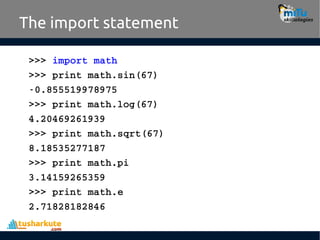
The import statement
>>> import math
>>> print math.sin(67)
­0.855519978975
>>> print math.log(67)
4.20469261939
>>> print math.sqrt(67)
8.18535277187
>>> print math.pi
3.14159265359
>>> print math.e
2.71828182846
Import using alias
>>> import math as m
>>> print m.sin(90)
0.893996663601
>>> print m.log(90)
4.49980967033
>>> print m.sqrt(90)
9.48683298051
>>> print m.pi
3.14159265359
>>> print m.e
2.71828182846
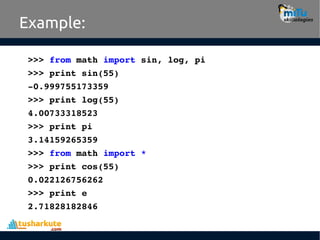
Selective import
• from..import statement is used to import
particular attribute from a module.
• In case you do not want whole of the module to
be imported then you can use from ?import
statement.
Example:
>>> from math import sin, log, pi
>>> print sin(55)
­0.999755173359
>>> print log(55)
4.00733318523
>>> print pi
3.14159265359
>>> from math import *
>>> print cos(55)
0.022126756262
>>> print e
2.71828182846
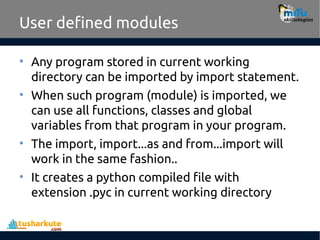
User defined modules
• Any program stored in current working
directory can be imported by import statement.
• When such program (module) is imported, we
can use all functions, classes and global
variables from that program in your program.
• The import, import...as and from...import will
work in the same fashion..
• It creates a python compiled file with
extension .pyc in current working directory
Example:
fact.py
main_prog.py
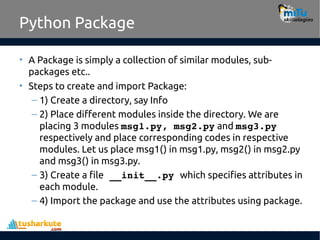
Python Package
• A Package is simply a collection of similar modules, sub-
packages etc..
• Steps to create and import Package:
– 1) Create a directory, say Info
– 2) Place different modules inside the directory. We are
placing 3 modules msg1.py, msg2.py and msg3.py
respectively and place corresponding codes in respective
modules. Let us place msg1() in msg1.py, msg2() in msg2.py
and msg3() in msg3.py.
– 3) Create a file __init__.py which specifies attributes in
each module.
– 4) Import the package and use the attributes using package.
Example:
files
folder
__init__.py
Using packages
• Now create a new file outside of ‘info’ to import
the given package. We can apply all import
methods to use the package.
• It creates four new .pyc files in info folder.
tushar@tusharkute.com
Thank you
This presentation is created using LibreOffice Impress 5.1.6.2, can be used freely as per GNU General Public License
Web Resources
http://mitu.co.in
http://tusharkute.com
/mITuSkillologies @mitu_group
contact@mitu.co.in
/company/mitu-
skillologies
Modules and Packages in Python_Basics.pdf

  • 1.
    Modules and Packagesin Python Tushar B. Kute, http://tusharkute.com
  • 2.
    Lets see theexample... • Modules are used to categorize code in Python into smaller part. • A module is simply a file, where classes, functions and variables are defined. • Grouping similar code into a single file makes it easy to access. • Types: – System modules – User defined modules
  • 3.
    Advantages • Python providesthe following advantages for using module: – 1) Reusability: Module can be used in some other python code. Hence it provides the facility of code reusability. – 2) Categorization: Similar type of attributes can be placed in one module.
  • 4.
    Using system modules •import keyword • import as • from import
  • 5.
    The import statement >>>import math >>> print math.sin(67) ­0.855519978975 >>> print math.log(67) 4.20469261939 >>> print math.sqrt(67) 8.18535277187 >>> print math.pi 3.14159265359 >>> print math.e 2.71828182846
  • 6.
    Import using alias >>>import math as m >>> print m.sin(90) 0.893996663601 >>> print m.log(90) 4.49980967033 >>> print m.sqrt(90) 9.48683298051 >>> print m.pi 3.14159265359 >>> print m.e 2.71828182846
  • 7.
    Selective import • from..importstatement is used to import particular attribute from a module. • In case you do not want whole of the module to be imported then you can use from ?import statement.
  • 8.
    Example: >>> from mathimport sin, log, pi >>> print sin(55) ­0.999755173359 >>> print log(55) 4.00733318523 >>> print pi 3.14159265359 >>> from math import * >>> print cos(55) 0.022126756262 >>> print e 2.71828182846
  • 9.
    User defined modules •Any program stored in current working directory can be imported by import statement. • When such program (module) is imported, we can use all functions, classes and global variables from that program in your program. • The import, import...as and from...import will work in the same fashion.. • It creates a python compiled file with extension .pyc in current working directory
  • 10.
  • 11.
    Python Package • APackage is simply a collection of similar modules, sub- packages etc.. • Steps to create and import Package: – 1) Create a directory, say Info – 2) Place different modules inside the directory. We are placing 3 modules msg1.py, msg2.py and msg3.py respectively and place corresponding codes in respective modules. Let us place msg1() in msg1.py, msg2() in msg2.py and msg3() in msg3.py. – 3) Create a file __init__.py which specifies attributes in each module. – 4) Import the package and use the attributes using package.
  • 12.
  • 13.
  • 14.
    Using packages • Nowcreate a new file outside of ‘info’ to import the given package. We can apply all import methods to use the package. • It creates four new .pyc files in info folder.
  • 15.
    tushar@tusharkute.com Thank you This presentationis created using LibreOffice Impress 5.1.6.2, can be used freely as per GNU General Public License Web Resources http://mitu.co.in http://tusharkute.com /mITuSkillologies @mitu_group contact@mitu.co.in /company/mitu- skillologies