 Classes and objects
 Classes and functions
 Classes and methods
1
2
3
Belongs To
Belongs To
Belongs To
Belongs To
Uses
Uses
Uses
Uses
Objec
t
Objec
t
Objec
t
Objec
t
Data
Class
 Python is an object-oriented programming language, which
means that it provides features that support object-oriented
programming ( OOP).
 Object-oriented programming has its roots in the 1960s, but it
wasn’t until the mid 1980s that it became the main
programming paradigm used in the creation of new software.
 It was developed as a way to handle the rapidly increasing size
and complexity of software systems, and to make it easier to
modify these large and complex systems over time.
 Up to now we have been writing programs using a procedural
programming paradigm.
 In procedural programming the focus is on writing functions or
procedures which operate on data.
 In object-oriented programming the focus is on the creation of
objects which contain both data and functionality together.
4
 A class in essence defines a new data type.
 Lets create our own user-defined type: Point.
 Consider the concept of a mathematical point.
 In two dimensions, a point is two numbers
(coordinates) that are treated collectively as a
single object.
 In mathematical notation, points are often
written in parentheses with a comma separating
the coordinates.
 For example, (0, 0) represents the origin, and (x,
y) represents the point x units to the right and y
units up from the origin.
5
 A natural way to represent a point in Python
is with two numeric values.
 The question, then, is how to group these
two values into a compound object.
 The quick and dirty solution is to use a list or
tuple, and for some applications that might
be the best choice.
 An alternative is to define a new user-defined
compound type, also called a class.
 This approach involves a bit more effort, but
it has advantages that will be apparent soon.
6
 A class is the blueprint from which individual
objects are created.
 In object-oriented programming, a class is an
extensible program-code-template for
creating objects, providing initial values for
member variables and implementations of
methods.
7
 A class definition looks like this:
 Class definitions can appear anywhere in a program, but they are usually
near the beginning (after the import statements).
 The syntax rules for a class definition are the same as for other
compound statements.
 There is a header which begins with the keyword, class, followed by the
name of the class, and ending with a colon.
 This definition creates a new class called Point.
 The pass statement has no effect; it is only necessary because a
compound statement must have something in its body.
 A docstring could serve the same purpose:
 a
8
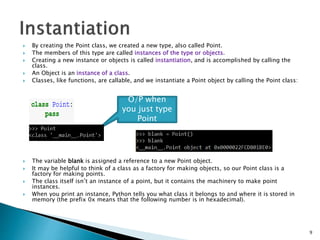
 By creating the Point class, we created a new type, also called Point.
 The members of this type are called instances of the type or objects.
 Creating a new instance or objects is called instantiation, and is accomplished by calling the
class.
 An Object is an instance of a class.
 Classes, like functions, are callable, and we instantiate a Point object by calling the Point class:
 The variable blank is assigned a reference to a new Point object.
 It may be helpful to think of a class as a factory for making objects, so our Point class is a
factory for making points.
 The class itself isn’t an instance of a point, but it contains the machinery to make point
instances.
 When you print an instance, Python tells you what class it belongs to and where it is stored in
memory (the prefix 0x means that the following number is in hexadecimal).
9
O/P when
you just type
Point
 Like real world objects, object instances have both form
and function.
 The form consists of data elements contained within the
instance.
 We can add new data elements to an instance using dot
notation:
 This syntax is similar to the syntax for selecting a variable
from a module, such as math.pi or string.uppercase.
 Both modules and instances create their own namespaces,
and the syntax for accessing names contained in each,
called attributes, is the same.
 These elements are called attributes
 In this case the attribute we are selecting is a data item
from an instance.
10
 The following state diagram shows the result
of these assignments:
 The variable blank refers to a Point object,
which contains two attributes.
 Each attribute refers to a number.
 We can read the value of an attribute using
the same syntax:
11
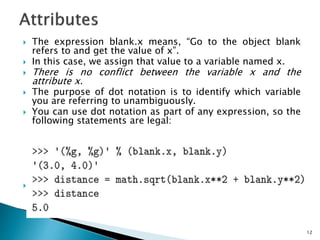
 The expression blank.x means, “Go to the object blank
refers to and get the value of x”.
 In this case, we assign that value to a variable named x.
 There is no conflict between the variable x and the
attribute x.
 The purpose of dot notation is to identify which variable
you are referring to unambiguously.
 You can use dot notation as part of any expression, so the
following statements are legal:
 a
12
 You can pass an instance as an argument in the
usual way. For example:
 print_point takes a point as an argument and
displays it in mathematical notation.
 To invoke it, you can pass blank as an argument:
 Inside the function, p is an alias for blank, so if
the function modifies p, blank changes.
13
 Imagine you are designing a class to
represent rectangles.
 What attributes would you use to specify the
location and size of a rectangle? You can
ignore angle; to keep things simple, assume
that the rectangle is either vertical or
horizontal.
 There are at least two possibilities:
◦ You could specify one corner of the rectangle (or
the center), the width, and the height.
◦ You could specify two opposing corners.
14
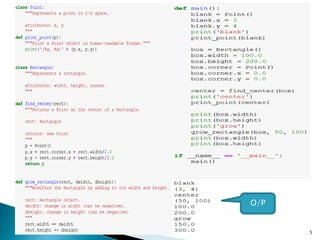
 To represent a rectangle, you have to instantiate a
Rectangle object and assign values to the attributes:
 The expression box.corner.x means, “Go to the
object box refers to and select the attribute named
corner; then go to that object and select the attribute
named x.”
15
 Functions can return instances. For example,
find_center takes a Rectangle as an argument
and returns a Point that contains the
coordinates of the center of the Rectangle:
 Here is an example that passes box as an
argument and assigns the resulting Point to
center:
16
 You can change the state of an object by
making an assignment to one of its
attributes.
 For example, to change the size of a
rectangle without changing its position, you
can modify the values of width and height:
17
 You can also write functions that modify objects.
For example, grow_rectangle takes a Rectangle
object and two numbers, dwidth and dheight, and
adds the numbers to the width and height of the
rectangle:
 Here is an example that demonstrates the effect:
 Inside the function, rect is an alias for box, so
when the function modifies rect, box changes
18
 Aliasing can make a program difficult to read
because changes in one place might have
unexpected effects in another place.
 It is hard to keep track of all the variables that
might refer to a given object.
 Copying an object is often an alternative to
aliasing.
 The copy module contains a function called copy
that can duplicate any object:
19
20
 The is operator indicates that p1 and p2 are
not the same object, which is what we
expected.
 But you might have expected == to yield True
because these points contain the same data.
 In that case, you will be disappointed to learn
that for instances, the default behavior of the
== operator is the same as the is operator; it
checks object identity, not object equivalence.
 That’s because for programmer-defined
types, Python doesn’t know what should be
considered equivalent. At least, not yet.
21
 If you use copy.copy to duplicate a Rectangle,
you will find that it copies the Rectangle
object but not the embedded Point.
 This operation is called a shallow copy
because it copies the object and any
references it contains, but not the embedded
objects.
 For most applications, this is not what you
want. This behavior is confusing and error-
prone.
 Fortunately, the copy module provides a
method named deepcopy that copies not only
the object but also the objects it refers to,
and the objects they refer to, and so on.
 box3 and box are completely separate
objects
23
 Since our Point class is intended to represent
two dimensional mathematical points, all
point instances ought to have x and y
attributes, but that is not yet so with our
Point objects.
 To solve this problem we add an initialization
method to our class.
24
25
O/P
 A method behaves like a function but it is part of
an object.
 Like a data attribute it is accessed using dot
notation.
 The initialization method is called automatically
when the class is called.
 Let’s add another method, distance_from_origin, to
see better how methods work:
26
27
28
O/P
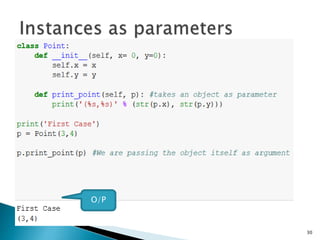
 You can pass an instance as a parameter to a
function in the usual way.
 For example:
 print_point takes a point as an argument and
displays it in the standard format.
 If you call print_point(p) with point p as defined
previously, the output is (3, 4).
29
30
O/P
31
32
O/
P
33
O/P
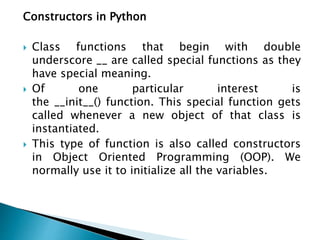
Constructors in Python
 Class functions that begin with double
underscore __ are called special functions as they
have special meaning.
 Of one particular interest is
the __init__() function. This special function gets
called whenever a new object of that class is
instantiated.
 This type of function is also called constructors
in Object Oriented Programming (OOP). We
normally use it to initialize all the variables.
35
O/P
36
O/P
37
O/P
38
 As another example of a user-defined type,
we’ll define a class called Time that records
the time of day.
 The class definition looks like this:
 We can create a new Time object and assign
attributes for hours, minutes, and seconds:
39
 In the next few slides, we’ll write two versions
of a function called add_time, which
calculates the sum of two Times.
 They will demonstrate two kinds of functions:
pure functions and modifiers.
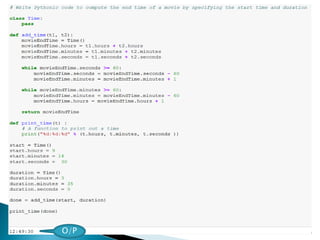
 The following is a rough version of add_time:
40
 The function creates a new Time object,
initializes its attributes, and returns a reference
to the new object.
 This is called a pure function because it does not
modify any of the objects passed to it as
parameters and it has no side effects, such as
displaying a value or getting user input.
 Here is an example of how to use this function.
We’ll create two Time objects: start contains the
start time of a movie, and duration contains the
run time of the movie.
 add_time figures out when the movie will be
done.
41
42
 The output of this program is 12:49:30,
which is correct.
 On the other hand, there are cases where the
result is not correct. Can you think of one?
 The problem is that this function does not
deal with cases where the number of seconds
or minutes adds up to more than sixty.
 When that happens, we have to carry the
extra seconds into the minutes column or the
extra minutes into the hours column.
43
 Here’s a second corrected version of the
function:
44
45
O/P
 There are times when it is useful for a
function to modify one or more of the objects
it gets as parameters.
 Usually, the caller keeps a reference to the
objects it passes, so any changes the function
makes are visible to the caller.
 Functions that work this way are called
modifiers.
 We have defined a function called increment,
which adds a given number of seconds to a
Time object.
46
47
O/P
 In the previous slides, we demonstrated an
approach to program development that we call
prototype development.
 In each case, we wrote a rough draft (or
prototype) that performed the basic calculation
and then tested it on a few cases, correcting
flaws as we found them.
 Although this approach can be effective, it can
lead to code that is unnecessarily complicated –
since it deals with many special cases – and
unreliable – since it is hard to know if you have
found all the errors.
 An alternative is planned development, in which
high-level insight into the problem can make the
programming much easier.
48
 In this case, the insight is that a Time object is really
a three-digit number in base 60! The second
component is the ones column, the minute
component is the sixties column, and the hour
component is the thirty-six hundreds column.
 When we wrote add_time and increment, we were
effectively doing addition in base 60, which is why we
had to carry from one column to the next.
 This observation suggests another approach to the
whole problem – we can convert a Time object into a
single number and take advantage of the fact that the
computer knows how to do arithmetic with numbers.
The following function converts a Time object into an
integer:
49
 In this case, the insight is that a Time object is
really a three-digit number in base 60.
 The second component is the ones column, the
minute component is the sixties column, and the
hour component is the thirty-six hundreds
column.
 When we wrote add_time and increment, we were
effectively doing addition in base 60, which is
why we had to carry from one column to the
next.
 This observation suggests another approach to
the whole problem – we can convert a Time
object into a single number and take advantage
of the fact that the computer knows how to do
arithmetic with numbers.
50
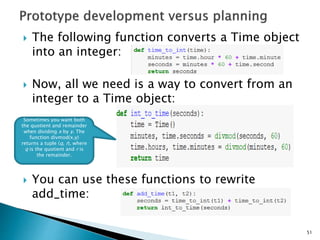
 The following function converts a Time object
into an integer:
 Now, all we need is a way to convert from an
integer to a Time object:
 You can use these functions to rewrite
add_time:
51
Sometimes you want both
the quotient and remainder
when dividing x by y. The
function divmod(x,y)
returns a tuple (q, r), where
q is the quotient and r is
the remainder.
52
O/P
53
54
 Methods are just like functions, with two
differences:
◦ Methods are defined inside a class definition in
order to make the relationship between the class
and the method explicit.
◦ The syntax for invoking a method is different from
the syntax for calling a function.
55
 In the last slide, we defined a class named
Time and you wrote a function named
print_time, which should have looked
something like this:
56
 To make print_time a method, all we have to
do is move the function definition inside the
class definition. Notice the change in
indentation.
 Now we can invoke print_time using dot
notation.
57
58
The object, start, gets
assigned to the first
parameter, self. The
argument, 1337, gets
assigned to the second
parameter, seconds.
 The is_after method is slightly more
complicated because it operates on two Time
objects, not just one. We can only convert
one of the parameters to self; the other stays
the same:
 We invoke this method on one object and
pass the other as an argument:
59
60
O/P
 The initialization method is a special method that
is invoked when an object is created.
 The name of this method is __init__ (two
underscore characters, followed by init, and then
two more underscores).
 An initialization method for the Time class looks
like this:
 There is no conflict between the attribute
self.hours and the parameter hours. Dot notation
specifies which variable we are referring to.
61
 When we invoke the Time constructor, the
arguments we provide are passed along to
init:
 Because the parameters are optional, we can
omit them:
 Or provide only the first parameter:
62
 Or the first two parameters:
 Finally, we can provide a subset of the
parameters by naming them explicitly:
 The initialization method takes x and y values as optional
parameters; the default for either parameter is 0.
 The method, __str__, returns a string representation of a
Point object.
 If a class provides a method named __str__, it overrides
the default behavior of the Python built-in str function.
 Printing a Point object implicitly invokes __str__ on the
object, so defining __str__ also changes the behavior of
print
64
 Some languages make it possible to change the definition
of the built- in operators when they are applied to user-
defined types.
 This feature is called operator overloading. It is especially
useful when defining new mathematical types.
 For example, to override the addition operator +, we
provide a method named __add__:
 As usual, the first parameter is the object on which the
method is invoked.
 The second parameter is conveniently named other to
distinguish it from self.
 To add two Points, we create and return a new Point that
contains the sum of the x coordinates and the sum of the
y coordinates.
 Now, when we apply the + operator to Point objects,
Python invokes __add__
65
66
 The expression p1 + p2 is equivalent to
p1.__add__(p2), but obviously more elegant.
 There are several ways to override the behavior
of the multiplication operator: by defining a
method named __mul__, or __rmul__, or both.
 If the left operand of * is a Point, Python invokes
__mul__, which assumes that the other operand
is also a Point.
 It computes the dot product of the two points,
defined according to the rules of linear algebra:
67
 The result is a new Point whose coordinates
are a multiple of the original coordinates.
 If other is a type that cannot be multiplied by
a floating-point number, then __rmul__ will
yield an error.
68
69
O/P
70
O/P
 Most of the methods we have written only work
for a specific type.
 When you create a new object, you write methods
that operate on that type.
 But there are certain operations that you will
want to apply to many types, such as the
arithmetic operations
 If many types support the same set of
operations, you can write functions that work on
any of those types.
 For example, the multadd operation (which is
common in linear algebra) takes three
parameters; it multiplies the first two and then
adds the third. We can write it in Python like this:
71
72
O/P
 As another example, consider the method
front_and_back, which prints a list twice,
forward and backward:
 Because the reverse method is a modifier, we
make a copy of the list before reversing it.
 That way, this method doesn’t modify the list
it gets as a parameter.
 Here’s an example that applies
front_and_back to a list:
73
74
O/P
Here’s an example that applies front_and_back to
objects:
75
O/P

Module 4.pptx

  • 1.
     Classes andobjects  Classes and functions  Classes and methods 1
  • 2.
  • 3.
    3 Belongs To Belongs To BelongsTo Belongs To Uses Uses Uses Uses Objec t Objec t Objec t Objec t Data Class
  • 4.
     Python isan object-oriented programming language, which means that it provides features that support object-oriented programming ( OOP).  Object-oriented programming has its roots in the 1960s, but it wasn’t until the mid 1980s that it became the main programming paradigm used in the creation of new software.  It was developed as a way to handle the rapidly increasing size and complexity of software systems, and to make it easier to modify these large and complex systems over time.  Up to now we have been writing programs using a procedural programming paradigm.  In procedural programming the focus is on writing functions or procedures which operate on data.  In object-oriented programming the focus is on the creation of objects which contain both data and functionality together. 4
  • 5.
     A classin essence defines a new data type.  Lets create our own user-defined type: Point.  Consider the concept of a mathematical point.  In two dimensions, a point is two numbers (coordinates) that are treated collectively as a single object.  In mathematical notation, points are often written in parentheses with a comma separating the coordinates.  For example, (0, 0) represents the origin, and (x, y) represents the point x units to the right and y units up from the origin. 5
  • 6.
     A naturalway to represent a point in Python is with two numeric values.  The question, then, is how to group these two values into a compound object.  The quick and dirty solution is to use a list or tuple, and for some applications that might be the best choice.  An alternative is to define a new user-defined compound type, also called a class.  This approach involves a bit more effort, but it has advantages that will be apparent soon. 6
  • 7.
     A classis the blueprint from which individual objects are created.  In object-oriented programming, a class is an extensible program-code-template for creating objects, providing initial values for member variables and implementations of methods. 7
  • 8.
     A classdefinition looks like this:  Class definitions can appear anywhere in a program, but they are usually near the beginning (after the import statements).  The syntax rules for a class definition are the same as for other compound statements.  There is a header which begins with the keyword, class, followed by the name of the class, and ending with a colon.  This definition creates a new class called Point.  The pass statement has no effect; it is only necessary because a compound statement must have something in its body.  A docstring could serve the same purpose:  a 8
  • 9.
     By creatingthe Point class, we created a new type, also called Point.  The members of this type are called instances of the type or objects.  Creating a new instance or objects is called instantiation, and is accomplished by calling the class.  An Object is an instance of a class.  Classes, like functions, are callable, and we instantiate a Point object by calling the Point class:  The variable blank is assigned a reference to a new Point object.  It may be helpful to think of a class as a factory for making objects, so our Point class is a factory for making points.  The class itself isn’t an instance of a point, but it contains the machinery to make point instances.  When you print an instance, Python tells you what class it belongs to and where it is stored in memory (the prefix 0x means that the following number is in hexadecimal). 9 O/P when you just type Point
  • 10.
     Like realworld objects, object instances have both form and function.  The form consists of data elements contained within the instance.  We can add new data elements to an instance using dot notation:  This syntax is similar to the syntax for selecting a variable from a module, such as math.pi or string.uppercase.  Both modules and instances create their own namespaces, and the syntax for accessing names contained in each, called attributes, is the same.  These elements are called attributes  In this case the attribute we are selecting is a data item from an instance. 10
  • 11.
     The followingstate diagram shows the result of these assignments:  The variable blank refers to a Point object, which contains two attributes.  Each attribute refers to a number.  We can read the value of an attribute using the same syntax: 11
  • 12.
     The expressionblank.x means, “Go to the object blank refers to and get the value of x”.  In this case, we assign that value to a variable named x.  There is no conflict between the variable x and the attribute x.  The purpose of dot notation is to identify which variable you are referring to unambiguously.  You can use dot notation as part of any expression, so the following statements are legal:  a 12
  • 13.
     You canpass an instance as an argument in the usual way. For example:  print_point takes a point as an argument and displays it in mathematical notation.  To invoke it, you can pass blank as an argument:  Inside the function, p is an alias for blank, so if the function modifies p, blank changes. 13
  • 14.
     Imagine youare designing a class to represent rectangles.  What attributes would you use to specify the location and size of a rectangle? You can ignore angle; to keep things simple, assume that the rectangle is either vertical or horizontal.  There are at least two possibilities: ◦ You could specify one corner of the rectangle (or the center), the width, and the height. ◦ You could specify two opposing corners. 14
  • 15.
     To representa rectangle, you have to instantiate a Rectangle object and assign values to the attributes:  The expression box.corner.x means, “Go to the object box refers to and select the attribute named corner; then go to that object and select the attribute named x.” 15
  • 16.
     Functions canreturn instances. For example, find_center takes a Rectangle as an argument and returns a Point that contains the coordinates of the center of the Rectangle:  Here is an example that passes box as an argument and assigns the resulting Point to center: 16
  • 17.
     You canchange the state of an object by making an assignment to one of its attributes.  For example, to change the size of a rectangle without changing its position, you can modify the values of width and height: 17
  • 18.
     You canalso write functions that modify objects. For example, grow_rectangle takes a Rectangle object and two numbers, dwidth and dheight, and adds the numbers to the width and height of the rectangle:  Here is an example that demonstrates the effect:  Inside the function, rect is an alias for box, so when the function modifies rect, box changes 18
  • 19.
     Aliasing canmake a program difficult to read because changes in one place might have unexpected effects in another place.  It is hard to keep track of all the variables that might refer to a given object.  Copying an object is often an alternative to aliasing.  The copy module contains a function called copy that can duplicate any object: 19
  • 20.
  • 21.
     The isoperator indicates that p1 and p2 are not the same object, which is what we expected.  But you might have expected == to yield True because these points contain the same data.  In that case, you will be disappointed to learn that for instances, the default behavior of the == operator is the same as the is operator; it checks object identity, not object equivalence.  That’s because for programmer-defined types, Python doesn’t know what should be considered equivalent. At least, not yet. 21
  • 22.
     If youuse copy.copy to duplicate a Rectangle, you will find that it copies the Rectangle object but not the embedded Point.  This operation is called a shallow copy because it copies the object and any references it contains, but not the embedded objects.
  • 23.
     For mostapplications, this is not what you want. This behavior is confusing and error- prone.  Fortunately, the copy module provides a method named deepcopy that copies not only the object but also the objects it refers to, and the objects they refer to, and so on.  box3 and box are completely separate objects 23
  • 24.
     Since ourPoint class is intended to represent two dimensional mathematical points, all point instances ought to have x and y attributes, but that is not yet so with our Point objects.  To solve this problem we add an initialization method to our class. 24
  • 25.
  • 26.
     A methodbehaves like a function but it is part of an object.  Like a data attribute it is accessed using dot notation.  The initialization method is called automatically when the class is called.  Let’s add another method, distance_from_origin, to see better how methods work: 26
  • 27.
  • 28.
  • 29.
     You canpass an instance as a parameter to a function in the usual way.  For example:  print_point takes a point as an argument and displays it in the standard format.  If you call print_point(p) with point p as defined previously, the output is (3, 4). 29
  • 30.
  • 31.
  • 32.
  • 33.
  • 34.
    Constructors in Python Class functions that begin with double underscore __ are called special functions as they have special meaning.  Of one particular interest is the __init__() function. This special function gets called whenever a new object of that class is instantiated.  This type of function is also called constructors in Object Oriented Programming (OOP). We normally use it to initialize all the variables.
  • 35.
  • 36.
  • 37.
  • 38.
  • 39.
     As anotherexample of a user-defined type, we’ll define a class called Time that records the time of day.  The class definition looks like this:  We can create a new Time object and assign attributes for hours, minutes, and seconds: 39
  • 40.
     In thenext few slides, we’ll write two versions of a function called add_time, which calculates the sum of two Times.  They will demonstrate two kinds of functions: pure functions and modifiers.  The following is a rough version of add_time: 40
  • 41.
     The functioncreates a new Time object, initializes its attributes, and returns a reference to the new object.  This is called a pure function because it does not modify any of the objects passed to it as parameters and it has no side effects, such as displaying a value or getting user input.  Here is an example of how to use this function. We’ll create two Time objects: start contains the start time of a movie, and duration contains the run time of the movie.  add_time figures out when the movie will be done. 41
  • 42.
  • 43.
     The outputof this program is 12:49:30, which is correct.  On the other hand, there are cases where the result is not correct. Can you think of one?  The problem is that this function does not deal with cases where the number of seconds or minutes adds up to more than sixty.  When that happens, we have to carry the extra seconds into the minutes column or the extra minutes into the hours column. 43
  • 44.
     Here’s asecond corrected version of the function: 44
  • 45.
  • 46.
     There aretimes when it is useful for a function to modify one or more of the objects it gets as parameters.  Usually, the caller keeps a reference to the objects it passes, so any changes the function makes are visible to the caller.  Functions that work this way are called modifiers.  We have defined a function called increment, which adds a given number of seconds to a Time object. 46
  • 47.
  • 48.
     In theprevious slides, we demonstrated an approach to program development that we call prototype development.  In each case, we wrote a rough draft (or prototype) that performed the basic calculation and then tested it on a few cases, correcting flaws as we found them.  Although this approach can be effective, it can lead to code that is unnecessarily complicated – since it deals with many special cases – and unreliable – since it is hard to know if you have found all the errors.  An alternative is planned development, in which high-level insight into the problem can make the programming much easier. 48
  • 49.
     In thiscase, the insight is that a Time object is really a three-digit number in base 60! The second component is the ones column, the minute component is the sixties column, and the hour component is the thirty-six hundreds column.  When we wrote add_time and increment, we were effectively doing addition in base 60, which is why we had to carry from one column to the next.  This observation suggests another approach to the whole problem – we can convert a Time object into a single number and take advantage of the fact that the computer knows how to do arithmetic with numbers. The following function converts a Time object into an integer: 49
  • 50.
     In thiscase, the insight is that a Time object is really a three-digit number in base 60.  The second component is the ones column, the minute component is the sixties column, and the hour component is the thirty-six hundreds column.  When we wrote add_time and increment, we were effectively doing addition in base 60, which is why we had to carry from one column to the next.  This observation suggests another approach to the whole problem – we can convert a Time object into a single number and take advantage of the fact that the computer knows how to do arithmetic with numbers. 50
  • 51.
     The followingfunction converts a Time object into an integer:  Now, all we need is a way to convert from an integer to a Time object:  You can use these functions to rewrite add_time: 51 Sometimes you want both the quotient and remainder when dividing x by y. The function divmod(x,y) returns a tuple (q, r), where q is the quotient and r is the remainder.
  • 52.
  • 53.
  • 54.
  • 55.
     Methods arejust like functions, with two differences: ◦ Methods are defined inside a class definition in order to make the relationship between the class and the method explicit. ◦ The syntax for invoking a method is different from the syntax for calling a function. 55
  • 56.
     In thelast slide, we defined a class named Time and you wrote a function named print_time, which should have looked something like this: 56
  • 57.
     To makeprint_time a method, all we have to do is move the function definition inside the class definition. Notice the change in indentation.  Now we can invoke print_time using dot notation. 57
  • 58.
    58 The object, start,gets assigned to the first parameter, self. The argument, 1337, gets assigned to the second parameter, seconds.
  • 59.
     The is_aftermethod is slightly more complicated because it operates on two Time objects, not just one. We can only convert one of the parameters to self; the other stays the same:  We invoke this method on one object and pass the other as an argument: 59
  • 60.
  • 61.
     The initializationmethod is a special method that is invoked when an object is created.  The name of this method is __init__ (two underscore characters, followed by init, and then two more underscores).  An initialization method for the Time class looks like this:  There is no conflict between the attribute self.hours and the parameter hours. Dot notation specifies which variable we are referring to. 61
  • 62.
     When weinvoke the Time constructor, the arguments we provide are passed along to init:  Because the parameters are optional, we can omit them:  Or provide only the first parameter: 62
  • 63.
     Or thefirst two parameters:  Finally, we can provide a subset of the parameters by naming them explicitly:
  • 64.
     The initializationmethod takes x and y values as optional parameters; the default for either parameter is 0.  The method, __str__, returns a string representation of a Point object.  If a class provides a method named __str__, it overrides the default behavior of the Python built-in str function.  Printing a Point object implicitly invokes __str__ on the object, so defining __str__ also changes the behavior of print 64
  • 65.
     Some languagesmake it possible to change the definition of the built- in operators when they are applied to user- defined types.  This feature is called operator overloading. It is especially useful when defining new mathematical types.  For example, to override the addition operator +, we provide a method named __add__:  As usual, the first parameter is the object on which the method is invoked.  The second parameter is conveniently named other to distinguish it from self.  To add two Points, we create and return a new Point that contains the sum of the x coordinates and the sum of the y coordinates.  Now, when we apply the + operator to Point objects, Python invokes __add__ 65
  • 66.
  • 67.
     The expressionp1 + p2 is equivalent to p1.__add__(p2), but obviously more elegant.  There are several ways to override the behavior of the multiplication operator: by defining a method named __mul__, or __rmul__, or both.  If the left operand of * is a Point, Python invokes __mul__, which assumes that the other operand is also a Point.  It computes the dot product of the two points, defined according to the rules of linear algebra: 67
  • 68.
     The resultis a new Point whose coordinates are a multiple of the original coordinates.  If other is a type that cannot be multiplied by a floating-point number, then __rmul__ will yield an error. 68
  • 69.
  • 70.
  • 71.
     Most ofthe methods we have written only work for a specific type.  When you create a new object, you write methods that operate on that type.  But there are certain operations that you will want to apply to many types, such as the arithmetic operations  If many types support the same set of operations, you can write functions that work on any of those types.  For example, the multadd operation (which is common in linear algebra) takes three parameters; it multiplies the first two and then adds the third. We can write it in Python like this: 71
  • 72.
  • 73.
     As anotherexample, consider the method front_and_back, which prints a list twice, forward and backward:  Because the reverse method is a modifier, we make a copy of the list before reversing it.  That way, this method doesn’t modify the list it gets as a parameter.  Here’s an example that applies front_and_back to a list: 73
  • 74.
  • 75.
    Here’s an examplethat applies front_and_back to objects: 75 O/P