Quick Start Guide
Cisco Small Business
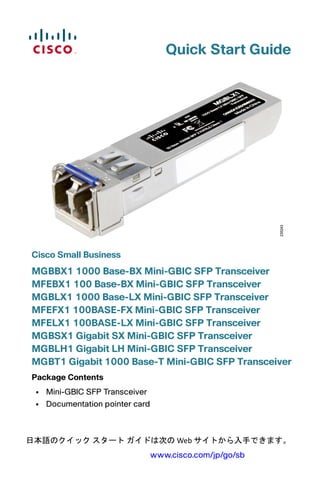
MGBBX1 1000 Base-BX Mini-GBIC SFP Transceiver
MFEBX1 100 Base-BX Mini-GBIC SFP Transceiver
MGBLX1 1000 Base-LX Mini-GBIC SFP Transceiver
MFEFX1 100BASE-FX Mini-GBIC SFP Transceiver
MFELX1 100BASE-LX Mini-GBIC SFP Transceiver
MGBSX1 Gigabit SX Mini-GBIC SFP Transceiver
MGBLH1 Gigabit LH Mini-GBIC SFP Transceiver
MGBT1 Gigabit 1000 Base-T Mini-GBIC SFP Transceiver
Package Contents
• Mini-GBIC SFP Transceiver
• Documentation pointer card
日本語のクイック スタート ガイドは次の Web サイトから入手できます。 
www.cisco.com/jp/go/sb
2 Cisco Mini-GBIC SFP Transceiver Quick Start Guide
Connecting the Transceiver
WARNING Optical SFPs use a small laser to generate the fiber-optic signal.
Because invisible laser radiation may be emitted from the
aperture of the port when no fiber cable is connected, avoid
exposure to laser radiation and do not stare into open
apertures. Keep the optical transmit and receive ports covered
whenever a cable is not connected to the port.
Connecting the Cisco MGBBX1, MFEBX1, MGBLX1,
MFEFX1, MFELX1, MGBSX1, and MGBLH1
STEP 1 Insert the mini-GBIC SFP module with the printed side up and the
rubber port cap facing out.
1
Cisco Mini-GBIC SFP Transceiver Quick Start Guide 3
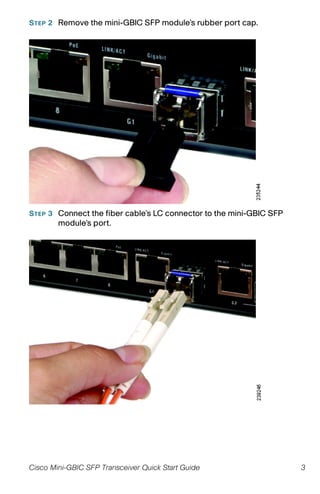
STEP 2 Remove the mini-GBIC SFP module’s rubber port cap.
STEP 3 Connect the fiber cable’s LC connector to the mini-GBIC SFP
module’s port.
4 Cisco Mini-GBIC SFP Transceiver Quick Start Guide
STEP 4 Connect the other end of the cable to an SFP module to verify that
the fiber connection is complete.
For the Cisco MGBBX1, use the Cisco GLC-BX-D as the
downstream SFP. For the Cisco MFEBX1, use the Cisco GLC-FE-
100BX-D as the downstream SFP. The Cisco MGBBX1 and the
Cisco MFEBBX1 support upstream only.
Connecting the Cisco MGBT1
STEP 1 Insert the gigabit SFP module with the printed side up and the pull
tab facing out.
STEP 2 Lock the gigabit SFP module in place.
STEP 3 Connect the cable to the gigabit SFP Module’s port.
STEP 4 Connect the other end of the cable to the switch.
Cisco Mini-GBIC SFP Transceiver Quick Start Guide 5
Removing the Transceiver
Removing the Cisco MGBBX1, MFEBX1, MGBLX1, MFEFX1,
MFELX1, MGBSX1, and MGBLH1
WARNING Optical SFPs use a small laser to generate the fiber-optic signal.
Because invisible laser radiation may be emitted from the
aperture of the port when no fiber cable is connected, avoid
exposure to laser radiation and do not stare into open
apertures. Keep the optical transmit and receive ports covered
whenever a cable is not connected to the port.
STEP 1 Press the fiber cable’s connector and pull to remove the fiber cable
from the mini-GBIC SFP module.
2
6 Cisco Mini-GBIC SFP Transceiver Quick Start Guide
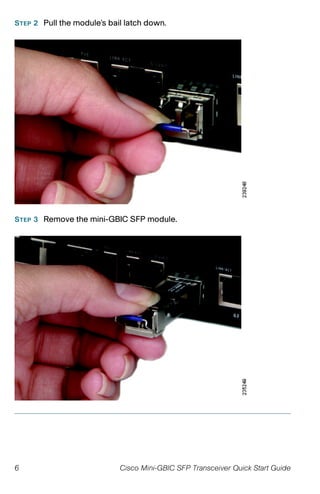
STEP 2 Pull the module’s bail latch down.
STEP 3 Remove the mini-GBIC SFP module.
Cisco Mini-GBIC SFP Transceiver Quick Start Guide 7
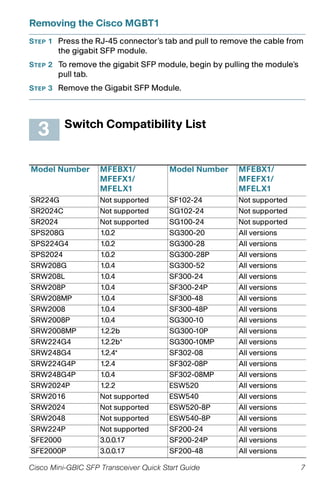
Removing the Cisco MGBT1
STEP 1 Press the RJ-45 connector’s tab and pull to remove the cable from
the gigabit SFP module.
STEP 2 To remove the gigabit SFP module, begin by pulling the module’s
pull tab.
STEP 3 Remove the Gigabit SFP Module.
Switch Compatibility List
Model Number MFEBX1/
MFEFX1/
MFELX1
Model Number MFEBX1/
MFEFX1/
MFELX1
SR224G Not supported SF102-24 Not supported
SR2024C Not supported SG102-24 Not supported
SR2024 Not supported SG100-24 Not supported
SPS208G 1.0.2 SG300-20 All versions
SPS224G4 1.0.2 SG300-28 All versions
SPS2024 1.0.2 SG300-28P All versions
SRW208G 1.0.4 SG300-52 All versions
SRW208L 1.0.4 SF300-24 All versions
SRW208P 1.0.4 SF300-24P All versions
SRW208MP 1.0.4 SF300-48 All versions
SRW2008 1.0.4 SF300-48P All versions
SRW2008P 1.0.4 SG300-10 All versions
SRW2008MP 1.2.2b SG300-10P All versions
SRW224G4 1.2.2b* SG300-10MP All versions
SRW248G4 1.2.4* SF302-08 All versions
SRW224G4P 1.2.4 SF302-08P All versions
SRW248G4P 1.0.4 SF302-08MP All versions
SRW2024P 1.2.2 ESW520 All versions
SRW2016 Not supported ESW540 All versions
SRW2024 Not supported ESW520-8P All versions
SRW2048 Not supported ESW540-8P All versions
SRW224P Not supported SF200-24 All versions
SFE2000 3.0.0.17 SF200-24P All versions
SFE2000P 3.0.0.17 SF200-48 All versions
3
8 Cisco Mini-GBIC SFP Transceiver Quick Start Guide
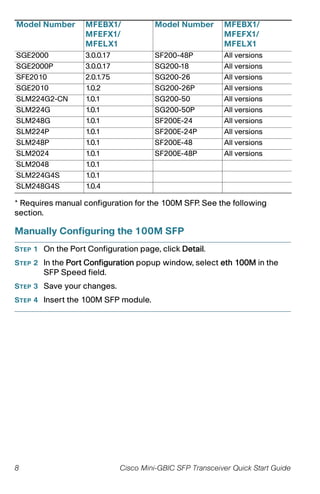
* Requires manual configuration for the 100M SFP. See the following
section.
Manually Configuring the 100M SFP
STEP 1 On the Port Configuration page, click Detail.
STEP 2 In the Port Configuration popup window, select eth 100M in the
SFP Speed field.
STEP 3 Save your changes.
STEP 4 Insert the 100M SFP module.
SGE2000 3.0.0.17 SF200-48P All versions
SGE2000P 3.0.0.17 SG200-18 All versions
SFE2010 2.0.1.75 SG200-26 All versions
SGE2010 1.0.2 SG200-26P All versions
SLM224G2-CN 1.0.1 SG200-50 All versions
SLM224G 1.0.1 SG200-50P All versions
SLM248G 1.0.1 SF200E-24 All versions
SLM224P 1.0.1 SF200E-24P All versions
SLM248P 1.0.1 SF200E-48 All versions
SLM2024 1.0.1 SF200E-48P All versions
SLM2048 1.0.1
SLM224G4S 1.0.1
SLM248G4S 1.0.4
Model Number MFEBX1/
MFEFX1/
MFELX1
Model Number MFEBX1/
MFEFX1/
MFELX1
Cisco Mini-GBIC SFP Transceiver Quick Start Guide 9
Where to Go From Here
Support
Cisco Small Business
Support Community
www.cisco.com/go/smallbizsupport
Cisco Small Business
Support and Resources
www.cisco.com/go/smallbizhelp
Phone Support Contacts www.cisco.com/en/US/support/
tsd_cisco_small_business
_support_center_contacts.html
Cisco Small Business
Firmware Downloads
www.cisco.com/go/software
Select a link to download firmware for Cisco
Small Business Products. No login is
required.
Cisco Small Business
Open Source Requests
www.cisco.com/go/
smallbiz_opensource_request
Product Documentation
Cisco Small Business
Network Accessories
www.cisco.com/go/
smallbiznetworkaccessories
Cisco Small Business
Smart Switches
www.cisco.com/go/smallbizsmartswitches
Cisco Small Business
Managed Switches
www.cisco.com/go/
smallbizmanagedswitches
Cisco Small Business
Unmanaged Switches
www.cisco.com/go/
smallbizunmanagedswitches
Regulatory, Compliance,
and Safety Information
www.cisco.com/en/US/docs/switches/ lan/
csb_switching_general/rcsi/
RCSI_Class_A_Switches.pdf
Cisco Small Business
Cisco Partner Central
for Small Business
(Partner Login Required)
www.cisco.com/web/partners/sell/smb
Cisco Small Business
Home
www.cisco.com/smb
4
Americas Headquarters
Cisco Systems, Inc.
170 West Tasman Drive
San Jose, CA 95134-1706
USA
www.cisco.com
Small Business Support, Global: www.cisco.com/go/sbsc
Cisco and the Cisco logo are trademarks or registered trademarks of Cisco and/or its affiliates
in the U.S. and other countries. To view a list of Cisco trademarks, go to this URL:
www.cisco.com/go/trademarks. Third-party trademarks mentioned are the property of their
respective owners. The use of the word partner does not imply a partnership relationship
between Cisco and any other company. (1110R)
© 2011 Cisco Systems, Inc. All rights reserved.
78-18990-02

transceiver minigbic

  • 1.
    Quick Start Guide CiscoSmall Business MGBBX1 1000 Base-BX Mini-GBIC SFP Transceiver MFEBX1 100 Base-BX Mini-GBIC SFP Transceiver MGBLX1 1000 Base-LX Mini-GBIC SFP Transceiver MFEFX1 100BASE-FX Mini-GBIC SFP Transceiver MFELX1 100BASE-LX Mini-GBIC SFP Transceiver MGBSX1 Gigabit SX Mini-GBIC SFP Transceiver MGBLH1 Gigabit LH Mini-GBIC SFP Transceiver MGBT1 Gigabit 1000 Base-T Mini-GBIC SFP Transceiver Package Contents • Mini-GBIC SFP Transceiver • Documentation pointer card 日本語のクイック スタート ガイドは次の Web サイトから入手できます。  www.cisco.com/jp/go/sb
  • 2.
    2 Cisco Mini-GBICSFP Transceiver Quick Start Guide Connecting the Transceiver WARNING Optical SFPs use a small laser to generate the fiber-optic signal. Because invisible laser radiation may be emitted from the aperture of the port when no fiber cable is connected, avoid exposure to laser radiation and do not stare into open apertures. Keep the optical transmit and receive ports covered whenever a cable is not connected to the port. Connecting the Cisco MGBBX1, MFEBX1, MGBLX1, MFEFX1, MFELX1, MGBSX1, and MGBLH1 STEP 1 Insert the mini-GBIC SFP module with the printed side up and the rubber port cap facing out. 1
  • 3.
    Cisco Mini-GBIC SFPTransceiver Quick Start Guide 3 STEP 2 Remove the mini-GBIC SFP module’s rubber port cap. STEP 3 Connect the fiber cable’s LC connector to the mini-GBIC SFP module’s port.
  • 4.
    4 Cisco Mini-GBICSFP Transceiver Quick Start Guide STEP 4 Connect the other end of the cable to an SFP module to verify that the fiber connection is complete. For the Cisco MGBBX1, use the Cisco GLC-BX-D as the downstream SFP. For the Cisco MFEBX1, use the Cisco GLC-FE- 100BX-D as the downstream SFP. The Cisco MGBBX1 and the Cisco MFEBBX1 support upstream only. Connecting the Cisco MGBT1 STEP 1 Insert the gigabit SFP module with the printed side up and the pull tab facing out. STEP 2 Lock the gigabit SFP module in place. STEP 3 Connect the cable to the gigabit SFP Module’s port. STEP 4 Connect the other end of the cable to the switch.
  • 5.
    Cisco Mini-GBIC SFPTransceiver Quick Start Guide 5 Removing the Transceiver Removing the Cisco MGBBX1, MFEBX1, MGBLX1, MFEFX1, MFELX1, MGBSX1, and MGBLH1 WARNING Optical SFPs use a small laser to generate the fiber-optic signal. Because invisible laser radiation may be emitted from the aperture of the port when no fiber cable is connected, avoid exposure to laser radiation and do not stare into open apertures. Keep the optical transmit and receive ports covered whenever a cable is not connected to the port. STEP 1 Press the fiber cable’s connector and pull to remove the fiber cable from the mini-GBIC SFP module. 2
  • 6.
    6 Cisco Mini-GBICSFP Transceiver Quick Start Guide STEP 2 Pull the module’s bail latch down. STEP 3 Remove the mini-GBIC SFP module.
  • 7.
    Cisco Mini-GBIC SFPTransceiver Quick Start Guide 7 Removing the Cisco MGBT1 STEP 1 Press the RJ-45 connector’s tab and pull to remove the cable from the gigabit SFP module. STEP 2 To remove the gigabit SFP module, begin by pulling the module’s pull tab. STEP 3 Remove the Gigabit SFP Module. Switch Compatibility List Model Number MFEBX1/ MFEFX1/ MFELX1 Model Number MFEBX1/ MFEFX1/ MFELX1 SR224G Not supported SF102-24 Not supported SR2024C Not supported SG102-24 Not supported SR2024 Not supported SG100-24 Not supported SPS208G 1.0.2 SG300-20 All versions SPS224G4 1.0.2 SG300-28 All versions SPS2024 1.0.2 SG300-28P All versions SRW208G 1.0.4 SG300-52 All versions SRW208L 1.0.4 SF300-24 All versions SRW208P 1.0.4 SF300-24P All versions SRW208MP 1.0.4 SF300-48 All versions SRW2008 1.0.4 SF300-48P All versions SRW2008P 1.0.4 SG300-10 All versions SRW2008MP 1.2.2b SG300-10P All versions SRW224G4 1.2.2b* SG300-10MP All versions SRW248G4 1.2.4* SF302-08 All versions SRW224G4P 1.2.4 SF302-08P All versions SRW248G4P 1.0.4 SF302-08MP All versions SRW2024P 1.2.2 ESW520 All versions SRW2016 Not supported ESW540 All versions SRW2024 Not supported ESW520-8P All versions SRW2048 Not supported ESW540-8P All versions SRW224P Not supported SF200-24 All versions SFE2000 3.0.0.17 SF200-24P All versions SFE2000P 3.0.0.17 SF200-48 All versions 3
  • 8.
    8 Cisco Mini-GBICSFP Transceiver Quick Start Guide * Requires manual configuration for the 100M SFP. See the following section. Manually Configuring the 100M SFP STEP 1 On the Port Configuration page, click Detail. STEP 2 In the Port Configuration popup window, select eth 100M in the SFP Speed field. STEP 3 Save your changes. STEP 4 Insert the 100M SFP module. SGE2000 3.0.0.17 SF200-48P All versions SGE2000P 3.0.0.17 SG200-18 All versions SFE2010 2.0.1.75 SG200-26 All versions SGE2010 1.0.2 SG200-26P All versions SLM224G2-CN 1.0.1 SG200-50 All versions SLM224G 1.0.1 SG200-50P All versions SLM248G 1.0.1 SF200E-24 All versions SLM224P 1.0.1 SF200E-24P All versions SLM248P 1.0.1 SF200E-48 All versions SLM2024 1.0.1 SF200E-48P All versions SLM2048 1.0.1 SLM224G4S 1.0.1 SLM248G4S 1.0.4 Model Number MFEBX1/ MFEFX1/ MFELX1 Model Number MFEBX1/ MFEFX1/ MFELX1
  • 9.
    Cisco Mini-GBIC SFPTransceiver Quick Start Guide 9 Where to Go From Here Support Cisco Small Business Support Community www.cisco.com/go/smallbizsupport Cisco Small Business Support and Resources www.cisco.com/go/smallbizhelp Phone Support Contacts www.cisco.com/en/US/support/ tsd_cisco_small_business _support_center_contacts.html Cisco Small Business Firmware Downloads www.cisco.com/go/software Select a link to download firmware for Cisco Small Business Products. No login is required. Cisco Small Business Open Source Requests www.cisco.com/go/ smallbiz_opensource_request Product Documentation Cisco Small Business Network Accessories www.cisco.com/go/ smallbiznetworkaccessories Cisco Small Business Smart Switches www.cisco.com/go/smallbizsmartswitches Cisco Small Business Managed Switches www.cisco.com/go/ smallbizmanagedswitches Cisco Small Business Unmanaged Switches www.cisco.com/go/ smallbizunmanagedswitches Regulatory, Compliance, and Safety Information www.cisco.com/en/US/docs/switches/ lan/ csb_switching_general/rcsi/ RCSI_Class_A_Switches.pdf Cisco Small Business Cisco Partner Central for Small Business (Partner Login Required) www.cisco.com/web/partners/sell/smb Cisco Small Business Home www.cisco.com/smb 4
  • 10.
    Americas Headquarters Cisco Systems,Inc. 170 West Tasman Drive San Jose, CA 95134-1706 USA www.cisco.com Small Business Support, Global: www.cisco.com/go/sbsc Cisco and the Cisco logo are trademarks or registered trademarks of Cisco and/or its affiliates in the U.S. and other countries. To view a list of Cisco trademarks, go to this URL: www.cisco.com/go/trademarks. Third-party trademarks mentioned are the property of their respective owners. The use of the word partner does not imply a partnership relationship between Cisco and any other company. (1110R) © 2011 Cisco Systems, Inc. All rights reserved. 78-18990-02