MediaMosa: Open source video backend Peter Forgacs MediaMosa developer Madcap
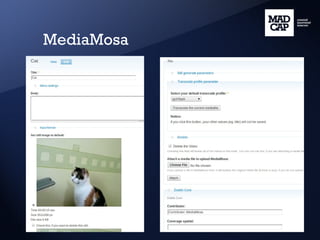
MediaMosa What you can do with MediaMosa:
MediaMosa
MediaMosa http://mediamosa.org “ MediaMosa is a robust, flexible and highly scalable media management platform. It is already helping deliver rich content (video, audio etc.) to educational organizations across the Netherlands.” ( http://mediamosa.org )
MediaMosa Open source video backend What does it mean? - Open source License: Open Source under GPLv2 license (GNU General Public License version 2) Framework: Drupal 6 / 7
MediaMosa Open source video backend - Video backend User MediaMosa Video frontend REST calls: POST, GET XML
MediaMosa is a backend application. Advantages of this separation: One backend can support multiple client sites. Easy integration for existing websites. What about the frontend? - There are different demo frontend applications. You may start with them: WLE, MediaMosa CK. - You may create one. Your application should communicate with MediaMosa through REST calls.
With MediaMosa you can - Upload videos and store them - Transcode videos (eg. h.264) - Generate video object, download link etc. - Create still images - Create metadata (title, description, DC, QDC) - Create collections - Stream your video's - Create authorizations
Introduction: MediaMosa Asset is a container. Asset
Introduction: MediaMosa Asset may have title, description etc. Asset Title Description DC, QDC fields
Introduction: MediaMosa Asset may have mediafiles. Asset Title Description Mediafile
Introduction: MediaMosa A mediafile may have a video. Asset Title Description Mediafile: Video (codec, filesize)
Introduction: MediaMosa We can transcode a mediafile to an other format. Asset Title Description Mediafile: Video (Original) Mediafile: Video (Transcoded)
Introduction: MediaMosa We can create an another mediafile (with video). Asset Title Description Mediafile: Video (Original) Mediafile: Video (Transcoded) Mediafile: Video (Original)
Introduction: MediaMosa Every mediafile may have still images. Asset Title Description Mediafile: Video (Original) Mediafile: Video (Transcoded) Mediafile: Video (Original)
Introduction: MediaMosa The asset has a default still (if there is any). Asset Title Description Mediafile: Video (Original) Mediafile: Video (Transcoded) Mediafile: Video (Original)
Introduction: MediaMosa A video site has assets with default stills. Asset  Title Desc. Asset  Title Desc. Asset  Title Desc. Asset  Title Desc.
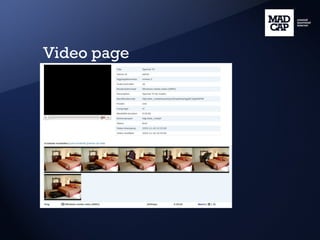
Introduction: MediaMosa A video page has an asset with video(s) and still(s). Asset Title Description
Videos site
Video page
Installing MediaMosa Download: http://mediamosa.org You need: LAMP, FFMpeg, Lua (LPEG) Recommended: Lav2yuv (MJPEG Tools) ... Installation: Drupal / MediaMosa install profile
Make it easy - VM Image on mediamosa.org - Demo site on mediamosa.org
Performance improvements If you need more power, you can separate your installation for: - Admin interface - Application interface(s) for REST calls - Upload interface - Download interface - Job interface(s) eg. transcoding video files Common DB server(s) and storage (SAN/NAS)
REST calls as a MediaMosa communication interface - REST = Representational State Transfer - GET calls for getting data - POST calls for changing or creating data - Output is XML - Documentation of REST calls: http://mediamosa.org/api
MediaMosa.org API page REST call: Parameters, Response fields, Examples http://mediamosa.org/api
REST calls as a MediaMosa communication interface Example: /mediafile/$mediafile_id [GET] <items> <item id=&quot;1&quot;> <mediafile_id>6778</mediafile_id> <asset_id>7AkD</asset_id> <app_id>14</app_id> <owner_id>admin</owner_id> <group_id></group_id> .... </item> </items>
REST call on WLE
How you can upload? Your client application: - Create asset /asset/create [POST] Response: $asset_id - Create mediafile /mediafile/create [POST] POST parameter: $asset_id Response: $mediafile_id - Create upload ticket /mediafile/$mediafile_id/uploadticket/create [POST] Response: Action URL, Upload progress URL (for upload progress bar)
Applications in action
Future / present developments - Solr - Atom, JSON, RSS feed - Watermarking still images - OpenAPI, oAuth, oEmbed
MediaMosa Status page
MediaMosa Browse and Statistics pages
MediaMosa Configuration pages
Thank you for you attention! Questions? MediaMosa http://mediamosa.org Peter Forgacs forgacs at madcap.nl http://xweb.hu

Mediamosa: Open source video backend

  • 1.
    MediaMosa: Open sourcevideo backend Peter Forgacs MediaMosa developer Madcap
  • 2.
    MediaMosa What youcan do with MediaMosa:
  • 3.
  • 4.
    MediaMosa http://mediamosa.org “MediaMosa is a robust, flexible and highly scalable media management platform. It is already helping deliver rich content (video, audio etc.) to educational organizations across the Netherlands.” ( http://mediamosa.org )
  • 5.
    MediaMosa Open sourcevideo backend What does it mean? - Open source License: Open Source under GPLv2 license (GNU General Public License version 2) Framework: Drupal 6 / 7
  • 6.
    MediaMosa Open sourcevideo backend - Video backend User MediaMosa Video frontend REST calls: POST, GET XML
  • 7.
    MediaMosa is abackend application. Advantages of this separation: One backend can support multiple client sites. Easy integration for existing websites. What about the frontend? - There are different demo frontend applications. You may start with them: WLE, MediaMosa CK. - You may create one. Your application should communicate with MediaMosa through REST calls.
  • 8.
    With MediaMosa youcan - Upload videos and store them - Transcode videos (eg. h.264) - Generate video object, download link etc. - Create still images - Create metadata (title, description, DC, QDC) - Create collections - Stream your video's - Create authorizations
  • 9.
    Introduction: MediaMosa Assetis a container. Asset
  • 10.
    Introduction: MediaMosa Assetmay have title, description etc. Asset Title Description DC, QDC fields
  • 11.
    Introduction: MediaMosa Assetmay have mediafiles. Asset Title Description Mediafile
  • 12.
    Introduction: MediaMosa Amediafile may have a video. Asset Title Description Mediafile: Video (codec, filesize)
  • 13.
    Introduction: MediaMosa Wecan transcode a mediafile to an other format. Asset Title Description Mediafile: Video (Original) Mediafile: Video (Transcoded)
  • 14.
    Introduction: MediaMosa Wecan create an another mediafile (with video). Asset Title Description Mediafile: Video (Original) Mediafile: Video (Transcoded) Mediafile: Video (Original)
  • 15.
    Introduction: MediaMosa Everymediafile may have still images. Asset Title Description Mediafile: Video (Original) Mediafile: Video (Transcoded) Mediafile: Video (Original)
  • 16.
    Introduction: MediaMosa Theasset has a default still (if there is any). Asset Title Description Mediafile: Video (Original) Mediafile: Video (Transcoded) Mediafile: Video (Original)
  • 17.
    Introduction: MediaMosa Avideo site has assets with default stills. Asset Title Desc. Asset Title Desc. Asset Title Desc. Asset Title Desc.
  • 18.
    Introduction: MediaMosa Avideo page has an asset with video(s) and still(s). Asset Title Description
  • 19.
  • 20.
  • 21.
    Installing MediaMosa Download:http://mediamosa.org You need: LAMP, FFMpeg, Lua (LPEG) Recommended: Lav2yuv (MJPEG Tools) ... Installation: Drupal / MediaMosa install profile
  • 22.
    Make it easy- VM Image on mediamosa.org - Demo site on mediamosa.org
  • 23.
    Performance improvements Ifyou need more power, you can separate your installation for: - Admin interface - Application interface(s) for REST calls - Upload interface - Download interface - Job interface(s) eg. transcoding video files Common DB server(s) and storage (SAN/NAS)
  • 24.
    REST calls asa MediaMosa communication interface - REST = Representational State Transfer - GET calls for getting data - POST calls for changing or creating data - Output is XML - Documentation of REST calls: http://mediamosa.org/api
  • 25.
    MediaMosa.org API pageREST call: Parameters, Response fields, Examples http://mediamosa.org/api
  • 26.
    MediaMosa.org API pageREST call: Parameters, Response fields, Examples http://mediamosa.org/api
  • 27.
    REST calls asa MediaMosa communication interface Example: /mediafile/$mediafile_id [GET] <items> <item id=&quot;1&quot;> <mediafile_id>6778</mediafile_id> <asset_id>7AkD</asset_id> <app_id>14</app_id> <owner_id>admin</owner_id> <group_id></group_id> .... </item> </items>
  • 28.
  • 29.
    How you canupload? Your client application: - Create asset /asset/create [POST] Response: $asset_id - Create mediafile /mediafile/create [POST] POST parameter: $asset_id Response: $mediafile_id - Create upload ticket /mediafile/$mediafile_id/uploadticket/create [POST] Response: Action URL, Upload progress URL (for upload progress bar)
  • 30.
  • 31.
    Future / presentdevelopments - Solr - Atom, JSON, RSS feed - Watermarking still images - OpenAPI, oAuth, oEmbed
  • 32.
  • 33.
    MediaMosa Browse andStatistics pages
  • 34.
  • 35.
  • 36.
  • 37.
  • 38.
  • 39.
  • 40.
    Thank you foryou attention! Questions? MediaMosa http://mediamosa.org Peter Forgacs forgacs at madcap.nl http://xweb.hu

Editor's Notes