➢ Organize your photo, movie and music
➢ Tag at photos and share the discription
➢ lock your media
for android
Album View
Album View shows the
folders having images
Category List
Photo, Movie, Music
are a Folder album.
Lock is a hidden album.
Person, Place, Keyword
are a tag album
Gallery View
Const of Album Panel
and Media Panel.
Media Panel is slided
Media View
By Sliding left in the
galllery view, only
media is shown
Simple type
By Sliding left in the
galllery view, only
media is shown
Select Mode
By long-pressing a
media, convert to select
mode
Multi Select
By click other media,
add the selection.
You can select by area
by long-press other
media
Choice
categoryTo pase, lock and tag,
You can change to
other category
Select album
To tag at the selection,
click the tag album
Attach tag
Confirm attach-tag, and
then tag will be
attached at the selction
Paste to album
Confirm move/copy,
and then the selction
will is pasted to the
album
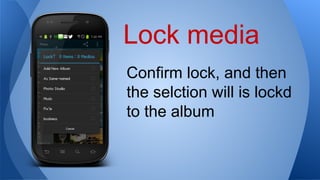
Lock media
Confirm lock, and then
the selction will is lockd
to the album
Photo viewer
Click your photo in
media view, and this
will be open.
Click the Description,
and you can tag
Tags & Desc
Enter new tag, and
press done button in
keyboard
Input Tags
You can choise the
existing tag on the list
If you input the tag
once, you can recyle it.
Edit description
If You select the
template, a description
is inputed automatically
And you can edit it
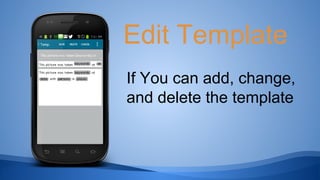
Edit Template
If You can add, change,
and delete the template
share desc
If You can share your
photo and description.
long-press the editor
and then you may paste
at a clipboard
Music album
You can show your
music album
Music Player
You can play music.
And can selcet an
album

Media gallery9