ELOQUA
MARKETING AUTOMATION SOFTWARE






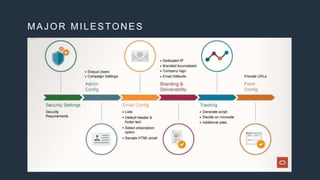
MAJOR MILESTONES
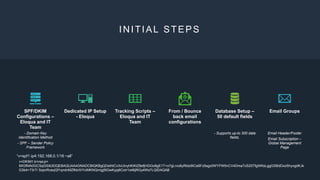
INITIAL STEPS
SPF/DKIM
Configurations –
Eloqua and IT
Team
- Domain Key
Identification Method
- SPF – Sender Policy
Framework
Dedicated IP Setup
- Eloqua
Tracking Scripts –
Eloqua and IT
Team
From / Bounce
back email
configurations
Database Setup –
50 default fields
- Supports up-to 300 data
fields.
Email Groups
Email Header/Footer
Email Subscription –
Global Management
Page
“v=spf1 ip4:192.168.0.1/16 ~all”
v=DKIM1;k=rsa;p=
MIGfMA0GCSqGSIb3DQEBAQUAA4GNADCBiQKBgQDeIhtCv3vUinyhKiKtZ8efjHGGo8gE1T+o7gLrvo6yRtdz9ICe6Fz5sgz0WYFW5nCV4DmaTcS25TfgWKsLggGSBdDxzShyvgdKJk
G3b4+73rT/ 5opnRceqQf1qndnMZfkb/0/YciMKNQmigj9IGwKypj6CoIr1s46jRGy4Ws7LQIDAQAB
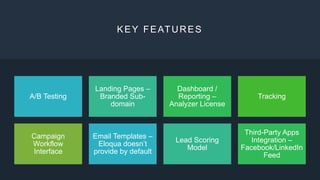
KEY FEATURES
A/B Testing
Landing Pages –
Branded Sub-
domain
Dashboard /
Reporting –
Analyzer License
Tracking
Campaign
Workflow
Interface
Email Templates –
Eloqua doesn’t
provide by default
Lead Scoring
Model
Third-Party Apps
Integration –
Facebook/LinkedIn
Feed
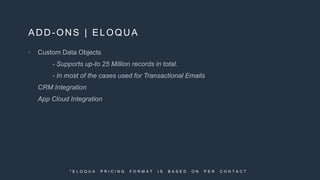
ADD-ONS | ELOQUA

* E L O Q U A P R I C I N G F O R M A T I S B A S E D O N P E R C O N T A C T .
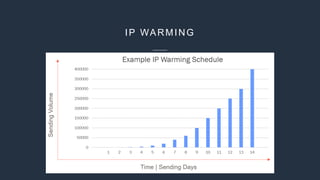
IP WARMING
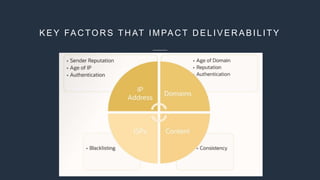
K E Y FA C TO R S T H AT IM PA C T D E L IV E R A B IL IT Y
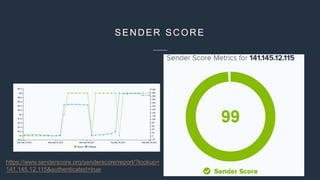
SENDER SCORE
https://www.senderscore.org/senderscore/report/?lookup=
141.145.12.115&authenticated=true
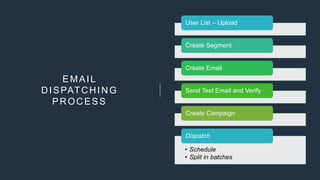
EMAIL
DISPATCHING
PROCESS
User List – Upload
Create Segment
Create Email
Send Test Email and Verify
Create Campaign
• Schedule
• Split in batches
Dispatch
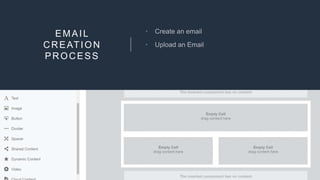
EMAIL
CREATION
PROCESS


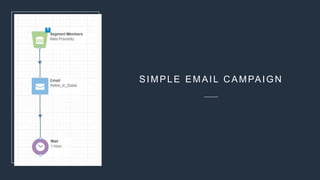
SIMPLE EMAIL CAMPAIGN
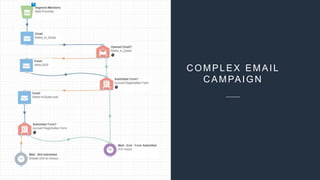
COMPLEX EMAIL
CAMPAIGN
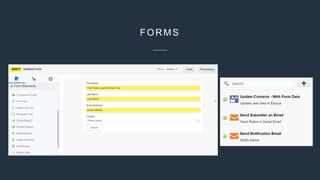
FORMS
VISITOR TRACKING
EMAIL REPORTING
COMPLEXITIES



DATA CLEANSING



-
-
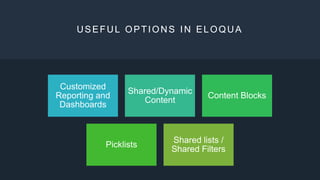
USEFUL OPTIONS IN ELOQUA
Customized
Reporting and
Dashboards
Shared/Dynamic
Content
Content Blocks
Picklists
Shared lists /
Shared Filters
THANK YOU

Marketing Automation | Eloqua

Editor's Notes

  • #4 Security Settings: It is important to review and configure the security settings for an account, which enforce an organization’s security requirements. Like: Access via a Secured network, password complexity, contact level security, whitelisting domains, User password expiration, invalid login attempts, session timeout, etc. Admin Configurations: This stage includes initial administration, configurations task like creation of fields and views, security groups, the Eloqua user list, Eloqua user setup and creation of marketing users. Email Configuration & Preference Management: This stage includes list uploads (of contacts, hard bounce backs, competitor domains and unsubscribes), and review (and configuration of a ) preference management options, and the creation of an Email template. Branding & Deliverability: This stage reviews the critical task related to deliverability (such as a dedicated IP, branded subdomain, email defaults, DNS record and branded bounce back) and client tactics like IP Warming. Tracking: This stage reviews the process of generating and installing the Eloqua tracking script on your website. Form configuration: This stage entails reviewing existing forms and outlining the methods for hosting forms.
  • #5 Why we do SPF DKIM Authentication? Sender Policy Framework Domain Key Identification Method In a nutshell, SPF allows email senders to define which IP addresses are allowed to send mail for a particular domain. DKIM on the other hand, provides an encryption key and digital signature that verifies that an email message was not forged or altered. When these email authentication methods are properly implemented, you will be one step closer to improving your email deliverability and sending secure emails that drive revenue for your business.
  • #8 When you add a new dedicated IP address to your account, you need to warm it up. You also need to warmup your IP if you haven't sent on it in more than 30 days. Warming up your IP allows you to gradually send more emails over your new IP to establish a good sender reputation. IP warming is the practice of gradually increasing the volume of mail sent with a dedicated IP address according to a predetermined schedule. This gradual process helps to establish a reputation with ISPs (Internet Service Providers) as a legitimate email sender. When an ISP observes email suddenly coming from a new or "cold" IP address, they will take notice and immediately begin evaluating the traffic coming from that IP. Since ISPs treat email volume as a key determining factor when detecting spam, it is best to begin sending a low to moderate volume, eventually working your way up to larger volumes. This gives the receiving email providers a chance to closely observe your sending habits and record how your recipients engage with your email.
  • #11 User List – Upload Create Segment Create Email Send Test Email and Verify - Make sure all the links are working fine. - Make sure Email Groups are configured properly. - Unsubscribe and Manage Email Preference links are working properly. - Reply-To, From and Bounce-back emails are configured properly - Tracking is Enabled Create Campaign: Configure segment and email Dispatch - Schedule - Split in batches
  • #14 Complex campaign basically includes: What is your audience – Segments or Shared List What are your assets – Email, Form and Landing Pages Decisions Criteria – criteria based on which we decide which email should go Actions based on Decisions
  • #15 Form creation process is pretty simple and straightforward. Create a form Drop it on a Landing Page or Connect it with our website. User can reach to that form via a link on an email or on a website.
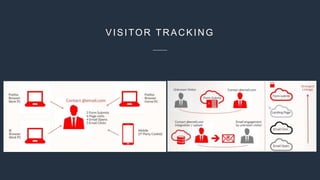
  • #16 A contact is a data entity that contains the explicit data around an individual person in the database. Contact information can be derived from email responses or form submissions, but also from <CLICK> website visits, event registrations or via external (non-Eloqua) activities. As visitors browse the website, Oracle Eloqua uses cookies and the visitor’s IP address to build a visitor record. The visitor record consists of fields that are pre-configured by Oracle Eloqua and cannot be changed or added to. Eloqua allows us to use 300+ contacts fields. There are 50+ standard contact fields and allow us to have 250 custom contact fields. ----- Oracle Eloqua uses cookies to track visits to your website. When a visitor visits your organization's website, cookies are placed in the browser and the visitor is identified with a globally unique identifier (GUID). Various types of information is captured about the visit such as the page visited, the time spent on the page, the IP address, and so on. Oracle Eloqua enables you to use this information to segment, trigger notifications, or build program builder feeders. The Oracle Eloqua asynchronous tracking scripts allow you to track visits to your website seamlessly without affecting the page load time for your visitors. When you visit a website with the Oracle Eloqua asynchronous tracking scripts deployed, cookies are placed in your browser. Cookies help identify you as a website visitor according to your specific browser and computer combination in the event that you return to this domain. As visitors browse your website, Oracle Eloqua uses cookies and the visitor's IP address to build a visitor record. Learn more about visitor records. Oracle Eloqua cookies remain in the browser until the visitor deletes them or for 13 months.
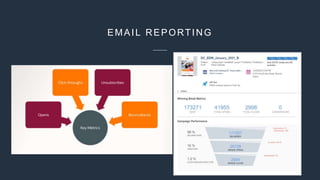
  • #17 Email Reporting Key Metrics includes: - Email Opens - Email Click-throughs - Unsubscribes - Bouncebacks - Soft bounce - Hard bounce