Map Interface &
HashMapin Java: A Deep
Dive
Explore the core concepts of Java's Map interface and its most popular
implementation, HashMap. Understand their functionality, practical
applications, and optimized usage.
Jay Varshney (2301921520085)
Ishank Aggarwal (2301921520084)
Dikshant Sharma (2301921520068)
Eklavya Verma (2301921520071)
Lakshay Saxena (2301921520102)
Kangana Vashistha (2301921520088)
Group Members:
2.
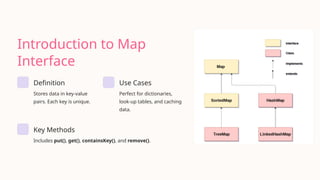
Introduction to Map
Interface
Definition
Storesdata in key-value
pairs. Each key is unique.
Use Cases
Perfect for dictionaries,
look-up tables, and caching
data.
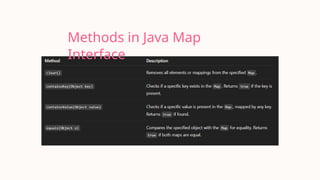
Key Methods
Includes put(), get(), containsKey(), and remove().
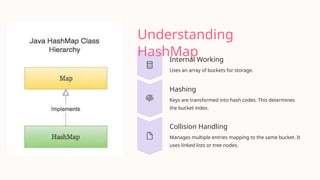
Understanding
HashMap
Internal Working
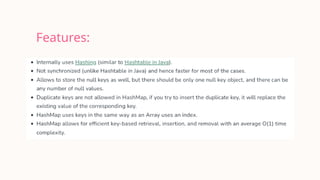
Uses anarray of buckets for storage.
Hashing
Keys are transformed into hash codes. This determines
the bucket index.
Collision Handling
Manages multiple entries mapping to the same bucket. It
uses linked lists or tree nodes.
5.
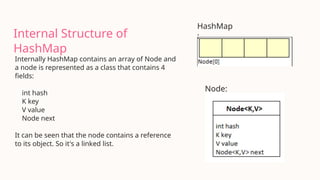
Internal Structure of
HashMap
InternallyHashMap contains an array of Node and
a node is represented as a class that contains 4
fields:
int hash
K key
V value
Node next
It can be seen that the node contains a reference
to its object. So it's a linked list.
HashMap
:
Node:
HashMap Code
Implementation
import java.util.HashMap;
importjava.util.Map;
public class BasicHashMap {
public static void main(String[] args) {
Map<String, Integer> ages = new HashMap<>();
// Adding elements
ages.put("Alice", 30);
ages.put("Bob", 25);
ages.put("Charlie", 35);
// Retrieving elements
System.out.println("Alice's age: " +
ages.get("Alice"));
// Removing an element
ages.remove("Bob");
System.out.println("Map after removing Bob: " +
ages);
}
}
• Create a HashMap: Instantiate a new HashMap.
• Add elements: Use put() to insert key-value pairs.
• Retrieve elements: Use get() with the key.
• Remove elements: Use remove() with the key.
9.
Iterating Through
HashMap
import java.util.HashMap;
importjava.util.Map;
public class IterateHashMap {
public static void main(String[] args) {
Map<String, Integer> scores = new HashMap<>();
scores.put("John", 90);
scores.put("Jane", 85);
// Using entrySet()
for (Map.Entry entry : scores.entrySet()) {
System.out.println("Key: " + entry.getKey() + ", Value: " +
entry.getValue());
}
// Using keySet()
for (String name : scores.keySet()) {
System.out.println("Key: " + name);
}
// Using values()
for (Integer score : scores.values()) {
System.out.println("Value: " + score);
}
}
}
10.
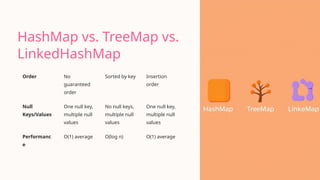
HashMap vs. TreeMapvs.
LinkedHashMap
Order No
guaranteed
order
Sorted by key Insertion
order
Null
Keys/Values
One null key,
multiple null
values
No null keys,
multiple null
values
One null key,
multiple null
values
Performanc
e
O(1) average O(log n) O(1) average
11.
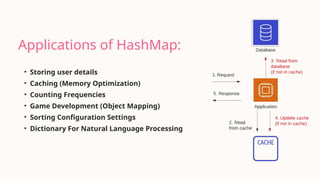
Applications of HashMap:
•Storing user details
• Caching (Memory Optimization)
• Counting Frequencies
• Game Development (Object Mapping)
• Sorting Configuration Settings
• Dictionary For Natural Language Processing
12.
Conclusion
HashMap is acrucial data structure for efficient key-value storage. It
offers constant-time performance on average.
• Performance: Generally O(1) for put/get.
• Considerations: Impact of collisions and rehashing.
• When to use: Ideal for fast lookups. Do not need insertion order or
sorted order.

![HashMap Code
Implementation
import java.util.HashMap;
import java.util.Map;
public class BasicHashMap {
public static void main(String[] args) {
Map<String, Integer> ages = new HashMap<>();
// Adding elements
ages.put("Alice", 30);
ages.put("Bob", 25);
ages.put("Charlie", 35);
// Retrieving elements
System.out.println("Alice's age: " +
ages.get("Alice"));
// Removing an element
ages.remove("Bob");
System.out.println("Map after removing Bob: " +
ages);
}
}
• Create a HashMap: Instantiate a new HashMap.
• Add elements: Use put() to insert key-value pairs.
• Retrieve elements: Use get() with the key.
• Remove elements: Use remove() with the key.](https://image.slidesharecdn.com/map-interface-and-hashmap-in-java-a-deep-dive-250608094533-7537a24e/85/Map-Interface-and-HashMap-in-Java-A-Deep-Dive-pptx-pptx-8-320.jpg)
![Iterating Through
HashMap
import java.util.HashMap;
import java.util.Map;
public class IterateHashMap {
public static void main(String[] args) {
Map<String, Integer> scores = new HashMap<>();
scores.put("John", 90);
scores.put("Jane", 85);
// Using entrySet()
for (Map.Entry entry : scores.entrySet()) {
System.out.println("Key: " + entry.getKey() + ", Value: " +
entry.getValue());
}
// Using keySet()
for (String name : scores.keySet()) {
System.out.println("Key: " + name);
}
// Using values()
for (Integer score : scores.values()) {
System.out.println("Value: " + score);
}
}
}](https://image.slidesharecdn.com/map-interface-and-hashmap-in-java-a-deep-dive-250608094533-7537a24e/85/Map-Interface-and-HashMap-in-Java-A-Deep-Dive-pptx-pptx-9-320.jpg)