Manipulating Web Application Interfaces

               Felipe Moreno
                felipe@wobot.org
         http://groundspeed.wobot.org


           SANS Webcast– April 19, 2010
Abstract
• This talk will discuss the current approach for
  performing input validation testing at the HTTP
  request level (using proxies) and suggest a new
  one: performing input validation testing directly
  in the user interface
• It will also introduce Groundspeed, an open-
  source add-on for Firefox that allows you to
  modify, on the fly, the forms and form fields in
  the page loaded in the browser
• Groundspeed is available at:
                  http://groundspeed.wobot.org
Input Validation Problems
• Most application vulnerabilities are related in
  one way or another to input validation
• While automated tools can help detect
  potential input validation problems they can
  only provide a superficial view
• The only way to fully identify and assess input
  validation issues is through manual testing
The Standard Approach


        1                            2                             3
Interact with the web     Intercept the HTTP request that   Inspect the response
 application interface   is generated and manipulate the     sent back from the
                                     input data                    server
Questions
• This approach works well, that’s why we use it
• But…
  – Does it make sense to use it all the time?
  – Why did we choose this approach?
  – Can we improve the test process?
Understanding the Problem
• We are trying to manipulate input data
• What is input data?
  – Anything that the application accepts as input
    from outside (in our case, anything coming from
    the browser)
  – This means (almost) anything in the HTTP request!

• But what is exactly this input data?
The Nature of Input Data
                       Data coming from Forms, including: text
   USER INTERFACE      fields, checkboxes, radio buttons, drop down
                       menus, etc.


                       Data coming from the client-side logic (data
   CLIENT SIDE LOGIC   originating in JavaScript, AJAX parameters
                       reflected back, etc)


                       Input data originating at the HTTP request
      HTTP LEVEL       level: HTTP headers, including cookies.


                       NETWORK               TO THE WEB SERVER
The Nature of Input Data
                       Data coming from Forms, including: text
   USER INTERFACE      fields, checkboxes, radio buttons, drop down
                       menus, etc.


                       Data coming from the client-side logic (data
   CLIENT SIDE LOGIC   originating in JavaScript, AJAX parameters
                       reflected back, etc)


                       Input data originating at the HTTP request
      HTTP LEVEL       level: HTTP headers, including cookies.


                       NETWORK               TO THE WEB SERVER
  HTTP MANIPULATION
Why the Current Approach Works
• HTTP manipulation is convenient
  – All input data has to pass through the HTTP layer
    in order to go to the server

• We have absolute control
  – No interference from browser or JavaScript

• Historic reason
  – Back in the day, the browser was a closed box, the
    best we could do was to place tools in front of it
A Different Approach
• Not all input data originates from the same
  place in the user-application interaction
• The limitation that prevented us from working
  inside the browser are no longer valid
  – Open source
  – Extensibility (add-ons, plug ins, etc)
• Can we manipulate data at other points in the
  client-side input data life cycle?
Introducing Groundspeed
• Groundspeed is an open-source add-on for Firefox
  http://groundspeed.wobot.org

• Groundspeed allows a tester to perform input
  validation testing from the user interface
• The core idea is to modify the browser in order to
  adapt it to the needs of security testers:
  – Manipulate the application’s user interface
  – Remove client side validation and other limitations
Manipulating the Interface
• Manipulate the Application Forms
  – Change type of form fields
  – Change length and size limitations
  – Remove or modify JavaScript Event Handlers

• In general: add, remove or modify any
  attribute of any form or form element loaded
  in the page
Opening Groundspeed
The Groundspeed Sidebar
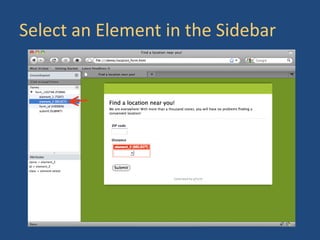
Select an Element in the Sidebar
Right Click the Element for Actions
Transform into Text Field
Some Practical Examples
• See and change the content of hidden fields
  directly at the interface
• Change checkboxes, drop-down lists, etc into
  text fields to manipulate their contents
• Remove length limits in text fields so you have
  space for your attack strings
• Increase the size of the text field so you can
  see your attack string
More Things You Can Do
• Remove all JavaScript event handlers associated
  with a form and its fields
• Encode and decode the contents (Base64, Hex,
  HTML Entities, Unicode, URL Encode)
• Hash the contents of the field (MD5, SHA1)
• Make the form submit in a new tab (so you don’t
  have to manipulate the interface all over again)
• Save all form field values and reload them later
Right Click Menus
But, wait a minute…
• How is Groundspeed really different than
  using a proxy, why should I bother?
• How is this different than using Firebug or the
  Web Developer extension?
• What about other input data (cookies, etc)?
What are the advantages of working
   at the user interface level?
Information Needs Context
• In order to understand a piece of information,
  we need context
  – The answer for the “ultimate question of life, the
    universe and everything”: 42

• Without proper context, we have to fill in the
  gaps to compensate what’s missing
  – Guessing, there is a chance of making mistakes
Labels Provide Context to Humans
• The labels next to form fields provide context
  to humans (users have to interact with it)
• As input data travels down towards the server,
  it is separated from the context (labels)
• When intercepted at the HTTP request level,
  the data is no longer in its original context (the
  user interface)
HTTP Parameters are Meant for Code
• To reconstruct the context when working at
  the HTTP level, we use the parameter names
• But HTTP parameter names are not meant for
  humans, they are meant for server side code
  – They could be any arbitrary value

• This is “mapping problem” (to match
  parameters to what the data in them mean)
  makes working at HTTP less efficient
Test Friction
• Working at the HTTP level forces the user to
  switch between two worlds
   – The user interface world and HTTP world
• This adds a lot of extra, secondary tasks, that
  don’t really help the tester, but only distract:
   – Reading thru HTTP requests, mapping parameters,
     etc.
• We can consider it as some sort of “test friction”
  that makes the work of the tester more difficult
  and does not contribute to the end result
Why is using Groundspeed different than using
 Firebug or the Web Developer extension?
Hammers and Screwdrivers
• Firebug and the Web Dev were not designed
  to be used in penetration tests
  – But you can still use them to manipulate the
    application forms

• Using Groundspeed requires less cognitive
  tasks (reading through source code, navigating
  a tree structure, etc.) and manipulation tasks
  (clicking, switching tabs, windows, etc.)
Convenience and Design
• Firebug and the Web Dev are developer tools,
  they were designed to solve developer
  problems
• In order to use them we have to adapt our test
  process to accommodate how the tools work
• But it should be the other way around: the tool
  that should be adapted to our test process
What about cookies and other input data
that does not come from the interface?
Different Tools for Different Tasks
• Groundspeed was not designed to replace the
  existing tools (proxy tools, Firebug, etc)
• It is one more tool in the penetration tester
  toolbox
• When you are faced with a problem, use the
  tool that works best for that problem
Manual Input Validation Toolbox
                       Data coming from HTML forms
   USER INTERFACE      Groundspeed, Web Dev Extension (some
                       cases)


                       Data coming from the client-side logic
   CLIENT SIDE LOGIC   Firebug or other JavaScript debuggers


                       Data at the HTTP level
      HTTP LEVEL       Burp or other proxies, TamperData


                       NETWORK              TO THE WEB SERVER
Wrap-up: Groundspeed
• Groundspeed adapts the web app interface to
  fit the needs of the security tester
  – What you need, where you need: no friction
  – Eliminates the complex secondary tasks

• Groundspeed allows manipulating interface
  input data directly at the interface
  – Eliminates the mapping problem of working at the
    HTTP level
Also Keep in Mind
• We can improve the test process by thinking
  about the nature of input data
  – Build a toolbox that provides the best tool for
    each type of problem

• Modern browsers are very extensible (open
  source, add-ons and plug-ins)
  – Let’s transform the browser into a security tool
For More Information
• More about Groundspeed, including the
  download link, can be found here:
  http://groundspeed.wobot.org

• If you have questions, comments or
  suggestions, send me an email:
  felipe@wobot.org
Questions?

Manipulating Web Application Interfaces

  • 1.
    Manipulating Web ApplicationInterfaces Felipe Moreno felipe@wobot.org http://groundspeed.wobot.org SANS Webcast– April 19, 2010
  • 2.
    Abstract • This talkwill discuss the current approach for performing input validation testing at the HTTP request level (using proxies) and suggest a new one: performing input validation testing directly in the user interface • It will also introduce Groundspeed, an open- source add-on for Firefox that allows you to modify, on the fly, the forms and form fields in the page loaded in the browser • Groundspeed is available at: http://groundspeed.wobot.org
  • 3.
    Input Validation Problems •Most application vulnerabilities are related in one way or another to input validation • While automated tools can help detect potential input validation problems they can only provide a superficial view • The only way to fully identify and assess input validation issues is through manual testing
  • 4.
    The Standard Approach 1 2 3 Interact with the web Intercept the HTTP request that Inspect the response application interface is generated and manipulate the sent back from the input data server
  • 5.
    Questions • This approachworks well, that’s why we use it • But… – Does it make sense to use it all the time? – Why did we choose this approach? – Can we improve the test process?
  • 6.
    Understanding the Problem •We are trying to manipulate input data • What is input data? – Anything that the application accepts as input from outside (in our case, anything coming from the browser) – This means (almost) anything in the HTTP request! • But what is exactly this input data?
  • 7.
    The Nature ofInput Data Data coming from Forms, including: text USER INTERFACE fields, checkboxes, radio buttons, drop down menus, etc. Data coming from the client-side logic (data CLIENT SIDE LOGIC originating in JavaScript, AJAX parameters reflected back, etc) Input data originating at the HTTP request HTTP LEVEL level: HTTP headers, including cookies. NETWORK TO THE WEB SERVER
  • 8.
    The Nature ofInput Data Data coming from Forms, including: text USER INTERFACE fields, checkboxes, radio buttons, drop down menus, etc. Data coming from the client-side logic (data CLIENT SIDE LOGIC originating in JavaScript, AJAX parameters reflected back, etc) Input data originating at the HTTP request HTTP LEVEL level: HTTP headers, including cookies. NETWORK TO THE WEB SERVER HTTP MANIPULATION
  • 9.
    Why the CurrentApproach Works • HTTP manipulation is convenient – All input data has to pass through the HTTP layer in order to go to the server • We have absolute control – No interference from browser or JavaScript • Historic reason – Back in the day, the browser was a closed box, the best we could do was to place tools in front of it
  • 10.
    A Different Approach •Not all input data originates from the same place in the user-application interaction • The limitation that prevented us from working inside the browser are no longer valid – Open source – Extensibility (add-ons, plug ins, etc) • Can we manipulate data at other points in the client-side input data life cycle?
  • 11.
    Introducing Groundspeed • Groundspeedis an open-source add-on for Firefox http://groundspeed.wobot.org • Groundspeed allows a tester to perform input validation testing from the user interface • The core idea is to modify the browser in order to adapt it to the needs of security testers: – Manipulate the application’s user interface – Remove client side validation and other limitations
  • 12.
    Manipulating the Interface •Manipulate the Application Forms – Change type of form fields – Change length and size limitations – Remove or modify JavaScript Event Handlers • In general: add, remove or modify any attribute of any form or form element loaded in the page
  • 13.
  • 14.
  • 15.
    Select an Elementin the Sidebar
  • 16.
    Right Click theElement for Actions
  • 17.
  • 18.
    Some Practical Examples •See and change the content of hidden fields directly at the interface • Change checkboxes, drop-down lists, etc into text fields to manipulate their contents • Remove length limits in text fields so you have space for your attack strings • Increase the size of the text field so you can see your attack string
  • 19.
    More Things YouCan Do • Remove all JavaScript event handlers associated with a form and its fields • Encode and decode the contents (Base64, Hex, HTML Entities, Unicode, URL Encode) • Hash the contents of the field (MD5, SHA1) • Make the form submit in a new tab (so you don’t have to manipulate the interface all over again) • Save all form field values and reload them later
  • 20.
  • 21.
    But, wait aminute… • How is Groundspeed really different than using a proxy, why should I bother? • How is this different than using Firebug or the Web Developer extension? • What about other input data (cookies, etc)?
  • 22.
    What are theadvantages of working at the user interface level?
  • 23.
    Information Needs Context •In order to understand a piece of information, we need context – The answer for the “ultimate question of life, the universe and everything”: 42 • Without proper context, we have to fill in the gaps to compensate what’s missing – Guessing, there is a chance of making mistakes
  • 24.
    Labels Provide Contextto Humans • The labels next to form fields provide context to humans (users have to interact with it) • As input data travels down towards the server, it is separated from the context (labels) • When intercepted at the HTTP request level, the data is no longer in its original context (the user interface)
  • 25.
    HTTP Parameters areMeant for Code • To reconstruct the context when working at the HTTP level, we use the parameter names • But HTTP parameter names are not meant for humans, they are meant for server side code – They could be any arbitrary value • This is “mapping problem” (to match parameters to what the data in them mean) makes working at HTTP less efficient
  • 26.
    Test Friction • Workingat the HTTP level forces the user to switch between two worlds – The user interface world and HTTP world • This adds a lot of extra, secondary tasks, that don’t really help the tester, but only distract: – Reading thru HTTP requests, mapping parameters, etc. • We can consider it as some sort of “test friction” that makes the work of the tester more difficult and does not contribute to the end result
  • 27.
    Why is usingGroundspeed different than using Firebug or the Web Developer extension?
  • 28.
    Hammers and Screwdrivers •Firebug and the Web Dev were not designed to be used in penetration tests – But you can still use them to manipulate the application forms • Using Groundspeed requires less cognitive tasks (reading through source code, navigating a tree structure, etc.) and manipulation tasks (clicking, switching tabs, windows, etc.)
  • 29.
    Convenience and Design •Firebug and the Web Dev are developer tools, they were designed to solve developer problems • In order to use them we have to adapt our test process to accommodate how the tools work • But it should be the other way around: the tool that should be adapted to our test process
  • 30.
    What about cookiesand other input data that does not come from the interface?
  • 31.
    Different Tools forDifferent Tasks • Groundspeed was not designed to replace the existing tools (proxy tools, Firebug, etc) • It is one more tool in the penetration tester toolbox • When you are faced with a problem, use the tool that works best for that problem
  • 32.
    Manual Input ValidationToolbox Data coming from HTML forms USER INTERFACE Groundspeed, Web Dev Extension (some cases) Data coming from the client-side logic CLIENT SIDE LOGIC Firebug or other JavaScript debuggers Data at the HTTP level HTTP LEVEL Burp or other proxies, TamperData NETWORK TO THE WEB SERVER
  • 33.
    Wrap-up: Groundspeed • Groundspeedadapts the web app interface to fit the needs of the security tester – What you need, where you need: no friction – Eliminates the complex secondary tasks • Groundspeed allows manipulating interface input data directly at the interface – Eliminates the mapping problem of working at the HTTP level
  • 34.
    Also Keep inMind • We can improve the test process by thinking about the nature of input data – Build a toolbox that provides the best tool for each type of problem • Modern browsers are very extensible (open source, add-ons and plug-ins) – Let’s transform the browser into a security tool
  • 35.
    For More Information •More about Groundspeed, including the download link, can be found here: http://groundspeed.wobot.org • If you have questions, comments or suggestions, send me an email: felipe@wobot.org
  • 36.