Website: http://www.itoris.com
Email: sales@itoris.com
ITORIS INC.
WEB DEVELOPMENT COMPANY
G
extension
http://www.itoris.com
sales@itoris.com
WEB DEVELOPMENT COMPANY
rouped Product Options
extension for Magento2
User Guide
version 1.0
rouped Product Options
for Magento2
User Guide
version 1.0
Page | 1
rouped Product Options
for Magento2
Website: http://www.itoris.com
Email: sales@itoris.com
ITORIS INC.
WEB DEVELOPMENT COMPANY
Contents
1. Introduction ................................
2. Installation ................................
2.1. System Requirements
2.2. Installation
2.3. License................................
3. How to Use................................
3.1. Settings................................
3.2. Grouped Product Configuration
3.2.1. Selecting associated products
3.2.2. Grouped Pr
3.2.3. Other Settings
http://www.itoris.com
sales@itoris.com
WEB DEVELOPMENT COMPANY
................................................................
................................................................
2.1. System Requirements ................................................................
2.2. Installation................................................................
................................................................
................................................................
................................................................
ped Product Configuration................................
3.2.1. Selecting associated products ................................
3.2.2. Grouped Product on Frontend ................................
3.2.3. Other Settings ................................................................
................................................................................................
................................................................................................
................................................................
................................................................................................
................................................................................................
................................................................................................
................................................................................................
................................................................................................
................................................................................................
................................................................................................
................................................................................................
Page | 2
..................................................3
....................................................3
............................................................3
..............................................3
....................................................3
....................................................4
...................................................4
.............................................4
.........................................4
........................................6
.................................6
Website: http://www.itoris.com
Email: sales@itoris.com
ITORIS INC.
WEB DEVELOPMENT COMPANY
1. Introduction
The document is a User Guide for extension
describes the extension functionality and provides some
The purpose of the extension is to enable custom options on the
simple products without
displayed on the
product size or color
The Grouped Product Options
with custom options,
you group configurable
with the options on frontend to configure
Using the extension a
the quantity of associated products before adding
checkboxes and
products in it.
2. Installation
2.1. System Requirements
The extension requires Magento 2.x
2.2. Installation
The extension is provided as a .zip archive with the source code and the installation instruction
Unpack the source code into
server. And run the following commands in the SSH console:
php bin/magento module:enable
php bin/magento setup:upgrade
Then log into Magento backend and flush cache in
If you experience any issues with the extension installatio
https://www.itoris.com/contact
2.3. License
The extension has
Magento2 website and its development instances.
needs. Redistribution of the extension or its parts is not allowed. Please read more details here
https://www.itoris.com/magento
http://www.itoris.com
sales@itoris.com
WEB DEVELOPMENT COMPANY
Introduction
The document is a User Guide for extension Grouped Product Options
describes the extension functionality and provides some
he purpose of the extension is to enable custom options on the
simple products without required custom options be added to
the frontend by default. This is not useful when you want
size or color, or other option.
Grouped Product Options extension fixes it. Now you are able to group simple and virtual products
with custom options, configurable products, and bundle products
you group configurable products you can enable color or configurable
with the options on frontend to configure them before adding to cart.
Using the extension a Grouped product can also be converted into a
the quantity of associated products before adding them
simplify the selection. That will be useful
Installation
System Requirements
xtension requires Magento 2.x
Installation
extension is provided as a .zip archive with the source code and the installation instruction
Unpack the source code into /app/code/Itoris/Itoris_
the following commands in the SSH console:
nto module:enable --clear-static
php bin/magento setup:upgrade
Then log into Magento backend and flush cache in System
If you experience any issues with the extension installatio
https://www.itoris.com/contact-us.html
The extension has full open source code. One license/purchase can be used on a single
Magento2 website and its development instances. The extension can be customized for the license owner
needs. Redistribution of the extension or its parts is not allowed. Please read more details here
https://www.itoris.com/magento-extensions-license.html
rouped Product Options created for Magento2 websites. It
describes the extension functionality and provides some tips for a quick start.
he purpose of the extension is to enable custom options on the Grouped products. Magento allows only
be added to a Grouped product. Options are not
This is not useful when you want the customer to
Now you are able to group simple and virtual products
, and bundle products. All this within one Grouped product.
color or configurable swatches. Customer will be provided
before adding to cart.
be converted into a Checklist. By default customer
hem to cart. It is possible to replace the QTY field
That will be useful for Grouped products with lot
extension is provided as a .zip archive with the source code and the installation instruction
Itoris_ GroupedProductConfiguration/ folder on your
the following commands in the SSH console:
static-content Itoris_GroupedProductConfiguration
System -> Cache Management -> Flush Magento Cache
If you experience any issues with the extension installation please contact us here -
One license/purchase can be used on a single production
The extension can be customized for the license owner
needs. Redistribution of the extension or its parts is not allowed. Please read more details here
license.html
Page | 3
created for Magento2 websites. It
Magento allows only
ptions are not
to choose let's say the
Now you are able to group simple and virtual products
rouped product. If
ustomer will be provided
y default customer enters
t is possible to replace the QTY fields with
lots of associated
extension is provided as a .zip archive with the source code and the installation instructions.
folder on your
GroupedProductConfiguration
> Flush Magento Cache
production
The extension can be customized for the license owner
needs. Redistribution of the extension or its parts is not allowed. Please read more details here -
Website: http://www.itoris.com
Email: sales@itoris.com
ITORIS INC.
WEB DEVELOPMENT COMPANY
3. How to Use
3.1. Settings
You can enable or disa
EXTENSIONS -> G
3.2. Grouped Product Configuration
3.2.1. Selecting
Create a new Grouped product following
Product). Or open
"Grouped Products
A popup will appear where you
http://www.itoris.com
sales@itoris.com
WEB DEVELOPMENT COMPANY
How to Use
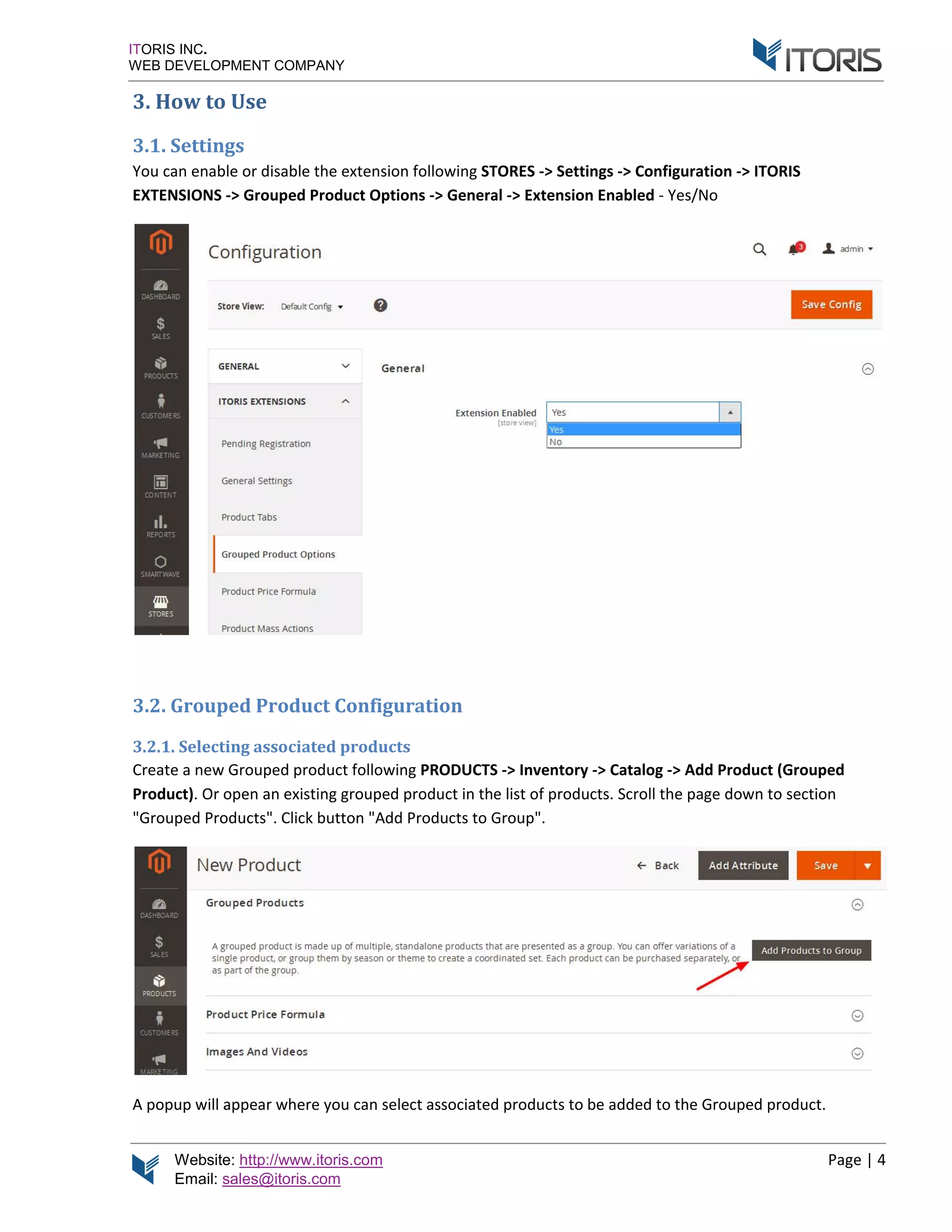
ou can enable or disable the extension following STORES
Grouped Product Options -> Genera
3.2. Grouped Product Configuration
Selecting associated products
Create a new Grouped product following PRODUCTS
open an existing grouped product in the list of products.
Grouped Products". Click button "Add Products to Group
A popup will appear where you can select associated products to be added to the Grouped product.
STORES -> Settings -> Configuration -
General -> Extension Enabled - Yes/No
RODUCTS -> Inventory -> Catalog -> Add Product
existing grouped product in the list of products. Scroll the page down
to Group".
select associated products to be added to the Grouped product.
Page | 4
-> ITORIS
Product (Grouped
down to section
select associated products to be added to the Grouped product.
Website: http://www.itoris.com
Email: sales@itoris.com
ITORIS INC.
WEB DEVELOPMENT COMPANY
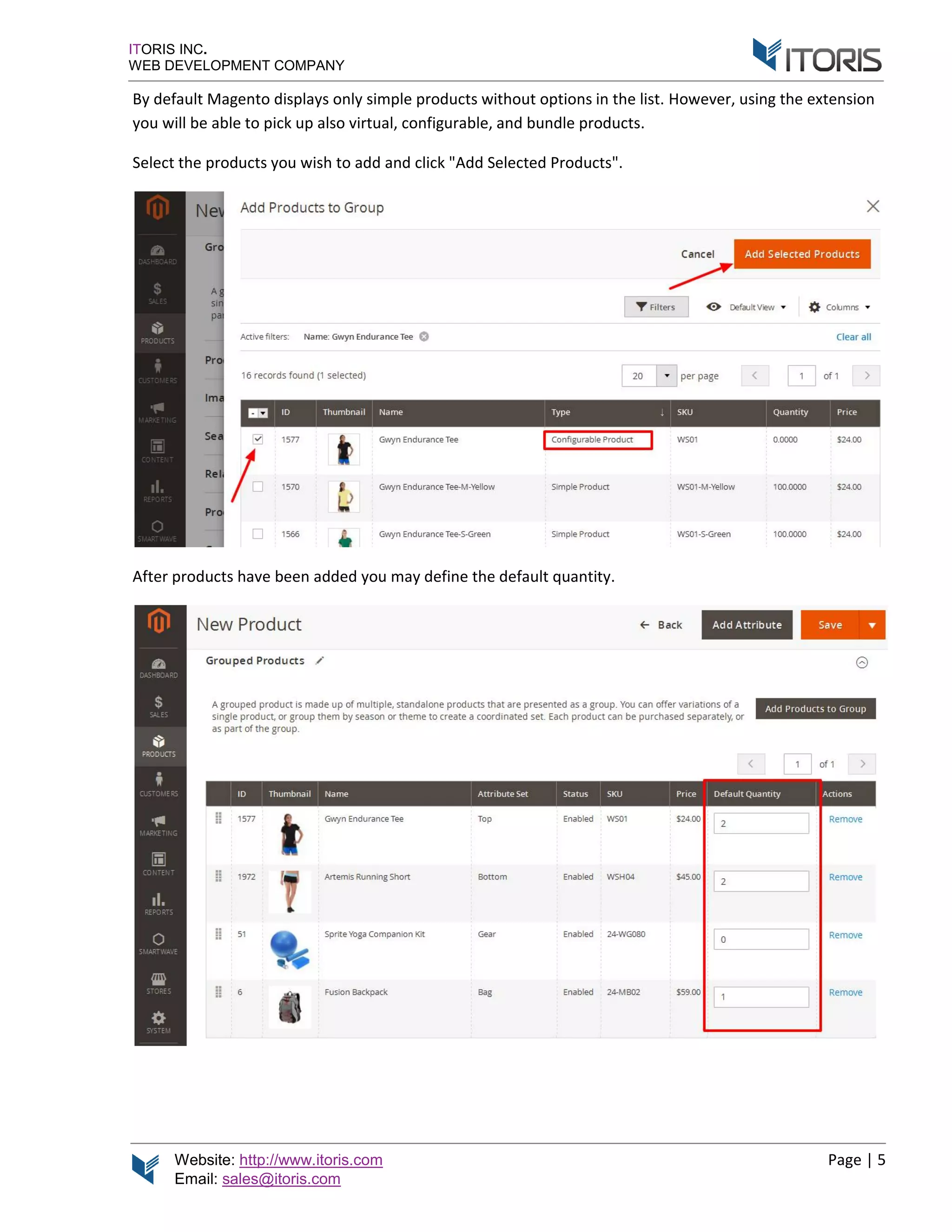
By default Magento displays only simple products without options in the list.
you will be able to p
Select the products you wish to a
After products have
http://www.itoris.com
sales@itoris.com
WEB DEVELOPMENT COMPANY
By default Magento displays only simple products without options in the list.
you will be able to pick up also virtual, configurable, and bundle products
products you wish to add and click "Add Selected Products
After products have been added you may define the default quantity
By default Magento displays only simple products without options in the list. However, u
ick up also virtual, configurable, and bundle products.
Add Selected Products".
you may define the default quantity.
Page | 5
using the extension
Website: http://www.itoris.com
Email: sales@itoris.com
ITORIS INC.
WEB DEVELOPMENT COMPANY
3.2.2. Grouped Product
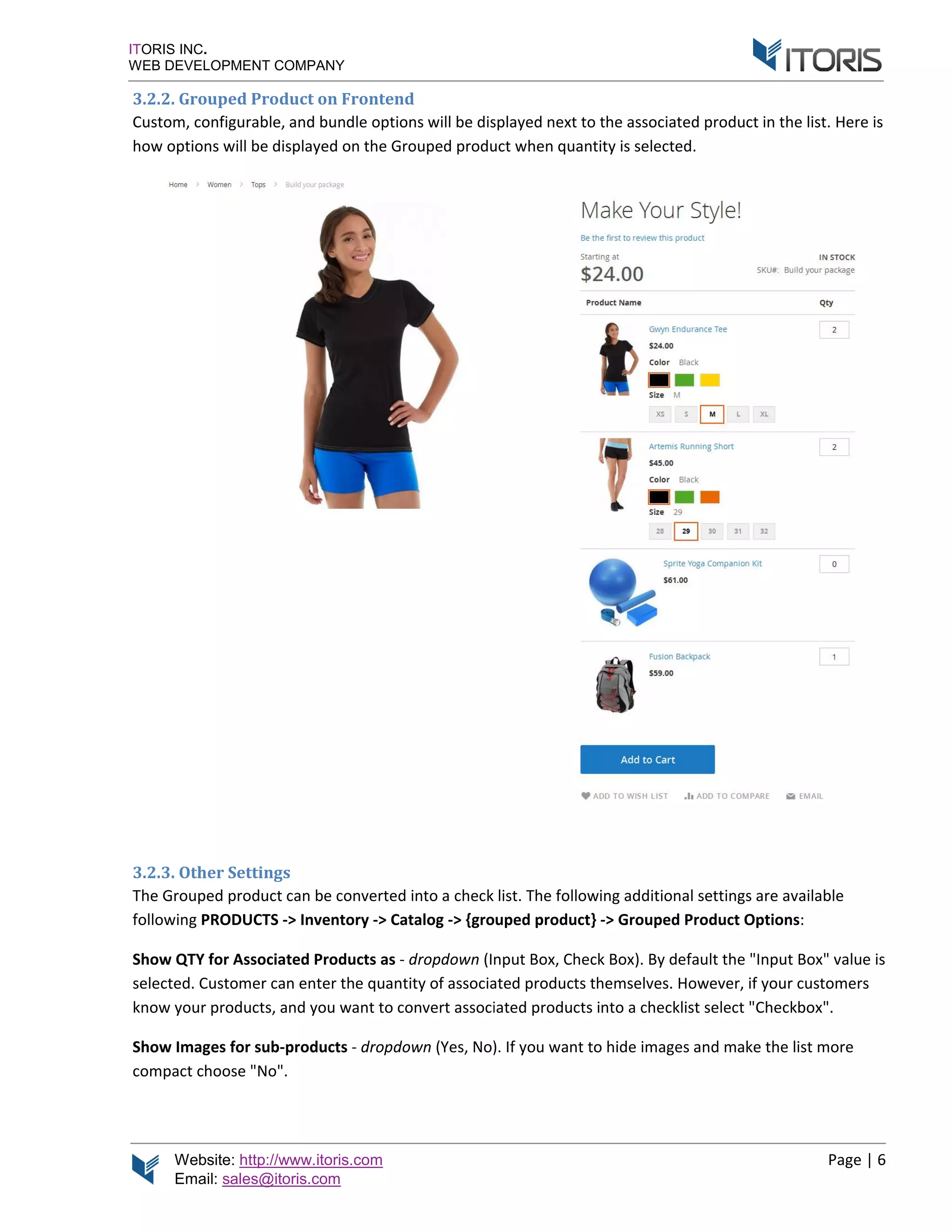
Custom, configurable, and bundle
how options will be displayed on the Grouped product
3.2.3. Other Settings
The Grouped product can be converted into a
following PRODUCTS
Show QTY for Associated Products
selected. Custom
know your products
Show Images for sub
compact choose "
http://www.itoris.com
sales@itoris.com
WEB DEVELOPMENT COMPANY
3.2.2. Grouped Product on Frontend
nfigurable, and bundle options will be displayed next to the associated product in the list.
options will be displayed on the Grouped product
Other Settings
The Grouped product can be converted into a check list.
PRODUCTS -> Inventory -> Catalog -> {grouped product
for Associated Products as - dropdown (Input
selected. Customer can enter the quantity of associated products themselves.
know your products, and you want to convert associated products into a checklist select "
for sub-products - dropdown (Yes, No)
choose "No".
ptions will be displayed next to the associated product in the list.
options will be displayed on the Grouped product when quantity is selected.
check list. The following additional settings are available
grouped product} -> Grouped Product Options
Input Box, Check Box). By default the "
er can enter the quantity of associated products themselves. However, if
convert associated products into a checklist select "
). If you want to hide images and make the list more
Page | 6
ptions will be displayed next to the associated product in the list. Here is
The following additional settings are available
Grouped Product Options:
y default the "Input Box" value is
However, if your customers
convert associated products into a checklist select "Checkbox".
o hide images and make the list more
Website: http://www.itoris.com
Email: sales@itoris.com
ITORIS INC.
WEB DEVELOPMENT COMPANY
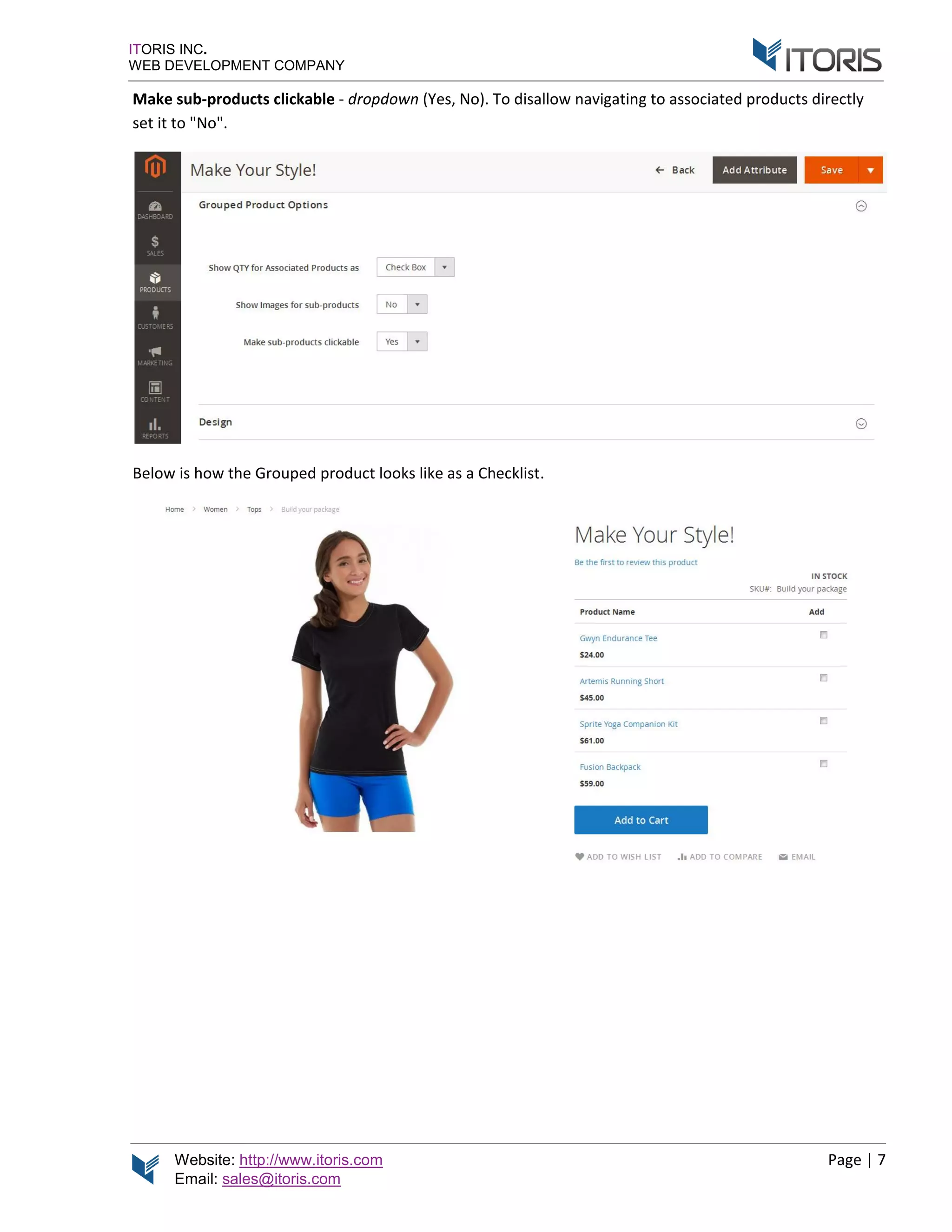
Make sub-products
set it to "No".
Below is how the Grouped product looks like as a Checklist
http://www.itoris.com
sales@itoris.com
WEB DEVELOPMENT COMPANY
products clickable - dropdown (Yes, No). T
elow is how the Grouped product looks like as a Checklist
To disallow navigating to associated product
elow is how the Grouped product looks like as a Checklist.
Page | 7
associated products directly

Magento 2 Grouped Product Options extension by Itoris Inc.

  • 1.
    Website: http://www.itoris.com Email: sales@itoris.com ITORISINC. WEB DEVELOPMENT COMPANY G extension http://www.itoris.com sales@itoris.com WEB DEVELOPMENT COMPANY rouped Product Options extension for Magento2 User Guide version 1.0 rouped Product Options for Magento2 User Guide version 1.0 Page | 1 rouped Product Options for Magento2
  • 2.
    Website: http://www.itoris.com Email: sales@itoris.com ITORISINC. WEB DEVELOPMENT COMPANY Contents 1. Introduction ................................ 2. Installation ................................ 2.1. System Requirements 2.2. Installation 2.3. License................................ 3. How to Use................................ 3.1. Settings................................ 3.2. Grouped Product Configuration 3.2.1. Selecting associated products 3.2.2. Grouped Pr 3.2.3. Other Settings http://www.itoris.com sales@itoris.com WEB DEVELOPMENT COMPANY ................................................................ ................................................................ 2.1. System Requirements ................................................................ 2.2. Installation................................................................ ................................................................ ................................................................ ................................................................ ped Product Configuration................................ 3.2.1. Selecting associated products ................................ 3.2.2. Grouped Product on Frontend ................................ 3.2.3. Other Settings ................................................................ ................................................................................................ ................................................................................................ ................................................................ ................................................................................................ ................................................................................................ ................................................................................................ ................................................................................................ ................................................................................................ ................................................................................................ ................................................................................................ ................................................................................................ Page | 2 ..................................................3 ....................................................3 ............................................................3 ..............................................3 ....................................................3 ....................................................4 ...................................................4 .............................................4 .........................................4 ........................................6 .................................6
  • 3.
    Website: http://www.itoris.com Email: sales@itoris.com ITORISINC. WEB DEVELOPMENT COMPANY 1. Introduction The document is a User Guide for extension describes the extension functionality and provides some The purpose of the extension is to enable custom options on the simple products without displayed on the product size or color The Grouped Product Options with custom options, you group configurable with the options on frontend to configure Using the extension a the quantity of associated products before adding checkboxes and products in it. 2. Installation 2.1. System Requirements The extension requires Magento 2.x 2.2. Installation The extension is provided as a .zip archive with the source code and the installation instruction Unpack the source code into server. And run the following commands in the SSH console: php bin/magento module:enable php bin/magento setup:upgrade Then log into Magento backend and flush cache in If you experience any issues with the extension installatio https://www.itoris.com/contact 2.3. License The extension has Magento2 website and its development instances. needs. Redistribution of the extension or its parts is not allowed. Please read more details here https://www.itoris.com/magento http://www.itoris.com sales@itoris.com WEB DEVELOPMENT COMPANY Introduction The document is a User Guide for extension Grouped Product Options describes the extension functionality and provides some he purpose of the extension is to enable custom options on the simple products without required custom options be added to the frontend by default. This is not useful when you want size or color, or other option. Grouped Product Options extension fixes it. Now you are able to group simple and virtual products with custom options, configurable products, and bundle products you group configurable products you can enable color or configurable with the options on frontend to configure them before adding to cart. Using the extension a Grouped product can also be converted into a the quantity of associated products before adding them simplify the selection. That will be useful Installation System Requirements xtension requires Magento 2.x Installation extension is provided as a .zip archive with the source code and the installation instruction Unpack the source code into /app/code/Itoris/Itoris_ the following commands in the SSH console: nto module:enable --clear-static php bin/magento setup:upgrade Then log into Magento backend and flush cache in System If you experience any issues with the extension installatio https://www.itoris.com/contact-us.html The extension has full open source code. One license/purchase can be used on a single Magento2 website and its development instances. The extension can be customized for the license owner needs. Redistribution of the extension or its parts is not allowed. Please read more details here https://www.itoris.com/magento-extensions-license.html rouped Product Options created for Magento2 websites. It describes the extension functionality and provides some tips for a quick start. he purpose of the extension is to enable custom options on the Grouped products. Magento allows only be added to a Grouped product. Options are not This is not useful when you want the customer to Now you are able to group simple and virtual products , and bundle products. All this within one Grouped product. color or configurable swatches. Customer will be provided before adding to cart. be converted into a Checklist. By default customer hem to cart. It is possible to replace the QTY field That will be useful for Grouped products with lot extension is provided as a .zip archive with the source code and the installation instruction Itoris_ GroupedProductConfiguration/ folder on your the following commands in the SSH console: static-content Itoris_GroupedProductConfiguration System -> Cache Management -> Flush Magento Cache If you experience any issues with the extension installation please contact us here - One license/purchase can be used on a single production The extension can be customized for the license owner needs. Redistribution of the extension or its parts is not allowed. Please read more details here license.html Page | 3 created for Magento2 websites. It Magento allows only ptions are not to choose let's say the Now you are able to group simple and virtual products rouped product. If ustomer will be provided y default customer enters t is possible to replace the QTY fields with lots of associated extension is provided as a .zip archive with the source code and the installation instructions. folder on your GroupedProductConfiguration > Flush Magento Cache production The extension can be customized for the license owner needs. Redistribution of the extension or its parts is not allowed. Please read more details here -
  • 4.
    Website: http://www.itoris.com Email: sales@itoris.com ITORISINC. WEB DEVELOPMENT COMPANY 3. How to Use 3.1. Settings You can enable or disa EXTENSIONS -> G 3.2. Grouped Product Configuration 3.2.1. Selecting Create a new Grouped product following Product). Or open "Grouped Products A popup will appear where you http://www.itoris.com sales@itoris.com WEB DEVELOPMENT COMPANY How to Use ou can enable or disable the extension following STORES Grouped Product Options -> Genera 3.2. Grouped Product Configuration Selecting associated products Create a new Grouped product following PRODUCTS open an existing grouped product in the list of products. Grouped Products". Click button "Add Products to Group A popup will appear where you can select associated products to be added to the Grouped product. STORES -> Settings -> Configuration - General -> Extension Enabled - Yes/No RODUCTS -> Inventory -> Catalog -> Add Product existing grouped product in the list of products. Scroll the page down to Group". select associated products to be added to the Grouped product. Page | 4 -> ITORIS Product (Grouped down to section select associated products to be added to the Grouped product.
  • 5.
    Website: http://www.itoris.com Email: sales@itoris.com ITORISINC. WEB DEVELOPMENT COMPANY By default Magento displays only simple products without options in the list. you will be able to p Select the products you wish to a After products have http://www.itoris.com sales@itoris.com WEB DEVELOPMENT COMPANY By default Magento displays only simple products without options in the list. you will be able to pick up also virtual, configurable, and bundle products products you wish to add and click "Add Selected Products After products have been added you may define the default quantity By default Magento displays only simple products without options in the list. However, u ick up also virtual, configurable, and bundle products. Add Selected Products". you may define the default quantity. Page | 5 using the extension
  • 6.
    Website: http://www.itoris.com Email: sales@itoris.com ITORISINC. WEB DEVELOPMENT COMPANY 3.2.2. Grouped Product Custom, configurable, and bundle how options will be displayed on the Grouped product 3.2.3. Other Settings The Grouped product can be converted into a following PRODUCTS Show QTY for Associated Products selected. Custom know your products Show Images for sub compact choose " http://www.itoris.com sales@itoris.com WEB DEVELOPMENT COMPANY 3.2.2. Grouped Product on Frontend nfigurable, and bundle options will be displayed next to the associated product in the list. options will be displayed on the Grouped product Other Settings The Grouped product can be converted into a check list. PRODUCTS -> Inventory -> Catalog -> {grouped product for Associated Products as - dropdown (Input selected. Customer can enter the quantity of associated products themselves. know your products, and you want to convert associated products into a checklist select " for sub-products - dropdown (Yes, No) choose "No". ptions will be displayed next to the associated product in the list. options will be displayed on the Grouped product when quantity is selected. check list. The following additional settings are available grouped product} -> Grouped Product Options Input Box, Check Box). By default the " er can enter the quantity of associated products themselves. However, if convert associated products into a checklist select " ). If you want to hide images and make the list more Page | 6 ptions will be displayed next to the associated product in the list. Here is The following additional settings are available Grouped Product Options: y default the "Input Box" value is However, if your customers convert associated products into a checklist select "Checkbox". o hide images and make the list more
  • 7.
    Website: http://www.itoris.com Email: sales@itoris.com ITORISINC. WEB DEVELOPMENT COMPANY Make sub-products set it to "No". Below is how the Grouped product looks like as a Checklist http://www.itoris.com sales@itoris.com WEB DEVELOPMENT COMPANY products clickable - dropdown (Yes, No). T elow is how the Grouped product looks like as a Checklist To disallow navigating to associated product elow is how the Grouped product looks like as a Checklist. Page | 7 associated products directly