
Low Level Hookup
    By - Ankush Asthana
Agenda

 Definition
 Windows Library
 Flowchart
 Implementation with an example
Definition


 A low level hook-up is a point in the system’s message-handling mechanism where an
  application can install a subroutine.

 Reason for low level hooking are:-
    To monitor the message traffic in the system.
    To process certain types of messages before they reach the target Windows procedure.
Windows Library
   For the keyboard and mouse hook-up we have to make use of the following
    Microsoft windows library:-
      user32.dll is a module that contains Windows API functions related the
         Windows user interface (Window handling, basic UI functions, and so forth).
         The methods we are going to user are as follows:-
         SetWindowsHookEx
         UnhookWindowsHookEx
         CallNextHookEx
         GetForegroundWindow
         GetWindowThreadProcessId
         kernel32.dll exposes to applications most of the Win32 base APIs, such as
          memory management, input/output operations, (process and thread)
          creation, and synchronization functions.
         GetModuleHandle
Flowchart
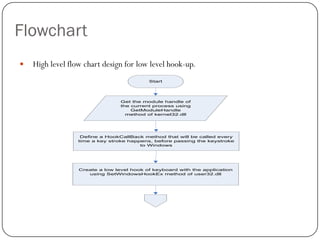
   High level flow chart design for low level hook-up.
                                           Start


                                 Get the module handle of
                                 the current process using
                                     GetModuleHandle
                                   method of kernel32.dll


                   Define a HookCallBack method that will be called every
                  time a key stroke happens, before passing the keystroke
                                        to Windows


                  Create a low level hook of keyboard with the application
                     using SetWindowsHookEx method of user32.dll
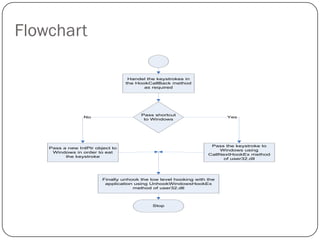
Flowchart

                                   Handel the keystrokes in
                                  the HookCallBack method
                                         as required


                                        Pass shortcut
                 No                                                      Yes
                                         to Windows


                                                                    Pass the keystroke to
    Pass a new IntPtr object to
                                                                        Windows using
     Windows in order to eat
                                                                   CallNextHookEx method
          the keystroke
                                                                         of user32.dll


                         Finally unhook the low level hooking with the
                          application using UnhookWindowsHookEx
                                     method of user32.dll


                                             Stop
Implementation

   Now we are going to create a small windows application with a windows form and
    perform low level hookup on the application.

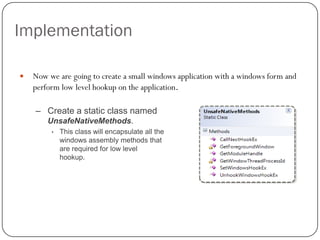
    – Create a static class named
        UnsafeNativeMethods.
         •   This class will encapsulate all the
             windows assembly methods that
             are required for low level
             hookup.
Implementation (Cont…)

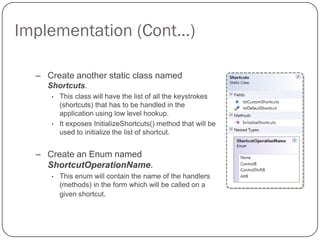
  – Create another static class named
    Shortcuts.
     •   This class will have the list of all the keystrokes
         (shortcuts) that has to be handled in the
         application using low level hookup.
     •   It exposes InitializeShortcuts() method that will be
         used to initialize the list of shortcut.


  – Create an Enum named
    ShortcutOperationName.
     •   This enum will contain the name of the handlers
         (methods) in the form which will be called on a
         given shortcut.
Implementation (Cont…)

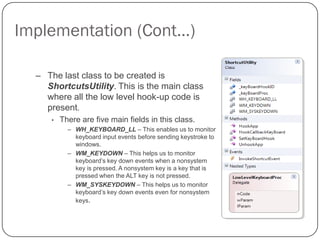
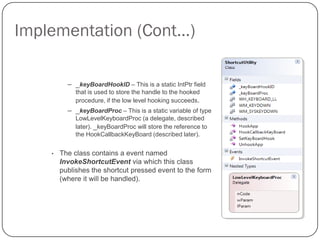
  – The last class to be created is
    ShortcutsUtility. This is the main class
    where all the low level hook-up code is
    present.
      •   There are five main fields in this class.
            – WH_KEYBOARD_LL – This enables us to monitor
              keyboard input events before sending keystroke to
              windows.
            – WM_KEYDOWN – This helps us to monitor
              keyboard’s key down events when a nonsystem
              key is pressed. A nonsystem key is a key that is
              pressed when the ALT key is not pressed.
            – WM_SYSKEYDOWN – This helps us to monitor
              keyboard’s key down events even for nonsystem
              keys.
Implementation (Cont…)

          – _keyBoardHookID – This is a static IntPtr field
             that is used to store the handle to the hooked
             procedure, if the low level hooking succeeds.
          – _keyBoardProc – This is a static variable of type
             LowLevelKeyboardProc (a delegate, described
             later). _keyBoardProc will store the reference to
             the HookCallbackKeyBoard (described later).


    •   The class contains a event named
        InvokeShortcutEvent via which this class
        publishes the shortcut pressed event to the form
        (where it will be handled).
Implementation (Cont…)

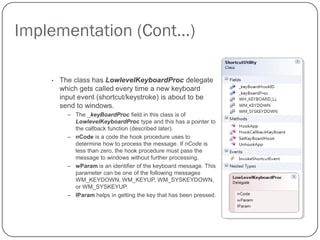
    •   The class has LowlevelKeyboardProc delegate
        which gets called every time a new keyboard
        input event (shortcut/keystroke) is about to be
        send to windows.
          – The _keyBoardProc field in this class is of
            LowlevelKeyboardProc type and this has a pointer to
            the callback function (described later).
          – nCode is a code the hook procedure uses to
            determine how to process the message. If nCode is
            less than zero, the hook procedure must pass the
            message to windows without further processing.
          – wParam is an identifier of the keyboard message. This
            parameter can be one of the following messages
            WM_KEYDOWN, WM_KEYUP, WM_SYSKEYDOWN,
            or WM_SYSKEYUP.
          – lParam helps in getting the key that has been pressed.
Implementation (Cont…)
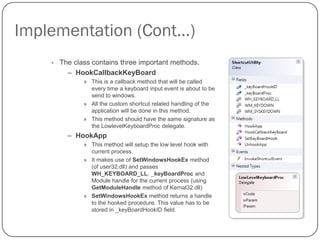
    •   The class contains three important methods.
          – HookCallbackKeyBoard
               » This is a callback method that will be called
                 every time a keyboard input event is about to be
                 send to windows.
               » All the custom shortcut related handling of the
                 application will be done in this method.
               » This method should have the same signature as
                 the LowlevelKeyboardProc delegate.
          – HookApp
               » This method will setup the low level hook with
                 current process.
               » It makes use of SetWindowsHookEx method
                 (of user32.dll) and passes
                 WH_KEYBOARD_LL, _keyBoardProc and
                 Module handle for the current process (using
                 GetModuleHandle method of Kernal32.dll)
               » SetWindowsHookEx method returns a handle
                 to the hooked procedure. This value has to be
                 stored in _keyBoardHookID field.
Implementation (Cont…)

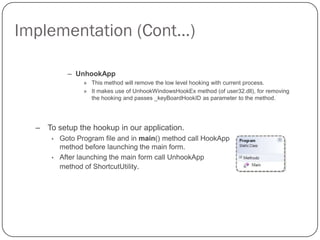
            – UnhookApp
                 » This method will remove the low level hooking with current process.
                 » It makes use of UnhookWindowsHookEx method (of user32.dll), for removing
                   the hooking and passes _keyBoardHookID as parameter to the method.


  – To setup the hookup in our application.
      •   Goto Program file and in main() method call HookApp
          method before launching the main form.
      •   After launching the main form call UnhookApp
          method of ShortcutUtility.
Implementation (Cont…)

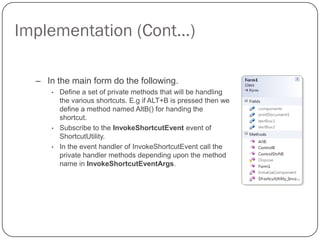
  – In the main form do the following.
      •   Define a set of private methods that will be handling
          the various shortcuts. E.g if ALT+B is pressed then we
          define a method named AltB() for handing the
          shortcut.
      •   Subscribe to the InvokeShortcutEvent event of
          ShortcutUtility.
      •   In the event handler of InvokeShortcutEvent call the
          private handler methods depending upon the method
          name in InvokeShortcutEventArgs.
Thank you.

Low level hookup

  • 1.
    Low Level Hookup By - Ankush Asthana
  • 2.
    Agenda  Definition  WindowsLibrary  Flowchart  Implementation with an example
  • 3.
    Definition  A lowlevel hook-up is a point in the system’s message-handling mechanism where an application can install a subroutine.  Reason for low level hooking are:-  To monitor the message traffic in the system.  To process certain types of messages before they reach the target Windows procedure.
  • 4.
    Windows Library  For the keyboard and mouse hook-up we have to make use of the following Microsoft windows library:-  user32.dll is a module that contains Windows API functions related the Windows user interface (Window handling, basic UI functions, and so forth). The methods we are going to user are as follows:-  SetWindowsHookEx  UnhookWindowsHookEx  CallNextHookEx  GetForegroundWindow  GetWindowThreadProcessId  kernel32.dll exposes to applications most of the Win32 base APIs, such as memory management, input/output operations, (process and thread) creation, and synchronization functions.  GetModuleHandle
  • 5.
    Flowchart  High level flow chart design for low level hook-up. Start Get the module handle of the current process using GetModuleHandle method of kernel32.dll Define a HookCallBack method that will be called every time a key stroke happens, before passing the keystroke to Windows Create a low level hook of keyboard with the application using SetWindowsHookEx method of user32.dll
  • 6.
    Flowchart Handel the keystrokes in the HookCallBack method as required Pass shortcut No Yes to Windows Pass the keystroke to Pass a new IntPtr object to Windows using Windows in order to eat CallNextHookEx method the keystroke of user32.dll Finally unhook the low level hooking with the application using UnhookWindowsHookEx method of user32.dll Stop
  • 7.
    Implementation  Now we are going to create a small windows application with a windows form and perform low level hookup on the application. – Create a static class named UnsafeNativeMethods. • This class will encapsulate all the windows assembly methods that are required for low level hookup.
  • 8.
    Implementation (Cont…) – Create another static class named Shortcuts. • This class will have the list of all the keystrokes (shortcuts) that has to be handled in the application using low level hookup. • It exposes InitializeShortcuts() method that will be used to initialize the list of shortcut. – Create an Enum named ShortcutOperationName. • This enum will contain the name of the handlers (methods) in the form which will be called on a given shortcut.
  • 9.
    Implementation (Cont…) – The last class to be created is ShortcutsUtility. This is the main class where all the low level hook-up code is present. • There are five main fields in this class. – WH_KEYBOARD_LL – This enables us to monitor keyboard input events before sending keystroke to windows. – WM_KEYDOWN – This helps us to monitor keyboard’s key down events when a nonsystem key is pressed. A nonsystem key is a key that is pressed when the ALT key is not pressed. – WM_SYSKEYDOWN – This helps us to monitor keyboard’s key down events even for nonsystem keys.
  • 10.
    Implementation (Cont…) – _keyBoardHookID – This is a static IntPtr field that is used to store the handle to the hooked procedure, if the low level hooking succeeds. – _keyBoardProc – This is a static variable of type LowLevelKeyboardProc (a delegate, described later). _keyBoardProc will store the reference to the HookCallbackKeyBoard (described later). • The class contains a event named InvokeShortcutEvent via which this class publishes the shortcut pressed event to the form (where it will be handled).
  • 11.
    Implementation (Cont…) • The class has LowlevelKeyboardProc delegate which gets called every time a new keyboard input event (shortcut/keystroke) is about to be send to windows. – The _keyBoardProc field in this class is of LowlevelKeyboardProc type and this has a pointer to the callback function (described later). – nCode is a code the hook procedure uses to determine how to process the message. If nCode is less than zero, the hook procedure must pass the message to windows without further processing. – wParam is an identifier of the keyboard message. This parameter can be one of the following messages WM_KEYDOWN, WM_KEYUP, WM_SYSKEYDOWN, or WM_SYSKEYUP. – lParam helps in getting the key that has been pressed.
  • 12.
    Implementation (Cont…) • The class contains three important methods. – HookCallbackKeyBoard » This is a callback method that will be called every time a keyboard input event is about to be send to windows. » All the custom shortcut related handling of the application will be done in this method. » This method should have the same signature as the LowlevelKeyboardProc delegate. – HookApp » This method will setup the low level hook with current process. » It makes use of SetWindowsHookEx method (of user32.dll) and passes WH_KEYBOARD_LL, _keyBoardProc and Module handle for the current process (using GetModuleHandle method of Kernal32.dll) » SetWindowsHookEx method returns a handle to the hooked procedure. This value has to be stored in _keyBoardHookID field.
  • 13.
    Implementation (Cont…) – UnhookApp » This method will remove the low level hooking with current process. » It makes use of UnhookWindowsHookEx method (of user32.dll), for removing the hooking and passes _keyBoardHookID as parameter to the method. – To setup the hookup in our application. • Goto Program file and in main() method call HookApp method before launching the main form. • After launching the main form call UnhookApp method of ShortcutUtility.
  • 14.
    Implementation (Cont…) – In the main form do the following. • Define a set of private methods that will be handling the various shortcuts. E.g if ALT+B is pressed then we define a method named AltB() for handing the shortcut. • Subscribe to the InvokeShortcutEvent event of ShortcutUtility. • In the event handler of InvokeShortcutEvent call the private handler methods depending upon the method name in InvokeShortcutEventArgs.
  • 15.