

LOAD BALANCING IN PUBLIC CLOUD USING
CLOUD PARTITIONING
Submitted by: under
guidance of:
Krishna Kumar (BE/1437/2011) Dr.
Amritanjali 1
TABLE OF CONTENTS:
1. Introduction to cloud computing
• What is cloud computing?
• Deployment models.
• Service models
• Advantages and Disadvantages
2. Load balancing in public cloud
• Architecture
• Models
• Algorithms
• Results
• Conclusion
2
INTRODUCTION to cloud computing
3
WHAT IS CLOUD COMPUTING?
Cloud:
Cloud refers to a Network or Internet. Cloud can provide services over
network.
Cloud Computing:
Cloud computing means "a type of Internet-based computing," where
different services — such as servers, storage and applications — are
delivered to an clients computers or devices through the Internet.
4
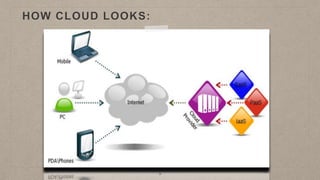
HOW CLOUD LOOKS:
5
SERVICE MODELS:
INFRASTRUCTURE AS A SERVICE (IAAS):
IaaS provides access to fundamental resources such as physical
machines, virtual machines, virtual storage, etc.
PLATFORM AS A SERVICE (PAAS):
PaaS provides the runtime environment for applications, development &
deployment tools, etc.
SOFTWARE AS A SERVICE (SAAS):
SaaS model allows to use software applications as a service to end users.
6
DEPLOYMENT MODELS:
Public Cloud:
The Public Cloud allows systems and services to be easily accessible to the general public. Public
cloud may be less secure because of its openness, e.g., e-mail.
Private Cloud:
The Private Cloud allows systems and services to be accessible within an organization. It offers
increased security because of its private nature.
Community Cloud:
The Community Cloud allows systems and services to be accessible by group of organizations.
Hybrid Cloud:
The Hybrid Cloud is mixture of public and private cloud. However, the critical activities are
performed using private cloud while the non-critical activities are performed using public cloud.
7
ADVANTAGES:
• Cost Efficient: All the maintenance works are done by cloud service
provider.Additional costs are minimised
• Mobility: Cloud mobility enables users to access anywhere with a
internet connection.
• Backup and Disaster Recovery: Most cloud providers offer backup and
recovery capabilities.
• Storage and Scalability: With the cloud,we have access to unlimited
storage and scalability.
DISADVANTAGES:
• Security and Privacy: Security is a major concern in clouds.Managing
confidential data may require deploying a private cloud.
• Compatibility: Softwares developed in one cloud may not be compatible
in other clouds.
Load balancing in public cloud
10
LOAD BALANCING:
• Load Balancing is a process of reassigning the total load to the
individual nodes of the collective system.
• It makes resource utilization effective and to improve the
response time of the job.
11
12
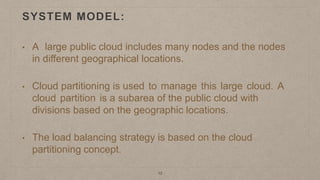
• A large public cloud includes many nodes and the nodes
in different geographical locations.
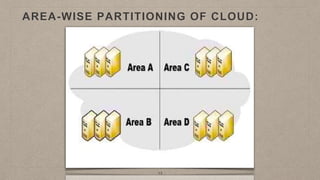
• Cloud partitioning is used to manage this large cloud. A
cloud partition is a subarea of the public cloud with
divisions based on the geographic locations.
• The load balancing strategy is based on the cloud
partitioning concept.
SYSTEM MODEL:
AREA-WISE PARTITIONING OF CLOUD:
13
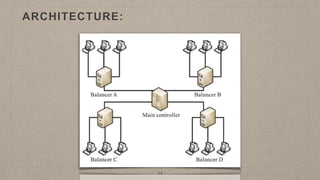
ARCHITECTURE:
14
15
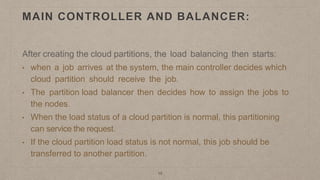
MAIN CONTROLLER AND BALANCER:
After creating the cloud partitions, the load balancing then starts:
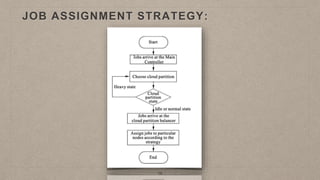
• when a job arrives at the system, the main controller decides which
cloud partition should receive the job.
• The partition load balancer then decides how to assign the jobs to
the nodes.
• When the load status of a cloud partition is normal, this partitioning
can service the request.
• If the cloud partition load status is not normal, this job should be
transferred to another partition.
JOB ASSIGNMENT STRATEGY:
16
LOAD DEGREE CALCULATION:
17
• Load degree of node is related to various static and dynamic parameters
Static parameters:
• No of CPUs.
• CPU processing speed.
• Memory speed.
Dynamic parameters:
• Memory utilisation.
• CPU utilization.
18
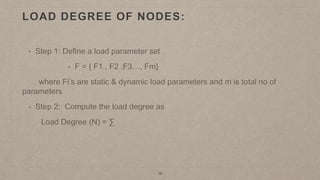
LOAD DEGREE OF NODES:
• Step 1: Define a load parameter set
• F = { F1 , F2 ,F3…, Fm}
where Fi’s are static & dynamic load parameters and m is total no of
parameters
• Step 2: Compute the load degree as
Load Degree (N) = ∑
19
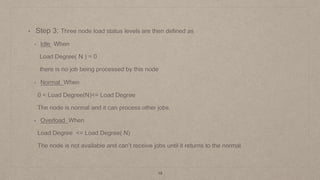
• Step 3: Three node load status levels are then defined as
• Idle When
Load Degree( N ) = 0
there is no job being processed by this node
• Normal When
0 < Load Degree(N)<= Load Degree
The node is normal and it can process other jobs.
• Overload When
Load Degree <= Load Degree( N)
The node is not available and can’t receive jobs until it returns to the normal.
20
LOAD DEGREE OF PARTITION:
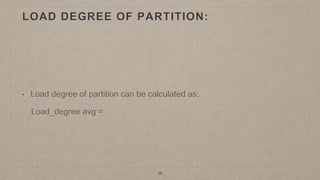
• Load degree of partition can be calculated as:
Load_degree avg =
21
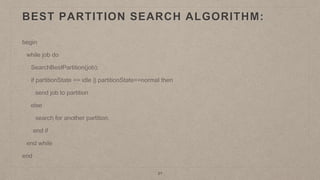
BEST PARTITION SEARCH ALGORITHM:
begin
while job do
SearchBestPartition(job);
if partitionState == idle || partitionState==normal then
send job to partition
else
search for another partition.
end if
end while
end
WEIGHTED ROUND ROBIN ALGORITHM:
22
STEP 1: Calculate the load degree of each node.
STEP 2: Make a circular queue of nodes ,arranged in ascending order
of their load degrees and queue ptr pointing to nodes with lowest
load degree.
Algorithm:
begin
while job do
Assign job to the node to which queue ptr is currently pointing to.
Move the queue ptr to next.
Re-calculate the load degree of the node and arrange nodes in circular queue.
end while
end
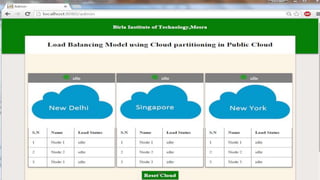
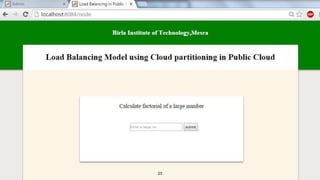
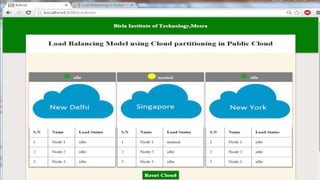
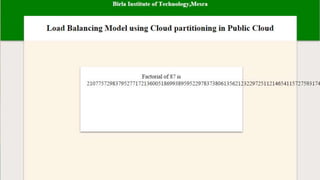
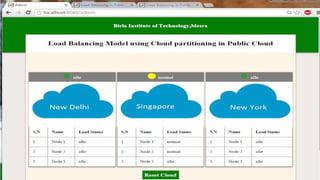
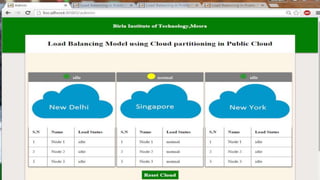
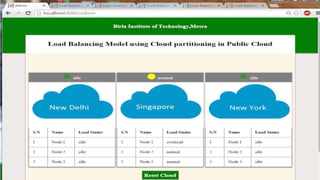
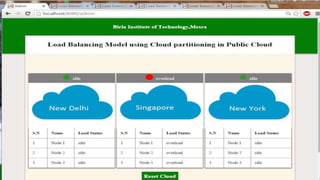
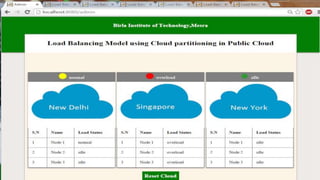
RESULT
24
25
CONCLUSION:
• Load balancing in cloud computing environment has an important
impact on the performance.
• In this project we have proposed a better load balance model for very
large and complex public cloud.
• With cloud partitioning concept it is possible to provide good load
balancing and hence improving the overall performance.
REFERENCES:
1. Microsoft Academic Research,Cloud computing,
http://libra.msra.cn/Keyword/6051/cloud-
computing?query=cloud%20computing,2012.
2. A load balancing model based on cloud partitioning for the public cloud
by Gaochao Xu, Junjie Pang and Xiaodong Fu.
3. http://www.javatpoint.com/cloud-computing-tutorial.
4. http://www.tutorialpoint.com/cloud_computing/
5. B.Adler,Load balancing in the cloud: Tools,tips and
techniques,http://www.rightscal.com/info_center/white-papers/Load-
Balancing-in-the-Cloud.pdf,2012.

load balancing in public cloud ppt

  • 1.
    LOAD BALANCING INPUBLIC CLOUD USING CLOUD PARTITIONING Submitted by: under guidance of: Krishna Kumar (BE/1437/2011) Dr. Amritanjali 1
  • 2.
    TABLE OF CONTENTS: 1.Introduction to cloud computing • What is cloud computing? • Deployment models. • Service models • Advantages and Disadvantages 2. Load balancing in public cloud • Architecture • Models • Algorithms • Results • Conclusion 2
  • 3.
  • 4.
    WHAT IS CLOUDCOMPUTING? Cloud: Cloud refers to a Network or Internet. Cloud can provide services over network. Cloud Computing: Cloud computing means "a type of Internet-based computing," where different services — such as servers, storage and applications — are delivered to an clients computers or devices through the Internet. 4
  • 5.
  • 6.
    SERVICE MODELS: INFRASTRUCTURE ASA SERVICE (IAAS): IaaS provides access to fundamental resources such as physical machines, virtual machines, virtual storage, etc. PLATFORM AS A SERVICE (PAAS): PaaS provides the runtime environment for applications, development & deployment tools, etc. SOFTWARE AS A SERVICE (SAAS): SaaS model allows to use software applications as a service to end users. 6
  • 7.
    DEPLOYMENT MODELS: Public Cloud: ThePublic Cloud allows systems and services to be easily accessible to the general public. Public cloud may be less secure because of its openness, e.g., e-mail. Private Cloud: The Private Cloud allows systems and services to be accessible within an organization. It offers increased security because of its private nature. Community Cloud: The Community Cloud allows systems and services to be accessible by group of organizations. Hybrid Cloud: The Hybrid Cloud is mixture of public and private cloud. However, the critical activities are performed using private cloud while the non-critical activities are performed using public cloud. 7
  • 8.
    ADVANTAGES: • Cost Efficient:All the maintenance works are done by cloud service provider.Additional costs are minimised • Mobility: Cloud mobility enables users to access anywhere with a internet connection. • Backup and Disaster Recovery: Most cloud providers offer backup and recovery capabilities. • Storage and Scalability: With the cloud,we have access to unlimited storage and scalability.
  • 9.
    DISADVANTAGES: • Security andPrivacy: Security is a major concern in clouds.Managing confidential data may require deploying a private cloud. • Compatibility: Softwares developed in one cloud may not be compatible in other clouds.
  • 10.
    Load balancing inpublic cloud 10
  • 11.
    LOAD BALANCING: • LoadBalancing is a process of reassigning the total load to the individual nodes of the collective system. • It makes resource utilization effective and to improve the response time of the job. 11
  • 12.
    12 • A largepublic cloud includes many nodes and the nodes in different geographical locations. • Cloud partitioning is used to manage this large cloud. A cloud partition is a subarea of the public cloud with divisions based on the geographic locations. • The load balancing strategy is based on the cloud partitioning concept. SYSTEM MODEL:
  • 13.
  • 14.
  • 15.
    15 MAIN CONTROLLER ANDBALANCER: After creating the cloud partitions, the load balancing then starts: • when a job arrives at the system, the main controller decides which cloud partition should receive the job. • The partition load balancer then decides how to assign the jobs to the nodes. • When the load status of a cloud partition is normal, this partitioning can service the request. • If the cloud partition load status is not normal, this job should be transferred to another partition.
  • 16.
  • 17.
    LOAD DEGREE CALCULATION: 17 •Load degree of node is related to various static and dynamic parameters Static parameters: • No of CPUs. • CPU processing speed. • Memory speed. Dynamic parameters: • Memory utilisation. • CPU utilization.
  • 18.
    18 LOAD DEGREE OFNODES: • Step 1: Define a load parameter set • F = { F1 , F2 ,F3…, Fm} where Fi’s are static & dynamic load parameters and m is total no of parameters • Step 2: Compute the load degree as Load Degree (N) = ∑
  • 19.
    19 • Step 3:Three node load status levels are then defined as • Idle When Load Degree( N ) = 0 there is no job being processed by this node • Normal When 0 < Load Degree(N)<= Load Degree The node is normal and it can process other jobs. • Overload When Load Degree <= Load Degree( N) The node is not available and can’t receive jobs until it returns to the normal.
  • 20.
    20 LOAD DEGREE OFPARTITION: • Load degree of partition can be calculated as: Load_degree avg =
  • 21.
    21 BEST PARTITION SEARCHALGORITHM: begin while job do SearchBestPartition(job); if partitionState == idle || partitionState==normal then send job to partition else search for another partition. end if end while end
  • 22.
    WEIGHTED ROUND ROBINALGORITHM: 22 STEP 1: Calculate the load degree of each node. STEP 2: Make a circular queue of nodes ,arranged in ascending order of their load degrees and queue ptr pointing to nodes with lowest load degree. Algorithm: begin while job do Assign job to the node to which queue ptr is currently pointing to. Move the queue ptr to next. Re-calculate the load degree of the node and arrange nodes in circular queue. end while end
  • 23.
  • 24.
  • 25.
  • 33.
    CONCLUSION: • Load balancingin cloud computing environment has an important impact on the performance. • In this project we have proposed a better load balance model for very large and complex public cloud. • With cloud partitioning concept it is possible to provide good load balancing and hence improving the overall performance.
  • 34.
    REFERENCES: 1. Microsoft AcademicResearch,Cloud computing, http://libra.msra.cn/Keyword/6051/cloud- computing?query=cloud%20computing,2012. 2. A load balancing model based on cloud partitioning for the public cloud by Gaochao Xu, Junjie Pang and Xiaodong Fu. 3. http://www.javatpoint.com/cloud-computing-tutorial. 4. http://www.tutorialpoint.com/cloud_computing/ 5. B.Adler,Load balancing in the cloud: Tools,tips and techniques,http://www.rightscal.com/info_center/white-papers/Load- Balancing-in-the-Cloud.pdf,2012.