
By
Ajal A J
Assistant Professor , ECE Department
1. Resource Management: Disk, CPU cycles,
etc. must be managed efficiently to
maximize overall system performance
2. Resource Abstraction: Software interface
to simplify use of hardware resources
3. Virtualization: Supports resource sharing –
gives each process the appearance of an
unshared resource
The forth generation: Personal Computers (1980-
present)
 Workstations and network operating systems and
distributed systems
 MSDOS, UNIX (supports IEEE POSIX standard
system calls interface),WINDOWS
 MINIX is Unix like operating system written in C for
educational purposes (1987)
 Linux is the extended version of MINIX
7.4
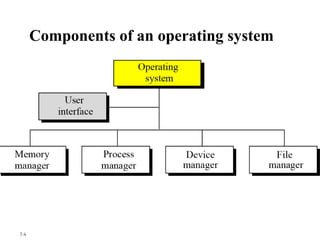
Components of an operating system
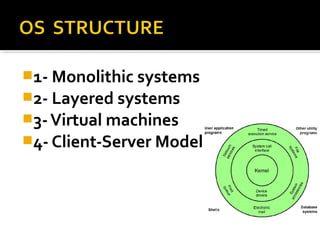
1- Monolithic systems
2- Layered systems
3-Virtual machines
4- Client-Server Model
OS structure
If we look inside OS, there are four designs:
1- Monolithic systems:
• Collection of the procedures each of
which calling other ones (The Big Mess)
• No information hiding. Ever procedure is
visible to other procedures.
• System calls switch to kernel mode (see
below)
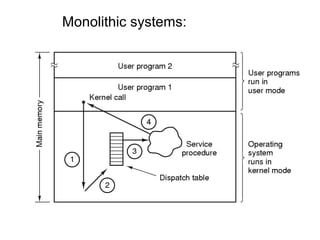
Monolithic systems:
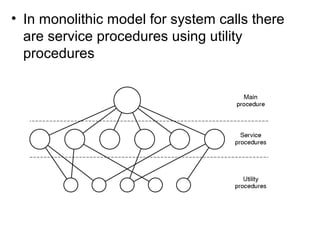
• In monolithic model for system calls there
are service procedures using utility
procedures
OS Structure
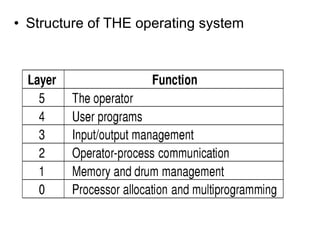
2- Layered systems
• It is generalization of monolithic approach
• In the user level , they should not worry
about process, memory, console or I/O
managements. These jobs are done by
lower layers.
• The first layered system was developed in
the Netherlands by Digestra(1968)
• Structure of THE operating system
OS Structure
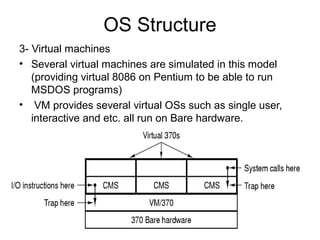
3- Virtual machines
• Several virtual machines are simulated in this model
(providing virtual 8086 on Pentium to be able to run
MSDOS programs)
• VM provides several virtual OSs such as single user,
interactive and etc. all run on Bare hardware.
OS Structure
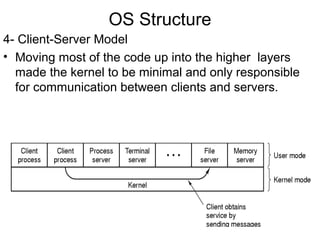
4- Client-Server Model
• Moving most of the code up into the higher layers
made the kernel to be minimal and only responsible
for communication between clients and servers.
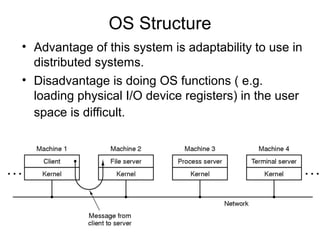
OS Structure
• Advantage of this system is adaptability to use in
distributed systems.
• Disadvantage is doing OS functions ( e.g.
loading physical I/O device registers) in the user
space is difficult.
OS Structure
There are two ways to solve this problem
• To have some critical server processes
run in the kernel with complete access to
hardware but still communicating with
other normal processes.
• Enhance the kernel to provides these
tasks but server decides how to use it
(Splitting policy and mechanism)
16
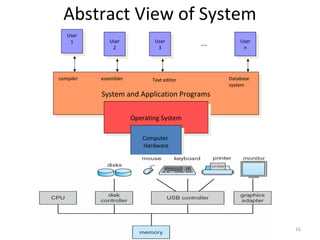
Abstract View of System
System and Application ProgramsSystem and Application Programs
Operating SystemOperating System
Computer
Hardware
Computer
Hardware
User
1
User
1 User
2
User
2
User
3
User
3
User
n
User
n
compiler assembler Text editor Database
system
...
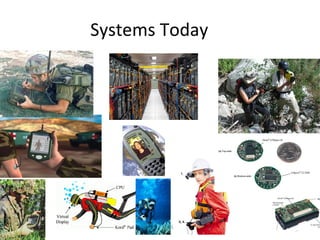
Systems Today
Principles of Operating Systems -
Lecture 1
17
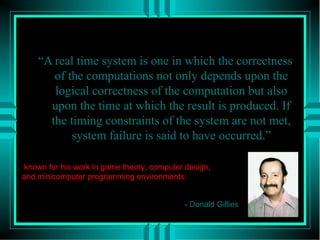
What is Real Time?
“A real time system is one in which the correctness
of the computations not only depends upon the
logical correctness of the computation but also
upon the time at which the result is produced. If
the timing constraints of the system are not met,
system failure is said to have occurred.”
- Donald Gillies
known for his work in game theory, computer design,
and minicomputer programming environments.
Irvine Sensorium
20
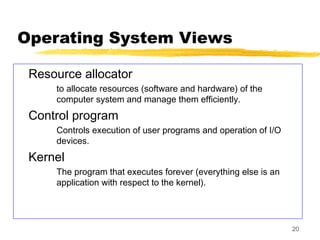
Operating System Views
Resource allocator
to allocate resources (software and hardware) of the
computer system and manage them efficiently.
Control program
Controls execution of user programs and operation of I/O
devices.
Kernel
The program that executes forever (everything else is an
application with respect to the kernel).
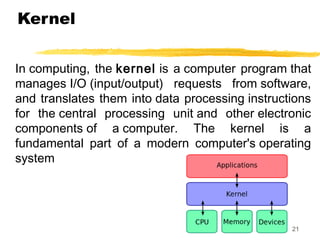
Kernel
In computing, the kernel is a computer program that
manages I/O (input/output) requests from software,
and translates them into data processing instructions
for the central processing unit and other electronic
components of a computer. The kernel is a
fundamental part of a modern computer's operating
system
21
22
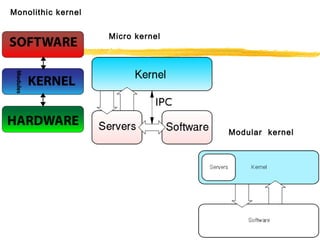
Monolithic kernel
Micro kernel
Modular kernel
23
Multiprogramming
Use interrupts to run multiple programs
simultaneously
When a program performs I/O, instead of polling, execute
another program till interrupt is received.
Requires secure memory, I/O for each program.
Requires intervention if program loops
indefinitely.
Requires CPU scheduling to choose the next job
to run.
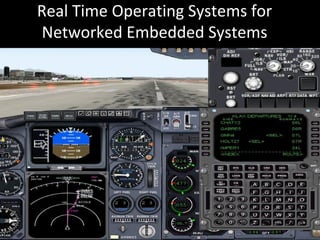
Real Time Operating Systems for
Networked Embedded Systems
Real Time System
• A system is said to be Real Time if it is
required to complete it’s work & deliver it’s
services on time.
• Example – Flight Control System
– All tasks in that system must execute on time.
Hard and Soft Real Time Systems
• Hard Real Time System
– Failure to meet deadlines is fatal
– example : Flight Control System
• Soft Real Time System
– Late completion of jobs is undesirable but not fatal.
– System performance degrades as more & more jobs miss
deadlines
– Online Databases
Hard and Soft Real Time Systems
(Operational Definition)
• Hard Real Time System
– Validation by provably correct procedures or extensive
simulation that the system always meets the timings
constraints
• Soft Real Time System
– Demonstration of jobs meeting some statistical constraints
suffices.
• Example – Multimedia System
– 25 frames per second on an average
Role of an OS in Real Time Systems
• Standalone Applications
– Often no OS involved
– Micro controller based Embedded Systems
• Some Real Time Applications are huge & complex
– Multiple threads
– Complicated Synchronization Requirements
– Filesystem / Network / Windowing support
– OS primitives reduce the software design time
Review Topics
• Processes &Threads
• Scheduling
• Synchronization
• Resource Allocation.
• Interrupt Handling.
• Memory Management
• File and I/O Management
Features of RTOS’s
OS concepts “review”
Review of Processes
• Processes
– process image
– states and state transitions
– process switch (context switch)
• Threads
• Concurrency
Process Definition
• A process is an instance of a program in
execution.
• It encompasses the static concept of program
and the dynamic aspect of execution.
• As the process runs, its context (state)
changes – register contents, memory
contents, etc., are modified by execution
Processes
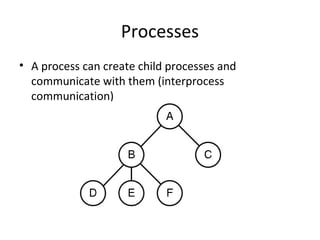
• A process can create child processes and
communicate with them (interprocess
communication)
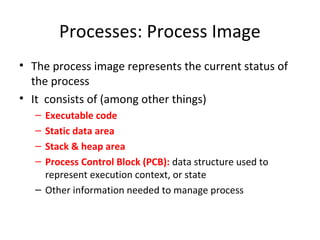
Processes: Process Image
• The process image represents the current status of
the process
• It consists of (among other things)
– Executable code
– Static data area
– Stack & heap area
– Process Control Block (PCB): data structure used to
represent execution context, or state
– Other information needed to manage process
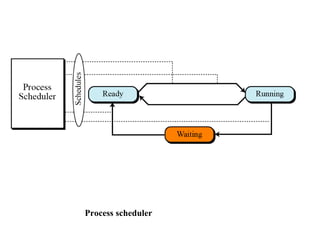
Process scheduler
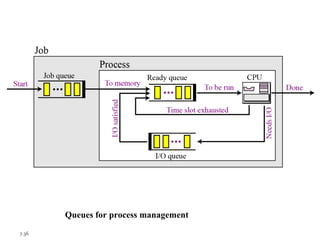
7.36
Queues for process management
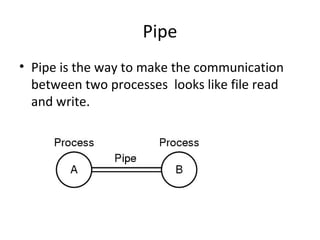
Pipe
• Pipe is the way to make the communication
between two processes looks like file read
and write.
Thread
• A thread or lightweight process is a basic unit
of CPU utilization that has
1.A program counter
2.A register set
3.A stack space
• With the right support , a process could have
several threads concurrently executing in it ,
all of them sharing the same address space.
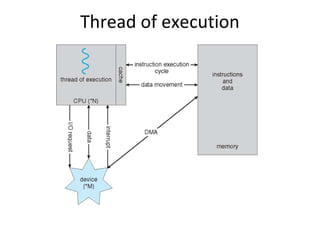
Thread of execution
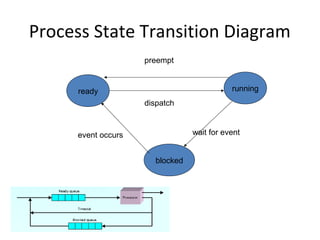
Process Execution States
• For convenience, we describe a process as
being in one of several basic states.
• Most basic:
– Running
– Ready
– Blocked (or sleeping)
Process State Transition Diagram
ready running
blocked
preempt
dispatch
wait for eventevent occurs
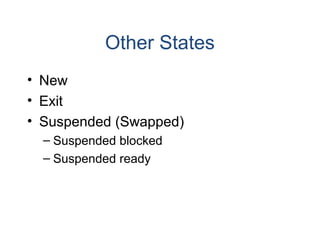
Other States
• New
• Exit
• Suspended (Swapped)
– Suspended blocked
– Suspended ready
Concurrent Processes
• Two processes are concurrent if their
executions overlap in time.
• In a uniprocessor environment,
multiprogramming provides concurrency.
• In a multiprocessor, true parallel execution
can occur.
Forms of Concurrency
Multi programming: Creates logical parallelism by running several
processes/threads at a time. The OS keeps several jobs in
memory simultaneously. It selects a job from the ready state
and starts executing it. When that job needs to wait for some
event the CPU is switched to another job. Primary objective:
eliminate CPU idle time
Time sharing: An extension of multiprogramming. After a certain
amount of time the CPU is switched to another job regardless of
whether the process/thread needs to wait for some operation.
Switching between jobs occurs so frequently that the users can
interact with each program while it is running.
Multiprocessing: Multiple processors on a single computer run
multiple processes at the same time. Creates physical
parallelism.
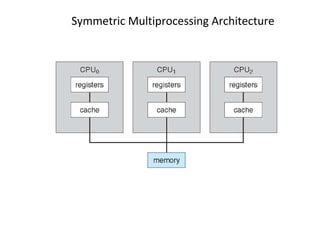
Symmetric Multiprocessing Architecture
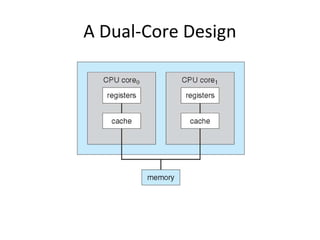
A Dual-Core Design
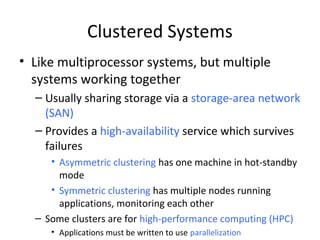
Clustered Systems
• Like multiprocessor systems, but multiple
systems working together
– Usually sharing storage via a storage-area network
(SAN)
– Provides a high-availability service which survives
failures
• Asymmetric clustering has one machine in hot-standby
mode
• Symmetric clustering has multiple nodes running
applications, monitoring each other
– Some clusters are for high-performance computing (HPC)
• Applications must be written to use parallelization
Protection
• When multiple processes (or threads) exist at the
same time, and execute concurrently, the OS must
protect them from mutual interference.
• Memory protection (memory isolation) prevents one
process from accessing the physical address space of
another process.
• Base/limit registers, virtual memory are techniques
to achieve memory protection.
Processes and Threads
• Traditional processes could only do one thing
at a time – they were single-threaded.
• Multithreaded processes can (conceptually)
do several things at once – they have multiple
threads.
• A thread is an “execution context” or
“separately schedulable” entity.
Threads
• Several threads can share the address space
of a single process, along with resources such
as files.
• Each thread has its own stack, PC, and TCB
(thread control block)
– Each thread executes a separate section of the
code and has private data
– All threads can access global data of process
Threads versus Processes
• If two processes want to access shared data
structures, the OS must be involved.
– Overhead: system calls, mode switches, context
switches, extra execution time.
• Two threads in a single process can share
global data automatically – as easily as two
functions in a single process.
Review Topics
• Processes &Threads
• Scheduling
• Synchronization
• Memory Management
• File and I/O Management
Scheduling Goals
• Optimize turnaround time and/or response
time
• Optimize throughput
• Avoid starvation (be “fair” )
• Respect priorities
– Static
– Dynamic
Process (Thread) Scheduling
• Process scheduling decides which process to
dispatch (to the Run state) next.
• In a multiprogrammed system several
processes compete for a single processor
• Preemptive scheduling: a process can be
removed from the Run state before it
completes or blocks (timer expires or higher
priority process enters Ready state).
Scheduling in RTOS
• More information about the tasks are known
– No of tasks
– Resource Requirements
– Release Time
– Execution time
– Deadlines
• Being a more deterministic system better scheduling
algorithms can be devised.
Scheduling Algorithms in RTOS
• Clock Driven Scheduling
• Weighted Round Robin Scheduling
• Priority Scheduling
(Greedy / List / Event Driven)
Scheduling Algorithms in RTOS (contd)
• Clock Driven
– All parameters about jobs (release time/
execution time/deadline) known in advance.
– Schedule can be computed offline or at some
regular time instances.
– Minimal runtime overhead.
– Not suitable for many applications.
Scheduling Algorithms in RTOS (contd)
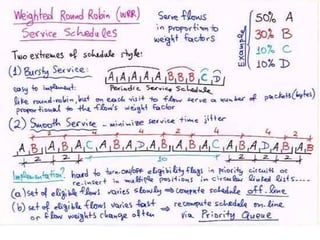
• Weighted Round Robin
– Jobs scheduled in FIFO manner
– Time quantum given to jobs is proportional to it’s weight
– Example use : High speed switching network
• QOS guarantee.
– Not suitable for precedence constrained jobs.
• Job A can run only after Job B. No point in giving time quantum to
Job B before Job A.
Scheduling Algorithms:
• FCFS (first-come, first-served): non-
preemptive: processes run until they
complete or block themselves for event wait
• RR (round robin): preemptive FCFS, based on
time slice
– Time slice = length of time a process can run
before being preempted
– Return to Ready state when preempted
Scheduling Algorithms in RTOS (contd)
• Priority Scheduling
(Greedy/List/Event Driven)
– Processor never left idle when there are ready
tasks
– Processor allocated to processes according to
priorities
– Priorities
• static - at design time
• Dynamic - at runtime
Priority Scheduling
• Earliest Deadline First (EDF)
– Process with earliest deadline given highest priority
• Least Slack Time First (LSF)
– slack = relative deadline – execution left
• Rate Monotonic Scheduling (RMS)
– For periodic tasks
– Tasks priority inversely proportional to it’s period
Review Topics
• Processes &Threads
• Scheduling
• Synchronization
• Memory Management
• File and I/O Management
66
Timesharing
• Programs queued for execution in FIFO order.
• Like multiprogramming, but timer device
interrupts after a quantum (timeslice).
• Interrupted program is returned to end of FIFO
• Next program is taken from head of FIFO
67
Timesharing (cont.)
• Interactive (action/response)
– when OS finishes execution of one command, it
seeks the next control statement from user.
• File systems
• online filesystem is required for users to access data
and code.
• Virtual memory
– Job is swapped in and out of memory to disk.
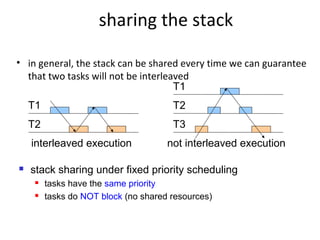
sharing the stack
• in general, the stack can be shared every time we can guarantee
that two tasks will not be interleaved
T1
T2
interleaved execution
T2
T3
not interleaved execution
T1
 stack sharing under fixed priority scheduling
 tasks have the same priority
 tasks do NOT block (no shared resources)
69
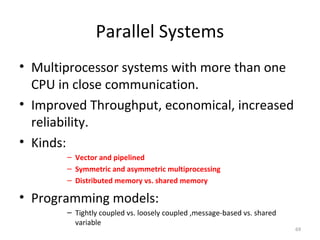
Parallel Systems
• Multiprocessor systems with more than one
CPU in close communication.
• Improved Throughput, economical, increased
reliability.
• Kinds:
– Vector and pipelined
– Symmetric and asymmetric multiprocessing
– Distributed memory vs. shared memory
• Programming models:
– Tightly coupled vs. loosely coupled ,message-based vs. shared
variable
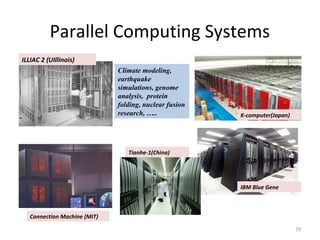
Parallel Computing Systems
70
Climate modeling,
earthquake
simulations, genome
analysis, protein
folding, nuclear fusion
research, …..
ILLIAC 2 (UIllinois)
Connection Machine (MIT)
IBM Blue Gene
Tianhe-1(China)
K-computer(Japan)
71
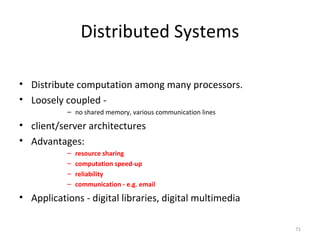
Distributed Systems
• Distribute computation among many processors.
• Loosely coupled -
– no shared memory, various communication lines
• client/server architectures
• Advantages:
– resource sharing
– computation speed-up
– reliability
– communication - e.g. email
• Applications - digital libraries, digital multimedia
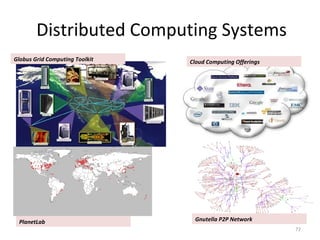
Distributed Computing Systems
72
Globus Grid Computing Toolkit Cloud Computing Offerings
PlanetLab Gnutella P2P Network
73
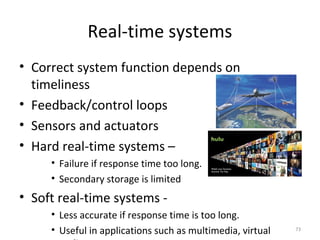
Real-time systems
• Correct system function depends on
timeliness
• Feedback/control loops
• Sensors and actuators
• Hard real-time systems –
• Failure if response time too long.
• Secondary storage is limited
• Soft real-time systems -
• Less accurate if response time is too long.
• Useful in applications such as multimedia, virtual
Interprocess Communication (IPC)
• Processes (or threads) that cooperate to
solve problems must exchange information.
• Two approaches:
– Shared memory
– Message passing (copying
information from one process address space to
another)
• Shared memory is more efficient (no
copying), but isn’t always possible.
Process/Thread Synchronization
• Concurrent processes are asynchronous: the
relative order of events within the two
processes cannot be predicted in advance.
• If processes are related (exchange information
in some way) it may be necessary to
synchronize their activity at some points.
Concurrent processing is a computing
model in which multiple processors execute
instructions simultaneously for better
performance.
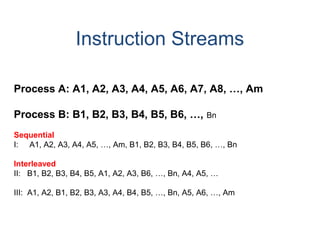
Instruction Streams
Process A: A1, A2, A3, A4, A5, A6, A7, A8, …, Am
Process B: B1, B2, B3, B4, B5, B6, …, Bn
Sequential
I: A1, A2, A3, A4, A5, …, Am, B1, B2, B3, B4, B5, B6, …, Bn
Interleaved
II: B1, B2, B3, B4, B5, A1, A2, A3, B6, …, Bn, A4, A5, …
III: A1, A2, B1, B2, B3, A3, A4, B4, B5, …, Bn, A5, A6, …, Am
Process Synchronization – 2 Types
• Correct synchronization may mean that we
want to be sure that event 2 in process A
happens before event 4 in process B.
• Or, it could mean that when one process is
accessing a shared resource, no other process
should be allowed to access the same
resource. This is the critical section problem,
and requires mutual exclusion.
Mutual Exclusion
• A critical section is the code that accesses
shared data or resources.
• A solution to the critical section problem
must ensure that only one process at a time
can execute its critical section (CS).
• Two separate shared resources can be
accessed concurrently.
Synchronization
• Processes and threads are responsible for
their own synchronization, but
programming languages and operating
systems may have features to help.
• Virtually all operating systems provide
some form of semaphore, which can be
used for mutual exclusion and other forms
of synchronization such as event ordering.
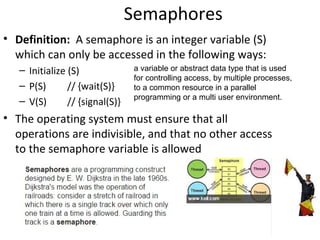
Semaphores
• Definition: A semaphore is an integer variable (S)
which can only be accessed in the following ways:
– Initialize (S)
– P(S) // {wait(S)}
– V(S) // {signal(S)}
• The operating system must ensure that all
operations are indivisible, and that no other access
to the semaphore variable is allowed
a variable or abstract data type that is used
for controlling access, by multiple processes,
to a common resource in a parallel
programming or a multi user environment.
Other Mechanisms for Mutual
Exclusion
• Spinlocks: a busy-waiting solution
in which a process wishing to enter a critical
section continuously tests some lock variable
to see if the critical section is available.
Implemented with various machine-language
instructions
• Disable interrupts before entering CS, enable
after leaving
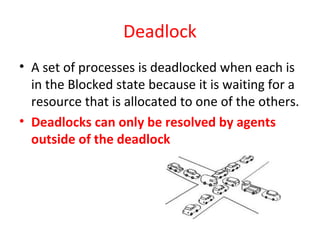
Deadlock
• A set of processes is deadlocked when each is
in the Blocked state because it is waiting for a
resource that is allocated to one of the others.
• Deadlocks can only be resolved by agents
outside of the deadlock
Deadlock versus Starvation
• Starvation occurs when a process is repeatedly
denied access to a resource even though the
resource becomes available.
• Deadlocked processes are permanently blocked but
starving processes may eventually get the resource
being requested.
• In starvation, the resource being waited for is
continually in use, while in deadlock it is not being
used because it is assigned to a blocked process.
Causes of Deadlock
• Mutual exclusion (exclusive access)
• Wait while hold (hold and wait)
• No preemption
• Circular wait
preemption is the act of temporarily
interrupting a task being carried out by a
computer system, without requiring its
cooperation,
7.85
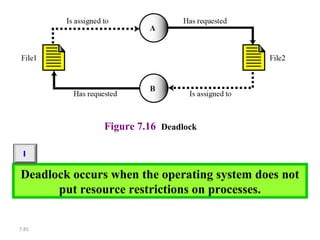
Figure 7.16 Deadlock
Deadlock occurs when the operating system does not
put resource restrictions on processes.
i
7.86
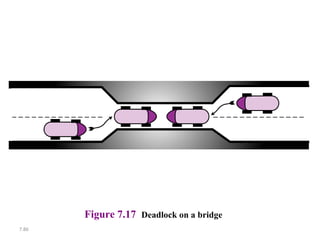
Figure 7.17 Deadlock on a bridge
7.87
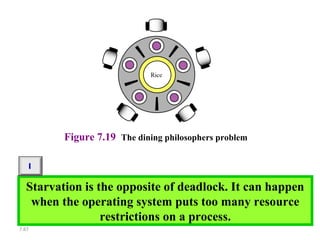
Figure 7.19 The dining philosophers problem
Starvation is the opposite of deadlock. It can happen
when the operating system puts too many resource
restrictions on a process.
i
Deadlock Management Strategies
• Prevention: design a system in which at least
one of the 4 causes can never happen
• Avoidance: allocate resources carefully, so
there will always be enough to allow all
processes to complete (Banker’s Algorithm)
• Detection: periodically, determine if a
deadlock exists. If there is one, abort one or
more processes, or take some other action.
Analysis of Deadlock Management
• Most systems do not use any form of deadlock
management because it is not cost effective
– Too time-consuming
– Too restrictive
• Exceptions: some transaction systems have
roll-back capability or apply ordering
techniques to control acquiring of locks.
Review Topics
• Processes &Threads
• Scheduling
• Synchronization
• Memory Management
• File and I/O Management
Memory Management
• Introduction
• Allocation methods
– One process at a time
– Multiple processes, contiguous allocation
– Multiple processes, virtual memory
Memory Management - Intro
• Primary memory must be shared between the
OS and user processes.
• OS must protect itself from users, and one
user from another.
• OS must also manage the sharing of physical
memory so that processes are able to execute
with reasonable efficiency.
Allocation Methods:
Single Process
• Earliest systems used a simple approach: OS
had a protected set of memory locations, the
remainder of memory belonged to one
process at a time.
• Process “owned” all computer resources from
the time it began until it completed
Allocation Methods:
Multiple Processes, Contiguous Allocation
• Several processes resided in memory at one
time (multiprogramming).
• The entire process image for each process was
stored in a contiguous set of locations.
• Drawbacks:
– Limited number of processes at one time
– Fragmentation of memory
Allocation Methods:
Multiple Processes, Virtual Memory
• Motivation for virtual memory:
– to better utilize memory (reduce fragmentation)
– to increase the number of processes that could
execute concurrently
• Method:
– allow program to be loaded non-contiguously
– allow program to execute even if it is not entirely
in memory.
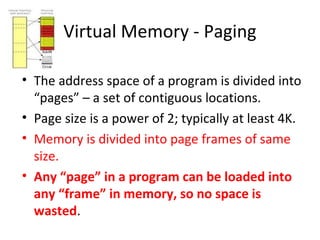
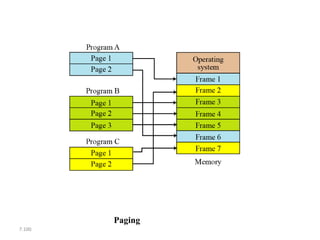
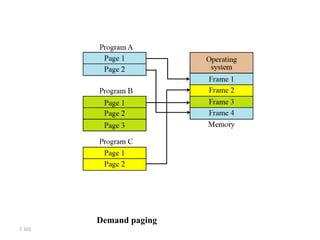
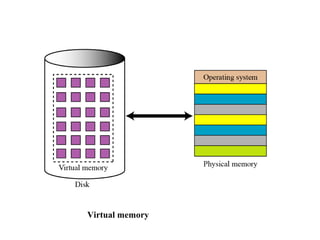
Virtual Memory - Paging
• The address space of a program is divided into
“pages” – a set of contiguous locations.
• Page size is a power of 2; typically at least 4K.
• Memory is divided into page frames of same
size.
• Any “page” in a program can be loaded into
any “frame” in memory, so no space is
wasted.
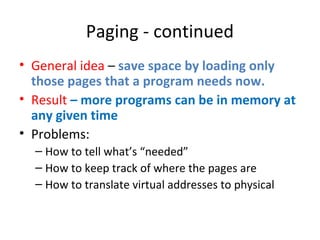
Paging - continued
• General idea – save space by loading only
those pages that a program needs now.
• Result – more programs can be in memory at
any given time
• Problems:
– How to tell what’s “needed”
– How to keep track of where the pages are
– How to translate virtual addresses to physical
7.98
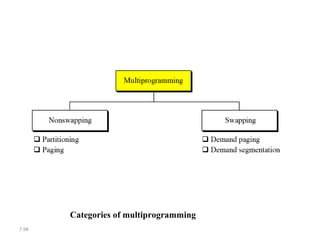
Categories of multiprogramming
7.99
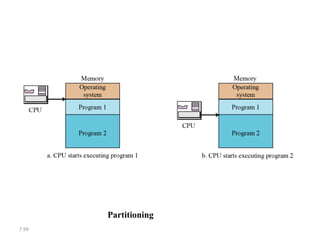
Partitioning
7.100
Paging
7.101
Demand paging
7.102
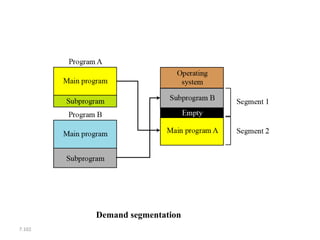
Demand segmentation
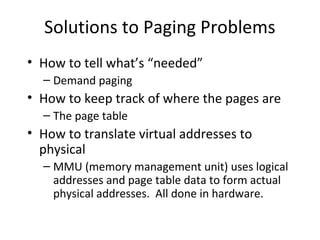
Solutions to Paging Problems
• How to tell what’s “needed”
– Demand paging
• How to keep track of where the pages are
– The page table
• How to translate virtual addresses to
physical
– MMU (memory management unit) uses logical
addresses and page table data to form actual
physical addresses. All done in hardware.
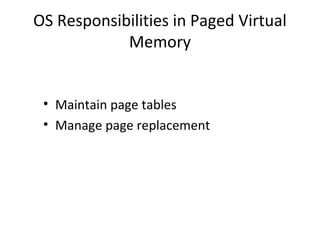
OS Responsibilities in Paged Virtual
Memory
• Maintain page tables
• Manage page replacement
Virtual memory
Review Topics
• Processes &Threads
• Scheduling
• Synchronization
• Memory Management
• File and I/O Management
File Systems
• Maintaining a shared file system is a major job
for the operating system.
• Single user systems require protection against
loss, efficient look-up service, etc.
• Multiple user systems also need to provide
access control.
File Systems – Disk Management
• The file system is also responsible for
allocating disk space and keeping track of
where files are located.
• Disk storage management has many of the
problems main memory management has,
including fragmentation issues.
Resource Allocation in RTOS
• Resource Allocation
– The issues with scheduling applicable here.
– Resources can be allocated in
• Weighted Round Robin
• Priority Based
• Some resources are non preemptible
– Example : semaphores
• Priority Inversion if priority scheduling is used
Other RTOS issues
• Interrupt Latency should be very small
– Kernel has to respond to real time events
– Interrupts should be disabled for minimum possible time
• For embedded applications Kernel Size should be
small
– Should fit in ROM
• Sophisticated features can be removed
– No Virtual Memory
– No Protection
Linux for Real Time Applications
• Scheduling
– Priority Driven Approach
• Optimize average case response time
– Interactive Processes Given Highest Priority
• Aim to reduce response times of processes
– Real Time Processes
• Processes with high priority
• No notion of deadlines
• Resource Allocation
– No support for handling priority inversion
Interrupt Handling in Linux
• Interrupts are disabled in ISR/critical sections
of the kernel
• No worst case bound on interrupt latency
avaliable
– eg: Disk Drivers may disable interrupt for few
hundred milliseconds
• Not suitable for Real Time Applications
– Interrupts may be missed
Why Linux
• Coexistence of Real Time Applications with
non Real Time Ones
– Example http server
• Device Driver Base
• Stability
RTLinux
• Real Time Kernel at the
lowest level
• Linux Kernel is a low
priority thread
– Executed only when no real
time tasks
• Interrupts trapped by the
Real Time Kernel and
passed onto Linux Kernel
– Software emulation to
hardware interrupts
• Interrupts are queued by
RTLinux
• Software emulation to
disable_interrupt()
• Real Time Tasks
– Statically allocate
memory
– No address space
protection
• Non Real Time
Tasks are
developed in Linux
• Communication
– Queues
– Shared memory
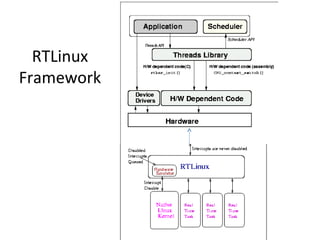
RTLinux
Framework
Two Level Interrupt Handling
• Two level Interrupt Handling
– Top Half Interrupt Handler
• Called Immediately – Kernel never disables interrupts
• Cannot invoke thread library functions - Race Conditions
– Bottom Half Interrupt Handler
• Invoked when kernel not in Critical Section
• Can invoke thread library functions
• Very Low Response time (as compared to Linux)
Peripheral devices and protocols
• Interfacing
Serial/parallel ports, USB, I2C, PCMCIA, IDE
• Communication
Serial, Ethernet, Low bandwidth radio, IrDA,
802.11b based devices
• User Interface
LCD, Keyboard, Touch sensors, Sound, Digital
pads, Webcams
• Sensors
A variety of sensors using fire, temperature,
pressure, water level, seismic, sound, vision

EMBEDDED OS

  • 1.
    By Ajal A J AssistantProfessor , ECE Department
  • 2.
    1. Resource Management:Disk, CPU cycles, etc. must be managed efficiently to maximize overall system performance 2. Resource Abstraction: Software interface to simplify use of hardware resources 3. Virtualization: Supports resource sharing – gives each process the appearance of an unshared resource
  • 3.
    The forth generation:Personal Computers (1980- present)  Workstations and network operating systems and distributed systems  MSDOS, UNIX (supports IEEE POSIX standard system calls interface),WINDOWS  MINIX is Unix like operating system written in C for educational purposes (1987)  Linux is the extended version of MINIX
  • 4.
    7.4 Components of anoperating system
  • 5.
    1- Monolithic systems 2-Layered systems 3-Virtual machines 4- Client-Server Model
  • 6.
    OS structure If welook inside OS, there are four designs: 1- Monolithic systems: • Collection of the procedures each of which calling other ones (The Big Mess) • No information hiding. Ever procedure is visible to other procedures. • System calls switch to kernel mode (see below)
  • 7.
  • 8.
    • In monolithicmodel for system calls there are service procedures using utility procedures
  • 9.
    OS Structure 2- Layeredsystems • It is generalization of monolithic approach • In the user level , they should not worry about process, memory, console or I/O managements. These jobs are done by lower layers. • The first layered system was developed in the Netherlands by Digestra(1968)
  • 11.
    • Structure ofTHE operating system
  • 12.
    OS Structure 3- Virtualmachines • Several virtual machines are simulated in this model (providing virtual 8086 on Pentium to be able to run MSDOS programs) • VM provides several virtual OSs such as single user, interactive and etc. all run on Bare hardware.
  • 13.
    OS Structure 4- Client-ServerModel • Moving most of the code up into the higher layers made the kernel to be minimal and only responsible for communication between clients and servers.
  • 14.
    OS Structure • Advantageof this system is adaptability to use in distributed systems. • Disadvantage is doing OS functions ( e.g. loading physical I/O device registers) in the user space is difficult.
  • 15.
    OS Structure There aretwo ways to solve this problem • To have some critical server processes run in the kernel with complete access to hardware but still communicating with other normal processes. • Enhance the kernel to provides these tasks but server decides how to use it (Splitting policy and mechanism)
  • 16.
    16 Abstract View ofSystem System and Application ProgramsSystem and Application Programs Operating SystemOperating System Computer Hardware Computer Hardware User 1 User 1 User 2 User 2 User 3 User 3 User n User n compiler assembler Text editor Database system ...
  • 17.
    Systems Today Principles ofOperating Systems - Lecture 1 17
  • 18.
    What is RealTime? “A real time system is one in which the correctness of the computations not only depends upon the logical correctness of the computation but also upon the time at which the result is produced. If the timing constraints of the system are not met, system failure is said to have occurred.” - Donald Gillies known for his work in game theory, computer design, and minicomputer programming environments.
  • 19.
  • 20.
    20 Operating System Views Resourceallocator to allocate resources (software and hardware) of the computer system and manage them efficiently. Control program Controls execution of user programs and operation of I/O devices. Kernel The program that executes forever (everything else is an application with respect to the kernel).
  • 21.
    Kernel In computing, the kernel is a computerprogram that manages I/O (input/output) requests from software, and translates them into data processing instructions for the central processing unit and other electronic components of a computer. The kernel is a fundamental part of a modern computer's operating system 21
  • 22.
  • 23.
    23 Multiprogramming Use interrupts torun multiple programs simultaneously When a program performs I/O, instead of polling, execute another program till interrupt is received. Requires secure memory, I/O for each program. Requires intervention if program loops indefinitely. Requires CPU scheduling to choose the next job to run.
  • 24.
    Real Time OperatingSystems for Networked Embedded Systems
  • 25.
    Real Time System •A system is said to be Real Time if it is required to complete it’s work & deliver it’s services on time. • Example – Flight Control System – All tasks in that system must execute on time.
  • 26.
    Hard and SoftReal Time Systems • Hard Real Time System – Failure to meet deadlines is fatal – example : Flight Control System • Soft Real Time System – Late completion of jobs is undesirable but not fatal. – System performance degrades as more & more jobs miss deadlines – Online Databases
  • 27.
    Hard and SoftReal Time Systems (Operational Definition) • Hard Real Time System – Validation by provably correct procedures or extensive simulation that the system always meets the timings constraints • Soft Real Time System – Demonstration of jobs meeting some statistical constraints suffices. • Example – Multimedia System – 25 frames per second on an average
  • 28.
    Role of anOS in Real Time Systems • Standalone Applications – Often no OS involved – Micro controller based Embedded Systems • Some Real Time Applications are huge & complex – Multiple threads – Complicated Synchronization Requirements – Filesystem / Network / Windowing support – OS primitives reduce the software design time
  • 29.
    Review Topics • Processes&Threads • Scheduling • Synchronization • Resource Allocation. • Interrupt Handling. • Memory Management • File and I/O Management Features of RTOS’s
  • 30.
  • 31.
    Review of Processes •Processes – process image – states and state transitions – process switch (context switch) • Threads • Concurrency
  • 32.
    Process Definition • Aprocess is an instance of a program in execution. • It encompasses the static concept of program and the dynamic aspect of execution. • As the process runs, its context (state) changes – register contents, memory contents, etc., are modified by execution
  • 33.
    Processes • A processcan create child processes and communicate with them (interprocess communication)
  • 34.
    Processes: Process Image •The process image represents the current status of the process • It consists of (among other things) – Executable code – Static data area – Stack & heap area – Process Control Block (PCB): data structure used to represent execution context, or state – Other information needed to manage process
  • 35.
  • 36.
  • 37.
    Pipe • Pipe isthe way to make the communication between two processes looks like file read and write.
  • 38.
    Thread • A threador lightweight process is a basic unit of CPU utilization that has 1.A program counter 2.A register set 3.A stack space • With the right support , a process could have several threads concurrently executing in it , all of them sharing the same address space.
  • 39.
  • 40.
    Process Execution States •For convenience, we describe a process as being in one of several basic states. • Most basic: – Running – Ready – Blocked (or sleeping)
  • 41.
    Process State TransitionDiagram ready running blocked preempt dispatch wait for eventevent occurs
  • 42.
    Other States • New •Exit • Suspended (Swapped) – Suspended blocked – Suspended ready
  • 43.
    Concurrent Processes • Twoprocesses are concurrent if their executions overlap in time. • In a uniprocessor environment, multiprogramming provides concurrency. • In a multiprocessor, true parallel execution can occur.
  • 44.
    Forms of Concurrency Multiprogramming: Creates logical parallelism by running several processes/threads at a time. The OS keeps several jobs in memory simultaneously. It selects a job from the ready state and starts executing it. When that job needs to wait for some event the CPU is switched to another job. Primary objective: eliminate CPU idle time Time sharing: An extension of multiprogramming. After a certain amount of time the CPU is switched to another job regardless of whether the process/thread needs to wait for some operation. Switching between jobs occurs so frequently that the users can interact with each program while it is running. Multiprocessing: Multiple processors on a single computer run multiple processes at the same time. Creates physical parallelism.
  • 45.
  • 46.
  • 47.
    Clustered Systems • Likemultiprocessor systems, but multiple systems working together – Usually sharing storage via a storage-area network (SAN) – Provides a high-availability service which survives failures • Asymmetric clustering has one machine in hot-standby mode • Symmetric clustering has multiple nodes running applications, monitoring each other – Some clusters are for high-performance computing (HPC) • Applications must be written to use parallelization
  • 49.
    Protection • When multipleprocesses (or threads) exist at the same time, and execute concurrently, the OS must protect them from mutual interference. • Memory protection (memory isolation) prevents one process from accessing the physical address space of another process. • Base/limit registers, virtual memory are techniques to achieve memory protection.
  • 50.
    Processes and Threads •Traditional processes could only do one thing at a time – they were single-threaded. • Multithreaded processes can (conceptually) do several things at once – they have multiple threads. • A thread is an “execution context” or “separately schedulable” entity.
  • 51.
    Threads • Several threadscan share the address space of a single process, along with resources such as files. • Each thread has its own stack, PC, and TCB (thread control block) – Each thread executes a separate section of the code and has private data – All threads can access global data of process
  • 52.
    Threads versus Processes •If two processes want to access shared data structures, the OS must be involved. – Overhead: system calls, mode switches, context switches, extra execution time. • Two threads in a single process can share global data automatically – as easily as two functions in a single process.
  • 53.
    Review Topics • Processes&Threads • Scheduling • Synchronization • Memory Management • File and I/O Management
  • 54.
    Scheduling Goals • Optimizeturnaround time and/or response time • Optimize throughput • Avoid starvation (be “fair” ) • Respect priorities – Static – Dynamic
  • 55.
    Process (Thread) Scheduling •Process scheduling decides which process to dispatch (to the Run state) next. • In a multiprogrammed system several processes compete for a single processor • Preemptive scheduling: a process can be removed from the Run state before it completes or blocks (timer expires or higher priority process enters Ready state).
  • 56.
    Scheduling in RTOS •More information about the tasks are known – No of tasks – Resource Requirements – Release Time – Execution time – Deadlines • Being a more deterministic system better scheduling algorithms can be devised.
  • 57.
    Scheduling Algorithms inRTOS • Clock Driven Scheduling • Weighted Round Robin Scheduling • Priority Scheduling (Greedy / List / Event Driven)
  • 58.
    Scheduling Algorithms inRTOS (contd) • Clock Driven – All parameters about jobs (release time/ execution time/deadline) known in advance. – Schedule can be computed offline or at some regular time instances. – Minimal runtime overhead. – Not suitable for many applications.
  • 59.
    Scheduling Algorithms inRTOS (contd) • Weighted Round Robin – Jobs scheduled in FIFO manner – Time quantum given to jobs is proportional to it’s weight – Example use : High speed switching network • QOS guarantee. – Not suitable for precedence constrained jobs. • Job A can run only after Job B. No point in giving time quantum to Job B before Job A.
  • 60.
    Scheduling Algorithms: • FCFS(first-come, first-served): non- preemptive: processes run until they complete or block themselves for event wait • RR (round robin): preemptive FCFS, based on time slice – Time slice = length of time a process can run before being preempted – Return to Ready state when preempted
  • 63.
    Scheduling Algorithms inRTOS (contd) • Priority Scheduling (Greedy/List/Event Driven) – Processor never left idle when there are ready tasks – Processor allocated to processes according to priorities – Priorities • static - at design time • Dynamic - at runtime
  • 64.
    Priority Scheduling • EarliestDeadline First (EDF) – Process with earliest deadline given highest priority • Least Slack Time First (LSF) – slack = relative deadline – execution left • Rate Monotonic Scheduling (RMS) – For periodic tasks – Tasks priority inversely proportional to it’s period
  • 65.
    Review Topics • Processes&Threads • Scheduling • Synchronization • Memory Management • File and I/O Management
  • 66.
    66 Timesharing • Programs queuedfor execution in FIFO order. • Like multiprogramming, but timer device interrupts after a quantum (timeslice). • Interrupted program is returned to end of FIFO • Next program is taken from head of FIFO
  • 67.
    67 Timesharing (cont.) • Interactive(action/response) – when OS finishes execution of one command, it seeks the next control statement from user. • File systems • online filesystem is required for users to access data and code. • Virtual memory – Job is swapped in and out of memory to disk.
  • 68.
    sharing the stack •in general, the stack can be shared every time we can guarantee that two tasks will not be interleaved T1 T2 interleaved execution T2 T3 not interleaved execution T1  stack sharing under fixed priority scheduling  tasks have the same priority  tasks do NOT block (no shared resources)
  • 69.
    69 Parallel Systems • Multiprocessorsystems with more than one CPU in close communication. • Improved Throughput, economical, increased reliability. • Kinds: – Vector and pipelined – Symmetric and asymmetric multiprocessing – Distributed memory vs. shared memory • Programming models: – Tightly coupled vs. loosely coupled ,message-based vs. shared variable
  • 70.
    Parallel Computing Systems 70 Climatemodeling, earthquake simulations, genome analysis, protein folding, nuclear fusion research, ….. ILLIAC 2 (UIllinois) Connection Machine (MIT) IBM Blue Gene Tianhe-1(China) K-computer(Japan)
  • 71.
    71 Distributed Systems • Distributecomputation among many processors. • Loosely coupled - – no shared memory, various communication lines • client/server architectures • Advantages: – resource sharing – computation speed-up – reliability – communication - e.g. email • Applications - digital libraries, digital multimedia
  • 72.
    Distributed Computing Systems 72 GlobusGrid Computing Toolkit Cloud Computing Offerings PlanetLab Gnutella P2P Network
  • 73.
    73 Real-time systems • Correctsystem function depends on timeliness • Feedback/control loops • Sensors and actuators • Hard real-time systems – • Failure if response time too long. • Secondary storage is limited • Soft real-time systems - • Less accurate if response time is too long. • Useful in applications such as multimedia, virtual
  • 74.
    Interprocess Communication (IPC) •Processes (or threads) that cooperate to solve problems must exchange information. • Two approaches: – Shared memory – Message passing (copying information from one process address space to another) • Shared memory is more efficient (no copying), but isn’t always possible.
  • 75.
    Process/Thread Synchronization • Concurrentprocesses are asynchronous: the relative order of events within the two processes cannot be predicted in advance. • If processes are related (exchange information in some way) it may be necessary to synchronize their activity at some points. Concurrent processing is a computing model in which multiple processors execute instructions simultaneously for better performance.
  • 76.
    Instruction Streams Process A:A1, A2, A3, A4, A5, A6, A7, A8, …, Am Process B: B1, B2, B3, B4, B5, B6, …, Bn Sequential I: A1, A2, A3, A4, A5, …, Am, B1, B2, B3, B4, B5, B6, …, Bn Interleaved II: B1, B2, B3, B4, B5, A1, A2, A3, B6, …, Bn, A4, A5, … III: A1, A2, B1, B2, B3, A3, A4, B4, B5, …, Bn, A5, A6, …, Am
  • 77.
    Process Synchronization –2 Types • Correct synchronization may mean that we want to be sure that event 2 in process A happens before event 4 in process B. • Or, it could mean that when one process is accessing a shared resource, no other process should be allowed to access the same resource. This is the critical section problem, and requires mutual exclusion.
  • 78.
    Mutual Exclusion • Acritical section is the code that accesses shared data or resources. • A solution to the critical section problem must ensure that only one process at a time can execute its critical section (CS). • Two separate shared resources can be accessed concurrently.
  • 79.
    Synchronization • Processes andthreads are responsible for their own synchronization, but programming languages and operating systems may have features to help. • Virtually all operating systems provide some form of semaphore, which can be used for mutual exclusion and other forms of synchronization such as event ordering.
  • 80.
    Semaphores • Definition: Asemaphore is an integer variable (S) which can only be accessed in the following ways: – Initialize (S) – P(S) // {wait(S)} – V(S) // {signal(S)} • The operating system must ensure that all operations are indivisible, and that no other access to the semaphore variable is allowed a variable or abstract data type that is used for controlling access, by multiple processes, to a common resource in a parallel programming or a multi user environment.
  • 81.
    Other Mechanisms forMutual Exclusion • Spinlocks: a busy-waiting solution in which a process wishing to enter a critical section continuously tests some lock variable to see if the critical section is available. Implemented with various machine-language instructions • Disable interrupts before entering CS, enable after leaving
  • 82.
    Deadlock • A setof processes is deadlocked when each is in the Blocked state because it is waiting for a resource that is allocated to one of the others. • Deadlocks can only be resolved by agents outside of the deadlock
  • 83.
    Deadlock versus Starvation •Starvation occurs when a process is repeatedly denied access to a resource even though the resource becomes available. • Deadlocked processes are permanently blocked but starving processes may eventually get the resource being requested. • In starvation, the resource being waited for is continually in use, while in deadlock it is not being used because it is assigned to a blocked process.
  • 84.
    Causes of Deadlock •Mutual exclusion (exclusive access) • Wait while hold (hold and wait) • No preemption • Circular wait preemption is the act of temporarily interrupting a task being carried out by a computer system, without requiring its cooperation,
  • 85.
    7.85 Figure 7.16 Deadlock Deadlockoccurs when the operating system does not put resource restrictions on processes. i
  • 86.
  • 87.
    7.87 Figure 7.19 Thedining philosophers problem Starvation is the opposite of deadlock. It can happen when the operating system puts too many resource restrictions on a process. i
  • 88.
    Deadlock Management Strategies •Prevention: design a system in which at least one of the 4 causes can never happen • Avoidance: allocate resources carefully, so there will always be enough to allow all processes to complete (Banker’s Algorithm) • Detection: periodically, determine if a deadlock exists. If there is one, abort one or more processes, or take some other action.
  • 89.
    Analysis of DeadlockManagement • Most systems do not use any form of deadlock management because it is not cost effective – Too time-consuming – Too restrictive • Exceptions: some transaction systems have roll-back capability or apply ordering techniques to control acquiring of locks.
  • 90.
    Review Topics • Processes&Threads • Scheduling • Synchronization • Memory Management • File and I/O Management
  • 91.
    Memory Management • Introduction •Allocation methods – One process at a time – Multiple processes, contiguous allocation – Multiple processes, virtual memory
  • 92.
    Memory Management -Intro • Primary memory must be shared between the OS and user processes. • OS must protect itself from users, and one user from another. • OS must also manage the sharing of physical memory so that processes are able to execute with reasonable efficiency.
  • 93.
    Allocation Methods: Single Process •Earliest systems used a simple approach: OS had a protected set of memory locations, the remainder of memory belonged to one process at a time. • Process “owned” all computer resources from the time it began until it completed
  • 94.
    Allocation Methods: Multiple Processes,Contiguous Allocation • Several processes resided in memory at one time (multiprogramming). • The entire process image for each process was stored in a contiguous set of locations. • Drawbacks: – Limited number of processes at one time – Fragmentation of memory
  • 95.
    Allocation Methods: Multiple Processes,Virtual Memory • Motivation for virtual memory: – to better utilize memory (reduce fragmentation) – to increase the number of processes that could execute concurrently • Method: – allow program to be loaded non-contiguously – allow program to execute even if it is not entirely in memory.
  • 96.
    Virtual Memory -Paging • The address space of a program is divided into “pages” – a set of contiguous locations. • Page size is a power of 2; typically at least 4K. • Memory is divided into page frames of same size. • Any “page” in a program can be loaded into any “frame” in memory, so no space is wasted.
  • 97.
    Paging - continued •General idea – save space by loading only those pages that a program needs now. • Result – more programs can be in memory at any given time • Problems: – How to tell what’s “needed” – How to keep track of where the pages are – How to translate virtual addresses to physical
  • 98.
  • 99.
  • 100.
  • 101.
  • 102.
  • 103.
    Solutions to PagingProblems • How to tell what’s “needed” – Demand paging • How to keep track of where the pages are – The page table • How to translate virtual addresses to physical – MMU (memory management unit) uses logical addresses and page table data to form actual physical addresses. All done in hardware.
  • 104.
    OS Responsibilities inPaged Virtual Memory • Maintain page tables • Manage page replacement
  • 105.
  • 106.
    Review Topics • Processes&Threads • Scheduling • Synchronization • Memory Management • File and I/O Management
  • 107.
    File Systems • Maintaininga shared file system is a major job for the operating system. • Single user systems require protection against loss, efficient look-up service, etc. • Multiple user systems also need to provide access control.
  • 108.
    File Systems –Disk Management • The file system is also responsible for allocating disk space and keeping track of where files are located. • Disk storage management has many of the problems main memory management has, including fragmentation issues.
  • 109.
    Resource Allocation inRTOS • Resource Allocation – The issues with scheduling applicable here. – Resources can be allocated in • Weighted Round Robin • Priority Based • Some resources are non preemptible – Example : semaphores • Priority Inversion if priority scheduling is used
  • 110.
    Other RTOS issues •Interrupt Latency should be very small – Kernel has to respond to real time events – Interrupts should be disabled for minimum possible time • For embedded applications Kernel Size should be small – Should fit in ROM • Sophisticated features can be removed – No Virtual Memory – No Protection
  • 111.
    Linux for RealTime Applications
  • 112.
    Linux for RealTime Applications • Scheduling – Priority Driven Approach • Optimize average case response time – Interactive Processes Given Highest Priority • Aim to reduce response times of processes – Real Time Processes • Processes with high priority • No notion of deadlines • Resource Allocation – No support for handling priority inversion
  • 113.
    Interrupt Handling inLinux • Interrupts are disabled in ISR/critical sections of the kernel • No worst case bound on interrupt latency avaliable – eg: Disk Drivers may disable interrupt for few hundred milliseconds • Not suitable for Real Time Applications – Interrupts may be missed
  • 114.
    Why Linux • Coexistenceof Real Time Applications with non Real Time Ones – Example http server • Device Driver Base • Stability
  • 115.
    RTLinux • Real TimeKernel at the lowest level • Linux Kernel is a low priority thread – Executed only when no real time tasks • Interrupts trapped by the Real Time Kernel and passed onto Linux Kernel – Software emulation to hardware interrupts • Interrupts are queued by RTLinux • Software emulation to disable_interrupt() • Real Time Tasks – Statically allocate memory – No address space protection • Non Real Time Tasks are developed in Linux • Communication – Queues – Shared memory
  • 116.
  • 117.
    Two Level InterruptHandling • Two level Interrupt Handling – Top Half Interrupt Handler • Called Immediately – Kernel never disables interrupts • Cannot invoke thread library functions - Race Conditions – Bottom Half Interrupt Handler • Invoked when kernel not in Critical Section • Can invoke thread library functions • Very Low Response time (as compared to Linux)
  • 118.
    Peripheral devices andprotocols • Interfacing Serial/parallel ports, USB, I2C, PCMCIA, IDE • Communication Serial, Ethernet, Low bandwidth radio, IrDA, 802.11b based devices • User Interface LCD, Keyboard, Touch sensors, Sound, Digital pads, Webcams • Sensors A variety of sensors using fire, temperature, pressure, water level, seismic, sound, vision

Editor's Notes

  • #19 On time deadlines
  • #29 Computer software that can work offline, i.e. does not necessarily require network connection to function Software that is not a part of some bundled software A program that is run as a separate computer process, not an add-on of an existing process
  • #79 E mail
  • #115 Stability in performance
  • #116 Interrupt mechanism