한국카카오은행안정민
StringInterpolation과 SwiftUI
• 現 카카오뱅크 iOS 개발자 (16.10 ~ )
• 블로그 운영 : minsone.github.io
소개
• StringInterpolation 소개
• StringInterpolation를 이용한 RichString 만들기
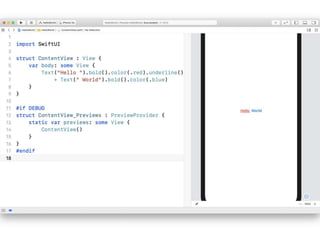
• SwiftUI를 이용한 RichString 만들기
• 번외 - FunctionBuilder를 이용한 RichString 만들
기
• QnA
목차
StringInterpolation
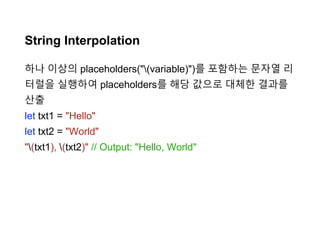
String Interpolation
하나 이상의 placeholders("(variable)")를 포함하는 문자열 리
터럴을 실행하여 placeholders를 해당 값으로 대체한 결과를
산출
let txt1 = "Hello"
let txt2 = "World"
"(txt1), (txt2)" // Output: "Hello, World"
1: ""
2: (txt1) -> "Hello"
3: ", "
4: (txt2) -> "World"
5: ""
결과: "Hello, World"
let txt1 = "Hello"
let txt2 = "World"
"(txt1), (txt2)" // Output: "Hello, World"
DefaultStringInterpolation
- Apple/Swift의 StringInterpolation.swift 공개
let txt1 = "Hello"
let txt2 = "World"
"(txt1), (txt2)" // Output: "Hello, World"
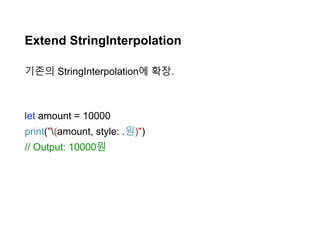
Extend StringInterpolation
기존의 StringInterpolation에 확장.
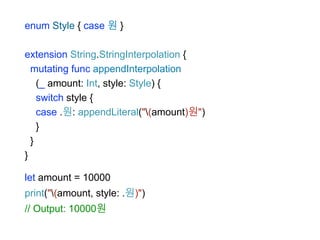
let amount = 10000
print("(amount, style: .원)")
// Output: 10000원
enum Style { case 원 }
extension String.StringInterpolation {
mutating func appendInterpolation
(_ amount: Int, style: Style) {
switch style {
case .원: appendLiteral("(amount)원")
}
}
}
let amount = 10000
print("(amount, style: .원)")
// Output: 10000원
let amount = 10000
"(amount, currency: .원화)"
"(amount, currency: .유로)"
"(amount, currency: .달러)"
"(amount, currency: .위안)"
"(amount.toCurrency(.원화))"
"(amount.toCurrency(.유로))"
"(amount.toCurrency(.달러))"
"(amount.toCurrency(.위안))"
StringInterpolationProtocol
StringInterpolation을 구현하기 위한 프로토콜.
public protocol StringInterpolationProtocol {
associatedtype StringLiteralType : _ExpressibleByBuiltinStringLiteral
init(literalCapacity: Int, interpolationCount: Int)
mutating func appendLiteral(_ literal: Self.StringLiteralType)
}
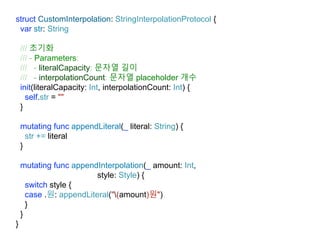
struct CustomInterpolation: StringInterpolationProtocol {
var str: String
초기화
Parameters
literalCapacity 문자열 길이
interpolationCount 문자열 placeholder 개수
init(literalCapacity: Int, interpolationCount: Int) {
self.str = ""
}
mutating func appendLiteral(_ literal: String) {
str += literal
}
mutating func appendInterpolation(_ amount: Int,
style: Style) {
switch style {
case .원: appendLiteral("(amount)원")
}
}
}
literalCapacity 문자열 길이
interpolationCount 문자열 placeholder 개수
init(literalCapacity: Int, interpolationCount: Int) {
self.str = ""
}
let txt1 = "Hello"
let txt2 = "World"
"(txt1), (txt2)" // Output: "Hello, World"
literalCapacity = 2
interpolationCount = 2
struct CustomInterpolation: StringInterpolationProtocol {
var str: String
초기화
Parameters
literalCapacity 문자열 길이
interpolationCount 문자열 placeholder 개수
init(literalCapacity: Int, interpolationCount: Int) {
self.str = ""
}
mutating func appendLiteral(_ literal: String) {
str += literal
}
mutating func appendInterpolation(_ amount: Int,
style: Style) {
switch style {
case .원: appendLiteral("(amount)원")
}
}
}
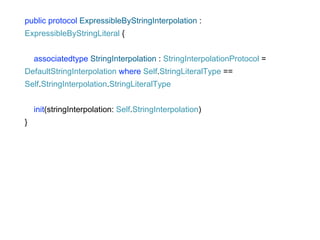
public protocol ExpressibleByStringInterpolation :
ExpressibleByStringLiteral {
associatedtype StringInterpolation : StringInterpolationProtocol =
DefaultStringInterpolation where Self.StringLiteralType ==
Self.StringInterpolation.StringLiteralType
init(stringInterpolation: Self.StringInterpolation)
}
struct WonStyleString: ExpressibleByStringInterpolation {
var str = ""
init(stringLiteral: String) {
self.str = stringLiteral
}
init(stringInterpolation: CustomInterpolation) {
self.str = stringInterpolation.str
}
}
///////////////////////////////////////////////////////
let styleStr: WonStyleString =
"(10000, style: .원), (20000, style: .원)"
styleStr.str // Output: "10000원, 20000원"
StringInterpolation을
이용한 RichString 만들
기
NSAttributedString Library
SwiftRichString, BonMot, Atributika 와 같은 라이브러리를 통
해 좀 더 손쉽게 NSAttributedString을 만들어줌.
let style = Style {
$0.font = UIFont.systemFont(ofSize: 25)
$0.color = UIColor.blue
$0.alignment = .center
}
let attributedText = "Hello World!".set(style: style)
let style1 = Style {
$0.font = UIFont.systemFont(ofSize: 25)
$0.color = UIColor.blue
$0.alignment = .center
}
let style2 = Style {
$0.font = UIFont.systemFont(ofSize: 25)
$0.color = UIColor.green
$0.alignment = .center
}
let attr = NSMutableAttributedString(string: "")
attr.append("Hello ".set(style: style1))
attr.append("World".set(style: style2))
struct RichStringInterpolation: StringInterpolationProtocol {
var attr: NSMutableAttributedString
init(literalCapacity: Int, interpolationCount: Int) {
self.attr = NSMutableAttributedString()
}
mutating func appendLiteral(_ literal: String) {
attr.append(NSAttributedString(string: literal))
}
func appendInterpolation(_ string: String,
style: Style) {
let attr: NSAttributedString = string.set(style: style)
self.attr.append(attr)
}
}
struct AttrString: ExpressibleByStringInterpolation {
let attributedString: NSAttributedString
init(stringLiteral: String) {
let attr = NSAttributedString(string: stringLiteral)
self.attributedString = attr
}
init(stringInterpolation: RichStringInterpolation) {
self.attributedString = stringInterpolation.attr
}
}
///////////////////////////////////////////////////////
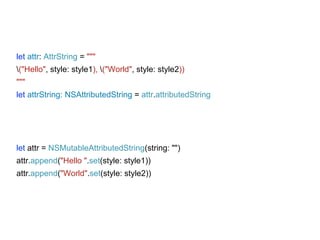
let attr: AttrString = """
("Hello", style: style1), ("World", style: style2))
"""
let attrString: NSAttributedString = attr.attributedString
let attr = NSMutableAttributedString(string: "")
attr.append("Hello ".set(style: style1))
attr.append("World".set(style: style2))
let attr: AttrString = """
("Hello", style: style1), ("World", style: style2))
"""
let attrString: NSAttributedString = attr.attributedString
SwiftUI을 이용한
RichString 만들기
FunctionBuilder을 이용
한 RichString 만들기
FunctionBuilder(Beta)
빌더 패턴을 좀 더 보기 쉽게 해주는 Annotation
struct ContentView : View {
var body: some View {
VStack {
Text("Hello").bold().color(.blue)
Text("World").bold().color(.red)
}
}
}
@_functionBuilder
struct NSAttributedStringBuilder {
static func buildBlock(_ components: NSAttributedString...)
-> NSAttributedString {
let attr = NSMutableAttributedString(string: "")
for component in components {
attr.append(component)
}
return attr
}
}
extension NSAttributedString {
convenience init(@NSAttributedStringBuilder
_ builder: () -> NSAttributedString) {
self.init(attributedString: builder())
}
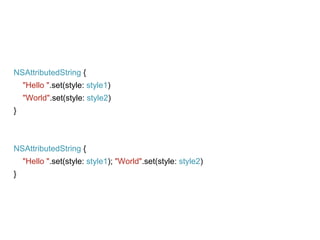
NSAttributedString {
"Hello ".set(style: style1)
"World".set(style: style2)
}
NSAttributedString {
"Hello ".set(style: style1); "World".set(style: style2)
}
QnA
• Apple : SE-0228 -
Fix ExpressibleByStringInterpolation
• MSDN - Interpolation
• Wikipedia - String interpolation
• HackingWithSwift - What’s new in Swift 5.0
Reference

Letusgo 2019 Summer - StringInterpolation and SwiftUI

  • 1.
  • 2.
    • 現 카카오뱅크iOS 개발자 (16.10 ~ ) • 블로그 운영 : minsone.github.io 소개
  • 3.
    • StringInterpolation 소개 •StringInterpolation를 이용한 RichString 만들기 • SwiftUI를 이용한 RichString 만들기 • 번외 - FunctionBuilder를 이용한 RichString 만들 기 • QnA 목차
  • 4.
  • 5.
    String Interpolation 하나 이상의placeholders("(variable)")를 포함하는 문자열 리 터럴을 실행하여 placeholders를 해당 값으로 대체한 결과를 산출 let txt1 = "Hello" let txt2 = "World" "(txt1), (txt2)" // Output: "Hello, World"
  • 6.
    1: "" 2: (txt1)-> "Hello" 3: ", " 4: (txt2) -> "World" 5: "" 결과: "Hello, World" let txt1 = "Hello" let txt2 = "World" "(txt1), (txt2)" // Output: "Hello, World"
  • 7.
    DefaultStringInterpolation - Apple/Swift의 StringInterpolation.swift공개 let txt1 = "Hello" let txt2 = "World" "(txt1), (txt2)" // Output: "Hello, World"
  • 8.
    Extend StringInterpolation 기존의 StringInterpolation에확장. let amount = 10000 print("(amount, style: .원)") // Output: 10000원
  • 9.
    enum Style {case 원 } extension String.StringInterpolation { mutating func appendInterpolation (_ amount: Int, style: Style) { switch style { case .원: appendLiteral("(amount)원") } } } let amount = 10000 print("(amount, style: .원)") // Output: 10000원
  • 10.
    let amount =10000 "(amount, currency: .원화)" "(amount, currency: .유로)" "(amount, currency: .달러)" "(amount, currency: .위안)" "(amount.toCurrency(.원화))" "(amount.toCurrency(.유로))" "(amount.toCurrency(.달러))" "(amount.toCurrency(.위안))"
  • 11.
    StringInterpolationProtocol StringInterpolation을 구현하기 위한프로토콜. public protocol StringInterpolationProtocol { associatedtype StringLiteralType : _ExpressibleByBuiltinStringLiteral init(literalCapacity: Int, interpolationCount: Int) mutating func appendLiteral(_ literal: Self.StringLiteralType) }
  • 12.
    struct CustomInterpolation: StringInterpolationProtocol{ var str: String 초기화 Parameters literalCapacity 문자열 길이 interpolationCount 문자열 placeholder 개수 init(literalCapacity: Int, interpolationCount: Int) { self.str = "" } mutating func appendLiteral(_ literal: String) { str += literal } mutating func appendInterpolation(_ amount: Int, style: Style) { switch style { case .원: appendLiteral("(amount)원") } } }
  • 13.
    literalCapacity 문자열 길이 interpolationCount문자열 placeholder 개수 init(literalCapacity: Int, interpolationCount: Int) { self.str = "" } let txt1 = "Hello" let txt2 = "World" "(txt1), (txt2)" // Output: "Hello, World" literalCapacity = 2 interpolationCount = 2
  • 14.
    struct CustomInterpolation: StringInterpolationProtocol{ var str: String 초기화 Parameters literalCapacity 문자열 길이 interpolationCount 문자열 placeholder 개수 init(literalCapacity: Int, interpolationCount: Int) { self.str = "" } mutating func appendLiteral(_ literal: String) { str += literal } mutating func appendInterpolation(_ amount: Int, style: Style) { switch style { case .원: appendLiteral("(amount)원") } } }
  • 15.
    public protocol ExpressibleByStringInterpolation: ExpressibleByStringLiteral { associatedtype StringInterpolation : StringInterpolationProtocol = DefaultStringInterpolation where Self.StringLiteralType == Self.StringInterpolation.StringLiteralType init(stringInterpolation: Self.StringInterpolation) }
  • 16.
    struct WonStyleString: ExpressibleByStringInterpolation{ var str = "" init(stringLiteral: String) { self.str = stringLiteral } init(stringInterpolation: CustomInterpolation) { self.str = stringInterpolation.str } } /////////////////////////////////////////////////////// let styleStr: WonStyleString = "(10000, style: .원), (20000, style: .원)" styleStr.str // Output: "10000원, 20000원"
  • 17.
  • 18.
    NSAttributedString Library SwiftRichString, BonMot,Atributika 와 같은 라이브러리를 통 해 좀 더 손쉽게 NSAttributedString을 만들어줌. let style = Style { $0.font = UIFont.systemFont(ofSize: 25) $0.color = UIColor.blue $0.alignment = .center } let attributedText = "Hello World!".set(style: style)
  • 19.
    let style1 =Style { $0.font = UIFont.systemFont(ofSize: 25) $0.color = UIColor.blue $0.alignment = .center } let style2 = Style { $0.font = UIFont.systemFont(ofSize: 25) $0.color = UIColor.green $0.alignment = .center } let attr = NSMutableAttributedString(string: "") attr.append("Hello ".set(style: style1)) attr.append("World".set(style: style2))
  • 20.
    struct RichStringInterpolation: StringInterpolationProtocol{ var attr: NSMutableAttributedString init(literalCapacity: Int, interpolationCount: Int) { self.attr = NSMutableAttributedString() } mutating func appendLiteral(_ literal: String) { attr.append(NSAttributedString(string: literal)) } func appendInterpolation(_ string: String, style: Style) { let attr: NSAttributedString = string.set(style: style) self.attr.append(attr) } }
  • 21.
    struct AttrString: ExpressibleByStringInterpolation{ let attributedString: NSAttributedString init(stringLiteral: String) { let attr = NSAttributedString(string: stringLiteral) self.attributedString = attr } init(stringInterpolation: RichStringInterpolation) { self.attributedString = stringInterpolation.attr } } /////////////////////////////////////////////////////// let attr: AttrString = """ ("Hello", style: style1), ("World", style: style2)) """ let attrString: NSAttributedString = attr.attributedString
  • 22.
    let attr =NSMutableAttributedString(string: "") attr.append("Hello ".set(style: style1)) attr.append("World".set(style: style2)) let attr: AttrString = """ ("Hello", style: style1), ("World", style: style2)) """ let attrString: NSAttributedString = attr.attributedString
  • 23.
  • 25.
  • 26.
    FunctionBuilder(Beta) 빌더 패턴을 좀더 보기 쉽게 해주는 Annotation struct ContentView : View { var body: some View { VStack { Text("Hello").bold().color(.blue) Text("World").bold().color(.red) } } }
  • 27.
    @_functionBuilder struct NSAttributedStringBuilder { staticfunc buildBlock(_ components: NSAttributedString...) -> NSAttributedString { let attr = NSMutableAttributedString(string: "") for component in components { attr.append(component) } return attr } } extension NSAttributedString { convenience init(@NSAttributedStringBuilder _ builder: () -> NSAttributedString) { self.init(attributedString: builder()) }
  • 28.
    NSAttributedString { "Hello ".set(style:style1) "World".set(style: style2) } NSAttributedString { "Hello ".set(style: style1); "World".set(style: style2) }
  • 29.
  • 30.
    • Apple :SE-0228 - Fix ExpressibleByStringInterpolation • MSDN - Interpolation • Wikipedia - String interpolation • HackingWithSwift - What’s new in Swift 5.0 Reference

Editor's Notes