1 lessonplantemplate-180221074742
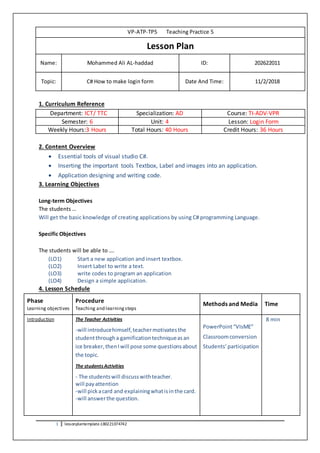
VP-ATP-TP5 Teaching Practice 5
Lesson Plan
Name: Mohammed Ali AL-haddad ID: 202622011
Topic: C# How to make login form Date And Time: 11/2/2018
1. Curriculum Reference
Department: ICT/ TTC Specialization: AD Course: TI-ADV-VPR
Semester: 6 Unit: 4 Lesson: Login Form
Weekly Hours:3 Hours Total Hours: 40 Hours Credit Hours: 36 Hours
2. Content Overview
 Essential tools of visual studio C#.
 Inserting the important tools Textbox, Label and images into an application.
 Application designing and writing code.
3. Learning Objectives
Long-term Objectives
The students …
Will get the basic knowledge of creating applications by using C# programming Language.
Specific Objectives
The students will be able to ….
(LO1) Start a new application and insert textbox.
(LO2) Insert Label to write a text.
(LO3) write codes to program an application
(LO4) Design a simple application.
4. Lesson Schedule
Phase
Learning objectives
Procedure
Teaching and learningsteps
Methods and Media Time
Introduction The Teacher Activities
-will introducehimself,teachermotivatesthe
studentthrougha gamificationtechniqueasan
ice breaker,thenIwill pose some questionsabout
the topic.
The students Activities
- The studentswill discusswithteacher.
will payattention
-will pickacard and explainingwhatisinthe card.
-will answerthe question.
PowerPoint“VIsME”
Classroomconversion
Students’participation
8 min
2 lessonplantemplate-180221074742
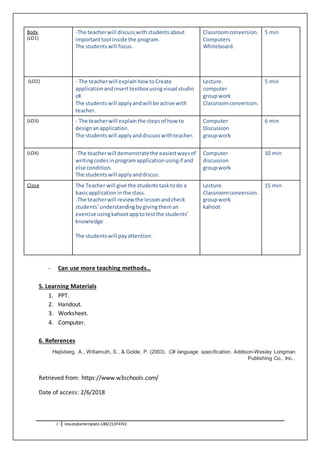
Body
(LO1)
-The teacherwill discuss withstudentsabout
importanttool inside the program.
The studentswill focus.
Classroomconversion.
Computers
Whiteboard.
5 min
(LO2) - The teacherwill explain how toCreate
applicationandinserttextboxusingvisual studio
c#.
The studentswill applyandwill be active with
teacher.
Lecture.
computer
groupwork
Classroomconversion.
5 min
(LO3) - The teacherwill explainthe stepsof how to
design anapplication.
The studentswill applyanddiscusswithteacher.
Computer
Discussion
groupwork
6 min
(LO4) -The teacherwill demonstratethe easiestwaysof
writingcodesinprogramapplication usingif and
else condition.
The studentswill applyanddiscus.
Computer
discussion
groupwork
10 min
Close The Teacher will give the studentstasktodo a
basicapplicationinthe class.
-The teacherwill reviewthe lesson andcheck
students’understandingbygivingtheman
exercise usingkahootapptotestthe students’
knowledge
The studentswill payattention.
Lecture.
Classroomconversion.
groupwork
kahoot
15 min
- Can use more teaching methods…
5. Learning Materials
1. PPT.
2. Handout.
3. Worksheet.
4. Computer.
6. References
Hejlsberg, A., Wiltamuth, S., & Golde, P. (2003). C# language specification. Addison-Wesley Longman
Publishing Co., Inc..
Retrieved from: https://www.w3schools.com/
Date of access: 2/6/2018

Lesson plan template

  • 1.
    1 lessonplantemplate-180221074742 VP-ATP-TP5 TeachingPractice 5 Lesson Plan Name: Mohammed Ali AL-haddad ID: 202622011 Topic: C# How to make login form Date And Time: 11/2/2018 1. Curriculum Reference Department: ICT/ TTC Specialization: AD Course: TI-ADV-VPR Semester: 6 Unit: 4 Lesson: Login Form Weekly Hours:3 Hours Total Hours: 40 Hours Credit Hours: 36 Hours 2. Content Overview  Essential tools of visual studio C#.  Inserting the important tools Textbox, Label and images into an application.  Application designing and writing code. 3. Learning Objectives Long-term Objectives The students … Will get the basic knowledge of creating applications by using C# programming Language. Specific Objectives The students will be able to …. (LO1) Start a new application and insert textbox. (LO2) Insert Label to write a text. (LO3) write codes to program an application (LO4) Design a simple application. 4. Lesson Schedule Phase Learning objectives Procedure Teaching and learningsteps Methods and Media Time Introduction The Teacher Activities -will introducehimself,teachermotivatesthe studentthrougha gamificationtechniqueasan ice breaker,thenIwill pose some questionsabout the topic. The students Activities - The studentswill discusswithteacher. will payattention -will pickacard and explainingwhatisinthe card. -will answerthe question. PowerPoint“VIsME” Classroomconversion Students’participation 8 min
  • 2.
    2 lessonplantemplate-180221074742 Body (LO1) -The teacherwilldiscuss withstudentsabout importanttool inside the program. The studentswill focus. Classroomconversion. Computers Whiteboard. 5 min (LO2) - The teacherwill explain how toCreate applicationandinserttextboxusingvisual studio c#. The studentswill applyandwill be active with teacher. Lecture. computer groupwork Classroomconversion. 5 min (LO3) - The teacherwill explainthe stepsof how to design anapplication. The studentswill applyanddiscusswithteacher. Computer Discussion groupwork 6 min (LO4) -The teacherwill demonstratethe easiestwaysof writingcodesinprogramapplication usingif and else condition. The studentswill applyanddiscus. Computer discussion groupwork 10 min Close The Teacher will give the studentstasktodo a basicapplicationinthe class. -The teacherwill reviewthe lesson andcheck students’understandingbygivingtheman exercise usingkahootapptotestthe students’ knowledge The studentswill payattention. Lecture. Classroomconversion. groupwork kahoot 15 min - Can use more teaching methods… 5. Learning Materials 1. PPT. 2. Handout. 3. Worksheet. 4. Computer. 6. References Hejlsberg, A., Wiltamuth, S., & Golde, P. (2003). C# language specification. Addison-Wesley Longman Publishing Co., Inc.. Retrieved from: https://www.w3schools.com/ Date of access: 2/6/2018