Importance
When working onbusiness system or application integration
projects, it is vital to follow suitable protocols and procedures.
The steps further will help gain a better understanding that can
be applied to the majority of enterprise application integration
projects.
Step 01: Understandingthe Enterprise and Problem Domain
The first step in understanding the enterprise and
problem domain involves analyzing the issue within the
context of the company. Engaging with leaders and
stakeholders is crucial to gather necessary information
about systems and business needs. The quality of
information collected at this stage significantly influences
the subsequent steps and the overall quality of the
outcomes.
Step 02: MakingSense of the Data
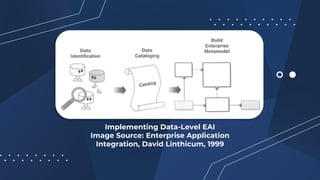
The second step emphasizes that data is central to EAI
initiatives, requiring a thorough understanding of the
various databases within an organization. Key actions
include identifying the data, cataloging it, and creating an
enterprise metadata model, all while applying business
principles to determine data organization and relevance.
Step 03: MakingSense of the Data
The third step focuses on understanding and
documenting business processes in relation to the
enterprise metadata model. This involves choosing an
approach based on the specific EAI issue domain, using
traditional modeling techniques to design processes.
Instead of starting with new application requirements, it's
more effective to analyze existing processes to inform their
integration at the method level.
Step 04: IdentifyingApplication Interfaces
This step involves identifying the interfaces through which
different applications will communicate. These interfaces
can be APIs, web services, or other forms of middleware.
Step 05: Identifyingthe Business Events
Business events are specific occurrences within a business
process that trigger actions or workflows. Identifying these
events is crucial for integration as they determine when
and how data should be exchanged between systems.
Step 06: Identifyingthe Schema and Content
Transformation Scenarios
This step involves defining how data will be transformed
as it moves between different systems. This includes
mapping data fields from one system's schema to another
and ensuring data consistency and integrity.
16.
Step 06: Identifyingthe Schema and Content
Transformation Scenarios
With an existing understanding of the data and application
semantics that exist within an application integration problem
domain, it is good to get an idea about how schema and content of
the data moving between systems will be transformed. This is
necessary for a couple of reasons. First, data existing in one system
won't make sense to another until the data schema and content is
reformatted to make sense to the target system. Second, it will
ensure the maintenance of consistent application semantics from
system to system.
Step 07: MappingInformation Movement
In this stage, you'll track the flow of information between
different systems within the enterprise application
integration (EAI) environment. The goal is to understand
how data travels from one system to another. You start by
identifying the data elements, such as customer numbers
or transaction IDs, and where they are initially located
(source systems) and where they will end up (target
systems).
19.
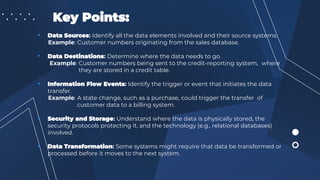
Key Points:
• DataSources: Identify all the data elements involved and their source systems.
Example: Customer numbers originating from the sales database.
• Data Destinations: Determine where the data needs to go.
Example: Customer numbers being sent to the credit-reporting system, where
they are stored in a credit table.
• Information Flow Events: Identify the trigger or event that initiates the data
transfer.
Example: A state change, such as a purchase, could trigger the transfer of
customer data to a billing system.
• Security and Storage: Understand where the data is physically stored, the
security protocols protecting it, and the technology (e.g., relational databases)
involved.
• Data Transformation: Some systems might require that data be transformed or
processed before it moves to the next system.
Step 08: ApplyingTechnology
Once the flow of information is mapped, the next step is to
select the appropriate technology to facilitate the EAI
solution. This step can be both exciting and difficult
because of the wide range of technologies available.
22.
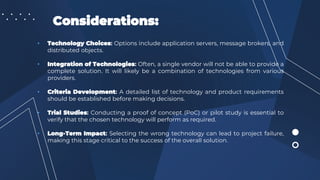
Considerations:
• Technology Choices:Options include application servers, message brokers, and
distributed objects.
• Integration of Technologies: Often, a single vendor will not be able to provide a
complete solution. It will likely be a combination of technologies from various
providers.
• Criteria Development: A detailed list of technology and product requirements
should be established before making decisions.
• Trial Studies: Conducting a proof of concept (PoC) or pilot study is essential to
verify that the chosen technology will perform as required.
• Long-Term Impact: Selecting the wrong technology can lead to project failure,
making this stage critical to the success of the overall solution.
Step 09: Testing,Testing, and Testing
Thorough testing of the EAI solution is crucial to avoid
future problems. Although time-consuming and
sometimes unappreciated, testing ensures that the
solution works under real-world conditions and scales
properly.
25.
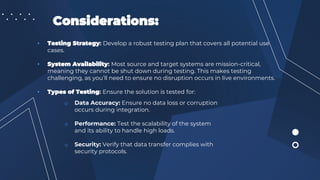
Considerations:
• Testing Strategy:Develop a robust testing plan that covers all potential use
cases.
• System Availability: Most source and target systems are mission-critical,
meaning they cannot be shut down during testing. This makes testing
challenging, as you’ll need to ensure no disruption occurs in live environments.
• Types of Testing: Ensure the solution is tested for:
o Data Accuracy: Ensure no data loss or corruption
occurs during integration.
o Performance: Test the scalability of the system
and its ability to handle high loads.
o Security: Verify that data transfer complies with
security protocols.
Step 10: ConsideringPerformance
Considering performance has a critical importance in
Enterprise Application Integration (EAI) systems.
Overlooking performance can lead to system failure, while
achieving zero latency may not be possible with current
technology, EAI solutions should aim for sub-second
response times for data flow and common business
processes
28.
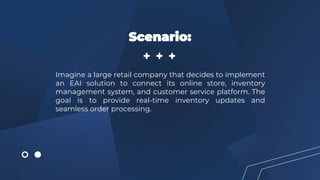
Imagine a largeretail company that decides to implement
an EAI solution to connect its online store, inventory
management system, and customer service platform. The
goal is to provide real-time inventory updates and
seamless order processing.
Scenario:
29.
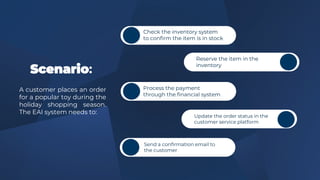
Scenario:
A customer placesan order
for a popular toy during the
holiday shopping season.
The EAI system needs to:
Check the inventory system
to confirm the item is in stock
Reserve the item in the
inventory
Process the payment
through the financial system
Update the order status in the
customer service platform
Send a confirmation email to
the customer
30.
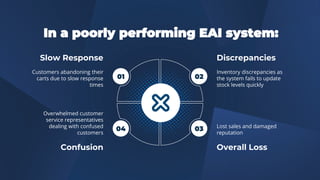
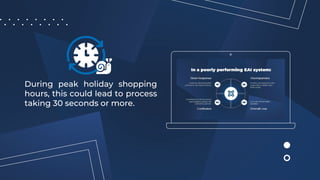
In a poorlyperforming EAI system:
Slow Response
Customers abandoning their
carts due to slow response
times
Confusion
Overwhelmed customer
service representatives
dealing with confused
customers
Discrepancies
Inventory discrepancies as
the system fails to update
stock levels quickly
Overall Loss
Lost sales and damaged
reputation
01 02
03
04
31.
During peak holidayshopping
hours, this could lead to process
taking 30 seconds or more.
32.
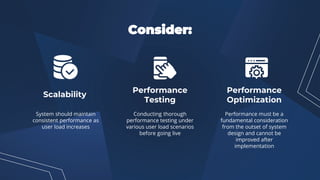
Consider:
System should maintain
consistentperformance as
user load increases
Conducting thorough
performance testing under
various user load scenarios
before going live
Performance must be a
fundamental consideration
from the outset of system
design and cannot be
improved after
implementation
Scalability
Performance
Testing
Performance
Optimization
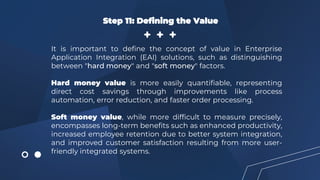
Step 11: Definingthe Value
It is important to define the concept of value in Enterprise
Application Integration (EAI) solutions, such as distinguishing
between "hard money" and "soft money" factors.
Hard money value is more easily quantifiable, representing
direct cost savings through improvements like process
automation, error reduction, and faster order processing.
Soft money value, while more difficult to measure precisely,
encompasses long-term benefits such as enhanced productivity,
increased employee retention due to better system integration,
and improved customer satisfaction resulting from more user-
friendly integrated systems.
Step 12: CreatingMaintenance Procedures
We need to clearly define and assign responsibilities for various
aspects of system upkeep, such as managing the message
broker server, overseeing security, and monitoring performance.
An EAI solution is crucial to an organization's operations, acting
as a central hub for data transfer between critical systems.






![Getting Started with Apache Spark: Big Data Made Simple [Free Meetup]](https://cdn.slidesharecdn.com/ss_thumbnails/apachesparkgettingstarted-260203175547-8361bcc3-thumbnail.jpg?width=640&height=640&fit=bounds)


