Lecture 03
Embedded Software
CE346 – Microprocessor System Design
Branden Ghena – Fall 2021
Some slides borrowed from:
Josiah Hester (Northwestern), Prabal Dutta (UC Berkeley)
2
Today’s Goals
• Discuss challenges of embedded software
• Describe compilation and linking of embedded code
• Actually applies to all code, but you probably never learned much
about linking before
• Explore the microcontroller boot process
3
• Embedded Software
• Embedded Toolchain
• Lab Software Environment
• Boot Process
Outline
4
Assumptions of embedded programs
• Expect limitations
• Very little memory
• Very little computational power
• Very little energy
• Don’t expect a lot of support
• Likely no operating system
• Might not even have error reporting capabilities
• Moral: think differently about your programs
5
Ramifications of limited memory
• Stack and Data sections are limited
• Be careful about too much recursion
• Be careful about large local variables
• Large data structures defined globally are preferred
• Fail at compile time
• Heap section is likely non-existent
• Why?
6
Ramifications of limited memory
• Stack and Data sections are limited
• Be careful about too much recursion
• Be careful about large local variables
• Large data structures defined globally are preferred
• Fail at compile time
• Heap section is likely non-existent
• Why?
• Malloc could run out of memory at runtime
7
Avoiding dynamic memory
• Malloc is scary in an embedded context
• What if there’s no more memory available?
• Traditional computer
• Swap memory to disk
• Worst case: wait for a process to end (or kill one)
• Embedded computer
• There’s likely only a single application
• And it’s the one asking for more memory
• So it’s not giving anything back anytime soon
• This is unlikely to happen at boot
• Instead it’ll happen hours or days into running as memory is slowly exhausted…
8
Limitations on processing power
• Typically not all that important
• Code still runs pretty fast
• 10 MHz -> 100 ns per cycle
• Controlling hardware usually doesn’t have a lot of code complexity
• Quickly gets to the “waiting on hardware” part
• Problems
• Machine learning
• Learning on the device is neigh impossible
• Memory limitations make it hard to fit weights anyways
• Cryptography
• Public key encryption takes seconds to minutes
9
Common programming languages for embedded
• C
• For all the reasons that you assume
• Easy to map variables to memory usage and code to instructions
• Assembly
• Not entirely uncommon, but rarer than you might guess
• C code optimized by a modern compiler is likely faster
• Notable uses:
• Cryptography to create deterministic algorithms
• Operating Systems to handle process swaps
• C++
• Similar to C but with better library support
• Libraries take up a lot of code space though ~100 KB
10
Rarer programming languages for embedded
• Rust
• Modern language with safety and reliability guarantees
• Relatively new to the embedded space
• And a high learning curve
• Python, Javascript, etc.
• Mostly toy languages
• Fine for simple things but incapable of complex operations
• Especially low-level things like managing memory
11
What’s missing from programming languages?
• The embedded domain has several requirements that other
domains do not
• What is missing from programming languages that it wants?
• Sense of time
• Sense of energy
12
Programming languages have no sense of time
• Imagine a system that needs to send messages to a motor
every 10 milliseconds
• Write a function that definitely completes within 10 milliseconds
• Accounting for timing when programming is very challenging
• We can profile code and determine timing at runtime
• If we know many details of hardware, instructions can give timing
• Unless the code interacts with external devices
13
Determining energy use is rather complicated
• Software might
• Start executing a loop
• Turn on/off an LED
• Send messages over a wired bus to another device
• Determining energy these operations take is really difficult
• Even with many details of the hardware
• Different choices of clocks can have a large impact
• Often profiled at runtime after writing the code
• Iterative write-test-modify cycle
14
Break + Open Question
• What language/system would you prefer to write embedded
software in?
• And why?
15
• Embedded Software
• Embedded Toolchain
• Lab Software Environment
• Boot Process
Outline
16
Embedded compilation steps
• Same first steps as any system
1. Compiler
• Turn C code into assembly
• Optimize code (often for size instead of speed)
17
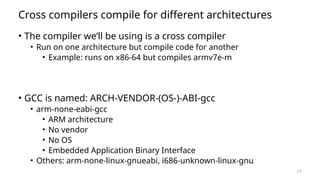
Cross compilers compile for different architectures
• The compiler we’ll be using is a cross compiler
• Run on one architecture but compile code for another
• Example: runs on x86-64 but compiles armv7e-m
• GCC is named: ARCH-VENDOR-(OS-)-ABI-gcc
• arm-none-eabi-gcc
• ARM architecture
• No vendor
• No OS
• Embedded Application Binary Interface
• Others: arm-none-linux-gnueabi, i686-unknown-linux-gnu
18
Embedded compilation steps
• Same first steps as any system
1. Compiler
• Turn C code into assembly
• Optimize code (often for size instead of speed)
2. Linker
• Combine multiple C files together
• Resolve dependencies
• Point function calls at correct place
• Connect creation and uses of global variables
19
Informing linker of system memory
• Linker actually places code and variables in memory
• It needs to know where to place things
• How do traditional computers handle this?
20
Informing linker of system memory
• Linker actually places code and variables in memory
• It needs to know where to place things
• How do traditional computers handle this?
• Virtual memory allows all applications to use the same memory
addresses
• Embedded solution
• Only run a single application
• Provide an LD file
• Specifies memory layout for a certain system
• Places sections of code in different places in memory
21
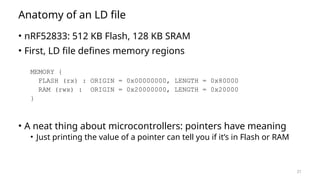
Anatomy of an LD file
• nRF52833: 512 KB Flash, 128 KB SRAM
• First, LD file defines memory regions
MEMORY {
FLASH (rx) : ORIGIN = 0x00000000, LENGTH = 0x80000
RAM (rwx) : ORIGIN = 0x20000000, LENGTH = 0x20000
}
• A neat thing about microcontrollers: pointers have meaning
• Just printing the value of a pointer can tell you if it’s in Flash or RAM
22
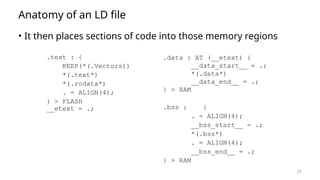
Anatomy of an LD file
• It then places sections of code into those memory regions
.text : {
KEEP(*(.Vectors))
*(.text*)
*(.rodata*)
. = ALIGN(4);
} > FLASH
__etext = .;
.data : AT (__etext) {
__data_start__ = .;
*(.data*)
__data_end__ = .;
} > RAM
.bss : {
. = ALIGN(4);
__bss_start__ = .;
*(.bss*)
. = ALIGN(4);
__bss_end__ = .;
} > RAM
23
Sections of code
• Where do these sections come from?
• Most are generated by the compiler
• .text, .rodata, .data, .bss
• You need to be deep in the docs to figure out how the esoteric ones
work
• Some are generated by the programmer
• Allows you to place certain data items in a specific way
__attribute__((section(".foo")))
int test[10] = {0,0,0,0,0,0,0,0,0,0};
24
Embedded compilation steps
• Same first steps as any system
1. Compiler
• Turn C code into assembly
• Optimize code (often for size instead of speed)
2. Linker
• Combine multiple C files together
• Resolve dependencies
• Point function calls at correct place
• Connect creation and uses of global variables
• Output: a binary (or hex) file
25
Example
• Demonstrated in the blink application in lab repo
• https://github.com/nu-ce346/nu-microbit-base/tree/main/software/
apps/blink
26
• Embedded Software
• Embedded Toolchain
• Lab Software Environment
• Boot Process
Outline
27
Embedded environments
• There are a multitude of embedded software systems
• Every microcontroller vendor has their own
• Popular platforms like Arduino
• We’re using the Nordic software plus some extensions made by
my research group
• It’ll be a week until that matters for the most part
• We’ll start off by writing low-level drivers ourselves
28
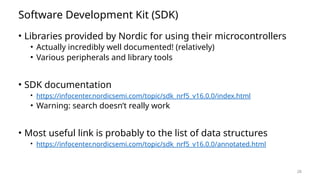
Software Development Kit (SDK)
• Libraries provided by Nordic for using their microcontrollers
• Actually incredibly well documented! (relatively)
• Various peripherals and library tools
• SDK documentation
• https://infocenter.nordicsemi.com/topic/sdk_nrf5_v16.0.0/index.html
• Warning: search doesn’t really work
• Most useful link is probably to the list of data structures
• https://infocenter.nordicsemi.com/topic/sdk_nrf5_v16.0.0/annotated.html
29
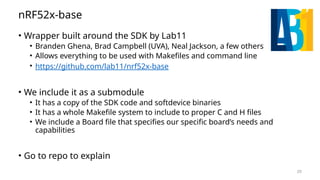
nRF52x-base
• Wrapper built around the SDK by Lab11
• Branden Ghena, Brad Campbell (UVA), Neal Jackson, a few others
• Allows everything to be used with Makefiles and command line
• https://github.com/lab11/nrf52x-base
• We include it as a submodule
• It has a copy of the SDK code and softdevice binaries
• It has a whole Makefile system to include to proper C and H files
• We include a Board file that specifies our specific board’s needs and
capabilities
• Go to repo to explain
30
Break
31
• Embedded Software
• Embedded Toolchain
• Lab Software Environment
• Boot Process
Outline
32
How does a microcontroller start running code?
• Power comes on
• Microcontroller needs to start executing assembly code
• You expect your main() function to run
• But a few things need to happen first
33
Step 0: set a stack pointer
• Assembly code might need to write data to the stack
• Might call functions that need to stack registers
• ARM: Valid address for the stack pointer is at address 0 in Flash
• Needs to point to somewhere in RAM
• Hardware loads it into the Stack Pointer when it powers on
34
Step 1: set the program counter (PC)
• a.k.a. the Instruction Pointer (IP) in x86 land
• ARM: valid instruction pointer is at address 4 in Flash
• Could point to RAM, usually to Flash though
• Automatically loaded into the PC after the SP is loaded
• Again, hardware does this
35
Step 2: “reset handler” prepares memory
• Code that handles system resets
• Either reset button or power-on reset
• Address was loaded into PC in Step 1
• Reset handler code:
• Loads initial values of .data section from Flash into RAM
• Loads zeros as values of .bss section in RAM
• Calls SystemInit
• Handles various hardware configurations/errata
• Calls _start
nu-microbit-base/software/nrf52x-base/sdk/nrf5_sdk_16.0.0/modules/nrfx/mdk/gcc_startup_nrf52833.S
nu-microbit-base/software/nrf52x-base/sdk/nrf5_sdk_16.0.0/modules/nrfx/mdk/system_nrf52.c
36
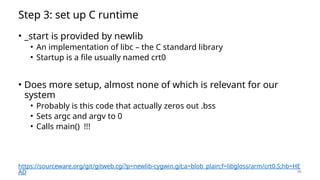
Step 3: set up C runtime
• _start is provided by newlib
• An implementation of libc – the C standard library
• Startup is a file usually named crt0
• Does more setup, almost none of which is relevant for our
system
• Probably is this code that actually zeros out .bss
• Sets argc and argv to 0
• Calls main() !!!
https://sourceware.org/git/gitweb.cgi?p=newlib-cygwin.git;a=blob_plain;f=libgloss/arm/crt0.S;hb=HE
AD
37
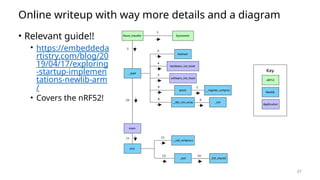
Online writeup with way more details and a diagram
• Relevant guide!!
• https://embeddeda
rtistry.com/blog/20
19/04/17/exploring
-startup-implemen
tations-newlib-arm
/
• Covers the nRF52!
38
• Embedded Software
• Embedded Toolchain
• Lab Software Environment
• Boot Process
Outline

lecture03_EmbeddedSoftware for Beginners

  • 1.
    Lecture 03 Embedded Software CE346– Microprocessor System Design Branden Ghena – Fall 2021 Some slides borrowed from: Josiah Hester (Northwestern), Prabal Dutta (UC Berkeley)
  • 2.
    2 Today’s Goals • Discusschallenges of embedded software • Describe compilation and linking of embedded code • Actually applies to all code, but you probably never learned much about linking before • Explore the microcontroller boot process
  • 3.
    3 • Embedded Software •Embedded Toolchain • Lab Software Environment • Boot Process Outline
  • 4.
    4 Assumptions of embeddedprograms • Expect limitations • Very little memory • Very little computational power • Very little energy • Don’t expect a lot of support • Likely no operating system • Might not even have error reporting capabilities • Moral: think differently about your programs
  • 5.
    5 Ramifications of limitedmemory • Stack and Data sections are limited • Be careful about too much recursion • Be careful about large local variables • Large data structures defined globally are preferred • Fail at compile time • Heap section is likely non-existent • Why?
  • 6.
    6 Ramifications of limitedmemory • Stack and Data sections are limited • Be careful about too much recursion • Be careful about large local variables • Large data structures defined globally are preferred • Fail at compile time • Heap section is likely non-existent • Why? • Malloc could run out of memory at runtime
  • 7.
    7 Avoiding dynamic memory •Malloc is scary in an embedded context • What if there’s no more memory available? • Traditional computer • Swap memory to disk • Worst case: wait for a process to end (or kill one) • Embedded computer • There’s likely only a single application • And it’s the one asking for more memory • So it’s not giving anything back anytime soon • This is unlikely to happen at boot • Instead it’ll happen hours or days into running as memory is slowly exhausted…
  • 8.
    8 Limitations on processingpower • Typically not all that important • Code still runs pretty fast • 10 MHz -> 100 ns per cycle • Controlling hardware usually doesn’t have a lot of code complexity • Quickly gets to the “waiting on hardware” part • Problems • Machine learning • Learning on the device is neigh impossible • Memory limitations make it hard to fit weights anyways • Cryptography • Public key encryption takes seconds to minutes
  • 9.
    9 Common programming languagesfor embedded • C • For all the reasons that you assume • Easy to map variables to memory usage and code to instructions • Assembly • Not entirely uncommon, but rarer than you might guess • C code optimized by a modern compiler is likely faster • Notable uses: • Cryptography to create deterministic algorithms • Operating Systems to handle process swaps • C++ • Similar to C but with better library support • Libraries take up a lot of code space though ~100 KB
  • 10.
    10 Rarer programming languagesfor embedded • Rust • Modern language with safety and reliability guarantees • Relatively new to the embedded space • And a high learning curve • Python, Javascript, etc. • Mostly toy languages • Fine for simple things but incapable of complex operations • Especially low-level things like managing memory
  • 11.
    11 What’s missing fromprogramming languages? • The embedded domain has several requirements that other domains do not • What is missing from programming languages that it wants? • Sense of time • Sense of energy
  • 12.
    12 Programming languages haveno sense of time • Imagine a system that needs to send messages to a motor every 10 milliseconds • Write a function that definitely completes within 10 milliseconds • Accounting for timing when programming is very challenging • We can profile code and determine timing at runtime • If we know many details of hardware, instructions can give timing • Unless the code interacts with external devices
  • 13.
    13 Determining energy useis rather complicated • Software might • Start executing a loop • Turn on/off an LED • Send messages over a wired bus to another device • Determining energy these operations take is really difficult • Even with many details of the hardware • Different choices of clocks can have a large impact • Often profiled at runtime after writing the code • Iterative write-test-modify cycle
  • 14.
    14 Break + OpenQuestion • What language/system would you prefer to write embedded software in? • And why?
  • 15.
    15 • Embedded Software •Embedded Toolchain • Lab Software Environment • Boot Process Outline
  • 16.
    16 Embedded compilation steps •Same first steps as any system 1. Compiler • Turn C code into assembly • Optimize code (often for size instead of speed)
  • 17.
    17 Cross compilers compilefor different architectures • The compiler we’ll be using is a cross compiler • Run on one architecture but compile code for another • Example: runs on x86-64 but compiles armv7e-m • GCC is named: ARCH-VENDOR-(OS-)-ABI-gcc • arm-none-eabi-gcc • ARM architecture • No vendor • No OS • Embedded Application Binary Interface • Others: arm-none-linux-gnueabi, i686-unknown-linux-gnu
  • 18.
    18 Embedded compilation steps •Same first steps as any system 1. Compiler • Turn C code into assembly • Optimize code (often for size instead of speed) 2. Linker • Combine multiple C files together • Resolve dependencies • Point function calls at correct place • Connect creation and uses of global variables
  • 19.
    19 Informing linker ofsystem memory • Linker actually places code and variables in memory • It needs to know where to place things • How do traditional computers handle this?
  • 20.
    20 Informing linker ofsystem memory • Linker actually places code and variables in memory • It needs to know where to place things • How do traditional computers handle this? • Virtual memory allows all applications to use the same memory addresses • Embedded solution • Only run a single application • Provide an LD file • Specifies memory layout for a certain system • Places sections of code in different places in memory
  • 21.
    21 Anatomy of anLD file • nRF52833: 512 KB Flash, 128 KB SRAM • First, LD file defines memory regions MEMORY { FLASH (rx) : ORIGIN = 0x00000000, LENGTH = 0x80000 RAM (rwx) : ORIGIN = 0x20000000, LENGTH = 0x20000 } • A neat thing about microcontrollers: pointers have meaning • Just printing the value of a pointer can tell you if it’s in Flash or RAM
  • 22.
    22 Anatomy of anLD file • It then places sections of code into those memory regions .text : { KEEP(*(.Vectors)) *(.text*) *(.rodata*) . = ALIGN(4); } > FLASH __etext = .; .data : AT (__etext) { __data_start__ = .; *(.data*) __data_end__ = .; } > RAM .bss : { . = ALIGN(4); __bss_start__ = .; *(.bss*) . = ALIGN(4); __bss_end__ = .; } > RAM
  • 23.
    23 Sections of code •Where do these sections come from? • Most are generated by the compiler • .text, .rodata, .data, .bss • You need to be deep in the docs to figure out how the esoteric ones work • Some are generated by the programmer • Allows you to place certain data items in a specific way __attribute__((section(".foo"))) int test[10] = {0,0,0,0,0,0,0,0,0,0};
  • 24.
    24 Embedded compilation steps •Same first steps as any system 1. Compiler • Turn C code into assembly • Optimize code (often for size instead of speed) 2. Linker • Combine multiple C files together • Resolve dependencies • Point function calls at correct place • Connect creation and uses of global variables • Output: a binary (or hex) file
  • 25.
    25 Example • Demonstrated inthe blink application in lab repo • https://github.com/nu-ce346/nu-microbit-base/tree/main/software/ apps/blink
  • 26.
    26 • Embedded Software •Embedded Toolchain • Lab Software Environment • Boot Process Outline
  • 27.
    27 Embedded environments • Thereare a multitude of embedded software systems • Every microcontroller vendor has their own • Popular platforms like Arduino • We’re using the Nordic software plus some extensions made by my research group • It’ll be a week until that matters for the most part • We’ll start off by writing low-level drivers ourselves
  • 28.
    28 Software Development Kit(SDK) • Libraries provided by Nordic for using their microcontrollers • Actually incredibly well documented! (relatively) • Various peripherals and library tools • SDK documentation • https://infocenter.nordicsemi.com/topic/sdk_nrf5_v16.0.0/index.html • Warning: search doesn’t really work • Most useful link is probably to the list of data structures • https://infocenter.nordicsemi.com/topic/sdk_nrf5_v16.0.0/annotated.html
  • 29.
    29 nRF52x-base • Wrapper builtaround the SDK by Lab11 • Branden Ghena, Brad Campbell (UVA), Neal Jackson, a few others • Allows everything to be used with Makefiles and command line • https://github.com/lab11/nrf52x-base • We include it as a submodule • It has a copy of the SDK code and softdevice binaries • It has a whole Makefile system to include to proper C and H files • We include a Board file that specifies our specific board’s needs and capabilities • Go to repo to explain
  • 30.
  • 31.
    31 • Embedded Software •Embedded Toolchain • Lab Software Environment • Boot Process Outline
  • 32.
    32 How does amicrocontroller start running code? • Power comes on • Microcontroller needs to start executing assembly code • You expect your main() function to run • But a few things need to happen first
  • 33.
    33 Step 0: seta stack pointer • Assembly code might need to write data to the stack • Might call functions that need to stack registers • ARM: Valid address for the stack pointer is at address 0 in Flash • Needs to point to somewhere in RAM • Hardware loads it into the Stack Pointer when it powers on
  • 34.
    34 Step 1: setthe program counter (PC) • a.k.a. the Instruction Pointer (IP) in x86 land • ARM: valid instruction pointer is at address 4 in Flash • Could point to RAM, usually to Flash though • Automatically loaded into the PC after the SP is loaded • Again, hardware does this
  • 35.
    35 Step 2: “resethandler” prepares memory • Code that handles system resets • Either reset button or power-on reset • Address was loaded into PC in Step 1 • Reset handler code: • Loads initial values of .data section from Flash into RAM • Loads zeros as values of .bss section in RAM • Calls SystemInit • Handles various hardware configurations/errata • Calls _start nu-microbit-base/software/nrf52x-base/sdk/nrf5_sdk_16.0.0/modules/nrfx/mdk/gcc_startup_nrf52833.S nu-microbit-base/software/nrf52x-base/sdk/nrf5_sdk_16.0.0/modules/nrfx/mdk/system_nrf52.c
  • 36.
    36 Step 3: setup C runtime • _start is provided by newlib • An implementation of libc – the C standard library • Startup is a file usually named crt0 • Does more setup, almost none of which is relevant for our system • Probably is this code that actually zeros out .bss • Sets argc and argv to 0 • Calls main() !!! https://sourceware.org/git/gitweb.cgi?p=newlib-cygwin.git;a=blob_plain;f=libgloss/arm/crt0.S;hb=HE AD
  • 37.
    37 Online writeup withway more details and a diagram • Relevant guide!! • https://embeddeda rtistry.com/blog/20 19/04/17/exploring -startup-implemen tations-newlib-arm / • Covers the nRF52!
  • 38.
    38 • Embedded Software •Embedded Toolchain • Lab Software Environment • Boot Process Outline