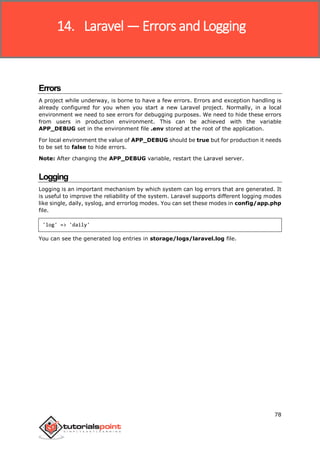
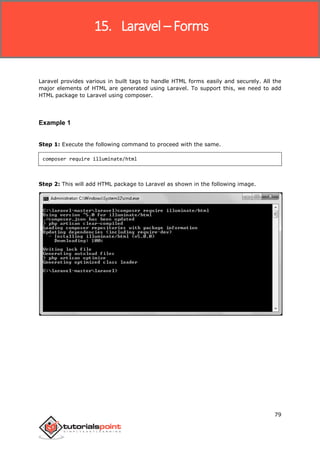
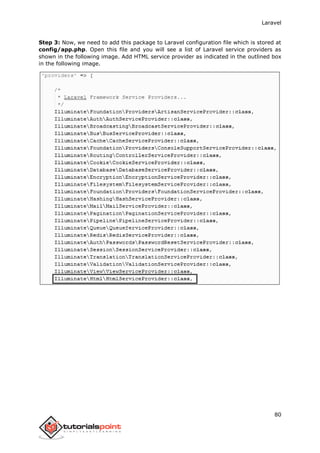
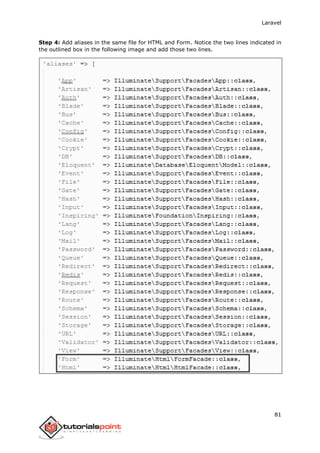
Laravel
Laravel
i
AbouttheTutorial
Laravel is a powerful MVC PHP framework, designed for developers who need a simple and
elegant toolkit to create full-featured web applications. Laravel was created by Taylor
Otwell. This is a brief tutorial that explains the basics of Laravel framework.
Audience
This tutorial will guide the developers and students who want to learn how to develop a
website using Laravel. This tutorial is particularly meant for all those developers who have
no prior experience of using Laravel.
Prerequisites
Before you start proceeding with this tutorial, we make an assumption that you are familiar
with HTML, Core PHP, and Advance PHP. We have used Laravel version 5.1 in all the
examples.
Copyright&Disclaimer
Copyright 2016 by Tutorials Point (I) Pvt. Ltd.
All the content and graphics published in this e-book are the property of Tutorials Point (I)
Pvt. Ltd. The user of this e-book is prohibited to reuse, retain, copy, distribute or republish
any contents or a part of contents of this e-book in any manner without written consent
of the publisher.
We strive to update the contents of our website and tutorials as timely and as precisely as
possible, however, the contents may contain inaccuracies or errors. Tutorials Point (I) Pvt.
Ltd. provides no guarantee regarding the accuracy, timeliness or completeness of our
website or its contents including this tutorial. If you discover any errors on our website or
in this tutorial, please notify us at contact@tutorialspoint.com
Laravel
ii
TableofContents
About the Tutorial....................................................................................................................................i
Audience..................................................................................................................................................i
Prerequisites............................................................................................................................................i
Copyright & Disclaimer.............................................................................................................................i
Table of Contents....................................................................................................................................ii
1. LARAVEL – OVERVIEW.........................................................................................................1
Introduction............................................................................................................................................1
Laravel – Features ...................................................................................................................................1
2. LARAVEL – INSTALLATION....................................................................................................2
3. LARAVEL – APPLICATION STRUCTURE..................................................................................4
Root Directory.........................................................................................................................................4
App Directory..........................................................................................................................................5
4. LARAVEL – CONFIGURATION ...............................................................................................6
Basic Configuration .................................................................................................................................6
Environmental Configuration ..................................................................................................................6
Database Configuration...........................................................................................................................7
Naming the Application...........................................................................................................................8
Maintenance Mode.................................................................................................................................8
5. LARAVEL – ROUTING .........................................................................................................10
Basic Routing.........................................................................................................................................10
Routing Parameters ..............................................................................................................................13
6. LARAVEL — MIDDLEWARE ................................................................................................16
Define Middleware ...............................................................................................................................16
Register Middleware.............................................................................................................................17
Laravel
iii
Middleware Parameters........................................................................................................................19
Terminable Middleware........................................................................................................................22
7. LARAVEL – CONTROLLERS..................................................................................................27
Basic Controllers ...................................................................................................................................27
Controller Middleware..........................................................................................................................28
Restful Resource Controllers .................................................................................................................33
Implicit Controllers................................................................................................................................35
Constructor Injection ............................................................................................................................38
Method Injection ..................................................................................................................................39
8. LARAVEL — REQUEST........................................................................................................41
Retrieving the Request URI ...................................................................................................................41
Retrieving Input ....................................................................................................................................43
9. LARAVEL – COOKIE ............................................................................................................47
Creating Cookie.....................................................................................................................................47
Retrieving Cookie ..................................................................................................................................47
10. LARAVEL — RESPONSE ......................................................................................................51
Basic Response......................................................................................................................................51
Attaching Headers.................................................................................................................................51
Attaching Cookies .................................................................................................................................52
JSON Response......................................................................................................................................53
11. LARAVEL — VIEWS ............................................................................................................54
Understanding Views ............................................................................................................................54
Passing Data to Views ...........................................................................................................................55
Sharing Data with all Views...................................................................................................................55
Blade Templates....................................................................................................................................57
Laravel
iv
12. LARAVEL — REDIRECTIONS................................................................................................61
Redirecting to Named Routes................................................................................................................61
Redirecting to Controller Actions ..........................................................................................................62
13. LARAVEL — WORKING WITH DATABASE............................................................................64
Connecting to Database ........................................................................................................................64
Insert Records .......................................................................................................................................64
Retrieve Records...................................................................................................................................67
Update Records.....................................................................................................................................70
Delete Records......................................................................................................................................74
14. LARAVEL — ERRORS AND LOGGING ..................................................................................78
Errors ....................................................................................................................................................78
Logging..................................................................................................................................................78
15. LARAVEL – FORMS.............................................................................................................79
16. LARAVEL – LOCALIZATION .................................................................................................85
17. LARAVEL — SESSION .........................................................................................................89
Accessing Session Data..........................................................................................................................89
Storing Session Data..............................................................................................................................89
Deleting Session Data............................................................................................................................89
18. LARAVEL – VALIDATION.....................................................................................................93
19. LARAVEL – FILE UPLOADING..............................................................................................98
20. LARAVEL – SENDING EMAIL.............................................................................................102
21. LARAVEL – AJAX...............................................................................................................108
22. LARAVEL – ERROR HANDLING..........................................................................................111
HTTP Exceptions..................................................................................................................................111
Laravel
v
Custom Error pages.............................................................................................................................111
23. LARAVEL – EVENT HANDLING..........................................................................................114
24. LARAVEL – FACADES........................................................................................................122
25. LARAVEL – SECURITY .......................................................................................................128
Laravel
1
Introduction
Laravel is an MVC framework with bundles, migrations, and Artisan CLI. Laravel offers a
robust set of tools and an application architecture that incorporates many of the best
features of frameworks like CodeIgniter, Yii, ASP.NET MVC, Ruby on Rails, Sinatra, and
others.
Laravel is an Open Source framework. It has a very rich set of features which will boost
the speed of Web Development. If you familiar with Core PHP and Advanced PHP, Laravel
will make your task easier. It will save a lot time if you are planning to develop a website
from scratch. Not only that, the website built in Laravel is also secure. It prevents the
various attacks that can take place on websites.
Laravel–Features
Laravel offers the following key features:
 Modularity
 Testability
 Routing
 Configuration management
 Query builder and ORM (Object Relational Mapper)
 Schema builder, migrations, and seeding
 Template engine
 E-mailing
 Authentication
 Redis
 Queues
 Event and command bus
1. Laravel – Overview
Laravel
2
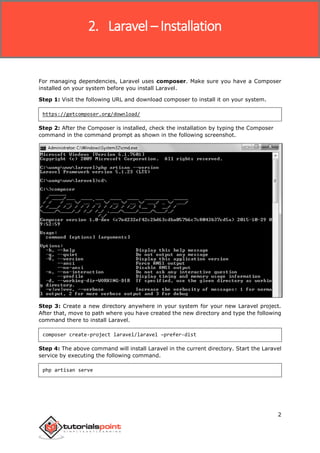
For managing dependencies, Laravel uses composer. Make sure you have a Composer
installed on your system before you install Laravel.
Step 1: Visit the following URL and download composer to install it on your system.
https://getcomposer.org/download/
Step 2: After the Composer is installed, check the installation by typing the Composer
command in the command prompt as shown in the following screenshot.
Step 3: Create a new directory anywhere in your system for your new Laravel project.
After that, move to path where you have created the new directory and type the following
command there to install Laravel.
composer create-project laravel/laravel –prefer-dist
Step 4: The above command will install Laravel in the current directory. Start the Laravel
service by executing the following command.
php artisan serve
2. Laravel – Installation
Laravel
3
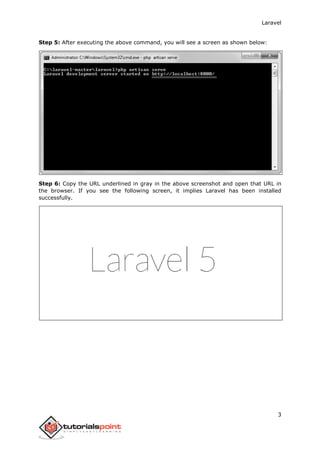
Step 5: After executing the above command, you will see a screen as shown below:
Step 6: Copy the URL underlined in gray in the above screenshot and open that URL in
the browser. If you see the following screen, it implies Laravel has been installed
successfully.
Laravel
4
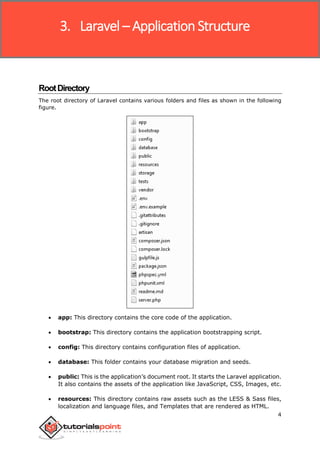
RootDirectory
The root directory of Laravel contains various folders and files as shown in the following
figure.
 app: This directory contains the core code of the application.
 bootstrap: This directory contains the application bootstrapping script.
 config: This directory contains configuration files of application.
 database: This folder contains your database migration and seeds.
 public: This is the application’s document root. It starts the Laravel application.
It also contains the assets of the application like JavaScript, CSS, Images, etc.
 resources: This directory contains raw assets such as the LESS & Sass files,
localization and language files, and Templates that are rendered as HTML.
3. Laravel – Application Structure
Laravel
5
 storage: This directory contains App storage, like file uploads etc. Framework
storage (cache), and application-generated logs.
 test: This directory contains various test cases.
 vendor: This directory contains composer dependencies.
AppDirectory
This is the application directory. It contains a variety of additional directories, which are
described below:
 Console: All the artisan commands are stored in this directory.
 Events: This directory stores events that your application can raise. Events
may be used to alert other parts of your application that a given action has
occurred, providing a great deal of flexibility and decoupling.
 Exceptions: This directory contains your application's exception handler
and is also a good place to stick any exceptions thrown by your application.
 Http: This directory contains your controllers, filters, and requests.
 Jobs: This directory contains the queueable jobs for your application.
 Listeners: This directory contains the handler classes for your events.
Handlers receive an event and perform logic in response to the event being
fired. For example, a UserRegistered event might be handled by a
SendWelcomeEmail listener.
 Policies: This directory contains various policies of the application.
 Providers: This directory contains various service providers.
Laravel
6
The config directory, as the name implies, contains all of your application's configuration
files. In this directory, you will find various files needed to configure database, session,
mail, application, services etc.
BasicConfiguration
 After installing Laravel, the first thing we need to do is to set the write permission for
the directory storage and bootstrap/cache.
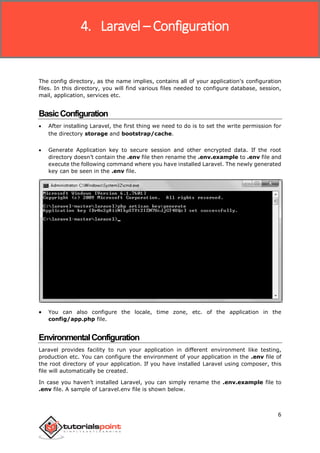
 Generate Application key to secure session and other encrypted data. If the root
directory doesn’t contain the .env file then rename the .env.example to .env file and
execute the following command where you have installed Laravel. The newly generated
key can be seen in the .env file.
 You can also configure the locale, time zone, etc. of the application in the
config/app.php file.
EnvironmentalConfiguration
Laravel provides facility to run your application in different environment like testing,
production etc. You can configure the environment of your application in the .env file of
the root directory of your application. If you have installed Laravel using composer, this
file will automatically be created.
In case you haven’t installed Laravel, you can simply rename the .env.example file to
.env file. A sample of Laravel.env file is shown below.
4. Laravel – Configuration
Laravel
7
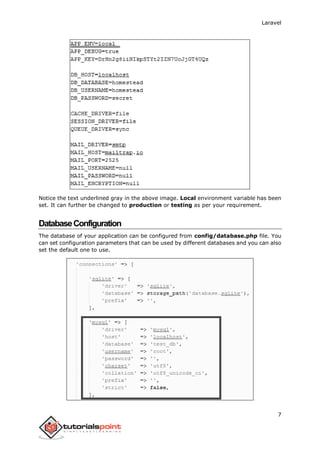
Notice the text underlined gray in the above image. Local environment variable has been
set. It can further be changed to production or testing as per your requirement.
DatabaseConfiguration
The database of your application can be configured from config/database.php file. You
can set configuration parameters that can be used by different databases and you can also
set the default one to use.
Laravel
8
NamingtheApplication
The App Directory, by default, is namespaced under App. To rename it, you can execute
the following command and rename the namespace.
php artisan app:name <name-of-your-application>
Replace the <name-of-your-application> with the new name of your application that you
want to give.
MaintenanceMode
We need to modify our website on a regular basis. The website needs to be put on
maintenance mode for this. Laravel has made this job easier. There are two artisan
commands which are used to start and stop the maintenance mode which are described
below.
Start Maintenance Mode
To start the maintenance mode, simply execute the following command.
php artisan down
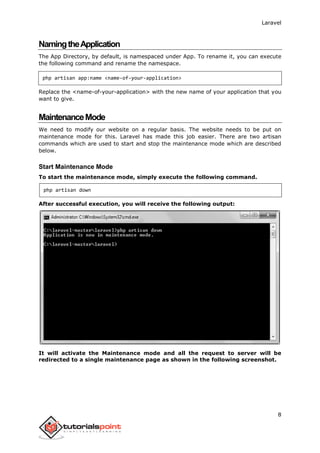
After successful execution, you will receive the following output:
It will activate the Maintenance mode and all the request to server will be
redirected to a single maintenance page as shown in the following screenshot.
Laravel
9
Stop Maintenance Mode
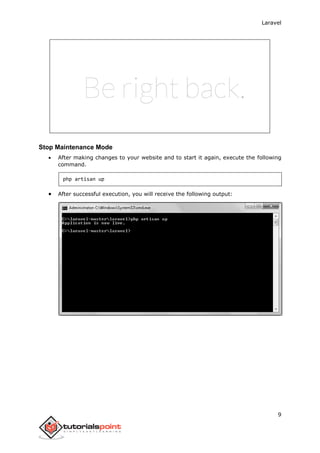
 After making changes to your website and to start it again, execute the following
command.
php artisan up
 After successful execution, you will receive the following output:
Laravel
10
BasicRouting
Basic routing is meant to route your request to an appropriate controller. The routes of
the application can be defined in app/Http/routes.php file. Here is the general route
syntax for each of the possible request.
Route::get('/', function () {
return 'Hello World';
});
Route::post('foo/bar', function () {
return 'Hello World';
});
Route::put('foo/bar', function () {
//
});
Route::delete('foo/bar', function () {
//
});
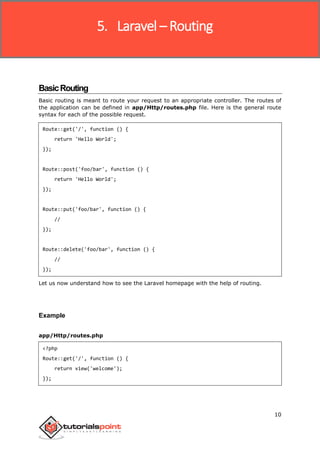
Let us now understand how to see the Laravel homepage with the help of routing.
Example
app/Http/routes.php
<?php
Route::get('/', function () {
return view('welcome');
});
5. Laravel – Routing
Laravel
11
resources/view/welcome.blade.php
<!DOCTYPE html>
<html>
<head>
<title>Laravel</title>
<link href="https://fonts.googleapis.com/css?family=Lato:100"
rel="stylesheet" type="text/css">
<style>
html, body {
height: 100%;
}
body {
margin: 0;
padding: 0;
width: 100%;
display: table;
font-weight: 100;
font-family: 'Lato';
}
.container {
text-align: center;
display: table-cell;
vertical-align: middle;
}
.content {
text-align: center;
display: inline-block;
}
.title {
font-size: 96px;
}
Laravel
12
</style>
</head>
<body>
<div class="container">
<div class="content">
<div class="title">Laravel 5</div>
</div>
</div>
</body>
</html>
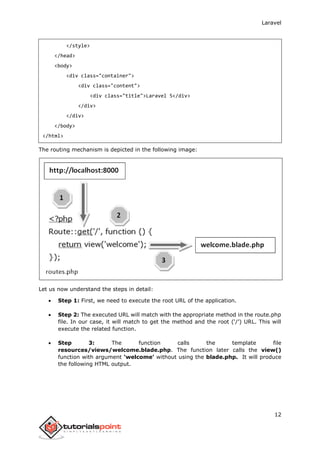
The routing mechanism is depicted in the following image:
Let us now understand the steps in detail:
 Step 1: First, we need to execute the root URL of the application.
 Step 2: The executed URL will match with the appropriate method in the route.php
file. In our case, it will match to get the method and the root (‘/’) URL. This will
execute the related function.
 Step 3: The function calls the template file
resources/views/welcome.blade.php. The function later calls the view()
function with argument ‘welcome’ without using the blade.php. It will produce
the following HTML output.
Laravel
13
RoutingParameters
Often in the application, we intend to capture the parameters passed with the URL. To do
this, we need to modify the code in routes.php file accordingly. There are two ways by
which we can capture the parameters passed with the URL.
 Required Parameters
 Optional Parameters
Required Parameters
These parameters must be present in the URL. For example, you may intend to capture
the ID from the URL to do something with that ID. Here is the sample coding for
routes.php file for that purpose.
Route::get('ID/{id}',function($id){
echo 'ID: '.$id;
});
Whatever argument that we pass after the root URL (http://localhost:8000/ID/5), it
will be stored in $id and we can use that parameter for further processing but here we are
simply displaying it. We can pass it onto view or controller for further processing.
Optional Parameters
There are some parameters which may or may not be present in the URL and in such cases
we can use the optional parameters. The presence of these parameters is not necessary
in the URL. These parameters are indicated by “?” sign after the name of the parameters.
Here is the sample coding for routes.php file for that purpose.
Route::get('/user/{name?}',function($name = 'Virat'){
echo "Name: ".$name;
});
Laravel
14
Example
routes.php
<?php
// First Route method – Root URL will match this method
Route::get('/', function () {
return view('welcome');
});
// Second Route method – Root URL with ID will match this method
Route::get('ID/{id}',function($id){
echo 'ID: '.$id;
});
// Third Route method – Root URL with or without name will match this method
Route::get('/user/{name?}',function($name = 'Virat Gandhi'){
echo "Name: ".$name;
});
Step 1: Here, we have defined 3 routes with get methods for different purposes. If we
execute the below URL then it will execute the first method.
http://localhost:8000
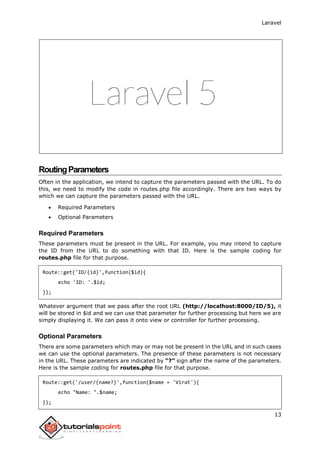
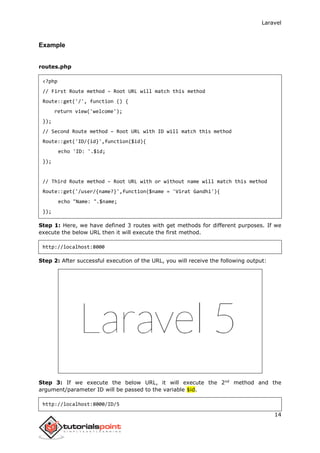
Step 2: After successful execution of the URL, you will receive the following output:
Step 3: If we execute the below URL, it will execute the 2nd
method and the
argument/parameter ID will be passed to the variable $id.
http://localhost:8000/ID/5
Laravel
15
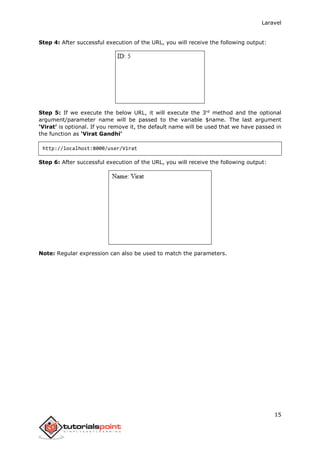
Step 4: After successful execution of the URL, you will receive the following output:
Step 5: If we execute the below URL, it will execute the 3rd
method and the optional
argument/parameter name will be passed to the variable $name. The last argument
‘Virat’ is optional. If you remove it, the default name will be used that we have passed in
the function as ‘Virat Gandhi’
http://localhost:8000/user/Virat
Step 6: After successful execution of the URL, you will receive the following output:
Note: Regular expression can also be used to match the parameters.
Laravel
16
DefineMiddleware
As the name suggest, Middleware acts as a middle man between request and response. It
is a type of filtering mechanism. For example, Laravel includes a middleware that verifies
whether user of the application is authenticated or not. If the user is authenticated, he will
be redirected to the home page otherwise, he will be redirected to the login page.
Middleware can be created by executing the following command:
php artisan make:middleware <middleware-name>
Replace the <middleware-name> with the name of your middleware. The middleware that
you create can be seen at app/Http/Middleware directory.
Example
Step 1: Let us now create AgeMiddleware. To create that, we need to execute the following
command:
php artisan make:middleware AgeMiddleware
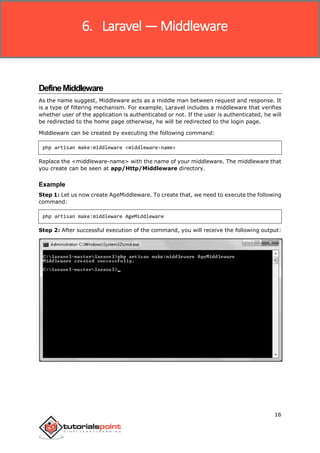
Step 2: After successful execution of the command, you will receive the following output:
6. Laravel —Middleware
Laravel
17
Step 3: AgeMiddlware will be created at app/Http/Middleware. The newly created
file will have the following code already created for you.
<?php
namespace AppHttpMiddleware;
use Closure;
class AgeMiddleware
{
public function handle($request, Closure $next)
{
return $next($request);
}
}
RegisterMiddleware
We need to register each and every middleware before using it. There are two types of
Middleware in Laravel.
 Global Middleware
 Route Middleware
The Global Middleware will run on every HTTP request of the application, whereas the
Route Middleware will be assigned to a specific route. The middleware can be registered
at app/Http/Kernel.php. This file contains two properties $middleware and
$routeMiddleware. $middleware property is used to register Global Middleware and
$routeMiddleware property is used to register route specific middleware.
To register the global middleware, list the class at the end of $middleware property.
protected $middleware = [
IlluminateFoundationHttpMiddlewareCheckForMaintenanceMode::class,
AppHttpMiddlewareEncryptCookies::class,
IlluminateCookieMiddlewareAddQueuedCookiesToResponse::class,
IlluminateSessionMiddlewareStartSession::class,
IlluminateViewMiddlewareShareErrorsFromSession::class,
AppHttpMiddlewareVerifyCsrfToken::class,
];
Laravel
18
To register the route specific middleware, add the key and value to $routeMiddleware
property.
protected $routeMiddleware = [
'auth' => AppHttpMiddlewareAuthenticate::class,
'auth.basic' =>
IlluminateAuthMiddlewareAuthenticateWithBasicAuth::class,
'guest' => AppHttpMiddlewareRedirectIfAuthenticated::class,
];
Example
We have created AgeMiddleware in the previous example. We can now register it in
route specific middleware property. The code for that registration is shown below.
The following is the code for app/Http/Kernel.php:
<?php
namespace AppHttp;
use IlluminateFoundationHttpKernel as HttpKernel;
class Kernel extends HttpKernel
{
protected $middleware = [
IlluminateFoundationHttpMiddlewareCheckForMaintenanceMode::class,
AppHttpMiddlewareEncryptCookies::class,
IlluminateCookieMiddlewareAddQueuedCookiesToResponse::class,
IlluminateSessionMiddlewareStartSession::class,
IlluminateViewMiddlewareShareErrorsFromSession::class,
AppHttpMiddlewareVerifyCsrfToken::class,
];
protected $routeMiddleware = [
'auth' => AppHttpMiddlewareAuthenticate::class,
'auth.basic' => IlluminateAuthMiddlewareAuthenticateWithBasicAuth::class,
'guest' => AppHttpMiddlewareRedirectIfAuthenticated::class,
'Age' => AppHttpMiddlwareAgeMiddleware::class,
];
}
Laravel
19
MiddlewareParameters
We can also pass parameters with the Middleware. For example, if your application has
different roles like user, admin, super admin etc. and you want to authenticate the action
based on role, this can be achieved by passing parameters with middleware. The
middleware that we create contains the following function and we can pass our custom
argument after the $next argument.
public function handle($request, Closure $next)
{
return $next($request);
}
Example
Step 1: Create RoleMiddleware by executing the following command:
php artisan make:middleware RoleMiddleware
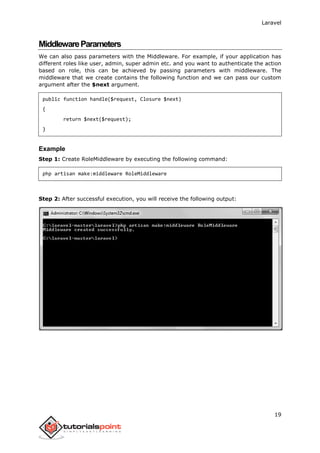
Step 2: After successful execution, you will receive the following output:
Laravel
20
Step 3: Add the following code in the handle method of the newly created RoleMiddleware
at app/Http/Middleware/RoleMiddleware.php.
<?php
namespace AppHttpMiddleware;
use Closure;
class RoleMiddleware
{
public function handle($request, Closure $next, $role)
{
echo "Role: ".$role;
return $next($request);
}
}
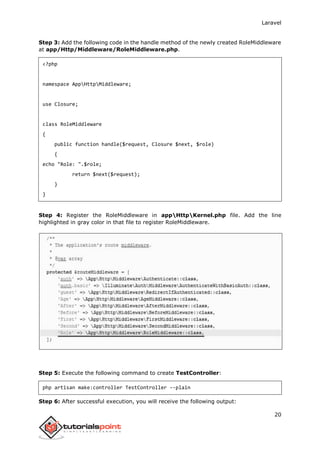
Step 4: Register the RoleMiddleware in appHttpKernel.php file. Add the line
highlighted in gray color in that file to register RoleMiddleware.
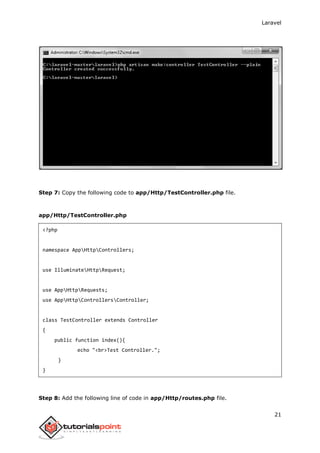
Step 5: Execute the following command to create TestController:
php artisan make:controller TestController --plain
Step 6: After successful execution, you will receive the following output:
Laravel
21
Step 7: Copy the following code to app/Http/TestController.php file.
app/Http/TestController.php
<?php
namespace AppHttpControllers;
use IlluminateHttpRequest;
use AppHttpRequests;
use AppHttpControllersController;
class TestController extends Controller
{
public function index(){
echo "<br>Test Controller.";
}
}
Step 8: Add the following line of code in app/Http/routes.php file.
Laravel
22
app/Http/routes.php
Route::get('role',[
'middleware' => 'Role:editor',
'uses' => 'TestController@index',
]);
Step 9: Visit the following URL to test the Middleware with parameters
http://localhost:8000/role
Step 10: The output will appear as shown in the following image.
TerminableMiddleware
Terminable middleware performs some task after the response has been sent to the
browser. This can be accomplished by creating a middleware with “terminate” method
in the middleware. Terminable middleware should be registered with global middleware.
The terminate method will receive two arguments $request and $response. Terminate
method can be created as shown in the following code.
Example
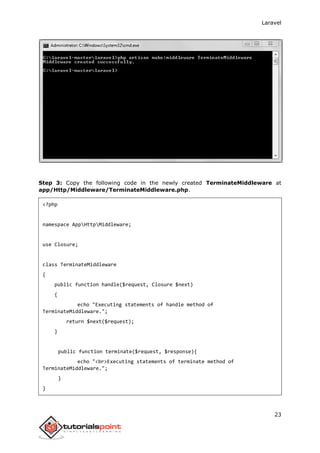
Step 1: Create TerminateMiddleware by executing the below command.
php artisan make:middleware TerminateMiddleware
Step 2: This will produce the following output:
Laravel
23
Step 3: Copy the following code in the newly created TerminateMiddleware at
app/Http/Middleware/TerminateMiddleware.php.
<?php
namespace AppHttpMiddleware;
use Closure;
class TerminateMiddleware
{
public function handle($request, Closure $next)
{
echo "Executing statements of handle method of
TerminateMiddleware.";
return $next($request);
}
public function terminate($request, $response){
echo "<br>Executing statements of terminate method of
TerminateMiddleware.";
}
}
Laravel
24
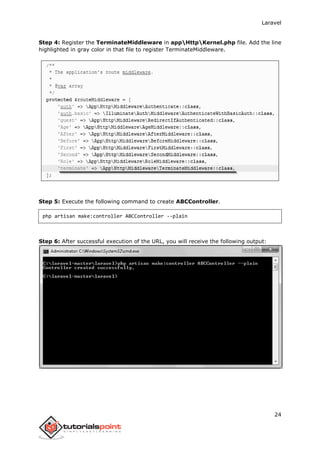
Step 4: Register the TerminateMiddleware in appHttpKernel.php file. Add the line
highlighted in gray color in that file to register TerminateMiddleware.
Step 5: Execute the following command to create ABCController.
php artisan make:controller ABCController --plain
Step 6: After successful execution of the URL, you will receive the following output:
Laravel
25
Step 7: Copy the following code to app/Http/ABCController.php file.
app/Http/ABCController.php
<?php
namespace AppHttpControllers;
use IlluminateHttpRequest;
use AppHttpRequests;
use AppHttpControllersController;
class ABCController extends Controller
{
public function index(){
echo "<br>ABC Controller.";
}
}
Step 8: Add the following line of code in app/Http/routes.php file.
app/Http/routes.php
Route::get('terminate',[
'middleware' => 'terminate',
'uses' => 'ABCController@index',
]);
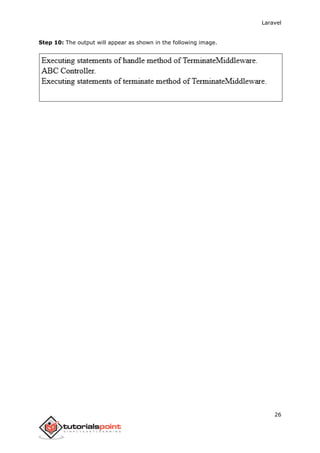
Step 9: Visit the following URL to test the Terminable Middleware.
http://localhost:8000/terminate
Laravel
26
Step 10: The output will appear as shown in the following image.
Laravel
27
BasicControllers
In MVC framework, the letter ‘C’ stands for Controller. It acts as a directing traffic between
Views and Models.
Creating a Controller
Open the command prompt or terminal based on the operating system you are using and
type the following command to create controller using the Artisan CLI (Command Line
Interface).
php artisan make:controller <controller-name> --plain
Replace the <controller-name> with the name of your controller. This will create a plain
constructor as we are passing the argument — plain. If you don’t want to create a plain
constructor, you can simply ignore the argument. The created constructor can be seen at
app/Http/Controllers. You will see that some basic coding has already been done for
you and you can add your custom coding. The created controller can be called from
routes.php by the following syntax.
Route::get(‘base URI’,’controller@method’);
Example
Step 1: Execute the following command to create UserController.
php artisan make:controller UserController --plain
7. Laravel – Controllers
Laravel
28
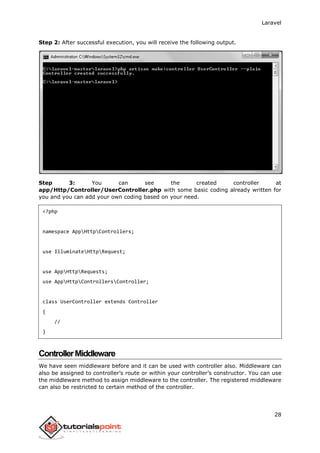
Step 2: After successful execution, you will receive the following output.
Step 3: You can see the created controller at
app/Http/Controller/UserController.php with some basic coding already written for
you and you can add your own coding based on your need.
<?php
namespace AppHttpControllers;
use IlluminateHttpRequest;
use AppHttpRequests;
use AppHttpControllersController;
class UserController extends Controller
{
//
}
ControllerMiddleware
We have seen middleware before and it can be used with controller also. Middleware can
also be assigned to controller’s route or within your controller’s constructor. You can use
the middleware method to assign middleware to the controller. The registered middleware
can also be restricted to certain method of the controller.
Laravel
29
Assigning Middleware to Route
Route::get('profile', [
'middleware' => 'auth',
'uses' => 'UserController@showProfile'
]);
Here we are assigning auth middleware to UserController in profile route.
Assigning Middleware within Controller’s constructor:
<?php
namespace AppHttpControllers;
use IlluminateHttpRequest;
use AppHttpRequests;
use AppHttpControllersController;
class UserController extends Controller
{
public function __construct(){
$this->middleware('auth');
}
}
Here we are assigning auth middleware using the middleware method in the
UserController’s constructor.
Example
Step 1: Add the following lines to the app/Http/routes.php file and save it.
routes.php
<?php
Route::get('/usercontroller/path',[
'middleware' => 'First',
'uses' => 'UserController@showPath'
Laravel
30
]);
Step 2: Create a middleware called FirstMiddleware by executing the following line.
php artisan make:middleware FirstMiddleware
Step 3: Add the following code in the handle method of the newly created FirstMiddleware
at app/Http/Middleware.
FirstMiddleware.php
<?php
namespace AppHttpMiddleware;
use Closure;
class FirstMiddleware
{
public function handle($request, Closure $next)
{
echo '<br>First Middleware';
return $next($request);
}
}
Step 4: Create a middleware called SecondMiddleware by executing the following line.
php artisan make:middleware SecondMiddleware
Laravel
31
Step 5: Add the following code in the handle method of the newly created
SecondMiddleware at app/Http/Middleware.
SecondMiddleware.php
<?php
namespace AppHttpMiddleware;
use Closure;
class SecondMiddleware
{
public function handle($request, Closure $next)
{
echo '<br>Second Middleware';
return $next($request);
}
}
Step 6: Create a controller called UserController by executing the following line.
php artisan make:controller UserController --plain
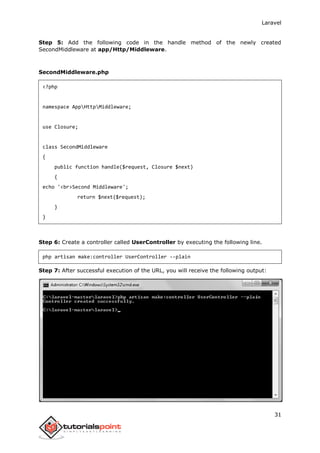
Step 7: After successful execution of the URL, you will receive the following output:
Laravel
32
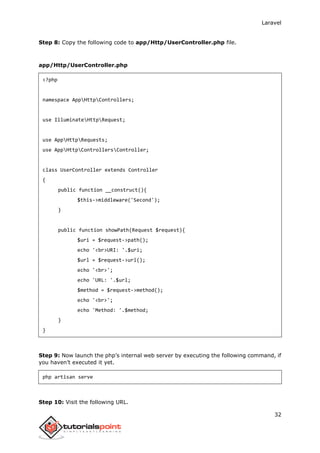
Step 8: Copy the following code to app/Http/UserController.php file.
app/Http/UserController.php
<?php
namespace AppHttpControllers;
use IlluminateHttpRequest;
use AppHttpRequests;
use AppHttpControllersController;
class UserController extends Controller
{
public function __construct(){
$this->middleware('Second');
}
public function showPath(Request $request){
$uri = $request->path();
echo '<br>URI: '.$uri;
$url = $request->url();
echo '<br>';
echo 'URL: '.$url;
$method = $request->method();
echo '<br>';
echo 'Method: '.$method;
}
}
Step 9: Now launch the php’s internal web server by executing the following command, if
you haven’t executed it yet.
php artisan serve
Step 10: Visit the following URL.
Laravel
33
http://localhost:8000/usercontroller/path
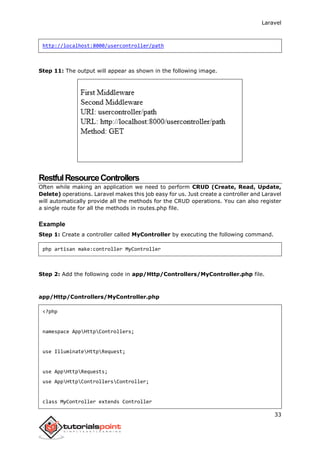
Step 11: The output will appear as shown in the following image.
RestfulResourceControllers
Often while making an application we need to perform CRUD (Create, Read, Update,
Delete) operations. Laravel makes this job easy for us. Just create a controller and Laravel
will automatically provide all the methods for the CRUD operations. You can also register
a single route for all the methods in routes.php file.
Example
Step 1: Create a controller called MyController by executing the following command.
php artisan make:controller MyController
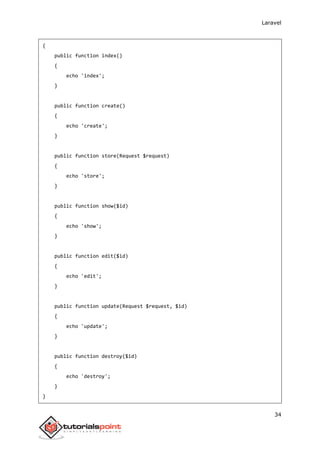
Step 2: Add the following code in app/Http/Controllers/MyController.php file.
app/Http/Controllers/MyController.php
<?php
namespace AppHttpControllers;
use IlluminateHttpRequest;
use AppHttpRequests;
use AppHttpControllersController;
class MyController extends Controller
Laravel
34
{
public function index()
{
echo 'index';
}
public function create()
{
echo 'create';
}
public function store(Request $request)
{
echo 'store';
}
public function show($id)
{
echo 'show';
}
public function edit($id)
{
echo 'edit';
}
public function update(Request $request, $id)
{
echo 'update';
}
public function destroy($id)
{
echo 'destroy';
}
}
Laravel
35
Step 3: Add the following line of code in app/Http/routes.php file.
app/Http/routes.php
Route::resource('my','MyController');
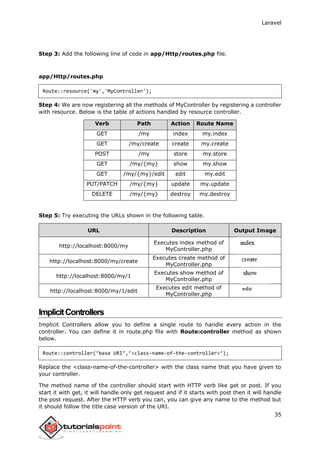
Step 4: We are now registering all the methods of MyController by registering a controller
with resource. Below is the table of actions handled by resource controller.
Verb Path Action Route Name
GET /my index my.index
GET /my/create create my.create
POST /my store my.store
GET /my/{my} show my.show
GET /my/{my}/edit edit my.edit
PUT/PATCH /my/{my} update my.update
DELETE /my/{my} destroy my.destroy
Step 5: Try executing the URLs shown in the following table.
URL Description Output Image
http://localhost:8000/my
Executes index method of
MyController.php
http://localhost:8000/my/create
Executes create method of
MyController.php
http://localhost:8000/my/1
Executes show method of
MyController.php
http://localhost:8000/my/1/edit
Executes edit method of
MyController.php
ImplicitControllers
Implicit Controllers allow you to define a single route to handle every action in the
controller. You can define it in route.php file with Route:controller method as shown
below.
Route::controller(‘base URI’,’<class-name-of-the-controller>’);
Replace the <class-name-of-the-controller> with the class name that you have given to
your controller.
The method name of the controller should start with HTTP verb like get or post. If you
start it with get, it will handle only get request and if it starts with post then it will handle
the post request. After the HTTP verb you can, you can give any name to the method but
it should follow the title case version of the URI.
Laravel
36
Example
Step 1: Execute the below command to create a controller. We have kept the class name
ImplicitController. You can give any name of your choice to the class.
php artisan make:controller ImplicitController --plain
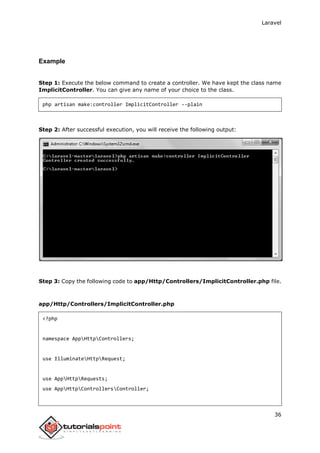
Step 2: After successful execution, you will receive the following output:
Step 3: Copy the following code to app/Http/Controllers/ImplicitController.php file.
app/Http/Controllers/ImplicitController.php
<?php
namespace AppHttpControllers;
use IlluminateHttpRequest;
use AppHttpRequests;
use AppHttpControllersController;
Laravel
37
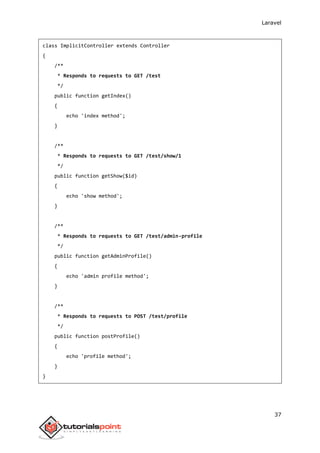
class ImplicitController extends Controller
{
/**
* Responds to requests to GET /test
*/
public function getIndex()
{
echo 'index method';
}
/**
* Responds to requests to GET /test/show/1
*/
public function getShow($id)
{
echo 'show method';
}
/**
* Responds to requests to GET /test/admin-profile
*/
public function getAdminProfile()
{
echo 'admin profile method';
}
/**
* Responds to requests to POST /test/profile
*/
public function postProfile()
{
echo 'profile method';
}
}
Laravel
38
Step 4: Add the following line to app/Http/routes.php file to route the requests to
specified controller.
app/Http/routes.php
Route::controller('test','ImplicitController');
ConstructorInjection
The Laravel service container is used to resolve all Laravel controllers. As a result, you are
able to type-hint any dependencies your controller may need in its constructor. The
dependencies will automatically be resolved and injected into the controller instance.
Example
Step 1: Add the following code to app/Http/routes.php file.
app/Http/routes.php
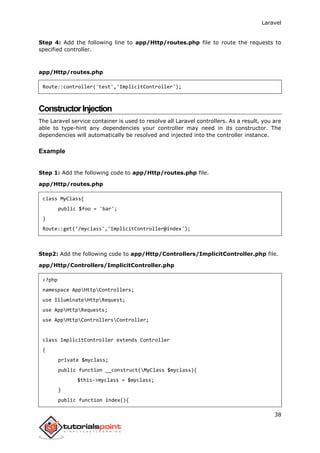
class MyClass{
public $foo = 'bar';
}
Route::get('/myclass','ImplicitController@index');
Step2: Add the following code to app/Http/Controllers/ImplicitController.php file.
app/Http/Controllers/ImplicitController.php
<?php
namespace AppHttpControllers;
use IlluminateHttpRequest;
use AppHttpRequests;
use AppHttpControllersController;
class ImplicitController extends Controller
{
private $myclass;
public function __construct(MyClass $myclass){
$this->myclass = $myclass;
}
public function index(){
Laravel
39
dd($this->myclass);
}
}
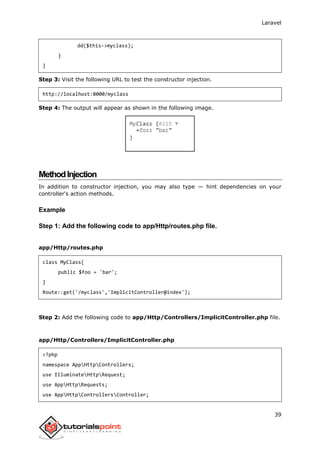
Step 3: Visit the following URL to test the constructor injection.
http://localhost:8000/myclass
Step 4: The output will appear as shown in the following image.
MethodInjection
In addition to constructor injection, you may also type — hint dependencies on your
controller's action methods.
Example
Step 1: Add the following code to app/Http/routes.php file.
app/Http/routes.php
class MyClass{
public $foo = 'bar';
}
Route::get('/myclass','ImplicitController@index');
Step 2: Add the following code to app/Http/Controllers/ImplicitController.php file.
app/Http/Controllers/ImplicitController.php
<?php
namespace AppHttpControllers;
use IlluminateHttpRequest;
use AppHttpRequests;
use AppHttpControllersController;
Laravel
40
class ImplicitController extends Controller
{
public function index(MyClass $myclass){
dd($myclass);
}
}
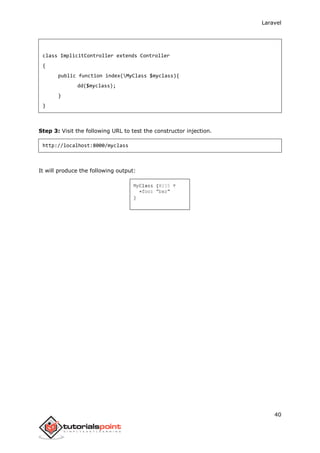
Step 3: Visit the following URL to test the constructor injection.
http://localhost:8000/myclass
It will produce the following output:
Laravel
41
RetrievingtheRequestURI
The “path” method is used to retrieve the requested URI. The “is” method is used to
retrieve the requested URI which matches the particular pattern specified in the argument
of the method. To get the full URL, we can use the “url” method.
Example
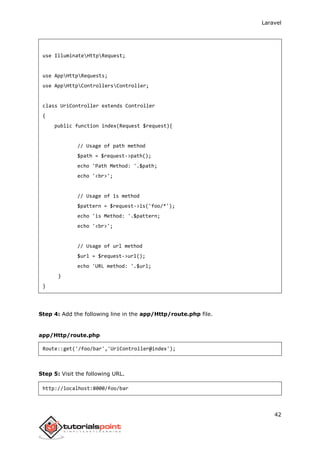
Step 1: Execute the below command to create a new controller called UriController.
php artisan make:controller UriController –plain
Step 2: After successful execution of the URL, you will receive the following output:
Step 3: After creating a controller, add the following code in that file.
app/Http/Controllers/UriController.php
<?php
namespace AppHttpControllers;
8. Laravel — Request
Laravel
42
use IlluminateHttpRequest;
use AppHttpRequests;
use AppHttpControllersController;
class UriController extends Controller
{
public function index(Request $request){
// Usage of path method
$path = $request->path();
echo 'Path Method: '.$path;
echo '<br>';
// Usage of is method
$pattern = $request->is('foo/*');
echo 'is Method: '.$pattern;
echo '<br>';
// Usage of url method
$url = $request->url();
echo 'URL method: '.$url;
}
}
Step 4: Add the following line in the app/Http/route.php file.
app/Http/route.php
Route::get('/foo/bar','UriController@index');
Step 5: Visit the following URL.
http://localhost:8000/foo/bar
Laravel
43
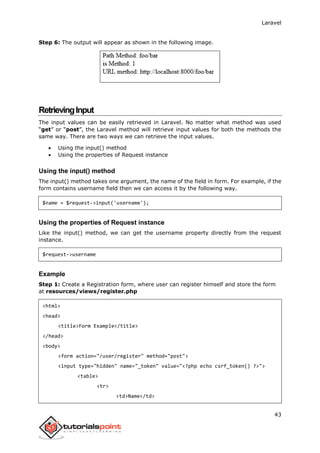
Step 6: The output will appear as shown in the following image.
RetrievingInput
The input values can be easily retrieved in Laravel. No matter what method was used
“get” or “post”, the Laravel method will retrieve input values for both the methods the
same way. There are two ways we can retrieve the input values.
 Using the input() method
 Using the properties of Request instance
Using the input() method
The input() method takes one argument, the name of the field in form. For example, if the
form contains username field then we can access it by the following way.
$name = $request->input('username');
Using the properties of Request instance
Like the input() method, we can get the username property directly from the request
instance.
$request->username
Example
Step 1: Create a Registration form, where user can register himself and store the form
at resources/views/register.php
<html>
<head>
<title>Form Example</title>
</head>
<body>
<form action="/user/register" method="post">
<input type="hidden" name="_token" value="<?php echo csrf_token() ?>">
<table>
<tr>
<td>Name</td>
Laravel
44
<td><input type="text" name="name" /></td>
</tr>
<tr>
<td>Username</td>
<td><input type="text" name="username" /></td>
</tr>
<tr>
<td>Password</td>
<td><input type="text" name="password" /></td>
</tr>
<tr>
<td colspan="2" align="center"><input type="submit"
value="Register" /></td>
</tr>
</table>
</form>
</body>
</html>
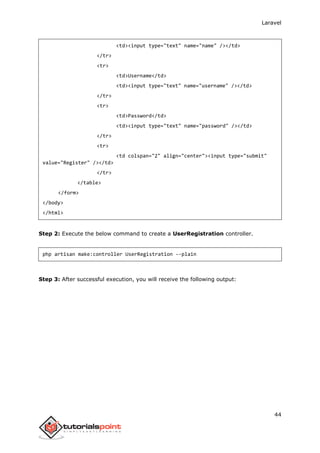
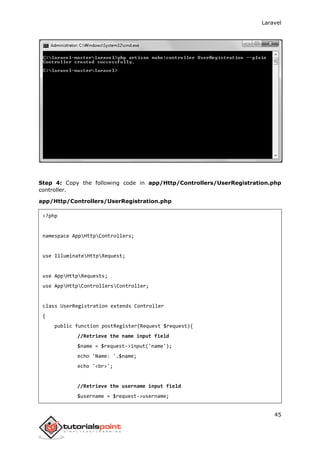
Step 2: Execute the below command to create a UserRegistration controller.
php artisan make:controller UserRegistration --plain
Step 3: After successful execution, you will receive the following output:
Laravel
45
Step 4: Copy the following code in app/Http/Controllers/UserRegistration.php
controller.
app/Http/Controllers/UserRegistration.php
<?php
namespace AppHttpControllers;
use IlluminateHttpRequest;
use AppHttpRequests;
use AppHttpControllersController;
class UserRegistration extends Controller
{
public function postRegister(Request $request){
//Retrieve the name input field
$name = $request->input('name');
echo 'Name: '.$name;
echo '<br>';
//Retrieve the username input field
$username = $request->username;
Laravel
46
echo 'Username: '.$username;
echo '<br>';
//Retrieve the password input field
$password = $request->password;
echo 'Password: '.$password;
}
}
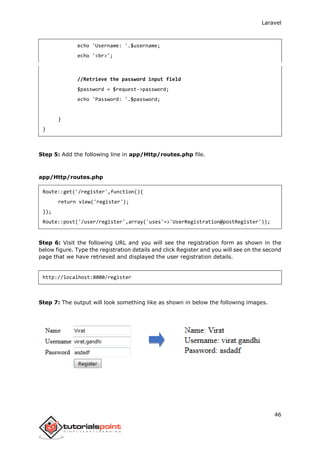
Step 5: Add the following line in app/Http/routes.php file.
app/Http/routes.php
Route::get('/register',function(){
return view('register');
});
Route::post('/user/register',array('uses'=>'UserRegistration@postRegister'));
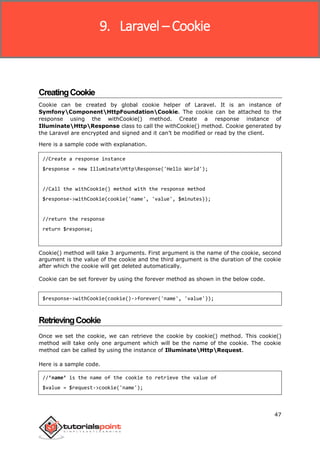
Step 6: Visit the following URL and you will see the registration form as shown in the
below figure. Type the registration details and click Register and you will see on the second
page that we have retrieved and displayed the user registration details.
http://localhost:8000/register
Step 7: The output will look something like as shown in below the following images.
Laravel
47
CreatingCookie
Cookie can be created by global cookie helper of Laravel. It is an instance of
SymfonyComponentHttpFoundationCookie. The cookie can be attached to the
response using the withCookie() method. Create a response instance of
IlluminateHttpResponse class to call the withCookie() method. Cookie generated by
the Laravel are encrypted and signed and it can’t be modified or read by the client.
Here is a sample code with explanation.
//Create a response instance
$response = new IlluminateHttpResponse('Hello World');
//Call the withCookie() method with the response method
$response->withCookie(cookie('name', 'value', $minutes));
//return the response
return $response;
Cookie() method will take 3 arguments. First argument is the name of the cookie, second
argument is the value of the cookie and the third argument is the duration of the cookie
after which the cookie will get deleted automatically.
Cookie can be set forever by using the forever method as shown in the below code.
$response->withCookie(cookie()->forever('name', 'value'));
RetrievingCookie
Once we set the cookie, we can retrieve the cookie by cookie() method. This cookie()
method will take only one argument which will be the name of the cookie. The cookie
method can be called by using the instance of IlluminateHttpRequest.
Here is a sample code.
//’name’ is the name of the cookie to retrieve the value of
$value = $request->cookie('name');
9. Laravel – Cookie
Laravel
48
Example
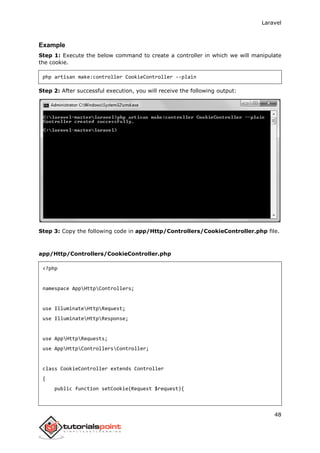
Step 1: Execute the below command to create a controller in which we will manipulate
the cookie.
php artisan make:controller CookieController --plain
Step 2: After successful execution, you will receive the following output:
Step 3: Copy the following code in app/Http/Controllers/CookieController.php file.
app/Http/Controllers/CookieController.php
<?php
namespace AppHttpControllers;
use IlluminateHttpRequest;
use IlluminateHttpResponse;
use AppHttpRequests;
use AppHttpControllersController;
class CookieController extends Controller
{
public function setCookie(Request $request){
Laravel
49
$minutes = 1;
$response = new Response('Hello World');
$response->withCookie(cookie('name', 'virat', $minutes));
return $response;
}
public function getCookie(Request $request){
$value = $request->cookie('name');
echo $value;
}
}
Step 4: Add the following line in app/Http/routes.php file.
app/Http/routes.php
Route::get('/cookie/set','CookieController@setCookie');
Route::get('/cookie/get','CookieController@getCookie');
Step 5: Visit the following URL to set the cookie.
http://localhost:8000/cookie/set
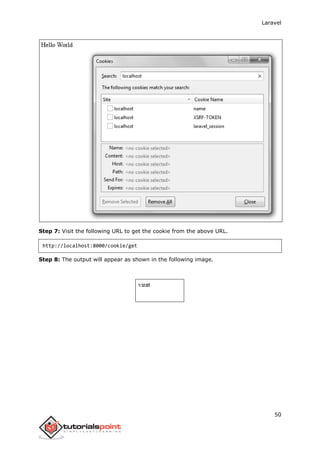
Step 6: The output will appear as shown below. The window appearing in the screenshot
is taken from firefox but depending on your browser, cookie can also be checked from the
cookie option.
Laravel
50
Step 7: Visit the following URL to get the cookie from the above URL.
http://localhost:8000/cookie/get
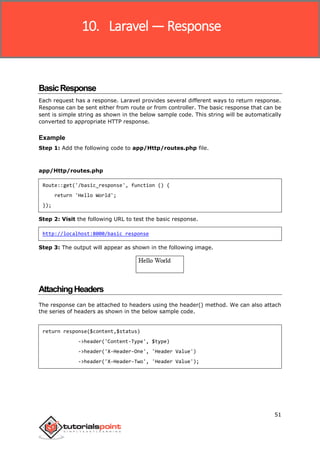
Step 8: The output will appear as shown in the following image.
Laravel
51
BasicResponse
Each request has a response. Laravel provides several different ways to return response.
Response can be sent either from route or from controller. The basic response that can be
sent is simple string as shown in the below sample code. This string will be automatically
converted to appropriate HTTP response.
Example
Step 1: Add the following code to app/Http/routes.php file.
app/Http/routes.php
Route::get('/basic_response', function () {
return 'Hello World';
});
Step 2: Visit the following URL to test the basic response.
http://localhost:8000/basic_response
Step 3: The output will appear as shown in the following image.
AttachingHeaders
The response can be attached to headers using the header() method. We can also attach
the series of headers as shown in the below sample code.
return response($content,$status)
->header('Content-Type', $type)
->header('X-Header-One', 'Header Value')
->header('X-Header-Two', 'Header Value');
10. Laravel — Response
Laravel
52
Example
Step 1: Add the following code to app/Http/routes.php file.
app/Http/routes.php
Route::get('/header',function(){
return response("Hello", 200)->header('Content-Type', 'text/html');
});
Step 2: Visit the following URL to test the basic response.
http://localhost:8000/header
Step 3: The output will appear as shown in the following image.
AttachingCookies
The withcookie() helper method is used to attach cookies. The cookie generated with this
method can be attached by calling withcookie() method with response instance. By default,
all cookies generated by Laravel are encrypted and signed so that they can't be modified
or read by the client.
Example
Step 1: Add the following code to app/Http/routes.php file.
app/Http/routes.php
Route::get('/cookie',function(){
return response("Hello", 200)->header('Content-Type', 'text/html')-
>withcookie('name','Virat Gandhi');
});
Step 2: Visit the following URL to test the basic response.
http://localhost:8000/cookie
Step 3: The output will appear as shown in the following image.
Laravel
53
JSONResponse
JSON response can be sent using the json method. This method will automatically set the
Content-Type header to application/json. The json method will automatically convert the
array into appropriate json response.
Example
Step 1: Add the following line in app/Http/routes.php file.
app/Http/routes.php
Route::get('json',function(){
return response()->json(['name' => 'Virat Gandhi', 'state' => 'Gujarat']);
});
Step 2: Visit the following URL to test the json response.
http://localhost:8000/json
Step 3: The output will appear as shown in the following image.
Laravel
54
UnderstandingViews
In MVC framework, the letter “V” stands for Views. It separates the application logic and
the presentation logic. Views are stored in resources/views directory. Generally, the
view contains the HTML which will be served by the application.
Example
Step 1: Copy the following code and save it at resources/views/test.php
<html>
<body>
<h1>Hello, World</h1>
</body>
</html>
Step 2: Add the following line in app/Http/routes.php file to set the route for the above
view.
app/Http/routes.php
Route::get('/test', function(){
return view('test');
});
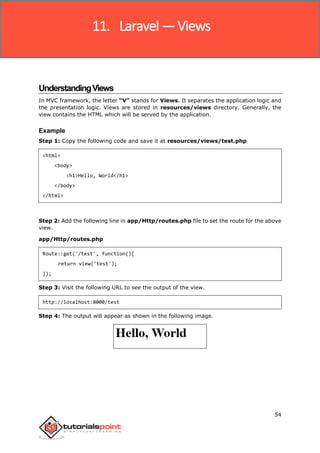
Step 3: Visit the following URL to see the output of the view.
http://localhost:8000/test
Step 4: The output will appear as shown in the following image.
11. Laravel —Views
Laravel
55
PassingDatatoViews
While building application it may be required to pass data to the views. Pass an array to
view helper function. After passing an array, we can use the key to get the value of that
key in the HTML file.
Example
Step 1: Copy the following code and save it at resources/views/test.php
<html>
<body>
<h1><?php echo $name; ?></h1>
</body>
</html>
Step 2: Add the following line in app/Http/routes.php file to set the route for the above
view.
app/Http/routes.php
Route::get('/test', function(){
return view('test',[‘name’=>’Virat Gandhi’]);
});
Step 3: The value of the key name will be passed to test.php file and $name will be
replaced by that value.
Step 4: Visit the following URL to see the output of the view.
http://localhost:8000/test
Step 5: The output will appear as shown in the following image.
SharingDatawithallViews
We have seen how we can pass data to views but at times, there is a need to pass data
to all the views. Laravel makes this simpler. There is a method called “share()” which
can be used for this purpose. The share() method will take two arguments, key and value.
Typically share() method can be called from boot method of service provider. We can use
any service provider, AppServiceProvider or our own service provider.
Laravel
56
Example
Step 1: Add the following line in app/Http/routes.php file.
app/Http/routes.php
Route::get('/test', function(){
return view('test');
});
Route::get('/test2', function(){
return view('test2');
});
Step 2: Create two view files — test.php and test2.php with the same code. These are
the two files which will share data. Copy the following code in both the files.
resources/views/test.php & resources/views/test2.php
<html>
<body>
<h1><?php echo $name; ?></h1>
</body>
</html>
Step 3: Change the code of boot method in the file
app/Providers/AppServiceProvider.php as shown below. (Here, we have used share
method and the data that we have passed will be shared with all the views.)
app/Providers/AppServiceProvider.php
<?php
namespace AppProviders;
use IlluminateSupportServiceProvider;
class AppServiceProvider extends ServiceProvider
{
/**
* Bootstrap any application services.
*
* @return void
*/
Laravel
57
public function boot()
{
view()->share('name', 'Virat Gandhi');
}
/**
* Register any application services.
*
* @return void
*/
public function register()
{
//
}
}
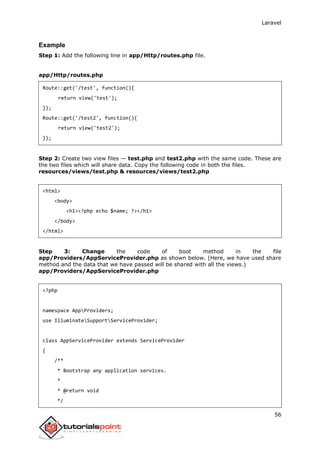
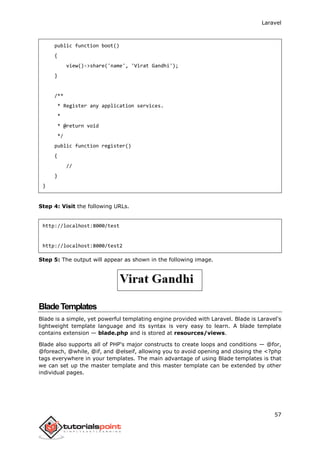
Step 4: Visit the following URLs.
http://localhost:8000/test
http://localhost:8000/test2
Step 5: The output will appear as shown in the following image.
BladeTemplates
Blade is a simple, yet powerful templating engine provided with Laravel. Blade is Laravel's
lightweight template language and its syntax is very easy to learn. A blade template
contains extension — blade.php and is stored at resources/views.
Blade also supports all of PHP's major constructs to create loops and conditions — @for,
@foreach, @while, @if, and @elseif, allowing you to avoid opening and closing the <?php
tags everywhere in your templates. The main advantage of using Blade templates is that
we can set up the master template and this master template can be extended by other
individual pages.
Laravel
58
Example
Step 1: Create a master template and save it at
resources/views/layouts/master.blade.php.
<html>
<head>
<title>@yield('title')</title>
</head>
<body>
@section('sidebar')
This is the master sidebar.
@show
<div class="container">
@yield('content')
</div>
</body>
</html>
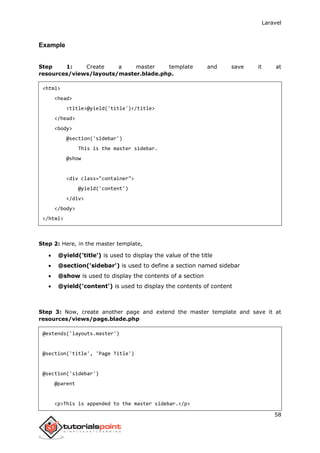
Step 2: Here, in the master template,
 @yield('title') is used to display the value of the title
 @section('sidebar') is used to define a section named sidebar
 @show is used to display the contents of a section
 @yield('content') is used to display the contents of content
Step 3: Now, create another page and extend the master template and save it at
resources/views/page.blade.php
@extends('layouts.master')
@section('title', 'Page Title')
@section('sidebar')
@parent
<p>This is appended to the master sidebar.</p>
Laravel
59
@endsection
@section('content')
<h2>{{$name}}</h2>
<p>This is my body content.</p>
@endsection
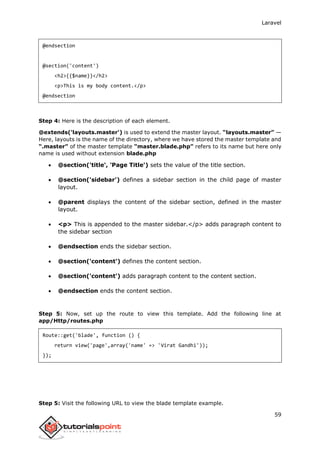
Step 4: Here is the description of each element.
@extends('layouts.master') is used to extend the master layout. “layouts.master” —
Here, layouts is the name of the directory, where we have stored the master template and
“.master” of the master template “master.blade.php” refers to its name but here only
name is used without extension blade.php
 @section('title', 'Page Title') sets the value of the title section.
 @section('sidebar') defines a sidebar section in the child page of master
layout.
 @parent displays the content of the sidebar section, defined in the master
layout.
 <p> This is appended to the master sidebar.</p> adds paragraph content to
the sidebar section
 @endsection ends the sidebar section.
 @section('content') defines the content section.
 @section('content') adds paragraph content to the content section.
 @endsection ends the content section.
Step 5: Now, set up the route to view this template. Add the following line at
app/Http/routes.php
Route::get('blade', function () {
return view('page',array('name' => 'Virat Gandhi'));
});
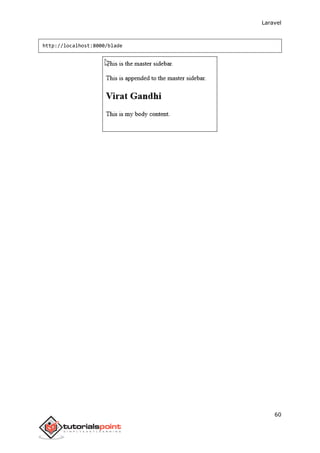
Step 5: Visit the following URL to view the blade template example.
Laravel
60
http://localhost:8000/blade
Laravel
61
RedirectingtoNamedRoutes
Named route is used to give specific name to a route. The name can be assigned using
the “as” array key.
Route::get('user/profile', ['as' => 'profile', function () {
//
}]);
Note: Here, we have given the name “profile” to a route “user/profile”.
Example
Step 1: Create a view called test.php and save it at resources/views/test.php.
<html>
<body>
<h1>Example of Redirecting to Named Routes</h1>
</body>
</html>
Step 2: In routes.php, we have set up the route for test.php file. We have renamed it to
“testing”. We have also set up another route “redirect” which will redirect the request
to the named route “testing”.
app/Http/routes.php
Route::get('/test', ['as'=>'testing',function(){
return view('test2');
}]);
Route::get('redirect',function(){
return redirect()->route('testing');
});
Step 3: Visit the following URL to test the named route example.
http://localhost:8000/redirect
Step 4: After execution of the above URL, you will be redirected to
http://localhost:8000/test as we are redirecting to the named route “testing”.
12. Laravel — Redirections
Laravel
62
Step 5: After successful execution of the URL, you will receive the following output:
RedirectingtoControllerActions
Not only named route but we can also redirect to controller actions. We need to simply
pass the controller and name of the action to the action method as shown in the following
example. If you want to pass a parameter, you can pass it as second argument of action
method.
return redirect()->action(‘NameOfController@methodName’,[parameters]);
Example
Step 1: Execute the below command to create a controller called RedirectController.
php artisan make:controller RedirectController --plain
Step 2: After successful execution, you will receive the following output:
Laravel
63
Step 3: Copy the following code to file app/Http/Controllers/RedirectController.php
app/Http/Controllers/RedirectController.php
<?php
namespace AppHttpControllers;
use IlluminateHttpRequest;
use AppHttpRequests;
use AppHttpControllersController;
class RedirectController extends Controller
{
public function index(){
echo "Redirecting to controller's action.";
}
}
Step 4: Add the following lines in app/Http/routes.php.
app/Http/routes.php
Route::get('rr','RedirectController@index');
Route::get('/redirectcontroller',function(){
return redirect()->action('RedirectController@index');
});
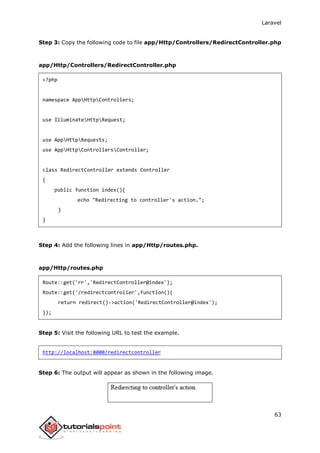
Step 5: Visit the following URL to test the example.
http://localhost:8000/redirectcontroller
Step 6: The output will appear as shown in the following image.
Laravel
64
ConnectingtoDatabase
Laravel has made processing with database very easy. Laravel currently supports following
4 databases:
 MySQL
 Postgres
 SQLite
 SQL Server
The query to the database can be fired using raw SQL, the fluent query builder, and the
Eloquent ORM. To understand the all CRUD (Create, Read, Update, Delete) operations with
Laravel, we will use simple student management system.
Configure the database in config/database.php file and create the college database with
structure in MySQL as shown in the following table.
Database: College
Table: student
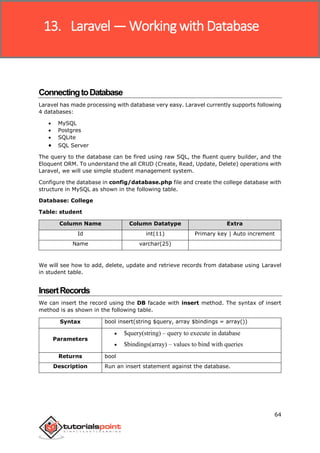
Column Name Column Datatype Extra
Id int(11) Primary key | Auto increment
Name varchar(25)
We will see how to add, delete, update and retrieve records from database using Laravel
in student table.
InsertRecords
We can insert the record using the DB facade with insert method. The syntax of insert
method is as shown in the following table.
Syntax bool insert(string $query, array $bindings = array())
Parameters
 $query(string) – query to execute in database
 $bindings(array) – values to bind with queries
Returns bool
Description Run an insert statement against the database.
13. Laravel —Working with Database
Laravel
65
Example
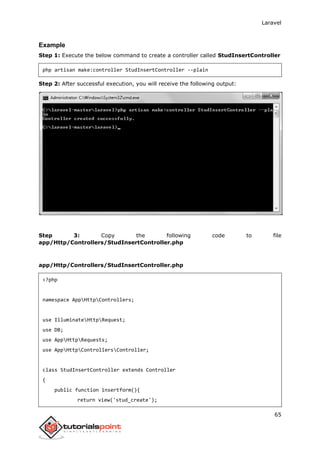
Step 1: Execute the below command to create a controller called StudInsertController
php artisan make:controller StudInsertController --plain
Step 2: After successful execution, you will receive the following output:
Step 3: Copy the following code to file
app/Http/Controllers/StudInsertController.php
<?php
namespace AppHttpControllers;
use IlluminateHttpRequest;
use DB;
use AppHttpRequests;
use AppHttpControllersController;
class StudInsertController extends Controller
{
public function insertform(){
return view('stud_create');
Laravel
66
}
public function insert(Request $request){
$name = $request->input('stud_name');
DB::insert('insert into student (name) values(?)',[$name]);
echo "Record inserted successfully.<br/>";
echo '<a href="/insert">Click Here</a> to go back.';
}
}
Step 4: Create a view file called resources/views/stud_create.php and copy the
following code in that file.
resources/views/stud_create.php
<html>
<head><title>Student Management | Add</title></head>
<body>
<form action="/create" method="post">
<input type="hidden" name="_token" value="<?php echo csrf_token(); ?>">
<table>
<tr>
<td>Name</td>
<td><input type='text' name='stud_name' /></td>
</tr>
<tr>
<td colspan='2'><input type='submit' value="Add student" /></td>
</tr>
</table>
</form>
</body>
</html>
Step 5: Add the following lines in app/Http/routes.php.
Laravel
67
app/Http/routes.php
Route::get('insert','StudInsertController@insertform');
Route::post('create','StudInsertController@insert');
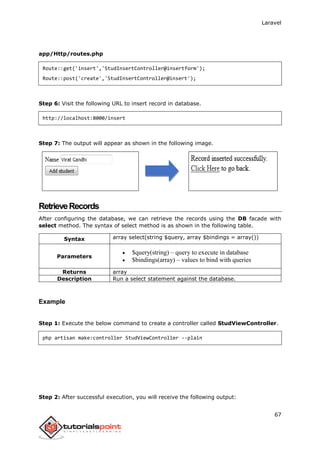
Step 6: Visit the following URL to insert record in database.
http://localhost:8000/insert
Step 7: The output will appear as shown in the following image.
RetrieveRecords
After configuring the database, we can retrieve the records using the DB facade with
select method. The syntax of select method is as shown in the following table.
Syntax array select(string $query, array $bindings = array())
Parameters
 $query(string) – query to execute in database
 $bindings(array) – values to bind with queries
Returns array
Description Run a select statement against the database.
Example
Step 1: Execute the below command to create a controller called StudViewController.
php artisan make:controller StudViewController --plain
Step 2: After successful execution, you will receive the following output:
Laravel
68
Step 3: Copy the following code to file
app/Http/Controllers/StudViewController.php
<?php
namespace AppHttpControllers;
use IlluminateHttpRequest;
use DB;
use AppHttpRequests;
use AppHttpControllersController;
class StudViewController extends Controller
{
public function index(){
$users = DB::select('select * from student');
return view('stud_view',['users'=>$users]);
}
}
Step 4: Create a view file called resources/views/stud_view.blade.php and copy the
following code in that file.
Laravel
69
resources/views/ stud_view.blade.php
<html>
<head><title>View Student Records</title></head>
<body>
<table border=1>
<tr>
<td>ID</td>
<td>Name</td>
</tr>
@foreach ($users as $user)
<tr>
<td>{{ $user->id }}</td>
<td>{{ $user->name }}</td>
</tr>
@endforeach
</table>
</body>
</html>
Step 5: Add the following lines in app/Http/routes.php.
app/Http/routes.php
Route::get('view-records','StudViewController@index');
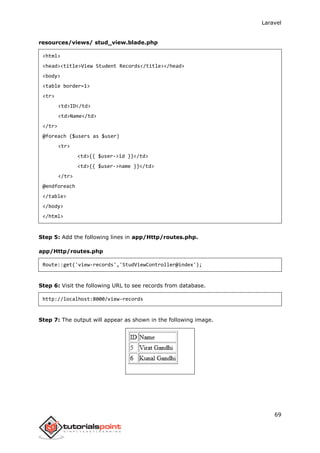
Step 6: Visit the following URL to see records from database.
http://localhost:8000/view-records
Step 7: The output will appear as shown in the following image.
Laravel
70
UpdateRecords
We can update the records using the DB facade with update method. The syntax of update
method is as shown in the following table.
Syntax int update(string $query, array $bindings = array())
Parameters
 $query(string) – query to execute in database
 $bindings(array) – values to bind with queries
Returns int
Description Run an update statement against the database.
Example
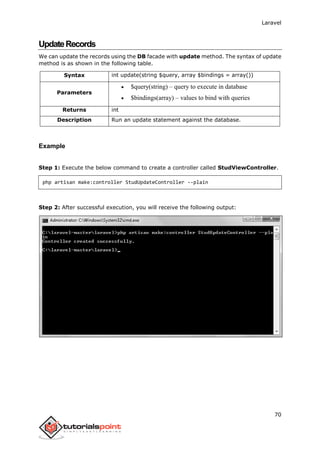
Step 1: Execute the below command to create a controller called StudViewController.
php artisan make:controller StudUpdateController --plain
Step 2: After successful execution, you will receive the following output:
Laravel
71
Step 3: Copy the following code to file app/Http/Controllers/
StudUpdateController.php
app/Http/Controllers/StudUpdateController.php
<?php
namespace AppHttpControllers;
use IlluminateHttpRequest;
use DB;
use AppHttpRequests;
use AppHttpControllersController;
class StudUpdateController extends Controller
{
public function index(){
$users = DB::select('select * from student');
return view('stud_edit_view',['users'=>$users]);
}
public function show($id)
{
$users = DB::select('select * from student where id = ?',[$id]);
return view('stud_update',['users'=>$users]);
}
public function edit(Request $request,$id)
{
$name = $request->input('stud_name');
DB::update('update student set name = ? where id = ?',[$name,$id]);
echo "Record updated successfully.<br/>";
echo '<a href="/edit-records">Click Here</a> to go back.';
}
}
Laravel
72
Step 4: Create a view file called resources/views/stud_edit_view.blade.php and
copy the following code in that file.
resources/views/ stud_edit_view.blade.php
<html>
<head><title>View Student Records</title></head>
<body>
<table border="1">
<tr>
<td>ID</td>
<td>Name</td>
<td>Edit</td>
</tr>
@foreach ($users as $user)
<tr>
<td>{{ $user->id }}</td>
<td>{{ $user->name }}</td>
<td><a href='edit/{{ $user->id }}'>Edit</a></td>
</tr>
@endforeach
</table>
</body>
</html>
Step 5: Create another view file called resources/views/stud_update.php and copy
the following code in that file.
resources/views/stud_update.php
<html>
<head><title>Student Management | Edit</title></head>
<body>
<form action="/edit/<?php echo $users[0]->id; ?>" method="post">
<input type="hidden" name="_token" value="<?php echo csrf_token(); ?>">
<table>
<tr>
<td>Name</td>
<td><input type='text' name='stud_name' value='<?php echo
$users[0]->name; ?>' /></td>
Laravel
73
</tr>
<tr>
<td colspan='2'><input type='submit' value="Update student" /></td>
</tr>
</table>
</form>
</body>
</html>
Step 6: Add the following lines in app/Http/routes.php.
app/Http/routes.php
Route::get('edit-records','StudUpdateController@index');
Route::get('edit/{id}','StudUpdateController@show');
Route::post('edit/{id}','StudUpdateController@edit');
Step 7: Visit the following URL to update records in database.
http://localhost:8000/edit-records
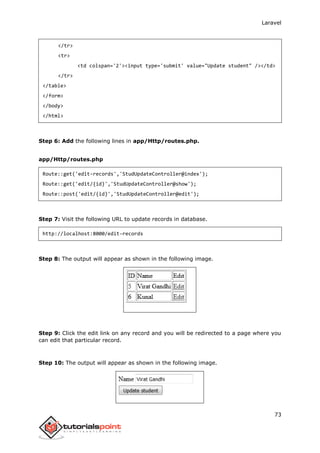
Step 8: The output will appear as shown in the following image.
Step 9: Click the edit link on any record and you will be redirected to a page where you
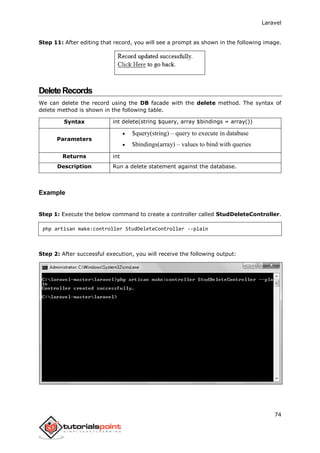
can edit that particular record.
Step 10: The output will appear as shown in the following image.
Laravel
74
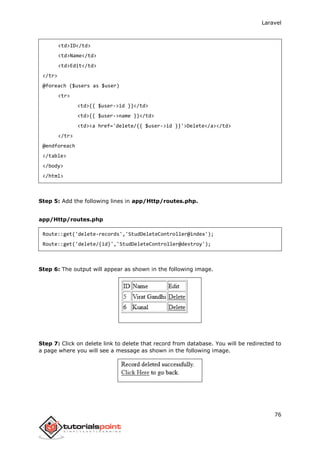
Step 11: After editing that record, you will see a prompt as shown in the following image.
DeleteRecords
We can delete the record using the DB facade with the delete method. The syntax of
delete method is shown in the following table.
Syntax int delete(string $query, array $bindings = array())
Parameters
 $query(string) – query to execute in database
 $bindings(array) – values to bind with queries
Returns int
Description Run a delete statement against the database.
Example
Step 1: Execute the below command to create a controller called StudDeleteController.
php artisan make:controller StudDeleteController --plain
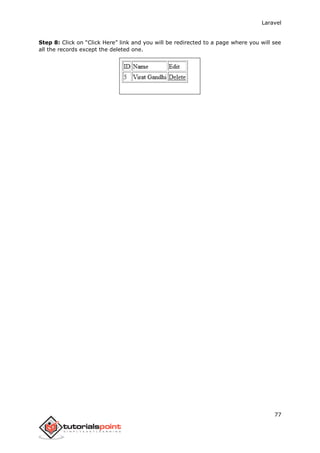
Step 2: After successful execution, you will receive the following output:
Laravel
75
Step 3: Copy the following code to file
app/Http/Controllers/StudDeleteController.php
<?php
namespace AppHttpControllers;
use IlluminateHttpRequest;
use DB;
use AppHttpRequests;
use AppHttpControllersController;
class StudDeleteController extends Controller
{
public function index(){
$users = DB::select('select * from student');
return view('stud_delete_view',['users'=>$users]);
}
public function destroy($id)
{
DB::delete('delete from student where id = ?',[$id]);
echo "Record deleted successfully.<br/>";
echo '<a href="/delete-records">Click Here</a> to go back.';
}
}
Step 4: Create a view file called resources/views/stud_delete_view.blade.php and
copy the following code in that file.
resources/views/stud_delete_view.blade.php
<html>
<head><title>View Student Records</title></head>
<body>
<table border="1">
<tr>
Laravel
76
<td>ID</td>
<td>Name</td>
<td>Edit</td>
</tr>
@foreach ($users as $user)
<tr>
<td>{{ $user->id }}</td>
<td>{{ $user->name }}</td>
<td><a href='delete/{{ $user->id }}'>Delete</a></td>
</tr>
@endforeach
</table>
</body>
</html>
Step 5: Add the following lines in app/Http/routes.php.
app/Http/routes.php
Route::get('delete-records','StudDeleteController@index');
Route::get('delete/{id}','StudDeleteController@destroy');
Step 6: The output will appear as shown in the following image.
Step 7: Click on delete link to delete that record from database. You will be redirected to
a page where you will see a message as shown in the following image.
Laravel
77
Step 8: Click on “Click Here” link and you will be redirected to a page where you will see
all the records except the deleted one.
Laravel
78
Errors
A project while underway, is borne to have a few errors. Errors and exception handling is
already configured for you when you start a new Laravel project. Normally, in a local
environment we need to see errors for debugging purposes. We need to hide these errors
from users in production environment. This can be achieved with the variable
APP_DEBUG set in the environment file .env stored at the root of the application.
For local environment the value of APP_DEBUG should be true but for production it needs
to be set to false to hide errors.
Note: After changing the APP_DEBUG variable, restart the Laravel server.
Logging
Logging is an important mechanism by which system can log errors that are generated. It
is useful to improve the reliability of the system. Laravel supports different logging modes
like single, daily, syslog, and errorlog modes. You can set these modes in config/app.php
file.
'log' => 'daily'
You can see the generated log entries in storage/logs/laravel.log file.
14. Laravel — Errors and Logging
Laravel
79
Laravel provides various in built tags to handle HTML forms easily and securely. All the
major elements of HTML are generated using Laravel. To support this, we need to add
HTML package to Laravel using composer.
Example 1
Step 1: Execute the following command to proceed with the same.
composer require illuminate/html
Step 2: This will add HTML package to Laravel as shown in the following image.
15. Laravel – Forms
Laravel
80
Step 3: Now, we need to add this package to Laravel configuration file which is stored at
config/app.php. Open this file and you will see a list of Laravel service providers as
shown in the following image. Add HTML service provider as indicated in the outlined box
in the following image.
Laravel
81
Step 4: Add aliases in the same file for HTML and Form. Notice the two lines indicated in
the outlined box in the following image and add those two lines.
Laravel
82
Step 5: Now everything is setup. Let’s see how we can use various HTML elements using
Laravel tags.
Opening a Form
{{ Form::open(array('url' => 'foo/bar')) }}
//
{{ Form::close() }}
Generating a Label Element
echo Form::label('email', 'E-Mail Address');
Generating a Text Input
echo Form::text('username');
Specifying a Default Value
echo Form::text('email', 'example@gmail.com');
Generating a Password Input
echo Form::password('password');
Generating a File Input
echo Form::file('image');
Generating a Checkbox Or Radio Input
echo Form::checkbox('name', 'value');
echo Form::radio('name', 'value');
Generating a Checkbox Or Radio Input That Is Checked
echo Form::checkbox('name', 'value', true);
echo Form::radio('name', 'value', true);
Laravel
83
Generating a Drop-Down List
echo Form::select('size', array('L' => 'Large', 'S' => 'Small'));
Generating A Submit Button
echo Form::submit('Click Me!');
Example 2
Step 1: Copy the following code to create a view called resources/views/form.php.
resources/views/form.php
<html>
<body>
<?php
echo Form::open(array('url' => 'foo/bar'));
echo Form::text('username','Username');
echo '<br/>';
echo Form::text('email', 'example@gmail.com');
echo '<br/>';
echo Form::password('password');
echo '<br/>';
echo Form::checkbox('name', 'value');
echo '<br/>';
echo Form::radio('name', 'value');
echo '<br/>';
echo Form::file('image');
echo '<br/>';
echo Form::select('size', array('L' => 'Large', 'S' =>
'Small'));
echo '<br/>';
echo Form::submit('Click Me!');
echo Form::close();
?>
</body>
Laravel
84
</html>
Step 2: Add the following line in app/Http/routes.php to add a route for view form.php
app/Http/routes.php
Route::get('/form',function(){
return view('form');
});
Step 3: Visit the following URL to see the form.
http://localhost:8000/form
Step 4: The output will appear as shown in the following image.
Laravel
85
Localization feature of Laravel supports different language to be used in application. You
need to store all the strings of different language in a file and these files are stored at
resources/views directory. You should create a separate directory for each supported
language. All the language files should return an array of keyed strings as shown below.
<?php
return [
'welcome' => 'Welcome to the application'
];
Example
Step 1: Create 3 files for languages — English, French, and German. Save English file
at resources/lang/en/lang.php
<?php
return [
'msg' => 'Laravel Internationalization example.'
];
?>
Step 2: Save French file at resources/lang/fr/lang.php.
<?php
return [
'msg' => 'Exemple Laravel internationalisation.'
];
?>
Step 3: Save German file at resources/lang/de/lang.php.
<?php
return [
'msg' => 'Laravel Internationalisierung Beispiel.'
];
?>
16. Laravel – Localization
Laravel
86
Step 4: Create a controller called LocalizationController by executing the following
command.
php artisan make:controller LocalizationController --plain
Step 5: After successful execution, you will receive the following output:
Step 6: Copy the following code to file
app/Http/Controllers/LocalizationController.php
<?php
namespace AppHttpControllers;
use IlluminateHttpRequest;
use AppHttpRequests;
use AppHttpControllersController;
class LocalizationController extends Controller
{
public function index(Request $request,$locale){
Laravel
87
//set’s application’s locale
app()->setLocale($locale);
//Gets the translated message and displays it
echo trans('lang.msg');
}
}
Step 7: Add a route for LocalizationController in app/Http/routes.php file. Notice that
we are passing {locale} argument after localization/ which we will use to see output in
different language.
app/Http/routes.php
Route::get('localization/{locale}','LocalizationController@index');
Step 8: Now, let us visit the different URLs to see all different languages. Execute the
below URL to see output in English language.
http://localhost:8000/localization/en
Step 9: The output will appear as shown in the following image.
Step 10: Execute the below URL to see output in French language.
http://localhost:8000/localization/fr
Step 11: The output will appear as shown in the following image.
Step 12: Execute the below URL to see output in German language.
Laravel
88
http://localhost:8000/localization/de
Step 13: The output will appear as shown in the following image.
Laravel
89
Sessions are used to store information about the user across the requests. Laravel
provides various drivers like file, cookie, apc, array, Memcached, Redis, and
database to handle session data. By default, file driver is used because it is lightweight.
Session can be configured in the file stored at config/session.php.
AccessingSessionData
To access the session data, we need an instance of session which can be accessed via
HTTP request. After getting the instance, we can use the get() method, which will take
one argument, “key”, to get the session data.
$value = $request->session()->get('key');
You can use all() method to get all session data instead of get() method.
StoringSessionData
Data can be stored in session using the put() method. The put() method will take two
arguments, the “key” and the “value”.
$request->session()->put('key', 'value');
DeletingSessionData
The forget() method is used to delete an item from the session. This method will take
“key” as the argument.
$request->session()->forget('key');
Use flush() method instead of forget() method to delete all session data. Use the pull()
method to retrieve data from session and delete it afterwards. The pull() method will also
take “key” as the argument. The difference between the forget() and the pull() method
is that forget() method will not return the value of the session and pull() method will
return it and delete that value from session.
Example
Step 1: Create a controller called SessionController by executing the following
command.
php artisan make:controller SessionController --plain
17. Laravel — Session
Laravel
90
Step 2: After successful execution, you will receive the following output:
Step 3: Copy the following code in a file at
app/Http/Controllers/SessionController.php.
app/Http/Controllers/SessionController.php
<?php
namespace AppHttpControllers;
use IlluminateHttpRequest;
use AppHttpRequests;
use AppHttpControllersController;
class SessionController extends Controller
{
public function accessSessionData(Request $request){
if($request->session()->has('my_name'))
echo $request->session()->get('my_name');
else
echo 'No data in the session';
}
Laravel
91
public function storeSessionData(Request $request){
$request->session()->put('my_name','Virat Gandhi');
echo "Data has been added to session";
}
public function deleteSessionData(Request $request){
$request->session()->forget('my_name');
echo "Data has been removed from session.";
}
}
Step 4: Add the following lines at app/Http/routes.php file.
app/Http/routes.php
Route::get('session/get','SessionController@accessSessionData');
Route::get('session/set','SessionController@storeSessionData');
Route::get('session/remove','SessionController@deleteSessionData');
Step 5: Visit the following URL to set data in session.
http://localhost:8000/session/set
Step 6: The output will appear as shown in the following image.
Step 7: Visit the following URL to get data from session.
http://localhost:8000/session/get
Step 8: The output will appear as shown in the following image.
Laravel
92
Step 9: Visit the following URL to remove session data.
http://localhost:8000/session/remove
Step 8: You will see a message as shown in the following image.
Laravel
93
Validation is the most important aspect while designing an application. It validates the
incoming data. By default, base controller class uses a ValidatesRequests trait which
provides a convenient method to validate incoming HTTP requests with a variety of
powerful validation rules.
Available Validation Rules in Laravel
Accepted Active URL After (Date)
Alpha Alpha Dash Alpha Numeric
Array Before (Date) Between
Boolean Confirmed Date
Date Format Different Digits
Digits Between E-Mail Exists (Database)
Image (File) In Integer
IP Address JSON Max
MIME Types(File) Min Not In
Numeric Regular Expression Required
Required If Required Unless Required With
Required With All Required Without Required Without All
Same Size String
Timezone Unique (Database) URL
Laravel will always check for errors in the session data, and automatically bind them to
the view if they are available. So, it is important to note that a $errors variable will always
be available in all of your views on every request, allowing you to conveniently assume
the $errors variable is always defined and can be safely used. The $errors variable will
be an instance of IlluminateSupportMessageBag. Error message can be displayed
in view file by adding the code as shown below.
@if (count($errors) > 0)
<div class="alert alert-danger">
<ul>
@foreach ($errors->all() as $error)
<li>{{ $error }}</li>
@endforeach
</ul>
</div>
@endif
18. Laravel – Validation
Laravel
94
Example
Step 1: Create a controller called ValidationController by executing the following
command.
php artisan make:controller ValidationController --plain
Step 2: After successful execution, you will receive the following output:
Step 3: Copy the following code in app/Http/Controllers/ValidationController.php
file.
app/Http/Controllers/ValidationController.php
<?php
namespace AppHttpControllers;
use IlluminateHttpRequest;
use AppHttpRequests;
use AppHttpControllersController;
class ValidationController extends Controller
{
Laravel
95
public function showform(){
return view('login');
}
public function validateform(Request $request){
print_r($request->all());
$this->validate($request,[
'username'=>'required|max:8',
'password'=>'required'
]);
}
}
Step 4: Create a view file called resources/views/login.blade.php and copy the
following code in that file.
resources/views/login.blade.php
<html>
<head>
<title>Login Form</title>
</head>
<body>
@if (count($errors) > 0)
<div class="alert alert-danger">
<ul>
@foreach ($errors->all() as $error)
<li>{{ $error }}</li>
@endforeach
</ul>
</div>
@endif
<?php
echo Form::open(array('url'=>'/validation'));
?>
<table border='1'>
<tr>
Laravel
96
<td align='center' colspan='2'>Login</td>
</tr>
<tr>
<td>Username</td>
<td><?php echo Form::text('username'); ?></td>
</tr>
<tr>
<td>Password</td>
<td><?php echo Form::password('password'); ?></td>
</tr>
<tr>
<td align='center' colspan='2'><?php echo
Form::submit('Login'); ?></td>
</tr>
</table>
<?php
echo Form::close();
?>
</body>
</html>
Step 5: Add the following lines in app/Http/routes.php.
app/Http/routes.php
Route::get('/validation','ValidationController@showform');
Route::post('/validation','ValidationController@validateform');
Step 6: Visit the following URL to test the validation.
http://localhost:8000/validation
Laravel
97
Step 7: Click the “Login” button without entering anything in the text field. The output
will be as shown in the following image.
Laravel
98
Uploading Files in Laravel is very easy. All we need to do is to create a view file where a
user can select a file to be uploaded and a controller where uploaded files will be processed.
In a view file, we need to generate a file input by adding the following line of code.
Form::file('file_name');
In Form::open(), we need to add ‘files’=>’true’ as shown below. This facilitates the form
to be uploaded in multiple parts.
Form::open(array('url' => '/uploadfile','files'=>'true'));
Example
Step 1: Create a view file called resources/views/uploadfile.php and copy the
following code in that file.
resources/views/uploadfile.php
<html>
<body>
<?php
echo Form::open(array('url' =>
'/uploadfile','files'=>'true'));
echo 'Select the file to upload.';
echo Form::file('image');
echo Form::submit('Upload File');
echo Form::close();
?>
</body>
</html>
Step 2: Create a controller called UploadFileController by executing the following
command.
php artisan make:controller UploadFileController --plain
19. Laravel – File Uploading
Laravel
99
Step 3: After successful execution, you will receive the following output:
Step 4: Copy the following code in app/Http/Controllers/UploadFileController.php
file.
app/Http/Controllers/UploadFileController.php
<?php
namespace AppHttpControllers;
use IlluminateHttpRequest;
use AppHttpRequests;
use AppHttpControllersController;
class UploadFileController extends Controller
{
public function index(){
return view('uploadfile');
}
public function showUploadFile(Request $request){
$file = $request->file('image');
//Display File Name
echo 'File Name: '.$file->getClientOriginalName();
Laravel
100
echo '<br>';
//Display File Extension
echo 'File Extension: '.$file->getClientOriginalExtension();
echo '<br>';
//Display File Real Path
echo 'File Real Path: '.$file->getRealPath();
echo '<br>';
//Display File Size
echo 'File Size: '.$file->getSize();
echo '<br>';
//Display File Mime Type
echo 'File Mime Type: '.$file->getMimeType();
//Move Uploaded File
$destinationPath = 'uploads';
$file->move($destinationPath,$file->getClientOriginalName());
}
}
Step 5: Add the following lines in app/Http/routes.php.
app/Http/routes.php
Route::get('/uploadfile','UploadFileController@index');
Route::post('/uploadfile','UploadFileController@showUploadFile');
Step 6: Visit the following URL to test the upload file functionality.
http://localhost:8000/uploadfile
Laravel
101
Step 7: You will receive a prompt as shown in the following image.
Laravel
102
Laravel uses free feature-rich library “SwiftMailer” to send emails. Using the library
function, we can easily send emails without too many hassles. The e-mail templates are
loaded in the same way as views, which means you can use the Blade syntax and inject
data into your templates. The following is the syntax of the send function.
Syntax void send(string|array $view, array $data, Closure|string $callback)
Parameters
 $view(string|array) – name of the view that contains email
message
 $data(array) – array of data to pass to view
 $callback – a Closure callback which receives a message
instance, allowing you to customize the recipients, subject, and
other aspects of the mail message
Returns nothing
Description Sends email.
In the third argument, the $callback closure received message instance and with that
instance we can also call the following functions and alter the message as shown below.
 $message->subject('Welcome to the Tutorials Point');
 $message->from('email@example.com', 'Mr. Example');
 $message->to('email@example.com', 'Mr. Example');
Some of the less common methods include:
 $message->sender('email@example.com', 'Mr. Example');
 $message->returnPath('email@example.com');
 $message->cc('email@example.com', 'Mr. Example');
 $message->bcc('email@example.com', 'Mr. Example');
 $message->replyTo('email@example.com', 'Mr. Example');
 $message->priority(2);
To attach or embed files, you can use the following methods:
 $message->attach('path/to/attachment.txt');
 $message->embed('path/to/attachment.jpg');
Mail can be sent as HTML or text. You can indicate the type of mail that you want to send
in the first argument by passing an array as shown below. The default type is HTML. If
you want to send plain text mail then use the following syntax.
Mail::send([‘text’=>’text.view’], $data, $callback);
20. Laravel – Sending Email
Laravel
103
In this syntax, the first argument takes an array. Use “text” as the key “name of the view”
as value of the key.
Example
Step 1: We will now send an email from Gmail account and for that you need to configure
your Gmail account in Laravel environment file — .env file. Enable 2-step verification in
your Gmail account and create an application specific password followed by changing the
.env parameters as shown below.
.env
MAIL_DRIVER=smtp
MAIL_HOST=smtp.gmail.com
MAIL_PORT=587
MAIL_USERNAME=your-gmail-username
MAIL_PASSWORD=your-application-specific-password
MAIL_ENCRYPTION=tls
Step 2: After changing the .env file execute the below two commands to clear the cache
and restart the Laravel server.
php artisan config:cache
Step 3: Create a controller called MailController by executing the following command.
php artisan make:controller MailController --plain
Laravel
104
Step 4: After successful execution, you will receive the following output:
Step 5: Copy the following code in app/Http/Controllers/MailController.php file.
app/Http/Controllers/MailController.php
<?php
namespace AppHttpControllers;
use IlluminateHttpRequest;
use Mail;
use AppHttpRequests;
use AppHttpControllersController;
class MailController extends Controller
{
public function basic_email(){
$data = array('name'=>"Virat Gandhi");
Mail::send(['text'=>'mail'], $data, function($message) {
$message->to('abc@gmail.com', 'Tutorials Point')-
>subject('Laravel Basic Testing Mail');
$message->from('xyz@gmail.com','Virat Gandhi');
});
Laravel
105
echo "Basic Email Sent. Check your inbox.";
}
public function html_email(){
$data = array('name'=>"Virat Gandhi");
Mail::send('mail', $data, function($message) {
$message->to('abc@gmail.com', 'Tutorials Point')-
>subject('Laravel HTML Testing Mail');
$message->from('xyz@gmail.com','Virat Gandhi');
});
echo "HTML Email Sent. Check your inbox.";
}
public function attachment_email(){
$data = array('name'=>"Virat Gandhi");
Mail::send('mail', $data, function($message) {
$message->to('abc@gmail.com', 'Tutorials Point')-
>subject('Laravel Testing Mail with Attachment');
$message->attach('C:laravel-
masterlaravelpublicuploadsimage.png');
$message->attach('C:laravel-
masterlaravelpublicuploadstest.txt');
$message->from('xyz@gmail.com','Virat Gandhi');
});
echo "Email Sent with attachment. Check your inbox.";
}
}
Step 6: Copy the following code in resources/views/mail.blade.php file.
resources/views/mail.blade.php
<h1>Hi, {{ $name }}</h1>
l<p>Sending Mail from Laravel.</p>
Laravel
106
Step 7: Add the following lines in app/Http/routes.php.
app/Http/routes.php
Route::get('sendbasicemail','MailController@basic_email');
Route::get('sendhtmlemail','MailController@html_email');
Route::get('sendattachmentemail','MailController@attachment_email');
Step 8: Visit the following URL to test basic email.
http://localhost:8000/sendbasicemail
Step 9: The output screen will look something like this. Check your inbox to see the basic
email output.
Step 10: Visit the following URL to test the HTML email.
http://localhost:8000/sendhtmlemail
Step 11: The output screen will look something like this. Check your inbox to see the html
email output.
Step 12: Visit the following URL to test the HTML email with attachment.
http://localhost:8000/sendattachmentemail
Laravel
107
Step 13: The output screen will look something like this. Check your inbox to see the html
email output with attachment.
Note: In the MailController.php file the email address in the from method should be the
email address from which you can send email address. Generally, it should be the email
address configured on your server.
Laravel
108
Ajax (Asynchronous JavaScript and XML) is a set of web development techniques
utilizing many web technologies used on the client-side to create asynchronous Web
applications. Import jquery library in your view file to use ajax functions of jquery which
will be used to send and receive data using ajax from the server. On the server side you
can use the response() function to send response to client and to send response in JSON
format you can chain the response function with json() function.
json() function syntax
json(string|array $data = array(), int $status = 200, array $headers = array(),
int $options)
Example
Step 1: Create a view file called resources/views/message.php and copy the following
code in that file.
<html>
<head>
<title>Ajax Example</title>
<script
src="https://ajax.googleapis.com/ajax/libs/jquery/2.1.3/jquery.min.js"></script
>
<script>
function getMessage(){
$.ajax({
type:'POST',
url:'/getmsg',
data:'_token=<?php echo csrf_token() ?>',
success:function(data){
$("#msg").html(data.msg);
}
});
}
</script>
<body>
<div id='msg'>This message will be replaced using Ajax. Click the button to
replace the message.</div>
21. Laravel – Ajax
Laravel
109
<?php
echo Form::button('Replace Message',['onClick'=>'getMessage()']);
?>
</body>
</html>
Step 2: Create a controller called AjaxController by executing the following command.
php artisan make:controller AjaxController --plain
Step 3: After successful execution, you will receive the following output:
Step 4: Copy the following code in app/Http/Controllers/AjaxController.php file.
app/Http/Controllers/AjaxController.php
<?php
namespace AppHttpControllers;
use IlluminateHttpRequest;
use AppHttpRequests;
use AppHttpControllersController;
Laravel
110
class AjaxController extends Controller
{
public function index(){
$msg = "This is a simple message.";
return response()->json(array('msg'=> $msg), 200);
}
}
Step 5: Add the following lines in app/Http/routes.php.
app/Http/routes.php
Route::get('ajax',function(){
return view('message');
});
Route::post('/getmsg','AjaxController@index');
Step 6: Visit the following URL to test the Ajax functionality.
http://localhost:8000/ajax
Step 7: You will be redirected to a page where you will see a message as shown in the
following image.
Step 8: The output will appear as shown in the following image after clicking the button.
Laravel
111
In Laravel all the exceptions are handled by appExceptionsHandler class. This class
contains two methods — report and render.
report() method
report() method is used to report or log exception. It is also used to send log exceptions
to external services like Sentry, Bugsnag etc.
render() method
render() method is used to render an exception into an HTTP response which will be sent
back to browser.
Beside these two methods, the appExceptionsHandler class contains an important
property called “$dontReport”. This property takes an array of exception types that will
not be logged.
HTTPExceptions
Some exceptions describe HTTP error codes like 404, 500 etc. To generate such response
anywhere in an application, you can use abort() method as follows.
abort(404)
CustomErrorpages
Laravel makes it very easy for us to use the custom error pages for each separate error
codes. For example, if you want to design custom page for error code 404, you can create
a view at resources/views/errors/404.blade.php. Same way, if you want to design
error page for error code 500, it should be stored at
resources/views/errors/500.blade.php.
Example
Step 1: Add the following lines in app/Http/routes.php.
app/Http/routes.php
Route::get('/error',function(){
abort(404);
});
22. Laravel – Error Handling
Laravel
112
Step 2: Create a view file called resources/views/errors/404.blade.php and copy the
following code in that file.
resources/views/errors/404.blade.php
<!DOCTYPE html>
<html>
<head>
<title>404</title>
<link href="https://fonts.googleapis.com/css?family=Lato:100"
rel="stylesheet" type="text/css">
<style>
html, body {
height: 100%;
}
body {
margin: 0;
padding: 0;
width: 100%;
color: #B0BEC5;
display: table;
font-weight: 100;
font-family: 'Lato';
}
.container {
text-align: center;
display: table-cell;
vertical-align: middle;
}
.content {
text-align: center;
display: inline-block;
}
Laravel
113
.title {
font-size: 72px;
margin-bottom: 40px;
}
</style>
</head>
<body>
<div class="container">
<div class="content">
<div class="title">404 Error</div>
</div>
</div>
</body>
</html>
Step 3: Visit the following URL to test the event.
http://localhost:8000/error
Step 4: After visiting the URL, you will receive the following output:
Laravel
114
An event is an action or occurrence recognized by a program that may be handled by the
program. Laravel events simply provide an observer implementation. Event can be
handled by the following steps:
Step 1: Create an Event class.
Event class can be created by executing the following command.
php artisan make:event <event-class>
Here the <event-class> should be replaced with the name of the event class. The created
class will be stored at appEvents directory.
Step 2: Create a handler class to handle the created event.
Event handler class can be created by executing the following command.
php artisan handler:event <handler-class> --event=<event-class>
Here the <event-class> should be replaced with the name of the event class that we have
created in step-1 and the <handler-class> should be replaced with the name of the handler
class. The newly created handler class will be stored at appHandlersEvents directory.
Step 3: Register the Event class and its handler in EventServiceProvider class.
We now need to register the event and its handler class in
appProvidersEventServiceProvier.php file. This file contains an array called $listen.
In this array we need to add event class as key and event handler class as its value.
Step 4: Fire the event.
Last step is to fire the event with Event facade. fire() method hsould be called which takes
object of the event class. Event can be fired as shown below:
Event::fire(<Event Class Object>);
<Event Class Object> should be replaced with the object of the event class.
23. Laravel – Event Handling
Laravel
115
Example
Step 1: Create a controller called CreateStudentController by executing the following
command.
php artisan make:controller CreateStudentController --plain
Step 2: After successful execution, you will receive the following output:
Step 3: Copy the following code in
app/Http/Controllers/CreateStudentController.php file.
app/Http/Controllers/CreateStudentController.php
<?php
namespace AppHttpControllers;
use IlluminateHttpRequest;
use DB;
use AppHttpRequests;
use AppHttpControllersController;
use AppEventsStudentAdded;
Laravel
116
use Event;
class CreateStudentController extends Controller
{
public function insertform(){
return view('stud_add');
}
public function insert(Request $request){
$name = $request->input('stud_name');
DB::insert('insert into student (name) values(?)',[$name]);
echo "Record inserted successfully.<br/>";
echo '<a href="/event">Click Here</a> to go back.';
//firing an event
Event::fire(new StudentAdded($name));
}
}
Step 4: Create an event called StudentAdded by executing the following command.
php artisan make:event StudentAdded
Step 5: After successful execution, you will receive the following output:
Laravel
117
Step 6: The above command will create an event file at
AppEventsStudentAdded.php. Copy the following code in that file.
AppEventsStudentAdded.php
<?php
namespace AppEvents;
use AppEventsEvent;
use IlluminateQueueSerializesModels;
use IlluminateContractsBroadcastingShouldBroadcast;
class StudentAdded extends Event
{
use SerializesModels;
public $name;
public function __construct($name)
{
$this->name = $name;
}
Laravel
118
public function broadcastOn()
{
return [];
}
}
Step 7: Create an event handler called HandleNewStudentAdded by executing the
following command.
php artisan handler:event HandlerNewStudentAdded --event=StudentAdded
Step 8: After successful execution, you will receive the following output:
Step 9: The above command will create an event handler file at
appHandlersEventsHandleNewStudentAdded.php. Copy the following code in
that file.
appHandlersEventsHandleNewStudentAdded.php
<?php
namespace AppHandlersEvents;
use AppEventsStudentAdded;
use IlluminateQueueInteractsWithQueue;
use IlluminateContractsQueueShouldQueue;
Laravel
119
class HandleNewStudentAdded
{
protected $name;
public function __construct()
{
//
}
public function handle(StudentAdded $event)
{
$this->name = $event->name;
echo "<br>New Student added in database with name: ".$this->name;
}
}
Step 10: We now need to add the event class and its handler class in a file stored at
appProvidersEventServiceProvider.php. Notice the line in bold font and add that
line in the file.
appProvidersEventServiceProvider.php
<?php
namespace AppProviders;
use IlluminateContractsEventsDispatcher as DispatcherContract;
use IlluminateFoundationSupportProvidersEventServiceProvider as
ServiceProvider;
class EventServiceProvider extends ServiceProvider
{
/**
* The event listener mappings for the application.
*
* @var array
*/
Laravel
120
protected $listen = [
'AppEventsSomeEvent' => [
'AppListenersEventListener',
],
'AppEventsStudentAdded' => [
'AppHandlersEventsHandleNewStudentAdded',
],
];
/**
* Register any other events for your application.
*
* @param IlluminateContractsEventsDispatcher $events
* @return void
*/
public function boot(DispatcherContract $events)
{
parent::boot($events);
//
}
}
Step 11: Add the following lines in app/Http/routes.php.
app/Http/routes.php
Route::get('event','CreateStudentController@insertform');
Route::post('addstudent','CreateStudentController@insert');
Step 12: Visit the following URL to test the event.
http://localhost:8000/event
Step 13: After visiting the above URL, you will receive the following output:
Laravel
121
Step 14: Add the name of student and click the “Add student” button which will redirect
you to the below screen. Look at the line highlighted in gray color. We have added this
line in our handle method of HandleNewStudentAdded class which indicates that
statements are executed in handle method when an event is fired.
Laravel
122
Facades provide a "static" interface to classes that are available in the application's
service container. Laravel "facades" serve as "static proxies" to underlying classes in the
service container, providing the benefit of a terse, expressive syntax while maintaining
more testability and flexibility than traditional static methods.
How to create Facade
The following are the steps to create Facade in Laravel.
 Step 1: Create PHP Class File.
 Step 2: Bind that class to Service Provider.
 Step 3: Register that ServiceProvider to Configapp.php as providers.
 Step 4: Create Class which is this class extends to
lluminateSupportFacadesFacade.
 Step 5: Register point 4 to Configapp.php as aliases.
Facade Class Reference
Laravel ships with many Facades. The following are the in-built Facade class references.
Facade Class Service Container
Binding
App IlluminateFoundationApplication app
Artisan IlluminateContractsConsoleKernel artisan
Auth IlluminateAuthAuthManager auth
Auth
(Instance)
IlluminateAuthGuard
Blade IlluminateViewCompilersBladeCompile
r
blade.compiler
Bus IlluminateContractsBusDispatcher
Cache IlluminateCacheRepository cache
Config IlluminateConfigRepository config
Cookie IlluminateCookieCookieJar cookie
Crypt IlluminateEncryptionEncrypter encrypter
DB IlluminateDatabaseDatabaseManager db
DB
(Instance)
IlluminateDatabaseConnection
Event IlluminateEventsDispatcher events
File IlluminateFilesystemFilesystem files
Gate IlluminateContractsAuthAccessGate
Hash IlluminateContractsHashingHasher hash
Input IlluminateHttpRequest request
Lang IlluminateTranslationTranslator translator
Log IlluminateLogWriter log
Mail IlluminateMailMailer mailer
24. Laravel – Facades
Laravel
123
Password IlluminateAuthPasswordsPasswordBro
ker
auth.password
Queue IlluminateQueueQueueManager queue
Queue
(Instance)
IlluminateQueueQueueInterface
Queue (Base
Class)
IlluminateQueueQueue
Redirect IlluminateRoutingRedirector redirect
Redis IlluminateRedisDatabase redis
Request IlluminateHttpRequest request
Response IlluminateContractsRoutingResponseF
actory
Route IlluminateRoutingRouter router
Schema IlluminateDatabaseSchemaBlueprint
Session IlluminateSessionSessionManager session
Session
(Instance)
IlluminateSessionStore
Storage IlluminateContractsFilesystemFactory filesystem
URL IlluminateRoutingUrlGenerator url
Validator IlluminateValidationFactory validator
Validator
(Instance)
IlluminateValidationValidator
View IlluminateViewFactory view
View
(Instance)
IlluminateViewView
Example
Step 1: Create a service provider called TestFacadesServiceProvider by executing the
following command.
php artisan make:provider TestFacadesServiceProvider
Laravel
124
Step 2: After successful execution, you will receive the following output:
Step 3: Create a class called “TestFacades.php” at “App/Test”.
App/Test/TestFacades.php
<?php
namespace AppTest;
class TestFacades{
public function testingFacades(){
echo "Testing the Facades in Laravel.";
}
}
?>
Step 4: Create a Facade class called “TestFacades.php” at “App/Test/Facades”.
App/Test/Facades/TestFacades.php
<?php
namespace appTestFacades;
Laravel
125
use IlluminateSupportFacadesFacade;
class TestFacades extends Facade{
protected static function getFacadeAccessor() { return 'test'; }
}
Step 5: Create a Facade class called “TestFacadesServiceProviders.php” at
“App/Test/Facades”.
App/Providers/TestFacadesServiceProviders.php
<?php
namespace AppProviders;
use App;
use IlluminateSupportServiceProvider;
class TestFacadesServiceProvider extends ServiceProvider
{
public function boot()
{
//
}
public function register()
{
App::bind('test',function()
{
return new AppTestTestFacades;
});
}
}
Laravel
126
Step 6: Add a service provider in a file config/app.php as shown in the below figure.
config/app.php
Step 7: Add an alias in a file config/app.php as shown in the below figure.
config/app.php
Step 8: Add the following lines in app/Http/routes.php.
app/Http/routes.php
Route::get('/facadeex', function(){
return TestFacades::testingFacades();
});
Laravel
127
Step 9: Visit the following URL to test the Facade.
http://localhost:8000/facadeex
Step 10: After visiting the URL, you will receive the following output:
Laravel
128
Security is important feature while designing web applications. It assures the users of the
website that their data is secured. Laravel provides various mechanisms to secure website.
Some of the features are listed below:
 Storing Passwords: Laravel provides a class called “Hash” class which provides
secure Bcrypt hashing. The password can be hashed in the following way.
$password = Hash::make('secret');
 make() function will take a value as argument and will return the hashed value. The
hashed value can be checked using the check() function in the following way.
Hash::check('secret', $hashedPassword)
The above function will return Boolean value. It will return true if password matched
or false otherwise.
 Authenticating Users: The other main security features in Laravel is authenticating
user and perform some action. Laravel has made this task easier and to do this we
can use Auth::attempt method in the following way.
if (Auth::attempt(array('email' => $email, 'password' => $password)))
{
return Redirect::intended('home');
}
The Auth::attempt method will take credentials as argument and will verify those
credentials against the credentials stored in database and will return true if it is
matched or false otherwise.
 CSRF Protection/Cross-site request forgery (XSS): Cross-site scripting (XSS)
attacks happen when attackers are able to place client-side JavaScript code in a page
viewed by other users. To avoid this kind of attack, you should never trust any user-
submitted data or escape any dangerous characters. You should favor the double-
brace syntax ({{ $value }}) in your Blade templates, and only use the {!! $value
!!} syntax, where you're certain the data is safe to display in its raw format.
 Avoiding SQL injection: SQL injection vulnerability exists when an application
inserts arbitrary and unfiltered user input in an SQL query. By default, Laravel will
protect you against this type of attack since both the query builder and Eloquent use
25. Laravel – Security
Laravel
129
PHP Data Objects (PDO) class behind the scenes. PDO uses prepared statements,
which allows you to safely pass any parameters without having to escape and sanitize
them.
 Cookies – Secure by default: Laravel makes it very easy to create, read, and
expire cookies with its Cookie class. In Laravel all cookies are automatically signed
and encrypted. This means that if they are tampered with, Laravel will automatically
discard them. This also means that you will not be able to read them from the client
side using JavaScript.
 Forcing HTTPS when exchanging sensitive data: HTTPS prevents attackers on
the same network to intercept private information such as session variables, and log
in as the victim.

Laravel tutorial

  • 1.
  • 2.
    Laravel i AbouttheTutorial Laravel is apowerful MVC PHP framework, designed for developers who need a simple and elegant toolkit to create full-featured web applications. Laravel was created by Taylor Otwell. This is a brief tutorial that explains the basics of Laravel framework. Audience This tutorial will guide the developers and students who want to learn how to develop a website using Laravel. This tutorial is particularly meant for all those developers who have no prior experience of using Laravel. Prerequisites Before you start proceeding with this tutorial, we make an assumption that you are familiar with HTML, Core PHP, and Advance PHP. We have used Laravel version 5.1 in all the examples. Copyright&Disclaimer Copyright 2016 by Tutorials Point (I) Pvt. Ltd. All the content and graphics published in this e-book are the property of Tutorials Point (I) Pvt. Ltd. The user of this e-book is prohibited to reuse, retain, copy, distribute or republish any contents or a part of contents of this e-book in any manner without written consent of the publisher. We strive to update the contents of our website and tutorials as timely and as precisely as possible, however, the contents may contain inaccuracies or errors. Tutorials Point (I) Pvt. Ltd. provides no guarantee regarding the accuracy, timeliness or completeness of our website or its contents including this tutorial. If you discover any errors on our website or in this tutorial, please notify us at contact@tutorialspoint.com
  • 3.
    Laravel ii TableofContents About the Tutorial....................................................................................................................................i Audience..................................................................................................................................................i Prerequisites............................................................................................................................................i Copyright& Disclaimer.............................................................................................................................i Table of Contents....................................................................................................................................ii 1. LARAVEL – OVERVIEW.........................................................................................................1 Introduction............................................................................................................................................1 Laravel – Features ...................................................................................................................................1 2. LARAVEL – INSTALLATION....................................................................................................2 3. LARAVEL – APPLICATION STRUCTURE..................................................................................4 Root Directory.........................................................................................................................................4 App Directory..........................................................................................................................................5 4. LARAVEL – CONFIGURATION ...............................................................................................6 Basic Configuration .................................................................................................................................6 Environmental Configuration ..................................................................................................................6 Database Configuration...........................................................................................................................7 Naming the Application...........................................................................................................................8 Maintenance Mode.................................................................................................................................8 5. LARAVEL – ROUTING .........................................................................................................10 Basic Routing.........................................................................................................................................10 Routing Parameters ..............................................................................................................................13 6. LARAVEL — MIDDLEWARE ................................................................................................16 Define Middleware ...............................................................................................................................16 Register Middleware.............................................................................................................................17
  • 4.
    Laravel iii Middleware Parameters........................................................................................................................19 Terminable Middleware........................................................................................................................22 7.LARAVEL – CONTROLLERS..................................................................................................27 Basic Controllers ...................................................................................................................................27 Controller Middleware..........................................................................................................................28 Restful Resource Controllers .................................................................................................................33 Implicit Controllers................................................................................................................................35 Constructor Injection ............................................................................................................................38 Method Injection ..................................................................................................................................39 8. LARAVEL — REQUEST........................................................................................................41 Retrieving the Request URI ...................................................................................................................41 Retrieving Input ....................................................................................................................................43 9. LARAVEL – COOKIE ............................................................................................................47 Creating Cookie.....................................................................................................................................47 Retrieving Cookie ..................................................................................................................................47 10. LARAVEL — RESPONSE ......................................................................................................51 Basic Response......................................................................................................................................51 Attaching Headers.................................................................................................................................51 Attaching Cookies .................................................................................................................................52 JSON Response......................................................................................................................................53 11. LARAVEL — VIEWS ............................................................................................................54 Understanding Views ............................................................................................................................54 Passing Data to Views ...........................................................................................................................55 Sharing Data with all Views...................................................................................................................55 Blade Templates....................................................................................................................................57
  • 5.
    Laravel iv 12. LARAVEL —REDIRECTIONS................................................................................................61 Redirecting to Named Routes................................................................................................................61 Redirecting to Controller Actions ..........................................................................................................62 13. LARAVEL — WORKING WITH DATABASE............................................................................64 Connecting to Database ........................................................................................................................64 Insert Records .......................................................................................................................................64 Retrieve Records...................................................................................................................................67 Update Records.....................................................................................................................................70 Delete Records......................................................................................................................................74 14. LARAVEL — ERRORS AND LOGGING ..................................................................................78 Errors ....................................................................................................................................................78 Logging..................................................................................................................................................78 15. LARAVEL – FORMS.............................................................................................................79 16. LARAVEL – LOCALIZATION .................................................................................................85 17. LARAVEL — SESSION .........................................................................................................89 Accessing Session Data..........................................................................................................................89 Storing Session Data..............................................................................................................................89 Deleting Session Data............................................................................................................................89 18. LARAVEL – VALIDATION.....................................................................................................93 19. LARAVEL – FILE UPLOADING..............................................................................................98 20. LARAVEL – SENDING EMAIL.............................................................................................102 21. LARAVEL – AJAX...............................................................................................................108 22. LARAVEL – ERROR HANDLING..........................................................................................111 HTTP Exceptions..................................................................................................................................111
  • 6.
    Laravel v Custom Error pages.............................................................................................................................111 23.LARAVEL – EVENT HANDLING..........................................................................................114 24. LARAVEL – FACADES........................................................................................................122 25. LARAVEL – SECURITY .......................................................................................................128
  • 7.
    Laravel 1 Introduction Laravel is anMVC framework with bundles, migrations, and Artisan CLI. Laravel offers a robust set of tools and an application architecture that incorporates many of the best features of frameworks like CodeIgniter, Yii, ASP.NET MVC, Ruby on Rails, Sinatra, and others. Laravel is an Open Source framework. It has a very rich set of features which will boost the speed of Web Development. If you familiar with Core PHP and Advanced PHP, Laravel will make your task easier. It will save a lot time if you are planning to develop a website from scratch. Not only that, the website built in Laravel is also secure. It prevents the various attacks that can take place on websites. Laravel–Features Laravel offers the following key features:  Modularity  Testability  Routing  Configuration management  Query builder and ORM (Object Relational Mapper)  Schema builder, migrations, and seeding  Template engine  E-mailing  Authentication  Redis  Queues  Event and command bus 1. Laravel – Overview
  • 8.
    Laravel 2 For managing dependencies,Laravel uses composer. Make sure you have a Composer installed on your system before you install Laravel. Step 1: Visit the following URL and download composer to install it on your system. https://getcomposer.org/download/ Step 2: After the Composer is installed, check the installation by typing the Composer command in the command prompt as shown in the following screenshot. Step 3: Create a new directory anywhere in your system for your new Laravel project. After that, move to path where you have created the new directory and type the following command there to install Laravel. composer create-project laravel/laravel –prefer-dist Step 4: The above command will install Laravel in the current directory. Start the Laravel service by executing the following command. php artisan serve 2. Laravel – Installation
  • 9.
    Laravel 3 Step 5: Afterexecuting the above command, you will see a screen as shown below: Step 6: Copy the URL underlined in gray in the above screenshot and open that URL in the browser. If you see the following screen, it implies Laravel has been installed successfully.
  • 10.
    Laravel 4 RootDirectory The root directoryof Laravel contains various folders and files as shown in the following figure.  app: This directory contains the core code of the application.  bootstrap: This directory contains the application bootstrapping script.  config: This directory contains configuration files of application.  database: This folder contains your database migration and seeds.  public: This is the application’s document root. It starts the Laravel application. It also contains the assets of the application like JavaScript, CSS, Images, etc.  resources: This directory contains raw assets such as the LESS & Sass files, localization and language files, and Templates that are rendered as HTML. 3. Laravel – Application Structure
  • 11.
    Laravel 5  storage: Thisdirectory contains App storage, like file uploads etc. Framework storage (cache), and application-generated logs.  test: This directory contains various test cases.  vendor: This directory contains composer dependencies. AppDirectory This is the application directory. It contains a variety of additional directories, which are described below:  Console: All the artisan commands are stored in this directory.  Events: This directory stores events that your application can raise. Events may be used to alert other parts of your application that a given action has occurred, providing a great deal of flexibility and decoupling.  Exceptions: This directory contains your application's exception handler and is also a good place to stick any exceptions thrown by your application.  Http: This directory contains your controllers, filters, and requests.  Jobs: This directory contains the queueable jobs for your application.  Listeners: This directory contains the handler classes for your events. Handlers receive an event and perform logic in response to the event being fired. For example, a UserRegistered event might be handled by a SendWelcomeEmail listener.  Policies: This directory contains various policies of the application.  Providers: This directory contains various service providers.
  • 12.
    Laravel 6 The config directory,as the name implies, contains all of your application's configuration files. In this directory, you will find various files needed to configure database, session, mail, application, services etc. BasicConfiguration  After installing Laravel, the first thing we need to do is to set the write permission for the directory storage and bootstrap/cache.  Generate Application key to secure session and other encrypted data. If the root directory doesn’t contain the .env file then rename the .env.example to .env file and execute the following command where you have installed Laravel. The newly generated key can be seen in the .env file.  You can also configure the locale, time zone, etc. of the application in the config/app.php file. EnvironmentalConfiguration Laravel provides facility to run your application in different environment like testing, production etc. You can configure the environment of your application in the .env file of the root directory of your application. If you have installed Laravel using composer, this file will automatically be created. In case you haven’t installed Laravel, you can simply rename the .env.example file to .env file. A sample of Laravel.env file is shown below. 4. Laravel – Configuration
  • 13.
    Laravel 7 Notice the textunderlined gray in the above image. Local environment variable has been set. It can further be changed to production or testing as per your requirement. DatabaseConfiguration The database of your application can be configured from config/database.php file. You can set configuration parameters that can be used by different databases and you can also set the default one to use.
  • 14.
    Laravel 8 NamingtheApplication The App Directory,by default, is namespaced under App. To rename it, you can execute the following command and rename the namespace. php artisan app:name <name-of-your-application> Replace the <name-of-your-application> with the new name of your application that you want to give. MaintenanceMode We need to modify our website on a regular basis. The website needs to be put on maintenance mode for this. Laravel has made this job easier. There are two artisan commands which are used to start and stop the maintenance mode which are described below. Start Maintenance Mode To start the maintenance mode, simply execute the following command. php artisan down After successful execution, you will receive the following output: It will activate the Maintenance mode and all the request to server will be redirected to a single maintenance page as shown in the following screenshot.
  • 15.
    Laravel 9 Stop Maintenance Mode After making changes to your website and to start it again, execute the following command. php artisan up  After successful execution, you will receive the following output:
  • 16.
    Laravel 10 BasicRouting Basic routing ismeant to route your request to an appropriate controller. The routes of the application can be defined in app/Http/routes.php file. Here is the general route syntax for each of the possible request. Route::get('/', function () { return 'Hello World'; }); Route::post('foo/bar', function () { return 'Hello World'; }); Route::put('foo/bar', function () { // }); Route::delete('foo/bar', function () { // }); Let us now understand how to see the Laravel homepage with the help of routing. Example app/Http/routes.php <?php Route::get('/', function () { return view('welcome'); }); 5. Laravel – Routing
  • 17.
    Laravel 11 resources/view/welcome.blade.php <!DOCTYPE html> <html> <head> <title>Laravel</title> <link href="https://fonts.googleapis.com/css?family=Lato:100" rel="stylesheet"type="text/css"> <style> html, body { height: 100%; } body { margin: 0; padding: 0; width: 100%; display: table; font-weight: 100; font-family: 'Lato'; } .container { text-align: center; display: table-cell; vertical-align: middle; } .content { text-align: center; display: inline-block; } .title { font-size: 96px; }
  • 18.
    Laravel 12 </style> </head> <body> <div class="container"> <div class="content"> <divclass="title">Laravel 5</div> </div> </div> </body> </html> The routing mechanism is depicted in the following image: Let us now understand the steps in detail:  Step 1: First, we need to execute the root URL of the application.  Step 2: The executed URL will match with the appropriate method in the route.php file. In our case, it will match to get the method and the root (‘/’) URL. This will execute the related function.  Step 3: The function calls the template file resources/views/welcome.blade.php. The function later calls the view() function with argument ‘welcome’ without using the blade.php. It will produce the following HTML output.
  • 19.
    Laravel 13 RoutingParameters Often in theapplication, we intend to capture the parameters passed with the URL. To do this, we need to modify the code in routes.php file accordingly. There are two ways by which we can capture the parameters passed with the URL.  Required Parameters  Optional Parameters Required Parameters These parameters must be present in the URL. For example, you may intend to capture the ID from the URL to do something with that ID. Here is the sample coding for routes.php file for that purpose. Route::get('ID/{id}',function($id){ echo 'ID: '.$id; }); Whatever argument that we pass after the root URL (http://localhost:8000/ID/5), it will be stored in $id and we can use that parameter for further processing but here we are simply displaying it. We can pass it onto view or controller for further processing. Optional Parameters There are some parameters which may or may not be present in the URL and in such cases we can use the optional parameters. The presence of these parameters is not necessary in the URL. These parameters are indicated by “?” sign after the name of the parameters. Here is the sample coding for routes.php file for that purpose. Route::get('/user/{name?}',function($name = 'Virat'){ echo "Name: ".$name; });
  • 20.
    Laravel 14 Example routes.php <?php // First Routemethod – Root URL will match this method Route::get('/', function () { return view('welcome'); }); // Second Route method – Root URL with ID will match this method Route::get('ID/{id}',function($id){ echo 'ID: '.$id; }); // Third Route method – Root URL with or without name will match this method Route::get('/user/{name?}',function($name = 'Virat Gandhi'){ echo "Name: ".$name; }); Step 1: Here, we have defined 3 routes with get methods for different purposes. If we execute the below URL then it will execute the first method. http://localhost:8000 Step 2: After successful execution of the URL, you will receive the following output: Step 3: If we execute the below URL, it will execute the 2nd method and the argument/parameter ID will be passed to the variable $id. http://localhost:8000/ID/5
  • 21.
    Laravel 15 Step 4: Aftersuccessful execution of the URL, you will receive the following output: Step 5: If we execute the below URL, it will execute the 3rd method and the optional argument/parameter name will be passed to the variable $name. The last argument ‘Virat’ is optional. If you remove it, the default name will be used that we have passed in the function as ‘Virat Gandhi’ http://localhost:8000/user/Virat Step 6: After successful execution of the URL, you will receive the following output: Note: Regular expression can also be used to match the parameters.
  • 22.
    Laravel 16 DefineMiddleware As the namesuggest, Middleware acts as a middle man between request and response. It is a type of filtering mechanism. For example, Laravel includes a middleware that verifies whether user of the application is authenticated or not. If the user is authenticated, he will be redirected to the home page otherwise, he will be redirected to the login page. Middleware can be created by executing the following command: php artisan make:middleware <middleware-name> Replace the <middleware-name> with the name of your middleware. The middleware that you create can be seen at app/Http/Middleware directory. Example Step 1: Let us now create AgeMiddleware. To create that, we need to execute the following command: php artisan make:middleware AgeMiddleware Step 2: After successful execution of the command, you will receive the following output: 6. Laravel —Middleware
  • 23.
    Laravel 17 Step 3: AgeMiddlwarewill be created at app/Http/Middleware. The newly created file will have the following code already created for you. <?php namespace AppHttpMiddleware; use Closure; class AgeMiddleware { public function handle($request, Closure $next) { return $next($request); } } RegisterMiddleware We need to register each and every middleware before using it. There are two types of Middleware in Laravel.  Global Middleware  Route Middleware The Global Middleware will run on every HTTP request of the application, whereas the Route Middleware will be assigned to a specific route. The middleware can be registered at app/Http/Kernel.php. This file contains two properties $middleware and $routeMiddleware. $middleware property is used to register Global Middleware and $routeMiddleware property is used to register route specific middleware. To register the global middleware, list the class at the end of $middleware property. protected $middleware = [ IlluminateFoundationHttpMiddlewareCheckForMaintenanceMode::class, AppHttpMiddlewareEncryptCookies::class, IlluminateCookieMiddlewareAddQueuedCookiesToResponse::class, IlluminateSessionMiddlewareStartSession::class, IlluminateViewMiddlewareShareErrorsFromSession::class, AppHttpMiddlewareVerifyCsrfToken::class, ];
  • 24.
    Laravel 18 To register theroute specific middleware, add the key and value to $routeMiddleware property. protected $routeMiddleware = [ 'auth' => AppHttpMiddlewareAuthenticate::class, 'auth.basic' => IlluminateAuthMiddlewareAuthenticateWithBasicAuth::class, 'guest' => AppHttpMiddlewareRedirectIfAuthenticated::class, ]; Example We have created AgeMiddleware in the previous example. We can now register it in route specific middleware property. The code for that registration is shown below. The following is the code for app/Http/Kernel.php: <?php namespace AppHttp; use IlluminateFoundationHttpKernel as HttpKernel; class Kernel extends HttpKernel { protected $middleware = [ IlluminateFoundationHttpMiddlewareCheckForMaintenanceMode::class, AppHttpMiddlewareEncryptCookies::class, IlluminateCookieMiddlewareAddQueuedCookiesToResponse::class, IlluminateSessionMiddlewareStartSession::class, IlluminateViewMiddlewareShareErrorsFromSession::class, AppHttpMiddlewareVerifyCsrfToken::class, ]; protected $routeMiddleware = [ 'auth' => AppHttpMiddlewareAuthenticate::class, 'auth.basic' => IlluminateAuthMiddlewareAuthenticateWithBasicAuth::class, 'guest' => AppHttpMiddlewareRedirectIfAuthenticated::class, 'Age' => AppHttpMiddlwareAgeMiddleware::class, ]; }
  • 25.
    Laravel 19 MiddlewareParameters We can alsopass parameters with the Middleware. For example, if your application has different roles like user, admin, super admin etc. and you want to authenticate the action based on role, this can be achieved by passing parameters with middleware. The middleware that we create contains the following function and we can pass our custom argument after the $next argument. public function handle($request, Closure $next) { return $next($request); } Example Step 1: Create RoleMiddleware by executing the following command: php artisan make:middleware RoleMiddleware Step 2: After successful execution, you will receive the following output:
  • 26.
    Laravel 20 Step 3: Addthe following code in the handle method of the newly created RoleMiddleware at app/Http/Middleware/RoleMiddleware.php. <?php namespace AppHttpMiddleware; use Closure; class RoleMiddleware { public function handle($request, Closure $next, $role) { echo "Role: ".$role; return $next($request); } } Step 4: Register the RoleMiddleware in appHttpKernel.php file. Add the line highlighted in gray color in that file to register RoleMiddleware. Step 5: Execute the following command to create TestController: php artisan make:controller TestController --plain Step 6: After successful execution, you will receive the following output:
  • 27.
    Laravel 21 Step 7: Copythe following code to app/Http/TestController.php file. app/Http/TestController.php <?php namespace AppHttpControllers; use IlluminateHttpRequest; use AppHttpRequests; use AppHttpControllersController; class TestController extends Controller { public function index(){ echo "<br>Test Controller."; } } Step 8: Add the following line of code in app/Http/routes.php file.
  • 28.
    Laravel 22 app/Http/routes.php Route::get('role',[ 'middleware' => 'Role:editor', 'uses'=> 'TestController@index', ]); Step 9: Visit the following URL to test the Middleware with parameters http://localhost:8000/role Step 10: The output will appear as shown in the following image. TerminableMiddleware Terminable middleware performs some task after the response has been sent to the browser. This can be accomplished by creating a middleware with “terminate” method in the middleware. Terminable middleware should be registered with global middleware. The terminate method will receive two arguments $request and $response. Terminate method can be created as shown in the following code. Example Step 1: Create TerminateMiddleware by executing the below command. php artisan make:middleware TerminateMiddleware Step 2: This will produce the following output:
  • 29.
    Laravel 23 Step 3: Copythe following code in the newly created TerminateMiddleware at app/Http/Middleware/TerminateMiddleware.php. <?php namespace AppHttpMiddleware; use Closure; class TerminateMiddleware { public function handle($request, Closure $next) { echo "Executing statements of handle method of TerminateMiddleware."; return $next($request); } public function terminate($request, $response){ echo "<br>Executing statements of terminate method of TerminateMiddleware."; } }
  • 30.
    Laravel 24 Step 4: Registerthe TerminateMiddleware in appHttpKernel.php file. Add the line highlighted in gray color in that file to register TerminateMiddleware. Step 5: Execute the following command to create ABCController. php artisan make:controller ABCController --plain Step 6: After successful execution of the URL, you will receive the following output:
  • 31.
    Laravel 25 Step 7: Copythe following code to app/Http/ABCController.php file. app/Http/ABCController.php <?php namespace AppHttpControllers; use IlluminateHttpRequest; use AppHttpRequests; use AppHttpControllersController; class ABCController extends Controller { public function index(){ echo "<br>ABC Controller."; } } Step 8: Add the following line of code in app/Http/routes.php file. app/Http/routes.php Route::get('terminate',[ 'middleware' => 'terminate', 'uses' => 'ABCController@index', ]); Step 9: Visit the following URL to test the Terminable Middleware. http://localhost:8000/terminate
  • 32.
    Laravel 26 Step 10: Theoutput will appear as shown in the following image.
  • 33.
    Laravel 27 BasicControllers In MVC framework,the letter ‘C’ stands for Controller. It acts as a directing traffic between Views and Models. Creating a Controller Open the command prompt or terminal based on the operating system you are using and type the following command to create controller using the Artisan CLI (Command Line Interface). php artisan make:controller <controller-name> --plain Replace the <controller-name> with the name of your controller. This will create a plain constructor as we are passing the argument — plain. If you don’t want to create a plain constructor, you can simply ignore the argument. The created constructor can be seen at app/Http/Controllers. You will see that some basic coding has already been done for you and you can add your custom coding. The created controller can be called from routes.php by the following syntax. Route::get(‘base URI’,’controller@method’); Example Step 1: Execute the following command to create UserController. php artisan make:controller UserController --plain 7. Laravel – Controllers
  • 34.
    Laravel 28 Step 2: Aftersuccessful execution, you will receive the following output. Step 3: You can see the created controller at app/Http/Controller/UserController.php with some basic coding already written for you and you can add your own coding based on your need. <?php namespace AppHttpControllers; use IlluminateHttpRequest; use AppHttpRequests; use AppHttpControllersController; class UserController extends Controller { // } ControllerMiddleware We have seen middleware before and it can be used with controller also. Middleware can also be assigned to controller’s route or within your controller’s constructor. You can use the middleware method to assign middleware to the controller. The registered middleware can also be restricted to certain method of the controller.
  • 35.
    Laravel 29 Assigning Middleware toRoute Route::get('profile', [ 'middleware' => 'auth', 'uses' => 'UserController@showProfile' ]); Here we are assigning auth middleware to UserController in profile route. Assigning Middleware within Controller’s constructor: <?php namespace AppHttpControllers; use IlluminateHttpRequest; use AppHttpRequests; use AppHttpControllersController; class UserController extends Controller { public function __construct(){ $this->middleware('auth'); } } Here we are assigning auth middleware using the middleware method in the UserController’s constructor. Example Step 1: Add the following lines to the app/Http/routes.php file and save it. routes.php <?php Route::get('/usercontroller/path',[ 'middleware' => 'First', 'uses' => 'UserController@showPath'
  • 36.
    Laravel 30 ]); Step 2: Createa middleware called FirstMiddleware by executing the following line. php artisan make:middleware FirstMiddleware Step 3: Add the following code in the handle method of the newly created FirstMiddleware at app/Http/Middleware. FirstMiddleware.php <?php namespace AppHttpMiddleware; use Closure; class FirstMiddleware { public function handle($request, Closure $next) { echo '<br>First Middleware'; return $next($request); } } Step 4: Create a middleware called SecondMiddleware by executing the following line. php artisan make:middleware SecondMiddleware
  • 37.
    Laravel 31 Step 5: Addthe following code in the handle method of the newly created SecondMiddleware at app/Http/Middleware. SecondMiddleware.php <?php namespace AppHttpMiddleware; use Closure; class SecondMiddleware { public function handle($request, Closure $next) { echo '<br>Second Middleware'; return $next($request); } } Step 6: Create a controller called UserController by executing the following line. php artisan make:controller UserController --plain Step 7: After successful execution of the URL, you will receive the following output:
  • 38.
    Laravel 32 Step 8: Copythe following code to app/Http/UserController.php file. app/Http/UserController.php <?php namespace AppHttpControllers; use IlluminateHttpRequest; use AppHttpRequests; use AppHttpControllersController; class UserController extends Controller { public function __construct(){ $this->middleware('Second'); } public function showPath(Request $request){ $uri = $request->path(); echo '<br>URI: '.$uri; $url = $request->url(); echo '<br>'; echo 'URL: '.$url; $method = $request->method(); echo '<br>'; echo 'Method: '.$method; } } Step 9: Now launch the php’s internal web server by executing the following command, if you haven’t executed it yet. php artisan serve Step 10: Visit the following URL.
  • 39.
    Laravel 33 http://localhost:8000/usercontroller/path Step 11: Theoutput will appear as shown in the following image. RestfulResourceControllers Often while making an application we need to perform CRUD (Create, Read, Update, Delete) operations. Laravel makes this job easy for us. Just create a controller and Laravel will automatically provide all the methods for the CRUD operations. You can also register a single route for all the methods in routes.php file. Example Step 1: Create a controller called MyController by executing the following command. php artisan make:controller MyController Step 2: Add the following code in app/Http/Controllers/MyController.php file. app/Http/Controllers/MyController.php <?php namespace AppHttpControllers; use IlluminateHttpRequest; use AppHttpRequests; use AppHttpControllersController; class MyController extends Controller
  • 40.
    Laravel 34 { public function index() { echo'index'; } public function create() { echo 'create'; } public function store(Request $request) { echo 'store'; } public function show($id) { echo 'show'; } public function edit($id) { echo 'edit'; } public function update(Request $request, $id) { echo 'update'; } public function destroy($id) { echo 'destroy'; } }
  • 41.
    Laravel 35 Step 3: Addthe following line of code in app/Http/routes.php file. app/Http/routes.php Route::resource('my','MyController'); Step 4: We are now registering all the methods of MyController by registering a controller with resource. Below is the table of actions handled by resource controller. Verb Path Action Route Name GET /my index my.index GET /my/create create my.create POST /my store my.store GET /my/{my} show my.show GET /my/{my}/edit edit my.edit PUT/PATCH /my/{my} update my.update DELETE /my/{my} destroy my.destroy Step 5: Try executing the URLs shown in the following table. URL Description Output Image http://localhost:8000/my Executes index method of MyController.php http://localhost:8000/my/create Executes create method of MyController.php http://localhost:8000/my/1 Executes show method of MyController.php http://localhost:8000/my/1/edit Executes edit method of MyController.php ImplicitControllers Implicit Controllers allow you to define a single route to handle every action in the controller. You can define it in route.php file with Route:controller method as shown below. Route::controller(‘base URI’,’<class-name-of-the-controller>’); Replace the <class-name-of-the-controller> with the class name that you have given to your controller. The method name of the controller should start with HTTP verb like get or post. If you start it with get, it will handle only get request and if it starts with post then it will handle the post request. After the HTTP verb you can, you can give any name to the method but it should follow the title case version of the URI.
  • 42.
    Laravel 36 Example Step 1: Executethe below command to create a controller. We have kept the class name ImplicitController. You can give any name of your choice to the class. php artisan make:controller ImplicitController --plain Step 2: After successful execution, you will receive the following output: Step 3: Copy the following code to app/Http/Controllers/ImplicitController.php file. app/Http/Controllers/ImplicitController.php <?php namespace AppHttpControllers; use IlluminateHttpRequest; use AppHttpRequests; use AppHttpControllersController;
  • 43.
    Laravel 37 class ImplicitController extendsController { /** * Responds to requests to GET /test */ public function getIndex() { echo 'index method'; } /** * Responds to requests to GET /test/show/1 */ public function getShow($id) { echo 'show method'; } /** * Responds to requests to GET /test/admin-profile */ public function getAdminProfile() { echo 'admin profile method'; } /** * Responds to requests to POST /test/profile */ public function postProfile() { echo 'profile method'; } }
  • 44.
    Laravel 38 Step 4: Addthe following line to app/Http/routes.php file to route the requests to specified controller. app/Http/routes.php Route::controller('test','ImplicitController'); ConstructorInjection The Laravel service container is used to resolve all Laravel controllers. As a result, you are able to type-hint any dependencies your controller may need in its constructor. The dependencies will automatically be resolved and injected into the controller instance. Example Step 1: Add the following code to app/Http/routes.php file. app/Http/routes.php class MyClass{ public $foo = 'bar'; } Route::get('/myclass','ImplicitController@index'); Step2: Add the following code to app/Http/Controllers/ImplicitController.php file. app/Http/Controllers/ImplicitController.php <?php namespace AppHttpControllers; use IlluminateHttpRequest; use AppHttpRequests; use AppHttpControllersController; class ImplicitController extends Controller { private $myclass; public function __construct(MyClass $myclass){ $this->myclass = $myclass; } public function index(){
  • 45.
    Laravel 39 dd($this->myclass); } } Step 3: Visitthe following URL to test the constructor injection. http://localhost:8000/myclass Step 4: The output will appear as shown in the following image. MethodInjection In addition to constructor injection, you may also type — hint dependencies on your controller's action methods. Example Step 1: Add the following code to app/Http/routes.php file. app/Http/routes.php class MyClass{ public $foo = 'bar'; } Route::get('/myclass','ImplicitController@index'); Step 2: Add the following code to app/Http/Controllers/ImplicitController.php file. app/Http/Controllers/ImplicitController.php <?php namespace AppHttpControllers; use IlluminateHttpRequest; use AppHttpRequests; use AppHttpControllersController;
  • 46.
    Laravel 40 class ImplicitController extendsController { public function index(MyClass $myclass){ dd($myclass); } } Step 3: Visit the following URL to test the constructor injection. http://localhost:8000/myclass It will produce the following output:
  • 47.
    Laravel 41 RetrievingtheRequestURI The “path” methodis used to retrieve the requested URI. The “is” method is used to retrieve the requested URI which matches the particular pattern specified in the argument of the method. To get the full URL, we can use the “url” method. Example Step 1: Execute the below command to create a new controller called UriController. php artisan make:controller UriController –plain Step 2: After successful execution of the URL, you will receive the following output: Step 3: After creating a controller, add the following code in that file. app/Http/Controllers/UriController.php <?php namespace AppHttpControllers; 8. Laravel — Request
  • 48.
    Laravel 42 use IlluminateHttpRequest; use AppHttpRequests; useAppHttpControllersController; class UriController extends Controller { public function index(Request $request){ // Usage of path method $path = $request->path(); echo 'Path Method: '.$path; echo '<br>'; // Usage of is method $pattern = $request->is('foo/*'); echo 'is Method: '.$pattern; echo '<br>'; // Usage of url method $url = $request->url(); echo 'URL method: '.$url; } } Step 4: Add the following line in the app/Http/route.php file. app/Http/route.php Route::get('/foo/bar','UriController@index'); Step 5: Visit the following URL. http://localhost:8000/foo/bar
  • 49.
    Laravel 43 Step 6: Theoutput will appear as shown in the following image. RetrievingInput The input values can be easily retrieved in Laravel. No matter what method was used “get” or “post”, the Laravel method will retrieve input values for both the methods the same way. There are two ways we can retrieve the input values.  Using the input() method  Using the properties of Request instance Using the input() method The input() method takes one argument, the name of the field in form. For example, if the form contains username field then we can access it by the following way. $name = $request->input('username'); Using the properties of Request instance Like the input() method, we can get the username property directly from the request instance. $request->username Example Step 1: Create a Registration form, where user can register himself and store the form at resources/views/register.php <html> <head> <title>Form Example</title> </head> <body> <form action="/user/register" method="post"> <input type="hidden" name="_token" value="<?php echo csrf_token() ?>"> <table> <tr> <td>Name</td>
  • 50.
    Laravel 44 <td><input type="text" name="name"/></td> </tr> <tr> <td>Username</td> <td><input type="text" name="username" /></td> </tr> <tr> <td>Password</td> <td><input type="text" name="password" /></td> </tr> <tr> <td colspan="2" align="center"><input type="submit" value="Register" /></td> </tr> </table> </form> </body> </html> Step 2: Execute the below command to create a UserRegistration controller. php artisan make:controller UserRegistration --plain Step 3: After successful execution, you will receive the following output:
  • 51.
    Laravel 45 Step 4: Copythe following code in app/Http/Controllers/UserRegistration.php controller. app/Http/Controllers/UserRegistration.php <?php namespace AppHttpControllers; use IlluminateHttpRequest; use AppHttpRequests; use AppHttpControllersController; class UserRegistration extends Controller { public function postRegister(Request $request){ //Retrieve the name input field $name = $request->input('name'); echo 'Name: '.$name; echo '<br>'; //Retrieve the username input field $username = $request->username;
  • 52.
    Laravel 46 echo 'Username: '.$username; echo'<br>'; //Retrieve the password input field $password = $request->password; echo 'Password: '.$password; } } Step 5: Add the following line in app/Http/routes.php file. app/Http/routes.php Route::get('/register',function(){ return view('register'); }); Route::post('/user/register',array('uses'=>'UserRegistration@postRegister')); Step 6: Visit the following URL and you will see the registration form as shown in the below figure. Type the registration details and click Register and you will see on the second page that we have retrieved and displayed the user registration details. http://localhost:8000/register Step 7: The output will look something like as shown in below the following images.
  • 53.
    Laravel 47 CreatingCookie Cookie can becreated by global cookie helper of Laravel. It is an instance of SymfonyComponentHttpFoundationCookie. The cookie can be attached to the response using the withCookie() method. Create a response instance of IlluminateHttpResponse class to call the withCookie() method. Cookie generated by the Laravel are encrypted and signed and it can’t be modified or read by the client. Here is a sample code with explanation. //Create a response instance $response = new IlluminateHttpResponse('Hello World'); //Call the withCookie() method with the response method $response->withCookie(cookie('name', 'value', $minutes)); //return the response return $response; Cookie() method will take 3 arguments. First argument is the name of the cookie, second argument is the value of the cookie and the third argument is the duration of the cookie after which the cookie will get deleted automatically. Cookie can be set forever by using the forever method as shown in the below code. $response->withCookie(cookie()->forever('name', 'value')); RetrievingCookie Once we set the cookie, we can retrieve the cookie by cookie() method. This cookie() method will take only one argument which will be the name of the cookie. The cookie method can be called by using the instance of IlluminateHttpRequest. Here is a sample code. //’name’ is the name of the cookie to retrieve the value of $value = $request->cookie('name'); 9. Laravel – Cookie
  • 54.
    Laravel 48 Example Step 1: Executethe below command to create a controller in which we will manipulate the cookie. php artisan make:controller CookieController --plain Step 2: After successful execution, you will receive the following output: Step 3: Copy the following code in app/Http/Controllers/CookieController.php file. app/Http/Controllers/CookieController.php <?php namespace AppHttpControllers; use IlluminateHttpRequest; use IlluminateHttpResponse; use AppHttpRequests; use AppHttpControllersController; class CookieController extends Controller { public function setCookie(Request $request){
  • 55.
    Laravel 49 $minutes = 1; $response= new Response('Hello World'); $response->withCookie(cookie('name', 'virat', $minutes)); return $response; } public function getCookie(Request $request){ $value = $request->cookie('name'); echo $value; } } Step 4: Add the following line in app/Http/routes.php file. app/Http/routes.php Route::get('/cookie/set','CookieController@setCookie'); Route::get('/cookie/get','CookieController@getCookie'); Step 5: Visit the following URL to set the cookie. http://localhost:8000/cookie/set Step 6: The output will appear as shown below. The window appearing in the screenshot is taken from firefox but depending on your browser, cookie can also be checked from the cookie option.
  • 56.
    Laravel 50 Step 7: Visitthe following URL to get the cookie from the above URL. http://localhost:8000/cookie/get Step 8: The output will appear as shown in the following image.
  • 57.
    Laravel 51 BasicResponse Each request hasa response. Laravel provides several different ways to return response. Response can be sent either from route or from controller. The basic response that can be sent is simple string as shown in the below sample code. This string will be automatically converted to appropriate HTTP response. Example Step 1: Add the following code to app/Http/routes.php file. app/Http/routes.php Route::get('/basic_response', function () { return 'Hello World'; }); Step 2: Visit the following URL to test the basic response. http://localhost:8000/basic_response Step 3: The output will appear as shown in the following image. AttachingHeaders The response can be attached to headers using the header() method. We can also attach the series of headers as shown in the below sample code. return response($content,$status) ->header('Content-Type', $type) ->header('X-Header-One', 'Header Value') ->header('X-Header-Two', 'Header Value'); 10. Laravel — Response
  • 58.
    Laravel 52 Example Step 1: Addthe following code to app/Http/routes.php file. app/Http/routes.php Route::get('/header',function(){ return response("Hello", 200)->header('Content-Type', 'text/html'); }); Step 2: Visit the following URL to test the basic response. http://localhost:8000/header Step 3: The output will appear as shown in the following image. AttachingCookies The withcookie() helper method is used to attach cookies. The cookie generated with this method can be attached by calling withcookie() method with response instance. By default, all cookies generated by Laravel are encrypted and signed so that they can't be modified or read by the client. Example Step 1: Add the following code to app/Http/routes.php file. app/Http/routes.php Route::get('/cookie',function(){ return response("Hello", 200)->header('Content-Type', 'text/html')- >withcookie('name','Virat Gandhi'); }); Step 2: Visit the following URL to test the basic response. http://localhost:8000/cookie Step 3: The output will appear as shown in the following image.
  • 59.
    Laravel 53 JSONResponse JSON response canbe sent using the json method. This method will automatically set the Content-Type header to application/json. The json method will automatically convert the array into appropriate json response. Example Step 1: Add the following line in app/Http/routes.php file. app/Http/routes.php Route::get('json',function(){ return response()->json(['name' => 'Virat Gandhi', 'state' => 'Gujarat']); }); Step 2: Visit the following URL to test the json response. http://localhost:8000/json Step 3: The output will appear as shown in the following image.
  • 60.
    Laravel 54 UnderstandingViews In MVC framework,the letter “V” stands for Views. It separates the application logic and the presentation logic. Views are stored in resources/views directory. Generally, the view contains the HTML which will be served by the application. Example Step 1: Copy the following code and save it at resources/views/test.php <html> <body> <h1>Hello, World</h1> </body> </html> Step 2: Add the following line in app/Http/routes.php file to set the route for the above view. app/Http/routes.php Route::get('/test', function(){ return view('test'); }); Step 3: Visit the following URL to see the output of the view. http://localhost:8000/test Step 4: The output will appear as shown in the following image. 11. Laravel —Views
  • 61.
    Laravel 55 PassingDatatoViews While building applicationit may be required to pass data to the views. Pass an array to view helper function. After passing an array, we can use the key to get the value of that key in the HTML file. Example Step 1: Copy the following code and save it at resources/views/test.php <html> <body> <h1><?php echo $name; ?></h1> </body> </html> Step 2: Add the following line in app/Http/routes.php file to set the route for the above view. app/Http/routes.php Route::get('/test', function(){ return view('test',[‘name’=>’Virat Gandhi’]); }); Step 3: The value of the key name will be passed to test.php file and $name will be replaced by that value. Step 4: Visit the following URL to see the output of the view. http://localhost:8000/test Step 5: The output will appear as shown in the following image. SharingDatawithallViews We have seen how we can pass data to views but at times, there is a need to pass data to all the views. Laravel makes this simpler. There is a method called “share()” which can be used for this purpose. The share() method will take two arguments, key and value. Typically share() method can be called from boot method of service provider. We can use any service provider, AppServiceProvider or our own service provider.
  • 62.
    Laravel 56 Example Step 1: Addthe following line in app/Http/routes.php file. app/Http/routes.php Route::get('/test', function(){ return view('test'); }); Route::get('/test2', function(){ return view('test2'); }); Step 2: Create two view files — test.php and test2.php with the same code. These are the two files which will share data. Copy the following code in both the files. resources/views/test.php & resources/views/test2.php <html> <body> <h1><?php echo $name; ?></h1> </body> </html> Step 3: Change the code of boot method in the file app/Providers/AppServiceProvider.php as shown below. (Here, we have used share method and the data that we have passed will be shared with all the views.) app/Providers/AppServiceProvider.php <?php namespace AppProviders; use IlluminateSupportServiceProvider; class AppServiceProvider extends ServiceProvider { /** * Bootstrap any application services. * * @return void */
  • 63.
    Laravel 57 public function boot() { view()->share('name','Virat Gandhi'); } /** * Register any application services. * * @return void */ public function register() { // } } Step 4: Visit the following URLs. http://localhost:8000/test http://localhost:8000/test2 Step 5: The output will appear as shown in the following image. BladeTemplates Blade is a simple, yet powerful templating engine provided with Laravel. Blade is Laravel's lightweight template language and its syntax is very easy to learn. A blade template contains extension — blade.php and is stored at resources/views. Blade also supports all of PHP's major constructs to create loops and conditions — @for, @foreach, @while, @if, and @elseif, allowing you to avoid opening and closing the <?php tags everywhere in your templates. The main advantage of using Blade templates is that we can set up the master template and this master template can be extended by other individual pages.
  • 64.
    Laravel 58 Example Step 1: Createa master template and save it at resources/views/layouts/master.blade.php. <html> <head> <title>@yield('title')</title> </head> <body> @section('sidebar') This is the master sidebar. @show <div class="container"> @yield('content') </div> </body> </html> Step 2: Here, in the master template,  @yield('title') is used to display the value of the title  @section('sidebar') is used to define a section named sidebar  @show is used to display the contents of a section  @yield('content') is used to display the contents of content Step 3: Now, create another page and extend the master template and save it at resources/views/page.blade.php @extends('layouts.master') @section('title', 'Page Title') @section('sidebar') @parent <p>This is appended to the master sidebar.</p>
  • 65.
    Laravel 59 @endsection @section('content') <h2>{{$name}}</h2> <p>This is mybody content.</p> @endsection Step 4: Here is the description of each element. @extends('layouts.master') is used to extend the master layout. “layouts.master” — Here, layouts is the name of the directory, where we have stored the master template and “.master” of the master template “master.blade.php” refers to its name but here only name is used without extension blade.php  @section('title', 'Page Title') sets the value of the title section.  @section('sidebar') defines a sidebar section in the child page of master layout.  @parent displays the content of the sidebar section, defined in the master layout.  <p> This is appended to the master sidebar.</p> adds paragraph content to the sidebar section  @endsection ends the sidebar section.  @section('content') defines the content section.  @section('content') adds paragraph content to the content section.  @endsection ends the content section. Step 5: Now, set up the route to view this template. Add the following line at app/Http/routes.php Route::get('blade', function () { return view('page',array('name' => 'Virat Gandhi')); }); Step 5: Visit the following URL to view the blade template example.
  • 66.
  • 67.
    Laravel 61 RedirectingtoNamedRoutes Named route isused to give specific name to a route. The name can be assigned using the “as” array key. Route::get('user/profile', ['as' => 'profile', function () { // }]); Note: Here, we have given the name “profile” to a route “user/profile”. Example Step 1: Create a view called test.php and save it at resources/views/test.php. <html> <body> <h1>Example of Redirecting to Named Routes</h1> </body> </html> Step 2: In routes.php, we have set up the route for test.php file. We have renamed it to “testing”. We have also set up another route “redirect” which will redirect the request to the named route “testing”. app/Http/routes.php Route::get('/test', ['as'=>'testing',function(){ return view('test2'); }]); Route::get('redirect',function(){ return redirect()->route('testing'); }); Step 3: Visit the following URL to test the named route example. http://localhost:8000/redirect Step 4: After execution of the above URL, you will be redirected to http://localhost:8000/test as we are redirecting to the named route “testing”. 12. Laravel — Redirections
  • 68.
    Laravel 62 Step 5: Aftersuccessful execution of the URL, you will receive the following output: RedirectingtoControllerActions Not only named route but we can also redirect to controller actions. We need to simply pass the controller and name of the action to the action method as shown in the following example. If you want to pass a parameter, you can pass it as second argument of action method. return redirect()->action(‘NameOfController@methodName’,[parameters]); Example Step 1: Execute the below command to create a controller called RedirectController. php artisan make:controller RedirectController --plain Step 2: After successful execution, you will receive the following output:
  • 69.
    Laravel 63 Step 3: Copythe following code to file app/Http/Controllers/RedirectController.php app/Http/Controllers/RedirectController.php <?php namespace AppHttpControllers; use IlluminateHttpRequest; use AppHttpRequests; use AppHttpControllersController; class RedirectController extends Controller { public function index(){ echo "Redirecting to controller's action."; } } Step 4: Add the following lines in app/Http/routes.php. app/Http/routes.php Route::get('rr','RedirectController@index'); Route::get('/redirectcontroller',function(){ return redirect()->action('RedirectController@index'); }); Step 5: Visit the following URL to test the example. http://localhost:8000/redirectcontroller Step 6: The output will appear as shown in the following image.
  • 70.
    Laravel 64 ConnectingtoDatabase Laravel has madeprocessing with database very easy. Laravel currently supports following 4 databases:  MySQL  Postgres  SQLite  SQL Server The query to the database can be fired using raw SQL, the fluent query builder, and the Eloquent ORM. To understand the all CRUD (Create, Read, Update, Delete) operations with Laravel, we will use simple student management system. Configure the database in config/database.php file and create the college database with structure in MySQL as shown in the following table. Database: College Table: student Column Name Column Datatype Extra Id int(11) Primary key | Auto increment Name varchar(25) We will see how to add, delete, update and retrieve records from database using Laravel in student table. InsertRecords We can insert the record using the DB facade with insert method. The syntax of insert method is as shown in the following table. Syntax bool insert(string $query, array $bindings = array()) Parameters  $query(string) – query to execute in database  $bindings(array) – values to bind with queries Returns bool Description Run an insert statement against the database. 13. Laravel —Working with Database
  • 71.
    Laravel 65 Example Step 1: Executethe below command to create a controller called StudInsertController php artisan make:controller StudInsertController --plain Step 2: After successful execution, you will receive the following output: Step 3: Copy the following code to file app/Http/Controllers/StudInsertController.php app/Http/Controllers/StudInsertController.php <?php namespace AppHttpControllers; use IlluminateHttpRequest; use DB; use AppHttpRequests; use AppHttpControllersController; class StudInsertController extends Controller { public function insertform(){ return view('stud_create');
  • 72.
    Laravel 66 } public function insert(Request$request){ $name = $request->input('stud_name'); DB::insert('insert into student (name) values(?)',[$name]); echo "Record inserted successfully.<br/>"; echo '<a href="/insert">Click Here</a> to go back.'; } } Step 4: Create a view file called resources/views/stud_create.php and copy the following code in that file. resources/views/stud_create.php <html> <head><title>Student Management | Add</title></head> <body> <form action="/create" method="post"> <input type="hidden" name="_token" value="<?php echo csrf_token(); ?>"> <table> <tr> <td>Name</td> <td><input type='text' name='stud_name' /></td> </tr> <tr> <td colspan='2'><input type='submit' value="Add student" /></td> </tr> </table> </form> </body> </html> Step 5: Add the following lines in app/Http/routes.php.
  • 73.
    Laravel 67 app/Http/routes.php Route::get('insert','StudInsertController@insertform'); Route::post('create','StudInsertController@insert'); Step 6: Visitthe following URL to insert record in database. http://localhost:8000/insert Step 7: The output will appear as shown in the following image. RetrieveRecords After configuring the database, we can retrieve the records using the DB facade with select method. The syntax of select method is as shown in the following table. Syntax array select(string $query, array $bindings = array()) Parameters  $query(string) – query to execute in database  $bindings(array) – values to bind with queries Returns array Description Run a select statement against the database. Example Step 1: Execute the below command to create a controller called StudViewController. php artisan make:controller StudViewController --plain Step 2: After successful execution, you will receive the following output:
  • 74.
    Laravel 68 Step 3: Copythe following code to file app/Http/Controllers/StudViewController.php app/Http/Controllers/StudViewController.php <?php namespace AppHttpControllers; use IlluminateHttpRequest; use DB; use AppHttpRequests; use AppHttpControllersController; class StudViewController extends Controller { public function index(){ $users = DB::select('select * from student'); return view('stud_view',['users'=>$users]); } } Step 4: Create a view file called resources/views/stud_view.blade.php and copy the following code in that file.
  • 75.
    Laravel 69 resources/views/ stud_view.blade.php <html> <head><title>View StudentRecords</title></head> <body> <table border=1> <tr> <td>ID</td> <td>Name</td> </tr> @foreach ($users as $user) <tr> <td>{{ $user->id }}</td> <td>{{ $user->name }}</td> </tr> @endforeach </table> </body> </html> Step 5: Add the following lines in app/Http/routes.php. app/Http/routes.php Route::get('view-records','StudViewController@index'); Step 6: Visit the following URL to see records from database. http://localhost:8000/view-records Step 7: The output will appear as shown in the following image.
  • 76.
    Laravel 70 UpdateRecords We can updatethe records using the DB facade with update method. The syntax of update method is as shown in the following table. Syntax int update(string $query, array $bindings = array()) Parameters  $query(string) – query to execute in database  $bindings(array) – values to bind with queries Returns int Description Run an update statement against the database. Example Step 1: Execute the below command to create a controller called StudViewController. php artisan make:controller StudUpdateController --plain Step 2: After successful execution, you will receive the following output:
  • 77.
    Laravel 71 Step 3: Copythe following code to file app/Http/Controllers/ StudUpdateController.php app/Http/Controllers/StudUpdateController.php <?php namespace AppHttpControllers; use IlluminateHttpRequest; use DB; use AppHttpRequests; use AppHttpControllersController; class StudUpdateController extends Controller { public function index(){ $users = DB::select('select * from student'); return view('stud_edit_view',['users'=>$users]); } public function show($id) { $users = DB::select('select * from student where id = ?',[$id]); return view('stud_update',['users'=>$users]); } public function edit(Request $request,$id) { $name = $request->input('stud_name'); DB::update('update student set name = ? where id = ?',[$name,$id]); echo "Record updated successfully.<br/>"; echo '<a href="/edit-records">Click Here</a> to go back.'; } }
  • 78.
    Laravel 72 Step 4: Createa view file called resources/views/stud_edit_view.blade.php and copy the following code in that file. resources/views/ stud_edit_view.blade.php <html> <head><title>View Student Records</title></head> <body> <table border="1"> <tr> <td>ID</td> <td>Name</td> <td>Edit</td> </tr> @foreach ($users as $user) <tr> <td>{{ $user->id }}</td> <td>{{ $user->name }}</td> <td><a href='edit/{{ $user->id }}'>Edit</a></td> </tr> @endforeach </table> </body> </html> Step 5: Create another view file called resources/views/stud_update.php and copy the following code in that file. resources/views/stud_update.php <html> <head><title>Student Management | Edit</title></head> <body> <form action="/edit/<?php echo $users[0]->id; ?>" method="post"> <input type="hidden" name="_token" value="<?php echo csrf_token(); ?>"> <table> <tr> <td>Name</td> <td><input type='text' name='stud_name' value='<?php echo $users[0]->name; ?>' /></td>
  • 79.
    Laravel 73 </tr> <tr> <td colspan='2'><input type='submit'value="Update student" /></td> </tr> </table> </form> </body> </html> Step 6: Add the following lines in app/Http/routes.php. app/Http/routes.php Route::get('edit-records','StudUpdateController@index'); Route::get('edit/{id}','StudUpdateController@show'); Route::post('edit/{id}','StudUpdateController@edit'); Step 7: Visit the following URL to update records in database. http://localhost:8000/edit-records Step 8: The output will appear as shown in the following image. Step 9: Click the edit link on any record and you will be redirected to a page where you can edit that particular record. Step 10: The output will appear as shown in the following image.
  • 80.
    Laravel 74 Step 11: Afterediting that record, you will see a prompt as shown in the following image. DeleteRecords We can delete the record using the DB facade with the delete method. The syntax of delete method is shown in the following table. Syntax int delete(string $query, array $bindings = array()) Parameters  $query(string) – query to execute in database  $bindings(array) – values to bind with queries Returns int Description Run a delete statement against the database. Example Step 1: Execute the below command to create a controller called StudDeleteController. php artisan make:controller StudDeleteController --plain Step 2: After successful execution, you will receive the following output:
  • 81.
    Laravel 75 Step 3: Copythe following code to file app/Http/Controllers/StudDeleteController.php app/Http/Controllers/StudDeleteController.php <?php namespace AppHttpControllers; use IlluminateHttpRequest; use DB; use AppHttpRequests; use AppHttpControllersController; class StudDeleteController extends Controller { public function index(){ $users = DB::select('select * from student'); return view('stud_delete_view',['users'=>$users]); } public function destroy($id) { DB::delete('delete from student where id = ?',[$id]); echo "Record deleted successfully.<br/>"; echo '<a href="/delete-records">Click Here</a> to go back.'; } } Step 4: Create a view file called resources/views/stud_delete_view.blade.php and copy the following code in that file. resources/views/stud_delete_view.blade.php <html> <head><title>View Student Records</title></head> <body> <table border="1"> <tr>
  • 82.
    Laravel 76 <td>ID</td> <td>Name</td> <td>Edit</td> </tr> @foreach ($users as$user) <tr> <td>{{ $user->id }}</td> <td>{{ $user->name }}</td> <td><a href='delete/{{ $user->id }}'>Delete</a></td> </tr> @endforeach </table> </body> </html> Step 5: Add the following lines in app/Http/routes.php. app/Http/routes.php Route::get('delete-records','StudDeleteController@index'); Route::get('delete/{id}','StudDeleteController@destroy'); Step 6: The output will appear as shown in the following image. Step 7: Click on delete link to delete that record from database. You will be redirected to a page where you will see a message as shown in the following image.
  • 83.
    Laravel 77 Step 8: Clickon “Click Here” link and you will be redirected to a page where you will see all the records except the deleted one.
  • 84.
    Laravel 78 Errors A project whileunderway, is borne to have a few errors. Errors and exception handling is already configured for you when you start a new Laravel project. Normally, in a local environment we need to see errors for debugging purposes. We need to hide these errors from users in production environment. This can be achieved with the variable APP_DEBUG set in the environment file .env stored at the root of the application. For local environment the value of APP_DEBUG should be true but for production it needs to be set to false to hide errors. Note: After changing the APP_DEBUG variable, restart the Laravel server. Logging Logging is an important mechanism by which system can log errors that are generated. It is useful to improve the reliability of the system. Laravel supports different logging modes like single, daily, syslog, and errorlog modes. You can set these modes in config/app.php file. 'log' => 'daily' You can see the generated log entries in storage/logs/laravel.log file. 14. Laravel — Errors and Logging
  • 85.
    Laravel 79 Laravel provides variousin built tags to handle HTML forms easily and securely. All the major elements of HTML are generated using Laravel. To support this, we need to add HTML package to Laravel using composer. Example 1 Step 1: Execute the following command to proceed with the same. composer require illuminate/html Step 2: This will add HTML package to Laravel as shown in the following image. 15. Laravel – Forms
  • 86.
    Laravel 80 Step 3: Now,we need to add this package to Laravel configuration file which is stored at config/app.php. Open this file and you will see a list of Laravel service providers as shown in the following image. Add HTML service provider as indicated in the outlined box in the following image.
  • 87.
    Laravel 81 Step 4: Addaliases in the same file for HTML and Form. Notice the two lines indicated in the outlined box in the following image and add those two lines.
  • 88.
    Laravel 82 Step 5: Noweverything is setup. Let’s see how we can use various HTML elements using Laravel tags. Opening a Form {{ Form::open(array('url' => 'foo/bar')) }} // {{ Form::close() }} Generating a Label Element echo Form::label('email', 'E-Mail Address'); Generating a Text Input echo Form::text('username'); Specifying a Default Value echo Form::text('email', 'example@gmail.com'); Generating a Password Input echo Form::password('password'); Generating a File Input echo Form::file('image'); Generating a Checkbox Or Radio Input echo Form::checkbox('name', 'value'); echo Form::radio('name', 'value'); Generating a Checkbox Or Radio Input That Is Checked echo Form::checkbox('name', 'value', true); echo Form::radio('name', 'value', true);
  • 89.
    Laravel 83 Generating a Drop-DownList echo Form::select('size', array('L' => 'Large', 'S' => 'Small')); Generating A Submit Button echo Form::submit('Click Me!'); Example 2 Step 1: Copy the following code to create a view called resources/views/form.php. resources/views/form.php <html> <body> <?php echo Form::open(array('url' => 'foo/bar')); echo Form::text('username','Username'); echo '<br/>'; echo Form::text('email', 'example@gmail.com'); echo '<br/>'; echo Form::password('password'); echo '<br/>'; echo Form::checkbox('name', 'value'); echo '<br/>'; echo Form::radio('name', 'value'); echo '<br/>'; echo Form::file('image'); echo '<br/>'; echo Form::select('size', array('L' => 'Large', 'S' => 'Small')); echo '<br/>'; echo Form::submit('Click Me!'); echo Form::close(); ?> </body>
  • 90.
    Laravel 84 </html> Step 2: Addthe following line in app/Http/routes.php to add a route for view form.php app/Http/routes.php Route::get('/form',function(){ return view('form'); }); Step 3: Visit the following URL to see the form. http://localhost:8000/form Step 4: The output will appear as shown in the following image.
  • 91.
    Laravel 85 Localization feature ofLaravel supports different language to be used in application. You need to store all the strings of different language in a file and these files are stored at resources/views directory. You should create a separate directory for each supported language. All the language files should return an array of keyed strings as shown below. <?php return [ 'welcome' => 'Welcome to the application' ]; Example Step 1: Create 3 files for languages — English, French, and German. Save English file at resources/lang/en/lang.php <?php return [ 'msg' => 'Laravel Internationalization example.' ]; ?> Step 2: Save French file at resources/lang/fr/lang.php. <?php return [ 'msg' => 'Exemple Laravel internationalisation.' ]; ?> Step 3: Save German file at resources/lang/de/lang.php. <?php return [ 'msg' => 'Laravel Internationalisierung Beispiel.' ]; ?> 16. Laravel – Localization
  • 92.
    Laravel 86 Step 4: Createa controller called LocalizationController by executing the following command. php artisan make:controller LocalizationController --plain Step 5: After successful execution, you will receive the following output: Step 6: Copy the following code to file app/Http/Controllers/LocalizationController.php app/Http/Controllers/LocalizationController.php <?php namespace AppHttpControllers; use IlluminateHttpRequest; use AppHttpRequests; use AppHttpControllersController; class LocalizationController extends Controller { public function index(Request $request,$locale){
  • 93.
    Laravel 87 //set’s application’s locale app()->setLocale($locale); //Getsthe translated message and displays it echo trans('lang.msg'); } } Step 7: Add a route for LocalizationController in app/Http/routes.php file. Notice that we are passing {locale} argument after localization/ which we will use to see output in different language. app/Http/routes.php Route::get('localization/{locale}','LocalizationController@index'); Step 8: Now, let us visit the different URLs to see all different languages. Execute the below URL to see output in English language. http://localhost:8000/localization/en Step 9: The output will appear as shown in the following image. Step 10: Execute the below URL to see output in French language. http://localhost:8000/localization/fr Step 11: The output will appear as shown in the following image. Step 12: Execute the below URL to see output in German language.
  • 94.
    Laravel 88 http://localhost:8000/localization/de Step 13: Theoutput will appear as shown in the following image.
  • 95.
    Laravel 89 Sessions are usedto store information about the user across the requests. Laravel provides various drivers like file, cookie, apc, array, Memcached, Redis, and database to handle session data. By default, file driver is used because it is lightweight. Session can be configured in the file stored at config/session.php. AccessingSessionData To access the session data, we need an instance of session which can be accessed via HTTP request. After getting the instance, we can use the get() method, which will take one argument, “key”, to get the session data. $value = $request->session()->get('key'); You can use all() method to get all session data instead of get() method. StoringSessionData Data can be stored in session using the put() method. The put() method will take two arguments, the “key” and the “value”. $request->session()->put('key', 'value'); DeletingSessionData The forget() method is used to delete an item from the session. This method will take “key” as the argument. $request->session()->forget('key'); Use flush() method instead of forget() method to delete all session data. Use the pull() method to retrieve data from session and delete it afterwards. The pull() method will also take “key” as the argument. The difference between the forget() and the pull() method is that forget() method will not return the value of the session and pull() method will return it and delete that value from session. Example Step 1: Create a controller called SessionController by executing the following command. php artisan make:controller SessionController --plain 17. Laravel — Session
  • 96.
    Laravel 90 Step 2: Aftersuccessful execution, you will receive the following output: Step 3: Copy the following code in a file at app/Http/Controllers/SessionController.php. app/Http/Controllers/SessionController.php <?php namespace AppHttpControllers; use IlluminateHttpRequest; use AppHttpRequests; use AppHttpControllersController; class SessionController extends Controller { public function accessSessionData(Request $request){ if($request->session()->has('my_name')) echo $request->session()->get('my_name'); else echo 'No data in the session'; }
  • 97.
    Laravel 91 public function storeSessionData(Request$request){ $request->session()->put('my_name','Virat Gandhi'); echo "Data has been added to session"; } public function deleteSessionData(Request $request){ $request->session()->forget('my_name'); echo "Data has been removed from session."; } } Step 4: Add the following lines at app/Http/routes.php file. app/Http/routes.php Route::get('session/get','SessionController@accessSessionData'); Route::get('session/set','SessionController@storeSessionData'); Route::get('session/remove','SessionController@deleteSessionData'); Step 5: Visit the following URL to set data in session. http://localhost:8000/session/set Step 6: The output will appear as shown in the following image. Step 7: Visit the following URL to get data from session. http://localhost:8000/session/get Step 8: The output will appear as shown in the following image.
  • 98.
    Laravel 92 Step 9: Visitthe following URL to remove session data. http://localhost:8000/session/remove Step 8: You will see a message as shown in the following image.
  • 99.
    Laravel 93 Validation is themost important aspect while designing an application. It validates the incoming data. By default, base controller class uses a ValidatesRequests trait which provides a convenient method to validate incoming HTTP requests with a variety of powerful validation rules. Available Validation Rules in Laravel Available Validation Rules in Laravel Accepted Active URL After (Date) Alpha Alpha Dash Alpha Numeric Array Before (Date) Between Boolean Confirmed Date Date Format Different Digits Digits Between E-Mail Exists (Database) Image (File) In Integer IP Address JSON Max MIME Types(File) Min Not In Numeric Regular Expression Required Required If Required Unless Required With Required With All Required Without Required Without All Same Size String Timezone Unique (Database) URL Laravel will always check for errors in the session data, and automatically bind them to the view if they are available. So, it is important to note that a $errors variable will always be available in all of your views on every request, allowing you to conveniently assume the $errors variable is always defined and can be safely used. The $errors variable will be an instance of IlluminateSupportMessageBag. Error message can be displayed in view file by adding the code as shown below. @if (count($errors) > 0) <div class="alert alert-danger"> <ul> @foreach ($errors->all() as $error) <li>{{ $error }}</li> @endforeach </ul> </div> @endif 18. Laravel – Validation
  • 100.
    Laravel 94 Example Step 1: Createa controller called ValidationController by executing the following command. php artisan make:controller ValidationController --plain Step 2: After successful execution, you will receive the following output: Step 3: Copy the following code in app/Http/Controllers/ValidationController.php file. app/Http/Controllers/ValidationController.php <?php namespace AppHttpControllers; use IlluminateHttpRequest; use AppHttpRequests; use AppHttpControllersController; class ValidationController extends Controller {
  • 101.
    Laravel 95 public function showform(){ returnview('login'); } public function validateform(Request $request){ print_r($request->all()); $this->validate($request,[ 'username'=>'required|max:8', 'password'=>'required' ]); } } Step 4: Create a view file called resources/views/login.blade.php and copy the following code in that file. resources/views/login.blade.php <html> <head> <title>Login Form</title> </head> <body> @if (count($errors) > 0) <div class="alert alert-danger"> <ul> @foreach ($errors->all() as $error) <li>{{ $error }}</li> @endforeach </ul> </div> @endif <?php echo Form::open(array('url'=>'/validation')); ?> <table border='1'> <tr>
  • 102.
    Laravel 96 <td align='center' colspan='2'>Login</td> </tr> <tr> <td>Username</td> <td><?phpecho Form::text('username'); ?></td> </tr> <tr> <td>Password</td> <td><?php echo Form::password('password'); ?></td> </tr> <tr> <td align='center' colspan='2'><?php echo Form::submit('Login'); ?></td> </tr> </table> <?php echo Form::close(); ?> </body> </html> Step 5: Add the following lines in app/Http/routes.php. app/Http/routes.php Route::get('/validation','ValidationController@showform'); Route::post('/validation','ValidationController@validateform'); Step 6: Visit the following URL to test the validation. http://localhost:8000/validation
  • 103.
    Laravel 97 Step 7: Clickthe “Login” button without entering anything in the text field. The output will be as shown in the following image.
  • 104.
    Laravel 98 Uploading Files inLaravel is very easy. All we need to do is to create a view file where a user can select a file to be uploaded and a controller where uploaded files will be processed. In a view file, we need to generate a file input by adding the following line of code. Form::file('file_name'); In Form::open(), we need to add ‘files’=>’true’ as shown below. This facilitates the form to be uploaded in multiple parts. Form::open(array('url' => '/uploadfile','files'=>'true')); Example Step 1: Create a view file called resources/views/uploadfile.php and copy the following code in that file. resources/views/uploadfile.php <html> <body> <?php echo Form::open(array('url' => '/uploadfile','files'=>'true')); echo 'Select the file to upload.'; echo Form::file('image'); echo Form::submit('Upload File'); echo Form::close(); ?> </body> </html> Step 2: Create a controller called UploadFileController by executing the following command. php artisan make:controller UploadFileController --plain 19. Laravel – File Uploading
  • 105.
    Laravel 99 Step 3: Aftersuccessful execution, you will receive the following output: Step 4: Copy the following code in app/Http/Controllers/UploadFileController.php file. app/Http/Controllers/UploadFileController.php <?php namespace AppHttpControllers; use IlluminateHttpRequest; use AppHttpRequests; use AppHttpControllersController; class UploadFileController extends Controller { public function index(){ return view('uploadfile'); } public function showUploadFile(Request $request){ $file = $request->file('image'); //Display File Name echo 'File Name: '.$file->getClientOriginalName();
  • 106.
    Laravel 100 echo '<br>'; //Display FileExtension echo 'File Extension: '.$file->getClientOriginalExtension(); echo '<br>'; //Display File Real Path echo 'File Real Path: '.$file->getRealPath(); echo '<br>'; //Display File Size echo 'File Size: '.$file->getSize(); echo '<br>'; //Display File Mime Type echo 'File Mime Type: '.$file->getMimeType(); //Move Uploaded File $destinationPath = 'uploads'; $file->move($destinationPath,$file->getClientOriginalName()); } } Step 5: Add the following lines in app/Http/routes.php. app/Http/routes.php Route::get('/uploadfile','UploadFileController@index'); Route::post('/uploadfile','UploadFileController@showUploadFile'); Step 6: Visit the following URL to test the upload file functionality. http://localhost:8000/uploadfile
  • 107.
    Laravel 101 Step 7: Youwill receive a prompt as shown in the following image.
  • 108.
    Laravel 102 Laravel uses freefeature-rich library “SwiftMailer” to send emails. Using the library function, we can easily send emails without too many hassles. The e-mail templates are loaded in the same way as views, which means you can use the Blade syntax and inject data into your templates. The following is the syntax of the send function. Syntax void send(string|array $view, array $data, Closure|string $callback) Parameters  $view(string|array) – name of the view that contains email message  $data(array) – array of data to pass to view  $callback – a Closure callback which receives a message instance, allowing you to customize the recipients, subject, and other aspects of the mail message Returns nothing Description Sends email. In the third argument, the $callback closure received message instance and with that instance we can also call the following functions and alter the message as shown below.  $message->subject('Welcome to the Tutorials Point');  $message->from('email@example.com', 'Mr. Example');  $message->to('email@example.com', 'Mr. Example'); Some of the less common methods include:  $message->sender('email@example.com', 'Mr. Example');  $message->returnPath('email@example.com');  $message->cc('email@example.com', 'Mr. Example');  $message->bcc('email@example.com', 'Mr. Example');  $message->replyTo('email@example.com', 'Mr. Example');  $message->priority(2); To attach or embed files, you can use the following methods:  $message->attach('path/to/attachment.txt');  $message->embed('path/to/attachment.jpg'); Mail can be sent as HTML or text. You can indicate the type of mail that you want to send in the first argument by passing an array as shown below. The default type is HTML. If you want to send plain text mail then use the following syntax. Mail::send([‘text’=>’text.view’], $data, $callback); 20. Laravel – Sending Email
  • 109.
    Laravel 103 In this syntax,the first argument takes an array. Use “text” as the key “name of the view” as value of the key. Example Step 1: We will now send an email from Gmail account and for that you need to configure your Gmail account in Laravel environment file — .env file. Enable 2-step verification in your Gmail account and create an application specific password followed by changing the .env parameters as shown below. .env MAIL_DRIVER=smtp MAIL_HOST=smtp.gmail.com MAIL_PORT=587 MAIL_USERNAME=your-gmail-username MAIL_PASSWORD=your-application-specific-password MAIL_ENCRYPTION=tls Step 2: After changing the .env file execute the below two commands to clear the cache and restart the Laravel server. php artisan config:cache Step 3: Create a controller called MailController by executing the following command. php artisan make:controller MailController --plain
  • 110.
    Laravel 104 Step 4: Aftersuccessful execution, you will receive the following output: Step 5: Copy the following code in app/Http/Controllers/MailController.php file. app/Http/Controllers/MailController.php <?php namespace AppHttpControllers; use IlluminateHttpRequest; use Mail; use AppHttpRequests; use AppHttpControllersController; class MailController extends Controller { public function basic_email(){ $data = array('name'=>"Virat Gandhi"); Mail::send(['text'=>'mail'], $data, function($message) { $message->to('abc@gmail.com', 'Tutorials Point')- >subject('Laravel Basic Testing Mail'); $message->from('xyz@gmail.com','Virat Gandhi'); });
  • 111.
    Laravel 105 echo "Basic EmailSent. Check your inbox."; } public function html_email(){ $data = array('name'=>"Virat Gandhi"); Mail::send('mail', $data, function($message) { $message->to('abc@gmail.com', 'Tutorials Point')- >subject('Laravel HTML Testing Mail'); $message->from('xyz@gmail.com','Virat Gandhi'); }); echo "HTML Email Sent. Check your inbox."; } public function attachment_email(){ $data = array('name'=>"Virat Gandhi"); Mail::send('mail', $data, function($message) { $message->to('abc@gmail.com', 'Tutorials Point')- >subject('Laravel Testing Mail with Attachment'); $message->attach('C:laravel- masterlaravelpublicuploadsimage.png'); $message->attach('C:laravel- masterlaravelpublicuploadstest.txt'); $message->from('xyz@gmail.com','Virat Gandhi'); }); echo "Email Sent with attachment. Check your inbox."; } } Step 6: Copy the following code in resources/views/mail.blade.php file. resources/views/mail.blade.php <h1>Hi, {{ $name }}</h1> l<p>Sending Mail from Laravel.</p>
  • 112.
    Laravel 106 Step 7: Addthe following lines in app/Http/routes.php. app/Http/routes.php Route::get('sendbasicemail','MailController@basic_email'); Route::get('sendhtmlemail','MailController@html_email'); Route::get('sendattachmentemail','MailController@attachment_email'); Step 8: Visit the following URL to test basic email. http://localhost:8000/sendbasicemail Step 9: The output screen will look something like this. Check your inbox to see the basic email output. Step 10: Visit the following URL to test the HTML email. http://localhost:8000/sendhtmlemail Step 11: The output screen will look something like this. Check your inbox to see the html email output. Step 12: Visit the following URL to test the HTML email with attachment. http://localhost:8000/sendattachmentemail
  • 113.
    Laravel 107 Step 13: Theoutput screen will look something like this. Check your inbox to see the html email output with attachment. Note: In the MailController.php file the email address in the from method should be the email address from which you can send email address. Generally, it should be the email address configured on your server.
  • 114.
    Laravel 108 Ajax (Asynchronous JavaScriptand XML) is a set of web development techniques utilizing many web technologies used on the client-side to create asynchronous Web applications. Import jquery library in your view file to use ajax functions of jquery which will be used to send and receive data using ajax from the server. On the server side you can use the response() function to send response to client and to send response in JSON format you can chain the response function with json() function. json() function syntax json(string|array $data = array(), int $status = 200, array $headers = array(), int $options) Example Step 1: Create a view file called resources/views/message.php and copy the following code in that file. <html> <head> <title>Ajax Example</title> <script src="https://ajax.googleapis.com/ajax/libs/jquery/2.1.3/jquery.min.js"></script > <script> function getMessage(){ $.ajax({ type:'POST', url:'/getmsg', data:'_token=<?php echo csrf_token() ?>', success:function(data){ $("#msg").html(data.msg); } }); } </script> <body> <div id='msg'>This message will be replaced using Ajax. Click the button to replace the message.</div> 21. Laravel – Ajax
  • 115.
    Laravel 109 <?php echo Form::button('Replace Message',['onClick'=>'getMessage()']); ?> </body> </html> Step2: Create a controller called AjaxController by executing the following command. php artisan make:controller AjaxController --plain Step 3: After successful execution, you will receive the following output: Step 4: Copy the following code in app/Http/Controllers/AjaxController.php file. app/Http/Controllers/AjaxController.php <?php namespace AppHttpControllers; use IlluminateHttpRequest; use AppHttpRequests; use AppHttpControllersController;
  • 116.
    Laravel 110 class AjaxController extendsController { public function index(){ $msg = "This is a simple message."; return response()->json(array('msg'=> $msg), 200); } } Step 5: Add the following lines in app/Http/routes.php. app/Http/routes.php Route::get('ajax',function(){ return view('message'); }); Route::post('/getmsg','AjaxController@index'); Step 6: Visit the following URL to test the Ajax functionality. http://localhost:8000/ajax Step 7: You will be redirected to a page where you will see a message as shown in the following image. Step 8: The output will appear as shown in the following image after clicking the button.
  • 117.
    Laravel 111 In Laravel allthe exceptions are handled by appExceptionsHandler class. This class contains two methods — report and render. report() method report() method is used to report or log exception. It is also used to send log exceptions to external services like Sentry, Bugsnag etc. render() method render() method is used to render an exception into an HTTP response which will be sent back to browser. Beside these two methods, the appExceptionsHandler class contains an important property called “$dontReport”. This property takes an array of exception types that will not be logged. HTTPExceptions Some exceptions describe HTTP error codes like 404, 500 etc. To generate such response anywhere in an application, you can use abort() method as follows. abort(404) CustomErrorpages Laravel makes it very easy for us to use the custom error pages for each separate error codes. For example, if you want to design custom page for error code 404, you can create a view at resources/views/errors/404.blade.php. Same way, if you want to design error page for error code 500, it should be stored at resources/views/errors/500.blade.php. Example Step 1: Add the following lines in app/Http/routes.php. app/Http/routes.php Route::get('/error',function(){ abort(404); }); 22. Laravel – Error Handling
  • 118.
    Laravel 112 Step 2: Createa view file called resources/views/errors/404.blade.php and copy the following code in that file. resources/views/errors/404.blade.php <!DOCTYPE html> <html> <head> <title>404</title> <link href="https://fonts.googleapis.com/css?family=Lato:100" rel="stylesheet" type="text/css"> <style> html, body { height: 100%; } body { margin: 0; padding: 0; width: 100%; color: #B0BEC5; display: table; font-weight: 100; font-family: 'Lato'; } .container { text-align: center; display: table-cell; vertical-align: middle; } .content { text-align: center; display: inline-block; }
  • 119.
    Laravel 113 .title { font-size: 72px; margin-bottom:40px; } </style> </head> <body> <div class="container"> <div class="content"> <div class="title">404 Error</div> </div> </div> </body> </html> Step 3: Visit the following URL to test the event. http://localhost:8000/error Step 4: After visiting the URL, you will receive the following output:
  • 120.
    Laravel 114 An event isan action or occurrence recognized by a program that may be handled by the program. Laravel events simply provide an observer implementation. Event can be handled by the following steps: Step 1: Create an Event class. Event class can be created by executing the following command. php artisan make:event <event-class> Here the <event-class> should be replaced with the name of the event class. The created class will be stored at appEvents directory. Step 2: Create a handler class to handle the created event. Event handler class can be created by executing the following command. php artisan handler:event <handler-class> --event=<event-class> Here the <event-class> should be replaced with the name of the event class that we have created in step-1 and the <handler-class> should be replaced with the name of the handler class. The newly created handler class will be stored at appHandlersEvents directory. Step 3: Register the Event class and its handler in EventServiceProvider class. We now need to register the event and its handler class in appProvidersEventServiceProvier.php file. This file contains an array called $listen. In this array we need to add event class as key and event handler class as its value. Step 4: Fire the event. Last step is to fire the event with Event facade. fire() method hsould be called which takes object of the event class. Event can be fired as shown below: Event::fire(<Event Class Object>); <Event Class Object> should be replaced with the object of the event class. 23. Laravel – Event Handling
  • 121.
    Laravel 115 Example Step 1: Createa controller called CreateStudentController by executing the following command. php artisan make:controller CreateStudentController --plain Step 2: After successful execution, you will receive the following output: Step 3: Copy the following code in app/Http/Controllers/CreateStudentController.php file. app/Http/Controllers/CreateStudentController.php <?php namespace AppHttpControllers; use IlluminateHttpRequest; use DB; use AppHttpRequests; use AppHttpControllersController; use AppEventsStudentAdded;
  • 122.
    Laravel 116 use Event; class CreateStudentControllerextends Controller { public function insertform(){ return view('stud_add'); } public function insert(Request $request){ $name = $request->input('stud_name'); DB::insert('insert into student (name) values(?)',[$name]); echo "Record inserted successfully.<br/>"; echo '<a href="/event">Click Here</a> to go back.'; //firing an event Event::fire(new StudentAdded($name)); } } Step 4: Create an event called StudentAdded by executing the following command. php artisan make:event StudentAdded Step 5: After successful execution, you will receive the following output:
  • 123.
    Laravel 117 Step 6: Theabove command will create an event file at AppEventsStudentAdded.php. Copy the following code in that file. AppEventsStudentAdded.php <?php namespace AppEvents; use AppEventsEvent; use IlluminateQueueSerializesModels; use IlluminateContractsBroadcastingShouldBroadcast; class StudentAdded extends Event { use SerializesModels; public $name; public function __construct($name) { $this->name = $name; }
  • 124.
    Laravel 118 public function broadcastOn() { return[]; } } Step 7: Create an event handler called HandleNewStudentAdded by executing the following command. php artisan handler:event HandlerNewStudentAdded --event=StudentAdded Step 8: After successful execution, you will receive the following output: Step 9: The above command will create an event handler file at appHandlersEventsHandleNewStudentAdded.php. Copy the following code in that file. appHandlersEventsHandleNewStudentAdded.php <?php namespace AppHandlersEvents; use AppEventsStudentAdded; use IlluminateQueueInteractsWithQueue; use IlluminateContractsQueueShouldQueue;
  • 125.
    Laravel 119 class HandleNewStudentAdded { protected $name; publicfunction __construct() { // } public function handle(StudentAdded $event) { $this->name = $event->name; echo "<br>New Student added in database with name: ".$this->name; } } Step 10: We now need to add the event class and its handler class in a file stored at appProvidersEventServiceProvider.php. Notice the line in bold font and add that line in the file. appProvidersEventServiceProvider.php <?php namespace AppProviders; use IlluminateContractsEventsDispatcher as DispatcherContract; use IlluminateFoundationSupportProvidersEventServiceProvider as ServiceProvider; class EventServiceProvider extends ServiceProvider { /** * The event listener mappings for the application. * * @var array */
  • 126.
    Laravel 120 protected $listen =[ 'AppEventsSomeEvent' => [ 'AppListenersEventListener', ], 'AppEventsStudentAdded' => [ 'AppHandlersEventsHandleNewStudentAdded', ], ]; /** * Register any other events for your application. * * @param IlluminateContractsEventsDispatcher $events * @return void */ public function boot(DispatcherContract $events) { parent::boot($events); // } } Step 11: Add the following lines in app/Http/routes.php. app/Http/routes.php Route::get('event','CreateStudentController@insertform'); Route::post('addstudent','CreateStudentController@insert'); Step 12: Visit the following URL to test the event. http://localhost:8000/event Step 13: After visiting the above URL, you will receive the following output:
  • 127.
    Laravel 121 Step 14: Addthe name of student and click the “Add student” button which will redirect you to the below screen. Look at the line highlighted in gray color. We have added this line in our handle method of HandleNewStudentAdded class which indicates that statements are executed in handle method when an event is fired.
  • 128.
    Laravel 122 Facades provide a"static" interface to classes that are available in the application's service container. Laravel "facades" serve as "static proxies" to underlying classes in the service container, providing the benefit of a terse, expressive syntax while maintaining more testability and flexibility than traditional static methods. How to create Facade The following are the steps to create Facade in Laravel.  Step 1: Create PHP Class File.  Step 2: Bind that class to Service Provider.  Step 3: Register that ServiceProvider to Configapp.php as providers.  Step 4: Create Class which is this class extends to lluminateSupportFacadesFacade.  Step 5: Register point 4 to Configapp.php as aliases. Facade Class Reference Laravel ships with many Facades. The following are the in-built Facade class references. Facade Class Service Container Binding App IlluminateFoundationApplication app Artisan IlluminateContractsConsoleKernel artisan Auth IlluminateAuthAuthManager auth Auth (Instance) IlluminateAuthGuard Blade IlluminateViewCompilersBladeCompile r blade.compiler Bus IlluminateContractsBusDispatcher Cache IlluminateCacheRepository cache Config IlluminateConfigRepository config Cookie IlluminateCookieCookieJar cookie Crypt IlluminateEncryptionEncrypter encrypter DB IlluminateDatabaseDatabaseManager db DB (Instance) IlluminateDatabaseConnection Event IlluminateEventsDispatcher events File IlluminateFilesystemFilesystem files Gate IlluminateContractsAuthAccessGate Hash IlluminateContractsHashingHasher hash Input IlluminateHttpRequest request Lang IlluminateTranslationTranslator translator Log IlluminateLogWriter log Mail IlluminateMailMailer mailer 24. Laravel – Facades
  • 129.
    Laravel 123 Password IlluminateAuthPasswordsPasswordBro ker auth.password Queue IlluminateQueueQueueManagerqueue Queue (Instance) IlluminateQueueQueueInterface Queue (Base Class) IlluminateQueueQueue Redirect IlluminateRoutingRedirector redirect Redis IlluminateRedisDatabase redis Request IlluminateHttpRequest request Response IlluminateContractsRoutingResponseF actory Route IlluminateRoutingRouter router Schema IlluminateDatabaseSchemaBlueprint Session IlluminateSessionSessionManager session Session (Instance) IlluminateSessionStore Storage IlluminateContractsFilesystemFactory filesystem URL IlluminateRoutingUrlGenerator url Validator IlluminateValidationFactory validator Validator (Instance) IlluminateValidationValidator View IlluminateViewFactory view View (Instance) IlluminateViewView Example Step 1: Create a service provider called TestFacadesServiceProvider by executing the following command. php artisan make:provider TestFacadesServiceProvider
  • 130.
    Laravel 124 Step 2: Aftersuccessful execution, you will receive the following output: Step 3: Create a class called “TestFacades.php” at “App/Test”. App/Test/TestFacades.php <?php namespace AppTest; class TestFacades{ public function testingFacades(){ echo "Testing the Facades in Laravel."; } } ?> Step 4: Create a Facade class called “TestFacades.php” at “App/Test/Facades”. App/Test/Facades/TestFacades.php <?php namespace appTestFacades;
  • 131.
    Laravel 125 use IlluminateSupportFacadesFacade; class TestFacadesextends Facade{ protected static function getFacadeAccessor() { return 'test'; } } Step 5: Create a Facade class called “TestFacadesServiceProviders.php” at “App/Test/Facades”. App/Providers/TestFacadesServiceProviders.php <?php namespace AppProviders; use App; use IlluminateSupportServiceProvider; class TestFacadesServiceProvider extends ServiceProvider { public function boot() { // } public function register() { App::bind('test',function() { return new AppTestTestFacades; }); } }
  • 132.
    Laravel 126 Step 6: Adda service provider in a file config/app.php as shown in the below figure. config/app.php Step 7: Add an alias in a file config/app.php as shown in the below figure. config/app.php Step 8: Add the following lines in app/Http/routes.php. app/Http/routes.php Route::get('/facadeex', function(){ return TestFacades::testingFacades(); });
  • 133.
    Laravel 127 Step 9: Visitthe following URL to test the Facade. http://localhost:8000/facadeex Step 10: After visiting the URL, you will receive the following output:
  • 134.
    Laravel 128 Security is importantfeature while designing web applications. It assures the users of the website that their data is secured. Laravel provides various mechanisms to secure website. Some of the features are listed below:  Storing Passwords: Laravel provides a class called “Hash” class which provides secure Bcrypt hashing. The password can be hashed in the following way. $password = Hash::make('secret');  make() function will take a value as argument and will return the hashed value. The hashed value can be checked using the check() function in the following way. Hash::check('secret', $hashedPassword) The above function will return Boolean value. It will return true if password matched or false otherwise.  Authenticating Users: The other main security features in Laravel is authenticating user and perform some action. Laravel has made this task easier and to do this we can use Auth::attempt method in the following way. if (Auth::attempt(array('email' => $email, 'password' => $password))) { return Redirect::intended('home'); } The Auth::attempt method will take credentials as argument and will verify those credentials against the credentials stored in database and will return true if it is matched or false otherwise.  CSRF Protection/Cross-site request forgery (XSS): Cross-site scripting (XSS) attacks happen when attackers are able to place client-side JavaScript code in a page viewed by other users. To avoid this kind of attack, you should never trust any user- submitted data or escape any dangerous characters. You should favor the double- brace syntax ({{ $value }}) in your Blade templates, and only use the {!! $value !!} syntax, where you're certain the data is safe to display in its raw format.  Avoiding SQL injection: SQL injection vulnerability exists when an application inserts arbitrary and unfiltered user input in an SQL query. By default, Laravel will protect you against this type of attack since both the query builder and Eloquent use 25. Laravel – Security
  • 135.
    Laravel 129 PHP Data Objects(PDO) class behind the scenes. PDO uses prepared statements, which allows you to safely pass any parameters without having to escape and sanitize them.  Cookies – Secure by default: Laravel makes it very easy to create, read, and expire cookies with its Cookie class. In Laravel all cookies are automatically signed and encrypted. This means that if they are tampered with, Laravel will automatically discard them. This also means that you will not be able to read them from the client side using JavaScript.  Forcing HTTPS when exchanging sensitive data: HTTPS prevents attackers on the same network to intercept private information such as session variables, and log in as the victim.