Guide to edit your project on LAP online
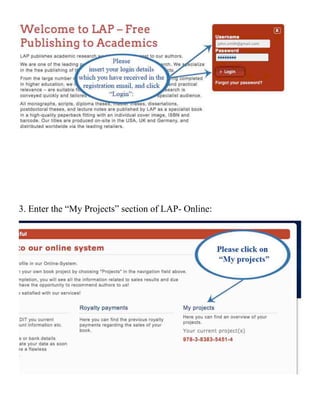
1. Please access the page of LAP Publishing: www.lap-publishing.com

Please make sure that you open the page with Mozilla Firefox and you
have JAVA installed on your computer.


2. Click on “Login” and introduce your login details you have received in
   the registration email (as shown in the pictures below).
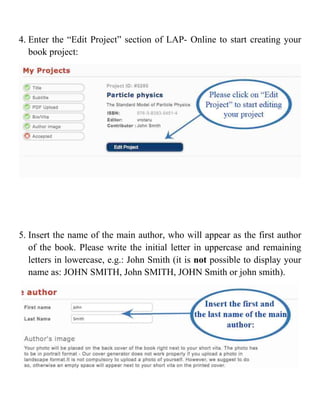
3. Enter the “My Projects” section of LAP- Online:
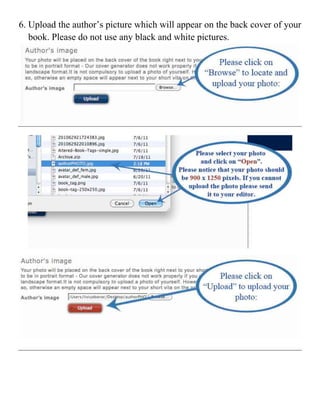
4. Enter the “Edit Project” section of LAP- Online to start creating your
   book project:


5. Insert the name of the main author, who will appear as the first author
   of the book. Please write the initial letter in uppercase and remaining
   letters in lowercase, e.g.: John Smith (it is not possible to display your
   name as: JOHN SMITH, John SMITH, JOHN Smith or john smith).
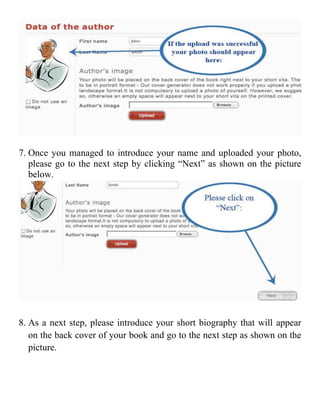
6. Upload the author’s picture which will appear on the back cover of your
   book. Please do not use any black and white pictures.


7. Once you managed to introduce your name and uploaded your photo,
   please go to the next step by clicking “Next” as shown on the picture
   below.


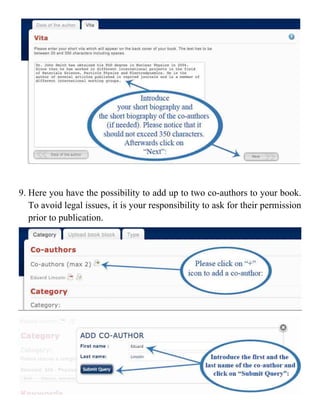
8. As a next step, please introduce your short biography that will appear
   on the back cover of your book and go to the next step as shown on the
   picture.
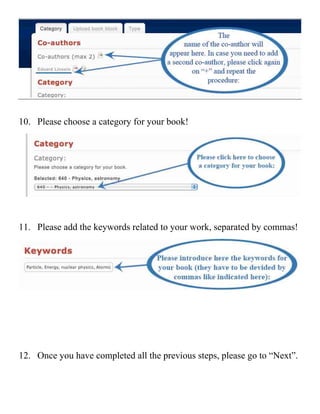
9. Here you have the possibility to add up to two co-authors to your book.
   To avoid legal issues, it is your responsibility to ask for their permission
   prior to publication.


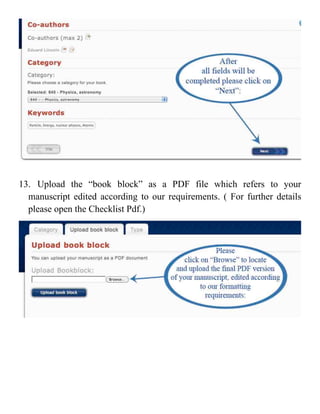
10. Please choose a category for your book!


11. Please add the keywords related to your work, separated by commas!


12. Once you have completed all the previous steps, please go to “Next”.
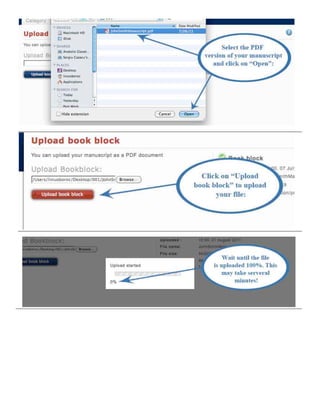
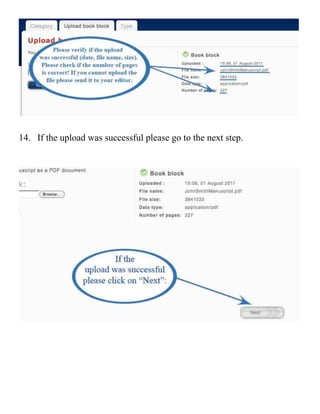
13. Upload the “book block” as a PDF file which refers to your
  manuscript edited according to our requirements. ( For further details
  please open the Checklist Pdf.)


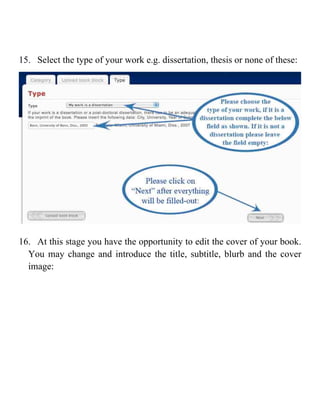
14. If the upload was successful please go to the next step.
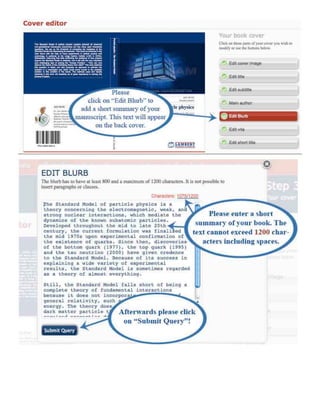
15. Select the type of your work e.g. dissertation, thesis or none of these:


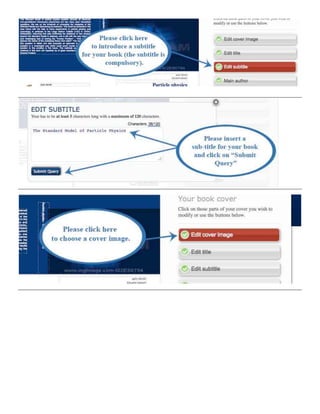
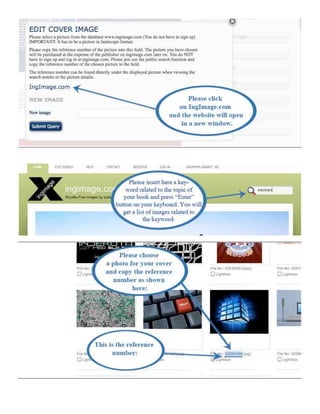
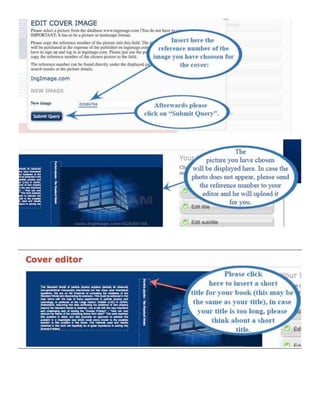
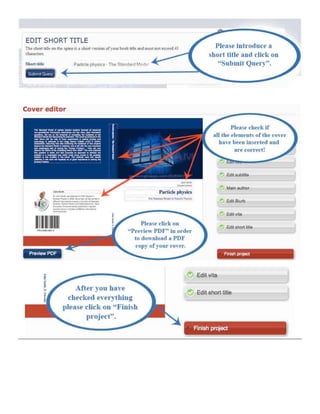
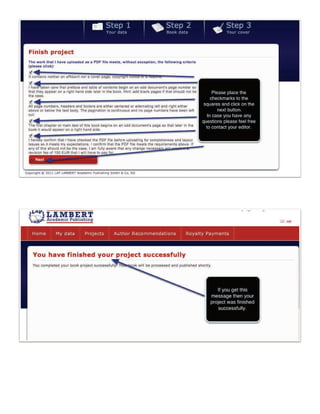
16. At this stage you have the opportunity to edit the cover of your book.
  You may change and introduce the title, subtitle, blurb and the cover
  image:


Lap   online manual en

Lap online manual en

  • 1.
    Guide to edityour project on LAP online 1. Please access the page of LAP Publishing: www.lap-publishing.com Please make sure that you open the page with Mozilla Firefox and you have JAVA installed on your computer. 2. Click on “Login” and introduce your login details you have received in the registration email (as shown in the pictures below).
  • 2.
    3. Enter the“My Projects” section of LAP- Online:
  • 3.
    4. Enter the“Edit Project” section of LAP- Online to start creating your book project: 5. Insert the name of the main author, who will appear as the first author of the book. Please write the initial letter in uppercase and remaining letters in lowercase, e.g.: John Smith (it is not possible to display your name as: JOHN SMITH, John SMITH, JOHN Smith or john smith).
  • 4.
    6. Upload theauthor’s picture which will appear on the back cover of your book. Please do not use any black and white pictures.  
  • 5.
    7. Once youmanaged to introduce your name and uploaded your photo, please go to the next step by clicking “Next” as shown on the picture below. 8. As a next step, please introduce your short biography that will appear on the back cover of your book and go to the next step as shown on the picture.
  • 6.
    9. Here youhave the possibility to add up to two co-authors to your book. To avoid legal issues, it is your responsibility to ask for their permission prior to publication.    
  • 7.
    10. Please choosea category for your book! 11. Please add the keywords related to your work, separated by commas! 12. Once you have completed all the previous steps, please go to “Next”.
  • 8.
    13. Upload the“book block” as a PDF file which refers to your manuscript edited according to our requirements. ( For further details please open the Checklist Pdf.)  
  • 9.
  • 10.
    14. If theupload was successful please go to the next step.
  • 11.
    15. Select thetype of your work e.g. dissertation, thesis or none of these: 16. At this stage you have the opportunity to edit the cover of your book. You may change and introduce the title, subtitle, blurb and the cover image:
  • 12.
  • 13.
  • 14.
  • 15.
  • 16.