Object Oriented Programming
Lab 1
2
Agenda • Logistics
• Introduction to OOP
• Main OOP Vocabulary
• Getting started with IntelliJ
• How to install
• Quick start Guide
• Displaying outputs
• How to run / debug ?
• Hands-on
3
Logistics
• Attendance is recorded weekly at the start of the lab.
• You have a 10-minute grace period for arrival.
• If you arrive more than 10 minutes late, you can stay, but you will be
marked absent.
• Critical: Exceeding 3 absences will prohibit you from taking the final exam.
4
Logistics - Grading Policy
• Final Grade Breakdown:
• 60% Semester Work
• 40% Final Exam
• There are NO points for attendance.
• Semester Work (60 points) includes:
• Midterm Exam: 20 points
• Quizzes: A minimum of 2 is mandatory.
• Other Activities: Assignments, lab work, and projects.
OOP ?
6
Introduction to OOP
• OOP is captured from real life, we always deal with different
types of objects. cars, mobiles, PCs, etc…
• All of these are objects that have particular behavior and
attributes.
• OOP can be defined as a programming paradigm where a
software system is represented as a collection of objects
that interact with each other to solve the overall task.
7
Introduction to OOP
Why Do We Need OOP?
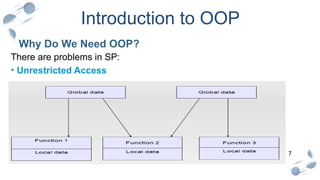
There are problems in SP:
• Unrestricted Access
8
Introduction to OOP
Why Do We Need OOP?
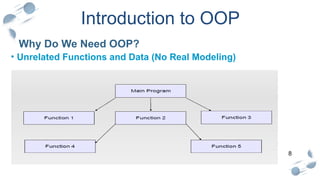
• Unrelated Functions and Data (No Real Modeling)
9
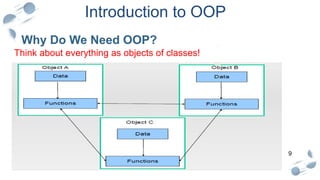
Why Do We Need OOP?
Think about everything as objects of classes!
Introduction to OOP
10
Classes & Objects
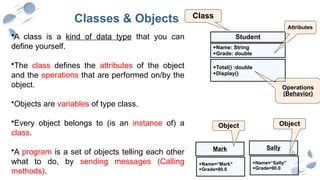
•A class is a kind of data type that you can
define yourself.
•The class defines the attributes of the object
and the operations that are performed on/by the
object.
•Objects are variables of type class.
•Every object belongs to (is an instance of) a
class.
•A program is a set of objects telling each other
what to do, by sending messages (Calling
methods).
Mark
+Name=“Mark"
+Grade=80.0
Sally
+Name=“Sally"
+Grade=90.0
Object Object
Student
+Name: String
+Grade: double
+Total() :double
+Display()
Class
Attributes
Operations
(Behavior)
11
OOP Concepts
12
OOP Concepts
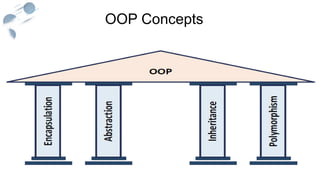
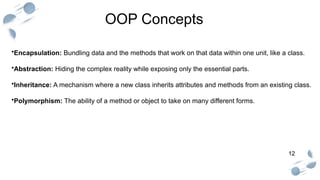
•Encapsulation: Bundling data and the methods that work on that data within one unit, like a class.
•Abstraction: Hiding the complex reality while exposing only the essential parts.
•Inheritance: A mechanism where a new class inherits attributes and methods from an existing class.
•Polymorphism: The ability of a method or object to take on many different forms.
13
Before JAVA
14
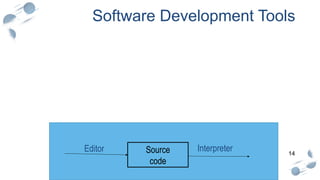
Software Development Tools
Editor
Source
code
Compiler
Object
code
Linker
Executable
program
Editor Source
code
Compiler
Object
code
Editor Source
code
Interpreter
15
Introduction to Java
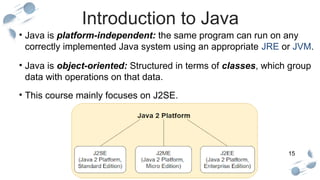
• Java is platform-independent: the same program can run on any
correctly implemented Java system using an appropriate JRE or JVM.
• Java is object-oriented: Structured in terms of classes, which group
data with operations on that data.
• This course mainly focuses on J2SE.
16
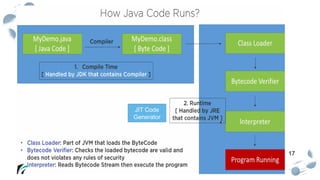
Installation
.
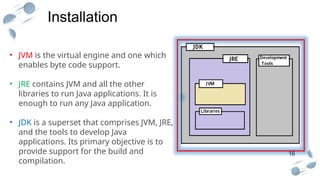
• JVM is the virtual engine and one which
enables byte code support.
• JRE contains JVM and all the other
libraries to run Java applications. It is
enough to run any Java application.
• JDK is a superset that comprises JVM, JRE,
and the tools to develop Java
applications. Its primary objective is to
provide support for the build and
compilation.
17
JIT Code
Generator
18
18
Different IDEs
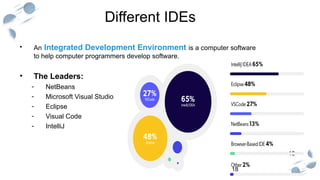
• An Integrated Development Environment is a computer software
to help computer programmers develop software.
• The Leaders:
- NetBeans
- Microsoft Visual Studio
- Eclipse
- Visual Code
- IntelliJ
19
Packages in JAVA
• A group of related classes.
• To guarantee a unique package name, use your company‘s Internet
domain name (which is known to be unique) written in reverse.
• For example, oracle.com is a domain when written in reverse order,
it turns into the package name com.oracle
• Packages can be nested.
• Standard Java Packages: java.* , javax.*
• such as java.lang, java.util, java.net, and so on
20
Packages
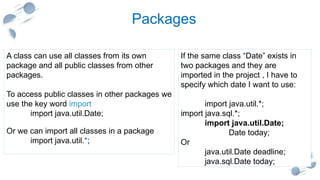
If the same class “Date” exists in
two packages and they are
imported in the project , I have to
specify which date I want to use:
import java.util.*;
import java.sql.*;
import java.util.Date;
Date today;
Or
java.util.Date deadline;
java.sql.Date today;
A class can use all classes from its own
package and all public classes from other
packages.
To access public classes in other packages we
use the key word import
import java.util.Date;
Or we can import all classes in a package
import java.util.*;
21
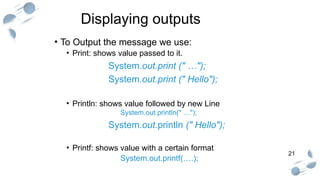
Displaying outputs
• To Output the message we use:
• Print: shows value passed to it.
System.out.print (" …");
System.out.print (" Hello");
• Println: shows value followed by new Line
System.out.println(" …");
System.out.println (" Hello");
• Printf: shows value with a certain format
System.out.printf(….);
22
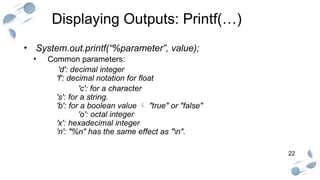
Displaying Outputs: Printf(…)
• System.out.printf(“%parameter”, value);
• Common parameters:
'd': decimal integer
'f': decimal notation for float
'c': for a character
's': for a string.
'b': for a boolean value  "true" or "false"
'o': octal integer
'x': hexadecimal integer
'n': "%n" has the same effect as "n".
23
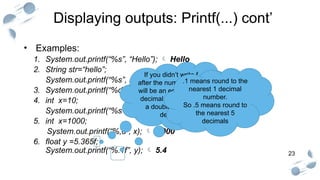
Displaying outputs: Printf(...) cont’
• Examples:
1. System.out.printf(“%s”, “Hello”);  Hello
2. String str=“hello”;
System.out.printf(“%s”, str); hello
3. System.out.printf(“%d”, 10);  10
4. int x=10;
System.out.printf(“%s=%d”, “x”, x);  x=10
5. int x=1000;
System.out.printf(“%,d”, x);  1,000
6. float y =5.365f;
System.out.printf(“%.1f”, y);  5.4
If you didn’t write f
after the number there
will be an error as any
decimal number is of
a double type “by
default”
.1 means round to the
nearest 1 decimal
number.
So .5 means round to
the nearest 5
decimals
24
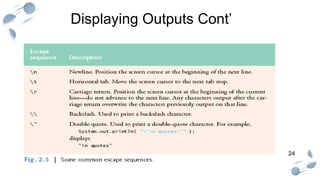
Displaying Outputs Cont’
25
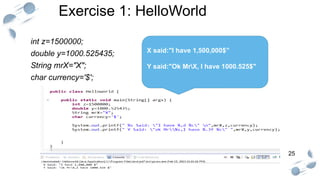
Exercise 1: HelloWorld
int z=1500000;
double y=1000.525435;
String mrX="X";
char currency='$';
X said:"I have 1,500,000$”
Y said:"Ok MrX, I have 1000.525$"
26
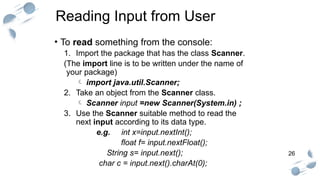
Reading Input from User
• To read something from the console:
1. Import the package that has the class Scanner.
(The import line is to be written under the name of
your package)
 import java.util.Scanner;
2. Take an object from the Scanner class.
 Scanner input =new Scanner(System.in) ;
3. Use the Scanner suitable method to read the
next input according to its data type.
e.g. int x=input.nextInt();
float f= input.nextFloat();
String s= input.next();
char c = input.next().charAt(0);
27
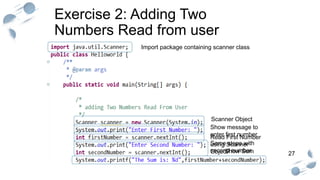
Exercise 2: Adding Two
Numbers Read from user
Scanner Object
Read First Number
using Scanner
Object
Show Sum
Show message to
enter first number
Same steps with
second number
Import package containing scanner class
28
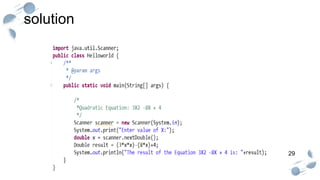
Hands on #1: Quadratic Equation
• Consider the following quadratic equation:
3X2
-8X + 4
• Write a program that reads X from user and shows result.
• Try the following values
• X=2 the result will be zero.
• X=200 the result will be 118404.
• X=1 the result will be -1.
10 Minutes
29
solution
30
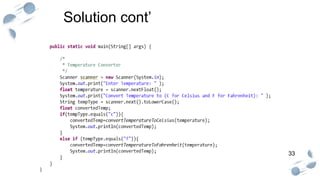
Hands on #2: Temperature Converter
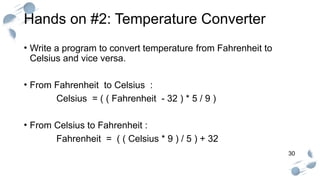
• Write a program to convert temperature from Fahrenheit to
Celsius and vice versa.
• From Fahrenheit to Celsius :
Celsius = ( ( Fahrenheit - 32 ) * 5 / 9 )
• From Celsius to Fahrenheit :
Fahrenheit = ( ( Celsius * 9 ) / 5 ) + 32
31
Hands on #2: Temperature Converter
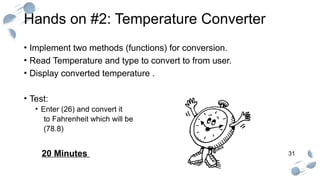
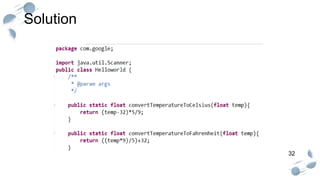
• Implement two methods (functions) for conversion.
• Read Temperature and type to convert to from user.
• Display converted temperature .
• Test:
• Enter (26) and convert it
to Fahrenheit which will be
(78.8)
20 Minutes
32
Solution
33
Solution cont’
THANK YOU

Lab1- OOP_26.pptx,,,,,,,,,,,,,,,,,,,,,,,,,,,,,,,,,,

  • 1.
  • 2.
    2 Agenda • Logistics •Introduction to OOP • Main OOP Vocabulary • Getting started with IntelliJ • How to install • Quick start Guide • Displaying outputs • How to run / debug ? • Hands-on
  • 3.
    3 Logistics • Attendance isrecorded weekly at the start of the lab. • You have a 10-minute grace period for arrival. • If you arrive more than 10 minutes late, you can stay, but you will be marked absent. • Critical: Exceeding 3 absences will prohibit you from taking the final exam.
  • 4.
    4 Logistics - GradingPolicy • Final Grade Breakdown: • 60% Semester Work • 40% Final Exam • There are NO points for attendance. • Semester Work (60 points) includes: • Midterm Exam: 20 points • Quizzes: A minimum of 2 is mandatory. • Other Activities: Assignments, lab work, and projects.
  • 5.
  • 6.
    6 Introduction to OOP •OOP is captured from real life, we always deal with different types of objects. cars, mobiles, PCs, etc… • All of these are objects that have particular behavior and attributes. • OOP can be defined as a programming paradigm where a software system is represented as a collection of objects that interact with each other to solve the overall task.
  • 7.
    7 Introduction to OOP WhyDo We Need OOP? There are problems in SP: • Unrestricted Access
  • 8.
    8 Introduction to OOP WhyDo We Need OOP? • Unrelated Functions and Data (No Real Modeling)
  • 9.
    9 Why Do WeNeed OOP? Think about everything as objects of classes! Introduction to OOP
  • 10.
    10 Classes & Objects •Aclass is a kind of data type that you can define yourself. •The class defines the attributes of the object and the operations that are performed on/by the object. •Objects are variables of type class. •Every object belongs to (is an instance of) a class. •A program is a set of objects telling each other what to do, by sending messages (Calling methods). Mark +Name=“Mark" +Grade=80.0 Sally +Name=“Sally" +Grade=90.0 Object Object Student +Name: String +Grade: double +Total() :double +Display() Class Attributes Operations (Behavior)
  • 11.
  • 12.
    12 OOP Concepts •Encapsulation: Bundlingdata and the methods that work on that data within one unit, like a class. •Abstraction: Hiding the complex reality while exposing only the essential parts. •Inheritance: A mechanism where a new class inherits attributes and methods from an existing class. •Polymorphism: The ability of a method or object to take on many different forms.
  • 13.
  • 14.
  • 15.
    15 Introduction to Java •Java is platform-independent: the same program can run on any correctly implemented Java system using an appropriate JRE or JVM. • Java is object-oriented: Structured in terms of classes, which group data with operations on that data. • This course mainly focuses on J2SE.
  • 16.
    16 Installation . • JVM isthe virtual engine and one which enables byte code support. • JRE contains JVM and all the other libraries to run Java applications. It is enough to run any Java application. • JDK is a superset that comprises JVM, JRE, and the tools to develop Java applications. Its primary objective is to provide support for the build and compilation.
  • 17.
  • 18.
    18 18 Different IDEs • AnIntegrated Development Environment is a computer software to help computer programmers develop software. • The Leaders: - NetBeans - Microsoft Visual Studio - Eclipse - Visual Code - IntelliJ
  • 19.
    19 Packages in JAVA •A group of related classes. • To guarantee a unique package name, use your company‘s Internet domain name (which is known to be unique) written in reverse. • For example, oracle.com is a domain when written in reverse order, it turns into the package name com.oracle • Packages can be nested. • Standard Java Packages: java.* , javax.* • such as java.lang, java.util, java.net, and so on
  • 20.
    20 Packages If the sameclass “Date” exists in two packages and they are imported in the project , I have to specify which date I want to use: import java.util.*; import java.sql.*; import java.util.Date; Date today; Or java.util.Date deadline; java.sql.Date today; A class can use all classes from its own package and all public classes from other packages. To access public classes in other packages we use the key word import import java.util.Date; Or we can import all classes in a package import java.util.*;
  • 21.
    21 Displaying outputs • ToOutput the message we use: • Print: shows value passed to it. System.out.print (" …"); System.out.print (" Hello"); • Println: shows value followed by new Line System.out.println(" …"); System.out.println (" Hello"); • Printf: shows value with a certain format System.out.printf(….);
  • 22.
    22 Displaying Outputs: Printf(…) •System.out.printf(“%parameter”, value); • Common parameters: 'd': decimal integer 'f': decimal notation for float 'c': for a character 's': for a string. 'b': for a boolean value  "true" or "false" 'o': octal integer 'x': hexadecimal integer 'n': "%n" has the same effect as "n".
  • 23.
    23 Displaying outputs: Printf(...)cont’ • Examples: 1. System.out.printf(“%s”, “Hello”);  Hello 2. String str=“hello”; System.out.printf(“%s”, str); hello 3. System.out.printf(“%d”, 10);  10 4. int x=10; System.out.printf(“%s=%d”, “x”, x);  x=10 5. int x=1000; System.out.printf(“%,d”, x);  1,000 6. float y =5.365f; System.out.printf(“%.1f”, y);  5.4 If you didn’t write f after the number there will be an error as any decimal number is of a double type “by default” .1 means round to the nearest 1 decimal number. So .5 means round to the nearest 5 decimals
  • 24.
  • 25.
    25 Exercise 1: HelloWorld intz=1500000; double y=1000.525435; String mrX="X"; char currency='$'; X said:"I have 1,500,000$” Y said:"Ok MrX, I have 1000.525$"
  • 26.
    26 Reading Input fromUser • To read something from the console: 1. Import the package that has the class Scanner. (The import line is to be written under the name of your package)  import java.util.Scanner; 2. Take an object from the Scanner class.  Scanner input =new Scanner(System.in) ; 3. Use the Scanner suitable method to read the next input according to its data type. e.g. int x=input.nextInt(); float f= input.nextFloat(); String s= input.next(); char c = input.next().charAt(0);
  • 27.
    27 Exercise 2: AddingTwo Numbers Read from user Scanner Object Read First Number using Scanner Object Show Sum Show message to enter first number Same steps with second number Import package containing scanner class
  • 28.
    28 Hands on #1:Quadratic Equation • Consider the following quadratic equation: 3X2 -8X + 4 • Write a program that reads X from user and shows result. • Try the following values • X=2 the result will be zero. • X=200 the result will be 118404. • X=1 the result will be -1. 10 Minutes
  • 29.
  • 30.
    30 Hands on #2:Temperature Converter • Write a program to convert temperature from Fahrenheit to Celsius and vice versa. • From Fahrenheit to Celsius : Celsius = ( ( Fahrenheit - 32 ) * 5 / 9 ) • From Celsius to Fahrenheit : Fahrenheit = ( ( Celsius * 9 ) / 5 ) + 32
  • 31.
    31 Hands on #2:Temperature Converter • Implement two methods (functions) for conversion. • Read Temperature and type to convert to from user. • Display converted temperature . • Test: • Enter (26) and convert it to Fahrenheit which will be (78.8) 20 Minutes
  • 32.
  • 33.
  • 34.

Editor's Notes

  • #7 But why do we need it? What problems does it solve? To understand that, let's look at older styles like Structured Programming. One major problem was unrestricted access. As you can see in this diagram, you often had 'Global data' that any function in the program could access and modify. This can lead to unpredictable bugs that are very hard to track down. Another issue was a lack of real-world modeling, with
  • #8 unrelated functions and data. The program was just a list of functions, and it was hard to see how they logically connected to the data they were supposed to be working on.
  • #9 OOP solves this by having us think about everything as objects. As this diagram shows, an object bundles its own data and the functions that operate on that data together. This protects the data and makes the whole system easier to understand."
  • #14 Before we jump into Java, let's quickly review how software is generally developed. You have an Editor or IDE where you write source code. A Compiler then translates that code into object code for a specific CPU. Finally, a Linker converts that object code into an executable program.
  • #15 Java does things a bit differently. A key feature of Java is that it is platform-independent, meaning the same program can run on any system with a Java environment. It is also, of course, object-oriented. This course will focus on J2SE, the Standard Edition of Java. This is possible because of these components:
  • #16 JVM, or Java Virtual Machine, is the engine that actually runs the Java bytecode. JRE, or Java Runtime Environment, contains the JVM plus all the libraries needed to run a Java application. JDK, or Java Development Kit, is a superset that contains the JRE plus the tools needed to develop Java applications, like the compiler.
  • #17 This diagram shows how it all works. At compile time, the JDK's compiler turns your .java code into .class bytecode. At runtime, the JRE's JVM uses a Class Loader and Bytecode Verifier, and then an Interpreter executes the program. A major difference between machine code and bytecode is their type. Machine code is a low-level code while bytecode is an intermediate code. It means that machine code can be directly understood by computers while byte code is produced as intermediate code produced after the source code is compiled.
  • #21 System.out is a PrintStream, normally outputs the data you write to it to the console.
  • #24  System.out.println("Hello \r world...\r"); Last one won’t overwrite as it doesn’t have any following characters
  • #26 System.in is an InputStream which is typically connected to keyboard input of console programs.