
Open APIs for Open Minds
The Stream Oriented Generic Enabler – SO GE
Developing rich multimedia applications with FI-WARE.
IVAN GRACIA
igracia@kurento.org
Human communications
Why technology?
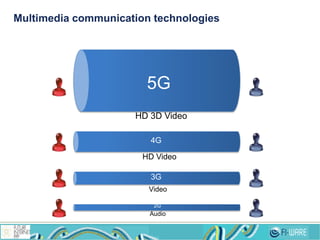
2G
3G
4G
5G
Audio
Video
HD Video
HD 3D Video
Multimedia communication technologies
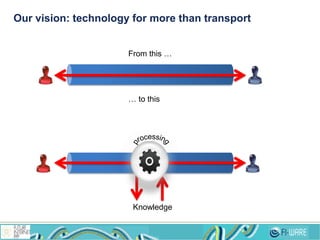
Our vision: technology for more than transport
From this …
… to this
Knowledge
Our ingredients for cooking the Stream Oriented GE
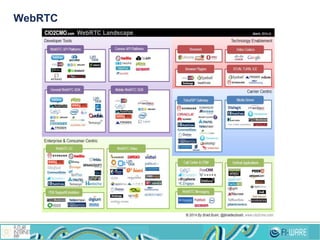
WebRTC
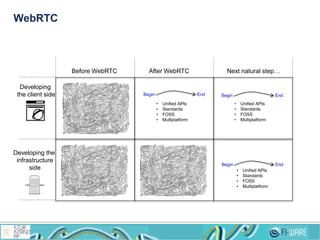
WebRTC
Developing
the client side
Developing the
infrastructure
side
Before WebRTC After WebRTC Next natural step…
Begin End Begin End
Begin End
• Unified APIs
• Standards
• FOSS
• Multiplatform
• Unified APIs
• Standards
• FOSS
• Multiplatform
• Unified APIs
• Standards
• FOSS
• Multiplatform
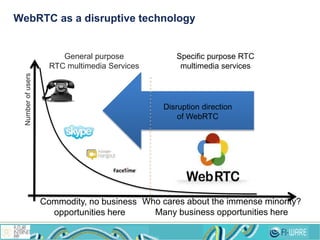
WebRTC as a disruptive technology
Numberofusers
General purpose
RTC multimedia Services
Specific purpose RTC
multimedia services
Commodity, no business
opportunities here
Who cares about the immense minority?
Many business opportunities here
Disruption direction
of WebRTC
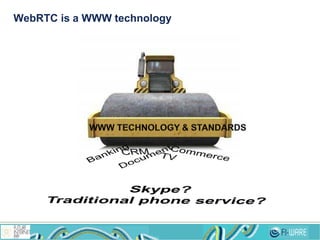
WebRTC is a WWW technology
10
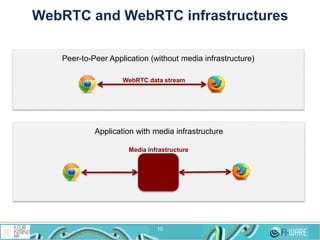
Peer-to-Peer Application (without media infrastructure)
WebRTC data stream
Application with media infrastructure
Media infrastructure
WebRTC and WebRTC infrastructures
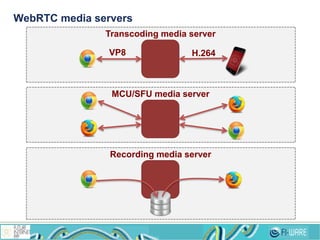
WebRTC media servers
Transcoding media server
VP8 H.264
MCU/SFU media server
Recording media server
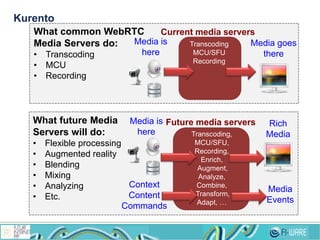
Kurento
What common WebRTC
Media Servers do:
• Transcoding
• MCU
• Recording
What future Media
Servers will do:
• Flexible processing
• Augmented reality
• Blending
• Mixing
• Analyzing
• Etc.
Media is
here
Media goes
there
Transcoding
MCU/SFU
Recording
Current media servers
Media is
here
Rich
Media
goes
there
Future media servers
Transcoding,
MCU/SFU,
Recording,
Enrich,
Augment,
Analyze,
Combine,
Transform,
Adapt, …
Context
Content
Commands
Media
Events
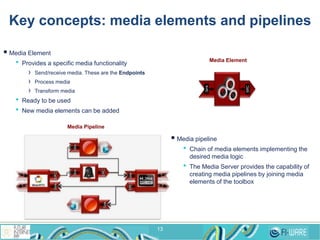
Key concepts: media elements and pipelines
13
 Media Element
• Provides a specific media functionality
› Send/receive media. These are the Endpoints
› Process media
› Transform media
• Ready to be used
• New media elements can be added
 Media pipeline
• Chain of media elements implementing the
desired media logic
• The Media Server provides the capability of
creating media pipelines by joining media
elements of the toolbox
Media Element
Sink
SRC
Media Pipeline
1414
1515
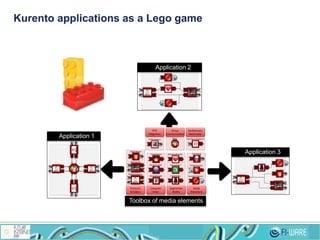
Kurento applications as a Lego game
Protocols
& Codecs
Computer
Vision
Augmented
Reality
Mul sensory
Mul media
Media
Repository
IPTV
Integra on
Group
Communica ons
Sink%
H pEndpoint
Sink%SRC%
RtpEndpoint
SRC$
DataChannelEndpoint
Sink%SRC%
WebRtcEndpoint
Sink%
SRC%
BarCodeReader
Sink%
SRC%
PointerTracker
Sink%
SRC%
FaceDetector
Sink%
SRC%
FaceOverlay
Sink%
SRC%
ChromaFilter
Sink%
SRC%
HeartRateBlender
Sink%
RecorderEndpoint
SRC$
PlayerEndpoint
Sink%
CdnUpload
Sink%
IPTVConnector Mixer
SinkSRC
Sink
SRC
Sink
SRCSink
Sink
Application 2
Sink
SRC
Sink
SRCSink
SinkSRC
Sink
Application 3
SinkSRC
SRCSink
SRC Sink
SinkSRC
Application 1
Toolbox of media elements
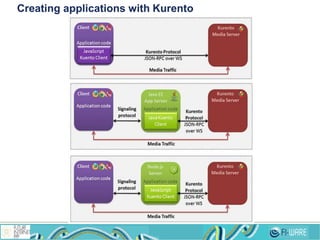
Creating applications with Kurento
18
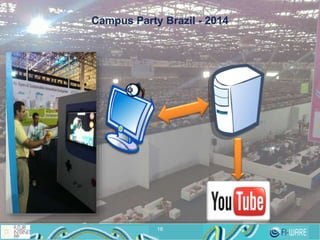
Campus Party Brazil - 2014
18
1919
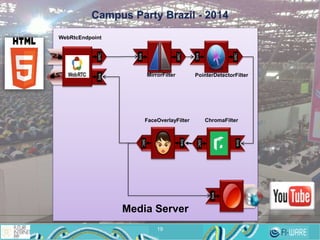
Campus Party Brazil - 2014
SinkSRC
Sink
WebRtcEndpoint
Sink
SRC
Sink
SRC
MirrorFilter PointerDetectorFilter
Sink
SRC
ChromaFilter
Sink
SRC
FaceOverlayFilter
Media Server
2020
Ready?
What you should learn first
 WebRTC basics
• http://www.html5rocks.com/en/tutorials/webrtc/basics/
 Signaling basics (STUN/TURN)
• http://www.html5rocks.com/en/tutorials/webrtc/infrastructure/
Where to start
 Kurento official documentation
• http://www.kurento.org/documentation
 Kurento FIWARE documentation
• Catalogue site
› http://catalogue.fiware.org/enablers/stream-oriented-kurento
• Documentation
› http://catalogue.fiware.org/enablers/stream-oriented-kurento/documentation
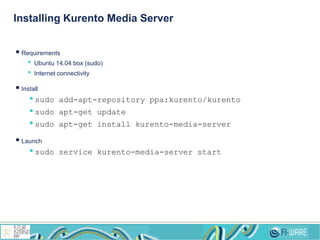
Installing Kurento Media Server
 Requirements
• Ubuntu 14.04 box (sudo)
• Internet connectivity
 Install
•sudo add-apt-repository ppa:kurento/kurento
•sudo apt-get update
•sudo apt-get install kurento-media-server
 Launch
•sudo service kurento-media-server start
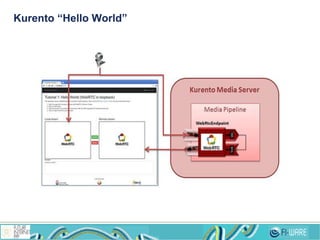
Kurento “Hello World”
 Tutorial
• http://www.kurento.org/docs/current/tutorials/js/tutorial-1-helloworld.html
 Code
• https://github.com/Kurento/kurento-tutorial-js/tree/release-5.1/kurento-hello-world
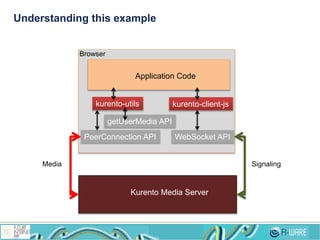
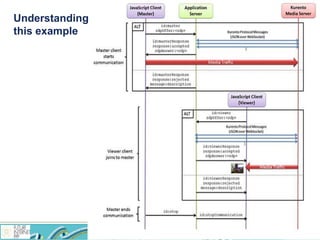
Understanding this example
PeerConnection API
getUserMedia API
kurento-utils kurento-client-js
Application Code
WebSocket API
Kurento Media Server
Browser
SignalingMedia
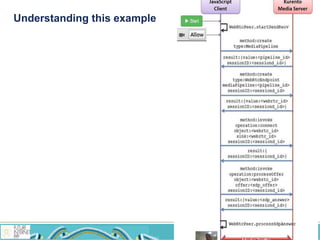
Understanding this example
You don’t catch the point?
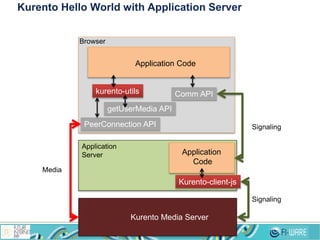
Kurento Hello World with Application Server
PeerConnection API
getUserMedia API
kurento-utils
Application Code
Comm API
Kurento Media Server
Browser
Signaling
Media
Application
Server
Kurento-client-js
Application
Code
Signaling
Kurento Hello World with application server
 Java EE Application Server
• http://www.kurento.org/docs/current/tutorials/java/tutorial-1-helloworld.html
 Node.js Application Server
• http://www.kurento.org/docs/current/tutorials/node/tutorial-1-helloworld.html
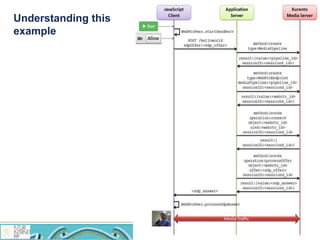
Understanding this
example
Why an application server
 Security
• KMS does not provide AAA in its control interface
• In WWW applications, DD.BB. access is directly exposed to the browser?
 Call signaling
• How several browsers can communicate?
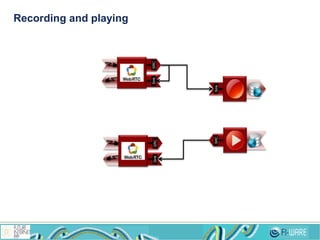
Recording and playing
SinkSRC
Sink
SinkSRC
SRC
Recording and playing: source code
 Get code here
• https://github.com/Kurento/kurento-tutorial-js/tree/release-5.1/kurento-hello-world-recorder-
generator
Understanding this example
 Generators
• Black magic for avoiding callback hell
• Program asynchronously with synchronous philosophy
 Warning
• “Enable Experimental JavaScript” flag
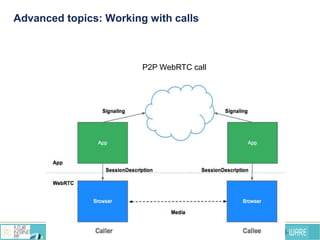
Advanced topics: Working with calls
P2P WebRTC call
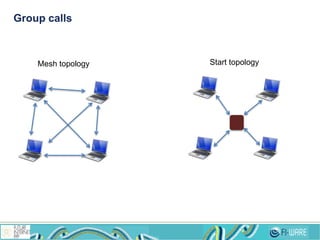
Group calls
Mesh topology Start topology
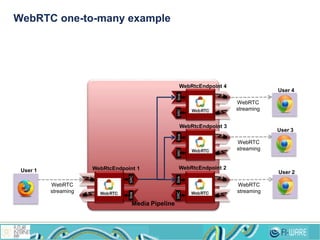
WebRTC one-to-many example
Media Pipeline
WebRTC
streaming
SinkSRC
WebRTC
streaming
SRCSinkSRCSink
WebRTC
streaming
WebRtcEndpoint 1
WebRtcEndpoint 3
WebRtcEndpoint 2
SRCSink
WebRTC
streaming
WebRtcEndpoint 4
User 1 User 2
User 3
User 4
WebRTC one to many example: code
 Java EE
• http://www.kurento.org/docs/current/tutorials/java/tutorial-3-one2many.html
 Node.js
• http://www.kurento.org/docs/current/tutorials/node/tutorial-3-one2many.html
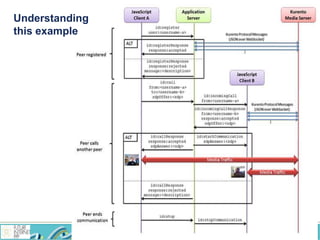
Understanding
this example
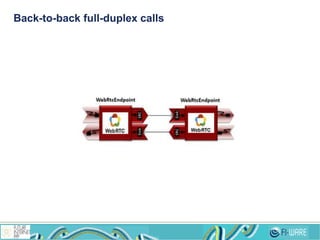
Back-to-back full-duplex calls
Understanding
this example
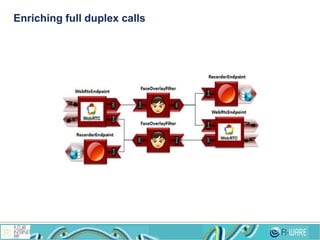
Enriching full duplex calls
Back-to-back full-duplex calls: source code
 Java EE
• http://www.kurento.org/docs/current/tutorials/java/tutorial-4-one2one.html
• https://github.com/Kurento/kurento-tutorial-java/tree/release-5.1/kurento-one2one-call-advanced
 Node.js
• http://www.kurento.org/docs/current/tutorials/node/tutorial-4-one2one.html
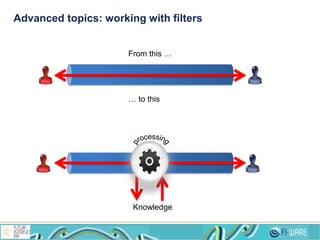
Advanced topics: working with filters
From this …
… to this
Knowledge
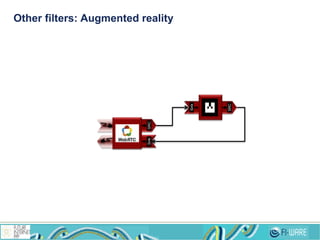
Other filters: Augmented reality
Sink
SRC
SinkSRC
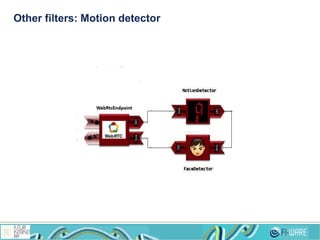
Other filters: Motion detector
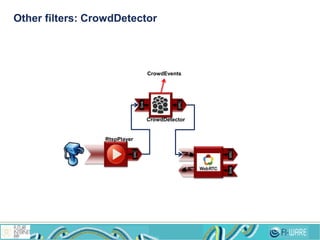
Other filters: CrowdDetector
CrowdEvents
SRC
Sink
SRC
CrowdDetector
RtspPlayer
SinkSRC
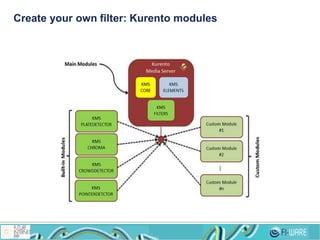
Create your own filter: Kurento modules
Create a custom module
 Two flavors
• OpenCV module
• GStreamer module
 Instructions
• http://www.kurento.org/docs/current/mastering/develop_kurento_modules.html
 http://fi-ppp.eu
 http://fi-ware.eu
 Follow @Fiware on Twitter !
Thanks !
52

Kurento FIWARE

  • 1.
    Open APIs forOpen Minds The Stream Oriented Generic Enabler – SO GE Developing rich multimedia applications with FI-WARE. IVAN GRACIA igracia@kurento.org
  • 2.
  • 3.
  • 4.
    2G 3G 4G 5G Audio Video HD Video HD 3DVideo Multimedia communication technologies
  • 5.
    Our vision: technologyfor more than transport From this … … to this Knowledge
  • 6.
    Our ingredients forcooking the Stream Oriented GE
  • 7.
  • 8.
    WebRTC Developing the client side Developingthe infrastructure side Before WebRTC After WebRTC Next natural step… Begin End Begin End Begin End • Unified APIs • Standards • FOSS • Multiplatform • Unified APIs • Standards • FOSS • Multiplatform • Unified APIs • Standards • FOSS • Multiplatform
  • 9.
    WebRTC as adisruptive technology Numberofusers General purpose RTC multimedia Services Specific purpose RTC multimedia services Commodity, no business opportunities here Who cares about the immense minority? Many business opportunities here Disruption direction of WebRTC
  • 10.
    WebRTC is aWWW technology
  • 11.
    10 Peer-to-Peer Application (withoutmedia infrastructure) WebRTC data stream Application with media infrastructure Media infrastructure WebRTC and WebRTC infrastructures
  • 12.
    WebRTC media servers Transcodingmedia server VP8 H.264 MCU/SFU media server Recording media server
  • 13.
    Kurento What common WebRTC MediaServers do: • Transcoding • MCU • Recording What future Media Servers will do: • Flexible processing • Augmented reality • Blending • Mixing • Analyzing • Etc. Media is here Media goes there Transcoding MCU/SFU Recording Current media servers Media is here Rich Media goes there Future media servers Transcoding, MCU/SFU, Recording, Enrich, Augment, Analyze, Combine, Transform, Adapt, … Context Content Commands Media Events
  • 14.
    Key concepts: mediaelements and pipelines 13  Media Element • Provides a specific media functionality › Send/receive media. These are the Endpoints › Process media › Transform media • Ready to be used • New media elements can be added  Media pipeline • Chain of media elements implementing the desired media logic • The Media Server provides the capability of creating media pipelines by joining media elements of the toolbox Media Element Sink SRC Media Pipeline
  • 15.
  • 16.
  • 17.
    Kurento applications asa Lego game Protocols & Codecs Computer Vision Augmented Reality Mul sensory Mul media Media Repository IPTV Integra on Group Communica ons Sink% H pEndpoint Sink%SRC% RtpEndpoint SRC$ DataChannelEndpoint Sink%SRC% WebRtcEndpoint Sink% SRC% BarCodeReader Sink% SRC% PointerTracker Sink% SRC% FaceDetector Sink% SRC% FaceOverlay Sink% SRC% ChromaFilter Sink% SRC% HeartRateBlender Sink% RecorderEndpoint SRC$ PlayerEndpoint Sink% CdnUpload Sink% IPTVConnector Mixer SinkSRC Sink SRC Sink SRCSink Sink Application 2 Sink SRC Sink SRCSink SinkSRC Sink Application 3 SinkSRC SRCSink SRC Sink SinkSRC Application 1 Toolbox of media elements
  • 18.
  • 19.
  • 20.
    1919 Campus Party Brazil- 2014 SinkSRC Sink WebRtcEndpoint Sink SRC Sink SRC MirrorFilter PointerDetectorFilter Sink SRC ChromaFilter Sink SRC FaceOverlayFilter Media Server
  • 21.
  • 22.
  • 23.
    What you shouldlearn first  WebRTC basics • http://www.html5rocks.com/en/tutorials/webrtc/basics/  Signaling basics (STUN/TURN) • http://www.html5rocks.com/en/tutorials/webrtc/infrastructure/
  • 24.
    Where to start Kurento official documentation • http://www.kurento.org/documentation  Kurento FIWARE documentation • Catalogue site › http://catalogue.fiware.org/enablers/stream-oriented-kurento • Documentation › http://catalogue.fiware.org/enablers/stream-oriented-kurento/documentation
  • 25.
    Installing Kurento MediaServer  Requirements • Ubuntu 14.04 box (sudo) • Internet connectivity  Install •sudo add-apt-repository ppa:kurento/kurento •sudo apt-get update •sudo apt-get install kurento-media-server  Launch •sudo service kurento-media-server start
  • 26.
  • 27.
    Kurento “Hello World” Tutorial • http://www.kurento.org/docs/current/tutorials/js/tutorial-1-helloworld.html  Code • https://github.com/Kurento/kurento-tutorial-js/tree/release-5.1/kurento-hello-world
  • 28.
    Understanding this example PeerConnectionAPI getUserMedia API kurento-utils kurento-client-js Application Code WebSocket API Kurento Media Server Browser SignalingMedia
  • 29.
  • 30.
  • 31.
    Kurento Hello Worldwith Application Server PeerConnection API getUserMedia API kurento-utils Application Code Comm API Kurento Media Server Browser Signaling Media Application Server Kurento-client-js Application Code Signaling
  • 32.
    Kurento Hello Worldwith application server  Java EE Application Server • http://www.kurento.org/docs/current/tutorials/java/tutorial-1-helloworld.html  Node.js Application Server • http://www.kurento.org/docs/current/tutorials/node/tutorial-1-helloworld.html
  • 33.
  • 34.
    Why an applicationserver  Security • KMS does not provide AAA in its control interface • In WWW applications, DD.BB. access is directly exposed to the browser?  Call signaling • How several browsers can communicate?
  • 35.
  • 36.
    Recording and playing:source code  Get code here • https://github.com/Kurento/kurento-tutorial-js/tree/release-5.1/kurento-hello-world-recorder- generator
  • 37.
    Understanding this example Generators • Black magic for avoiding callback hell • Program asynchronously with synchronous philosophy  Warning • “Enable Experimental JavaScript” flag
  • 38.
    Advanced topics: Workingwith calls P2P WebRTC call
  • 39.
  • 40.
    WebRTC one-to-many example MediaPipeline WebRTC streaming SinkSRC WebRTC streaming SRCSinkSRCSink WebRTC streaming WebRtcEndpoint 1 WebRtcEndpoint 3 WebRtcEndpoint 2 SRCSink WebRTC streaming WebRtcEndpoint 4 User 1 User 2 User 3 User 4
  • 41.
    WebRTC one tomany example: code  Java EE • http://www.kurento.org/docs/current/tutorials/java/tutorial-3-one2many.html  Node.js • http://www.kurento.org/docs/current/tutorials/node/tutorial-3-one2many.html
  • 42.
  • 43.
  • 44.
  • 45.
  • 46.
    Back-to-back full-duplex calls:source code  Java EE • http://www.kurento.org/docs/current/tutorials/java/tutorial-4-one2one.html • https://github.com/Kurento/kurento-tutorial-java/tree/release-5.1/kurento-one2one-call-advanced  Node.js • http://www.kurento.org/docs/current/tutorials/node/tutorial-4-one2one.html
  • 47.
    Advanced topics: workingwith filters From this … … to this Knowledge
  • 48.
    Other filters: Augmentedreality Sink SRC SinkSRC
  • 49.
  • 50.
  • 51.
    Create your ownfilter: Kurento modules
  • 52.
    Create a custommodule  Two flavors • OpenCV module • GStreamer module  Instructions • http://www.kurento.org/docs/current/mastering/develop_kurento_modules.html
  • 53.
     http://fi-ppp.eu  http://fi-ware.eu Follow @Fiware on Twitter ! Thanks ! 52

Editor's Notes

  • #3 With the advent of unlimited channels, unlimited applications, unlimited news, unlimited information and unlimited entertainment — why are we feeling more isolated? Has the technology of connecting human beings and ideas only begun to tap into fulfilling the most fundamental human needs? Even as we are living through a transitional period where we are now able to instantly “attach” to other people and ideas, why are we longing less for “instant messaging” and more for “meaningful messaging?”
  • #7 If you're not familiar with WebRTC, it's the technology which will cause the next drive towards mass adoption of voice, video and file collaboration. In essence, it will enable high quality video and audio in your web browser, which is one of the most deployed applications in the world. It has been drafted by W3C (World Wide Web Consortium) with protocol work done by IETF (Internet Engineering Task Force). WebRTC ultimately simplifies the incorporation of real-time communications into a web browser. The objective of WebRTC is to trigger a real-time session in your browser, without having to download anything, simply functioning as part of the normal operation of browser. Everything required to deliver a high quality experience at the endpoint is supported natively within a WebRTC-capable web browser.
  • #9 WebRTC defines several APIs together with a collection of communication processes and protocols. From a development perspective, core functions are encapsulated into three main JavaScript APIs: getUserMedia, RTCPeerConnection and RTCDataChannel. These APIs are incorporated into browsers that support WebRTC, hence a web developer who has JavaScript programming experience can bring an interactive video collaboration experience to the web. WebRTC allows a mesh-based technology to enable users to send and receive streams to and from each other.
  • #10 Although WebRTC isn't confined solely to web applications, embedding real-time communications directly into web browsers has been the focus for most of the industry. With WebRTC it becomes possible to embed real-time video into a range of vertical applications, including for business, medical and education purposes.