Koubei F2E 善朋
  2010.04.20
iPhone 3G S
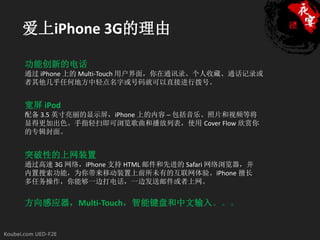
爱上iPhone 3G的理由

功能创新的电话
通过 iPhone 上的 Multi-Touch 用户界面,你在通讯录、个人收藏、通话记录或
者其他几乎任何地方中轻点名字或号码就可以直接进行拨号。


宽屏 iPod
配备 3.5 英寸亮丽的显示屏,iPhone 上的内容 ─ 包括音乐、照片和视频等将
显得更加出色。手指轻扫即可浏览歌曲和播放列表,使用 Cover Flow 欣赏你
的专辑封面。


突破性的上网装置
通过高速 3G 网络,iPhone 支持 HTML 邮件和先进的 Safari 网络浏览器,并
内置搜索功能,为你带来移动装置上前所未有的互联网体验。iPhone 擅长
多任务操作,你能够一边打电话,一边发送邮件或者上网。


方向感应器,Multi-Touch,智能键盘和中文输入。。。
border-radius
 background-origin
 background-clip
 text-shadow
 box-shadow
 first-child
 last-child
  ……


Happy Ending…
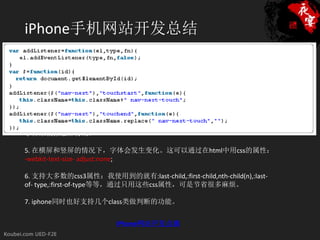
iPhone手机网站开发总结
1. HTML的head标签内需要显示声明meta属性:<meta name=”viewport”
content=”width=device-width; minimum-scale=1.0; maximum-scale=1″ />,minimum-
scale和maximum-scale主要作用是控制内容的显示比例。

2. 在使用css3的时候,要通过-khtml为前缀的方式,-webkit的方式不管用。比如:
-khtml-border-radius。

3. 对css的inline-block支持不是很良好。

4. 没有:hover状态,不过可以通过iphone的ontouchstart和ontouchend两个独有的
事件来模拟触屏特效。

5. 在横屏和竖屏的情况下,字体会发生变化。这可以通过在html中用css的属性:
-webkit-text-size- adjust:none;

6. 支持大多数的css3属性:我使用到的就有:last-child,:first-child,nth-child(n),:last-
of- type,:first-of-type等等,通过只用这些css属性,可是节省很多麻烦。

7. iphone同时也好支持几个class类做判断的功能。


                           iPhone网站开发点滴
iPhone 3G S

                CSS

              Javascript

                HTML
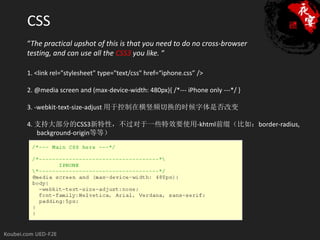
CSS
“The practical upshot of this is that you need to do no cross-browser
testing, and can use all the CSS3 you like. “

1. <link rel="stylesheet" type="text/css" href=“iphone.css” />

2. @media screen and (max-device-width: 480px){ /*--- iPhone only ---*/ }

3. -webkit-text-size-adjust 用于控制在横竖频切换的时候字体是否改变

4. 支持大部分的CSS3新特性,不过对于一些特效要使用-khtml前缀(比如:border-radius,
   background-origin等等)
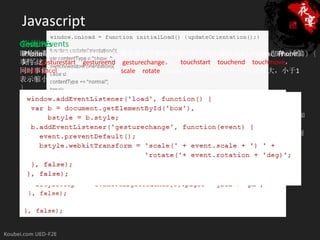
Javascript
侦测iPhone/iPod
Touch Events
Gestures
即是指两只手指接触屏幕的时候缩放或者旋转的效果,对于侦听gestures,iPhone也有三个
if((navigator.userAgent.match(/iPhone/i)) ||(navigator.userAgent.match(/iPad/i))) {
iPhone是使用触屏的方式,所以就需要有手触屏和离开的时候的事件机制,幸好,iPhone做
好了这方面的工作,提供了四个处理touch的事件:touchstart,touchend,touchmove,
事件:gesturestart,gestureend,gesturechange。
    if (document.cookie.indexOf("iphone_redirect=false") == -1) {
同时事件参数event有两个属性:scale,rotate。Scale的中间值是1,大于1表示放大,小于1
      window.location = “http://www.example.com/iphone/";
touchcancel (when the system cancels the touch)
表示缩小。
    }
}

侦测设备旋转方向
iPhone可以在横屏状态下浏览网页,有时候你会想知道用户设备的手持状态来增强可用性和
功能。
iPhone/iPad中都有一个window.orientation的属性来判断在页面onload的时候设备向哪个方向
旋转。
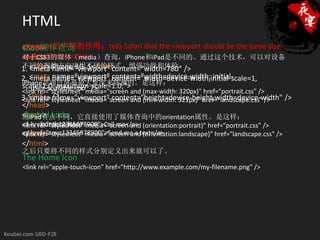
HTML
viewport的声明的作用:tells Safari that the viewport should be the same size
CSS3媒体查询
<html>
as the iPhone screen。
对于CSS3的媒体(media)查询,iPhone和iPad是不同的。通过这个技术,可以对设备
<head>
不同的握持方向应用不同的样式,增强功能和体验。
   <title>iPhone 3G S</title>
1. <meta name="viewport" content="width=780" />
   <meta name="viewport" content="width=device-width; initial-
2. <meta name="viewport" content="width=device-width,initial-scale=1,
iPhone是通过屏幕最大宽度来侦测的。是这样:
scale=1.0; maximum-scale=1.0;">
   user-scalable=no" />
<link rel="stylesheet" media="screen and (max-width: 320px)" href="portrait.css" />
3.<link … name="viewport" content="height=device-height,width=device-width" />
   <meta />
<link rel="stylesheet" media="screen and (min-width: 321px)" href="landscape.css" />
</head>
<body> Links
 Special
而iPad有点不同,它直接使用了媒体查询中的orientation属性。是这样:
<!-- content here -- >
<a href="tel:12345678900">Call me</a> (orientation:portrait)" href="portrait.css" />
<link rel="stylesheet" media="screen and
<a href="sms:12345678900">Send me a text</a>
</body>
<link rel="stylesheet" media="screen and (orientation:landscape)" href="landscape.css" />
</html>
之后只要将不同的样式分别定义出来就可以了。
The Home Icon
<link rel="apple-touch-icon" href="http://www.example.com/my-filename.png" />
Resource List:
Tutorial: Building a website for the iPhone
iPhone Development: 12 Tips To Get You Started
10条小代码开发 iPhone友好的网站
iPhone CSS—tips for building iPhone websites
CSS3 Previews
iPad的CSS3媒体查询
iPhone网站开发点滴

Thanks!!

Banquet 23

  • 1.
  • 2.
  • 3.
    爱上iPhone 3G的理由 功能创新的电话 通过 iPhone上的 Multi-Touch 用户界面,你在通讯录、个人收藏、通话记录或 者其他几乎任何地方中轻点名字或号码就可以直接进行拨号。 宽屏 iPod 配备 3.5 英寸亮丽的显示屏,iPhone 上的内容 ─ 包括音乐、照片和视频等将 显得更加出色。手指轻扫即可浏览歌曲和播放列表,使用 Cover Flow 欣赏你 的专辑封面。 突破性的上网装置 通过高速 3G 网络,iPhone 支持 HTML 邮件和先进的 Safari 网络浏览器,并 内置搜索功能,为你带来移动装置上前所未有的互联网体验。iPhone 擅长 多任务操作,你能够一边打电话,一边发送邮件或者上网。 方向感应器,Multi-Touch,智能键盘和中文输入。。。
  • 4.
    border-radius background-origin background-clip text-shadow box-shadow first-child last-child …… Happy Ending…
  • 5.
    iPhone手机网站开发总结 1. HTML的head标签内需要显示声明meta属性:<meta name=”viewport” content=”width=device-width;minimum-scale=1.0; maximum-scale=1″ />,minimum- scale和maximum-scale主要作用是控制内容的显示比例。 2. 在使用css3的时候,要通过-khtml为前缀的方式,-webkit的方式不管用。比如: -khtml-border-radius。 3. 对css的inline-block支持不是很良好。 4. 没有:hover状态,不过可以通过iphone的ontouchstart和ontouchend两个独有的 事件来模拟触屏特效。 5. 在横屏和竖屏的情况下,字体会发生变化。这可以通过在html中用css的属性: -webkit-text-size- adjust:none; 6. 支持大多数的css3属性:我使用到的就有:last-child,:first-child,nth-child(n),:last- of- type,:first-of-type等等,通过只用这些css属性,可是节省很多麻烦。 7. iphone同时也好支持几个class类做判断的功能。 iPhone网站开发点滴
  • 6.
    iPhone 3G S CSS Javascript HTML
  • 7.
    CSS “The practical upshotof this is that you need to do no cross-browser testing, and can use all the CSS3 you like. “ 1. <link rel="stylesheet" type="text/css" href=“iphone.css” /> 2. @media screen and (max-device-width: 480px){ /*--- iPhone only ---*/ } 3. -webkit-text-size-adjust 用于控制在横竖频切换的时候字体是否改变 4. 支持大部分的CSS3新特性,不过对于一些特效要使用-khtml前缀(比如:border-radius, background-origin等等)
  • 8.
    Javascript 侦测iPhone/iPod Touch Events Gestures 即是指两只手指接触屏幕的时候缩放或者旋转的效果,对于侦听gestures,iPhone也有三个 if((navigator.userAgent.match(/iPhone/i)) ||(navigator.userAgent.match(/iPad/i))){ iPhone是使用触屏的方式,所以就需要有手触屏和离开的时候的事件机制,幸好,iPhone做 好了这方面的工作,提供了四个处理touch的事件:touchstart,touchend,touchmove, 事件:gesturestart,gestureend,gesturechange。 if (document.cookie.indexOf("iphone_redirect=false") == -1) { 同时事件参数event有两个属性:scale,rotate。Scale的中间值是1,大于1表示放大,小于1 window.location = “http://www.example.com/iphone/"; touchcancel (when the system cancels the touch) 表示缩小。 } } 侦测设备旋转方向 iPhone可以在横屏状态下浏览网页,有时候你会想知道用户设备的手持状态来增强可用性和 功能。 iPhone/iPad中都有一个window.orientation的属性来判断在页面onload的时候设备向哪个方向 旋转。
  • 9.
    HTML viewport的声明的作用:tells Safari thatthe viewport should be the same size CSS3媒体查询 <html> as the iPhone screen。 对于CSS3的媒体(media)查询,iPhone和iPad是不同的。通过这个技术,可以对设备 <head> 不同的握持方向应用不同的样式,增强功能和体验。 <title>iPhone 3G S</title> 1. <meta name="viewport" content="width=780" /> <meta name="viewport" content="width=device-width; initial- 2. <meta name="viewport" content="width=device-width,initial-scale=1, iPhone是通过屏幕最大宽度来侦测的。是这样: scale=1.0; maximum-scale=1.0;"> user-scalable=no" /> <link rel="stylesheet" media="screen and (max-width: 320px)" href="portrait.css" /> 3.<link … name="viewport" content="height=device-height,width=device-width" /> <meta /> <link rel="stylesheet" media="screen and (min-width: 321px)" href="landscape.css" /> </head> <body> Links Special 而iPad有点不同,它直接使用了媒体查询中的orientation属性。是这样: <!-- content here -- > <a href="tel:12345678900">Call me</a> (orientation:portrait)" href="portrait.css" /> <link rel="stylesheet" media="screen and <a href="sms:12345678900">Send me a text</a> </body> <link rel="stylesheet" media="screen and (orientation:landscape)" href="landscape.css" /> </html> 之后只要将不同的样式分别定义出来就可以了。 The Home Icon <link rel="apple-touch-icon" href="http://www.example.com/my-filename.png" />
  • 10.
    Resource List: Tutorial: Buildinga website for the iPhone iPhone Development: 12 Tips To Get You Started 10条小代码开发 iPhone友好的网站 iPhone CSS—tips for building iPhone websites CSS3 Previews iPad的CSS3媒体查询 iPhone网站开发点滴
  • 11.