JSR 75
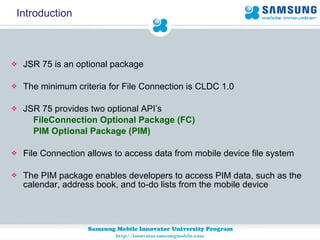
Introduction JSR 75 is an optional package The minimum criteria for File Connection is CLDC 1.0 JSR 75 provides two optional API’s FileConnection Optional Package (FC)  PIM Optional Package (PIM)   File Connection allows to access data from mobile device file system The PIM package enables developers to access PIM data, such as the calendar, address book, and to-do lists from the mobile device
File Connection API
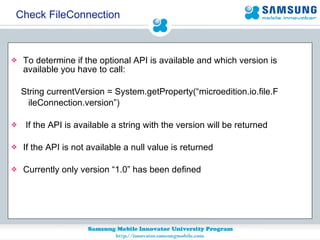
To determine if the optional API is available and which version is  available you have to call:  String currentVersion = System.getProperty(“microedition.io.file.F  ileConnection.version”) If the API is available a string with the version will be returned If the API is not available a null value is returned Currently only version “1.0” has been defined Check FileConnection
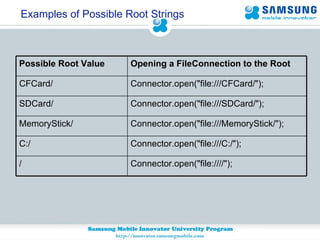
Examples of Possible Root Strings Connector.open("file:////");  / Connector.open("file:///C:/");  C:/  Connector.open("file:///MemoryStick/");  MemoryStick/  Connector.open("file:///SDCard/");  SDCard/  Connector.open("file:///CFCard/");  CFCard/  Opening a FileConnection to the Root  Possible Root Value
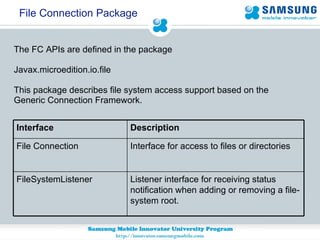
File Connection Package The FC APIs are defined in the package   Javax.microedition.io.file This package describes file system access support based on the  Generic Connection Framework.  Interface for access to files or directories File Connection Listener interface for receiving status notification when adding or removing a file-system root. FileSystemListener Description Interface
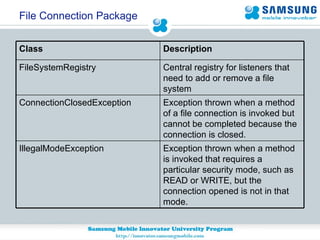
File Connection Package Exception thrown when a method of a file connection is invoked but cannot be completed because the connection is closed. ConnectionClosedException Central registry for listeners that need to add or remove a file system FileSystemRegistry Exception thrown when a method is invoked that requires a particular security mode, such as READ or WRITE, but the connection opened is not in that mode. IllegalModeException Description Class
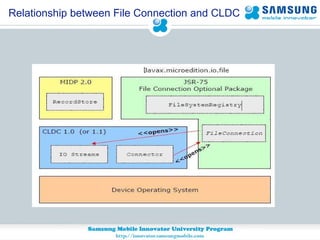
Relationship between File Connection and CLDC
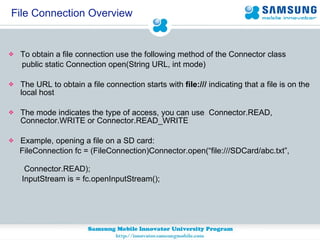
File Connection Overview To obtain a file connection use the following method of the Connector class public static Connection open(String URL, int mode) The URL to obtain a file connection starts with  file:///  indicating that a file is on the local host The mode indicates the type of access, you can use  Connector.READ, Connector.WRITE or Connector.READ_WRITE Example, opening a file on a SD card: FileConnection fc = (FileConnection)Connector.open(“file:///SDCard/abc.txt”,  Connector.READ); InputStream is = fc.openInputStream();
File Connection Overview To create a new file, you first have to call Connector.open() with the new file name and Connector.WRITE mode fc = (FileConnection) Connector.open("file:///root1/text.txt",  Connector.WRITE); fc.create(); If you are constructing file paths manually, you should always obtain the file separator by using the system property called file.separator Example: String fileSep = System.getProperty(“file.separator”)  To obtain the file system roots the method listRoots() is called on the FileSystemRegistry class and the first returned file root is usually root1/ for the Samsung SDK
File Connection Features Allow to access the files and retrieve data present in the file system Allow to write files and add data into the file system Allow to hide a file and also to determine whether a file or directory is hidden. Allow to change the attribute of a file to read/write Allow to edit the files and data in the file system Allow to make new directory in the file system Allow to notify in case of adding and removing a new file system root
Protect users’ files and data in the mobile device Untrusted MIDlet suites that access the protected APIs and functions of the FileConnection APIs must be subject to confirmation by the user.  Trusted MIDlet suites must specify the permissions that are applicable to the FileConnection APIs.  File Permissions required to be added javax.microedition.io.Connector.file.read javax.microedition.io.Connector.file.write Security Considerations
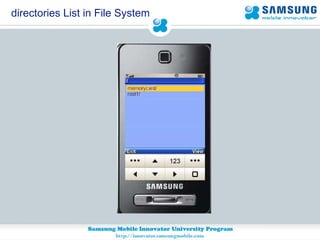
Access list of directories in File System Call the method listRoots of FileSystemRegistry class to know the list  of roots available in phone Enumeration e = FileSystemRegistry.listRoots(); Now get the names of list of roots available from the enumeration  object while (e.hasMoreElements()) { String fileName = (String)e.nextElement(); …  form.append(fileName ); }
directories List in File System
Access Files From Directory URL of the directory you Want to access  String url = "file:///MemoryStick";  Pass the above url  in Connector.open() method as below  FileConnection fc = (FileConnection)Connector.open( url, Connector.WRITE); Determine whether the directory is available calling the method isDirectory() if( fc.isDirectory() ){  //directory exits }else{ //no directory }
Now once the directory exists use list() method in FileConnection  class to get the enumeration of directories names. if( conn.isDirectory() ){  Enumeration names = conn.list();  while( names.hasMoreElements() ){  String name = (String) e.nextElement();  // The String name here contains name of all files or folders present in directory }  } else {  // not a directory!  } Access Files From Directory
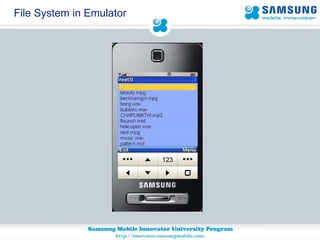
File System in Emulator
Read Text File from File System File Connection URL of the text file String url = "file:///root1/text.txt"; Pass the above url  in Connector.open() method as below  FileConnection fc = (FileConnection)Connector.open( url, Connector.READ); Check whether the file is already exits  If(!fc.exists){ throw new IOException("File does not exists"); } Obtain the input stream data using openInputStream() method InputStream streamData = fc.openInputStream();
Read Text File from File System Read the byte data of the text file byte[] b = new byte[1024];  int length = fis.read(b, 0, 1024); convert the byte data to string  String str=new String(b,0,length); append the data in form  … form.append(str);
Adding Image To File System File Connection URL of the image String url = "file:///root1/image.png"; Pass the above url  in Connector.open() method as below  FileConnection fc = (FileConnection)Connector.open( url, Connector.WRITE); Check whether the file is already exits and create a new file If(!fc.exists){ fc.create(); } Obtain the output stream data using openOutputStream() method OutputStream streamData = fc.openOutputStream();
Adding Image To File System //Add the image byte data in write() method of OutputStream //Get the byte data of the Image --- Byte[] imageBytes=ImageData; streamData.write(imageBytes); And finally close all connections streamData.close(); fc.close(); Image is successfully added in the File System
Personal Information Management API
PIM API Availability To determine if the optional PIM API is available and which version is installed you have to call:  String currentVersion =  System.getProperty(“microedition.pim.version”) If the PIM API is available a string with the version will be returned (eg: “1.0”) If the PIM API is not available a null value is returned
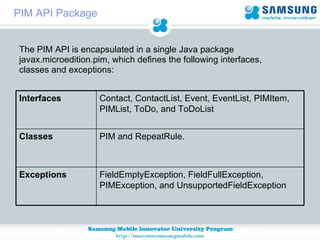
The PIM API is encapsulated in a single Java package javax.microedition.pim, which defines the following interfaces, classes and exceptions:   PIM API Package FieldEmptyException, FieldFullException, PIMException, and UnsupportedFieldException  Exceptions PIM and RepeatRule. Classes Contact, ContactList, Event, EventList, PIMItem, PIMList, ToDo, and ToDoList  Interfaces
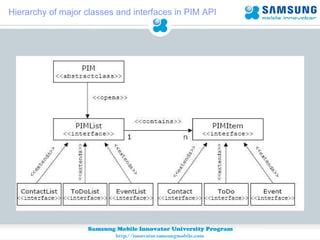
Hierarchy of major classes and interfaces in PIM API
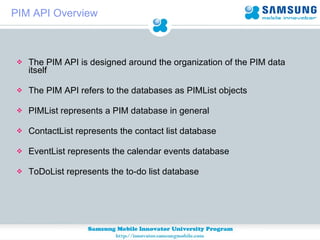
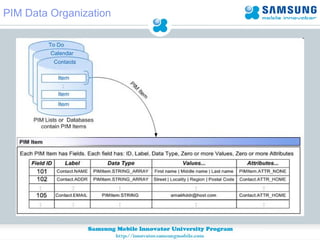
PIM API Overview The PIM API is designed around the organization of the PIM data itself The PIM API refers to the databases as PIMList objects PIMList represents a PIM database in general  ContactList represents the contact list database  EventList represents the calendar events database  ToDoList represents the to-do list database
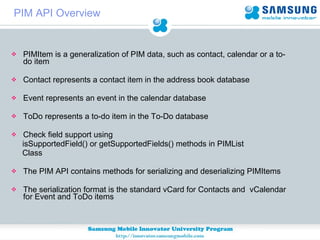
PIM API Overview PIMItem is a generalization of PIM data, such as contact, calendar or a to-do item  Contact represents a contact item in the address book database  Event represents an event in the calendar database  ToDo represents a to-do item in the To-Do database  Check field support using  isSupportedField() or getSupportedFields() methods in PIMList  Class The PIM API contains methods for serializing and deserializing PIMItems The serialization format is the standard vCard for Contacts and  vCalendar for Event and ToDo items
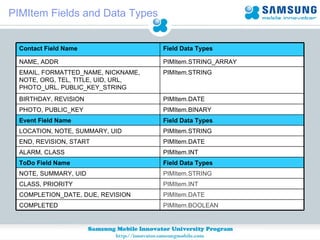
PIMItem Fields and Data Types Field Data Types ToDo Field Name Field Data Types Event Field Name PIMItem.STRING LOCATION, NOTE, SUMMARY, UID PIMItem.DATE END, REVISION, START PIMItem.INT ALARM, CLASS PIMItem.STRING NOTE, SUMMARY, UID PIMItem.INT CLASS, PRIORITY PIMItem.DATE COMPLETION_DATE, DUE, REVISION PIMItem.BOOLEAN COMPLETED PIMItem.BINARY PHOTO, PUBLIC_KEY PIMItem.DATE BIRTHDAY, REVISION PIMItem.STRING EMAIL, FORMATTED_NAME, NICKNAME, NOTE, ORG, TEL, TITLE, UID, URL, PHOTO_URL, PUBLIC_KEY_STRING PIMItem.STRING_ARRAY NAME, ADDR Field Data Types Contact Field Name
PIM Data Organization
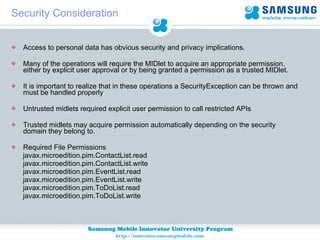
Security Consideration Access to personal data has obvious security and privacy implications. Many of the operations will require the MIDlet to acquire an appropriate permission, either by explicit user approval or by being granted a permission as a trusted MIDlet. It is important to realize that in these operations a SecurityException can be thrown and must be handled properly Untrusted midlets required explicit user permission to call restricted APIs Trusted midlets may acquire permission automatically depending on the security domain they belong to. Required File Permissions  javax.microedition.pim.ContactList.read  javax.microedition.pim.ContactList.write javax.microedition.pim.EventList.read javax.microedition.pim.EventList.write  javax.microedition.pim.ToDoList.read  javax.microedition.pim.ToDoList.write
How To Read Telephone Number From openPIMList(int pimListType, int mode) method of PIM class retrieve PIMList object Pass the parameters PIM.CONTACT_LIST as listType and PIM.READ_WRITE as Mode PIMList pimList = PIM.getInstance().openPIMList(PIM.CONTACT_LIST,  PIM.READ_WRITE); Then retrieve the enumeration of pimItems using items() method of PIMList  class for (Enumeration items = pimList.items(); items.hasMoreElements();) PIMItem pimItem = (PIMItem) items.nextElement(); Now get supported field in each PIMItem int[] fields = pimItem.getPIMList().getSupportedFields();
How To Read Telephone Number Retrieve the data types present in each field for (int i = 0; i < fields.length; i++)  int fieldIndex = fields[i]; int dataType = pimItem.getPIMList().getFieldDataType(fieldIndex); Now in String data type get the Telephone Numbers using Contant.TEL if(dataType==PIMItem.STRING) { for (int j = 0; j < pimItem.countValues(fieldIndex); j++)  {  String sValue = pimItem.getString(fieldIndex, j); if(fieldIndex==Contact.TEL){ int attr = pimItem.getAttributes(fieldIndex, j); String label = pimItem.getPIMList().getAttributeLabel(attr); form=new Form(“Telephone numbers”);  form.append(label+&quot;=&quot;+sValue); display.setCurrent(form); } }
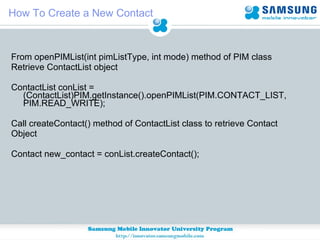
How To Create a New Contact From openPIMList(int pimListType, int mode) method of PIM class Retrieve ContactList object ContactList conList = (ContactList)PIM.getInstance().openPIMList(PIM.CONTACT_LIST, PIM.READ_WRITE); Call createContact() method of ContactList class to retrieve Contact  Object Contact new_contact = conList.createContact();
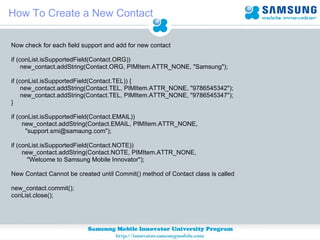
How To Create a New Contact Now check for each field support and add for new contact if (conList.isSupportedField(Contact.ORG)) new_contact.addString(Contact.ORG, PIMItem.ATTR_NONE, &quot;Samsung&quot;); if (conList.isSupportedField(Contact.TEL)) { new_contact.addString(Contact.TEL, PIMItem.ATTR_NONE, &quot;9786545342&quot;); new_contact.addString(Contact.TEL, PIMItem.ATTR_NONE, &quot;9786545347&quot;); } if (conList.isSupportedField(Contact.EMAIL)) new_contact.addString(Contact.EMAIL, PIMItem.ATTR_NONE,  &quot;support.smi@samaung.com&quot;); if (conList.isSupportedField(Contact.NOTE)) new_contact.addString(Contact.NOTE, PIMItem.ATTR_NONE, &quot;Welcome to Samsung Mobile Innovator&quot;); New Contact Cannot be created until Commit() method of Contact class is called new_contact.commit(); conList.close();
How To Modify An Event in a Calendar From openPIMList(int pimListType, int mode) method of PIM class retrieve  EventList object EventList el = (EventList) PIM.getInstance().openPIMList(                 PIM.EVENT_LIST, PIM.READ_WRITE); Retrieve the Calender Class instances for start of the day and end of the day Calendar start_of_day = Calendar.getInstance(); Calendar end_of_day = Calendar.getInstance();           Set the start of the working day as 6am start_of_day.set(Calendar.HOUR_OF_DAY, 7);            Set the end of the working day as 9pm end_of_day.set(Calendar.HOUR_OF_DAY, 21); 
How To Modify An Event in a Calendar Now get the enumeration of matching elements Enumeration todays_events =  el.items(Event.OCCURRING, start_of_day.getTime().getTime(), end_of_day.getTime().getTime(), true); Now update all events by one day while (todays_events != null && todays_events.hasMoreElements()) { Event e = (Event) todays_events.nextElement(); e.setDate(Event.START, 0, PIMItem.ATTR_NONE,  e.getDate(Event.START, 0) + 86400000); e.commit();       }   
Thank You

Jsr75 sup

  • 1.
  • 2.
    Introduction JSR 75is an optional package The minimum criteria for File Connection is CLDC 1.0 JSR 75 provides two optional API’s FileConnection Optional Package (FC) PIM Optional Package (PIM) File Connection allows to access data from mobile device file system The PIM package enables developers to access PIM data, such as the calendar, address book, and to-do lists from the mobile device
  • 3.
  • 4.
    To determine ifthe optional API is available and which version is available you have to call: String currentVersion = System.getProperty(“microedition.io.file.F ileConnection.version”) If the API is available a string with the version will be returned If the API is not available a null value is returned Currently only version “1.0” has been defined Check FileConnection
  • 5.
    Examples of PossibleRoot Strings Connector.open(&quot;file:////&quot;); / Connector.open(&quot;file:///C:/&quot;); C:/ Connector.open(&quot;file:///MemoryStick/&quot;); MemoryStick/ Connector.open(&quot;file:///SDCard/&quot;); SDCard/ Connector.open(&quot;file:///CFCard/&quot;); CFCard/ Opening a FileConnection to the Root Possible Root Value
  • 6.
    File Connection PackageThe FC APIs are defined in the package Javax.microedition.io.file This package describes file system access support based on the Generic Connection Framework. Interface for access to files or directories File Connection Listener interface for receiving status notification when adding or removing a file-system root. FileSystemListener Description Interface
  • 7.
    File Connection PackageException thrown when a method of a file connection is invoked but cannot be completed because the connection is closed. ConnectionClosedException Central registry for listeners that need to add or remove a file system FileSystemRegistry Exception thrown when a method is invoked that requires a particular security mode, such as READ or WRITE, but the connection opened is not in that mode. IllegalModeException Description Class
  • 8.
    Relationship between FileConnection and CLDC
  • 9.
    File Connection OverviewTo obtain a file connection use the following method of the Connector class public static Connection open(String URL, int mode) The URL to obtain a file connection starts with file:/// indicating that a file is on the local host The mode indicates the type of access, you can use Connector.READ, Connector.WRITE or Connector.READ_WRITE Example, opening a file on a SD card: FileConnection fc = (FileConnection)Connector.open(“file:///SDCard/abc.txt”, Connector.READ); InputStream is = fc.openInputStream();
  • 10.
    File Connection OverviewTo create a new file, you first have to call Connector.open() with the new file name and Connector.WRITE mode fc = (FileConnection) Connector.open(&quot;file:///root1/text.txt&quot;, Connector.WRITE); fc.create(); If you are constructing file paths manually, you should always obtain the file separator by using the system property called file.separator Example: String fileSep = System.getProperty(“file.separator”) To obtain the file system roots the method listRoots() is called on the FileSystemRegistry class and the first returned file root is usually root1/ for the Samsung SDK
  • 11.
    File Connection FeaturesAllow to access the files and retrieve data present in the file system Allow to write files and add data into the file system Allow to hide a file and also to determine whether a file or directory is hidden. Allow to change the attribute of a file to read/write Allow to edit the files and data in the file system Allow to make new directory in the file system Allow to notify in case of adding and removing a new file system root
  • 12.
    Protect users’ filesand data in the mobile device Untrusted MIDlet suites that access the protected APIs and functions of the FileConnection APIs must be subject to confirmation by the user. Trusted MIDlet suites must specify the permissions that are applicable to the FileConnection APIs. File Permissions required to be added javax.microedition.io.Connector.file.read javax.microedition.io.Connector.file.write Security Considerations
  • 13.
    Access list ofdirectories in File System Call the method listRoots of FileSystemRegistry class to know the list of roots available in phone Enumeration e = FileSystemRegistry.listRoots(); Now get the names of list of roots available from the enumeration object while (e.hasMoreElements()) { String fileName = (String)e.nextElement(); … form.append(fileName ); }
  • 14.
  • 15.
    Access Files FromDirectory URL of the directory you Want to access String url = &quot;file:///MemoryStick&quot;; Pass the above url in Connector.open() method as below FileConnection fc = (FileConnection)Connector.open( url, Connector.WRITE); Determine whether the directory is available calling the method isDirectory() if( fc.isDirectory() ){ //directory exits }else{ //no directory }
  • 16.
    Now once thedirectory exists use list() method in FileConnection class to get the enumeration of directories names. if( conn.isDirectory() ){ Enumeration names = conn.list(); while( names.hasMoreElements() ){ String name = (String) e.nextElement(); // The String name here contains name of all files or folders present in directory } } else { // not a directory! } Access Files From Directory
  • 17.
  • 18.
    Read Text Filefrom File System File Connection URL of the text file String url = &quot;file:///root1/text.txt&quot;; Pass the above url in Connector.open() method as below FileConnection fc = (FileConnection)Connector.open( url, Connector.READ); Check whether the file is already exits If(!fc.exists){ throw new IOException(&quot;File does not exists&quot;); } Obtain the input stream data using openInputStream() method InputStream streamData = fc.openInputStream();
  • 19.
    Read Text Filefrom File System Read the byte data of the text file byte[] b = new byte[1024]; int length = fis.read(b, 0, 1024); convert the byte data to string String str=new String(b,0,length); append the data in form … form.append(str);
  • 20.
    Adding Image ToFile System File Connection URL of the image String url = &quot;file:///root1/image.png&quot;; Pass the above url in Connector.open() method as below FileConnection fc = (FileConnection)Connector.open( url, Connector.WRITE); Check whether the file is already exits and create a new file If(!fc.exists){ fc.create(); } Obtain the output stream data using openOutputStream() method OutputStream streamData = fc.openOutputStream();
  • 21.
    Adding Image ToFile System //Add the image byte data in write() method of OutputStream //Get the byte data of the Image --- Byte[] imageBytes=ImageData; streamData.write(imageBytes); And finally close all connections streamData.close(); fc.close(); Image is successfully added in the File System
  • 22.
  • 23.
    PIM API AvailabilityTo determine if the optional PIM API is available and which version is installed you have to call: String currentVersion = System.getProperty(“microedition.pim.version”) If the PIM API is available a string with the version will be returned (eg: “1.0”) If the PIM API is not available a null value is returned
  • 24.
    The PIM APIis encapsulated in a single Java package javax.microedition.pim, which defines the following interfaces, classes and exceptions: PIM API Package FieldEmptyException, FieldFullException, PIMException, and UnsupportedFieldException Exceptions PIM and RepeatRule. Classes Contact, ContactList, Event, EventList, PIMItem, PIMList, ToDo, and ToDoList Interfaces
  • 25.
    Hierarchy of majorclasses and interfaces in PIM API
  • 26.
    PIM API OverviewThe PIM API is designed around the organization of the PIM data itself The PIM API refers to the databases as PIMList objects PIMList represents a PIM database in general ContactList represents the contact list database EventList represents the calendar events database ToDoList represents the to-do list database
  • 27.
    PIM API OverviewPIMItem is a generalization of PIM data, such as contact, calendar or a to-do item Contact represents a contact item in the address book database Event represents an event in the calendar database ToDo represents a to-do item in the To-Do database Check field support using isSupportedField() or getSupportedFields() methods in PIMList Class The PIM API contains methods for serializing and deserializing PIMItems The serialization format is the standard vCard for Contacts and vCalendar for Event and ToDo items
  • 28.
    PIMItem Fields andData Types Field Data Types ToDo Field Name Field Data Types Event Field Name PIMItem.STRING LOCATION, NOTE, SUMMARY, UID PIMItem.DATE END, REVISION, START PIMItem.INT ALARM, CLASS PIMItem.STRING NOTE, SUMMARY, UID PIMItem.INT CLASS, PRIORITY PIMItem.DATE COMPLETION_DATE, DUE, REVISION PIMItem.BOOLEAN COMPLETED PIMItem.BINARY PHOTO, PUBLIC_KEY PIMItem.DATE BIRTHDAY, REVISION PIMItem.STRING EMAIL, FORMATTED_NAME, NICKNAME, NOTE, ORG, TEL, TITLE, UID, URL, PHOTO_URL, PUBLIC_KEY_STRING PIMItem.STRING_ARRAY NAME, ADDR Field Data Types Contact Field Name
  • 29.
  • 30.
    Security Consideration Accessto personal data has obvious security and privacy implications. Many of the operations will require the MIDlet to acquire an appropriate permission, either by explicit user approval or by being granted a permission as a trusted MIDlet. It is important to realize that in these operations a SecurityException can be thrown and must be handled properly Untrusted midlets required explicit user permission to call restricted APIs Trusted midlets may acquire permission automatically depending on the security domain they belong to. Required File Permissions javax.microedition.pim.ContactList.read javax.microedition.pim.ContactList.write javax.microedition.pim.EventList.read javax.microedition.pim.EventList.write javax.microedition.pim.ToDoList.read javax.microedition.pim.ToDoList.write
  • 31.
    How To ReadTelephone Number From openPIMList(int pimListType, int mode) method of PIM class retrieve PIMList object Pass the parameters PIM.CONTACT_LIST as listType and PIM.READ_WRITE as Mode PIMList pimList = PIM.getInstance().openPIMList(PIM.CONTACT_LIST, PIM.READ_WRITE); Then retrieve the enumeration of pimItems using items() method of PIMList class for (Enumeration items = pimList.items(); items.hasMoreElements();) PIMItem pimItem = (PIMItem) items.nextElement(); Now get supported field in each PIMItem int[] fields = pimItem.getPIMList().getSupportedFields();
  • 32.
    How To ReadTelephone Number Retrieve the data types present in each field for (int i = 0; i < fields.length; i++) int fieldIndex = fields[i]; int dataType = pimItem.getPIMList().getFieldDataType(fieldIndex); Now in String data type get the Telephone Numbers using Contant.TEL if(dataType==PIMItem.STRING) { for (int j = 0; j < pimItem.countValues(fieldIndex); j++) { String sValue = pimItem.getString(fieldIndex, j); if(fieldIndex==Contact.TEL){ int attr = pimItem.getAttributes(fieldIndex, j); String label = pimItem.getPIMList().getAttributeLabel(attr); form=new Form(“Telephone numbers”); form.append(label+&quot;=&quot;+sValue); display.setCurrent(form); } }
  • 33.
    How To Createa New Contact From openPIMList(int pimListType, int mode) method of PIM class Retrieve ContactList object ContactList conList = (ContactList)PIM.getInstance().openPIMList(PIM.CONTACT_LIST, PIM.READ_WRITE); Call createContact() method of ContactList class to retrieve Contact Object Contact new_contact = conList.createContact();
  • 34.
    How To Createa New Contact Now check for each field support and add for new contact if (conList.isSupportedField(Contact.ORG)) new_contact.addString(Contact.ORG, PIMItem.ATTR_NONE, &quot;Samsung&quot;); if (conList.isSupportedField(Contact.TEL)) { new_contact.addString(Contact.TEL, PIMItem.ATTR_NONE, &quot;9786545342&quot;); new_contact.addString(Contact.TEL, PIMItem.ATTR_NONE, &quot;9786545347&quot;); } if (conList.isSupportedField(Contact.EMAIL)) new_contact.addString(Contact.EMAIL, PIMItem.ATTR_NONE, &quot;support.smi@samaung.com&quot;); if (conList.isSupportedField(Contact.NOTE)) new_contact.addString(Contact.NOTE, PIMItem.ATTR_NONE, &quot;Welcome to Samsung Mobile Innovator&quot;); New Contact Cannot be created until Commit() method of Contact class is called new_contact.commit(); conList.close();
  • 35.
    How To ModifyAn Event in a Calendar From openPIMList(int pimListType, int mode) method of PIM class retrieve EventList object EventList el = (EventList) PIM.getInstance().openPIMList(                 PIM.EVENT_LIST, PIM.READ_WRITE); Retrieve the Calender Class instances for start of the day and end of the day Calendar start_of_day = Calendar.getInstance(); Calendar end_of_day = Calendar.getInstance();          Set the start of the working day as 6am start_of_day.set(Calendar.HOUR_OF_DAY, 7);          Set the end of the working day as 9pm end_of_day.set(Calendar.HOUR_OF_DAY, 21); 
  • 36.
    How To ModifyAn Event in a Calendar Now get the enumeration of matching elements Enumeration todays_events =  el.items(Event.OCCURRING, start_of_day.getTime().getTime(), end_of_day.getTime().getTime(), true); Now update all events by one day while (todays_events != null && todays_events.hasMoreElements()) { Event e = (Event) todays_events.nextElement(); e.setDate(Event.START, 0, PIMItem.ATTR_NONE,  e.getDate(Event.START, 0) + 86400000); e.commit();       }   
  • 37.