Introduction to Programming I
Lecture 9
Variables Scope
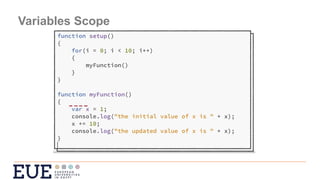
Variables Scope
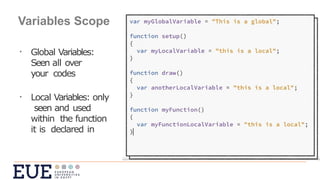
• Global Variables: Seen all over your codes
• Local Variables: only seen and used within the function it is
declared in
Variables Scope
• Global Variables:
Seen all over
your codes
• Local Variables: only
seen and used
within the function
it is declared in
Variables Scope
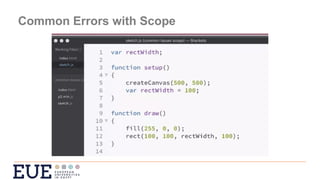
Common Errors with Scope
Copying Variables
var myVariable1 = 50;
var myVariable2 = myVariable1;
What is the value stored for myVariable2 ?
50
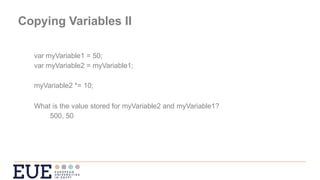
Copying Variables II
var myVariable1 = 50;
var myVariable2 = myVariable1;
myVariable2 *= 10;
What is the value stored for myVariable2 and myVariable1?
500, 50
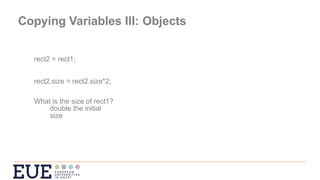
Copying Variables III: Objects
rect2 = rect1;
rect2.size = rect2.size*2;
What is the size of rect1?
double the initial
size
Copying Variables III: Objects
-You are copying the reference to the object not the value like the simple variable
types e.g., string, Boolean, number.
- What if you want to have 2 different objects?
- Pass the simple type not the entire object
Arrays:
var sizes = [4, 9, 10, 5, 110, 95, 40, 40];
var names = ["Mercury", "Venus", "Earth", "Mars", "Jupiter", "Saturn", "Uranus",
"Neptune"];
var colours = ["grey", "brown", "blue", "red", "sienna", "pink", "blue", "cyan"];
var arrayPlanets = [planet1, planet2, planet3, planet4, planet5, planet6, planet7,
planet8];
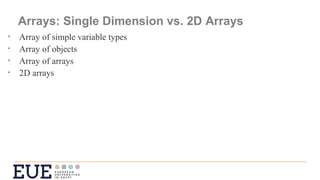
Arrays: Single Dimension vs. 2D Arrays
• Array of simple variable types
• Array of objects
• Array of arrays
• 2D arrays
Arrays: 2D Arrays Syntax
var myArray = [];
var myArray = [[],[],[]];
Arrays: 2D Arrays Initialising
var myArray = [];
var my2DArray = [[],[],[]];
var my2DArray = [[1,2,3],[4,5,6],[7,8,9,10]];
console.table (my2DArray);
my2DArray [0][0];  1
my2DArray [1][2];  6
Looping over a 2D Array
For (var i=0; i<my2DArray.length; ++i)
for (var j=0; j<my2DArray[i].length; ++j)
console.log(my2DArray[i][j]);
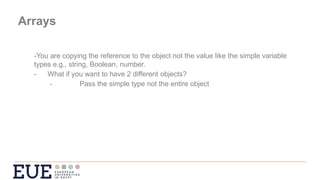
Arrays
-You are copying the reference to the object not the value like the simple variable
types e.g., string, Boolean, number.
- What if you want to have 2 different objects?
- Pass the simple type not the entire object
Lecture 9: Summary
• Use the concept of scope to explain how different parts of a program see
different variables.
• Use nested loops to iterate through 2D arrays of numbers and generate
images from them.

JavaScript scopes and arrays, 2D array handling

  • 1.
  • 2.
  • 3.
    Variables Scope • GlobalVariables: Seen all over your codes • Local Variables: only seen and used within the function it is declared in
  • 4.
    Variables Scope • GlobalVariables: Seen all over your codes • Local Variables: only seen and used within the function it is declared in
  • 5.
  • 6.
  • 7.
    Copying Variables var myVariable1= 50; var myVariable2 = myVariable1; What is the value stored for myVariable2 ? 50
  • 8.
    Copying Variables II varmyVariable1 = 50; var myVariable2 = myVariable1; myVariable2 *= 10; What is the value stored for myVariable2 and myVariable1? 500, 50
  • 9.
    Copying Variables III:Objects rect2 = rect1; rect2.size = rect2.size*2; What is the size of rect1? double the initial size
  • 10.
    Copying Variables III:Objects -You are copying the reference to the object not the value like the simple variable types e.g., string, Boolean, number. - What if you want to have 2 different objects? - Pass the simple type not the entire object
  • 11.
    Arrays: var sizes =[4, 9, 10, 5, 110, 95, 40, 40]; var names = ["Mercury", "Venus", "Earth", "Mars", "Jupiter", "Saturn", "Uranus", "Neptune"]; var colours = ["grey", "brown", "blue", "red", "sienna", "pink", "blue", "cyan"]; var arrayPlanets = [planet1, planet2, planet3, planet4, planet5, planet6, planet7, planet8];
  • 12.
    Arrays: Single Dimensionvs. 2D Arrays • Array of simple variable types • Array of objects • Array of arrays • 2D arrays
  • 13.
    Arrays: 2D ArraysSyntax var myArray = []; var myArray = [[],[],[]];
  • 14.
    Arrays: 2D ArraysInitialising var myArray = []; var my2DArray = [[],[],[]]; var my2DArray = [[1,2,3],[4,5,6],[7,8,9,10]]; console.table (my2DArray); my2DArray [0][0];  1 my2DArray [1][2];  6
  • 15.
    Looping over a2D Array For (var i=0; i<my2DArray.length; ++i) for (var j=0; j<my2DArray[i].length; ++j) console.log(my2DArray[i][j]);
  • 16.
    Arrays -You are copyingthe reference to the object not the value like the simple variable types e.g., string, Boolean, number. - What if you want to have 2 different objects? - Pass the simple type not the entire object
  • 17.
    Lecture 9: Summary •Use the concept of scope to explain how different parts of a program see different variables. • Use nested loops to iterate through 2D arrays of numbers and generate images from them.