
Author
D. SULTHAN BASHA
B.Sc - Computer Science
i
B.Sc (Computer Science)
SRI KRISHNADEVARAYA UNIVERSITY :: ANANTHAPURAMU
Revised Common Framework of CBCS for Colleges in Andhra Pradesh
(A.P. State Council of Higher Education) 2016-17
SECOND YEAR – SEMESTER-III
Paper-III : OBJECT ORIENTED PROGRAMMING USING JAVA
UNIT-1
FUNDAMENTALS OF OBJECT – ORIENTED PROGRAMMING : Introduction, Object Oriented
paradigm, Basic Concepts of OOP, Benefits of OOP, Applications of OOP, Java features.
OVERVIEW OF JAVA LANGUAGE: Introduction, Simple Java program structure, Java tokens,
Java Statements, Implementing a Java Program, Java Virtual Machine, Command line
arguments.
CONSTANTS, VARIABLES & DATA TYPES: Introduction, Constants, Variables, Data Types,
Declaration of Variables, Giving Value to Variables, Scope of variables, Symbolic Constants, Type
casting, Getting Value of Variables, Standard Default values;
OPERATORS & EXPRESSIONS.
UNIT-2
DECISION MAKING & BRANCHING: Introduction, Decision making with if statement, Simple if
statement, if. Else statement, Nesting of if. else statements, the else if ladder, the switch
statement, the conditional operator.
LOOPING: Introduction, The While statement, the do-while statement, the for statement,
Jumps in loops.
CLASSES, OBJECTS & METHODS: Introduction, Defining a class, Adding variables, Adding
methods, Creating objects, Accessing class members, Constructors, Method overloading, Static
members, Nesting of methods;
UNIT-3
INHERITANCE: Extending a class, Overloading methods, Final variables and methods, Final
classes, Abstract methods and classes;
ARRAYS, STRINGS AND VECTORS: Arrays, One-dimensional arrays, Creating an array, Two –
dimensional arrays, Strings, Vectors, Wrapper classes;
INTERFACES: MULTIPLE INHERITANCE: Introduction, Defining interfaces, Extending interfaces,
Implementing interfaces, Assessing interface variables;
UNIT-4
MULTITHREADED PROGRAMMING: Introduction, Creating Threads, Extending the Threads,
Stopping and Blocking a Thread, Lifecycle of a Thread, Using Thread Methods, Thread
Exceptions, Thread Priority, Synchronization, Implementing the ‘Runnable’ Interface.
MANAGING ERRORS AND EXCEPTIONS: Types of errors : Compile-time errors, Runtime errors,
Exceptions, Exception handling, Multiple Catch Statements, Using finally statement,
ii
UNIT-5
APPLET PROGRAMMING: local and remote applets, Applets and Applications, Building Applet
code, Applet Life cycle: Initialization state, Running state, Idle or stopped state, Dead state,
Display state.
PACKAGES: Introduction, Java API Packages, Using System Packages, Naming conventions,
Creating Packages, Accessing a Package, using a Package.
MANAGING INPUT/OUTPUT FILES IN JAVA: Introduction, Concept of Streams, Stream classes,
Byte Stream Classes, Input Stream Classes, Output Stream Classes, Character Stream classes,
Reader stream classes, Writer Stream classes, Using Streams, Reading and writing files.
Object Oriented Programming using Java Unit - 1
Prepared By Page 1
Mr. D. Sulthan Basha Lecturer in Computer Science
Unit - 1
1.1FUNDAMENTALS OF OOP
Introduction:
In 1990 “Sun Micro Systems INC” has conserved a project to develop
software for consumer electronic devices that would be controlled by a remote. This project
was called “Stealth Project”, but later its name was changed to “Green Project”.
In January of 1991, Billjoy James Gosling, Mike Sheareden, Patrick Naughton
and several others met in Aspen, Colorado to discuss this project. “Mike Sheareden” was
focus on business development. “Patrick Naughton” was to begin work on the graphics
system and “James Gosling” was to identify the proper programming language for the
project.
Gosling through C and C++ could be used to develop the project. But the
problem he faced with them is that there were system dependent languages and hence
could not be used on various processors which the electronic devices might use. So he
started developing a new language which was completely system independent.
This language was initially called OAK. Since the name was registered by
some other company, later it was changed to JAVA. Because James Gosling and his team
members were consuming a lot of coffee while developing this language. So they felt that
they were able to develop a better language because of the good quality coffee they
consumed. So the coffee had its own role in development of his own language & good
quality coffee was exported to the entire world from the place called JAVA Island.
Hence they fixed the name of the place for the language as the JAVA and the
symbol for JAVA language is Coffee Cup & Saucer.
*************
1.1.1 Object Oriented Paradigm (OOPS Concepts)
There are many paradigms (features) related to object oriented programming. Some of the
features are:
1. Class / Object
2. Encapsulation
3. Abstraction
4. Inheritance
5. Polymorphism
Class / Object:
A class is a model for creating objects. It contains a block of data members
and methods. An object is an instance of a class. Both the class and object contains variables
and methods.
By following that class one can create objects. So we can say whatever is
there in the class will be seen in its object also.
Encapsulation:
Encapsulation is a mechanism where the variables and the methods that act
on the data will bind together. For example if we take a class, we write the variables &
Object Oriented Programming using Java Unit - 1
Prepared By Page 2
Mr. D. Sulthan Basha Lecturer in Computer Science
methods inside the class. Thus class is binding them together. So class is example for
encapsulation.
Since encapsulation is a protective mechanism for the members of a class. Let
us write a class “Person” in such a way that the variable of the “Person” class are not
available outside to any other program.
Abstraction:
There may be a lot of data, a class contains and user does not need entire
data. The user requires only some part of available data. In this we can hide unnecessary
data from the user and expose only data i.e. of interest to the user. This is called
abstraction.
A good example for abstraction is a car. Any car will have some parts like
engine, radiator, mechanical & electrical equipment etc. the user of that car should know
how to drive the car and does not require any knowledge of this parts.
The advantage of abstraction is that every user will get his own view of the
data according to his requirements and will not get confused with unnecessary data.
Inheritance:
It create new classes from existing class, so that the new class will acquired
all the features of the existing classes is called inheritance.
A good example for inheritance in nature is parents producing the children
and children inheriting the qualities of parents.
Polymorphism:
The word “polymorphism” came from two Greek words. They are “poly” &
“morphs”. Poly means many and morphs means forms. The polymorphism represents the
ability to assume several different forms in programming. We can use a single variable to
refer to the objects of different types & using that variable we can call the methods of the
different objects. Polymorphism provides flexibility in writing programs.
*********
1.1.2 Benefits of OOP
Using OOP is beneficial for both the programmer and the user. OOP technology
offers greater programmer productivity better quality of software and minimal maintenance
effort.
There are also some important benefits of using OOP as follows:
 Inheritance allows us to reuse the code and thus eliminates redundancy.
 With the help of encapsulation it is possible to build the secure codes (programs).
 It is easy to divide the work in a project based on objects.
 Systems can be easily upgraded.
 Software complexity can be easily managed.
 Since the objects can represent real world entities, it is easy to map the problems
domain to those objects in program.
 Objects can easily work with another, without any interference.
 It is possible to build programs from existing standard working modules. This saves a
lot of time and development effort.
*********
Object Oriented Programming using Java Unit - 1
Prepared By Page 3
Mr. D. Sulthan Basha Lecturer in Computer Science
1.1.3 Applications of OOP
If there is complexity in software development, object oriented programming is the
best paradigm. To solve the problem, object concepts helps the programmers to translate
our program solutions into objects.
Real time business system are often much more complex, so object oriented
programming is the best suitable for them. The following areas make use of OOP.
 Computer aided designing and manufacturing.
 Object oriented database management system.
 Computer aided teaching.
 Distributed computing and applications.
 Support system and office decision automation.
 Enterprise resource planning.
 Data ware housing and data mining.
 Parallel computing.
 Mobile computing.
************
1.1.4 Features of JAVA Programming Language
Following are the features of Java Programming Language:
1. Compiled & Interpreted
2. Platform independent and Portable
3. Object Oriented
4. Robust and Secure
5. Distributed
6. Simple and Familiar
7. Multi threaded
8. Dynamic
9. High Performance
10. Scalable
Compiled & Interpreted:
Generally a programming language is either compiled or interpreted. But java has
both of these processes. First, java program is translated into byte code by the compiler
which is called compilation. Once byte code is generated, interpreter generates machine
code that can be executed by the machine which is called interpretation.
Platform Independent and Portable:
This is the most significant feature of java language. Java programs can be moved
from one platform to another easily. Any changes made in processors, CPU & OS of the
machine will not force any change in java program. That is the reason why java is useful for
programming on internet which interconnects different kinds of machines across the world.
Java ensures portability in two ways. Java compiler generates byte code instruction
that can be interpreted by any machine. Secondly java uses primitive datatypes whose sizes
are machine independent.
Object Oriented Programming using Java Unit - 1
Prepared By Page 4
Mr. D. Sulthan Basha Lecturer in Computer Science
Object Oriented:
Java is a true object oriented programming language. Everything in a java program is
an object. All data and code of a program are parts of objects and classes. Java provides a
huge set of classes arranged in packages that we can use in our programs.
Robust and Secure:
Java is a robust (strong) language. Java restricts a programmer in a few areas to find
mistakes easily in program development. Since java is strictly typed language it checks the
code for errors that can crash the system cannot take place in java runtime environments.
Security becomes an important issue for a language i.e. used for programming on
internet. Java does not use pointers. All java programs are run under java virtual machine
(JVM) which restricts them from gaining access to the resources of local machines.
Distributed:
Java is designed as a distributed language for creating applications on networks. Java
applications can open and access objects on remote machines in a network.
Simple and Familiar:
Java is a simple and small language. Many features of C and C++ are not part of java
language. Java does not use pointers, pre processors, header files, and got statement etc. It
also eliminates operator overloading & multiple inheritance.
Familiarity is another attractive feature of java. Since java is designed based on C &
C++ and syntax of java is almost same as of them. It seems very familiar languages for C and
C++ programmers.
Multi Threaded:
A multi threaded program handles multiple tasks simultaneously. Java supports multi
threaded programming this means that we need not wait for a java application to finish one
task before starting another one.
Dynamic:
Java is a dynamic language. Java is capable of dynamically linking in new class
libraries, methods and objects.
High Performance:
Java’s performance is impressive due to the use of intermediate byte code.
According to sun micro systems java’s speed is comparable to C and C++. Incorporation of
multithreading also enhance the execution speed of java applications.
Scalable:
When compared to C and C++ programs java program length is very small because
the lines of code will be reduced by using some objects. And the performance of java is also
very speed compare to C, C++.
*********
Object Oriented Programming using Java Unit - 1
Prepared By Page 5
Mr. D. Sulthan Basha Lecturer in Computer Science
1.1.5 Difference between Java and C.
C Java
1. C supports pointer variables. 1. Java does not support pointer types.
2. C contains the datatypes struct &
union.
2. Java does not contain struct and
union
3. C supports the type modifier
keywords auto, register, extern,
signed & unsigned.
3. Java does not support these types of
modifiers.
4. C supports some statement keywords
SIZEOF & TYPEDEF.
4. Java does not include SIZEOF &
TYPEDEF.
5. C uses goto, break & continue
statements.
5. Java does not use goto statement but
JAVA uses labeled break and
continue statements.
6. C is a procedural oriented
programming language (POP).
6. Java is a object oriented
programming language (OOP).
7. C requires that function without
arguments must be declared with a
keyword “void”.
7. Java does not requires “void” to
declare methods without arguments.
8. C has several pre-processors like
#include, #define, #ifdef, etc.
8. Java does not support any pre-
processors.
*******
1.2Java Environment
Java environment includes a large number of development tools and
hundreds of classes and methods that the development tools are part of the system
known as Java Development Kit (JDK) and the classes and methods are part of the Java
standard Library (JSL). Also known as Application Programming Interface(API).
1.2.1 Java Development Kit
Java development kit comes with a collection of tools used for developing and running java
programs. They are as follows:
appletviewer
javac
java
javap
javah
javadoc
jdb
appletviewer: “appletviewer” enables us to run java applet programs without using java
compatable browser.
Object Oriented Programming using Java Unit - 1
Prepared By Page 6
Mr. D. Sulthan Basha Lecturer in Computer Science
javac: “javac” is the command to call java compiler which translates java source code to
byte code instructions that the interpreter can understand.
java: “java” is a command to call the interpreter. Which is useful to run applets and
applications by reading and interpreting byte code files.
javap: “javap” is the java disasembler, which enables to convert byte code files into a
program description.
javah: “javah” produces headerfiles of C & C++ with native methods.
javadoc: it creates HTML format documentation from java source code files.
jdb: it means java debugger which helps us to find errors in our program.
As illustrated in the above we create a java program source code using a text editor.
Then java source code is compiled using java compiler (javac) and executed using the java
interpreter (java). The java debugger (jdb) is used to find errors in the source code.
********
1.2.2 Application Programming Interface (API)
Java API includes hundreds of classes and methods grouped into several packages.
Following are the most useful packages.
1. Language support package: A collection of classes & methods required for
implementing basic features of java.
2. Utility Packages: A collection of classes to provide utility functions such as date and
time functions.
3. i/o Packages: A collection of classes for input and output manipulation.
4. Networking Packages: A collection of classes for communication with other
computer via internet.
5. AWT Packages: The abstract window tool kit package contains classes that
implements graphical user interface (GUI).
6. Applet Package: This includes a set of classes that are useful for writing java applet.
********
1.2.3 Over view of java language
With the use of java language we can write two types of programs.
1. Standalone applications
2. Web applications
Stand alone applications are run in a non-networking environment. Any language can
be used such kind of applications. Executing a standalone application involves two steps.
Step1: compiling source code using javac.
Step2: executing byte code program using java interpreter.
Object Oriented Programming using Java Unit - 1
Prepared By Page 7
Mr. D. Sulthan Basha Lecturer in Computer Science
Web applications are other kind of programs developed for internet applications. Web
applications are located in one computer and can be downloaded into another remote
computer and executed there using a java enabled browser.
Standalone programs can gain access to computer resources like files and memory, but
applets (web applications) run within a browser & cannot gain access to system resources.
Following figure illustrates the above discussed java programs.
Web application Standalone application
******
1.2.4 Structure of java programme.
A java program may contain one or more sections as shown in below.
Documentation Section
Package Statement
Import statement
Interface statement
Class definition
class………
{
main() ---- method definition
}
Documentation Section:
This section is not a mandatory one but it is suggested
because it consists of one or more comment line giving some details like name of developer,
purpose of this application etc,. In java we can use single line comments or multi line
Java Source Code
Compiler
Web Browser Interpreter
Output Output
Object Oriented Programming using Java Unit - 1
Prepared By Page 8
Mr. D. Sulthan Basha Lecturer in Computer Science
comments to describe the things. Every single line comment start with “//” and multi line
comments starts with “/*” and ends with “*/”.
Package Statement:
A package statement in a java program is not necessarily
used and if it is used, it must be the first statement in java file. This statement declares a
package name and all the classes declared in this java file will become part of this package.
Import Section:
An import section is similar to “#include” statement in C
program. Import statement must be placed before any class definition.
Following is the example for import statement.
import java.io.BufferedReader;
import java.util.stack;
import java.applet.*;
Interface Section:
An interface is like a class but it includes only method
declarations. Interfaces are used whenever multiple inheritance is to be implemented. This
section is also an optional one.
Class Definition:
A java program can contain multiple class definitions.
No.of class definitions depends upon the complexity of application being developed.
Main method class:
Every java stand alone application starts with main()
method, so a class consisting of main() method definition is compulsory for a java
application. Java application’s execution starts when operating system invokes main
method. On reaching the end of main(), the application terminates & control passes back to
operating system.
********
1.2.5 Java tokens.
A java program is a collection of tokens, comments and white spaces.
Tokens are smallest individual units in a program. Java language includes 5 types of tokens:
Keywords
Identifiers
Literals
Operators
Separators
Keywords:
Keywords are very important for any language definition. Java language has
around 50 keywords. All keywords in java have specific meaning and thus we cannot use
them as names for variables, methods, classes & interfaces. All the keywords are written in
lower case letters. Since java is case sensitive language. Changing the case of a letters in
keywords may alter their feature and meaning. Some of the keywords are: class, abstract,
boolean, case, break, public, static etc.
Object Oriented Programming using Java Unit - 1
Prepared By Page 9
Mr. D. Sulthan Basha Lecturer in Computer Science
Identifiers:
Identifiers are the names used for classes, functions(methods), variables,
objects, package & interface.
Identifiers are choosen by programmers according to the need of program. A
programmer should follow some rules while using identifiers:
i) Identifiers include only alphabet, digits, underscore sign & dollar sign characters.
ii) An identifier should not have a digit as its first character.
iii) Upper case & lower case letters are different.
iv) Identifiers can be of any length.
Literals:
Literals represent constant values to be stored in variables. These are 5 major
types of literals in java.
i) Integer literals: Ex – 123, 35, 79, -21, etc.
ii) Floating point literals: Ex – 12.5, 1.48, 3.14, etc.
iii) String literals: Ex – “Java”, “sulthan”, “123”, etc.
iv) Character literals: Ex – ‘K’, ‘@’, ‘7’, etc.
v) Boolean literals: Ex – TRUE, FALSE.
Operators:
Operators are symbols that taken one (or) more operands and operates on
them to produce a result. The following are the types of operators:
i) Arithmetic operators
ii) Relational operators
iii) Logical operators
iv) Conditional operators
v) Bitwise operators
vi) Unary operators
vii) Assignment operators.
Separators:
Separators are symbols used to include where & how groups of code is divided
and arranged.
Separator name Purpose
1. Paranthesis – ( ) Used to enclose parameters in methods, also
used for precedence in expression.
2. Braces – { } Used in array initialization & to define a
block of codes for classes, methods & loops.
3. Brackets – [ ] Used to declare array types.
4. Semi-colon -- ; Used to separate statements
5. Period – . Used to separate a variable or a method
from a reference variable and also used to
separate package names from sub-package
names.
******
Object Oriented Programming using Java Unit - 1
Prepared By Page 10
Mr. D. Sulthan Basha Lecturer in Computer Science
1.2.6 Java statements:
Java program statements are similar to sentences in a
general language. Each statement is compared of tokens and is an executable statement.
Each statement is ended with a termination operator (;). Statements are executed is a
sequence.
Following are the various types of java statements:
 Empty statements
 Labeled statements
 Expression statements
 Selection/control statements
 Iterative statements
 Jump statements
 Synchronization statements
 Guarding statements
Empty statements:
Empty statements perform any action and/are used as a place holder in
a program.
Labeled statements:
Labels are used as arrangements of jump statements in java
programme, labels must not be keywords.
Expression statements:
Expressions are composed using variables, constants and operators.
There are several expression statements available like pre-increment and decrement, post-
increment and decrement, assignment method call etc.
Selection/Control Statements:
In java three types of selection statements. Such as if, if-else & switch.
Iterative Statements:
These statements specify when iteration takes place in a program. In
java there are 3 iterative statements like: do, while, for.
Jump Statements:
Jump statements pass the control from one block to another block.
continue, return, throw are jump statements in java.
Synchronization Statements:
These statements are used in multi threaded programming.
Guarding Statements:
These statements are safe guards to the execution of program from
being crashed due to runtime errors. These statements used keywords like try, catch &
finally.
*******
Object Oriented Programming using Java Unit - 1
Prepared By Page 11
Mr. D. Sulthan Basha Lecturer in Computer Science
1.2.7 Naming conventions in Java.
There are some conventions in java to be followed by programmers.
 Names of methods & instance variables start with a lower case letters.
Ex:- total, result, show(), etc.
 If names of any method or variables involves more than one word, then second and
subsequent word should contain upper case letter as its first character.
Ex:- basicSalary, totalMarks, showDetails(), etc.
 All private, local variables should use only lower case letters combined with
underscore.
Ex:- salary_month
 Classes and interfaces names should start with upper case letters, if more than one
word involoves in their names, all words should start with upper case letters.
 Variables that contain constant values should use all upper case letters and
underscore between words.
Ex:- MAX_MARKS
RATE_OF_INTEREST
*******
1.2.8 Implementing a java Programme.
class Sample
{
public static void main(String args[])
{
System.out.println(“Hello world”);
System.out.println(“Welcome to JAVA”);
}
}
From the above program, we can observe the following things:
1. class Sample:- It is a class definition to start a java program. “Sample” is a class
name.
2. public static void main(String args[]) :- It is a main method, it helps a programmer to
execute their programs and without this statement the execution control cannot run
java program. Here “String” is a class in java.
3. System.out.println() :- It is an output statement in Java. It helps us to print or display
a message and result. Here “System” is a class in java.
4. To type a java program we need a text editor like notepad, notepad++, edit+ etc.
5. After typing a java program we need to save it with an extension (.java) such as
“FileName.java”.
Ex:- Sample.java
6. To compile a java program we need to open the DOS command prompt (OR)
terminal.
7. In command prompt/ terminal we need to move the cursor into file location.
Ex:- C:>Documents and settings> D:[ press Enterkey]
D:>
8. If you saved your java program in a folder included in ‘D’ drive then you need to
move the cursor into that particular folder by using “cd” command in DOS.
Object Oriented Programming using Java Unit - 1
Prepared By Page 12
Mr. D. Sulthan Basha Lecturer in Computer Science
Ex:- D:cd <folder_name>[ press Enterkey]
D:cd javaprograms [ press Enterkey]
D:Javaprograms>
9. After this we need to call the java compiler (javac) to compile our java program.
Syntax:- D:Javaprograms> javac <File_name.java>
Ex:- D:Javaprograms> javac Sample.java [ press Enterkey]
10. To execute java program we need to call the java interpreter using “java”.
Syntax:- D:Javaprograms> java <class_namea>
Ex:- D:Javaprograms> java Sample [ press Enterkey]
********
1.2.9 Java Virtual Machine:
Java virtual machine is heart of entire java program
execution. It is responsible for taking the “.class” file and converted each byte code
instruction into the machine language instruction. That can be executed by micro
processor. The following diagram shows the architecture of JVM.
Class Loader subsystem
Class file
Runtime Data Areas
Heap Java Stacks PC Registers
Native
Method
Stacks
Method
Area
Execution Engine
Interpreter JIT Compiler
Native
Method
interface
Native
Method
Libraries
Operating
System
Object Oriented Programming using Java Unit - 1
Prepared By Page 13
Mr. D. Sulthan Basha Lecturer in Computer Science
First of all the “.java” file is converted into a “.class” file consisting of byte code instructions
by the java compiler. Remember this java compiler is outside the JVM.
In JVM there is module (program) called class loader subsystem, which performs the
following functions:
1. First it loads the “.class” file into memory. Then it verify whether all byte code
instructions are proper or not. If it finds any instruction suspicious the execution is
rejected immediately.
2. If the byte code instructions are proper then it allocates necessary memory to
execute the program. This memory is divided into parts called Runtime Data Areas,
which contains data and results while running the program. These areas are as
follows:
Method area:
Method area is the memory block which stores the class codes, code of the
variables and code of the methods in the java program.
Heap:
This is the area where objects are created whenever JVM loads a class, a method and
heap areas are immediately created in it.
Java stacks:
Method code is stored on method area, but while running a method it needs
some more memory to store the data and results. This memory is allocated on java stacks.
So java stacks are memory areas where java methods are executed. While executing
methods a separate frame will be created in the java stacks where the method is executed.
PC Registers:
There are the registers (memory areas), which contain memory address of the
instructions of the methods.
Native Method stacks:
Java methods are executed on java stacks. Similarly native methods
(C,C++ functions) are executed in the native method stacks. Generally Native Method
Libraries for examine C, C++ header files. They are located and connected to JVM by a
program called Native Method Interface.
Execution Engine:
Execution engine contains Interpreter and JIT (Just in Time) Compiler,
which are responsible for converting byte code instructions into machine code. So that the
processor will execute them. Most of the JVM implementations use the both Interpreter
and JIT Compiler simultaneously to convert the byte code.
*********
1.2.10 Command Line Arguments:
Sometimes a programmer may wish to provide input data at the time of running a
programme. This can be achieved in java by using the concept of Command Line
Arguments.
Java Code Java Compiler JVM
Object Oriented Programming using Java Unit - 1
Prepared By Page 14
Mr. D. Sulthan Basha Lecturer in Computer Science
Command Line Arguments are parameters supplied to an application
program at the time of invoking it for execution. If we have a look at the signature of main()
method, it looks like as follows:
public static void main(String args[])
here the main() method consists of a String array as it’s parameter named args[], if we
provided any arguments in command line at the time of running an application, all those
arguments are passed to array “args[]” as it’s elements. It is a simple process to access those
array elements and use them in the program.
If we run a java program by passing some arguments like below example.
D:>javac Example.java
D:> java Example 2021 windows Linux Java Sulthan these are command line arguments
In the above example we passed 5 values or arguments to the main method, which are
assigned to the array arguments as follows:
args[0] = “2021”
args[1] = “windows”
args[2] = “Linux”
args[3] = “Java”
args[4] = “Sulthan”
An example program to illustrate Command Line Arguments:
class Fruits
{
public static void main(String frt[])
{
System.out.println(“Some Fruits are:”);
System.out.println(“@@@@@@@@@@”);
System.out.println(frt[0]);
System.out.println(frt[1]);
System.out.println(frt[2]);
System.out.println(frt[3]);
System.out.println(frt[4]);
}
}
D:> javac Fruit.java
D:>java Fruit Banana Orange Grape Apple Mango
After compilation of execution the above program gives the output as below.
Output:- Some Fruits are
@@@@@@@@
Banana
Orange
Grape
Apple
Mango
Object Oriented Programming using Java Unit - 1
Prepared By Page 15
Mr. D. Sulthan Basha Lecturer in Computer Science
1.3 Constants, Variables, and Datatypes:
When working with computers, either for something as simple as writing a
college paper or as complex as solving quantum theory equations, the single most important
thing for the computer to do is idle with Data. Data to a computer can be numbers,
characters or simply values. Like any other programming languages, Java supports its own
set of data types.
1.3.1 Constants:
A constant is a value that cannot be changed during execution of that
program. Java supports several types of constants as follows:
Integer Constants:-
Integers are probably the most commonly used type in a typical program. Any
whole number is an integer value. Integer constants are of three types: decimal, octal &
hexadecimal.
Decimal integers are formed with the digits 0 through 9. Negative values can also
be there as parts of decimal integer constants.
Ex: 46, -25, 0, 1234, etc.
An octal integer constant consists of digits 0 through 7 with ‘o’ as most significant
digit.
Ex: o46, o35, o677, o702 etc.
Hexadecimal integer constants consist of digits 0 through 9 and alphabets A to F.
A represents 10, B represents 11, C represents 12, D represents 13, E represents 14, F
represents 15. All digits in hexadecimal constant must be preceded by OX.
Ex: OX2A, OX7F, etc.
Octal and hexadecimal constants are rarely used in programs.
Real Constants:
Real constants are floating point constants represents decimal with a
functional component. They can be expressed either as standard or scientific notation.
Standard notation consists of a whole number component followed by a decimal point and a
functional component.
Ex: 6.02e23
– it means 6.02X10²³
Constants
Numeric Non-Numeric
Integer Real Character String
Object Oriented Programming using Java Unit - 1
Prepared By Page 16
Mr. D. Sulthan Basha Lecturer in Computer Science
Character Constants:
A character constant contains a single character enclosed within a
pair of single quote marks.
Ex:- ‘A’, ‘&’, ‘ ’, ‘#’ etc.
String Constants:
A sequence of characters enclosed between a pair of double quote marks
is called a string constant.
Ex:- “sulthan” , “java” , etc.
Back slash character constants:
Java supports some back slash characters. Generally they
are used in output method.
Constant Meaning
’ Single quote
” Double quote
 Back slash
| Carriage return
n New line OR Line feed
f Form feed
t Tab
b Back space
1.3.2 Variables:
A variable is an identifier that denotes a storage location
used to store a value. A variable value may not be fixed, and it can vary during the programs
execution. The name of a variable can be choosen by programmer, but it is suggested that
name given to a variable should be meaningful in the context of the program.
Ex:- total_marks, balance,…..
A java programmer should follow some rules while naming variables as given below:
1. A variable name must not begin with a digit.
2. Variable names can consist of any number of characters.
3. Variable name should not be a keyword.
4. White spaces in variable names are not allowed.
Object Oriented Programming using Java Unit - 1
Prepared By Page 17
Mr. D. Sulthan Basha Lecturer in Computer Science
1.3.3 Datatypes:
There we will discuss only primitive datatypes:
Integers:-
Integer datatypes holds the numbers that do not have any decimal point. The size
of the values that can be stored depends on the integer datatype we choose. Java supports
four types of integers namely: byte, short, int, long. All of these are signed positive and
negative values. Java does not support unsigned values, positive integers only.
The width and range of these integer datatypes are shown in below table:
Name
Width
Range
In Bits In Bytes
byte 8 1 -128 to 127
short 16 2 -32768 to 32767
int 32 4 -2147483648 to 2147483647
long 64 8 -9223372036854775808 to 9223372036854775807
Floating points:
Floating point numbers also known as real numbers that require fractional
precision. There are two kinds of floating point storage in java, namely: float and double.
Float type of values are single precision numbers and double type represents double
precision numbers.
Data types
Primitive Datatypes Non-Primitive Datatypes
Numeric
Datatypes
Non-numeric
Datatypes
Classes Interface Array
Integer
Datatypes
Floating
point
Datatypes
Character
Datatypes
Boolean
Datatypes
Object Oriented Programming using Java Unit - 1
Prepared By Page 18
Mr. D. Sulthan Basha Lecturer in Computer Science
Name
Width
Range
In Bits In Bytes
float 32 4
-3.4 e38
to -1.4 e-45
for –ve values
1.4 e-45
to 3.4 e38
for +ve values
double 64 8
-1.8 e308
to -4.9 e-324
for –ve values
4.9 e-324
to 1.8 e308
for +ve values
Character datatypes:
In java the datatype used to store character is “char”. The size of char is
16 bits and the range is 0 to 65,536.
Boolean datatype:
Java has a primitive type called boolean, for logical values. It can have
only one of the two possible values: true OR false. A boolean variable uses only one bit of
storage.
1.3.4 Declaration of Variables:
Like in any other language java also needs a variable to
declare before it is used to store a value. Variables are names of storage locations in
memory. Declaration tells compiler the following three things about the variable.
1. The variable name
2. What type of value the variable holds
3. The place of declaration besides the scope of a variable.
The general form of a variable is as follows:
Datatype variable1, variable2, variable3, ……., variable-n
Ex:- float average;
int x, k, n;
byte z;
All the variable declaration statements must end with semicolon. If more than one variable
is declared in one line of same datatype, they have to be separated by commas.
1.3.5 Assigning values to variables:
A variable in any program is a storage location and it can store value depending upon
its datatype. In order to use a variable in an expression it must be assigned a value.
We can assign a value to a variable using assignment operator “=” OR we can use a read
(input) statement to get a value from user input and store it in the variable.
Ex:- int val1 = 25;
float f = 12.6;
1.3.6 Scope of variables in Java:
Java variables are classified into three kinds.
1. Local variables
2. Instance variables
3. Class variables / static variables
Object Oriented Programming using Java Unit - 1
Prepared By Page 19
Mr. D. Sulthan Basha Lecturer in Computer Science
Local variables:
Local variables are declared in a method OR block. they cannot be accessed
from outside method OR block in the program.
Ex:-
void method1()
{
int x,y;
float f=2.1;
block1()
{ (beginning…)
int a;
block2()
{ (beginning…..)
float c=1.25;
} (block2 ending..)
} (block1 ending..)
} (method1 ending..)
From the above example we have a method named method1(). The variables x,y declared as
integer variables and ‘f’ is declared as float variable in this method. So all these variables are
local to method1(), and they cannot be visible to any part of programme out side this
method. In the same way we have blocks in side method1() in which there is a variable ‘a’
which is local to this block1() and not visible outside of this block.
Again similarly we have another block in side block1() named block2(), variable ‘c’ is local to
this block2() and the variable cannot be accessed from outside of this block.
Instance variables:
Instance variables are declared in a class but outside the method. These
are also called member variables OR field variables. Instance variables are created when
objects are instantiated for its class and they are associated with objects. These variables
are visible in all methods of defining class. These can be declared as private in order to
prevent from being accessed from other objects of application.
Class variables OR static variables:
Class variables are declared with the key word called ‘static’.
Ex:- static int num;
1.3.7 Type casting in Java:
Sometimes type casting becomes necessary to assign a value of one type to a
variable of other type. If two types are compatible, then java will perform the conversion
automatically. It is also possible to obtain a conversion between incompatible types.
Automatic Conversion:
When one type of data is assigned to another type of variable, an
automatic type conversion will takes place if following two conditions are met.
1. The two types are compatible.
2. The destination type is larger than the source type.
Object Oriented Programming using Java Unit - 1
Prepared By Page 20
Mr. D. Sulthan Basha Lecturer in Computer Science
For example int type is larger than byte type, so no explicit stated cast statement is
required. It is not possible to convert from numeric types to char OR boolean. And also char
and boolean are not compatible with each other.
Ex:-
1. int a=50; int b; b=a;
2. int a; byte b=50; a=b;
Casting incompatible types:
Although the automatic type conversions are helpful, they will
not fulfill all needs sometimes. We need to convert one type of value into another type
explicitly. For example if we want an int type to be assigned to byte is smaller than int.
Following is the syntax to convert a value into another type explicitly.
Syn:- type variable1 = (type) variavle2;
Ex:- int m=150; byte k = (byte) m;
1.3.8 Getting values of variables:
Any computer program is written to manipulate data and to display OR print the
processed data. Java language supports two methods that are used to display results on the
screen.
1. println()
2. print()
The println() method takes arguments, displays their value on a line and moves
cursor to next line.
System.out.println(“Good”);
System.out.println(“Morning”);
The above two statements produce the following output:
Good
Morning
print() method sends information to buffer. This buffer is not flushed until a new
line character is sent. As a result print() method prints output on one line until a new line
character is encountered.
System.out.print(“Good”);
System.out.print(“Morning”);
This code will produce following output:
GoodMorning
A new line back slash character can be used to cause the cursor to move to next line as
follows:
System.out.print(“n”);
To display the values of variables we need to follow the below statement.
Syntax:- System.out.println(variable_name);
Ex:- System.out.println(result);
Object Oriented Programming using Java Unit - 1
Prepared By Page 21
Mr. D. Sulthan Basha Lecturer in Computer Science
1.4 Operators & Expressions
An operator is a symbol that performs an operation on one
OR more operands. Operators are from a part of mathematical or logical expressions.
Java operators can be classified into several categories as follows:
1.4.1 Unary operators:
Unary operator is one which performs an operation on only one operand.
Java uses two types of unary operators called increment and decrement operators (++ & - -).
1. The increment operator ++ adds 1 to the operand.
2. The decrement operator - - subtracts 1 from the operand.
These are used in the following form.
 ++ var : This is called Pre-Increment
 var ++ : This is called Post-Increment
 - - var : This is called Pre-Decrement
 var - - : This is called Post-Decrement
++ var OR var ++ is equivalent to var=var+1;
- -var OR var- - is equivalent to var=var-1;
Both these operators can be used before the operand OR after the operand.
1.4.2 Binary Operators:
Binary operator is one which performs an operation on two operands.
Java uses five types of binary operators.
Java Operators
Unary Operators
Binary
Operators
Ternary
Operator
1. Increment
Operator
2. Decrement
Operator
1. Arithmetic
2. Relational
3. Logical
4. Assignment
5. Bitwise
Conditional
Operator
Object Oriented Programming using Java Unit - 1
Prepared By Page 22
Mr. D. Sulthan Basha Lecturer in Computer Science
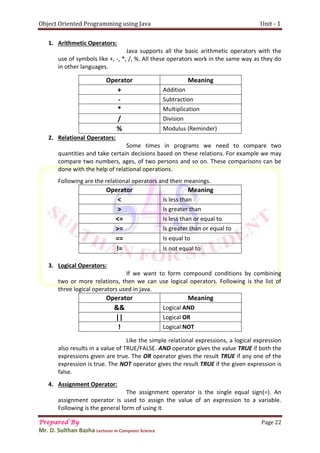
1. Arithmetic Operators:
Java supports all the basic arithmetic operators with the
use of symbols like +, -, *, /, %. All these operators work in the same way as they do
in other languages.
Operator Meaning
+ Addition
- Subtraction
* Multiplication
/ Division
% Modulus (Reminder)
2. Relational Operators:
Some times in programs we need to compare two
quantities and take certain decisions based on these relations. For example we may
compare two numbers, ages, of two persons and so on. These comparisons can be
done with the help of relational operations.
Following are the relational operators and their meanings.
Operator Meaning
< Is less than
> Is greater than
<= Is less than or equal to
>= Is greater than or equal to
== Is equal to
!= Is not equal to
3. Logical Operators:
If we want to form compound conditions by combining
two or more relations, then we can use logical operators. Following is the list of
three logical operators used in java.
Operator Meaning
&& Logical AND
|| Logical OR
! Logical NOT
Like the simple relational expressions, a logical expression
also results in a value of TRUE/FALSE. AND operator gives the value TRUE if both the
expressions given are true. The OR operator gives the result TRUE if any one of the
expression is true. The NOT operator gives the result TRUE if the given expression is
false.
4. Assignment Operator:
The assignment operator is the single equal sign(=). An
assignment operator is used to assign the value of an expression to a variable.
Following is the general form of using it.
Object Oriented Programming using Java Unit - 1
Prepared By Page 23
Mr. D. Sulthan Basha Lecturer in Computer Science
var = expression;
x=10;
x=x+1; etc.
“=” operator can also be used to create short hand assignment statement by
using along with an arithmetic operator as shown in below.
Ex:-
x+=10;  which means x = x+10
y-=25;  which means y = y-25
z*=2;  which means z = z*2
5. Bitwise operators:
There are some operators for manipulating the data values at fit level. These
operators are used for testing the bits shifting them to right OR left …., etc. these
operators may not be used for float and double.
Operator Meaning
& Bitwise AND
| Bitwise OR
^ Bitwise Exclusive OR (XOR)
~ One’s Complement
>> Right Shift
<< Left Shift
Bitwise AND:
This operator performs AND operation on the individual
bits of the numbers. The symbol for this operator is &, which is called Ampersand.
To understand the AND operator see the below expressions.
Truth Table
x y x&y
0 0 0
0 1 0
1 0 0
1 1 1
From the truth table we can conclude that by multiplying the input bits (x,y
values), we can get the output bit (X&Y).
The bitwise operators will perform operation on binary number system which
is different from the decimal number system used in our daily life.
Binary number system uses only two digits (0’s & 1’s) to represent any number.
X = 10 -------------- 1010 (in Binary Numbers)
Y = 11 --------------- 1011 (in Binary Numbers)
X & Y --------------- 1010 (in Binary Numbers)
-- 10 (Answer in Decimal)
Object Oriented Programming using Java Unit - 1
Prepared By Page 24
Mr. D. Sulthan Basha Lecturer in Computer Science
top
Example for converting a decimal number system to binary number system.
Rule:
Divide the number successfully by 2 and take the reminders from bottom to
top. See the below example in that the decimal number 25 is represented as
11001 in binary. If we use 8 bit representation then we can write it as
00011001.
bottom
In 8 bit representation :
converting binary number system to decimal number.
Rule:
Multiply the individual bits by powers of 2 and take the sum of the products.
See the below example.
Binary number
1 1 0 0 1
24
23
22
21
20
Converting: = 1X24
+ 1X23
+ 0X22
+ 0X21
+ 1X20
= 1X16 + 1X8 + 0X4 + 0X2 + 1X1
= 16 + 8 + 0 + 0 + 1
= 25
Bitwise OR:
This operator performs OR operation on the individual bits
of the numbers. The symbol for this operator is ‘|’, which is called Pipe symbol. To
understand this operator see the below expressions.
Truth Table
X Y X|Y
0 0 0
0 1 1
1 0 1
1 1 1
2 25
2 12 ---- 1
2 6 ---- 0
2 3 ---- 0
2 1 ---- 1
2 0 ---- 1
00011001
Ans: 11001
X = 10 -------------- 1010 (in Binary Numbers)
Y = 11 --------------- 1011 (in Binary Numbers)
X | Y --------------- 1011 (in Binary Numbers)
-- 11 (Answer in Decimal)
Object Oriented Programming using Java Unit - 1
Prepared By Page 25
Mr. D. Sulthan Basha Lecturer in Computer Science
From the truth table we can conclude that by adding the input bits (x,y values), we
can get the output bits. From the truth table by adding the bits we get X|Y = 1011.
This is nothing but 11 in decimal number.
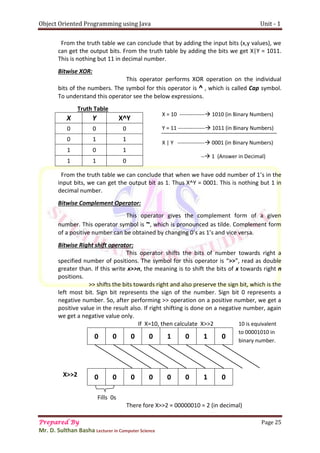
Bitwise XOR:
This operator performs XOR operation on the individual
bits of the numbers. The symbol for this operator is ^ , which is called Cap symbol.
To understand this operator see the below expressions.
Truth Table
X Y X^Y
0 0 0
0 1 1
1 0 1
1 1 0
From the truth table we can conclude that when we have odd number of 1’s in the
input bits, we can get the output bit as 1. Thus X^Y = 0001. This is nothing but 1 in
decimal number.
Bitwise Complement Operator:
This operator gives the complement form of a given
number. This operator symbol is ~, which is pronounced as tilde. Complement form
of a positive number can be obtained by changing 0’s as 1’s and vice versa.
Bitwise Right shift operator:
This operator shifts the bits of number towards right a
specified number of positions. The symbol for this operator is “>>”, read as double
greater than. If this write x>>n, the meaning is to shift the bits of x towards right n
positions.
>> shifts the bits towards right and also preserve the sign bit, which is the
left most bit. Sign bit represents the sign of the number. Sign bit 0 represents a
negative number. So, after performing >> operation on a positive number, we get a
positive value in the result also. If right shifting is done on a negative number, again
we get a negative value only.
If X=10, then calculate X>>2
0 0 0 0 1 0 1 0
0 0 0 0 0 0 1 0
Fills 0s
There fore X>>2 = 00000010 = 2 (in decimal)
X = 10 -------------- 1010 (in Binary Numbers)
Y = 11 --------------- 1011 (in Binary Numbers)
X | Y --------------- 0001 (in Binary Numbers)
-- 1 (Answer in Decimal)
X>>2
10 is equivalent
to 00001010 in
binary number.
Object Oriented Programming using Java Unit - 1
Prepared By Page 26
Mr. D. Sulthan Basha Lecturer in Computer Science
Bitwise Left shift operator:
This operator shifts the bits of number towards left a
specified number of positions. The symbol for this operator is “<<”, read as double
less than. If this write x<<n, the meaning is to shift the bits of x towards left n
positions.
If X=10, then calculate X>>2
10 is equivalent to 00001010 in binary number.
0 0 0 0 1 0 1 0
0 0 1 0 1 0 0 0
Fills 0s
There fore X<<2 = 00101000 = 40 (in decimal)
Shifting the value of x towards left 2 positions will make the left most 2 bits to be
lost. The value of x is 10 = 00001010. Now X<<2 will be 00101000 = 40 (in decimal).
The procedure to do this is explained above.
1.4.3 Ternary Operator [OR] Conditional Operator:
Java includes a special operator (?:) that can replace
certain types of if-else statements. This operator is used to construct conditional expression
of the following forms.
Exp1 ? Exp2 : Exp3
From the above syntax Exp1 is evaluated first, if it is true then the Exp2 is evaluated
and becomes the value of conditional expression. If Exp1 is false, Exp3 is evaluated and its
value becomes the value of conditional expression.
Ex:-
x=15;
y=25;
result = (x>y) ? x : y
Since the condition x>y is false it ignores the value of x and y value is assigned to result.
1.4.4 Expressions:
An expression is a combination of variables, constants and
operators arranged as per java’s syntax. Java can handle any complex mathematical
expressions. In java some expressions of algebra are not available like exponentiation.
X<<2
Object Oriented Programming using Java Unit - 1
Prepared By Page 27
Mr. D. Sulthan Basha Lecturer in Computer Science
Algebraic Expression Java Expression
1) 𝑎2
+ 2𝑎𝑏 + 𝑏2 a*a + 2*a*b + b*b
2) (𝑎 + 𝑏)(𝑎 − 𝑏) (a+b)*(a-b)
3)
𝑛(𝑛+1)
2
(n*(n+1))/2
4)
𝑥𝑦
𝑧
(x*y)/z
5) (
𝑎
𝑏
) + 𝑐 (a/b)+c
Evaluation of Expressions:
Expressions are evaluated using an assignment statement of the following form.
var = Expression
In the above form variable is any java identifier. When a statement if above form is
encountered the expression at the right hand side is evaluated first and its resultant value is
assigned to the variable on the left hand side. In an expression if there are some variables
exists, all the variables in that expression must be given a value in order to evaluate this
expression and produce a result.
Ex:
x = a*a + 2*a*b + b*b;
y = (a+b)*(a-b);
Object Oriented Programming using Java Unit - 2
Prepared By Page 28
Mr. D. Sulthan Basha Lecturer in Computer Science
Unit - 2
2.1. DECISION MAKING AND BRANCHING
Generally java program statements are executed sequentially, but in some situations it may
be need to change the order of execution of the statements, that often depends upon certain
conditions. If a program breaks the sequence of flow of execution and jump to another part of
program it is called branching. When branching is down-based on a condition then it is said to be
conditional branching.
Java supports three kinds of decision making statements (or) control statements as given
below:
 if..statement
 switch statement
 conditional operator
2.1.1. Decision making with if statements:
The “if” statement is a powerful decision making statement and is used to control the flow of
execution of statements.
It takes the following form:
if(test-condition)
When the if statement is encountered, test condition is evaluated first. Depending upon the
value of condition (true/false) “if” transfers the execution control to a particular statement.
The “if” statement may be implemented in different forms:
1. Simple if
2. if … else statement
3. Nested if…else statement
4. else- if ladder
Simple if statement:
An “if” statement consists of a Boolean expression followed by one or more statements. It
looks like the following syntax.
Syn:
if(Expression)
{
Statement1;
Statement2;
……….
Statement-n;
}
In the above syntax, the test condition is evaluated first. If it is true then block of statements
i.e. statement-1 through statement-n are executed, otherwise execution control skips the block and
goto the statements following it. Please observe the following flow chart of “if” statement.
Block of statements
Object Oriented Programming using Java Unit - 2
Prepared By Page 29
Mr. D. Sulthan Basha Lecturer in Computer Science
Ex:-
if(n%2!=0)
{
System.out.prinln(“This is an Odd number”);
}
if-else Statement:
The if-else statement is an extension of the simple if statement. The general form is as follows.
if(test-condition)
{
Block of statements;
}
else{
Block of statements;
}
Here the test condition is evaluated first, if it is true the block of “if” statements are executed.
Otherwise the block of “else” statements are executed.
Flow chart:-
Ex:- if(n%2!=0)
{
System.out.prinln(“This is an Odd number”);
}
else
{
System.out.prinln(“This is an Even number”);
}
Entry
Test-
condition
false
true
Entry
Test-
condition
False-block
statements
True-block
statements
Object Oriented Programming using Java Unit - 2
Prepared By Page 30
Mr. D. Sulthan Basha Lecturer in Computer Science
True
False
Nested if- else Statement:
The process of writing one “if” statement inside the other “if” statement is called “Nesting”
of if-statement. It takes the following form:
if(condition-1)
{
if(condition-2)
{
Statement block-1;
}
else
{
Statement block-2;
}
}
else
{
Statement block-3;
}
-- > other following statements….
The process of nested if-else statement is as follows:
Condition-1 is evaluated first, if it is true, then condition-2 is evaluated. If it is also true, then
“statement block-1” is executed. If condition-2 is false, then “statement block-2” is executed. But at
first if condition-1 becomes false execution control goes to “else” part and executes “statement
block-3”.
Flow chart:- Entry
False True
Test-
condition1
statement
block-2
statement
block-3
Test-
condition2
statement
block-1
Other following statements
Object Oriented Programming using Java Unit - 2
Prepared By Page 31
Mr. D. Sulthan Basha Lecturer in Computer Science
Ex:-
if(x>y)
{
if(x>z)
{
System.out.println(x);
}
else
{
System.out.println(z);
}
}
else
{
System.out.println(y);
}
else - if Ladder:
“else-if” ladder is a way of putting it together when multipath decisions are involved. It is a
chain of conditions in which the statement associated with each “else-if” is an “if” as given below.
if(condition-1)
statement-1;
else if(condition-2)
statement-2;
else if(condition-3)
statement-3;
...
else
statement-x;
The above construct is known as “else-if” ladder. The conditions are evaluated from top-to-
bottom. Whenever the test condition is executed and the control is transferred to other statements.
When all conditions become false, then finally else containing statements are executed.
Example:
if(per >= 90)
grade = ‘O’;
else if(per >= 80 && per <90)
grade = ‘E’;
else if(per >= 70 && per <80)
grade = ‘A’;
else if(per >= 60 && per <70)
grade = ‘B’;
else if(per >= 50 && per <60)
grade = ‘C’;
else if(per >= 40 && per <50)
grade = ‘D’;
else
grade = ‘F’;
Object Oriented Programming using Java Unit - 2
Prepared By Page 32
Mr. D. Sulthan Basha Lecturer in Computer Science
true false
false
true
Flow chart:- Entry
true false
2.1.2. Switch statement:
Java has a built-in multi way decision making statement known as “switch” the switch
statement test the value of an expression against the list of case values. When match is found the
block of statements of that case is executed. Following is the general form of “switch-statement”.
switch (Expression)
{
case value1:
Block-1;
break;
case value2:
Block-2;
break;
… … …
case valueN:
Block-N;
break;
default:
default statement.
}
Test-
condition1
statement-2
Statement-1
Test-
condition2
Default statement
Test-
condition3
statement-3
Statement-x
Object Oriented Programming using Java Unit - 2
Prepared By Page 33
Mr. D. Sulthan Basha Lecturer in Computer Science
Value-1
Value-2
default
The expression is an integer OR character. Value1, value2,…… are constants and known as
case labels.
Each of these values should be unique with in a switch statement. Block-1, Block-2 are blocks
of statements and can contain zero OR more statements.
The “break” statement at the end of each block signals the end of a particular case and
causes on exit from the switch statement, and transfers the control to other statements following
switch.
The “default” is optional case, it will be executed if the value of expression doesn’t match
with any of the case values.
Example:-
class ColorDemo
{
public static void main(String args[])
char color = ‘g’ ;
switch (color)
{
case 'r':
System.out.println ("red");
break;
case 'g':
System.out.println ("green");
break;
case 'b':
System.out.println ("blue");
break;
case 'y':
System.out.println ("yellow");
break;
case 'w':
System.out.println ("white");
break;
default:
System.out.println ("No Color Selected");
}
}
}
** Flow chart **
Entry
switch
Block-1
Block-2
default
Other statements
Object Oriented Programming using Java Unit - 2
Prepared By Page 34
Mr. D. Sulthan Basha Lecturer in Computer Science
2.1.3. Conditional Operator (? : )
It is a ternary operator, useful for making two way decisions. This operator is a combination
of ? and : and takes three operands. The general form of this operator is:
exp1 ? exp2: exp3;
The exp1 is evaluated first. If the result is true, exp2 is evaluated and returned as the value of the
conditional expression. Otherwise exp3 is evaluated and its value is returned. When the conditional
operator is used, the code becomes simpler, efficient.
2.2. DECISION MAKING AND LOOPING
The process of repeatedly executing a block of statements is known as looping. The
statements in the block may be executed any number of times from “0” to infinite number. If a loop
contains forever, it is called an infinite loop.
In looping a block of statements are executed until come conditions for the termination of
loops are satisfied. A loop should consists of two statements known as body of loop and control
statement.
The control statement tests certain conditions and directs the repeated execution of the
body of a loop.
Java language provides two types of loops such as:
1. Entry controlled loops
2. Exit controlled loops
2.2.1. Entry controlled loops:-
These loops test the condition first, if it is true then body of loop is executed. These loops
are classified into two types: while & for.
While Loop: The simplest looping statement in java is the while loop statement. Folloeing is the
general form of while.
while(Condition)
{
Body of loop
}
In a while statement condition is evaluated first, and if it is true, then body of loop is
executed. After the execution of body, the condition is evaluated once again and if it is true, body of
loop is executed once again. This process continues until the condition become false and execution
control is transferred out of the loop.
Ex:-
int x = 1;
int sum = 0;
while(n<=10)
{
Sum=sum+n;
n++;
}
System.out.println(“Sum of first 10 natural numbers: ”+sum);
Object Oriented Programming using Java Unit - 2
Prepared By Page 35
Mr. D. Sulthan Basha Lecturer in Computer Science
Entry
false
true
Flow chart:
Other statements followed by loop
for Loop:-
“for” loop is another entry controlled loop that provides a more concise loop control
structure. Following is the general form of loop.
for(initialization; test-condition; increment/ decrement)
{
Body of loop;
}
The execution of “for” loop is as follows:
1. Initialization of control variable is done first.
2. The value of control variable is tested using test condition. If the condition is true, then the
body of loop is terminated.
3. When body of loop is executed, the control is transferred back to the statement. Now the
control variable is either incremented or decremented and the new value of variable is
tested to see whether it satisfies the condition. If the condition is true, then the body of loop
is executed once again. This process continues till the condition satisfies.
Ex:-
for(int i=1; i<=10; i++)
{
System.out.println(i);
}
Test-
condition
Body of loop
Object Oriented Programming using Java Unit - 2
Prepared By Page 36
Mr. D. Sulthan Basha Lecturer in Computer Science
Entry
false
true
Flow chart:
Other statements followed by loop
2.2.2. Exit controlled loops:-
This type of loop makes a test of condition after the process of body of the loop. It means
this type of loops evaluates or process the body of the loop first, then finally checks the condition.
That’s why these are called exit controlled loops.
It includes only one loop i.e. do .. while
do . . while Loop:-
The while statements makes a test of condition before loop executed. The body of loop may
not get executed at all, if the condition is not satisfied at first. But in some occasions, it becomes
necessary to execute body of loop at least once. This type of situation can be handled with “do”
statement. Following is the general form of “do” statement.
do
{
Body of loop;
}
while(test-condition)
When the execution control encounter the “do” statement, it automatically enters the body
of loop and executes it once. At the end, it evaluates the condition in “while” statement. If the
condition is true, then the program continues to execute body of loop once again. This process
continues as long as the condition is tested to be true. When condition becomes false, loop will be
terminated and execution control goes to the statement that follow while statement. So that
“do..while” loop.
Test-
condition
Body of loop
Object Oriented Programming using Java Unit - 2
Prepared By Page 37
Mr. D. Sulthan Basha Lecturer in Computer Science
Entry
false
true
Ex:-
int x=1;
int sum=0;
do
{
Sum = sum+1;
x++;
}
while(x<20);
Flow chart:
2.2.3. Jumps in Loops:-
Java provides three types of jump statements such as “break”, “continue” and “return”.
“break” statement:-
The break statement can be used in three ways:
1. “break” is used inside a loop to come out of it.
2. “break” is used inside the switch block to come out of the switch block.
3. “break” can be used in nested blocks to go to the end of a block.
Ex:-
for(int I = 1; i<=10; i++)
{
System.out.println(i);
if(i<=5)
break;
}
Test-
condition
Body of loop
Object Oriented Programming using Java Unit - 2
Prepared By Page 38
Mr. D. Sulthan Basha Lecturer in Computer Science
“continue” statement:-
“continue” is used inside a loop to repeat the next iteration of the loop, then continue is
executed. Subsequent statement in the loop are not executed and control of execution goes back to
the next repeating of the loop.
Ex:-
for(int i=10; i>=1; I --)
{
if(i>=5)
continue;
System.out.println(i);
}
Here we are redirecting the flow of execution back to the next iteration of the loop when
i>=5. So when “i” value changes from 10 to 5 , continue statement will be executed and hence the
subsequent statement “System.out.println(i);” will not be executed. So the values of “i” from 10 to
5 not be displayed.
“return” statement:-
“return” statement is used in a method to come out of it to the calling method. For example
we are calling a method by the name “myMethod()” from the “main()” method. If “return” is used
inside the “myMethod()” then the flow of execution going back from “myMethod()”, we can also
return some value to the main() method. For this purpose “return” should be used as follows.
return 1; --> it returns “1” to the calling method.
return x; --> it returns “x” or value of “x” to the calling method.
2.3. CLASS, OBJECT and METHODS
We know a class is a model for creating an object. This means that properties and action of
the objects are written in the class. Properties are represented by variables and actions of the
objects are represented by methods. So, a class contains variables and methods. The same variables
and methods are available in the objects because they are created from the class. These variables
are also called instance variable because they are created inside the object(instance).
Defining a class:
A class is defined by using a keyword “class”. The general form of a class definition is
shown in below.
class Class-Name
{
Datatype variable-name1;
Datatype variable-name2;
. . . . . . . . . . . . . . . . . .
. . . . . . . . . . . . . . . . . .
Dtatatype method-Name1()
{
Method body;
}
Object Oriented Programming using Java Unit - 2
Prepared By Page 39
Mr. D. Sulthan Basha Lecturer in Computer Science
Dtatatype method-Name2( parameters )
{
Method body;
}
}
Object creation:
We know that the class code along with method code is stored in “method area” of
the JVM. When an object is created, the memory is allocated on “heap”. After creation of an object,
JVM produces a unique reference number for the object from the memory address of the object.
This reference number is also called hash code number.
To create an object the following syntax is used.
Syn:-
Class-Name variable = new Class-Name ();
Ex:- Person obj = new Person();
Here “new” is an operator that creates the object for Person class, hence the right hand side
part of the statement is responsible for creating the object.
Here “Person” is the class name and “obj” is the object-name. “obj” is actually a variable of
Person class. This variable stores the reference number of the object returned by JVM after creating
the object.
To know the hash code number/ reference number as on object, we can use “hashCode()”
method of “Object” class, as shown in below.
Person p = new Person();
System.out.println(“The hash code No.:” +p.hashCode());
2.4. ACCESS SPECIFIERS/ MODIFIERS
An access specifier is a keyword that specifies how to access the members of
a class or a class itself. We can use access specifiers before a class and its members. There are four
types of access specifiers available in java.
1. private
2. public
3. protected
4. default
private: private members of a class are not accessible outside the class. They are accessible only
within the class by the methods of that class.
public: public members of a class are accessible anywhere outside the class, so any other program
can read them and use them.
protected: protected members of a class are accessible outside the class, but generally within the
same directory.
default: If no access specifier is written by the programmer then the java compiler uses “default”
access specifier. Default members are accessible outside the class but within the same directory.
Object Oriented Programming using Java Unit - 2
Prepared By Page 40
Mr. D. Sulthan Basha Lecturer in Computer Science
We generally use private for instance variables, public for methods. In java classes cannot be
declared by using private. You may feel public, protected and default are same but there is some
difference between them.
2.5. METHODS in JAVA
A method represents a group of statements that perform a task. Here task represents a
calculation or processing of data or generating a report. For example: take “sqrt()”, it calculates
square root value and returns that value. A method has two parts.
1. Method header (or) Method prototype.
2. Method body
Method header (or) Method prototype:
It contains name, method parameters and method return datatype.
Method prototype is written in following form.
return datatype method_name()
(OR)
return datatype method_name(parameter1, parameter2………)
Here “method_name” represents the name given to the method. After the method_name,
we write some variables in the parenthesis. These variables are called parameters. Method
parameters are useful to receive data from outside into the method. This data can be processed by
the method. Return datatype is written before the method_name to represent what type of result or
data the method is returning.
Ex:-
 int calculate(int x, int y)
 float sum()
 String display(String term)
Method Body:
Below the method header we should write method body. Method bbody
consist of a group of statements which contains logic to perform the task. Method body can
be written in the following form:
{
------------------
------------------ statements;
------------------
}
For example we want to write a method that calculates sum of two numbers. It may contain
the body as shown in below.
{
int result = a+b;
System.out.println(“The sum is:”+result);
}
Object Oriented Programming using Java Unit - 2
Prepared By Page 41
Mr. D. Sulthan Basha Lecturer in Computer Science
If a method returns some values, then a return statement should written in the body of the
method as shown in below.
{
int c = a+b;
return c;
}
Note: A method never return more than 1 value.
Understanding methods in java
To understand how to write methods, let us take an
example program, in this we can write a sample class with two instance variables to find sum of the
values.
class Sample
{
int x=25, y=35;
System.out.println(“The value of x :”+x+ “n The value of y :”+y);
public void sum()
{
int result = x+y;
System.out.println(“The sum of numbers :”+result);
}
}
Constructors:
A constructor is similar to method that is used to initialize the instance variable. The
constructor has following characteristics.
1. The constructor’s name and class name should be same. And the constructor name should
end with a pair of parenthesis.
For example in Person class we can write a constructor as follows:
Person()
{
-------
}
2. A constructor may (or) may not have parameters. Parameters are variables to receive data
from outside into the constructor. If a constructor does not have any parameters, then it is
called “default constructor” or “Zero Parameterized Constructor”. If a constructor has 1 or
more parameters, then it is called Parameterized Constructor.
Ex:-
Person(int x, String name)
{
--------
}
Object Oriented Programming using Java Unit - 2
Prepared By Page 42
Mr. D. Sulthan Basha Lecturer in Computer Science
3. A constructor does not return any value, not even void.
4. A constructor is automatically called and executed at the time of creating an object, while
creating an object if nothing is passed to the object, then default constructor is called and
executed. If some values are passed to the object, then the parameterized constructor is
called and executed. For example if we create the object as shown in below
Person raju = new Person();
Here zero parameterized constructor is called.
Person raju = new Person(19, “swathi”);
Here parameterized constructor is called and it will receive data “19, swathi”.
5. A constructor is called and executed only once per object. This means when we create an
object then constructor is called. When we create second object, again the constructor is
called second time.
Example program to describe default constructor:
class Person
{
int age;
String name;
Person()
{
age = 19;
name = “swathi”;
}
public void display()
{
System.out.println(“The person name is:” + name);
System.out.println(“Age is:” + age);
}
}
class UsePerson
{
public static void main(String args[])
{
Person p1 = new Person();
P1.display();
Person p2 = new Person();
P2.display();
}
}
Note: If any program contains number of classes, then we need to save that program with the
main() method class name. for example: The above program should be saved as “UsePerson.java”
Output: The person name is: swathi
Age is : 19
The person name is: swathi
Age is : 19
Object Oriented Programming using Java Unit - 2
Prepared By Page 43
Mr. D. Sulthan Basha Lecturer in Computer Science
Example program to describe parameterized constructor:
class Person
{
int age;
String name;
Person(String s, int i)
{
name = s;
age = i;
}
public void display()
{
System.out.println(“The person name is:” + name);
System.out.println(“Age is:” + age);
}
}
class UsePerson
{
public static void main(String args[])
{
Person p1 = new Person(“sulthan”, 29);
P1.display();
Person p2 = new Person(“Shahanaz”, 24);
P2.display();
}
}
Output: The person name is: sulthan
Age is : 29
The person name is: shahanaz
Age is : 24
Differences between default constructor & parameterized constructor:
Default constructor Parameterized constructor
Default constructor is useful to initialize all
objects with same data.
Parameterized constructor is useful to initialize
each object with different data.
Default constructor does not have any
parameters.
Parameterized constructor will have 1 or more
parameters.
When data is not passed at the time of creating
an object, default constructor will be called.
When data is passed at the time of creating an
object, parameterized constructor will be called.
Object Oriented Programming using Java Unit - 2
Prepared By Page 44
Mr. D. Sulthan Basha Lecturer in Computer Science
Differences between Methods & Constructors:
Constructor Method
A constructor is used to initialize the instance
variables of class.
A method is used for any general purpose that is
processing (or) calculations.
A constructor name and class name should be
same.
A method name and class name can be same or
different.
A constructor is called at the time of creating
object.
A method can be called after creating object.
A constructor will be called only once per object. A method can be called several times on the
object.
A constructor will be called and executed
automatically.
A method executed only when we call it.
2.6. INPUT AND OUTPUT
Input represents data given to a program and output represents program data
displayed as a result of a program. We are already familiar with the following two statements to
display the output.
System.out.print();
System.out.println();
Both these statements are used to display output on the screen. The difference between
two is that “print()” method keeps cursor in the same line after displaying the output, and “println()”
method throws the cursor to the next line after displaying output.
2.6.1. Accepting input from the keyboard:
A stream is required to accept it could from the keyboard. A stream represents the flow of
data from one place to another place. A stream can carry data from keyboard to memory or from
memory to printer or a file.
Basically, there are two types of streams: 1). Input Stream 2). Output Stream
 Input streams are useful to receive or read data coming from some other place.
 Output streams useful to send or write data to some other place.
All streams are represented by a class in “java.io” (input-output) Package.
Keyboard is represented by a field called “in”, which is available in “System” class. When we write
“System.in” , we are representing a standard input device i.e. keyboard by default.
To accept data from the keyboard i.e. “System.in” we need to connect it to the input stream
as shown in following points:
1. Connect the keyboard to an input stream reader.
Here we can use “InputStreamReader”, that can read data from keyboard.
In the above statement we are creating InputStreamReader object and connecting the keyboard
(System.in) to it.
InputStreamReader obj = new InputStreamReader(System.in);
Object Oriented Programming using Java Unit - 2
Prepared By Page 45
Mr. D. Sulthan Basha Lecturer in Computer Science
2. Connect InputStreamReader to BufferedReader, which is another input type of stream.
We are using “BufferedReader” because it has a method to read data properly coming from the
stream.
In the above statement, we are creating BufferedReader object and connecting the
“InputStreamReader” object to it.
From the above two statements, we got “BufferedReader” object (br). These two
statements can be combined and rewrite in a single statement as follows:
Now, we can read the data coming from the keyboard using “read()” and “readLine()”
methods, available in BufferedReader class.
2.6.2. Accepting Integer, Float, Double and Long type of values from keyboard:
To accept a numeric value from the keyboard, we should use “readLine()” method. This
method can returns String type of values. So, if we want to declare the variables as int, float, double
& long types then also “readLine()” method will returns String type of values only. So that, we need
to convert the accepted value (String value) into our required datatype elements by using parse
methods.
Parse methods are static methods, which are available in wrapper classes (Integer, Float,
Double, Short, Byte and Long). So, if we want to call these parse methods we should use the
particular class name.
Accepting Integer:
First we should accept the integer number from the keyboard as a string
with the help of readLine() method.
Now the number is in the form of a string. This should be convert to int by using “parseInt()”
method of “Integer” class.
If needed the above two statements can be combined and written as follows:
Here parseInt() method is a static method in Integer class, so it can be called using class
name as “Integer.parseInt()”.
BufferedReader br = new BufferedReader(obj);
BufferedReader br = new BufferedReader (new InputStreamReader(System.in));
String s = br.readLine();
int n = Integer.parseInt(s);
int n = Integer.parseInt(br.readLine());
Object Oriented Programming using Java Unit - 2
Prepared By Page 46
Mr. D. Sulthan Basha Lecturer in Computer Science
Accepting Float:
First we should accept the Float number from the keyboard as a string with
the help of readLine() method.
Now the number is in the form of a string. This should be convert to float by using
“parseFloat()” method of “Float” class.
If needed the above two statements can be combined and written as follows:
Here parseFloat() method is a static method in Float class, so it can be called using class
name as “Float.parseFloat()”.
Accepting Double:
First we should accept the Double number from the keyboard as a string
with the help of readLine() method.
Now the number is in the form of a string. This should be convert to Double by using
“parseDouble()” method of “Double” class.
If needed the above two statements can be combined and written as follows:
Here parseDouble() method is a static method in Double class, so it can be called using class
name as “Double.parseDouble()”.
Accepting other type of values:
Similarly we can write different statements to accept many other datatypes from the
keyboard as follows:
1. To accept byte value: byte n = Byte.parseByte(br.readLine());
2. To accept short value: short n = Short.parseShort(br.readLine());
3. To accept long value: long n = Long.parseLong(br.readLine());
In the above discussion we used the classes as Byte, Short, Integer, Long and Double. Which are
belongs to “java.lang” package. These classes are also called wrapper classes.
String s = br.readLine();
float n = Float.parseFloat(s);
float n = Float.parseFloat(br.readLine());
String s = br.readLine();
double n = Double.parseDouble(s);
double n = Double.parseDouble(br.readLine());
Object Oriented Programming using Java Unit - 2
Prepared By Page 47
Mr. D. Sulthan Basha Lecturer in Computer Science
2.7. METHOD OVERLOADING
In java, it is possible to define two or more methods within the same class that share the
same name, as long as their parameter declarations are different. When this is the case, the
methods are said to be overloaded and the process is called as method over loading.
Method overloading is one of java’s most exciting and useful features. When an overloaded
method is invoked, that java uses the type and/or no.of arguments as its guide to determine which
version of the overloaded method to actually called. Overloaded methods may have different return
types.
Eg:-
class OverLoadDemo
{
void display()
{
System.out.println(“No parameters”);
}
void display(int x)
{
System.out.println(“ X value is:”+x);
}
void display(int x, int y)
{
System.out.prinln(“Parameter1: ”+x);
System.out.println(“Parameter2: ”+y);
}
double display(double d1, double d2)
{
System.out.prinln(“d1 = ”+d1);
System.out.prinln(“d2 = ”+d2);
Return d1;
}
}
class Use
{
public static void main(String args[])
{
OverLoadDemo od = new OverLoadDemo();
od.display();
od.display(20);
od.display(25,10);
od.display(3.14, 6.25);
}
}
Object Oriented Programming using Java Unit - 2
Prepared By Page 48
Mr. D. Sulthan Basha Lecturer in Computer Science
2.8. STATIC MEMBERS
In java the members of a class can be declared as static. That means variables and methods
can be static. These members are declared as static with the help of a keyword “static”.
2.8.1 static variables:-
The following rules apply to variables that are declared as static.
 It is a variable which belongs to the class and not to a particular object.
 Static variables are initialized only once at the start of execution.
 A single copy of variable is shared by all instances of the class(objects).
 A static variable can be accessed directly by the class name and does not need any object.
Syntax is: static datatype variable_Name;
Eg:-
class StaticDemo
{
static int n1;
int n2;
public void display(int x)
{
StaticDemo.n1 = x;
}
public void display2(int y)
{
n2 = y;
}
}
Here the class “StaticDemo” contains two variables which are n1,n2. “n1” is static variable,
this is accessed from the method display1() directly, with the help of class name.
2.8.2 static method:-
The best example for a static method is “main()”. Which does not required to create an
object of a class before calling it. Following rules applied to methods that are defined as static.
 It is a method which belongs to the class and not to the object.
 A static method can access only static data, it can’t access non-static data.
 A static method can call only other static methods.
 A static method can be accessed directly by the class name and does not need any object.
Syntax: static return_type methodName()
Ex:-
In the following program we are typing to read and display the instance variable (or) non-
static variable of the class in a static method. This gives an error at compile time.
Object Oriented Programming using Java Unit - 2
Prepared By Page 49
Mr. D. Sulthan Basha Lecturer in Computer Science
class Test
{
int x;
static void access(int n)
{
x = n;
System.out.println(“x = ”+x);
}
}
class Result
{
public static void main(String args[])
{
System.out.println(“Accessing non-static data through static method”);
Test.access(50);
}
}
Output:-
D:>javac Result.java
Result.java 7: non static variable x cannot be referenced from a static context
x=n;
^
Result.java 8: non static variable x cannot be referenced from a static context
System.out.println(“x = ”+x);
^
2 Errors.
In the following program we are declaring “x” as static variable. Now it is accessible in the static
method.
class Test
{
static int x;
static void access(int n)
{
x = n;
System.out.println(“x = ”+x);
}
}
class Result
{
public static void main(String args[])
{
System.out.println(“Accessing static data through static method”);
Test.access(50);
}
}
Object Oriented Programming using Java Unit - 2
Prepared By Page 50
Mr. D. Sulthan Basha Lecturer in Computer Science
Output:-
D:>javac Result.java
D:>java Result
Accessing static data through static method
x = 50
Object Oriented Programming using Java Unit - 3
Prepared By Page 51
Mr. D. Sulthan Basha Lecturer in Computer Science
Unit – 3
INTRODUCTION:
It is possible to acquire all the members of a class and use them in another class by relating
the objects of the two classes. This is possible by using inheritance concept. When a class is written
by a programmer & another programmer wants the same features in his class also, then he will go
for inheritance.
Definition: Inheritance is a concept where new classes can be created and acquires all the
features of existing class from where it is derived.
(OR)
Inheritance is a process of acquiring all the features of one class to another class (or)
super class to sub class (or) base class to derived class (or) parent class to child class
The keyword “extends” is used to derive a sub class from the super class as shown in below.
Syntax:
class Subclass_name extends Superclass_name
Eg:-
class Student extends Teacher
The following program illustrates the concept of inheritance.
class Parent
{
int i, j;
void display1()
{
System.out.prinln(“i = ”+i);
System.out.prinln(“j = ”+j);
}
}
class Child extends Parent
{
int k;
void display2()
{
System.out.prinln(“k = ”+k);
}
}
class SimpleInheritance
{
public static void main(String arr[])
{
Child c = new Child();
c.i = 10;
c.j = 20;
c.k = 25;
System.out.println(“Sum of all values: ”+(c.i + c.j + c.k));
c.display1();
c.display2();
}
}
Object Oriented Programming using Java Unit - 3
Prepared By Page 52
Mr. D. Sulthan Basha Lecturer in Computer Science
Output:
Sum of all values : 55
i = 10
j = 20
k = 25
3.1. TYPES OF INHERITANCE
On the basis of class, there are five types of inheritance in java i.e.
i) Single Inheritance
ii) Multi level Inheritance
iii) Hierarchical Inheritance
iv) Multiple Inheritance
v) Hybrid Inheritance
In java, multiple & hybrid Inheritances are supported through interface only. We will learn
about these interfaces later.
3.1.1. Single Inheritance:
A single inheritance is very easy to understand. When a class extends
another one class only then we call it as a single inheritance. The below diagram shows that the class
B extends only one class i.e. class A. Here A is parent class of B and B would be a child class of A.
Ex:-
class Animal
{
void eat()
{
System.out.println(“Eating…….”);
}
}
class Dog extends Animal
{
void bark()
{
System.out.println(“Barking……….”);
}
}
class A
class B
Object Oriented Programming using Java Unit - 3
Prepared By Page 53
Mr. D. Sulthan Basha Lecturer in Computer Science
class TestInheritance
{
public static void main(String args[])
{
Dog d = new Dog();
d.bark();
d.eat();
}
}
Output:-
Barking……….
Eating…………
3.1.2. Multi Level Inheritance:
It refers to a mechanism in OOP technology where one class can
inherit from a derived (Sub/Child) class there by making this derived class as the base class for the
new class. You can see this in the below diagram.
Here C is the subclass of “class B” and B is the subclass of “class A”
Ex:-
class Animal
{
void eat()
{
System.out.println(“Eating…….”);
}
}
class Dog extends Animal
{
void bark()
{
System.out.println(“Barking……….”);
}
}
class A
class B
class C
Object Oriented Programming using Java Unit - 3
Prepared By Page 54
Mr. D. Sulthan Basha Lecturer in Computer Science
class BabyDog extends Dog
{
void weep()
{
System.out.println(“Weeping……….”);
}
}
class TestInheritance
{
public static void main(String args[])
{
BabyDog d = new BabyDog();
d.weep();
d.bark();
d.eat();
}
}
Output:-
Weeping……….
Barking……….
Eating…………
3.1.3. Hierarchical Inheritance:
In this kind of inheritance one class is inherited by many subclasses. In below
diagram class B, C, & D inherits from the same class A.
A is the parent/super/base class of B,C, & D.
Ex:-
class Animal
{
void eat()
{
System.out.println(“Eating…….”);
}
}
class A
class C
class B class D
Object Oriented Programming using Java Unit - 3
Prepared By Page 55
Mr. D. Sulthan Basha Lecturer in Computer Science
class Dog extends Animal
{
void bark()
{
System.out.println(“Barking……….”);
}
}
class Cat extends Animal
{
void meow()
{
System.out.println(“Mewoing……….”);
}
}
class TestInheritance
{
public static void main(String args[])
{
Dog d = new Dog();
d.bark();
d.eat();
Cat c = new Cat();
c.meow();
c.eat();
}
}
Output:-
Barking……….
Eating…………
Meowing……….
Eating…………
3.1.4. Multiple Inheritance:
Multiple inheritance refers to the concept of one class extends/
inherits from more than one super class. The problem with multiple inheritance is that the subclass
will have to manage the dependency on two super classes.
Note: Multiple inheritance is not supported in java through classes.
class B
class A
class C
Object Oriented Programming using Java Unit - 3
Prepared By Page 56
Mr. D. Sulthan Basha Lecturer in Computer Science
Q: Why multiple inheritance is not supported in Java?
To reduce the complexity and simplify the language, multiple inheritance is not supported in
java.
Consider a scenario, where A,B and C are three classes. The C class inherits A & B classes. If A
& B have the same method and you call it from child class object, there will be ambiguity to call the
method of A (or) B classes.
Since compile time errors are better than runtime errors, java renders compile time error if
you inherit 2 classes. So weather you have same method (or) different, there will be compile time
error.
Ex:-
class A
{
void msg()
{
System.out.println(“Hi, Hello…….”);
}
}
class B
{
void msg()
{
System.out.println(“Welcomes you…….”);
}
}
class C extends A,B
{
void show()
{
System.out.println(“Extending A & B……….”);
}
}
class TestingMultipleInheritance
{
public static void main(String args[])
{
C obj = new C();
Obj.msg();
}
}
Testing. . . . . . . . . . .
Compile Time error..,
Now which
msg() method
would be
invoked?
Object Oriented Programming using Java Unit - 3
Prepared By Page 57
Mr. D. Sulthan Basha Lecturer in Computer Science
3.2. OVERRIDING METHODS
This is a process of defining or implementing a method in a class with the same name and
signature (Parameters) as in its super class.
In the below example class “Two” is the subclass and class “One” is the super class. In
overriding method of both subclass & super classes are having same signatures/ Parameters.
Overriding is used in modifying the methods of super class. In overriding return types and
constructor parameters of method should match.
class One
{
int i;
One(int a, int b)
{
i = a+b;
}
void add()
{
System.out.println(“Sum of a & b is :”+i);
}
}
class Two extends One
{
int j;
Two(int a, int b, int c)
{
super(a,b);
j = a+b+c;
}
void add()
{
super.add();
System.out.println(“Sum of a, b, & c is :”+j);
}
}
class OverridingMethods
{
public static void main(String args[])
{
Two t = new Two(10,15,20);
t.add();
}
}
Output:-
Sum of a & b is :25
Sum of a,b & c is :45
Object Oriented Programming using Java Unit - 3
Prepared By Page 58
Mr. D. Sulthan Basha Lecturer in Computer Science
3.2.1. The keyword “super”:
If we create an object to super class, we can access only the super class members, but not
the subclass members. But if we create the subclass object all the members of both super & sub
classes available to it. This is the reason we always create an object to subclasses in inheritance.
Sometimes the super class members and subclass members may have same names, in that case by
default only sub class members are accessible. This is shown in the above program, which has
method overriding. In such cases the super class members from subclass “super” keyword is used as
follows.
 “super” keyword can be used to refer to super class variables as:
 “super” keyword can be used to refer to super class method as:
 “super” keyword can be used to refer to super class Constructor.
We need not call the default constructor of the super class, as it is by default available to
subclass. To call the parameterized constructor of super class, we can write as
3.2.2. The keyword “this”:
“this” is the keyword that refers to the object of the class where it is used. In other words
“this” refers to the object of that the present class. Generally we write instance variables,
constructors and methods in a class, all these members are referenced by “this”. When an object is
created to an object class, a default reference is also created internally to the objects as shown in
below figure. This default reference is nothing but “this”. So “this” can refer to all things of the
present object.
Ex:-
class Example
{
int x,y;
public void display(int x, int y)
{
this.x = x;
this.y = y;
System.out.println(“Value of x :”+x);
super.variable;
super.method();
Super(values – separated by commas);
Instance variable
Constructors
Method
this
Object Oriented Programming using Java Unit - 3
Prepared By Page 59
Mr. D. Sulthan Basha Lecturer in Computer Science
System.out.println(“Value of y :”+y);
System.out.println(“sum of x & y :”+(x+y));
}
}
class UseExample
{
public static void main(String args[])
{
Example e = new Example();
e.display(25,45);
}
}
3.2.3. Final variables, Methods and classes:
In java, “final” keyword is used in several contexts. It is used before a variables, methods and
classes. So that they cannot be changed later.
Final variable/field:
A final variable can assigned a value only once. This value cannot be
changed later. If final variable is used in class, then it must be assigned a value in class constructor.
Attempting change the value of final variable/ field will generate an error.
Ex:-
public class FinalVariable
{
public final int val1;
public final int val2;
FinalVariable(int n1, int n2)
{
val1 = n1;
val1 = n2;
}
}
Final Method:
A method declared as final, then it cannot be overridden by subclass. To
declare a final method put the keyword “final” after the access specifier and before the return type.
Ex:- class One
{
public final void display()
{
final int x = 15;
final int y = 30;
final int result = x+y;
System.out.println(“x, y, x+y are:”+x+ “,”+y+ “,”+(x+y));
}
}
Error: a final variable value cannot be altered
Object Oriented Programming using Java Unit - 3
Prepared By Page 60
Mr. D. Sulthan Basha Lecturer in Computer Science
Final class:
In java, final keyword can also be used to declare a class, final class prevents
a class from being inherited. Preceding this class declaration with the keyword final allows us to
declare final classes. Declaring a class as final implicitly declares all of its methods as final so it is
illegal to declare a class as final. Here is an example of final class.
Ex:- final class One
{
- - - - - - - - -
- - - - - - - - -
- - - - - - - - -
}
class Two extends One
{
- - - - - - - - -
- - - - - - - - -
- - - - - - - - -
}
3.2.4. Abstract Methods and classes:
While going through the java language we have learnt so many times the word abstract. In
java programming language the word abstract used with methods and classes.
Abstract classes:
An abstract class is not a complete one and not eligible for creating
objects. Any class i.e. inherited from it and can implement the incomplete methods. If that class is
also not capable of implementation, then implementation can be differed to its subclass by declaring
itself as abstract.
Abstract method:
An abstract method is one that has the empty implementation. That
means, a method can be present with no implementation but only their declaration in a class.
Abstract method provides the standardization for the “name & signature” of any method. Anyone
can extends and implements these methods in their own classes according to the requirements.
Ex:-
abstract class One
{
void callMe1()
{
System.out.println(“It is implemented method callMe1() in abstract class One”);
}
void callMe2()
{
System.out.println(“It is implemented method callMe2() in abstract class One”);
}
abstract void callMe3(); // it is method declaration only….
abstract void callMe4(); // it is method declaration only….
}
[Error]
(or)
can’t Inherit subclass Two, One. Because One is final class.
Object Oriented Programming using Java Unit - 3
Prepared By Page 61
Mr. D. Sulthan Basha Lecturer in Computer Science
class Two extends One
{
void callMe3()
{
System.out.println(“It is implemented method callMe3() in class Two”);
}
void callMe4()
{
System.out.println(“It is implemented method callMe4() in class Two”);
}
}
class AbstractDemo
{
public static void main(String args[])
{
Two t = new Two();
t.callMe1();
t.callMe2();
t.callMe3();
t.callMe4();
}
}
3.3. ARRAYS
An array represents a group of elements of same data type. It can store a group of
elements so we can store a group of int values (or) group of float values (or) group of string values in
array.
Ex:- int marks[5]; OR
int marks = new int[5];
Arrays are generally categorized into two groups:
1. One dimensional Array (1D)
2. Two dimensional Array (2D)
3.3.1. One Dimensional Array:
A one dimensional array represents a row OR a column of
elements. For example, the marks obtained by a student in 5 different subjects can be represented
by a 1D array. Because these marks can be written as a row/ a column.
Creating a 1D array:
There are some ways of creating a single/one dimensional array as mentioned here.
 We can declare a one dimensional array and directly store elements at the time of its
declaration.
Ex:- int marks[] = {50,60,70,80,90};
Here int represents integer type elements which can be stored into the array and the
array name is “marks”. Then the actual elements are mentioned inside the { } left and right
curly braces.
Object Oriented Programming using Java Unit - 3
Prepared By Page 62
Mr. D. Sulthan Basha Lecturer in Computer Science
Now JVM creates 5 blocks of memory as marks of 0,1,2,. . . .
marks[0] . . . . . . . . . . marks[4]
 Another way of creating an array is: by declaring the array first and then allotting memory
for it by using new operator.
int marks[] = new int[5];
Here we should understand that JVM allots memory for storing 5 integer elements into the
array. But there are no actual elements stored in the array so far. To store the elements into the
array, we can use statements like the below in the program.
marks[0] = 50;
marks[1] = 60;
marks[2] = 70;
marks[3] = 80;
marks[4] = 90; (OR)
We can give/ pass values from the keyboard to array by using loop as given below.
for(int i = 0; i<5; i++)
{
marks[i] = Integer.parseInt(br.readLine());
}
Ex:-
/* A java program to create one dimensional array and read its elements by using a loop and display
one by one */
import java.io.*;
class OneDArray
{
public static void main(String args[])throws IOException
{
BufferedReader br = new BufferedReader(new InputStreamReader(System.in));
System.out.print(“Please enter how many values you want? ”);
int n = Integer.parseInt(br.readLine());
int marks[] = new int[n];
for(int i=0; i<n; i++)
{
System.out.print(“Please enter value”+(i+1)+“: ”);
marks[i] = Integer.parseInt(br.readLine());
}
for(int i=0; i<n; i++)
{
System.out.print(“t”+marks[i]);
}
}
}
50 60 70 80 90
Object Oriented Programming using Java Unit - 3
Prepared By Page 63
Mr. D. Sulthan Basha Lecturer in Computer Science
3.3.2. Two Dimensional Array:
A two dimensional array represents several rows and
columns of data. For example, the marks obtained by a group of students in 5 different subjects can
be represented by a two dimensional array. If we write the marks of these students as:
1) 50, 55, 60, 65, 48
2) 70, 80, 59, 85, 68
3) 78, 80, 75, 90, 87
The preceding marks represent a 2D array. Since it got three rows (no. of students)
and in each row 5 columns (no. of subjects). There are totally 3X5=15 elements. We can take the first
row itself as 1D array. Similarly the second row is a 1D array. So the preceding 2D array contains
three 1D arrays.
Creating 2D array:
 We can declare a 2D array & directly store elements at the time of its declaration as
int marks[][] = {{50, 55, 60, 65, 48}, {70, 80, 59, 85, 68}, {78, 80, 75, 90, 87}};
Another way of creating a 2D array is by declaring the array first and then allotting memory
for it by using new operator.
int marks[][] = new int[3][5];
Here JAVA allots memory for storing 15 integer elements into the array.. the blocks of
memory can be individually referred to as follows:
marks[0][0] marks[0][1] marks[0][2] marks[0][3] marks[0][4]
marks[1][0] marks[1][1] marks[1][2] marks[1][3] marks[1][4]
marks[2][0] marks[2][1] marks[2][2] marks[2][3] marks[2][4]
Ex: Java program to accept elements for 2D array as matrix, and display them.
import java.io.*;
class OneDArray
{
public static void main(String args[])throws IOException
{
BufferedReader br = new BufferedReader(new InputStreamReader(System.in));
System.out.print(“Please enter how many rows you want? ”);
int r = Integer.parseInt(br.readLine());
System.out.print(“Please enter how many columns you want? ”);
int cr = Integer.parseInt(br.readLine());
int arr[][] = new int[r][c];
for(int i=0; i<r; i++)
{
for(int j=0; j<c; i++)
{
System.out.print(“Please enter value”+(i+j+1)+“: ”);
arr[i][j] = Integer.parseInt(br.readLine());
}
}
Object Oriented Programming using Java Unit - 3
Prepared By Page 64
Mr. D. Sulthan Basha Lecturer in Computer Science
System.out.println(“The elements of 2D array :”)
System.out.println(“-------------------“);
for(int i=0; i<r; i++)
{
for(int j=0; j<c; i++)
{
System.out.print(“ ”+arr[i][j] );
}
System.out.println( );
}
}
}
Output:-
Please Enter how many rows you want? 2
Please Enter how many columns you want? 2
Please enter value1: 4
Please enter value2: 1
Please enter value3: 0
Please enter value4: 7
The elements of 2D array:
---------------------------------
4 1
0 7
3.3.3. Array Name .(dot) length:
If we want to know the size of array, we can use the property
(length) of an array i.e. “array_name.length”. It will return an integer value as a result, which
represents the size of an array.
For example: int marks[] = new int[10];
Now “marks.lene.gth” gives 10. If the array marks[] contains 3 or 4 values, then also “length”
property doesn’t give the no. of elements of the array, it only gives its size.
But in case of two/three dimensional array. “length” property gives the number of rows of
the array as given below.
int arr[][] = new int[5][10];
from the above “arr.length” gives 5.
3.4. STRINGS
Most of the data that transmits on internet will be in the form of group of
characters. Such groups of characters are called strings. For example in a business order form a
person enters the details like his name, address, credit card number, etc., which are all nothing but
strings only.
Creating String:
There are 3 ways to create strings in java. We can create a string just by
assigning a group of characters to a string type variable.
Ex:- String name;  declaring string type variable.
name = “sulthan”;  assigning a group of characters.
Object Oriented Programming using Java Unit - 3
Prepared By Page 65
Mr. D. Sulthan Basha Lecturer in Computer Science
The above two statements can be combined and written as follows:
String name = “sulthan”;
In second way, we can create an object to “String” class by allotting memory using new
operator. This is just like creating an object to any class.
Ex:-
String str = new String(“Hello”);
The third way of creating the string is by converting the character arrays into strings. Let us
take a character type array with some characters such as follows:
char arr[] = {‘w’, ‘e’, ‘l’, ‘c’, ‘o’, ‘m’, ‘e’};
Now create a String object, by passing the array name to it.
String str = new String( arr );
Now the string object str contains the string “welcome”. This means all the characters of the
array are copied into the string.
3.4.1. String Methods:
The “String” class defines several methods to manipulate strings in
java language. Following is the description of some of the methods available in “String” class.
toLowerCase()- This method converts all of the characters in the string to lower case.
Ex:- String str = “SULTHAN”
System.out.println(str.toLowerCase());
toUpperCase()- This method converts all of the characters in the string to upper case.
Ex:- String str = “sulthan”
System.out.println(str.toUpperCase());
replace()- This method returns a new string resulting from replacing all occurrences of old characters
in the string with new characters.
Ex:- String str = “JAVA”
System.out.println(str.replace(‘V’, ‘N’));
trim()- This method returns a copy of the string with loading and filling white space omitted.
Ex:- String str = “WELCOME TO JAVA”
System.out.println(str.trim());
Note:- Here trim() will remove all the white spaces among the word.
equals()- This method compares the string to the specified object. The result is true if and only iff the
argument is not null & is a string object that represents the same sequence of characters as this
object.
Ex:- String str1 = new String(“JAVA”);
String str2 = new String(“JAVA”);
boolean result;
result = str1.equals(str2);
System.out.println(result);
equalsIgnoreCase()- This method compares the string to another string, ignoring case
considerations. Two strings are considered equal ignoring Case if they are of the some length, and
corresponding characters in the two strings are equal ignoring case.
Ex:- String str1 = new String(“JAVA”);
String str2 = new String(“JAVA”);
Object Oriented Programming using Java Unit - 3
Prepared By Page 66
Mr. D. Sulthan Basha Lecturer in Computer Science
boolean result;
result = str1.equalsIgnoreCase(str2);
System.out.println(result);
charAt()- This method returns the character located at the specified index of the string. The string
indexec start from zero.
Ex:-
String str = “Switzerland”;
char result = str.charAt(8);
System.out.println(result);
length()- This method returns the length of string. The length is equal to the number of 16 bit
Unicode characters in the string.
Ex:-
String s1 = “Ananthapur”;
String s2 = “Guntakal”;
System.out.println(s1.length());
System.out.println(s2.length());
compareTo()- There are two variant uses of this method. First it compares the string to another
object, second it compares two strings.
Ex:-
String s1 = “welcome to java”;
String s2 = “welcome to java”;
System.out.println(s1.compareTo(s2));
concat()- This method appends one string to the end of another string.
Ex:-
String s1 = “Happy ”;
String s2 = “Journey”;
s1 = s1.concat(s2);
OR
s1 = s1.concat(“Journey”);
substring()- This method has two varients and return a new string that is a substring of this string.
The substring beings with the character at the specified index and extends to the end of its
string or upto end index-1.
Ex:-
String str = “welcome to java”;
System.out.println(str.subString(7));
System.out.println(str.subString(7,15));
Object Oriented Programming using Java Unit - 3
Prepared By Page 67
Mr. D. Sulthan Basha Lecturer in Computer Science
3.4.2. StringBuffer:
The StringBuffer class is used to represent character that can be
notified. This is simply used for concatenation or manipulation of the string. StringBuffer is mainly
used for the dynamic string concatenation which enhance the performance. A string buffer
implements a mutable sequence of characters. A StringBuffer is like a String, but can be modified.
Following is the description of some commonly used methods in StringBuffer class.
append(String str)- This method is used for concatenate the string in StringBuffer. This is better to
use for dynamic string concatenation. This method works like a simple String concatenation such as:
String str = str+”added string”
insert()- This is the method used to insert any string or character at the specified position in the
given string.
Ex:- StringBuffer sb = “WELOME”;
str = str.insert(3,C);
reverse()- This is the method used to reverse the string present in StringBuffer.
Ex:- StringBuffer sb = “String”;
sb = sb.reverse();
3.5. VECTORS
“Vector” is an array list with extended properties, which follow the dynamic and automatic
addition of data at runtime unlike array. Vector can grow and shrink as needed and accommodate
exercise add and remove items even after the vector has been created. The vector class implements
dynamic array of objects. The component in vector class can accessed by integer index.
Vectors are created like arrays as follows:
Vector v1 = new Vector();  declaring without size.
Vector v1 = new Vector(10);  declaring with size.
Vectors can declared with or without specifying the size explicitly. A vector without size can
accommodate any no. of items even when the size is specified, different number of items can be put
into the vector.
Vectors have no. of advantages over arrays:
 It is convenient to use vectors to store objects.
 A vector can be used to store a list of objects that may vary in use.
 We can add or delete objects from the list as when required.
A major limitation of using a vector is that we cannot use it to store simple datatypes. We can only
store objects in it. Therefore we need to convert simple types into objects using wrapper classes.
The vector has several methods as follows.
addElement()- This method adds specified component to the end of this vector, increasing its size
by 1, the capacity of this vector is increased if its size becomes greater than its capacity.
Syntax:- addElement(Object obj);
Ex:- addElement(item5);
Object Oriented Programming using Java Unit - 3
Prepared By Page 68
Mr. D. Sulthan Basha Lecturer in Computer Science
elementAt()- This method returns the component at the specified index.
Syntax:- elementAt(int index);
Ex:- elementAt(4);
size()- This method returns the number of components in the vector.
Syntax:- vector_object.size();
Ex:- obj.size();
removeElement()- This method removes the first occurrence of the argument (lowest-indexed) from
the vector. If the object is found in the vector, each component in vector with an downward have an
index1 smaller than the value it had previously.
Syntax:- removeElement(Object obj);
Ex:- removeElement(item3);
removeElementAt()- This method removes the component at the specified index. Each component
in this vector with an index greater or equal to the specified index is shifted downward have an
index1 smaller than the value it had index must be a value greater than or equal to ‘0’ and less than
the current size of the vector.
Syntax:- removeElementAt(int index);
Ex:- removeElementAt(7);
removeAllElements()- This method removes all components from the vector and sets its size to ‘0’.
Syntax:- vector_object . removeAllElements( );
Ex:- vtr . removeAllElements();
copyInto()- This method copies the components of the vector into the specified array. The item at
the index “k” in the vector is copied into component “k” of an array. The array must be big enough
to hold all the objects in the vector, else an IndexOutOfBoundsException is thrown.
Syntax:- copyInto( Object arr[]);
Ex:- copyInto(item1);
insertElementAt()- This method inserts the specified object as a component in the vector at the
specified index. Each component in its vector with an index greater or equal to the specified index is
shifted upward to have an index1 greater than value it had previously. The index must be a value
greater than or equal to ‘0’ and less than or equal to the current size of the vector.
Syntax:- inertElementAt(Object obj, int index);
Ex:- insertElementAt(item3, 7);
/* Creating a vector with integer elements in the following Programme */
import java.util.*;
class VectorDemo
{
public static void main(String args[])
{
Object Oriented Programming using Java Unit - 3
Prepared By Page 69
Mr. D. Sulthan Basha Lecturer in Computer Science
Vector<Integer> v = new Vector<Integer>();
int x[] = {22,20,15,42,38,12,65};
for(int i=0; i<x.length; i++)
{
v.add(x[i]);
}
System.out.println(“Vector Elements:”);
for(int i=0; i<v.size(); i++)
{
System.out.println(v.get(i)+ “t”);
}
System.out.println(“Elements using ListIterator:”);
ListIterator lit = v.ListIterator();
System.out.println(“In forward direction:”);
while(lit.hasNext())
System.out.prinln(lit.next()+ “t”);
System.out.println(“In backward direction:”);
while(lit.hasPrevious())
System.out.prinln(lit.previous()+ “t”);
}
}
Output:-
D:> javac VectorDemo.java
D:> java VectorDemo
Vector Elements
22
20
15
42
38
12
65
Elements using ListIterator:
In forward direction:
22 20 15 42 38 12 65
In backward direction:
65 12 38 42 15 20 22
Object Oriented Programming using Java Unit - 3
Prepared By Page 70
Mr. D. Sulthan Basha Lecturer in Computer Science
3.6. WRAPPER CLASSES
A wrapper class is a class whose object wraps or contains a primitive datatype. When we
create an object to a wrapper class, it contain a field and in this field we can store a primitive
datatype. For example if we create an object to Character class, it contains a single field char and it is
possible to store a character like ‘A’. so Character is a wrapper class of char datatype.
Ex:- Character obj = new Character(‘A’);
Primitive Datatype Corresponding wrapper Class
char Character
byte Byte
Short Short
int Integer
long Long
float Float
double Double
boolean Boolean
Byte Class:
The Byte class wraps a value of the primitive type “byte” in an object. The “Byte”
class object contain a byte type field. In this field we can store a primitive byte number.
Ex:- Byte obj = new Byte(5);
Short Class:
The Short class wraps a value of the primitive type “short” in an object. The “Short”
class object contain a short type field. In this field we can store a primitive short number.
Ex:- Short obj = new Short(7);
Integer Class:
The Integer class wraps a value of the primitive type “integer” in an object. The
“Integer” class object contain a integer type field. In this field we can store a primitive integer
number.
Ex:- Integer obj = new Integer(12);
Long Class:
The Long class wraps a value of the primitive type “long” in an object. The “Long”
class object contain a long type field. In this field we can store a primitive long number.
Ex:- Long obj = new Long(18);
Float Class:
The Float class wraps a value of the primitive type “float” in an object. The “Float”
class object contain a float type field. In this field we can store a primitive float number.
Ex:- Float obj = new Float(7.5);
Double Class:
The Double class wraps a value of the primitive type “double” in an object. The
“Double” class object contain a double type field. In this field we can store a primitive double
number.
Ex:- Double obj = new Double(6.2);
Object Oriented Programming using Java Unit - 3
Prepared By Page 71
Mr. D. Sulthan Basha Lecturer in Computer Science
Boolean Class:
The Boolean class wraps a value of the primitive type “boolean” in an object. The
“Boolean” class object contain a boolean type field. In this field we can store a primitive boolean
number.
Ex:- Boolean obj = new Boolean(true);
3.6.1. Boxing and Unboxing:
1. Converting a primitive datatype into an object is called boxing.
2. Converting an object into its corresponding primitive datatype is called unboxing.
Boxing: Conversion of primitive numbers to objects.
Primitive data values can be converted into their corresponding objects with the use of
wrapper classes.
int i; float f; double d; long l;
Integer intVal = new Integer(i); conversion of primitive int value to Integer Object.
Float floatVal = new Float(f); conversion of primitive float value to Float Object.
Double doubleVal = new Double(d); conversion of primitive double value to Double Object.
Long longVal = new Long(l); conversion of primitive long value to Long Object.
Unboxing: Conversion of object numbers to primitive numbers.
Object numbers can be converted into primitive values as follows.
int i = intVal . intValue();
float f = floatVal . floatValue();
double d = doubleVal . doubleValue();
long l = longVal . longValue();
3.7. INTERFACES
An interface contains only abstract methods which are all incomplete methods. So it is not
possible to create an object to an interface. In this case, we can create separate classes, where we
can implement all the methods of the interface. These classes are called implementation classes.
Since, implementation classes will have all the methods with body; it is possible to create objects to
the implementation classes.
An interface is similar to a class in the following ways:
 An interface can contain any number of methods.
 An interface is written in a file with “.java” extension, with the name of the interface
matching the name of file.
 The byte code of an interface appears in a “.class” file.
 Interfaces appear in packages, and their corresponding byte code file must be in a directory
structure that matches the package name.
An interface is different from a class in several ways as following:
 You cannot create an object for interface.
 An interface does not contain any constructor.
 All of the methods in an interface are abstract.
 An interface cannot contain instance fields. The only fields that can appear in an interface
must be declared both static and final.
 An interface is not extended by a class; it is implemented by a class.
 An interface can extend any number of interfaces.
Object Oriented Programming using Java Unit - 3
Prepared By Page 72
Mr. D. Sulthan Basha Lecturer in Computer Science
static final datatype variable_Name = value;
3.7.1. Defining interface:
An interface is basically a kind of class. Like classes, interfaces contain methods and variables
but with a major difference. The difference is that interfaces create only abstract methods and final
variables. This means that interfaces do not specify any code implements these methods and data
fields contain only constant. Therefore it is the responsibility of the class that implements an
interface to define the code for implementation of these methods.
The general form of an interface definition is as follows.
interface NameOfInterface
{
variables declaration;
methods declaration;
}
Here “interface” is the keyword used to create an interface.
 Variables are declared as follows:
 Method declaration will contain only a list of methods without body. It takes the following
from:
Ex:-
interface Animal
{
static final float weight = 1000;
static final String name = “Tiger”;
public void eat();
public void travel();
}
Note: All the methods of an interface are public by default.
3.7.2. Extending interfaces:
An interface can extend another interface, similar to the way that a class can extend another
class. The “extends” keyword is used to extend the interface, and the child interface inherits the
methods of the parent interface.
Following is the general form of extending interfaces.
When extending interfaces the new sub-interface will inherit all the members of the super-
interface in the manner similar to subclasses.
return type methodname1();
return type methodName2(List of parameters);
interface BlackTiger extends Animal
{
Body of BlackTiger;
}
Object Oriented Programming using Java Unit - 3
Prepared By Page 73
Mr. D. Sulthan Basha Lecturer in Computer Science
Ex:-
interface Sports
{
public void setHomeTeam( String name );
public void setVisitingTeam( String name );
}
interface Football extends Sports
{
public void setHomeTeamScored( int points );
public void setVisitingTeamScored( int points );
public void endOfQuarter( int quarter );
}
In the above example the interface “Football” will get both the members in its super
interface “Sports”, by interface.
3.7.3. Extending Multiple interfaces:
A java class can extend only one parent class. Multiple inheritance is not allowed for classes.
Here interfaces are not classes so an interface can extend more than one parent interface.
The extends keyword is used once, and the parent interfaces are declared in a comma
separated list. For example Hockey interface extended both Sports & Event. It would be declared as
follows.
interface Hockey extends Sports,Event
{
public void endOfPeriod(int period);
public void overTimePeriod(int ot);
}
3.7.4. Implementing interfaces:
When a class implements an interface, you can think of the class as signing a contract,
agreeing to perform the specific behaviours of the interface. A class uses the keyword “implements”
to implement an interface. The implements keyword appears in the class declaration.
Following is the general form of implementing an interface.
class className implements interfaceName
{
Body of class;
}
And even more general form of implementing an interface is as follows.
class className extends suprclassName implements interface1, interface2, . . . . .
{
Body of class;
}
Ex:-
interface Animal
{
public void eat();
public void travel();
}
Object Oriented Programming using Java Unit - 3
Prepared By Page 74
Mr. D. Sulthan Basha Lecturer in Computer Science
class Elephant implements Animal
{
public void eat()
{
System.out.println(“Elephant eats”);
}
public void travel()
{
System.out.println(“Elephant travels”);
}
public static void main(String args[])
{
Elephant e = new Elephant();
e.eats();
e.travels();
}
}
3.7.5. Accessing Interface Variable:
Interfaces can be used to declare a set of constants that can be used in different classes. This
is similar to creating header files in C language to contain a large no. of constants. Since such
interfaces do not contain methods, there is no need to worry about implementing any methods. The
constant values will be available to any class that implements the interface. The values can be used
in any method or other part of program where we can use a final value.
Ex:-
interface Sample
{
int n1 = 10;
int n2 = 50;
}
class Demo implements Sample
{
int x=n1;
void method1(int size)
{
. . . . . . . . . . . .
. . . . . . . . . . . .
if (size<n2)
{
. . . . . . . . . . . .
. . . . . . . . . . . .
}
}
}
Object Oriented Programming using Java Unit - 3
Prepared By Page 75
Mr. D. Sulthan Basha Lecturer in Computer Science
3.7.6. Multiple Inheritance using Interfaces:
We know that in multiple inheritance, subclasses are derived from multiple super classes. If
two super classes have same names for their members (variables & methods) then which member is
inherited into the subclass is the main confusion in multiple inheritance. This is the reason; java does
not support the concept of multiple inheritance. This confusion is reduced by using multiple
interfaces to achieve multiple inheritance.
Ex:-
interface Father
{
float ht = 6.2f;
void height();
}
interface Mother
{
float ht = 5.8f;
void height();
}
class Child implements Father, Mother
{
Public void height()
{
float ht = (Father.ht + Mother.ht)/2;
System.out.println(“Child’s Height = ”+ht);
}
}
class Multi
{
public static void main(String args[])
{
Child c = new Child();
c.height();
}
}
Output:-
D:> javac Multi.java
D:> java Multi
Child Height = 6.0
Object Oriented Programming using Java Unit - 4
Prepared By Page 76
Mr. D. Sulthan Basha Lecturer in Computer Science
Unit – 4
MULTITHREADED PROGRAMING
4.1. Multithreaded Programming:
Multithreading is a conceptual programming paradigm where a program (process) is divided
into two or more sub programs(processes), which can be implemented at the same time parallel.
In most of our computers, we have only a single processor and therefore, in reality, the
processor is doing only one thing at a time. However, the processor switches between the processes
so fast that it appears to human beings that all of them are being done simultaneously.
A thread is similar to a program that has a single flow of control. It has a beginning, a body,
and an end, and executes commands sequentially. Every program will have at least one thread. A
unique property of java is its support for multithreading. Java enables us to use multiple flows of
control in developing programs. Each flow of control may be thought of as a separate tiny program
or module known as a thread that runs in parallel to others. A program that contains multiple flows
of control is known as multithreaded program.
A multithreaded program
The above program contains one main and three others. The main thread is actually the
main method module, which is designed to create and start the other three threads, namely A, B
and C. Once initiated by the main thread, the threads A, B and C run concurrently and share the
resources jointly. Since threads in java are sub programs of a main application program and share
the same memory space, they are known as lightweight threads or lightweight processes.
Threads running in parallel, does not really mean that they actually run at the same time.
Since all the threads are running on a single processor, the flow of execution is shared between the
threads. The java interpreter handles the switching of control between the threads in such a way
that it appears they are running concurrently.
4.1.1. Creating Threads:
Crating threads in java is simple. Threads are implemented in the form of objects that
contain a method called run( ) method. The run( ) method is the heart and soul of any thread. It
makes up the entire body of a thread and is the only method in which the thread’s behavior can be
implemented. The general form is
Object Oriented Programming using Java Unit - 4
Prepared By Page 77
Mr. D. Sulthan Basha Lecturer in Computer Science
Syntax:- public void run( )
{
…………….
……………. (statements for implementing tread)
…………….
}
The run( ) method should be invoked by an object of the concerned thread. This can be achieved
by creating the thread and initiating it with the help of another thread method called start( ). A new
thread can be created in two ways
1. By creating a thread class: Define a class that extends Thread class and override its run( )
method with the code required by the thread.
2. By converting a class to a thread: Define a class that implements Runnable interface. The
Runnable interface has only one method run( ) that is to be defined in the method with the
code to be executed by the thread.
4.1.2. Extending the thread class:
We can make our class runnable as thread by extending the class “java.lang.Thread”. This
gives us access to all the thread methods directly. It includes the following steps
1. Declare the class as extending the Thread class.
2. Implement the run( ) method that is responsible for executing the sequence of code that the
thread will execute.
3. Create a thread object and call the start( ) method to initiate the thread execution.
Declaring the class: The Thread class can be extended as follows
class MyThread extends Thread
{
………………….
………………….
}
Now we have a new type of thread MyThread.
4.1.3. Implementing the rum( ) method:
The run( ) method has been inherited by the class MyThread. We have to override this
method in order to implement the code to be executed by our thread. The basic implementation of
run( ) method will look like this
public void run( )
{
………………….
…………………. Thread code here
}
When we start the new thread, java calls the thread’s run( ) method, so it is the run( )
method where all the action takes place.
Starting new thread:
To actually create and run an instance of our thread class. We must write the following
MyThread t = new MyThread( );
t.start( );
The first line instantiates a new object of class MyThread. Then the thread is in a newborn
state. The second line calls the start( ) method causing the thread to move into the runnable state.
Object Oriented Programming using Java Unit - 4
Prepared By Page 78
Mr. D. Sulthan Basha Lecturer in Computer Science
Then, the java runtime will schedule the thread to run by invoking the run( ) method. Now, the
thread is in the running state.
Ex-:
class One extends Thread
{
public void run()
{
for(int i=1;i<=5;i++)
{
System.out.println("from Thread One: i="+i);
}
System.out.println("exit from Thread One");
}
}
class Two extends Thread
{
public void run()
{
for(int j=1;j<=5;j++)
{
System.out.println("from Thread Two: j="+j);
}
System.out.println("exit from Thread Two");
}
}
class Three extends Thread
{
public void run()
{
for(int k=1;k<=5;k++)
{
System.out.println("from Thread Three:k="+k);
}
System.out.println("exit from Thread Three");
}
}
class ThreadDemo
{
public static void main(String arg[])
{
One o = new One();
o.start();
Two t = new Two();
t.start();
Three tr = new Three();
tr.start();
}
}
Object Oriented Programming using Java Unit - 4
Prepared By Page 79
Mr. D. Sulthan Basha Lecturer in Computer Science
4.1.4. Stopping and blocking a thread:
Stopping a thread:
Whenever we want to stop a thread from running further, we may do so by calling its stop( )
method.
Ex:- threadOne.stop( );
This statement causes the thread to move to the dead state. A thread will also move to the
dead state automatically when it reaches the end of its method. The stop( ) method may be used
when the premature death of a thread is desired.
Blocking a thread:
A thread can also be temporarily suspended or blocked from entering into the runnable and
subsequently running state by using either of the following thread methods.
sleep( ) //blocked for a specified time
suspend( ) //blocked until further orders
wait( ) //blocked until certain condition occurs
These methods cause the thread to go into the blocked or not-runnable state. The thread
will return to the runnable stat when the specified time is elapsed in the case of sleep( ) method, the
resume( ) method is invoked in the case of suspend( ) method and the notify( ) method is called in
the case of wait( ) method.
4.1.5. Life cycle of a thread:
During the lifetime of a thread, there are many states it can enter. They include
1. Newborn state
2. Runnable state
3. Running state
4. Blocked state
5. Dead state
A thread is always in one of these five states. Ti can move from one state to another via a variety of
ways.
State transition diagram of a thread
Object Oriented Programming using Java Unit - 4
Prepared By Page 80
Mr. D. Sulthan Basha Lecturer in Computer Science
Newborn state:
When we create a thread object, the thread is born and is said to be in newborn
state. The thread is not yet scheduled for running. At this state, we can do only one of the following
things with it.
 Schedule it for running using start( ) method.
 Kill it using stop( ) method.
If scheduled, it moves to the runnable state.
Scheduling a newborn thread
Runnable State:
The runnable state means that the thread is ready for execution and is waiting for the
availability of the processor. That is, the thread has joined the queue of threads that are waiting for
execution. If all threads have equal priority, then they are given time slots for execution in round
robin fashion or first-come first-serve manner. The thread that relinquishes control joins the queue
at the end and again waits for its turn. This process of assigning time to threads is known as time-
slicing.
However, if we want a thread to relinquish control to another thread to equal priority before
its turn comes, we can do so by using the yield( ) method.
Relinquishing control using yield( ) method
Object Oriented Programming using Java Unit - 4
Prepared By Page 81
Mr. D. Sulthan Basha Lecturer in Computer Science
Running State:
Running means that the processor has given its time to the thread for its execution. The thread
runs until it relinquishes control on its own or it is preempted by a higher priority thread. A running
thread may relinquish its control in one of the following situations
1. It has been suspended using suspend( ) method. A suspended thread can be revived by using
the resume( ) method. This approach is useful when we want to suspend a thread for some
time due to certain reason, but do not want to kill it.
Relinquishing control using suspend( ) method
2. It has been made to sleep. We can put a thread to sleep for a specified time period using the
method sleep(time) where time is in milliseconds. This means that the thread is out of the
queue during this time period. The thread re-enters the runnable state as soon as this time
period is elapsed.
Relinquishing control using sleep( ) method
3. It has been told to wait until some event occurs. This is done using the wait( ) method. The
thread can be scheduled to run again using the notify( ) method.
Relinquishing control using wait( ) method
Blocked state:
A thread is said to be blocked when it is prevented from entering into the runnable state and
subsequently the running state. This happens when the thread is suspended, sleeping or waiting in
order to satisfy certain requirements. A blocked thread is considered not-runnable but not dead and
therefore fully qualified to run again.
Dead state:
Every thread has a life cycle. A running thread ends its life when it has completed executing
its run( ) method. It is a natural death. However, we can kill it by sending the stop message to it at
Object Oriented Programming using Java Unit - 4
Prepared By Page 82
Mr. D. Sulthan Basha Lecturer in Computer Science
any state thus causing a premature death to it. A thread can be killed as soon it is born, or while it is
running, or even when it is in not-runnable(blocked) condition.
4.1.6. Using thread methods:
The thread methods are:
1. start ()- the start( ) method is used to move the thread into the runnable state
2. yield()- the yield( ) method is used to move the thread from running state to runnable state
3. suspend()- the suspend( ) method is to move the thread from running state to not-runnable
(blocked) state
4. resume()- the resume( ) method is to move the thread from not-runnable(blocked) state to
runnable state
5. sleep()- the sleep( ) method is to move the thread from running state to not-runnable
(blocked) state
6. wait()- the wait( ) method is to move the thread form running state to not-runnable
(blocked) state
7. notify()- the notify( ) method is to move the thread form not-runnable(blocked) state to
runnable state
8. stop()- the stop( ) method is to move the thread in to dead state
Ex:- class One extends Thread
{
public void run()
{
for(int i=1;i<=5;i++)
{
if(i==1)
yield( );
System.out.println("from Thread One: i="+i);
}
System.out.println("exit from Thread One");
}
}
class Two extends Thread
{
public void run()
{
for(int j=1;j<=5;j++)
{
System.out.println("from Thread Two: j="+j);
if(j==3)
stop();
}
System.out.println("exit from Thread Two");
}
}
Object Oriented Programming using Java Unit - 4
Prepared By Page 83
Mr. D. Sulthan Basha Lecturer in Computer Science
class Three extends Thread
{
public void run()
{
for(int k=1;k<=5;k++)
{
System.out.println("from Thread Three:k="+k);
if(k==1)
try
{
sleep(1000);
}
catch(Exception e)
{ }
}
System.out.println("exit from Thread Three");
}
}
class UseThread
{
public static void main(String arg[])
{
One o = new One();
Two t = new Two();
Three tr = new Three();
System.out.println(“Start thread One”);
o.start();
System.out.println(“Start thread Two”);
t.start();
System.out.println(“Start thread Three”);
tr.start();
System.out.println(“End of main thread”);
}
}
4.1.7. Thread Exceptions:
Java runtime system will throw IllegalThreadStateException whenever we attempt to invoke
a method that a thread cannot handle in the given state. For6 example, a sleeping thread cannot
deal with the resume( ) method because a sleeping thread cannot receive any instructions. The same
is true with the suspend( ) method when it is used on a blocked thread.
Whenever we call a thread method that is likely to throw an exception, we have to supply an
appropriate exception handler to catch it. The catch statement may take one of the following forms.
1. catch(ThreadDeath e)
{
…………….
……………. //killed thread
…………….
}
Object Oriented Programming using Java Unit - 4
Prepared By Page 84
Mr. D. Sulthan Basha Lecturer in Computer Science
2. catch(InterruptedException e)
{
…………….
……………. //cannot handle it in the current state
…………….
}
3. catch(IllegalArgumentException e)
{
…………….
……………. //illegal method argument
…………….
}
4. catch(Exception e)
{
…………….
……………. //any other
…………….
}
4.1.8. Thread Priority:
In java, each thread is assigned a priority, which affects the order in which it is scheduled for
running. The threads of the same priority are given equal treatment by the java scheduler and
therefore they share the processor on a first-come first-serve basis. Java permits us to set the
priority of a thread using the setPriotiry( ) method.
The general form is:
ThreadName.setPriority(number);
The number is an integer value to which the thread’s priority is set. The thread class defines
several priority constants.
MIN_PRIORITY=1
NORM_PRIORITY=5
MAX_PRIORITY=10
The number may one of these any constants or any value between 1 to 10. Most user level
processes should use NORM_PRIORITY, plus or minus 1. Whenever multiple threads are ready for
execution, the java system chooses the highest priority thread and executes it. For a thread of lower
priority to again control, one of the following things should happen.
1. It stops running at the end of run( )
2. It is made to sleep using sleep( )
3. It is told to wait using wait( )
However, if another thread of a higher priority comes along, the currently running thread
will be Pre-empted by the incoming thread thus forcing the current thread to move to the runnable
state. Note the highest priority thread always preempts any lower priority threads.
4.1.9. Synchronization:
Threads use their own data and methods provided inside their run( ) methods. What
happens when they try to use data and methods outside themselves? On such occasions, may lead
to serious problems.
Object Oriented Programming using Java Unit - 4
Prepared By Page 85
Mr. D. Sulthan Basha Lecturer in Computer Science
For example, one thread may try to read a record from a file while another is still writing to
the same file. Depending on the situation, we may get strange results. Java enables us to overcome
this problem using a technique known as synchronization.
In case of java, the keyword “synchronized” helps to solve such problems by keeping a watch
on such locations. For example, the method that will read information from a file and the method
that will update the same file may be declared as synchronized.
Ex:- synchronized void update( )
{
…………….
……………. // code here is synchronized
…………….
}
When we declare a method synchronized, java creates a monitor and hands it over to the
thread that calls the method first time. As long as the thread holds the monitor, no other thread can
enter the synchronized section of code. A monitor is like a key and the thread that holds the key can
only open the lock. It is also possible to mark a block of code as synchronized.
The general form is:
synchronized(lock-object)
{
…………….
……………. // code here is synchronized
…………….
}
Whenever a thread has completed its work of using synchronized method or block of code,
it was hand over the monitor to the next thread that is ready to use the same resource.
4.1.10. Implementing the Runnable interface:
The Runnable interface declares the run|( ) method that is required for implementing
threads in our programs. To do this, we must perform the steps
1. Declare the class as implementing the Runnable interface.
2. Implement the run( ) method.
3. Create a thread by defining an object that is instantiated form this runnable class as the
target of the thread.
4. Call the thread’s start( ) method to run the thread.
Ex:-
class MyThread implements Runnable
{
public void run( )
{
for(int i=1;i<=10;i++)
{
System.out.println(“t Thread MyThread ”+i);
}
System.out.println(“End of thread MyThread”);
}
}
Object Oriented Programming using Java Unit - 4
Prepared By Page 86
Mr. D. Sulthan Basha Lecturer in Computer Science
class RunnableDemo
{
public static void main(String args[ ])
{
MyThread runnable = new MyThread( );
Thread t = new Thread(runnable);
t.start( );
System.out.println(“End of main thread”);
}
}
4.2. MANAGING ERRORS AND EXCEPTIONS
4.2.1. Types of Errors:
It is common to make mistakes while developing as well as typing the program. A mistake
might lead to an error causing the program to produce unexpected results. Errors ate the wrongs
that can make a program go wrong.
An error may produce an incorrect output or may terminate the execution of the program
abnormally or even may cause the system to crash. Errors may broadly be classified into two
categories. They are
1. Compile-time errors
2. Run-time errors
Compile-time errors:
All syntax errors will be detected and displayed by the java compiler and therefore errors are
known as compile-time errors. Whenever the compiler displays an error, it will not create the .class
file. It is therefore necessary that we fix all the errors before we can successfully compile and run the
program.
The java compiler does a nice job of telling us where the errors are in the program. We can
now go to the appropriate line, correct the error and recompile the program. Sometimes, a single
error may be the source of multiple errors later in the compilation.
Most of the compile-time errors are due to typing mistakes and these errors are hard to
find. We may have to check the code word by word or even character by character. The most
common problems are
1. Missing semicolons
2. Missing or mismatch of brackets in classes and methods
3. Misspelling of identifiers and keywords
4. Missing double quotes in strings
5. Use of undeclared variables
6. Incompatible types in assignments or initialization
7. Bad references to objects
8. Use of = in place of == operator and so on.
Object Oriented Programming using Java Unit - 4
Prepared By Page 87
Mr. D. Sulthan Basha Lecturer in Computer Science
Run-time errors:
Sometimes, a program may compile successfully creating the .class file but may not run
properly. Such programs may produce wrong results due to wrong logic or may terminate due to
errors such as stack overflow. Most common run-time errors are
1. Dividing an integer by zero
2. Accessing an element that is out of the bounds of an array
3. Trying to store a value into an array of an incompatible class or type
4. Trying to cast an instance of a class to one of its subclasses
5. Passing a parameter that is not in a valid range or value for a method
6. Trying to illegally change the state of a thread
7. Attempting to use a negative size for an array
8. Using a null object reference as a legitimate object reference to access a method or a
variable
9. Converting invalid string to a number
10. Accessing a character that is out of bounds of a string and so on.
4.2.2. Exceptions:
An exception is a condition that is caused by a run-time error in the program. When the java
interpreter encounters an error such as dividing an integer by zero, it creates an exception object
and throws it that is informs us that an error has occurred.
If the exception object is not caught and handled properly, the interpreter will display an
error message and will terminate the program. If we want the program to continue with the
execution of the remaining code, then we should try to catch the exception object thrown by the
error condition and then display an appropriate message for taking corrective actions. This task is
known as exception handling.
This purpose of exception handling mechanism is to provide a means to detect and report an
exceptional circumstance so that appropriate action can be taken. The mechanism performs the
following tasks.
1. Find the problem (Hit the exception)
2. Inform that an error has occurred (Throw the exception)
3. Receive the error information (Catch the exception)
4. Take corrective actions (Handle the exception)
The error handling code basically consists of two segments, one to detect errors and to
throw exceptions and the other to catch exceptions and to take appropriate actions. Some common
exceptions in java are:
Exception type Cause of exception
ArithmeticException Caused by math errors such as division by zero
ArrayIndexOutOfBoundsException Caused by bad array indexes
ArrayStroeException Caused by when a program tries to store the wrong
type of data in an array
FileNotFoundExcepiton Caused by an attempt to access a nonexistent file
IOException Caused by general I/O failures such as inability to read
from a file
NullPointerException Caused by referencing a null object
NumberFormatExcepiton Caused when a conversion between strings and
number fails
Object Oriented Programming using Java Unit - 4
Prepared By Page 88
Mr. D. Sulthan Basha Lecturer in Computer Science
OutOfMemoryException Caused when there’s not enough memory to allocate a
new object
SecurityException Caused when an applet tries to perform an action not
allowed by the browser’s security setting
StackOverFlowException Caused when the system runs out of stack space
StringIndexOutOfBoundsException Caused when a program attempts to access a
nonexistent character position in a string
Exceptions in java can be categorized into two types:
1. Checked exceptions: These exceptions are explicitly handled in the code itself with the help
of try-catch blocks. Checked exceptions are extended from the “java.lang.Exception” class.
2. Unchecked exceptions: These exceptions are not essentially handled in the program code
instead the JVM handles such exceptions. Unchecked exceptions are extended from the
“java.lang.RuntimeException” class.
Syntax of Exception handling code:
The basic concepts of exception handling are throwing an exception and catching it.
Exception handling mechanism
Java uses a keyword “try” to preface a block of code that is likely to cause an error condition
and throw an exception. A catch block defined by the keyword “catch” catches the exception thrown
by block and handles it appropriately. The catch block is added immediately after the try block.
Syntax:
try
{
statements; //generates an exception
}
catch(Exception-type e)
{
statements; //processes the exception
}
The try block can have one or more statements that could generate an exception. If any one
statement generates an exception, the remaining statements in the block are skipped and execute
jumps to the catch block that is placed next to the try block.
try block
statements that may
cause an exception
catch block
statements that handle
the exception if it
occurred in try block
Exception
Object
creator
Exception
handler
Throws
Exception
Object
Object Oriented Programming using Java Unit - 4
Prepared By Page 89
Mr. D. Sulthan Basha Lecturer in Computer Science
The catch block too can have one or more statements that are necessary to process the
exception. Note that every try statement should be followed by at least one catch statement
otherwise compilation error will occur.
The catch statement works like a method definition. The catch statement is passed a single
parameter, which is reference to the exception object thrown by the try block. If the catch
parameter matches with the type of exception object, then the exception is caught and statements
in the catch block will be executed. Otherwise, the exception is not caught and the default exception
handler will cause the execution to terminate.
Ex:-
class Error
{
public static void main(String args[ ])
{
int a=10;
int b=5;
int c=5;
int x,y;
try
{
x=a/(b-c);
}
catch(ArithmeticException e)
{
System.out.println("Division by zero");
}
y=a/(b+c);
System.out.println("y="+y);
}
}
4.2.2.1. Multiple catch statements:
It is possible to have more than one catch statement in the catch block. The general form is
Syntax:
try
{
statements; //generates an exception
}
catch(Exception-type1 e)
{
statements; //processes the exception1
}
catch(Exception-type2 e)
{
statements; //processes the exception2
}
………….
catch(Exception-typeN e)
{
statements; //processes the exceptionN
}
Object Oriented Programming using Java Unit - 4
Prepared By Page 90
Mr. D. Sulthan Basha Lecturer in Computer Science
When an exception in a try block is generated, the java treats the multiple catch statements
like cases in a switch statement. The first statement whose parameter matches with the exception
object will be executed, and the remaining statements will be skipped.
Note that java does not require any processing of the exception at all. We can simply have a
catch statement with an empty block to avoid program abortion.
Ex:-
catch(Exception e);
The catch statement simply ends with a semicolon, which does nothing. This statement will
catch an exception and then ignore it.
Ex:-
class Error
{
public static void main(String args[ ])
{
int a[ ]={5,10};
int b=5;
try
{
int x=a[2]/b-a[1];
}
catch(ArithmeticException e)
{
System.out.println("Division by zero");
}
catch(ArrayIndexOutOfBoundsException e)
{
System.out.println("Array index error");
}
catch(ArrayStoreException e)
{
System.out.println("Wrong data type");
}
int y=a[1]/a[0];
System.out.println("y="+y);
}
}
4.2.2.2. Using Finally statement:
Java supports another statement known as finally statement that can be used to handle an
exception that is not caught by any of the previous catch statements. Finally block can be used to
handle any exception generated within a try block. It may be added immediately after the try block
or after the last catch block as follows
Object Oriented Programming using Java Unit - 4
Prepared By Page 91
Mr. D. Sulthan Basha Lecturer in Computer Science
(1) try (2) try
{ {
…………. ………….
…………. ………….
} }
finally catch(…….)
{ {
…………. ………….
…………. ………….
} }
finally
{
………….
………….
}
When a finally block is defined, this is guaranteed to execute, regardless of whether or not
an exception is thrown.
Throwing our own Exceptions:
There may be times when we would like to throw our own exceptions. We can do this by
using the keyword “throw”. The general form is
Syntax:-
throw new ThrowableSubClass;
Ex:-
1. throw new ArithmeticException( );
2. throw new NumberFormatExcepiton( );
Object Oriented Programming using Java Unit - 5
Prepared By Page 92
Mr. D. Sulthan Basha Lecturer in Computer Science
UNIT – 5
APPLET PROGRAMING
5.1. Applets:
Applets are small java programs that are primarily used in internet computing. They can be
transported over the internet form one computer to another and run using the Applet Viewer or any
Web Browser that supports java.
An applet, like any application program, can do many things for us. It can perform arithmetic
operations, display graphics, play sounds, accept user input, create animation and play interactive
games. Java applets have begun to make a significant impact on World Wide Web (WWW).
5.1.1. Local and Remote Applets:
We can embed applets into web pages in two ways. One, we can write our own applets and
embed them into web pages. Second, we can download an applet from a remote computer system
and then embed it into a web page.
An applet developed locally and stored in a local system is known as a local applet. When a
web page is trying to find a local applet, it does not need to use the internet and therefore the local
system does not require the internet connection. It simply searches the directions in the local system
and locates and loads the specified applet.
A remote applet is that which is developed by someone else and stored on a remote
computer connected to the internet. If our system is connected to the internet, we can download
the remote applet onto our system via at the internet and run it.
In order to locate and load a remote applet, we must know the applet’s address on the web.
This is known as Uniform Resource Locator (URL) and must be specified in the applet’s HTML
document.
Object Oriented Programming using Java Unit - 5
Prepared By Page 93
Mr. D. Sulthan Basha Lecturer in Computer Science
5.1.2. How applets differ from applications:
Although both the applets and applications are java programs, there are significant
differences between them. Applets are not full-featured application programs. They are usually
written to accomplish a small task or a component of a task. Since they are usually designed for use
on the internet.
1. Applets do not use the main( ) method for initialing the execution of the code. Applets,
when loaded automatically call certain methods of Applet class to start and execute the
applet code.
2. Unlike stand-alone applications, applets cannot be run independently. They are run from
inside a web page using a special feature known as HTML tag.
3. Applets cannot read from or write to the files in the local computer.
4. Applets cannot communicate with other servers on the network.
5. Applets cannot run any program form the local computer.
6. Applets are restricted from using libraries from other languages such as C or C++.
5.1.3. Preparing to write applets:
 When we creating applets exclusively and therefore we will need to know
 When to use applets
 How an applet works
 What sort of features an applet has
 Where to start when we first create our own applets
Before we try to write applets, we must make sure that java is installed properly and also
ensure that either the java “appletviewer” or a java-enabled browser is available. The steps involved
in developing and testing in applet are
1. Building an applet code (.java file)
2. Creating an executable applet (.class file)
3. Designing a web page using HTML tags
4. Preparing <APPLET> tag
5. Incorporating <APPLET> tag into the web page
6. Creating HTML file
7. Testing the applet code
Building applet code:
It is essential that our applet code uses the services of tow classes, namely Applet and
Graphics from the java class library. The Applet class which is contained in the “java.applet” package
provides life and behavior to the applet through its methods such as init( ), start( ) and paint( ).
Unlike the applications, where java calls the main( ) method directly to initiate the execution of the
program, When an applet is loaded, java automatically calls a series of Applet class methods for
starting, running and stopping the applet code. The Applet class therefore maintains the lifecycle of
an applet.
The paint( ) method of the Applet class, when it is called, actually displays the result of the
applet code on the screen. The output may be text, graphics or sound. The paint( ) method, which
requires a Graphics object as an argument is defined as follows:
Syntax: public void paint(Graphics g)
This requires that the applet code imports the java.awt package that contains the Graphics
class. All output operations of an applet are performed using the methods defined in the Graphics
class. An applet code will have a general format as follows
Syntax: import java.awt.*;
Object Oriented Programming using Java Unit - 5
Prepared By Page 94
Mr. D. Sulthan Basha Lecturer in Computer Science
import java.applet.*;
public class AppletClassName extends Applet
{
……………..
……………..
public void paint(Graphics g)
{
……………..
…………….. //Applet operations code
}
}
The AppletClassName is the main class for the applet. When the applet is loaded, java
creates an instance of this class and then a series of Applet class methods are called on that instance
to execute the code.
Ex:- import java.awt.*;
import java.applet.*;
public class HelloJava extends Applet
{
public void paint(Graphics g)
{
g.drawString(“Hello Java”,10,100);
}
}
Creating an executable applet:
Executable applet is nothing by the .class file of the applet, which is obtained by compiling
the source code of the applet. Compiling an applet is exactly the same as compiling an application.
Therefore, we can use the java compiler to compile the applet.
Consider the above example, this applet has been stored in a file called HelloJava.java and
the steps to compiling the HelloJava applet.
1. Move to the directory containing the source code and type the following command
javac HelloJava.java
2. The compiled output file called HelloJava.class is placed in the same directory as the
source.
3. If any error message is received, then we must check for errors, correct them and
compile the applet again.
Designing a web page:
In order to run a java applet, it is first necessary to have a web page that references that
applet. A web page is basically made up of text and HTML tags that can be interpreted by a web
browser or an applet viewer. Like java source code, it can be prepare using any ASCII text editor. A
web page is also known as HTML page or HTML document. Web pages are stored using a file
extension .html such as HelloJava.html, such files are referred to as HTML files. HTML files should be
stored in the same directory as the compiled code of the applets.
Web pages include both text that we want to display and HTML tags(command) to web
rowsers. A web page is marked by an opening HTML tag <HTML> and a closing HTML tag </HTML>
and is divided into the three major sections.
Object Oriented Programming using Java Unit - 5
Prepared By Page 95
Mr. D. Sulthan Basha Lecturer in Computer Science
1. Comment section (optional)
2. Head section (optional)
3. Body section
<! DOCTYPE html>
<HTML>
<Head>
<title> Title_text here </title>
</Head>
<body>
Webpage information/ instructions through formatting tags.
</body>
</HTML>
Comment Section:
This section contains comments about the web page. It is important to include comments
that tell us what is going on in the web page. A comment line begins with a <! and ends with a >.
Web browsers will ignore the text enclosed between them. Although comments are important, they
should be kept to a minimum as they will be downloaded along with the applet. Note that
comments are optional and can be included anywhere to the web page.
Head Section:
The head section is defined with a starting <HEAD> tag and a closing </HEAD> tag. This
section usually contains a title for the web page. The head section is also optional.
Body section:
After the head section, comes the body section. We call this as body section because this
section contains the entire information about the web page and its behavior. We can set up many
options to indicate how our page must appear on the screen. The body section is defined with a
starting <BODY> tag and a closing </BODY> tag.
Applet Tag:
The applet tag supplies the name of the applet to be loaded and tells the browser how much
space the applet requires. We can define name of the applet, width of the applet and height of the
applet in pixels. The opening applet tag is <APPLET> and the ending tag is </APPLET>.
Ex:-
<html>
<head>
<title>
Welcome to java applets
</title>
</head>
<body>
<center>
<h1>
Welcome to the world of applets
</h1>
</center><br>
<applet code = “HelloJava.class” width = “400” height = “200”>
</applet>
</body>
</html>
Object Oriented Programming using Java Unit - 5
Prepared By Page 96
Mr. D. Sulthan Basha Lecturer in Computer Science
We must name this file as HelloJava.html and save it in the same directory as the compiled
applet.
Running the applet:
Note that we have created applet files as well as the HTML file containing the applet, we
must have the following files in our current directory.
HelloJava.java
HelloJava.class
HelloJava.html
To run applet, we require one of the following tools.
1. Java-enabled web browser
2. Java appletviewer
If we use a java enabled web browser. We will be able to see the entire web page containing the
applet. If we use the appletviewer tool, we will only see the applet output.
Ex:- appletviewer HelloJava.html
5.2. Applet Life cycle:
Every java applet inherits a set of default behaviors from the Applet class. As a result, when
an applet is loaded, it undergoes a series of changes in its state. The applet states include
1. Born or initialization state
2. Running state
3. Idle state
4. Dead or destroyed state
A state transition diagram of an applet
Initialization state: Applet enters the initialization state when it is first loaded. This is achieved by
calling the init( ) method of Applet class. The applet is born. At this stage, we may do the following if
required.
1. Create objects needed by the applet
2. Set up initial values
3. Load images or fonts
4. Set up colors
Object Oriented Programming using Java Unit - 5
Prepared By Page 97
Mr. D. Sulthan Basha Lecturer in Computer Science
The initialization occurs only once in the applet’s life cycle. To provide any of the behaviors
mentioned above, we must override the init( ) method.
public void init( )
{
……………..
…………….. (Action)
}
Running state:
Applet enters the running state when the system calls the start( ) method of Applet class.
This occurs automatically after the applet is initialized. Starting can also occur if the applet is already
in stopped (idle) state. Note that, unlike init( ) method the start( ) method may be called more than
once. We may override the start( ) method to create a thread to control the applet.
public void start( )
{
……………..
…………….. (Action)
}
Idle or Stopped state:
An applet becomes idle when it is stopped from running. Stopping occurs automatically
when we leave the page containing the currently running applet. We can also do so by calling the
stop( ) method explicitly. If we use a thread to run the applet, then we must use stop( ) method to
terminate the thread. We can achieve this by overriding the stop( ) method.
public void stop( )
{
……………..
…………….. (Action)
}
Dead state: An applet is said to be dead when it is removed from memory. This occurs automatically
by invoking the destroy( ) method when we quit the browser. Like initialization, destroying stage
occurs only once in the applet’s life cycle. If the applet has created any resources, like threads, we
may override the destroy( ) method to clean up these resources.
public void destroy( )
{
……………..
…………….. (Action)
}
Display state:
Applet moves to the display state whenever it has to perform some output operations on
the screen. This happens immediately after the applet enters into the running state. The paint( )
method is called to accomplish this task. Almost every applet will have a paint( ) method. Like other
methods in the life cycle the default version of paint( ) method does absolutely nothing. We must
therefore override the method if we want anything to be displayed on the screen.
public void paint(Graphics g)
{
……………..
…………….. (display statements)
}
Object Oriented Programming using Java Unit - 5
Prepared By Page 98
Mr. D. Sulthan Basha Lecturer in Computer Science
5.3. PACKAGES
Packages:
Packages are java’s way of grouping a variety of classes and interfaces together. The
grouping is usually done according to functionality. In fact, packages act as containers for classes.
Some of the benefits of packages are:
 The classes contained in the packages of other programs can be easily reused
 In packages, Classes can be unique compared with classes in other packages.
 Packages provide a way to hide classes thus preventing other programs or packages from
accessing classes that are meant for internal use only
 Packages also provide a way for separating design from coding.
Java packages are classified into two types.
1. Java API packages
2. User defined packages
5.3.1. Java API packages:
Java API provides a large number of classes grouped into different packages according to
functionality. Most of the time we use the packages available with the java API.
Frequently used API packages
The java system packages and their classes
Package name Contents
java.lang Language support classes. These are classes that java compiler itself uses and
therefore they are automatically imported. They include classes for primitive
types, strings, math functions, threads and exceptions.
java.util Java utility classes such as vectors, hash tables, random numbers and date
etc.,
java.io Input/output support classes. They provide facilities for the input and output
of data.
java.awt Set of classes for implementing graphical user interface. They include classes
for windows, buttons, lists, menus and so on.
java.net Classes for networking. They include classes for communicating with local
computers as well as with internet servers.
java.applet Classes for creating and implementing applets.
5.3.2. Using System packages:
The packages are organized in a hierarchical structure. For example, the package named java
contains the package awt, which in turn contains various classes required for implementing graphical
user interface.
There are two ways of accessing the classes stored in a package. The first approach is to use
the fully qualified class name of the class that we want to use. This is done by using the package
name containing the class and then appending the class name to it using the dot operator.
API Packages
lang util io awt net applet
Object Oriented Programming using Java Unit - 5
Prepared By Page 99
Mr. D. Sulthan Basha Lecturer in Computer Science
For example, if we want to refer to the class Color in the awt package, then we may do so as
follows
java.awt.Color
But in many situations, we might want to use a class in a number of places in the program or
we may like to use many of the classes contained in a package. The general form is:
Syntax:- import packagename.ClassName;
(or)
import packagename.*;
These are known as import statements and must appear at top of the file, before any classes
declarations, import is keyword. The ‘*’ denotes all the classes present in the package.
Ex:- 1. Import java.awt.Color;
2. import java.awt.*;
5.3.3. Naming conventions:
Packages can be named using the standard java naming rules. By convention, however
packages begin with lower case letters. This makes it easy for users to distinguish package names
form class names when looking at an explicit reference to a class. We know that all class names,
again by convention, begin with an uppercase letter.
Ex:- double y = java.lang.Math.sqrt(x);
Here java.lang is a package name, Math is a class name and sqrt( ) is a method. Every
package name must be unique to make the best use of packages. Duplicate names will cause run-
time errors. Since multiple users work on internet, duplicate package names are unavoidable.
Java designers have recognized this problem and therefore suggested a package naming
convention that ensures uniqueness. Note that we can create a hierarchy of packages within
packages by separating levels with dots.
5.3.3.1. Creating packages:
To create our own packages (user defined packages), we must first declare the name of the
package using the “package” keyword followed by a package name. This must be the first statement
in a java source file (except for comments and white spaces). Then we define a class, just as we
normally define a class.
Creating our own package involves the following steps
1. Declare the package at the beginning of a file using the form
Syntax: package packagename;
2. Define the class that is to be put in the package and declare it public.
3. Create a subdirectory under the directory where the main source files are stored.
4. Store the listing as the classname.java file in the subdirectory created.
5. Compile the file. This creates .class file in the subdirectory.
Note that the subdirectory name must match the package name exactly.
Ex:- package firstpackage; //package declaration
public class FirstClass //class definition
{
……………….
………………. (body of classs)
……………….
}
Object Oriented Programming using Java Unit - 5
Prepared By Page 100
Mr. D. Sulthan Basha Lecturer in Computer Science
Here the package name is firstpackage. The class FirstClass is now considered a part of this
package. This listing would be saved as a file called FirstClass.java and located in a directory named
firstpackage. When the source file is compiled, java will create a .class file and store it in the same
directory.
Java also supports the concept of package hierarchy. This is done by specifying multiple
names in a package statement, separated by dots.
Ex:- package firstpackage.secondpackage;
This approach allows us to group related classes into a package and then group related
packages into a larger package. Note that to store this package in a subdirectory named
secondpackage in the firstpackage directory.
A java package file can have more than one class definitions. In such cases, only one of the
classes may be declared public and that class name with .java extension is the source file name,
when a source file with more than one class definition is compiled. Java creates independent .class
files for those classes.
5.3.3.2. Accessing a package:
The import statement can be used to search a list of packages for a particular class. The
general form of import statement is
Syntax: import package1[.package2][.package3].classname;
Here package1 is the name of the top level package, package2 is the name of the package
that is inside the package1 and so on. We can have any number of packages in a package hierarchy.
Finally, the explicit classname is specified. The statement must end with a semicolon(;). The import
statement should appear before any class definitions in a source file. Multiple import statements are
allowed.
Ex:- import firstpackage.secondpackage.MyClass;
After defining this statement, all the members of the class MyClass can be directly accessed
using the class name or its objects directly without using the package name. We can also use
another approach as follows.
Syntax: import packagename.*;
Here packagename may denote a single package or a hierarchy of packages. The stat(*)
indicates that the compiler should search this entire package hierarchy when it encounters a class
name. this implies that we can access all classes contained in the above package directly.
Ex:- import firstpackage.secondpackage.*;
5.3.3.3. Using a package:
Consider the simple program, a package named package1 containing a single class ClassA
Ex:-
package package1;
public class ClassA
{
public void displayA( )
{
System.out.println(“Class A”);
}
}
Object Oriented Programming using Java Unit - 5
Prepared By Page 101
Mr. D. Sulthan Basha Lecturer in Computer Science
This source file should be named ClassA.java and stored in the subdirectory package1. Now
compile this java file. The resultant ClassA.class will be stored in the same subdirectory. This simple
program will imports in another program.
Ex:-
import package1.ClassA;
class PackageTest1
{
public static void main(String args[ ])
{
ClassA objectA=new ClassA( );
objectA.displaayA( );
}
}
This program that imports the class ClassA from the package package1. The source file
should be saved as PackageTest1.java and then compiled. The source file and the compiled file
would be saved in the directory of which package1 was a subdirectory. Now we can run the program
and obtain the results.
Ex:-
Operations.java:
package arithmetic;
public class Operations
{
public void add(int a,int b)
{
int c=a+b;
System.out.println("Sum is:"+c);
}
public void sub(int a,int b)
{
int c=a-b;
System.out.println("Difference is"+c);
}
public void mul(int a,int b)
{
int c=a*b;
System.out.println("Product is:"+c);
}
public void div(int a,int b)
{
int c=a/b;
System.out.println("Division is:"+c);
}
}
Object Oriented Programming using Java Unit - 5
Prepared By Page 102
Mr. D. Sulthan Basha Lecturer in Computer Science
PackageTest.java
import java.io.*;
import arithmetic.Operations;
class PackageTest
{
public static void main(String args[]) throws IOException
{
InputStreamReader isr = new InputStreamReader(System.in));
BufferedReader br=new BufferedReader(isr);
System.out.println("Enter any two numbers");
int a=Integer.parseInt(br.readLine());
int b=Integer.parseInt(br.readLine());
Operations obj=new Operations();
obj.add(a,b);
obj.sub(a,b);
obj.mul(a,b);
obj.div(a,b);
}
}
5.4. MANAGING INPUT/OUTPUT FILES IN JAVA
Introduction:
We can overcome the problems by storing data in the variables and arrays inside the
programs by storing data on secondary storage devices such as floppy disks or hard disks. The data is
stored in these devices using the concept of files. Data stored in files is often called persistent data.
A file is a collection of related records placed in a particular area on the disk. A record is
composed of several fields and a field is a group of characters. Characters in java are Unicode
characters composed of two bytes, each byte containing eight binary digits 1 or 0.
Storing and manipulating data using files is known as file processing which includes tasks
such as creating files, updating files and manipulation of data. Java supports many powerful features
for managing input and output of data using files. Reading and writing of data in a file can be done at
the level of bytes or characters or fields depending on the requirements of a particular application.
Java also provides capabilities to read and write class objects directly. Note that a record
may be represented as a class object in java. The process of reading and writing objects is called
object serialization.
5.4.1. Concept of streams:
A stream is a representation of sequential flow of data from one place to another place.
Object Oriented Programming using Java Unit - 5
Prepared By Page 103
Mr. D. Sulthan Basha Lecturer in Computer Science
Flow of data from one place to another place (OR) one location to another location (OR) source to
destination.
The streams are classified into mainly two categories:
1. Byte streams
2. Character streams
Byte Streams:
These streams are used to perform the operation in byte-to-byte. These streams can
handle text, character, audio, video, and images etc.
These streams are further classified into two types, they are:
a) Input stream
b) Output stream
Input stream: These streams are used to perform reading operations from various resources byte-
to-byte. Using this streams we can read data into an application.
Ex:- DataInputStream, and FileInputStream
Output stream: These streams are used to perform writing operations into various resources byte-
to-byte. These streams can be used for sending data out of the application.
Ex:- DataOutputStream, and FileOutputStream
Character Streams:
These streams are used to perform the operation in character-to-character. These
streams can handle character only. These streams are faster than byte streams.
These streams are further classified into two types, they are:
a) Reader
b) Writer
Reader:These streams are similar to Input Streams. Performs the reading operations from various
resources but the operations will be done character by character.
Ex:- FileReader, BufferedReader
Object Oriented Programming using Java Unit - 5
Prepared By Page 104
Mr. D. Sulthan Basha Lecturer in Computer Science
Writer: These streams are similar to Output Streams. Performs the writing operations into various
resources, but the operations will be performed character by character.
Ex:- FileWriter, BufferedWriter
Note: All the streams are classes and they are available in “java.io” package.
Some important Byte stream classes.
Stream class Description
BufferedInputStream Used for Buffered Input Stream.
BufferedOutputStream Used for Buffered Output Stream.
DataInputStream Contains method for reading java standard datatype
DataOutputStream An output stream that contain method for writing java standard data type
FileInputStream Input stream that reads from a file
FileOutputStream Output stream that write to a file.
InputStream Abstract class that describe stream input.
OutputStream Abstract class that describe stream output.
PrintStream Output Stream that contain print() and println() method
These classes define several key methods. Two most important are
1. read() : reads byte of data.
2. write() : Writes byte of data.
Some important Charcter stream classes
Stream class Description
BufferedReader Handles buffered input stream.
BufferedWriter Handles buffered output stream.
FileReader Input stream that reads from file.
FileWriter Output stream that writes to file.
InputStreamReader Input stream that translate byte to character
OutputStreamReader Output stream that translate character to byte.
PrintWriter Output Stream that contain print() and println() method.
Reader Abstract class that define character stream input
Writer Abstract class that define character stream output
Object Oriented Programming using Java Unit - 5
Prepared By Page 105
Mr. D. Sulthan Basha Lecturer in Computer Science
Reading Console Input:
We use the object of BufferedReader class to take inputs from the keyboard.
Program to take String input from Keyboard in Java
import java.io.*;
class MyInput
{
public static void main(String[] args)
{
String text;
InputStreamReader isr = new InputStreamReader(System.in);
BufferedReader br = new BufferedReader(isr);
text = br.readLine(); //Reading String
System.out.println(text);
}
}
Program to read from a file using BufferedReader class
import java. io *;
class ReadTest
{
public static void main(String[] args)
{
try
{
Object Oriented Programming using Java Unit - 5
Prepared By Page 106
Mr. D. Sulthan Basha Lecturer in Computer Science
File fl = new File("d:/myfile.txt");
BufferedReader br = new BufferedReader(new FileReader(fl)) ;
String str;
while ((str=br.readLine())!=null)
{
System.out.println(str);
}
br.close();
fl.close();
}
catch(IOException e) {
e.printStackTrace();
}
}
}
Program to write to a File using FileWriter class
import java. io *;
class WriteTest
{
public static void main(String[] args)
{
try
{
File fl = new File("d:/myfile.txt");
String str="Write this string to my file";
FileWriter fw = new FileWriter(fl) ;
fw.write(str);
fw.close();
fl.close();
}
catch (IOException e)
{ e.printStackTrace(); }
}
}

Sulthan's_JAVA_Material_for_B.Sc-CS.pdf

  • 1.
    Author D. SULTHAN BASHA B.Sc- Computer Science
  • 3.
    i B.Sc (Computer Science) SRIKRISHNADEVARAYA UNIVERSITY :: ANANTHAPURAMU Revised Common Framework of CBCS for Colleges in Andhra Pradesh (A.P. State Council of Higher Education) 2016-17 SECOND YEAR – SEMESTER-III Paper-III : OBJECT ORIENTED PROGRAMMING USING JAVA UNIT-1 FUNDAMENTALS OF OBJECT – ORIENTED PROGRAMMING : Introduction, Object Oriented paradigm, Basic Concepts of OOP, Benefits of OOP, Applications of OOP, Java features. OVERVIEW OF JAVA LANGUAGE: Introduction, Simple Java program structure, Java tokens, Java Statements, Implementing a Java Program, Java Virtual Machine, Command line arguments. CONSTANTS, VARIABLES & DATA TYPES: Introduction, Constants, Variables, Data Types, Declaration of Variables, Giving Value to Variables, Scope of variables, Symbolic Constants, Type casting, Getting Value of Variables, Standard Default values; OPERATORS & EXPRESSIONS. UNIT-2 DECISION MAKING & BRANCHING: Introduction, Decision making with if statement, Simple if statement, if. Else statement, Nesting of if. else statements, the else if ladder, the switch statement, the conditional operator. LOOPING: Introduction, The While statement, the do-while statement, the for statement, Jumps in loops. CLASSES, OBJECTS & METHODS: Introduction, Defining a class, Adding variables, Adding methods, Creating objects, Accessing class members, Constructors, Method overloading, Static members, Nesting of methods; UNIT-3 INHERITANCE: Extending a class, Overloading methods, Final variables and methods, Final classes, Abstract methods and classes; ARRAYS, STRINGS AND VECTORS: Arrays, One-dimensional arrays, Creating an array, Two – dimensional arrays, Strings, Vectors, Wrapper classes; INTERFACES: MULTIPLE INHERITANCE: Introduction, Defining interfaces, Extending interfaces, Implementing interfaces, Assessing interface variables; UNIT-4 MULTITHREADED PROGRAMMING: Introduction, Creating Threads, Extending the Threads, Stopping and Blocking a Thread, Lifecycle of a Thread, Using Thread Methods, Thread Exceptions, Thread Priority, Synchronization, Implementing the ‘Runnable’ Interface. MANAGING ERRORS AND EXCEPTIONS: Types of errors : Compile-time errors, Runtime errors, Exceptions, Exception handling, Multiple Catch Statements, Using finally statement,
  • 4.
    ii UNIT-5 APPLET PROGRAMMING: localand remote applets, Applets and Applications, Building Applet code, Applet Life cycle: Initialization state, Running state, Idle or stopped state, Dead state, Display state. PACKAGES: Introduction, Java API Packages, Using System Packages, Naming conventions, Creating Packages, Accessing a Package, using a Package. MANAGING INPUT/OUTPUT FILES IN JAVA: Introduction, Concept of Streams, Stream classes, Byte Stream Classes, Input Stream Classes, Output Stream Classes, Character Stream classes, Reader stream classes, Writer Stream classes, Using Streams, Reading and writing files.
  • 5.
    Object Oriented Programmingusing Java Unit - 1 Prepared By Page 1 Mr. D. Sulthan Basha Lecturer in Computer Science Unit - 1 1.1FUNDAMENTALS OF OOP Introduction: In 1990 “Sun Micro Systems INC” has conserved a project to develop software for consumer electronic devices that would be controlled by a remote. This project was called “Stealth Project”, but later its name was changed to “Green Project”. In January of 1991, Billjoy James Gosling, Mike Sheareden, Patrick Naughton and several others met in Aspen, Colorado to discuss this project. “Mike Sheareden” was focus on business development. “Patrick Naughton” was to begin work on the graphics system and “James Gosling” was to identify the proper programming language for the project. Gosling through C and C++ could be used to develop the project. But the problem he faced with them is that there were system dependent languages and hence could not be used on various processors which the electronic devices might use. So he started developing a new language which was completely system independent. This language was initially called OAK. Since the name was registered by some other company, later it was changed to JAVA. Because James Gosling and his team members were consuming a lot of coffee while developing this language. So they felt that they were able to develop a better language because of the good quality coffee they consumed. So the coffee had its own role in development of his own language & good quality coffee was exported to the entire world from the place called JAVA Island. Hence they fixed the name of the place for the language as the JAVA and the symbol for JAVA language is Coffee Cup & Saucer. ************* 1.1.1 Object Oriented Paradigm (OOPS Concepts) There are many paradigms (features) related to object oriented programming. Some of the features are: 1. Class / Object 2. Encapsulation 3. Abstraction 4. Inheritance 5. Polymorphism Class / Object: A class is a model for creating objects. It contains a block of data members and methods. An object is an instance of a class. Both the class and object contains variables and methods. By following that class one can create objects. So we can say whatever is there in the class will be seen in its object also. Encapsulation: Encapsulation is a mechanism where the variables and the methods that act on the data will bind together. For example if we take a class, we write the variables &
  • 6.
    Object Oriented Programmingusing Java Unit - 1 Prepared By Page 2 Mr. D. Sulthan Basha Lecturer in Computer Science methods inside the class. Thus class is binding them together. So class is example for encapsulation. Since encapsulation is a protective mechanism for the members of a class. Let us write a class “Person” in such a way that the variable of the “Person” class are not available outside to any other program. Abstraction: There may be a lot of data, a class contains and user does not need entire data. The user requires only some part of available data. In this we can hide unnecessary data from the user and expose only data i.e. of interest to the user. This is called abstraction. A good example for abstraction is a car. Any car will have some parts like engine, radiator, mechanical & electrical equipment etc. the user of that car should know how to drive the car and does not require any knowledge of this parts. The advantage of abstraction is that every user will get his own view of the data according to his requirements and will not get confused with unnecessary data. Inheritance: It create new classes from existing class, so that the new class will acquired all the features of the existing classes is called inheritance. A good example for inheritance in nature is parents producing the children and children inheriting the qualities of parents. Polymorphism: The word “polymorphism” came from two Greek words. They are “poly” & “morphs”. Poly means many and morphs means forms. The polymorphism represents the ability to assume several different forms in programming. We can use a single variable to refer to the objects of different types & using that variable we can call the methods of the different objects. Polymorphism provides flexibility in writing programs. ********* 1.1.2 Benefits of OOP Using OOP is beneficial for both the programmer and the user. OOP technology offers greater programmer productivity better quality of software and minimal maintenance effort. There are also some important benefits of using OOP as follows:  Inheritance allows us to reuse the code and thus eliminates redundancy.  With the help of encapsulation it is possible to build the secure codes (programs).  It is easy to divide the work in a project based on objects.  Systems can be easily upgraded.  Software complexity can be easily managed.  Since the objects can represent real world entities, it is easy to map the problems domain to those objects in program.  Objects can easily work with another, without any interference.  It is possible to build programs from existing standard working modules. This saves a lot of time and development effort. *********
  • 7.
    Object Oriented Programmingusing Java Unit - 1 Prepared By Page 3 Mr. D. Sulthan Basha Lecturer in Computer Science 1.1.3 Applications of OOP If there is complexity in software development, object oriented programming is the best paradigm. To solve the problem, object concepts helps the programmers to translate our program solutions into objects. Real time business system are often much more complex, so object oriented programming is the best suitable for them. The following areas make use of OOP.  Computer aided designing and manufacturing.  Object oriented database management system.  Computer aided teaching.  Distributed computing and applications.  Support system and office decision automation.  Enterprise resource planning.  Data ware housing and data mining.  Parallel computing.  Mobile computing. ************ 1.1.4 Features of JAVA Programming Language Following are the features of Java Programming Language: 1. Compiled & Interpreted 2. Platform independent and Portable 3. Object Oriented 4. Robust and Secure 5. Distributed 6. Simple and Familiar 7. Multi threaded 8. Dynamic 9. High Performance 10. Scalable Compiled & Interpreted: Generally a programming language is either compiled or interpreted. But java has both of these processes. First, java program is translated into byte code by the compiler which is called compilation. Once byte code is generated, interpreter generates machine code that can be executed by the machine which is called interpretation. Platform Independent and Portable: This is the most significant feature of java language. Java programs can be moved from one platform to another easily. Any changes made in processors, CPU & OS of the machine will not force any change in java program. That is the reason why java is useful for programming on internet which interconnects different kinds of machines across the world. Java ensures portability in two ways. Java compiler generates byte code instruction that can be interpreted by any machine. Secondly java uses primitive datatypes whose sizes are machine independent.
  • 8.
    Object Oriented Programmingusing Java Unit - 1 Prepared By Page 4 Mr. D. Sulthan Basha Lecturer in Computer Science Object Oriented: Java is a true object oriented programming language. Everything in a java program is an object. All data and code of a program are parts of objects and classes. Java provides a huge set of classes arranged in packages that we can use in our programs. Robust and Secure: Java is a robust (strong) language. Java restricts a programmer in a few areas to find mistakes easily in program development. Since java is strictly typed language it checks the code for errors that can crash the system cannot take place in java runtime environments. Security becomes an important issue for a language i.e. used for programming on internet. Java does not use pointers. All java programs are run under java virtual machine (JVM) which restricts them from gaining access to the resources of local machines. Distributed: Java is designed as a distributed language for creating applications on networks. Java applications can open and access objects on remote machines in a network. Simple and Familiar: Java is a simple and small language. Many features of C and C++ are not part of java language. Java does not use pointers, pre processors, header files, and got statement etc. It also eliminates operator overloading & multiple inheritance. Familiarity is another attractive feature of java. Since java is designed based on C & C++ and syntax of java is almost same as of them. It seems very familiar languages for C and C++ programmers. Multi Threaded: A multi threaded program handles multiple tasks simultaneously. Java supports multi threaded programming this means that we need not wait for a java application to finish one task before starting another one. Dynamic: Java is a dynamic language. Java is capable of dynamically linking in new class libraries, methods and objects. High Performance: Java’s performance is impressive due to the use of intermediate byte code. According to sun micro systems java’s speed is comparable to C and C++. Incorporation of multithreading also enhance the execution speed of java applications. Scalable: When compared to C and C++ programs java program length is very small because the lines of code will be reduced by using some objects. And the performance of java is also very speed compare to C, C++. *********
  • 9.
    Object Oriented Programmingusing Java Unit - 1 Prepared By Page 5 Mr. D. Sulthan Basha Lecturer in Computer Science 1.1.5 Difference between Java and C. C Java 1. C supports pointer variables. 1. Java does not support pointer types. 2. C contains the datatypes struct & union. 2. Java does not contain struct and union 3. C supports the type modifier keywords auto, register, extern, signed & unsigned. 3. Java does not support these types of modifiers. 4. C supports some statement keywords SIZEOF & TYPEDEF. 4. Java does not include SIZEOF & TYPEDEF. 5. C uses goto, break & continue statements. 5. Java does not use goto statement but JAVA uses labeled break and continue statements. 6. C is a procedural oriented programming language (POP). 6. Java is a object oriented programming language (OOP). 7. C requires that function without arguments must be declared with a keyword “void”. 7. Java does not requires “void” to declare methods without arguments. 8. C has several pre-processors like #include, #define, #ifdef, etc. 8. Java does not support any pre- processors. ******* 1.2Java Environment Java environment includes a large number of development tools and hundreds of classes and methods that the development tools are part of the system known as Java Development Kit (JDK) and the classes and methods are part of the Java standard Library (JSL). Also known as Application Programming Interface(API). 1.2.1 Java Development Kit Java development kit comes with a collection of tools used for developing and running java programs. They are as follows: appletviewer javac java javap javah javadoc jdb appletviewer: “appletviewer” enables us to run java applet programs without using java compatable browser.
  • 10.
    Object Oriented Programmingusing Java Unit - 1 Prepared By Page 6 Mr. D. Sulthan Basha Lecturer in Computer Science javac: “javac” is the command to call java compiler which translates java source code to byte code instructions that the interpreter can understand. java: “java” is a command to call the interpreter. Which is useful to run applets and applications by reading and interpreting byte code files. javap: “javap” is the java disasembler, which enables to convert byte code files into a program description. javah: “javah” produces headerfiles of C & C++ with native methods. javadoc: it creates HTML format documentation from java source code files. jdb: it means java debugger which helps us to find errors in our program. As illustrated in the above we create a java program source code using a text editor. Then java source code is compiled using java compiler (javac) and executed using the java interpreter (java). The java debugger (jdb) is used to find errors in the source code. ******** 1.2.2 Application Programming Interface (API) Java API includes hundreds of classes and methods grouped into several packages. Following are the most useful packages. 1. Language support package: A collection of classes & methods required for implementing basic features of java. 2. Utility Packages: A collection of classes to provide utility functions such as date and time functions. 3. i/o Packages: A collection of classes for input and output manipulation. 4. Networking Packages: A collection of classes for communication with other computer via internet. 5. AWT Packages: The abstract window tool kit package contains classes that implements graphical user interface (GUI). 6. Applet Package: This includes a set of classes that are useful for writing java applet. ******** 1.2.3 Over view of java language With the use of java language we can write two types of programs. 1. Standalone applications 2. Web applications Stand alone applications are run in a non-networking environment. Any language can be used such kind of applications. Executing a standalone application involves two steps. Step1: compiling source code using javac. Step2: executing byte code program using java interpreter.
  • 11.
    Object Oriented Programmingusing Java Unit - 1 Prepared By Page 7 Mr. D. Sulthan Basha Lecturer in Computer Science Web applications are other kind of programs developed for internet applications. Web applications are located in one computer and can be downloaded into another remote computer and executed there using a java enabled browser. Standalone programs can gain access to computer resources like files and memory, but applets (web applications) run within a browser & cannot gain access to system resources. Following figure illustrates the above discussed java programs. Web application Standalone application ****** 1.2.4 Structure of java programme. A java program may contain one or more sections as shown in below. Documentation Section Package Statement Import statement Interface statement Class definition class……… { main() ---- method definition } Documentation Section: This section is not a mandatory one but it is suggested because it consists of one or more comment line giving some details like name of developer, purpose of this application etc,. In java we can use single line comments or multi line Java Source Code Compiler Web Browser Interpreter Output Output
  • 12.
    Object Oriented Programmingusing Java Unit - 1 Prepared By Page 8 Mr. D. Sulthan Basha Lecturer in Computer Science comments to describe the things. Every single line comment start with “//” and multi line comments starts with “/*” and ends with “*/”. Package Statement: A package statement in a java program is not necessarily used and if it is used, it must be the first statement in java file. This statement declares a package name and all the classes declared in this java file will become part of this package. Import Section: An import section is similar to “#include” statement in C program. Import statement must be placed before any class definition. Following is the example for import statement. import java.io.BufferedReader; import java.util.stack; import java.applet.*; Interface Section: An interface is like a class but it includes only method declarations. Interfaces are used whenever multiple inheritance is to be implemented. This section is also an optional one. Class Definition: A java program can contain multiple class definitions. No.of class definitions depends upon the complexity of application being developed. Main method class: Every java stand alone application starts with main() method, so a class consisting of main() method definition is compulsory for a java application. Java application’s execution starts when operating system invokes main method. On reaching the end of main(), the application terminates & control passes back to operating system. ******** 1.2.5 Java tokens. A java program is a collection of tokens, comments and white spaces. Tokens are smallest individual units in a program. Java language includes 5 types of tokens: Keywords Identifiers Literals Operators Separators Keywords: Keywords are very important for any language definition. Java language has around 50 keywords. All keywords in java have specific meaning and thus we cannot use them as names for variables, methods, classes & interfaces. All the keywords are written in lower case letters. Since java is case sensitive language. Changing the case of a letters in keywords may alter their feature and meaning. Some of the keywords are: class, abstract, boolean, case, break, public, static etc.
  • 13.
    Object Oriented Programmingusing Java Unit - 1 Prepared By Page 9 Mr. D. Sulthan Basha Lecturer in Computer Science Identifiers: Identifiers are the names used for classes, functions(methods), variables, objects, package & interface. Identifiers are choosen by programmers according to the need of program. A programmer should follow some rules while using identifiers: i) Identifiers include only alphabet, digits, underscore sign & dollar sign characters. ii) An identifier should not have a digit as its first character. iii) Upper case & lower case letters are different. iv) Identifiers can be of any length. Literals: Literals represent constant values to be stored in variables. These are 5 major types of literals in java. i) Integer literals: Ex – 123, 35, 79, -21, etc. ii) Floating point literals: Ex – 12.5, 1.48, 3.14, etc. iii) String literals: Ex – “Java”, “sulthan”, “123”, etc. iv) Character literals: Ex – ‘K’, ‘@’, ‘7’, etc. v) Boolean literals: Ex – TRUE, FALSE. Operators: Operators are symbols that taken one (or) more operands and operates on them to produce a result. The following are the types of operators: i) Arithmetic operators ii) Relational operators iii) Logical operators iv) Conditional operators v) Bitwise operators vi) Unary operators vii) Assignment operators. Separators: Separators are symbols used to include where & how groups of code is divided and arranged. Separator name Purpose 1. Paranthesis – ( ) Used to enclose parameters in methods, also used for precedence in expression. 2. Braces – { } Used in array initialization & to define a block of codes for classes, methods & loops. 3. Brackets – [ ] Used to declare array types. 4. Semi-colon -- ; Used to separate statements 5. Period – . Used to separate a variable or a method from a reference variable and also used to separate package names from sub-package names. ******
  • 14.
    Object Oriented Programmingusing Java Unit - 1 Prepared By Page 10 Mr. D. Sulthan Basha Lecturer in Computer Science 1.2.6 Java statements: Java program statements are similar to sentences in a general language. Each statement is compared of tokens and is an executable statement. Each statement is ended with a termination operator (;). Statements are executed is a sequence. Following are the various types of java statements:  Empty statements  Labeled statements  Expression statements  Selection/control statements  Iterative statements  Jump statements  Synchronization statements  Guarding statements Empty statements: Empty statements perform any action and/are used as a place holder in a program. Labeled statements: Labels are used as arrangements of jump statements in java programme, labels must not be keywords. Expression statements: Expressions are composed using variables, constants and operators. There are several expression statements available like pre-increment and decrement, post- increment and decrement, assignment method call etc. Selection/Control Statements: In java three types of selection statements. Such as if, if-else & switch. Iterative Statements: These statements specify when iteration takes place in a program. In java there are 3 iterative statements like: do, while, for. Jump Statements: Jump statements pass the control from one block to another block. continue, return, throw are jump statements in java. Synchronization Statements: These statements are used in multi threaded programming. Guarding Statements: These statements are safe guards to the execution of program from being crashed due to runtime errors. These statements used keywords like try, catch & finally. *******
  • 15.
    Object Oriented Programmingusing Java Unit - 1 Prepared By Page 11 Mr. D. Sulthan Basha Lecturer in Computer Science 1.2.7 Naming conventions in Java. There are some conventions in java to be followed by programmers.  Names of methods & instance variables start with a lower case letters. Ex:- total, result, show(), etc.  If names of any method or variables involves more than one word, then second and subsequent word should contain upper case letter as its first character. Ex:- basicSalary, totalMarks, showDetails(), etc.  All private, local variables should use only lower case letters combined with underscore. Ex:- salary_month  Classes and interfaces names should start with upper case letters, if more than one word involoves in their names, all words should start with upper case letters.  Variables that contain constant values should use all upper case letters and underscore between words. Ex:- MAX_MARKS RATE_OF_INTEREST ******* 1.2.8 Implementing a java Programme. class Sample { public static void main(String args[]) { System.out.println(“Hello world”); System.out.println(“Welcome to JAVA”); } } From the above program, we can observe the following things: 1. class Sample:- It is a class definition to start a java program. “Sample” is a class name. 2. public static void main(String args[]) :- It is a main method, it helps a programmer to execute their programs and without this statement the execution control cannot run java program. Here “String” is a class in java. 3. System.out.println() :- It is an output statement in Java. It helps us to print or display a message and result. Here “System” is a class in java. 4. To type a java program we need a text editor like notepad, notepad++, edit+ etc. 5. After typing a java program we need to save it with an extension (.java) such as “FileName.java”. Ex:- Sample.java 6. To compile a java program we need to open the DOS command prompt (OR) terminal. 7. In command prompt/ terminal we need to move the cursor into file location. Ex:- C:>Documents and settings> D:[ press Enterkey] D:> 8. If you saved your java program in a folder included in ‘D’ drive then you need to move the cursor into that particular folder by using “cd” command in DOS.
  • 16.
    Object Oriented Programmingusing Java Unit - 1 Prepared By Page 12 Mr. D. Sulthan Basha Lecturer in Computer Science Ex:- D:cd <folder_name>[ press Enterkey] D:cd javaprograms [ press Enterkey] D:Javaprograms> 9. After this we need to call the java compiler (javac) to compile our java program. Syntax:- D:Javaprograms> javac <File_name.java> Ex:- D:Javaprograms> javac Sample.java [ press Enterkey] 10. To execute java program we need to call the java interpreter using “java”. Syntax:- D:Javaprograms> java <class_namea> Ex:- D:Javaprograms> java Sample [ press Enterkey] ******** 1.2.9 Java Virtual Machine: Java virtual machine is heart of entire java program execution. It is responsible for taking the “.class” file and converted each byte code instruction into the machine language instruction. That can be executed by micro processor. The following diagram shows the architecture of JVM. Class Loader subsystem Class file Runtime Data Areas Heap Java Stacks PC Registers Native Method Stacks Method Area Execution Engine Interpreter JIT Compiler Native Method interface Native Method Libraries Operating System
  • 17.
    Object Oriented Programmingusing Java Unit - 1 Prepared By Page 13 Mr. D. Sulthan Basha Lecturer in Computer Science First of all the “.java” file is converted into a “.class” file consisting of byte code instructions by the java compiler. Remember this java compiler is outside the JVM. In JVM there is module (program) called class loader subsystem, which performs the following functions: 1. First it loads the “.class” file into memory. Then it verify whether all byte code instructions are proper or not. If it finds any instruction suspicious the execution is rejected immediately. 2. If the byte code instructions are proper then it allocates necessary memory to execute the program. This memory is divided into parts called Runtime Data Areas, which contains data and results while running the program. These areas are as follows: Method area: Method area is the memory block which stores the class codes, code of the variables and code of the methods in the java program. Heap: This is the area where objects are created whenever JVM loads a class, a method and heap areas are immediately created in it. Java stacks: Method code is stored on method area, but while running a method it needs some more memory to store the data and results. This memory is allocated on java stacks. So java stacks are memory areas where java methods are executed. While executing methods a separate frame will be created in the java stacks where the method is executed. PC Registers: There are the registers (memory areas), which contain memory address of the instructions of the methods. Native Method stacks: Java methods are executed on java stacks. Similarly native methods (C,C++ functions) are executed in the native method stacks. Generally Native Method Libraries for examine C, C++ header files. They are located and connected to JVM by a program called Native Method Interface. Execution Engine: Execution engine contains Interpreter and JIT (Just in Time) Compiler, which are responsible for converting byte code instructions into machine code. So that the processor will execute them. Most of the JVM implementations use the both Interpreter and JIT Compiler simultaneously to convert the byte code. ********* 1.2.10 Command Line Arguments: Sometimes a programmer may wish to provide input data at the time of running a programme. This can be achieved in java by using the concept of Command Line Arguments. Java Code Java Compiler JVM
  • 18.
    Object Oriented Programmingusing Java Unit - 1 Prepared By Page 14 Mr. D. Sulthan Basha Lecturer in Computer Science Command Line Arguments are parameters supplied to an application program at the time of invoking it for execution. If we have a look at the signature of main() method, it looks like as follows: public static void main(String args[]) here the main() method consists of a String array as it’s parameter named args[], if we provided any arguments in command line at the time of running an application, all those arguments are passed to array “args[]” as it’s elements. It is a simple process to access those array elements and use them in the program. If we run a java program by passing some arguments like below example. D:>javac Example.java D:> java Example 2021 windows Linux Java Sulthan these are command line arguments In the above example we passed 5 values or arguments to the main method, which are assigned to the array arguments as follows: args[0] = “2021” args[1] = “windows” args[2] = “Linux” args[3] = “Java” args[4] = “Sulthan” An example program to illustrate Command Line Arguments: class Fruits { public static void main(String frt[]) { System.out.println(“Some Fruits are:”); System.out.println(“@@@@@@@@@@”); System.out.println(frt[0]); System.out.println(frt[1]); System.out.println(frt[2]); System.out.println(frt[3]); System.out.println(frt[4]); } } D:> javac Fruit.java D:>java Fruit Banana Orange Grape Apple Mango After compilation of execution the above program gives the output as below. Output:- Some Fruits are @@@@@@@@ Banana Orange Grape Apple Mango
  • 19.
    Object Oriented Programmingusing Java Unit - 1 Prepared By Page 15 Mr. D. Sulthan Basha Lecturer in Computer Science 1.3 Constants, Variables, and Datatypes: When working with computers, either for something as simple as writing a college paper or as complex as solving quantum theory equations, the single most important thing for the computer to do is idle with Data. Data to a computer can be numbers, characters or simply values. Like any other programming languages, Java supports its own set of data types. 1.3.1 Constants: A constant is a value that cannot be changed during execution of that program. Java supports several types of constants as follows: Integer Constants:- Integers are probably the most commonly used type in a typical program. Any whole number is an integer value. Integer constants are of three types: decimal, octal & hexadecimal. Decimal integers are formed with the digits 0 through 9. Negative values can also be there as parts of decimal integer constants. Ex: 46, -25, 0, 1234, etc. An octal integer constant consists of digits 0 through 7 with ‘o’ as most significant digit. Ex: o46, o35, o677, o702 etc. Hexadecimal integer constants consist of digits 0 through 9 and alphabets A to F. A represents 10, B represents 11, C represents 12, D represents 13, E represents 14, F represents 15. All digits in hexadecimal constant must be preceded by OX. Ex: OX2A, OX7F, etc. Octal and hexadecimal constants are rarely used in programs. Real Constants: Real constants are floating point constants represents decimal with a functional component. They can be expressed either as standard or scientific notation. Standard notation consists of a whole number component followed by a decimal point and a functional component. Ex: 6.02e23 – it means 6.02X10²³ Constants Numeric Non-Numeric Integer Real Character String
  • 20.
    Object Oriented Programmingusing Java Unit - 1 Prepared By Page 16 Mr. D. Sulthan Basha Lecturer in Computer Science Character Constants: A character constant contains a single character enclosed within a pair of single quote marks. Ex:- ‘A’, ‘&’, ‘ ’, ‘#’ etc. String Constants: A sequence of characters enclosed between a pair of double quote marks is called a string constant. Ex:- “sulthan” , “java” , etc. Back slash character constants: Java supports some back slash characters. Generally they are used in output method. Constant Meaning ’ Single quote ” Double quote Back slash | Carriage return n New line OR Line feed f Form feed t Tab b Back space 1.3.2 Variables: A variable is an identifier that denotes a storage location used to store a value. A variable value may not be fixed, and it can vary during the programs execution. The name of a variable can be choosen by programmer, but it is suggested that name given to a variable should be meaningful in the context of the program. Ex:- total_marks, balance,….. A java programmer should follow some rules while naming variables as given below: 1. A variable name must not begin with a digit. 2. Variable names can consist of any number of characters. 3. Variable name should not be a keyword. 4. White spaces in variable names are not allowed.
  • 21.
    Object Oriented Programmingusing Java Unit - 1 Prepared By Page 17 Mr. D. Sulthan Basha Lecturer in Computer Science 1.3.3 Datatypes: There we will discuss only primitive datatypes: Integers:- Integer datatypes holds the numbers that do not have any decimal point. The size of the values that can be stored depends on the integer datatype we choose. Java supports four types of integers namely: byte, short, int, long. All of these are signed positive and negative values. Java does not support unsigned values, positive integers only. The width and range of these integer datatypes are shown in below table: Name Width Range In Bits In Bytes byte 8 1 -128 to 127 short 16 2 -32768 to 32767 int 32 4 -2147483648 to 2147483647 long 64 8 -9223372036854775808 to 9223372036854775807 Floating points: Floating point numbers also known as real numbers that require fractional precision. There are two kinds of floating point storage in java, namely: float and double. Float type of values are single precision numbers and double type represents double precision numbers. Data types Primitive Datatypes Non-Primitive Datatypes Numeric Datatypes Non-numeric Datatypes Classes Interface Array Integer Datatypes Floating point Datatypes Character Datatypes Boolean Datatypes
  • 22.
    Object Oriented Programmingusing Java Unit - 1 Prepared By Page 18 Mr. D. Sulthan Basha Lecturer in Computer Science Name Width Range In Bits In Bytes float 32 4 -3.4 e38 to -1.4 e-45 for –ve values 1.4 e-45 to 3.4 e38 for +ve values double 64 8 -1.8 e308 to -4.9 e-324 for –ve values 4.9 e-324 to 1.8 e308 for +ve values Character datatypes: In java the datatype used to store character is “char”. The size of char is 16 bits and the range is 0 to 65,536. Boolean datatype: Java has a primitive type called boolean, for logical values. It can have only one of the two possible values: true OR false. A boolean variable uses only one bit of storage. 1.3.4 Declaration of Variables: Like in any other language java also needs a variable to declare before it is used to store a value. Variables are names of storage locations in memory. Declaration tells compiler the following three things about the variable. 1. The variable name 2. What type of value the variable holds 3. The place of declaration besides the scope of a variable. The general form of a variable is as follows: Datatype variable1, variable2, variable3, ……., variable-n Ex:- float average; int x, k, n; byte z; All the variable declaration statements must end with semicolon. If more than one variable is declared in one line of same datatype, they have to be separated by commas. 1.3.5 Assigning values to variables: A variable in any program is a storage location and it can store value depending upon its datatype. In order to use a variable in an expression it must be assigned a value. We can assign a value to a variable using assignment operator “=” OR we can use a read (input) statement to get a value from user input and store it in the variable. Ex:- int val1 = 25; float f = 12.6; 1.3.6 Scope of variables in Java: Java variables are classified into three kinds. 1. Local variables 2. Instance variables 3. Class variables / static variables
  • 23.
    Object Oriented Programmingusing Java Unit - 1 Prepared By Page 19 Mr. D. Sulthan Basha Lecturer in Computer Science Local variables: Local variables are declared in a method OR block. they cannot be accessed from outside method OR block in the program. Ex:- void method1() { int x,y; float f=2.1; block1() { (beginning…) int a; block2() { (beginning…..) float c=1.25; } (block2 ending..) } (block1 ending..) } (method1 ending..) From the above example we have a method named method1(). The variables x,y declared as integer variables and ‘f’ is declared as float variable in this method. So all these variables are local to method1(), and they cannot be visible to any part of programme out side this method. In the same way we have blocks in side method1() in which there is a variable ‘a’ which is local to this block1() and not visible outside of this block. Again similarly we have another block in side block1() named block2(), variable ‘c’ is local to this block2() and the variable cannot be accessed from outside of this block. Instance variables: Instance variables are declared in a class but outside the method. These are also called member variables OR field variables. Instance variables are created when objects are instantiated for its class and they are associated with objects. These variables are visible in all methods of defining class. These can be declared as private in order to prevent from being accessed from other objects of application. Class variables OR static variables: Class variables are declared with the key word called ‘static’. Ex:- static int num; 1.3.7 Type casting in Java: Sometimes type casting becomes necessary to assign a value of one type to a variable of other type. If two types are compatible, then java will perform the conversion automatically. It is also possible to obtain a conversion between incompatible types. Automatic Conversion: When one type of data is assigned to another type of variable, an automatic type conversion will takes place if following two conditions are met. 1. The two types are compatible. 2. The destination type is larger than the source type.
  • 24.
    Object Oriented Programmingusing Java Unit - 1 Prepared By Page 20 Mr. D. Sulthan Basha Lecturer in Computer Science For example int type is larger than byte type, so no explicit stated cast statement is required. It is not possible to convert from numeric types to char OR boolean. And also char and boolean are not compatible with each other. Ex:- 1. int a=50; int b; b=a; 2. int a; byte b=50; a=b; Casting incompatible types: Although the automatic type conversions are helpful, they will not fulfill all needs sometimes. We need to convert one type of value into another type explicitly. For example if we want an int type to be assigned to byte is smaller than int. Following is the syntax to convert a value into another type explicitly. Syn:- type variable1 = (type) variavle2; Ex:- int m=150; byte k = (byte) m; 1.3.8 Getting values of variables: Any computer program is written to manipulate data and to display OR print the processed data. Java language supports two methods that are used to display results on the screen. 1. println() 2. print() The println() method takes arguments, displays their value on a line and moves cursor to next line. System.out.println(“Good”); System.out.println(“Morning”); The above two statements produce the following output: Good Morning print() method sends information to buffer. This buffer is not flushed until a new line character is sent. As a result print() method prints output on one line until a new line character is encountered. System.out.print(“Good”); System.out.print(“Morning”); This code will produce following output: GoodMorning A new line back slash character can be used to cause the cursor to move to next line as follows: System.out.print(“n”); To display the values of variables we need to follow the below statement. Syntax:- System.out.println(variable_name); Ex:- System.out.println(result);
  • 25.
    Object Oriented Programmingusing Java Unit - 1 Prepared By Page 21 Mr. D. Sulthan Basha Lecturer in Computer Science 1.4 Operators & Expressions An operator is a symbol that performs an operation on one OR more operands. Operators are from a part of mathematical or logical expressions. Java operators can be classified into several categories as follows: 1.4.1 Unary operators: Unary operator is one which performs an operation on only one operand. Java uses two types of unary operators called increment and decrement operators (++ & - -). 1. The increment operator ++ adds 1 to the operand. 2. The decrement operator - - subtracts 1 from the operand. These are used in the following form.  ++ var : This is called Pre-Increment  var ++ : This is called Post-Increment  - - var : This is called Pre-Decrement  var - - : This is called Post-Decrement ++ var OR var ++ is equivalent to var=var+1; - -var OR var- - is equivalent to var=var-1; Both these operators can be used before the operand OR after the operand. 1.4.2 Binary Operators: Binary operator is one which performs an operation on two operands. Java uses five types of binary operators. Java Operators Unary Operators Binary Operators Ternary Operator 1. Increment Operator 2. Decrement Operator 1. Arithmetic 2. Relational 3. Logical 4. Assignment 5. Bitwise Conditional Operator
  • 26.
    Object Oriented Programmingusing Java Unit - 1 Prepared By Page 22 Mr. D. Sulthan Basha Lecturer in Computer Science 1. Arithmetic Operators: Java supports all the basic arithmetic operators with the use of symbols like +, -, *, /, %. All these operators work in the same way as they do in other languages. Operator Meaning + Addition - Subtraction * Multiplication / Division % Modulus (Reminder) 2. Relational Operators: Some times in programs we need to compare two quantities and take certain decisions based on these relations. For example we may compare two numbers, ages, of two persons and so on. These comparisons can be done with the help of relational operations. Following are the relational operators and their meanings. Operator Meaning < Is less than > Is greater than <= Is less than or equal to >= Is greater than or equal to == Is equal to != Is not equal to 3. Logical Operators: If we want to form compound conditions by combining two or more relations, then we can use logical operators. Following is the list of three logical operators used in java. Operator Meaning && Logical AND || Logical OR ! Logical NOT Like the simple relational expressions, a logical expression also results in a value of TRUE/FALSE. AND operator gives the value TRUE if both the expressions given are true. The OR operator gives the result TRUE if any one of the expression is true. The NOT operator gives the result TRUE if the given expression is false. 4. Assignment Operator: The assignment operator is the single equal sign(=). An assignment operator is used to assign the value of an expression to a variable. Following is the general form of using it.
  • 27.
    Object Oriented Programmingusing Java Unit - 1 Prepared By Page 23 Mr. D. Sulthan Basha Lecturer in Computer Science var = expression; x=10; x=x+1; etc. “=” operator can also be used to create short hand assignment statement by using along with an arithmetic operator as shown in below. Ex:- x+=10;  which means x = x+10 y-=25;  which means y = y-25 z*=2;  which means z = z*2 5. Bitwise operators: There are some operators for manipulating the data values at fit level. These operators are used for testing the bits shifting them to right OR left …., etc. these operators may not be used for float and double. Operator Meaning & Bitwise AND | Bitwise OR ^ Bitwise Exclusive OR (XOR) ~ One’s Complement >> Right Shift << Left Shift Bitwise AND: This operator performs AND operation on the individual bits of the numbers. The symbol for this operator is &, which is called Ampersand. To understand the AND operator see the below expressions. Truth Table x y x&y 0 0 0 0 1 0 1 0 0 1 1 1 From the truth table we can conclude that by multiplying the input bits (x,y values), we can get the output bit (X&Y). The bitwise operators will perform operation on binary number system which is different from the decimal number system used in our daily life. Binary number system uses only two digits (0’s & 1’s) to represent any number. X = 10 -------------- 1010 (in Binary Numbers) Y = 11 --------------- 1011 (in Binary Numbers) X & Y --------------- 1010 (in Binary Numbers) -- 10 (Answer in Decimal)
  • 28.
    Object Oriented Programmingusing Java Unit - 1 Prepared By Page 24 Mr. D. Sulthan Basha Lecturer in Computer Science top Example for converting a decimal number system to binary number system. Rule: Divide the number successfully by 2 and take the reminders from bottom to top. See the below example in that the decimal number 25 is represented as 11001 in binary. If we use 8 bit representation then we can write it as 00011001. bottom In 8 bit representation : converting binary number system to decimal number. Rule: Multiply the individual bits by powers of 2 and take the sum of the products. See the below example. Binary number 1 1 0 0 1 24 23 22 21 20 Converting: = 1X24 + 1X23 + 0X22 + 0X21 + 1X20 = 1X16 + 1X8 + 0X4 + 0X2 + 1X1 = 16 + 8 + 0 + 0 + 1 = 25 Bitwise OR: This operator performs OR operation on the individual bits of the numbers. The symbol for this operator is ‘|’, which is called Pipe symbol. To understand this operator see the below expressions. Truth Table X Y X|Y 0 0 0 0 1 1 1 0 1 1 1 1 2 25 2 12 ---- 1 2 6 ---- 0 2 3 ---- 0 2 1 ---- 1 2 0 ---- 1 00011001 Ans: 11001 X = 10 -------------- 1010 (in Binary Numbers) Y = 11 --------------- 1011 (in Binary Numbers) X | Y --------------- 1011 (in Binary Numbers) -- 11 (Answer in Decimal)
  • 29.
    Object Oriented Programmingusing Java Unit - 1 Prepared By Page 25 Mr. D. Sulthan Basha Lecturer in Computer Science From the truth table we can conclude that by adding the input bits (x,y values), we can get the output bits. From the truth table by adding the bits we get X|Y = 1011. This is nothing but 11 in decimal number. Bitwise XOR: This operator performs XOR operation on the individual bits of the numbers. The symbol for this operator is ^ , which is called Cap symbol. To understand this operator see the below expressions. Truth Table X Y X^Y 0 0 0 0 1 1 1 0 1 1 1 0 From the truth table we can conclude that when we have odd number of 1’s in the input bits, we can get the output bit as 1. Thus X^Y = 0001. This is nothing but 1 in decimal number. Bitwise Complement Operator: This operator gives the complement form of a given number. This operator symbol is ~, which is pronounced as tilde. Complement form of a positive number can be obtained by changing 0’s as 1’s and vice versa. Bitwise Right shift operator: This operator shifts the bits of number towards right a specified number of positions. The symbol for this operator is “>>”, read as double greater than. If this write x>>n, the meaning is to shift the bits of x towards right n positions. >> shifts the bits towards right and also preserve the sign bit, which is the left most bit. Sign bit represents the sign of the number. Sign bit 0 represents a negative number. So, after performing >> operation on a positive number, we get a positive value in the result also. If right shifting is done on a negative number, again we get a negative value only. If X=10, then calculate X>>2 0 0 0 0 1 0 1 0 0 0 0 0 0 0 1 0 Fills 0s There fore X>>2 = 00000010 = 2 (in decimal) X = 10 -------------- 1010 (in Binary Numbers) Y = 11 --------------- 1011 (in Binary Numbers) X | Y --------------- 0001 (in Binary Numbers) -- 1 (Answer in Decimal) X>>2 10 is equivalent to 00001010 in binary number.
  • 30.
    Object Oriented Programmingusing Java Unit - 1 Prepared By Page 26 Mr. D. Sulthan Basha Lecturer in Computer Science Bitwise Left shift operator: This operator shifts the bits of number towards left a specified number of positions. The symbol for this operator is “<<”, read as double less than. If this write x<<n, the meaning is to shift the bits of x towards left n positions. If X=10, then calculate X>>2 10 is equivalent to 00001010 in binary number. 0 0 0 0 1 0 1 0 0 0 1 0 1 0 0 0 Fills 0s There fore X<<2 = 00101000 = 40 (in decimal) Shifting the value of x towards left 2 positions will make the left most 2 bits to be lost. The value of x is 10 = 00001010. Now X<<2 will be 00101000 = 40 (in decimal). The procedure to do this is explained above. 1.4.3 Ternary Operator [OR] Conditional Operator: Java includes a special operator (?:) that can replace certain types of if-else statements. This operator is used to construct conditional expression of the following forms. Exp1 ? Exp2 : Exp3 From the above syntax Exp1 is evaluated first, if it is true then the Exp2 is evaluated and becomes the value of conditional expression. If Exp1 is false, Exp3 is evaluated and its value becomes the value of conditional expression. Ex:- x=15; y=25; result = (x>y) ? x : y Since the condition x>y is false it ignores the value of x and y value is assigned to result. 1.4.4 Expressions: An expression is a combination of variables, constants and operators arranged as per java’s syntax. Java can handle any complex mathematical expressions. In java some expressions of algebra are not available like exponentiation. X<<2
  • 31.
    Object Oriented Programmingusing Java Unit - 1 Prepared By Page 27 Mr. D. Sulthan Basha Lecturer in Computer Science Algebraic Expression Java Expression 1) 𝑎2 + 2𝑎𝑏 + 𝑏2 a*a + 2*a*b + b*b 2) (𝑎 + 𝑏)(𝑎 − 𝑏) (a+b)*(a-b) 3) 𝑛(𝑛+1) 2 (n*(n+1))/2 4) 𝑥𝑦 𝑧 (x*y)/z 5) ( 𝑎 𝑏 ) + 𝑐 (a/b)+c Evaluation of Expressions: Expressions are evaluated using an assignment statement of the following form. var = Expression In the above form variable is any java identifier. When a statement if above form is encountered the expression at the right hand side is evaluated first and its resultant value is assigned to the variable on the left hand side. In an expression if there are some variables exists, all the variables in that expression must be given a value in order to evaluate this expression and produce a result. Ex: x = a*a + 2*a*b + b*b; y = (a+b)*(a-b);
  • 32.
    Object Oriented Programmingusing Java Unit - 2 Prepared By Page 28 Mr. D. Sulthan Basha Lecturer in Computer Science Unit - 2 2.1. DECISION MAKING AND BRANCHING Generally java program statements are executed sequentially, but in some situations it may be need to change the order of execution of the statements, that often depends upon certain conditions. If a program breaks the sequence of flow of execution and jump to another part of program it is called branching. When branching is down-based on a condition then it is said to be conditional branching. Java supports three kinds of decision making statements (or) control statements as given below:  if..statement  switch statement  conditional operator 2.1.1. Decision making with if statements: The “if” statement is a powerful decision making statement and is used to control the flow of execution of statements. It takes the following form: if(test-condition) When the if statement is encountered, test condition is evaluated first. Depending upon the value of condition (true/false) “if” transfers the execution control to a particular statement. The “if” statement may be implemented in different forms: 1. Simple if 2. if … else statement 3. Nested if…else statement 4. else- if ladder Simple if statement: An “if” statement consists of a Boolean expression followed by one or more statements. It looks like the following syntax. Syn: if(Expression) { Statement1; Statement2; ………. Statement-n; } In the above syntax, the test condition is evaluated first. If it is true then block of statements i.e. statement-1 through statement-n are executed, otherwise execution control skips the block and goto the statements following it. Please observe the following flow chart of “if” statement. Block of statements
  • 33.
    Object Oriented Programmingusing Java Unit - 2 Prepared By Page 29 Mr. D. Sulthan Basha Lecturer in Computer Science Ex:- if(n%2!=0) { System.out.prinln(“This is an Odd number”); } if-else Statement: The if-else statement is an extension of the simple if statement. The general form is as follows. if(test-condition) { Block of statements; } else{ Block of statements; } Here the test condition is evaluated first, if it is true the block of “if” statements are executed. Otherwise the block of “else” statements are executed. Flow chart:- Ex:- if(n%2!=0) { System.out.prinln(“This is an Odd number”); } else { System.out.prinln(“This is an Even number”); } Entry Test- condition false true Entry Test- condition False-block statements True-block statements
  • 34.
    Object Oriented Programmingusing Java Unit - 2 Prepared By Page 30 Mr. D. Sulthan Basha Lecturer in Computer Science True False Nested if- else Statement: The process of writing one “if” statement inside the other “if” statement is called “Nesting” of if-statement. It takes the following form: if(condition-1) { if(condition-2) { Statement block-1; } else { Statement block-2; } } else { Statement block-3; } -- > other following statements…. The process of nested if-else statement is as follows: Condition-1 is evaluated first, if it is true, then condition-2 is evaluated. If it is also true, then “statement block-1” is executed. If condition-2 is false, then “statement block-2” is executed. But at first if condition-1 becomes false execution control goes to “else” part and executes “statement block-3”. Flow chart:- Entry False True Test- condition1 statement block-2 statement block-3 Test- condition2 statement block-1 Other following statements
  • 35.
    Object Oriented Programmingusing Java Unit - 2 Prepared By Page 31 Mr. D. Sulthan Basha Lecturer in Computer Science Ex:- if(x>y) { if(x>z) { System.out.println(x); } else { System.out.println(z); } } else { System.out.println(y); } else - if Ladder: “else-if” ladder is a way of putting it together when multipath decisions are involved. It is a chain of conditions in which the statement associated with each “else-if” is an “if” as given below. if(condition-1) statement-1; else if(condition-2) statement-2; else if(condition-3) statement-3; ... else statement-x; The above construct is known as “else-if” ladder. The conditions are evaluated from top-to- bottom. Whenever the test condition is executed and the control is transferred to other statements. When all conditions become false, then finally else containing statements are executed. Example: if(per >= 90) grade = ‘O’; else if(per >= 80 && per <90) grade = ‘E’; else if(per >= 70 && per <80) grade = ‘A’; else if(per >= 60 && per <70) grade = ‘B’; else if(per >= 50 && per <60) grade = ‘C’; else if(per >= 40 && per <50) grade = ‘D’; else grade = ‘F’;
  • 36.
    Object Oriented Programmingusing Java Unit - 2 Prepared By Page 32 Mr. D. Sulthan Basha Lecturer in Computer Science true false false true Flow chart:- Entry true false 2.1.2. Switch statement: Java has a built-in multi way decision making statement known as “switch” the switch statement test the value of an expression against the list of case values. When match is found the block of statements of that case is executed. Following is the general form of “switch-statement”. switch (Expression) { case value1: Block-1; break; case value2: Block-2; break; … … … case valueN: Block-N; break; default: default statement. } Test- condition1 statement-2 Statement-1 Test- condition2 Default statement Test- condition3 statement-3 Statement-x
  • 37.
    Object Oriented Programmingusing Java Unit - 2 Prepared By Page 33 Mr. D. Sulthan Basha Lecturer in Computer Science Value-1 Value-2 default The expression is an integer OR character. Value1, value2,…… are constants and known as case labels. Each of these values should be unique with in a switch statement. Block-1, Block-2 are blocks of statements and can contain zero OR more statements. The “break” statement at the end of each block signals the end of a particular case and causes on exit from the switch statement, and transfers the control to other statements following switch. The “default” is optional case, it will be executed if the value of expression doesn’t match with any of the case values. Example:- class ColorDemo { public static void main(String args[]) char color = ‘g’ ; switch (color) { case 'r': System.out.println ("red"); break; case 'g': System.out.println ("green"); break; case 'b': System.out.println ("blue"); break; case 'y': System.out.println ("yellow"); break; case 'w': System.out.println ("white"); break; default: System.out.println ("No Color Selected"); } } } ** Flow chart ** Entry switch Block-1 Block-2 default Other statements
  • 38.
    Object Oriented Programmingusing Java Unit - 2 Prepared By Page 34 Mr. D. Sulthan Basha Lecturer in Computer Science 2.1.3. Conditional Operator (? : ) It is a ternary operator, useful for making two way decisions. This operator is a combination of ? and : and takes three operands. The general form of this operator is: exp1 ? exp2: exp3; The exp1 is evaluated first. If the result is true, exp2 is evaluated and returned as the value of the conditional expression. Otherwise exp3 is evaluated and its value is returned. When the conditional operator is used, the code becomes simpler, efficient. 2.2. DECISION MAKING AND LOOPING The process of repeatedly executing a block of statements is known as looping. The statements in the block may be executed any number of times from “0” to infinite number. If a loop contains forever, it is called an infinite loop. In looping a block of statements are executed until come conditions for the termination of loops are satisfied. A loop should consists of two statements known as body of loop and control statement. The control statement tests certain conditions and directs the repeated execution of the body of a loop. Java language provides two types of loops such as: 1. Entry controlled loops 2. Exit controlled loops 2.2.1. Entry controlled loops:- These loops test the condition first, if it is true then body of loop is executed. These loops are classified into two types: while & for. While Loop: The simplest looping statement in java is the while loop statement. Folloeing is the general form of while. while(Condition) { Body of loop } In a while statement condition is evaluated first, and if it is true, then body of loop is executed. After the execution of body, the condition is evaluated once again and if it is true, body of loop is executed once again. This process continues until the condition become false and execution control is transferred out of the loop. Ex:- int x = 1; int sum = 0; while(n<=10) { Sum=sum+n; n++; } System.out.println(“Sum of first 10 natural numbers: ”+sum);
  • 39.
    Object Oriented Programmingusing Java Unit - 2 Prepared By Page 35 Mr. D. Sulthan Basha Lecturer in Computer Science Entry false true Flow chart: Other statements followed by loop for Loop:- “for” loop is another entry controlled loop that provides a more concise loop control structure. Following is the general form of loop. for(initialization; test-condition; increment/ decrement) { Body of loop; } The execution of “for” loop is as follows: 1. Initialization of control variable is done first. 2. The value of control variable is tested using test condition. If the condition is true, then the body of loop is terminated. 3. When body of loop is executed, the control is transferred back to the statement. Now the control variable is either incremented or decremented and the new value of variable is tested to see whether it satisfies the condition. If the condition is true, then the body of loop is executed once again. This process continues till the condition satisfies. Ex:- for(int i=1; i<=10; i++) { System.out.println(i); } Test- condition Body of loop
  • 40.
    Object Oriented Programmingusing Java Unit - 2 Prepared By Page 36 Mr. D. Sulthan Basha Lecturer in Computer Science Entry false true Flow chart: Other statements followed by loop 2.2.2. Exit controlled loops:- This type of loop makes a test of condition after the process of body of the loop. It means this type of loops evaluates or process the body of the loop first, then finally checks the condition. That’s why these are called exit controlled loops. It includes only one loop i.e. do .. while do . . while Loop:- The while statements makes a test of condition before loop executed. The body of loop may not get executed at all, if the condition is not satisfied at first. But in some occasions, it becomes necessary to execute body of loop at least once. This type of situation can be handled with “do” statement. Following is the general form of “do” statement. do { Body of loop; } while(test-condition) When the execution control encounter the “do” statement, it automatically enters the body of loop and executes it once. At the end, it evaluates the condition in “while” statement. If the condition is true, then the program continues to execute body of loop once again. This process continues as long as the condition is tested to be true. When condition becomes false, loop will be terminated and execution control goes to the statement that follow while statement. So that “do..while” loop. Test- condition Body of loop
  • 41.
    Object Oriented Programmingusing Java Unit - 2 Prepared By Page 37 Mr. D. Sulthan Basha Lecturer in Computer Science Entry false true Ex:- int x=1; int sum=0; do { Sum = sum+1; x++; } while(x<20); Flow chart: 2.2.3. Jumps in Loops:- Java provides three types of jump statements such as “break”, “continue” and “return”. “break” statement:- The break statement can be used in three ways: 1. “break” is used inside a loop to come out of it. 2. “break” is used inside the switch block to come out of the switch block. 3. “break” can be used in nested blocks to go to the end of a block. Ex:- for(int I = 1; i<=10; i++) { System.out.println(i); if(i<=5) break; } Test- condition Body of loop
  • 42.
    Object Oriented Programmingusing Java Unit - 2 Prepared By Page 38 Mr. D. Sulthan Basha Lecturer in Computer Science “continue” statement:- “continue” is used inside a loop to repeat the next iteration of the loop, then continue is executed. Subsequent statement in the loop are not executed and control of execution goes back to the next repeating of the loop. Ex:- for(int i=10; i>=1; I --) { if(i>=5) continue; System.out.println(i); } Here we are redirecting the flow of execution back to the next iteration of the loop when i>=5. So when “i” value changes from 10 to 5 , continue statement will be executed and hence the subsequent statement “System.out.println(i);” will not be executed. So the values of “i” from 10 to 5 not be displayed. “return” statement:- “return” statement is used in a method to come out of it to the calling method. For example we are calling a method by the name “myMethod()” from the “main()” method. If “return” is used inside the “myMethod()” then the flow of execution going back from “myMethod()”, we can also return some value to the main() method. For this purpose “return” should be used as follows. return 1; --> it returns “1” to the calling method. return x; --> it returns “x” or value of “x” to the calling method. 2.3. CLASS, OBJECT and METHODS We know a class is a model for creating an object. This means that properties and action of the objects are written in the class. Properties are represented by variables and actions of the objects are represented by methods. So, a class contains variables and methods. The same variables and methods are available in the objects because they are created from the class. These variables are also called instance variable because they are created inside the object(instance). Defining a class: A class is defined by using a keyword “class”. The general form of a class definition is shown in below. class Class-Name { Datatype variable-name1; Datatype variable-name2; . . . . . . . . . . . . . . . . . . . . . . . . . . . . . . . . . . . . Dtatatype method-Name1() { Method body; }
  • 43.
    Object Oriented Programmingusing Java Unit - 2 Prepared By Page 39 Mr. D. Sulthan Basha Lecturer in Computer Science Dtatatype method-Name2( parameters ) { Method body; } } Object creation: We know that the class code along with method code is stored in “method area” of the JVM. When an object is created, the memory is allocated on “heap”. After creation of an object, JVM produces a unique reference number for the object from the memory address of the object. This reference number is also called hash code number. To create an object the following syntax is used. Syn:- Class-Name variable = new Class-Name (); Ex:- Person obj = new Person(); Here “new” is an operator that creates the object for Person class, hence the right hand side part of the statement is responsible for creating the object. Here “Person” is the class name and “obj” is the object-name. “obj” is actually a variable of Person class. This variable stores the reference number of the object returned by JVM after creating the object. To know the hash code number/ reference number as on object, we can use “hashCode()” method of “Object” class, as shown in below. Person p = new Person(); System.out.println(“The hash code No.:” +p.hashCode()); 2.4. ACCESS SPECIFIERS/ MODIFIERS An access specifier is a keyword that specifies how to access the members of a class or a class itself. We can use access specifiers before a class and its members. There are four types of access specifiers available in java. 1. private 2. public 3. protected 4. default private: private members of a class are not accessible outside the class. They are accessible only within the class by the methods of that class. public: public members of a class are accessible anywhere outside the class, so any other program can read them and use them. protected: protected members of a class are accessible outside the class, but generally within the same directory. default: If no access specifier is written by the programmer then the java compiler uses “default” access specifier. Default members are accessible outside the class but within the same directory.
  • 44.
    Object Oriented Programmingusing Java Unit - 2 Prepared By Page 40 Mr. D. Sulthan Basha Lecturer in Computer Science We generally use private for instance variables, public for methods. In java classes cannot be declared by using private. You may feel public, protected and default are same but there is some difference between them. 2.5. METHODS in JAVA A method represents a group of statements that perform a task. Here task represents a calculation or processing of data or generating a report. For example: take “sqrt()”, it calculates square root value and returns that value. A method has two parts. 1. Method header (or) Method prototype. 2. Method body Method header (or) Method prototype: It contains name, method parameters and method return datatype. Method prototype is written in following form. return datatype method_name() (OR) return datatype method_name(parameter1, parameter2………) Here “method_name” represents the name given to the method. After the method_name, we write some variables in the parenthesis. These variables are called parameters. Method parameters are useful to receive data from outside into the method. This data can be processed by the method. Return datatype is written before the method_name to represent what type of result or data the method is returning. Ex:-  int calculate(int x, int y)  float sum()  String display(String term) Method Body: Below the method header we should write method body. Method bbody consist of a group of statements which contains logic to perform the task. Method body can be written in the following form: { ------------------ ------------------ statements; ------------------ } For example we want to write a method that calculates sum of two numbers. It may contain the body as shown in below. { int result = a+b; System.out.println(“The sum is:”+result); }
  • 45.
    Object Oriented Programmingusing Java Unit - 2 Prepared By Page 41 Mr. D. Sulthan Basha Lecturer in Computer Science If a method returns some values, then a return statement should written in the body of the method as shown in below. { int c = a+b; return c; } Note: A method never return more than 1 value. Understanding methods in java To understand how to write methods, let us take an example program, in this we can write a sample class with two instance variables to find sum of the values. class Sample { int x=25, y=35; System.out.println(“The value of x :”+x+ “n The value of y :”+y); public void sum() { int result = x+y; System.out.println(“The sum of numbers :”+result); } } Constructors: A constructor is similar to method that is used to initialize the instance variable. The constructor has following characteristics. 1. The constructor’s name and class name should be same. And the constructor name should end with a pair of parenthesis. For example in Person class we can write a constructor as follows: Person() { ------- } 2. A constructor may (or) may not have parameters. Parameters are variables to receive data from outside into the constructor. If a constructor does not have any parameters, then it is called “default constructor” or “Zero Parameterized Constructor”. If a constructor has 1 or more parameters, then it is called Parameterized Constructor. Ex:- Person(int x, String name) { -------- }
  • 46.
    Object Oriented Programmingusing Java Unit - 2 Prepared By Page 42 Mr. D. Sulthan Basha Lecturer in Computer Science 3. A constructor does not return any value, not even void. 4. A constructor is automatically called and executed at the time of creating an object, while creating an object if nothing is passed to the object, then default constructor is called and executed. If some values are passed to the object, then the parameterized constructor is called and executed. For example if we create the object as shown in below Person raju = new Person(); Here zero parameterized constructor is called. Person raju = new Person(19, “swathi”); Here parameterized constructor is called and it will receive data “19, swathi”. 5. A constructor is called and executed only once per object. This means when we create an object then constructor is called. When we create second object, again the constructor is called second time. Example program to describe default constructor: class Person { int age; String name; Person() { age = 19; name = “swathi”; } public void display() { System.out.println(“The person name is:” + name); System.out.println(“Age is:” + age); } } class UsePerson { public static void main(String args[]) { Person p1 = new Person(); P1.display(); Person p2 = new Person(); P2.display(); } } Note: If any program contains number of classes, then we need to save that program with the main() method class name. for example: The above program should be saved as “UsePerson.java” Output: The person name is: swathi Age is : 19 The person name is: swathi Age is : 19
  • 47.
    Object Oriented Programmingusing Java Unit - 2 Prepared By Page 43 Mr. D. Sulthan Basha Lecturer in Computer Science Example program to describe parameterized constructor: class Person { int age; String name; Person(String s, int i) { name = s; age = i; } public void display() { System.out.println(“The person name is:” + name); System.out.println(“Age is:” + age); } } class UsePerson { public static void main(String args[]) { Person p1 = new Person(“sulthan”, 29); P1.display(); Person p2 = new Person(“Shahanaz”, 24); P2.display(); } } Output: The person name is: sulthan Age is : 29 The person name is: shahanaz Age is : 24 Differences between default constructor & parameterized constructor: Default constructor Parameterized constructor Default constructor is useful to initialize all objects with same data. Parameterized constructor is useful to initialize each object with different data. Default constructor does not have any parameters. Parameterized constructor will have 1 or more parameters. When data is not passed at the time of creating an object, default constructor will be called. When data is passed at the time of creating an object, parameterized constructor will be called.
  • 48.
    Object Oriented Programmingusing Java Unit - 2 Prepared By Page 44 Mr. D. Sulthan Basha Lecturer in Computer Science Differences between Methods & Constructors: Constructor Method A constructor is used to initialize the instance variables of class. A method is used for any general purpose that is processing (or) calculations. A constructor name and class name should be same. A method name and class name can be same or different. A constructor is called at the time of creating object. A method can be called after creating object. A constructor will be called only once per object. A method can be called several times on the object. A constructor will be called and executed automatically. A method executed only when we call it. 2.6. INPUT AND OUTPUT Input represents data given to a program and output represents program data displayed as a result of a program. We are already familiar with the following two statements to display the output. System.out.print(); System.out.println(); Both these statements are used to display output on the screen. The difference between two is that “print()” method keeps cursor in the same line after displaying the output, and “println()” method throws the cursor to the next line after displaying output. 2.6.1. Accepting input from the keyboard: A stream is required to accept it could from the keyboard. A stream represents the flow of data from one place to another place. A stream can carry data from keyboard to memory or from memory to printer or a file. Basically, there are two types of streams: 1). Input Stream 2). Output Stream  Input streams are useful to receive or read data coming from some other place.  Output streams useful to send or write data to some other place. All streams are represented by a class in “java.io” (input-output) Package. Keyboard is represented by a field called “in”, which is available in “System” class. When we write “System.in” , we are representing a standard input device i.e. keyboard by default. To accept data from the keyboard i.e. “System.in” we need to connect it to the input stream as shown in following points: 1. Connect the keyboard to an input stream reader. Here we can use “InputStreamReader”, that can read data from keyboard. In the above statement we are creating InputStreamReader object and connecting the keyboard (System.in) to it. InputStreamReader obj = new InputStreamReader(System.in);
  • 49.
    Object Oriented Programmingusing Java Unit - 2 Prepared By Page 45 Mr. D. Sulthan Basha Lecturer in Computer Science 2. Connect InputStreamReader to BufferedReader, which is another input type of stream. We are using “BufferedReader” because it has a method to read data properly coming from the stream. In the above statement, we are creating BufferedReader object and connecting the “InputStreamReader” object to it. From the above two statements, we got “BufferedReader” object (br). These two statements can be combined and rewrite in a single statement as follows: Now, we can read the data coming from the keyboard using “read()” and “readLine()” methods, available in BufferedReader class. 2.6.2. Accepting Integer, Float, Double and Long type of values from keyboard: To accept a numeric value from the keyboard, we should use “readLine()” method. This method can returns String type of values. So, if we want to declare the variables as int, float, double & long types then also “readLine()” method will returns String type of values only. So that, we need to convert the accepted value (String value) into our required datatype elements by using parse methods. Parse methods are static methods, which are available in wrapper classes (Integer, Float, Double, Short, Byte and Long). So, if we want to call these parse methods we should use the particular class name. Accepting Integer: First we should accept the integer number from the keyboard as a string with the help of readLine() method. Now the number is in the form of a string. This should be convert to int by using “parseInt()” method of “Integer” class. If needed the above two statements can be combined and written as follows: Here parseInt() method is a static method in Integer class, so it can be called using class name as “Integer.parseInt()”. BufferedReader br = new BufferedReader(obj); BufferedReader br = new BufferedReader (new InputStreamReader(System.in)); String s = br.readLine(); int n = Integer.parseInt(s); int n = Integer.parseInt(br.readLine());
  • 50.
    Object Oriented Programmingusing Java Unit - 2 Prepared By Page 46 Mr. D. Sulthan Basha Lecturer in Computer Science Accepting Float: First we should accept the Float number from the keyboard as a string with the help of readLine() method. Now the number is in the form of a string. This should be convert to float by using “parseFloat()” method of “Float” class. If needed the above two statements can be combined and written as follows: Here parseFloat() method is a static method in Float class, so it can be called using class name as “Float.parseFloat()”. Accepting Double: First we should accept the Double number from the keyboard as a string with the help of readLine() method. Now the number is in the form of a string. This should be convert to Double by using “parseDouble()” method of “Double” class. If needed the above two statements can be combined and written as follows: Here parseDouble() method is a static method in Double class, so it can be called using class name as “Double.parseDouble()”. Accepting other type of values: Similarly we can write different statements to accept many other datatypes from the keyboard as follows: 1. To accept byte value: byte n = Byte.parseByte(br.readLine()); 2. To accept short value: short n = Short.parseShort(br.readLine()); 3. To accept long value: long n = Long.parseLong(br.readLine()); In the above discussion we used the classes as Byte, Short, Integer, Long and Double. Which are belongs to “java.lang” package. These classes are also called wrapper classes. String s = br.readLine(); float n = Float.parseFloat(s); float n = Float.parseFloat(br.readLine()); String s = br.readLine(); double n = Double.parseDouble(s); double n = Double.parseDouble(br.readLine());
  • 51.
    Object Oriented Programmingusing Java Unit - 2 Prepared By Page 47 Mr. D. Sulthan Basha Lecturer in Computer Science 2.7. METHOD OVERLOADING In java, it is possible to define two or more methods within the same class that share the same name, as long as their parameter declarations are different. When this is the case, the methods are said to be overloaded and the process is called as method over loading. Method overloading is one of java’s most exciting and useful features. When an overloaded method is invoked, that java uses the type and/or no.of arguments as its guide to determine which version of the overloaded method to actually called. Overloaded methods may have different return types. Eg:- class OverLoadDemo { void display() { System.out.println(“No parameters”); } void display(int x) { System.out.println(“ X value is:”+x); } void display(int x, int y) { System.out.prinln(“Parameter1: ”+x); System.out.println(“Parameter2: ”+y); } double display(double d1, double d2) { System.out.prinln(“d1 = ”+d1); System.out.prinln(“d2 = ”+d2); Return d1; } } class Use { public static void main(String args[]) { OverLoadDemo od = new OverLoadDemo(); od.display(); od.display(20); od.display(25,10); od.display(3.14, 6.25); } }
  • 52.
    Object Oriented Programmingusing Java Unit - 2 Prepared By Page 48 Mr. D. Sulthan Basha Lecturer in Computer Science 2.8. STATIC MEMBERS In java the members of a class can be declared as static. That means variables and methods can be static. These members are declared as static with the help of a keyword “static”. 2.8.1 static variables:- The following rules apply to variables that are declared as static.  It is a variable which belongs to the class and not to a particular object.  Static variables are initialized only once at the start of execution.  A single copy of variable is shared by all instances of the class(objects).  A static variable can be accessed directly by the class name and does not need any object. Syntax is: static datatype variable_Name; Eg:- class StaticDemo { static int n1; int n2; public void display(int x) { StaticDemo.n1 = x; } public void display2(int y) { n2 = y; } } Here the class “StaticDemo” contains two variables which are n1,n2. “n1” is static variable, this is accessed from the method display1() directly, with the help of class name. 2.8.2 static method:- The best example for a static method is “main()”. Which does not required to create an object of a class before calling it. Following rules applied to methods that are defined as static.  It is a method which belongs to the class and not to the object.  A static method can access only static data, it can’t access non-static data.  A static method can call only other static methods.  A static method can be accessed directly by the class name and does not need any object. Syntax: static return_type methodName() Ex:- In the following program we are typing to read and display the instance variable (or) non- static variable of the class in a static method. This gives an error at compile time.
  • 53.
    Object Oriented Programmingusing Java Unit - 2 Prepared By Page 49 Mr. D. Sulthan Basha Lecturer in Computer Science class Test { int x; static void access(int n) { x = n; System.out.println(“x = ”+x); } } class Result { public static void main(String args[]) { System.out.println(“Accessing non-static data through static method”); Test.access(50); } } Output:- D:>javac Result.java Result.java 7: non static variable x cannot be referenced from a static context x=n; ^ Result.java 8: non static variable x cannot be referenced from a static context System.out.println(“x = ”+x); ^ 2 Errors. In the following program we are declaring “x” as static variable. Now it is accessible in the static method. class Test { static int x; static void access(int n) { x = n; System.out.println(“x = ”+x); } } class Result { public static void main(String args[]) { System.out.println(“Accessing static data through static method”); Test.access(50); } }
  • 54.
    Object Oriented Programmingusing Java Unit - 2 Prepared By Page 50 Mr. D. Sulthan Basha Lecturer in Computer Science Output:- D:>javac Result.java D:>java Result Accessing static data through static method x = 50
  • 55.
    Object Oriented Programmingusing Java Unit - 3 Prepared By Page 51 Mr. D. Sulthan Basha Lecturer in Computer Science Unit – 3 INTRODUCTION: It is possible to acquire all the members of a class and use them in another class by relating the objects of the two classes. This is possible by using inheritance concept. When a class is written by a programmer & another programmer wants the same features in his class also, then he will go for inheritance. Definition: Inheritance is a concept where new classes can be created and acquires all the features of existing class from where it is derived. (OR) Inheritance is a process of acquiring all the features of one class to another class (or) super class to sub class (or) base class to derived class (or) parent class to child class The keyword “extends” is used to derive a sub class from the super class as shown in below. Syntax: class Subclass_name extends Superclass_name Eg:- class Student extends Teacher The following program illustrates the concept of inheritance. class Parent { int i, j; void display1() { System.out.prinln(“i = ”+i); System.out.prinln(“j = ”+j); } } class Child extends Parent { int k; void display2() { System.out.prinln(“k = ”+k); } } class SimpleInheritance { public static void main(String arr[]) { Child c = new Child(); c.i = 10; c.j = 20; c.k = 25; System.out.println(“Sum of all values: ”+(c.i + c.j + c.k)); c.display1(); c.display2(); } }
  • 56.
    Object Oriented Programmingusing Java Unit - 3 Prepared By Page 52 Mr. D. Sulthan Basha Lecturer in Computer Science Output: Sum of all values : 55 i = 10 j = 20 k = 25 3.1. TYPES OF INHERITANCE On the basis of class, there are five types of inheritance in java i.e. i) Single Inheritance ii) Multi level Inheritance iii) Hierarchical Inheritance iv) Multiple Inheritance v) Hybrid Inheritance In java, multiple & hybrid Inheritances are supported through interface only. We will learn about these interfaces later. 3.1.1. Single Inheritance: A single inheritance is very easy to understand. When a class extends another one class only then we call it as a single inheritance. The below diagram shows that the class B extends only one class i.e. class A. Here A is parent class of B and B would be a child class of A. Ex:- class Animal { void eat() { System.out.println(“Eating…….”); } } class Dog extends Animal { void bark() { System.out.println(“Barking……….”); } } class A class B
  • 57.
    Object Oriented Programmingusing Java Unit - 3 Prepared By Page 53 Mr. D. Sulthan Basha Lecturer in Computer Science class TestInheritance { public static void main(String args[]) { Dog d = new Dog(); d.bark(); d.eat(); } } Output:- Barking………. Eating………… 3.1.2. Multi Level Inheritance: It refers to a mechanism in OOP technology where one class can inherit from a derived (Sub/Child) class there by making this derived class as the base class for the new class. You can see this in the below diagram. Here C is the subclass of “class B” and B is the subclass of “class A” Ex:- class Animal { void eat() { System.out.println(“Eating…….”); } } class Dog extends Animal { void bark() { System.out.println(“Barking……….”); } } class A class B class C
  • 58.
    Object Oriented Programmingusing Java Unit - 3 Prepared By Page 54 Mr. D. Sulthan Basha Lecturer in Computer Science class BabyDog extends Dog { void weep() { System.out.println(“Weeping……….”); } } class TestInheritance { public static void main(String args[]) { BabyDog d = new BabyDog(); d.weep(); d.bark(); d.eat(); } } Output:- Weeping………. Barking………. Eating………… 3.1.3. Hierarchical Inheritance: In this kind of inheritance one class is inherited by many subclasses. In below diagram class B, C, & D inherits from the same class A. A is the parent/super/base class of B,C, & D. Ex:- class Animal { void eat() { System.out.println(“Eating…….”); } } class A class C class B class D
  • 59.
    Object Oriented Programmingusing Java Unit - 3 Prepared By Page 55 Mr. D. Sulthan Basha Lecturer in Computer Science class Dog extends Animal { void bark() { System.out.println(“Barking……….”); } } class Cat extends Animal { void meow() { System.out.println(“Mewoing……….”); } } class TestInheritance { public static void main(String args[]) { Dog d = new Dog(); d.bark(); d.eat(); Cat c = new Cat(); c.meow(); c.eat(); } } Output:- Barking………. Eating………… Meowing………. Eating………… 3.1.4. Multiple Inheritance: Multiple inheritance refers to the concept of one class extends/ inherits from more than one super class. The problem with multiple inheritance is that the subclass will have to manage the dependency on two super classes. Note: Multiple inheritance is not supported in java through classes. class B class A class C
  • 60.
    Object Oriented Programmingusing Java Unit - 3 Prepared By Page 56 Mr. D. Sulthan Basha Lecturer in Computer Science Q: Why multiple inheritance is not supported in Java? To reduce the complexity and simplify the language, multiple inheritance is not supported in java. Consider a scenario, where A,B and C are three classes. The C class inherits A & B classes. If A & B have the same method and you call it from child class object, there will be ambiguity to call the method of A (or) B classes. Since compile time errors are better than runtime errors, java renders compile time error if you inherit 2 classes. So weather you have same method (or) different, there will be compile time error. Ex:- class A { void msg() { System.out.println(“Hi, Hello…….”); } } class B { void msg() { System.out.println(“Welcomes you…….”); } } class C extends A,B { void show() { System.out.println(“Extending A & B……….”); } } class TestingMultipleInheritance { public static void main(String args[]) { C obj = new C(); Obj.msg(); } } Testing. . . . . . . . . . . Compile Time error.., Now which msg() method would be invoked?
  • 61.
    Object Oriented Programmingusing Java Unit - 3 Prepared By Page 57 Mr. D. Sulthan Basha Lecturer in Computer Science 3.2. OVERRIDING METHODS This is a process of defining or implementing a method in a class with the same name and signature (Parameters) as in its super class. In the below example class “Two” is the subclass and class “One” is the super class. In overriding method of both subclass & super classes are having same signatures/ Parameters. Overriding is used in modifying the methods of super class. In overriding return types and constructor parameters of method should match. class One { int i; One(int a, int b) { i = a+b; } void add() { System.out.println(“Sum of a & b is :”+i); } } class Two extends One { int j; Two(int a, int b, int c) { super(a,b); j = a+b+c; } void add() { super.add(); System.out.println(“Sum of a, b, & c is :”+j); } } class OverridingMethods { public static void main(String args[]) { Two t = new Two(10,15,20); t.add(); } } Output:- Sum of a & b is :25 Sum of a,b & c is :45
  • 62.
    Object Oriented Programmingusing Java Unit - 3 Prepared By Page 58 Mr. D. Sulthan Basha Lecturer in Computer Science 3.2.1. The keyword “super”: If we create an object to super class, we can access only the super class members, but not the subclass members. But if we create the subclass object all the members of both super & sub classes available to it. This is the reason we always create an object to subclasses in inheritance. Sometimes the super class members and subclass members may have same names, in that case by default only sub class members are accessible. This is shown in the above program, which has method overriding. In such cases the super class members from subclass “super” keyword is used as follows.  “super” keyword can be used to refer to super class variables as:  “super” keyword can be used to refer to super class method as:  “super” keyword can be used to refer to super class Constructor. We need not call the default constructor of the super class, as it is by default available to subclass. To call the parameterized constructor of super class, we can write as 3.2.2. The keyword “this”: “this” is the keyword that refers to the object of the class where it is used. In other words “this” refers to the object of that the present class. Generally we write instance variables, constructors and methods in a class, all these members are referenced by “this”. When an object is created to an object class, a default reference is also created internally to the objects as shown in below figure. This default reference is nothing but “this”. So “this” can refer to all things of the present object. Ex:- class Example { int x,y; public void display(int x, int y) { this.x = x; this.y = y; System.out.println(“Value of x :”+x); super.variable; super.method(); Super(values – separated by commas); Instance variable Constructors Method this
  • 63.
    Object Oriented Programmingusing Java Unit - 3 Prepared By Page 59 Mr. D. Sulthan Basha Lecturer in Computer Science System.out.println(“Value of y :”+y); System.out.println(“sum of x & y :”+(x+y)); } } class UseExample { public static void main(String args[]) { Example e = new Example(); e.display(25,45); } } 3.2.3. Final variables, Methods and classes: In java, “final” keyword is used in several contexts. It is used before a variables, methods and classes. So that they cannot be changed later. Final variable/field: A final variable can assigned a value only once. This value cannot be changed later. If final variable is used in class, then it must be assigned a value in class constructor. Attempting change the value of final variable/ field will generate an error. Ex:- public class FinalVariable { public final int val1; public final int val2; FinalVariable(int n1, int n2) { val1 = n1; val1 = n2; } } Final Method: A method declared as final, then it cannot be overridden by subclass. To declare a final method put the keyword “final” after the access specifier and before the return type. Ex:- class One { public final void display() { final int x = 15; final int y = 30; final int result = x+y; System.out.println(“x, y, x+y are:”+x+ “,”+y+ “,”+(x+y)); } } Error: a final variable value cannot be altered
  • 64.
    Object Oriented Programmingusing Java Unit - 3 Prepared By Page 60 Mr. D. Sulthan Basha Lecturer in Computer Science Final class: In java, final keyword can also be used to declare a class, final class prevents a class from being inherited. Preceding this class declaration with the keyword final allows us to declare final classes. Declaring a class as final implicitly declares all of its methods as final so it is illegal to declare a class as final. Here is an example of final class. Ex:- final class One { - - - - - - - - - - - - - - - - - - - - - - - - - - - } class Two extends One { - - - - - - - - - - - - - - - - - - - - - - - - - - - } 3.2.4. Abstract Methods and classes: While going through the java language we have learnt so many times the word abstract. In java programming language the word abstract used with methods and classes. Abstract classes: An abstract class is not a complete one and not eligible for creating objects. Any class i.e. inherited from it and can implement the incomplete methods. If that class is also not capable of implementation, then implementation can be differed to its subclass by declaring itself as abstract. Abstract method: An abstract method is one that has the empty implementation. That means, a method can be present with no implementation but only their declaration in a class. Abstract method provides the standardization for the “name & signature” of any method. Anyone can extends and implements these methods in their own classes according to the requirements. Ex:- abstract class One { void callMe1() { System.out.println(“It is implemented method callMe1() in abstract class One”); } void callMe2() { System.out.println(“It is implemented method callMe2() in abstract class One”); } abstract void callMe3(); // it is method declaration only…. abstract void callMe4(); // it is method declaration only…. } [Error] (or) can’t Inherit subclass Two, One. Because One is final class.
  • 65.
    Object Oriented Programmingusing Java Unit - 3 Prepared By Page 61 Mr. D. Sulthan Basha Lecturer in Computer Science class Two extends One { void callMe3() { System.out.println(“It is implemented method callMe3() in class Two”); } void callMe4() { System.out.println(“It is implemented method callMe4() in class Two”); } } class AbstractDemo { public static void main(String args[]) { Two t = new Two(); t.callMe1(); t.callMe2(); t.callMe3(); t.callMe4(); } } 3.3. ARRAYS An array represents a group of elements of same data type. It can store a group of elements so we can store a group of int values (or) group of float values (or) group of string values in array. Ex:- int marks[5]; OR int marks = new int[5]; Arrays are generally categorized into two groups: 1. One dimensional Array (1D) 2. Two dimensional Array (2D) 3.3.1. One Dimensional Array: A one dimensional array represents a row OR a column of elements. For example, the marks obtained by a student in 5 different subjects can be represented by a 1D array. Because these marks can be written as a row/ a column. Creating a 1D array: There are some ways of creating a single/one dimensional array as mentioned here.  We can declare a one dimensional array and directly store elements at the time of its declaration. Ex:- int marks[] = {50,60,70,80,90}; Here int represents integer type elements which can be stored into the array and the array name is “marks”. Then the actual elements are mentioned inside the { } left and right curly braces.
  • 66.
    Object Oriented Programmingusing Java Unit - 3 Prepared By Page 62 Mr. D. Sulthan Basha Lecturer in Computer Science Now JVM creates 5 blocks of memory as marks of 0,1,2,. . . . marks[0] . . . . . . . . . . marks[4]  Another way of creating an array is: by declaring the array first and then allotting memory for it by using new operator. int marks[] = new int[5]; Here we should understand that JVM allots memory for storing 5 integer elements into the array. But there are no actual elements stored in the array so far. To store the elements into the array, we can use statements like the below in the program. marks[0] = 50; marks[1] = 60; marks[2] = 70; marks[3] = 80; marks[4] = 90; (OR) We can give/ pass values from the keyboard to array by using loop as given below. for(int i = 0; i<5; i++) { marks[i] = Integer.parseInt(br.readLine()); } Ex:- /* A java program to create one dimensional array and read its elements by using a loop and display one by one */ import java.io.*; class OneDArray { public static void main(String args[])throws IOException { BufferedReader br = new BufferedReader(new InputStreamReader(System.in)); System.out.print(“Please enter how many values you want? ”); int n = Integer.parseInt(br.readLine()); int marks[] = new int[n]; for(int i=0; i<n; i++) { System.out.print(“Please enter value”+(i+1)+“: ”); marks[i] = Integer.parseInt(br.readLine()); } for(int i=0; i<n; i++) { System.out.print(“t”+marks[i]); } } } 50 60 70 80 90
  • 67.
    Object Oriented Programmingusing Java Unit - 3 Prepared By Page 63 Mr. D. Sulthan Basha Lecturer in Computer Science 3.3.2. Two Dimensional Array: A two dimensional array represents several rows and columns of data. For example, the marks obtained by a group of students in 5 different subjects can be represented by a two dimensional array. If we write the marks of these students as: 1) 50, 55, 60, 65, 48 2) 70, 80, 59, 85, 68 3) 78, 80, 75, 90, 87 The preceding marks represent a 2D array. Since it got three rows (no. of students) and in each row 5 columns (no. of subjects). There are totally 3X5=15 elements. We can take the first row itself as 1D array. Similarly the second row is a 1D array. So the preceding 2D array contains three 1D arrays. Creating 2D array:  We can declare a 2D array & directly store elements at the time of its declaration as int marks[][] = {{50, 55, 60, 65, 48}, {70, 80, 59, 85, 68}, {78, 80, 75, 90, 87}}; Another way of creating a 2D array is by declaring the array first and then allotting memory for it by using new operator. int marks[][] = new int[3][5]; Here JAVA allots memory for storing 15 integer elements into the array.. the blocks of memory can be individually referred to as follows: marks[0][0] marks[0][1] marks[0][2] marks[0][3] marks[0][4] marks[1][0] marks[1][1] marks[1][2] marks[1][3] marks[1][4] marks[2][0] marks[2][1] marks[2][2] marks[2][3] marks[2][4] Ex: Java program to accept elements for 2D array as matrix, and display them. import java.io.*; class OneDArray { public static void main(String args[])throws IOException { BufferedReader br = new BufferedReader(new InputStreamReader(System.in)); System.out.print(“Please enter how many rows you want? ”); int r = Integer.parseInt(br.readLine()); System.out.print(“Please enter how many columns you want? ”); int cr = Integer.parseInt(br.readLine()); int arr[][] = new int[r][c]; for(int i=0; i<r; i++) { for(int j=0; j<c; i++) { System.out.print(“Please enter value”+(i+j+1)+“: ”); arr[i][j] = Integer.parseInt(br.readLine()); } }
  • 68.
    Object Oriented Programmingusing Java Unit - 3 Prepared By Page 64 Mr. D. Sulthan Basha Lecturer in Computer Science System.out.println(“The elements of 2D array :”) System.out.println(“-------------------“); for(int i=0; i<r; i++) { for(int j=0; j<c; i++) { System.out.print(“ ”+arr[i][j] ); } System.out.println( ); } } } Output:- Please Enter how many rows you want? 2 Please Enter how many columns you want? 2 Please enter value1: 4 Please enter value2: 1 Please enter value3: 0 Please enter value4: 7 The elements of 2D array: --------------------------------- 4 1 0 7 3.3.3. Array Name .(dot) length: If we want to know the size of array, we can use the property (length) of an array i.e. “array_name.length”. It will return an integer value as a result, which represents the size of an array. For example: int marks[] = new int[10]; Now “marks.lene.gth” gives 10. If the array marks[] contains 3 or 4 values, then also “length” property doesn’t give the no. of elements of the array, it only gives its size. But in case of two/three dimensional array. “length” property gives the number of rows of the array as given below. int arr[][] = new int[5][10]; from the above “arr.length” gives 5. 3.4. STRINGS Most of the data that transmits on internet will be in the form of group of characters. Such groups of characters are called strings. For example in a business order form a person enters the details like his name, address, credit card number, etc., which are all nothing but strings only. Creating String: There are 3 ways to create strings in java. We can create a string just by assigning a group of characters to a string type variable. Ex:- String name;  declaring string type variable. name = “sulthan”;  assigning a group of characters.
  • 69.
    Object Oriented Programmingusing Java Unit - 3 Prepared By Page 65 Mr. D. Sulthan Basha Lecturer in Computer Science The above two statements can be combined and written as follows: String name = “sulthan”; In second way, we can create an object to “String” class by allotting memory using new operator. This is just like creating an object to any class. Ex:- String str = new String(“Hello”); The third way of creating the string is by converting the character arrays into strings. Let us take a character type array with some characters such as follows: char arr[] = {‘w’, ‘e’, ‘l’, ‘c’, ‘o’, ‘m’, ‘e’}; Now create a String object, by passing the array name to it. String str = new String( arr ); Now the string object str contains the string “welcome”. This means all the characters of the array are copied into the string. 3.4.1. String Methods: The “String” class defines several methods to manipulate strings in java language. Following is the description of some of the methods available in “String” class. toLowerCase()- This method converts all of the characters in the string to lower case. Ex:- String str = “SULTHAN” System.out.println(str.toLowerCase()); toUpperCase()- This method converts all of the characters in the string to upper case. Ex:- String str = “sulthan” System.out.println(str.toUpperCase()); replace()- This method returns a new string resulting from replacing all occurrences of old characters in the string with new characters. Ex:- String str = “JAVA” System.out.println(str.replace(‘V’, ‘N’)); trim()- This method returns a copy of the string with loading and filling white space omitted. Ex:- String str = “WELCOME TO JAVA” System.out.println(str.trim()); Note:- Here trim() will remove all the white spaces among the word. equals()- This method compares the string to the specified object. The result is true if and only iff the argument is not null & is a string object that represents the same sequence of characters as this object. Ex:- String str1 = new String(“JAVA”); String str2 = new String(“JAVA”); boolean result; result = str1.equals(str2); System.out.println(result); equalsIgnoreCase()- This method compares the string to another string, ignoring case considerations. Two strings are considered equal ignoring Case if they are of the some length, and corresponding characters in the two strings are equal ignoring case. Ex:- String str1 = new String(“JAVA”); String str2 = new String(“JAVA”);
  • 70.
    Object Oriented Programmingusing Java Unit - 3 Prepared By Page 66 Mr. D. Sulthan Basha Lecturer in Computer Science boolean result; result = str1.equalsIgnoreCase(str2); System.out.println(result); charAt()- This method returns the character located at the specified index of the string. The string indexec start from zero. Ex:- String str = “Switzerland”; char result = str.charAt(8); System.out.println(result); length()- This method returns the length of string. The length is equal to the number of 16 bit Unicode characters in the string. Ex:- String s1 = “Ananthapur”; String s2 = “Guntakal”; System.out.println(s1.length()); System.out.println(s2.length()); compareTo()- There are two variant uses of this method. First it compares the string to another object, second it compares two strings. Ex:- String s1 = “welcome to java”; String s2 = “welcome to java”; System.out.println(s1.compareTo(s2)); concat()- This method appends one string to the end of another string. Ex:- String s1 = “Happy ”; String s2 = “Journey”; s1 = s1.concat(s2); OR s1 = s1.concat(“Journey”); substring()- This method has two varients and return a new string that is a substring of this string. The substring beings with the character at the specified index and extends to the end of its string or upto end index-1. Ex:- String str = “welcome to java”; System.out.println(str.subString(7)); System.out.println(str.subString(7,15));
  • 71.
    Object Oriented Programmingusing Java Unit - 3 Prepared By Page 67 Mr. D. Sulthan Basha Lecturer in Computer Science 3.4.2. StringBuffer: The StringBuffer class is used to represent character that can be notified. This is simply used for concatenation or manipulation of the string. StringBuffer is mainly used for the dynamic string concatenation which enhance the performance. A string buffer implements a mutable sequence of characters. A StringBuffer is like a String, but can be modified. Following is the description of some commonly used methods in StringBuffer class. append(String str)- This method is used for concatenate the string in StringBuffer. This is better to use for dynamic string concatenation. This method works like a simple String concatenation such as: String str = str+”added string” insert()- This is the method used to insert any string or character at the specified position in the given string. Ex:- StringBuffer sb = “WELOME”; str = str.insert(3,C); reverse()- This is the method used to reverse the string present in StringBuffer. Ex:- StringBuffer sb = “String”; sb = sb.reverse(); 3.5. VECTORS “Vector” is an array list with extended properties, which follow the dynamic and automatic addition of data at runtime unlike array. Vector can grow and shrink as needed and accommodate exercise add and remove items even after the vector has been created. The vector class implements dynamic array of objects. The component in vector class can accessed by integer index. Vectors are created like arrays as follows: Vector v1 = new Vector();  declaring without size. Vector v1 = new Vector(10);  declaring with size. Vectors can declared with or without specifying the size explicitly. A vector without size can accommodate any no. of items even when the size is specified, different number of items can be put into the vector. Vectors have no. of advantages over arrays:  It is convenient to use vectors to store objects.  A vector can be used to store a list of objects that may vary in use.  We can add or delete objects from the list as when required. A major limitation of using a vector is that we cannot use it to store simple datatypes. We can only store objects in it. Therefore we need to convert simple types into objects using wrapper classes. The vector has several methods as follows. addElement()- This method adds specified component to the end of this vector, increasing its size by 1, the capacity of this vector is increased if its size becomes greater than its capacity. Syntax:- addElement(Object obj); Ex:- addElement(item5);
  • 72.
    Object Oriented Programmingusing Java Unit - 3 Prepared By Page 68 Mr. D. Sulthan Basha Lecturer in Computer Science elementAt()- This method returns the component at the specified index. Syntax:- elementAt(int index); Ex:- elementAt(4); size()- This method returns the number of components in the vector. Syntax:- vector_object.size(); Ex:- obj.size(); removeElement()- This method removes the first occurrence of the argument (lowest-indexed) from the vector. If the object is found in the vector, each component in vector with an downward have an index1 smaller than the value it had previously. Syntax:- removeElement(Object obj); Ex:- removeElement(item3); removeElementAt()- This method removes the component at the specified index. Each component in this vector with an index greater or equal to the specified index is shifted downward have an index1 smaller than the value it had index must be a value greater than or equal to ‘0’ and less than the current size of the vector. Syntax:- removeElementAt(int index); Ex:- removeElementAt(7); removeAllElements()- This method removes all components from the vector and sets its size to ‘0’. Syntax:- vector_object . removeAllElements( ); Ex:- vtr . removeAllElements(); copyInto()- This method copies the components of the vector into the specified array. The item at the index “k” in the vector is copied into component “k” of an array. The array must be big enough to hold all the objects in the vector, else an IndexOutOfBoundsException is thrown. Syntax:- copyInto( Object arr[]); Ex:- copyInto(item1); insertElementAt()- This method inserts the specified object as a component in the vector at the specified index. Each component in its vector with an index greater or equal to the specified index is shifted upward to have an index1 greater than value it had previously. The index must be a value greater than or equal to ‘0’ and less than or equal to the current size of the vector. Syntax:- inertElementAt(Object obj, int index); Ex:- insertElementAt(item3, 7); /* Creating a vector with integer elements in the following Programme */ import java.util.*; class VectorDemo { public static void main(String args[]) {
  • 73.
    Object Oriented Programmingusing Java Unit - 3 Prepared By Page 69 Mr. D. Sulthan Basha Lecturer in Computer Science Vector<Integer> v = new Vector<Integer>(); int x[] = {22,20,15,42,38,12,65}; for(int i=0; i<x.length; i++) { v.add(x[i]); } System.out.println(“Vector Elements:”); for(int i=0; i<v.size(); i++) { System.out.println(v.get(i)+ “t”); } System.out.println(“Elements using ListIterator:”); ListIterator lit = v.ListIterator(); System.out.println(“In forward direction:”); while(lit.hasNext()) System.out.prinln(lit.next()+ “t”); System.out.println(“In backward direction:”); while(lit.hasPrevious()) System.out.prinln(lit.previous()+ “t”); } } Output:- D:> javac VectorDemo.java D:> java VectorDemo Vector Elements 22 20 15 42 38 12 65 Elements using ListIterator: In forward direction: 22 20 15 42 38 12 65 In backward direction: 65 12 38 42 15 20 22
  • 74.
    Object Oriented Programmingusing Java Unit - 3 Prepared By Page 70 Mr. D. Sulthan Basha Lecturer in Computer Science 3.6. WRAPPER CLASSES A wrapper class is a class whose object wraps or contains a primitive datatype. When we create an object to a wrapper class, it contain a field and in this field we can store a primitive datatype. For example if we create an object to Character class, it contains a single field char and it is possible to store a character like ‘A’. so Character is a wrapper class of char datatype. Ex:- Character obj = new Character(‘A’); Primitive Datatype Corresponding wrapper Class char Character byte Byte Short Short int Integer long Long float Float double Double boolean Boolean Byte Class: The Byte class wraps a value of the primitive type “byte” in an object. The “Byte” class object contain a byte type field. In this field we can store a primitive byte number. Ex:- Byte obj = new Byte(5); Short Class: The Short class wraps a value of the primitive type “short” in an object. The “Short” class object contain a short type field. In this field we can store a primitive short number. Ex:- Short obj = new Short(7); Integer Class: The Integer class wraps a value of the primitive type “integer” in an object. The “Integer” class object contain a integer type field. In this field we can store a primitive integer number. Ex:- Integer obj = new Integer(12); Long Class: The Long class wraps a value of the primitive type “long” in an object. The “Long” class object contain a long type field. In this field we can store a primitive long number. Ex:- Long obj = new Long(18); Float Class: The Float class wraps a value of the primitive type “float” in an object. The “Float” class object contain a float type field. In this field we can store a primitive float number. Ex:- Float obj = new Float(7.5); Double Class: The Double class wraps a value of the primitive type “double” in an object. The “Double” class object contain a double type field. In this field we can store a primitive double number. Ex:- Double obj = new Double(6.2);
  • 75.
    Object Oriented Programmingusing Java Unit - 3 Prepared By Page 71 Mr. D. Sulthan Basha Lecturer in Computer Science Boolean Class: The Boolean class wraps a value of the primitive type “boolean” in an object. The “Boolean” class object contain a boolean type field. In this field we can store a primitive boolean number. Ex:- Boolean obj = new Boolean(true); 3.6.1. Boxing and Unboxing: 1. Converting a primitive datatype into an object is called boxing. 2. Converting an object into its corresponding primitive datatype is called unboxing. Boxing: Conversion of primitive numbers to objects. Primitive data values can be converted into their corresponding objects with the use of wrapper classes. int i; float f; double d; long l; Integer intVal = new Integer(i); conversion of primitive int value to Integer Object. Float floatVal = new Float(f); conversion of primitive float value to Float Object. Double doubleVal = new Double(d); conversion of primitive double value to Double Object. Long longVal = new Long(l); conversion of primitive long value to Long Object. Unboxing: Conversion of object numbers to primitive numbers. Object numbers can be converted into primitive values as follows. int i = intVal . intValue(); float f = floatVal . floatValue(); double d = doubleVal . doubleValue(); long l = longVal . longValue(); 3.7. INTERFACES An interface contains only abstract methods which are all incomplete methods. So it is not possible to create an object to an interface. In this case, we can create separate classes, where we can implement all the methods of the interface. These classes are called implementation classes. Since, implementation classes will have all the methods with body; it is possible to create objects to the implementation classes. An interface is similar to a class in the following ways:  An interface can contain any number of methods.  An interface is written in a file with “.java” extension, with the name of the interface matching the name of file.  The byte code of an interface appears in a “.class” file.  Interfaces appear in packages, and their corresponding byte code file must be in a directory structure that matches the package name. An interface is different from a class in several ways as following:  You cannot create an object for interface.  An interface does not contain any constructor.  All of the methods in an interface are abstract.  An interface cannot contain instance fields. The only fields that can appear in an interface must be declared both static and final.  An interface is not extended by a class; it is implemented by a class.  An interface can extend any number of interfaces.
  • 76.
    Object Oriented Programmingusing Java Unit - 3 Prepared By Page 72 Mr. D. Sulthan Basha Lecturer in Computer Science static final datatype variable_Name = value; 3.7.1. Defining interface: An interface is basically a kind of class. Like classes, interfaces contain methods and variables but with a major difference. The difference is that interfaces create only abstract methods and final variables. This means that interfaces do not specify any code implements these methods and data fields contain only constant. Therefore it is the responsibility of the class that implements an interface to define the code for implementation of these methods. The general form of an interface definition is as follows. interface NameOfInterface { variables declaration; methods declaration; } Here “interface” is the keyword used to create an interface.  Variables are declared as follows:  Method declaration will contain only a list of methods without body. It takes the following from: Ex:- interface Animal { static final float weight = 1000; static final String name = “Tiger”; public void eat(); public void travel(); } Note: All the methods of an interface are public by default. 3.7.2. Extending interfaces: An interface can extend another interface, similar to the way that a class can extend another class. The “extends” keyword is used to extend the interface, and the child interface inherits the methods of the parent interface. Following is the general form of extending interfaces. When extending interfaces the new sub-interface will inherit all the members of the super- interface in the manner similar to subclasses. return type methodname1(); return type methodName2(List of parameters); interface BlackTiger extends Animal { Body of BlackTiger; }
  • 77.
    Object Oriented Programmingusing Java Unit - 3 Prepared By Page 73 Mr. D. Sulthan Basha Lecturer in Computer Science Ex:- interface Sports { public void setHomeTeam( String name ); public void setVisitingTeam( String name ); } interface Football extends Sports { public void setHomeTeamScored( int points ); public void setVisitingTeamScored( int points ); public void endOfQuarter( int quarter ); } In the above example the interface “Football” will get both the members in its super interface “Sports”, by interface. 3.7.3. Extending Multiple interfaces: A java class can extend only one parent class. Multiple inheritance is not allowed for classes. Here interfaces are not classes so an interface can extend more than one parent interface. The extends keyword is used once, and the parent interfaces are declared in a comma separated list. For example Hockey interface extended both Sports & Event. It would be declared as follows. interface Hockey extends Sports,Event { public void endOfPeriod(int period); public void overTimePeriod(int ot); } 3.7.4. Implementing interfaces: When a class implements an interface, you can think of the class as signing a contract, agreeing to perform the specific behaviours of the interface. A class uses the keyword “implements” to implement an interface. The implements keyword appears in the class declaration. Following is the general form of implementing an interface. class className implements interfaceName { Body of class; } And even more general form of implementing an interface is as follows. class className extends suprclassName implements interface1, interface2, . . . . . { Body of class; } Ex:- interface Animal { public void eat(); public void travel(); }
  • 78.
    Object Oriented Programmingusing Java Unit - 3 Prepared By Page 74 Mr. D. Sulthan Basha Lecturer in Computer Science class Elephant implements Animal { public void eat() { System.out.println(“Elephant eats”); } public void travel() { System.out.println(“Elephant travels”); } public static void main(String args[]) { Elephant e = new Elephant(); e.eats(); e.travels(); } } 3.7.5. Accessing Interface Variable: Interfaces can be used to declare a set of constants that can be used in different classes. This is similar to creating header files in C language to contain a large no. of constants. Since such interfaces do not contain methods, there is no need to worry about implementing any methods. The constant values will be available to any class that implements the interface. The values can be used in any method or other part of program where we can use a final value. Ex:- interface Sample { int n1 = 10; int n2 = 50; } class Demo implements Sample { int x=n1; void method1(int size) { . . . . . . . . . . . . . . . . . . . . . . . . if (size<n2) { . . . . . . . . . . . . . . . . . . . . . . . . } } }
  • 79.
    Object Oriented Programmingusing Java Unit - 3 Prepared By Page 75 Mr. D. Sulthan Basha Lecturer in Computer Science 3.7.6. Multiple Inheritance using Interfaces: We know that in multiple inheritance, subclasses are derived from multiple super classes. If two super classes have same names for their members (variables & methods) then which member is inherited into the subclass is the main confusion in multiple inheritance. This is the reason; java does not support the concept of multiple inheritance. This confusion is reduced by using multiple interfaces to achieve multiple inheritance. Ex:- interface Father { float ht = 6.2f; void height(); } interface Mother { float ht = 5.8f; void height(); } class Child implements Father, Mother { Public void height() { float ht = (Father.ht + Mother.ht)/2; System.out.println(“Child’s Height = ”+ht); } } class Multi { public static void main(String args[]) { Child c = new Child(); c.height(); } } Output:- D:> javac Multi.java D:> java Multi Child Height = 6.0
  • 80.
    Object Oriented Programmingusing Java Unit - 4 Prepared By Page 76 Mr. D. Sulthan Basha Lecturer in Computer Science Unit – 4 MULTITHREADED PROGRAMING 4.1. Multithreaded Programming: Multithreading is a conceptual programming paradigm where a program (process) is divided into two or more sub programs(processes), which can be implemented at the same time parallel. In most of our computers, we have only a single processor and therefore, in reality, the processor is doing only one thing at a time. However, the processor switches between the processes so fast that it appears to human beings that all of them are being done simultaneously. A thread is similar to a program that has a single flow of control. It has a beginning, a body, and an end, and executes commands sequentially. Every program will have at least one thread. A unique property of java is its support for multithreading. Java enables us to use multiple flows of control in developing programs. Each flow of control may be thought of as a separate tiny program or module known as a thread that runs in parallel to others. A program that contains multiple flows of control is known as multithreaded program. A multithreaded program The above program contains one main and three others. The main thread is actually the main method module, which is designed to create and start the other three threads, namely A, B and C. Once initiated by the main thread, the threads A, B and C run concurrently and share the resources jointly. Since threads in java are sub programs of a main application program and share the same memory space, they are known as lightweight threads or lightweight processes. Threads running in parallel, does not really mean that they actually run at the same time. Since all the threads are running on a single processor, the flow of execution is shared between the threads. The java interpreter handles the switching of control between the threads in such a way that it appears they are running concurrently. 4.1.1. Creating Threads: Crating threads in java is simple. Threads are implemented in the form of objects that contain a method called run( ) method. The run( ) method is the heart and soul of any thread. It makes up the entire body of a thread and is the only method in which the thread’s behavior can be implemented. The general form is
  • 81.
    Object Oriented Programmingusing Java Unit - 4 Prepared By Page 77 Mr. D. Sulthan Basha Lecturer in Computer Science Syntax:- public void run( ) { ……………. ……………. (statements for implementing tread) ……………. } The run( ) method should be invoked by an object of the concerned thread. This can be achieved by creating the thread and initiating it with the help of another thread method called start( ). A new thread can be created in two ways 1. By creating a thread class: Define a class that extends Thread class and override its run( ) method with the code required by the thread. 2. By converting a class to a thread: Define a class that implements Runnable interface. The Runnable interface has only one method run( ) that is to be defined in the method with the code to be executed by the thread. 4.1.2. Extending the thread class: We can make our class runnable as thread by extending the class “java.lang.Thread”. This gives us access to all the thread methods directly. It includes the following steps 1. Declare the class as extending the Thread class. 2. Implement the run( ) method that is responsible for executing the sequence of code that the thread will execute. 3. Create a thread object and call the start( ) method to initiate the thread execution. Declaring the class: The Thread class can be extended as follows class MyThread extends Thread { …………………. …………………. } Now we have a new type of thread MyThread. 4.1.3. Implementing the rum( ) method: The run( ) method has been inherited by the class MyThread. We have to override this method in order to implement the code to be executed by our thread. The basic implementation of run( ) method will look like this public void run( ) { …………………. …………………. Thread code here } When we start the new thread, java calls the thread’s run( ) method, so it is the run( ) method where all the action takes place. Starting new thread: To actually create and run an instance of our thread class. We must write the following MyThread t = new MyThread( ); t.start( ); The first line instantiates a new object of class MyThread. Then the thread is in a newborn state. The second line calls the start( ) method causing the thread to move into the runnable state.
  • 82.
    Object Oriented Programmingusing Java Unit - 4 Prepared By Page 78 Mr. D. Sulthan Basha Lecturer in Computer Science Then, the java runtime will schedule the thread to run by invoking the run( ) method. Now, the thread is in the running state. Ex-: class One extends Thread { public void run() { for(int i=1;i<=5;i++) { System.out.println("from Thread One: i="+i); } System.out.println("exit from Thread One"); } } class Two extends Thread { public void run() { for(int j=1;j<=5;j++) { System.out.println("from Thread Two: j="+j); } System.out.println("exit from Thread Two"); } } class Three extends Thread { public void run() { for(int k=1;k<=5;k++) { System.out.println("from Thread Three:k="+k); } System.out.println("exit from Thread Three"); } } class ThreadDemo { public static void main(String arg[]) { One o = new One(); o.start(); Two t = new Two(); t.start(); Three tr = new Three(); tr.start(); } }
  • 83.
    Object Oriented Programmingusing Java Unit - 4 Prepared By Page 79 Mr. D. Sulthan Basha Lecturer in Computer Science 4.1.4. Stopping and blocking a thread: Stopping a thread: Whenever we want to stop a thread from running further, we may do so by calling its stop( ) method. Ex:- threadOne.stop( ); This statement causes the thread to move to the dead state. A thread will also move to the dead state automatically when it reaches the end of its method. The stop( ) method may be used when the premature death of a thread is desired. Blocking a thread: A thread can also be temporarily suspended or blocked from entering into the runnable and subsequently running state by using either of the following thread methods. sleep( ) //blocked for a specified time suspend( ) //blocked until further orders wait( ) //blocked until certain condition occurs These methods cause the thread to go into the blocked or not-runnable state. The thread will return to the runnable stat when the specified time is elapsed in the case of sleep( ) method, the resume( ) method is invoked in the case of suspend( ) method and the notify( ) method is called in the case of wait( ) method. 4.1.5. Life cycle of a thread: During the lifetime of a thread, there are many states it can enter. They include 1. Newborn state 2. Runnable state 3. Running state 4. Blocked state 5. Dead state A thread is always in one of these five states. Ti can move from one state to another via a variety of ways. State transition diagram of a thread
  • 84.
    Object Oriented Programmingusing Java Unit - 4 Prepared By Page 80 Mr. D. Sulthan Basha Lecturer in Computer Science Newborn state: When we create a thread object, the thread is born and is said to be in newborn state. The thread is not yet scheduled for running. At this state, we can do only one of the following things with it.  Schedule it for running using start( ) method.  Kill it using stop( ) method. If scheduled, it moves to the runnable state. Scheduling a newborn thread Runnable State: The runnable state means that the thread is ready for execution and is waiting for the availability of the processor. That is, the thread has joined the queue of threads that are waiting for execution. If all threads have equal priority, then they are given time slots for execution in round robin fashion or first-come first-serve manner. The thread that relinquishes control joins the queue at the end and again waits for its turn. This process of assigning time to threads is known as time- slicing. However, if we want a thread to relinquish control to another thread to equal priority before its turn comes, we can do so by using the yield( ) method. Relinquishing control using yield( ) method
  • 85.
    Object Oriented Programmingusing Java Unit - 4 Prepared By Page 81 Mr. D. Sulthan Basha Lecturer in Computer Science Running State: Running means that the processor has given its time to the thread for its execution. The thread runs until it relinquishes control on its own or it is preempted by a higher priority thread. A running thread may relinquish its control in one of the following situations 1. It has been suspended using suspend( ) method. A suspended thread can be revived by using the resume( ) method. This approach is useful when we want to suspend a thread for some time due to certain reason, but do not want to kill it. Relinquishing control using suspend( ) method 2. It has been made to sleep. We can put a thread to sleep for a specified time period using the method sleep(time) where time is in milliseconds. This means that the thread is out of the queue during this time period. The thread re-enters the runnable state as soon as this time period is elapsed. Relinquishing control using sleep( ) method 3. It has been told to wait until some event occurs. This is done using the wait( ) method. The thread can be scheduled to run again using the notify( ) method. Relinquishing control using wait( ) method Blocked state: A thread is said to be blocked when it is prevented from entering into the runnable state and subsequently the running state. This happens when the thread is suspended, sleeping or waiting in order to satisfy certain requirements. A blocked thread is considered not-runnable but not dead and therefore fully qualified to run again. Dead state: Every thread has a life cycle. A running thread ends its life when it has completed executing its run( ) method. It is a natural death. However, we can kill it by sending the stop message to it at
  • 86.
    Object Oriented Programmingusing Java Unit - 4 Prepared By Page 82 Mr. D. Sulthan Basha Lecturer in Computer Science any state thus causing a premature death to it. A thread can be killed as soon it is born, or while it is running, or even when it is in not-runnable(blocked) condition. 4.1.6. Using thread methods: The thread methods are: 1. start ()- the start( ) method is used to move the thread into the runnable state 2. yield()- the yield( ) method is used to move the thread from running state to runnable state 3. suspend()- the suspend( ) method is to move the thread from running state to not-runnable (blocked) state 4. resume()- the resume( ) method is to move the thread from not-runnable(blocked) state to runnable state 5. sleep()- the sleep( ) method is to move the thread from running state to not-runnable (blocked) state 6. wait()- the wait( ) method is to move the thread form running state to not-runnable (blocked) state 7. notify()- the notify( ) method is to move the thread form not-runnable(blocked) state to runnable state 8. stop()- the stop( ) method is to move the thread in to dead state Ex:- class One extends Thread { public void run() { for(int i=1;i<=5;i++) { if(i==1) yield( ); System.out.println("from Thread One: i="+i); } System.out.println("exit from Thread One"); } } class Two extends Thread { public void run() { for(int j=1;j<=5;j++) { System.out.println("from Thread Two: j="+j); if(j==3) stop(); } System.out.println("exit from Thread Two"); } }
  • 87.
    Object Oriented Programmingusing Java Unit - 4 Prepared By Page 83 Mr. D. Sulthan Basha Lecturer in Computer Science class Three extends Thread { public void run() { for(int k=1;k<=5;k++) { System.out.println("from Thread Three:k="+k); if(k==1) try { sleep(1000); } catch(Exception e) { } } System.out.println("exit from Thread Three"); } } class UseThread { public static void main(String arg[]) { One o = new One(); Two t = new Two(); Three tr = new Three(); System.out.println(“Start thread One”); o.start(); System.out.println(“Start thread Two”); t.start(); System.out.println(“Start thread Three”); tr.start(); System.out.println(“End of main thread”); } } 4.1.7. Thread Exceptions: Java runtime system will throw IllegalThreadStateException whenever we attempt to invoke a method that a thread cannot handle in the given state. For6 example, a sleeping thread cannot deal with the resume( ) method because a sleeping thread cannot receive any instructions. The same is true with the suspend( ) method when it is used on a blocked thread. Whenever we call a thread method that is likely to throw an exception, we have to supply an appropriate exception handler to catch it. The catch statement may take one of the following forms. 1. catch(ThreadDeath e) { ……………. ……………. //killed thread ……………. }
  • 88.
    Object Oriented Programmingusing Java Unit - 4 Prepared By Page 84 Mr. D. Sulthan Basha Lecturer in Computer Science 2. catch(InterruptedException e) { ……………. ……………. //cannot handle it in the current state ……………. } 3. catch(IllegalArgumentException e) { ……………. ……………. //illegal method argument ……………. } 4. catch(Exception e) { ……………. ……………. //any other ……………. } 4.1.8. Thread Priority: In java, each thread is assigned a priority, which affects the order in which it is scheduled for running. The threads of the same priority are given equal treatment by the java scheduler and therefore they share the processor on a first-come first-serve basis. Java permits us to set the priority of a thread using the setPriotiry( ) method. The general form is: ThreadName.setPriority(number); The number is an integer value to which the thread’s priority is set. The thread class defines several priority constants. MIN_PRIORITY=1 NORM_PRIORITY=5 MAX_PRIORITY=10 The number may one of these any constants or any value between 1 to 10. Most user level processes should use NORM_PRIORITY, plus or minus 1. Whenever multiple threads are ready for execution, the java system chooses the highest priority thread and executes it. For a thread of lower priority to again control, one of the following things should happen. 1. It stops running at the end of run( ) 2. It is made to sleep using sleep( ) 3. It is told to wait using wait( ) However, if another thread of a higher priority comes along, the currently running thread will be Pre-empted by the incoming thread thus forcing the current thread to move to the runnable state. Note the highest priority thread always preempts any lower priority threads. 4.1.9. Synchronization: Threads use their own data and methods provided inside their run( ) methods. What happens when they try to use data and methods outside themselves? On such occasions, may lead to serious problems.
  • 89.
    Object Oriented Programmingusing Java Unit - 4 Prepared By Page 85 Mr. D. Sulthan Basha Lecturer in Computer Science For example, one thread may try to read a record from a file while another is still writing to the same file. Depending on the situation, we may get strange results. Java enables us to overcome this problem using a technique known as synchronization. In case of java, the keyword “synchronized” helps to solve such problems by keeping a watch on such locations. For example, the method that will read information from a file and the method that will update the same file may be declared as synchronized. Ex:- synchronized void update( ) { ……………. ……………. // code here is synchronized ……………. } When we declare a method synchronized, java creates a monitor and hands it over to the thread that calls the method first time. As long as the thread holds the monitor, no other thread can enter the synchronized section of code. A monitor is like a key and the thread that holds the key can only open the lock. It is also possible to mark a block of code as synchronized. The general form is: synchronized(lock-object) { ……………. ……………. // code here is synchronized ……………. } Whenever a thread has completed its work of using synchronized method or block of code, it was hand over the monitor to the next thread that is ready to use the same resource. 4.1.10. Implementing the Runnable interface: The Runnable interface declares the run|( ) method that is required for implementing threads in our programs. To do this, we must perform the steps 1. Declare the class as implementing the Runnable interface. 2. Implement the run( ) method. 3. Create a thread by defining an object that is instantiated form this runnable class as the target of the thread. 4. Call the thread’s start( ) method to run the thread. Ex:- class MyThread implements Runnable { public void run( ) { for(int i=1;i<=10;i++) { System.out.println(“t Thread MyThread ”+i); } System.out.println(“End of thread MyThread”); } }
  • 90.
    Object Oriented Programmingusing Java Unit - 4 Prepared By Page 86 Mr. D. Sulthan Basha Lecturer in Computer Science class RunnableDemo { public static void main(String args[ ]) { MyThread runnable = new MyThread( ); Thread t = new Thread(runnable); t.start( ); System.out.println(“End of main thread”); } } 4.2. MANAGING ERRORS AND EXCEPTIONS 4.2.1. Types of Errors: It is common to make mistakes while developing as well as typing the program. A mistake might lead to an error causing the program to produce unexpected results. Errors ate the wrongs that can make a program go wrong. An error may produce an incorrect output or may terminate the execution of the program abnormally or even may cause the system to crash. Errors may broadly be classified into two categories. They are 1. Compile-time errors 2. Run-time errors Compile-time errors: All syntax errors will be detected and displayed by the java compiler and therefore errors are known as compile-time errors. Whenever the compiler displays an error, it will not create the .class file. It is therefore necessary that we fix all the errors before we can successfully compile and run the program. The java compiler does a nice job of telling us where the errors are in the program. We can now go to the appropriate line, correct the error and recompile the program. Sometimes, a single error may be the source of multiple errors later in the compilation. Most of the compile-time errors are due to typing mistakes and these errors are hard to find. We may have to check the code word by word or even character by character. The most common problems are 1. Missing semicolons 2. Missing or mismatch of brackets in classes and methods 3. Misspelling of identifiers and keywords 4. Missing double quotes in strings 5. Use of undeclared variables 6. Incompatible types in assignments or initialization 7. Bad references to objects 8. Use of = in place of == operator and so on.
  • 91.
    Object Oriented Programmingusing Java Unit - 4 Prepared By Page 87 Mr. D. Sulthan Basha Lecturer in Computer Science Run-time errors: Sometimes, a program may compile successfully creating the .class file but may not run properly. Such programs may produce wrong results due to wrong logic or may terminate due to errors such as stack overflow. Most common run-time errors are 1. Dividing an integer by zero 2. Accessing an element that is out of the bounds of an array 3. Trying to store a value into an array of an incompatible class or type 4. Trying to cast an instance of a class to one of its subclasses 5. Passing a parameter that is not in a valid range or value for a method 6. Trying to illegally change the state of a thread 7. Attempting to use a negative size for an array 8. Using a null object reference as a legitimate object reference to access a method or a variable 9. Converting invalid string to a number 10. Accessing a character that is out of bounds of a string and so on. 4.2.2. Exceptions: An exception is a condition that is caused by a run-time error in the program. When the java interpreter encounters an error such as dividing an integer by zero, it creates an exception object and throws it that is informs us that an error has occurred. If the exception object is not caught and handled properly, the interpreter will display an error message and will terminate the program. If we want the program to continue with the execution of the remaining code, then we should try to catch the exception object thrown by the error condition and then display an appropriate message for taking corrective actions. This task is known as exception handling. This purpose of exception handling mechanism is to provide a means to detect and report an exceptional circumstance so that appropriate action can be taken. The mechanism performs the following tasks. 1. Find the problem (Hit the exception) 2. Inform that an error has occurred (Throw the exception) 3. Receive the error information (Catch the exception) 4. Take corrective actions (Handle the exception) The error handling code basically consists of two segments, one to detect errors and to throw exceptions and the other to catch exceptions and to take appropriate actions. Some common exceptions in java are: Exception type Cause of exception ArithmeticException Caused by math errors such as division by zero ArrayIndexOutOfBoundsException Caused by bad array indexes ArrayStroeException Caused by when a program tries to store the wrong type of data in an array FileNotFoundExcepiton Caused by an attempt to access a nonexistent file IOException Caused by general I/O failures such as inability to read from a file NullPointerException Caused by referencing a null object NumberFormatExcepiton Caused when a conversion between strings and number fails
  • 92.
    Object Oriented Programmingusing Java Unit - 4 Prepared By Page 88 Mr. D. Sulthan Basha Lecturer in Computer Science OutOfMemoryException Caused when there’s not enough memory to allocate a new object SecurityException Caused when an applet tries to perform an action not allowed by the browser’s security setting StackOverFlowException Caused when the system runs out of stack space StringIndexOutOfBoundsException Caused when a program attempts to access a nonexistent character position in a string Exceptions in java can be categorized into two types: 1. Checked exceptions: These exceptions are explicitly handled in the code itself with the help of try-catch blocks. Checked exceptions are extended from the “java.lang.Exception” class. 2. Unchecked exceptions: These exceptions are not essentially handled in the program code instead the JVM handles such exceptions. Unchecked exceptions are extended from the “java.lang.RuntimeException” class. Syntax of Exception handling code: The basic concepts of exception handling are throwing an exception and catching it. Exception handling mechanism Java uses a keyword “try” to preface a block of code that is likely to cause an error condition and throw an exception. A catch block defined by the keyword “catch” catches the exception thrown by block and handles it appropriately. The catch block is added immediately after the try block. Syntax: try { statements; //generates an exception } catch(Exception-type e) { statements; //processes the exception } The try block can have one or more statements that could generate an exception. If any one statement generates an exception, the remaining statements in the block are skipped and execute jumps to the catch block that is placed next to the try block. try block statements that may cause an exception catch block statements that handle the exception if it occurred in try block Exception Object creator Exception handler Throws Exception Object
  • 93.
    Object Oriented Programmingusing Java Unit - 4 Prepared By Page 89 Mr. D. Sulthan Basha Lecturer in Computer Science The catch block too can have one or more statements that are necessary to process the exception. Note that every try statement should be followed by at least one catch statement otherwise compilation error will occur. The catch statement works like a method definition. The catch statement is passed a single parameter, which is reference to the exception object thrown by the try block. If the catch parameter matches with the type of exception object, then the exception is caught and statements in the catch block will be executed. Otherwise, the exception is not caught and the default exception handler will cause the execution to terminate. Ex:- class Error { public static void main(String args[ ]) { int a=10; int b=5; int c=5; int x,y; try { x=a/(b-c); } catch(ArithmeticException e) { System.out.println("Division by zero"); } y=a/(b+c); System.out.println("y="+y); } } 4.2.2.1. Multiple catch statements: It is possible to have more than one catch statement in the catch block. The general form is Syntax: try { statements; //generates an exception } catch(Exception-type1 e) { statements; //processes the exception1 } catch(Exception-type2 e) { statements; //processes the exception2 } …………. catch(Exception-typeN e) { statements; //processes the exceptionN }
  • 94.
    Object Oriented Programmingusing Java Unit - 4 Prepared By Page 90 Mr. D. Sulthan Basha Lecturer in Computer Science When an exception in a try block is generated, the java treats the multiple catch statements like cases in a switch statement. The first statement whose parameter matches with the exception object will be executed, and the remaining statements will be skipped. Note that java does not require any processing of the exception at all. We can simply have a catch statement with an empty block to avoid program abortion. Ex:- catch(Exception e); The catch statement simply ends with a semicolon, which does nothing. This statement will catch an exception and then ignore it. Ex:- class Error { public static void main(String args[ ]) { int a[ ]={5,10}; int b=5; try { int x=a[2]/b-a[1]; } catch(ArithmeticException e) { System.out.println("Division by zero"); } catch(ArrayIndexOutOfBoundsException e) { System.out.println("Array index error"); } catch(ArrayStoreException e) { System.out.println("Wrong data type"); } int y=a[1]/a[0]; System.out.println("y="+y); } } 4.2.2.2. Using Finally statement: Java supports another statement known as finally statement that can be used to handle an exception that is not caught by any of the previous catch statements. Finally block can be used to handle any exception generated within a try block. It may be added immediately after the try block or after the last catch block as follows
  • 95.
    Object Oriented Programmingusing Java Unit - 4 Prepared By Page 91 Mr. D. Sulthan Basha Lecturer in Computer Science (1) try (2) try { { …………. …………. …………. …………. } } finally catch(…….) { { …………. …………. …………. …………. } } finally { …………. …………. } When a finally block is defined, this is guaranteed to execute, regardless of whether or not an exception is thrown. Throwing our own Exceptions: There may be times when we would like to throw our own exceptions. We can do this by using the keyword “throw”. The general form is Syntax:- throw new ThrowableSubClass; Ex:- 1. throw new ArithmeticException( ); 2. throw new NumberFormatExcepiton( );
  • 96.
    Object Oriented Programmingusing Java Unit - 5 Prepared By Page 92 Mr. D. Sulthan Basha Lecturer in Computer Science UNIT – 5 APPLET PROGRAMING 5.1. Applets: Applets are small java programs that are primarily used in internet computing. They can be transported over the internet form one computer to another and run using the Applet Viewer or any Web Browser that supports java. An applet, like any application program, can do many things for us. It can perform arithmetic operations, display graphics, play sounds, accept user input, create animation and play interactive games. Java applets have begun to make a significant impact on World Wide Web (WWW). 5.1.1. Local and Remote Applets: We can embed applets into web pages in two ways. One, we can write our own applets and embed them into web pages. Second, we can download an applet from a remote computer system and then embed it into a web page. An applet developed locally and stored in a local system is known as a local applet. When a web page is trying to find a local applet, it does not need to use the internet and therefore the local system does not require the internet connection. It simply searches the directions in the local system and locates and loads the specified applet. A remote applet is that which is developed by someone else and stored on a remote computer connected to the internet. If our system is connected to the internet, we can download the remote applet onto our system via at the internet and run it. In order to locate and load a remote applet, we must know the applet’s address on the web. This is known as Uniform Resource Locator (URL) and must be specified in the applet’s HTML document.
  • 97.
    Object Oriented Programmingusing Java Unit - 5 Prepared By Page 93 Mr. D. Sulthan Basha Lecturer in Computer Science 5.1.2. How applets differ from applications: Although both the applets and applications are java programs, there are significant differences between them. Applets are not full-featured application programs. They are usually written to accomplish a small task or a component of a task. Since they are usually designed for use on the internet. 1. Applets do not use the main( ) method for initialing the execution of the code. Applets, when loaded automatically call certain methods of Applet class to start and execute the applet code. 2. Unlike stand-alone applications, applets cannot be run independently. They are run from inside a web page using a special feature known as HTML tag. 3. Applets cannot read from or write to the files in the local computer. 4. Applets cannot communicate with other servers on the network. 5. Applets cannot run any program form the local computer. 6. Applets are restricted from using libraries from other languages such as C or C++. 5.1.3. Preparing to write applets:  When we creating applets exclusively and therefore we will need to know  When to use applets  How an applet works  What sort of features an applet has  Where to start when we first create our own applets Before we try to write applets, we must make sure that java is installed properly and also ensure that either the java “appletviewer” or a java-enabled browser is available. The steps involved in developing and testing in applet are 1. Building an applet code (.java file) 2. Creating an executable applet (.class file) 3. Designing a web page using HTML tags 4. Preparing <APPLET> tag 5. Incorporating <APPLET> tag into the web page 6. Creating HTML file 7. Testing the applet code Building applet code: It is essential that our applet code uses the services of tow classes, namely Applet and Graphics from the java class library. The Applet class which is contained in the “java.applet” package provides life and behavior to the applet through its methods such as init( ), start( ) and paint( ). Unlike the applications, where java calls the main( ) method directly to initiate the execution of the program, When an applet is loaded, java automatically calls a series of Applet class methods for starting, running and stopping the applet code. The Applet class therefore maintains the lifecycle of an applet. The paint( ) method of the Applet class, when it is called, actually displays the result of the applet code on the screen. The output may be text, graphics or sound. The paint( ) method, which requires a Graphics object as an argument is defined as follows: Syntax: public void paint(Graphics g) This requires that the applet code imports the java.awt package that contains the Graphics class. All output operations of an applet are performed using the methods defined in the Graphics class. An applet code will have a general format as follows Syntax: import java.awt.*;
  • 98.
    Object Oriented Programmingusing Java Unit - 5 Prepared By Page 94 Mr. D. Sulthan Basha Lecturer in Computer Science import java.applet.*; public class AppletClassName extends Applet { …………….. …………….. public void paint(Graphics g) { …………….. …………….. //Applet operations code } } The AppletClassName is the main class for the applet. When the applet is loaded, java creates an instance of this class and then a series of Applet class methods are called on that instance to execute the code. Ex:- import java.awt.*; import java.applet.*; public class HelloJava extends Applet { public void paint(Graphics g) { g.drawString(“Hello Java”,10,100); } } Creating an executable applet: Executable applet is nothing by the .class file of the applet, which is obtained by compiling the source code of the applet. Compiling an applet is exactly the same as compiling an application. Therefore, we can use the java compiler to compile the applet. Consider the above example, this applet has been stored in a file called HelloJava.java and the steps to compiling the HelloJava applet. 1. Move to the directory containing the source code and type the following command javac HelloJava.java 2. The compiled output file called HelloJava.class is placed in the same directory as the source. 3. If any error message is received, then we must check for errors, correct them and compile the applet again. Designing a web page: In order to run a java applet, it is first necessary to have a web page that references that applet. A web page is basically made up of text and HTML tags that can be interpreted by a web browser or an applet viewer. Like java source code, it can be prepare using any ASCII text editor. A web page is also known as HTML page or HTML document. Web pages are stored using a file extension .html such as HelloJava.html, such files are referred to as HTML files. HTML files should be stored in the same directory as the compiled code of the applets. Web pages include both text that we want to display and HTML tags(command) to web rowsers. A web page is marked by an opening HTML tag <HTML> and a closing HTML tag </HTML> and is divided into the three major sections.
  • 99.
    Object Oriented Programmingusing Java Unit - 5 Prepared By Page 95 Mr. D. Sulthan Basha Lecturer in Computer Science 1. Comment section (optional) 2. Head section (optional) 3. Body section <! DOCTYPE html> <HTML> <Head> <title> Title_text here </title> </Head> <body> Webpage information/ instructions through formatting tags. </body> </HTML> Comment Section: This section contains comments about the web page. It is important to include comments that tell us what is going on in the web page. A comment line begins with a <! and ends with a >. Web browsers will ignore the text enclosed between them. Although comments are important, they should be kept to a minimum as they will be downloaded along with the applet. Note that comments are optional and can be included anywhere to the web page. Head Section: The head section is defined with a starting <HEAD> tag and a closing </HEAD> tag. This section usually contains a title for the web page. The head section is also optional. Body section: After the head section, comes the body section. We call this as body section because this section contains the entire information about the web page and its behavior. We can set up many options to indicate how our page must appear on the screen. The body section is defined with a starting <BODY> tag and a closing </BODY> tag. Applet Tag: The applet tag supplies the name of the applet to be loaded and tells the browser how much space the applet requires. We can define name of the applet, width of the applet and height of the applet in pixels. The opening applet tag is <APPLET> and the ending tag is </APPLET>. Ex:- <html> <head> <title> Welcome to java applets </title> </head> <body> <center> <h1> Welcome to the world of applets </h1> </center><br> <applet code = “HelloJava.class” width = “400” height = “200”> </applet> </body> </html>
  • 100.
    Object Oriented Programmingusing Java Unit - 5 Prepared By Page 96 Mr. D. Sulthan Basha Lecturer in Computer Science We must name this file as HelloJava.html and save it in the same directory as the compiled applet. Running the applet: Note that we have created applet files as well as the HTML file containing the applet, we must have the following files in our current directory. HelloJava.java HelloJava.class HelloJava.html To run applet, we require one of the following tools. 1. Java-enabled web browser 2. Java appletviewer If we use a java enabled web browser. We will be able to see the entire web page containing the applet. If we use the appletviewer tool, we will only see the applet output. Ex:- appletviewer HelloJava.html 5.2. Applet Life cycle: Every java applet inherits a set of default behaviors from the Applet class. As a result, when an applet is loaded, it undergoes a series of changes in its state. The applet states include 1. Born or initialization state 2. Running state 3. Idle state 4. Dead or destroyed state A state transition diagram of an applet Initialization state: Applet enters the initialization state when it is first loaded. This is achieved by calling the init( ) method of Applet class. The applet is born. At this stage, we may do the following if required. 1. Create objects needed by the applet 2. Set up initial values 3. Load images or fonts 4. Set up colors
  • 101.
    Object Oriented Programmingusing Java Unit - 5 Prepared By Page 97 Mr. D. Sulthan Basha Lecturer in Computer Science The initialization occurs only once in the applet’s life cycle. To provide any of the behaviors mentioned above, we must override the init( ) method. public void init( ) { …………….. …………….. (Action) } Running state: Applet enters the running state when the system calls the start( ) method of Applet class. This occurs automatically after the applet is initialized. Starting can also occur if the applet is already in stopped (idle) state. Note that, unlike init( ) method the start( ) method may be called more than once. We may override the start( ) method to create a thread to control the applet. public void start( ) { …………….. …………….. (Action) } Idle or Stopped state: An applet becomes idle when it is stopped from running. Stopping occurs automatically when we leave the page containing the currently running applet. We can also do so by calling the stop( ) method explicitly. If we use a thread to run the applet, then we must use stop( ) method to terminate the thread. We can achieve this by overriding the stop( ) method. public void stop( ) { …………….. …………….. (Action) } Dead state: An applet is said to be dead when it is removed from memory. This occurs automatically by invoking the destroy( ) method when we quit the browser. Like initialization, destroying stage occurs only once in the applet’s life cycle. If the applet has created any resources, like threads, we may override the destroy( ) method to clean up these resources. public void destroy( ) { …………….. …………….. (Action) } Display state: Applet moves to the display state whenever it has to perform some output operations on the screen. This happens immediately after the applet enters into the running state. The paint( ) method is called to accomplish this task. Almost every applet will have a paint( ) method. Like other methods in the life cycle the default version of paint( ) method does absolutely nothing. We must therefore override the method if we want anything to be displayed on the screen. public void paint(Graphics g) { …………….. …………….. (display statements) }
  • 102.
    Object Oriented Programmingusing Java Unit - 5 Prepared By Page 98 Mr. D. Sulthan Basha Lecturer in Computer Science 5.3. PACKAGES Packages: Packages are java’s way of grouping a variety of classes and interfaces together. The grouping is usually done according to functionality. In fact, packages act as containers for classes. Some of the benefits of packages are:  The classes contained in the packages of other programs can be easily reused  In packages, Classes can be unique compared with classes in other packages.  Packages provide a way to hide classes thus preventing other programs or packages from accessing classes that are meant for internal use only  Packages also provide a way for separating design from coding. Java packages are classified into two types. 1. Java API packages 2. User defined packages 5.3.1. Java API packages: Java API provides a large number of classes grouped into different packages according to functionality. Most of the time we use the packages available with the java API. Frequently used API packages The java system packages and their classes Package name Contents java.lang Language support classes. These are classes that java compiler itself uses and therefore they are automatically imported. They include classes for primitive types, strings, math functions, threads and exceptions. java.util Java utility classes such as vectors, hash tables, random numbers and date etc., java.io Input/output support classes. They provide facilities for the input and output of data. java.awt Set of classes for implementing graphical user interface. They include classes for windows, buttons, lists, menus and so on. java.net Classes for networking. They include classes for communicating with local computers as well as with internet servers. java.applet Classes for creating and implementing applets. 5.3.2. Using System packages: The packages are organized in a hierarchical structure. For example, the package named java contains the package awt, which in turn contains various classes required for implementing graphical user interface. There are two ways of accessing the classes stored in a package. The first approach is to use the fully qualified class name of the class that we want to use. This is done by using the package name containing the class and then appending the class name to it using the dot operator. API Packages lang util io awt net applet
  • 103.
    Object Oriented Programmingusing Java Unit - 5 Prepared By Page 99 Mr. D. Sulthan Basha Lecturer in Computer Science For example, if we want to refer to the class Color in the awt package, then we may do so as follows java.awt.Color But in many situations, we might want to use a class in a number of places in the program or we may like to use many of the classes contained in a package. The general form is: Syntax:- import packagename.ClassName; (or) import packagename.*; These are known as import statements and must appear at top of the file, before any classes declarations, import is keyword. The ‘*’ denotes all the classes present in the package. Ex:- 1. Import java.awt.Color; 2. import java.awt.*; 5.3.3. Naming conventions: Packages can be named using the standard java naming rules. By convention, however packages begin with lower case letters. This makes it easy for users to distinguish package names form class names when looking at an explicit reference to a class. We know that all class names, again by convention, begin with an uppercase letter. Ex:- double y = java.lang.Math.sqrt(x); Here java.lang is a package name, Math is a class name and sqrt( ) is a method. Every package name must be unique to make the best use of packages. Duplicate names will cause run- time errors. Since multiple users work on internet, duplicate package names are unavoidable. Java designers have recognized this problem and therefore suggested a package naming convention that ensures uniqueness. Note that we can create a hierarchy of packages within packages by separating levels with dots. 5.3.3.1. Creating packages: To create our own packages (user defined packages), we must first declare the name of the package using the “package” keyword followed by a package name. This must be the first statement in a java source file (except for comments and white spaces). Then we define a class, just as we normally define a class. Creating our own package involves the following steps 1. Declare the package at the beginning of a file using the form Syntax: package packagename; 2. Define the class that is to be put in the package and declare it public. 3. Create a subdirectory under the directory where the main source files are stored. 4. Store the listing as the classname.java file in the subdirectory created. 5. Compile the file. This creates .class file in the subdirectory. Note that the subdirectory name must match the package name exactly. Ex:- package firstpackage; //package declaration public class FirstClass //class definition { ………………. ………………. (body of classs) ………………. }
  • 104.
    Object Oriented Programmingusing Java Unit - 5 Prepared By Page 100 Mr. D. Sulthan Basha Lecturer in Computer Science Here the package name is firstpackage. The class FirstClass is now considered a part of this package. This listing would be saved as a file called FirstClass.java and located in a directory named firstpackage. When the source file is compiled, java will create a .class file and store it in the same directory. Java also supports the concept of package hierarchy. This is done by specifying multiple names in a package statement, separated by dots. Ex:- package firstpackage.secondpackage; This approach allows us to group related classes into a package and then group related packages into a larger package. Note that to store this package in a subdirectory named secondpackage in the firstpackage directory. A java package file can have more than one class definitions. In such cases, only one of the classes may be declared public and that class name with .java extension is the source file name, when a source file with more than one class definition is compiled. Java creates independent .class files for those classes. 5.3.3.2. Accessing a package: The import statement can be used to search a list of packages for a particular class. The general form of import statement is Syntax: import package1[.package2][.package3].classname; Here package1 is the name of the top level package, package2 is the name of the package that is inside the package1 and so on. We can have any number of packages in a package hierarchy. Finally, the explicit classname is specified. The statement must end with a semicolon(;). The import statement should appear before any class definitions in a source file. Multiple import statements are allowed. Ex:- import firstpackage.secondpackage.MyClass; After defining this statement, all the members of the class MyClass can be directly accessed using the class name or its objects directly without using the package name. We can also use another approach as follows. Syntax: import packagename.*; Here packagename may denote a single package or a hierarchy of packages. The stat(*) indicates that the compiler should search this entire package hierarchy when it encounters a class name. this implies that we can access all classes contained in the above package directly. Ex:- import firstpackage.secondpackage.*; 5.3.3.3. Using a package: Consider the simple program, a package named package1 containing a single class ClassA Ex:- package package1; public class ClassA { public void displayA( ) { System.out.println(“Class A”); } }
  • 105.
    Object Oriented Programmingusing Java Unit - 5 Prepared By Page 101 Mr. D. Sulthan Basha Lecturer in Computer Science This source file should be named ClassA.java and stored in the subdirectory package1. Now compile this java file. The resultant ClassA.class will be stored in the same subdirectory. This simple program will imports in another program. Ex:- import package1.ClassA; class PackageTest1 { public static void main(String args[ ]) { ClassA objectA=new ClassA( ); objectA.displaayA( ); } } This program that imports the class ClassA from the package package1. The source file should be saved as PackageTest1.java and then compiled. The source file and the compiled file would be saved in the directory of which package1 was a subdirectory. Now we can run the program and obtain the results. Ex:- Operations.java: package arithmetic; public class Operations { public void add(int a,int b) { int c=a+b; System.out.println("Sum is:"+c); } public void sub(int a,int b) { int c=a-b; System.out.println("Difference is"+c); } public void mul(int a,int b) { int c=a*b; System.out.println("Product is:"+c); } public void div(int a,int b) { int c=a/b; System.out.println("Division is:"+c); } }
  • 106.
    Object Oriented Programmingusing Java Unit - 5 Prepared By Page 102 Mr. D. Sulthan Basha Lecturer in Computer Science PackageTest.java import java.io.*; import arithmetic.Operations; class PackageTest { public static void main(String args[]) throws IOException { InputStreamReader isr = new InputStreamReader(System.in)); BufferedReader br=new BufferedReader(isr); System.out.println("Enter any two numbers"); int a=Integer.parseInt(br.readLine()); int b=Integer.parseInt(br.readLine()); Operations obj=new Operations(); obj.add(a,b); obj.sub(a,b); obj.mul(a,b); obj.div(a,b); } } 5.4. MANAGING INPUT/OUTPUT FILES IN JAVA Introduction: We can overcome the problems by storing data in the variables and arrays inside the programs by storing data on secondary storage devices such as floppy disks or hard disks. The data is stored in these devices using the concept of files. Data stored in files is often called persistent data. A file is a collection of related records placed in a particular area on the disk. A record is composed of several fields and a field is a group of characters. Characters in java are Unicode characters composed of two bytes, each byte containing eight binary digits 1 or 0. Storing and manipulating data using files is known as file processing which includes tasks such as creating files, updating files and manipulation of data. Java supports many powerful features for managing input and output of data using files. Reading and writing of data in a file can be done at the level of bytes or characters or fields depending on the requirements of a particular application. Java also provides capabilities to read and write class objects directly. Note that a record may be represented as a class object in java. The process of reading and writing objects is called object serialization. 5.4.1. Concept of streams: A stream is a representation of sequential flow of data from one place to another place.
  • 107.
    Object Oriented Programmingusing Java Unit - 5 Prepared By Page 103 Mr. D. Sulthan Basha Lecturer in Computer Science Flow of data from one place to another place (OR) one location to another location (OR) source to destination. The streams are classified into mainly two categories: 1. Byte streams 2. Character streams Byte Streams: These streams are used to perform the operation in byte-to-byte. These streams can handle text, character, audio, video, and images etc. These streams are further classified into two types, they are: a) Input stream b) Output stream Input stream: These streams are used to perform reading operations from various resources byte- to-byte. Using this streams we can read data into an application. Ex:- DataInputStream, and FileInputStream Output stream: These streams are used to perform writing operations into various resources byte- to-byte. These streams can be used for sending data out of the application. Ex:- DataOutputStream, and FileOutputStream Character Streams: These streams are used to perform the operation in character-to-character. These streams can handle character only. These streams are faster than byte streams. These streams are further classified into two types, they are: a) Reader b) Writer Reader:These streams are similar to Input Streams. Performs the reading operations from various resources but the operations will be done character by character. Ex:- FileReader, BufferedReader
  • 108.
    Object Oriented Programmingusing Java Unit - 5 Prepared By Page 104 Mr. D. Sulthan Basha Lecturer in Computer Science Writer: These streams are similar to Output Streams. Performs the writing operations into various resources, but the operations will be performed character by character. Ex:- FileWriter, BufferedWriter Note: All the streams are classes and they are available in “java.io” package. Some important Byte stream classes. Stream class Description BufferedInputStream Used for Buffered Input Stream. BufferedOutputStream Used for Buffered Output Stream. DataInputStream Contains method for reading java standard datatype DataOutputStream An output stream that contain method for writing java standard data type FileInputStream Input stream that reads from a file FileOutputStream Output stream that write to a file. InputStream Abstract class that describe stream input. OutputStream Abstract class that describe stream output. PrintStream Output Stream that contain print() and println() method These classes define several key methods. Two most important are 1. read() : reads byte of data. 2. write() : Writes byte of data. Some important Charcter stream classes Stream class Description BufferedReader Handles buffered input stream. BufferedWriter Handles buffered output stream. FileReader Input stream that reads from file. FileWriter Output stream that writes to file. InputStreamReader Input stream that translate byte to character OutputStreamReader Output stream that translate character to byte. PrintWriter Output Stream that contain print() and println() method. Reader Abstract class that define character stream input Writer Abstract class that define character stream output
  • 109.
    Object Oriented Programmingusing Java Unit - 5 Prepared By Page 105 Mr. D. Sulthan Basha Lecturer in Computer Science Reading Console Input: We use the object of BufferedReader class to take inputs from the keyboard. Program to take String input from Keyboard in Java import java.io.*; class MyInput { public static void main(String[] args) { String text; InputStreamReader isr = new InputStreamReader(System.in); BufferedReader br = new BufferedReader(isr); text = br.readLine(); //Reading String System.out.println(text); } } Program to read from a file using BufferedReader class import java. io *; class ReadTest { public static void main(String[] args) { try {
  • 110.
    Object Oriented Programmingusing Java Unit - 5 Prepared By Page 106 Mr. D. Sulthan Basha Lecturer in Computer Science File fl = new File("d:/myfile.txt"); BufferedReader br = new BufferedReader(new FileReader(fl)) ; String str; while ((str=br.readLine())!=null) { System.out.println(str); } br.close(); fl.close(); } catch(IOException e) { e.printStackTrace(); } } } Program to write to a File using FileWriter class import java. io *; class WriteTest { public static void main(String[] args) { try { File fl = new File("d:/myfile.txt"); String str="Write this string to my file"; FileWriter fw = new FileWriter(fl) ; fw.write(str); fw.close(); fl.close(); } catch (IOException e) { e.printStackTrace(); } } }