Basic to Advance
Theory Concepts with Practical Examples
DPP (Exercise/ Assignments)
Placement Oriented Subject
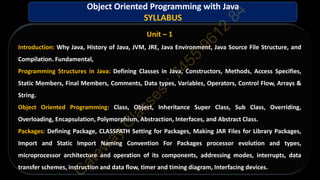
Unit – 1
Introduction: Why Java, History of Java, JVM, JRE, Java Environment, Java Source File Structure, and
Compilation. Fundamental,
Programming Structures in Java: Defining Classes in Java, Constructors, Methods, Access Specifies,
Static Members, Final Members, Comments, Data types, Variables, Operators, Control Flow, Arrays &
String.
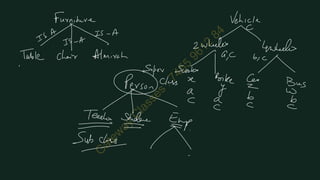
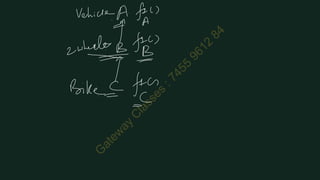
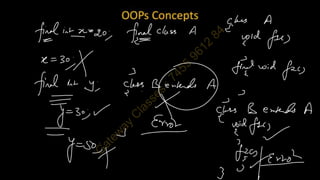
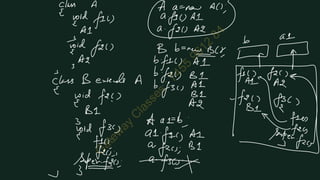
Object Oriented Programming: Class, Object, Inheritance Super Class, Sub Class, Overriding,
Overloading, Encapsulation, Polymorphism, Abstraction, Interfaces, and Abstract Class.
Packages: Defining Package, CLASSPATH Setting for Packages, Making JAR Files for Library Packages,
Import and Static Import Naming Convention For Packages processor evolution and types,
microprocessor architecture and operation of its components, addressing modes, interrupts, data
transfer schemes, instruction and data flow, timer and timing diagram, Interfacing devices.
Object Oriented Programming with Java
SYLLABUS
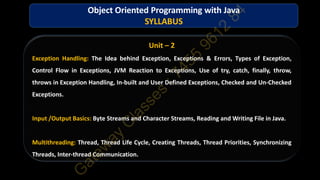
Unit – 2
Exception Handling: The Idea behind Exception, Exceptions & Errors, Types of Exception,
Control Flow in Exceptions, JVM Reaction to Exceptions, Use of try, catch, finally, throw,
throws in Exception Handling, In-built and User Defined Exceptions, Checked and Un-Checked
Exceptions.
Input /Output Basics: Byte Streams and Character Streams, Reading and Writing File in Java.
Multithreading: Thread, Thread Life Cycle, Creating Threads, Thread Priorities, Synchronizing
Threads, Inter-thread Communication.
Object Oriented Programming with Java
SYLLABUS
Unit – 3
Java New Features: Functional Interfaces, Lambda Expression, Method References, Stream
API, Default Methods, Static Method, Base64 Encode and Decode, ForEach Method, Try-with
resources, Type Annotations, Repeating Annotations, Java Module System, Diamond Syntax
with 08 Inner Anonymous Class, Local Variable Type Inference, Switch Expressions, Yield
Keyword, Text Blocks, Records, Sealed Classes.
Object Oriented Programming with Java
SYLLABUS
Unit – 4
Java Collections Framework: Collection in Java, Collection Framework in Java, Hierarchy of
Collection Framework, Iterator Interface, Collection Interface, List Interface, ArrayList,
LinkedList, Vector, Stack, Queue Interface, Set Interface, HashSet, LinkedHashSet, SortedSet
Interface, TreeSet, Map Interface, HashMap Class, LinkedHashMap Class, TreeMap Class,
Hashtable Class, Sorting, Comparable Interface, Comparator Interface, Properties Class in Java.
Object Oriented Programming with Java
SYLLABUS
Unit – 5
Spring Framework: Spring Core Basics-Spring Dependency Injection concepts, Spring Inversion
of Control, AOP, Bean Scopes- Singleton, Prototype, Request, Session, Application, Web
Socket, Auto wiring, Annotations, Life Cycle Call backs, Bean Configuration styles
Spring Boot: Spring Boot Build Systems, Spring Boot Code Structure, Spring Boot Runners,
Logger, BUILDING RESTFUL WEB SERVICES, Rest Controller, Request Mapping, Request Body,
Path Variable, Request Parameter, GET, POST, PUT, DELETE APIs, Build Web Applications
Object Oriented Programming with Java
SYLLABUS
Java was originally developed by James Gosling at Sun Microsystems.
It was released in May 1995 as a core component of Sun's Java platform.
The language was initially called Oak after an oak tree that stood outside Gosling's office.
Later the project went by the name Green and was finally renamed Java, from Java coffee, a type of
coffee from Indonesia.
Gosling designed Java with a C/C++-style syntax that system and application programmers would find
familiar.
Java gained popularity shortly after its release and has been a very popular programming
language since then.
Java was the third most popular programming language in 2022 according to GitHub.
As of March 2024, Java 22 is the latest version.
Java 8, 11, 17, and 21 are previous LTS versions still officially supported.
History of Java
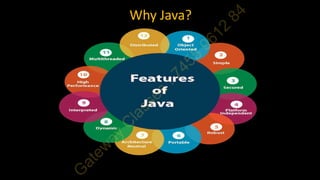
Why Java?
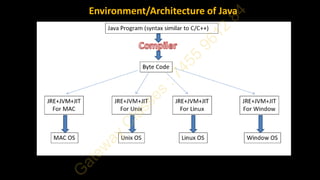
Environment/Architecture of Java
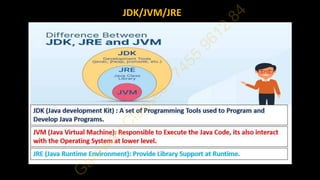
JDK/JVM/JRE
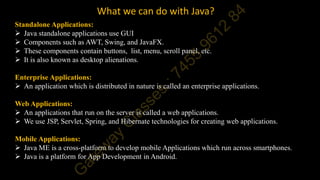
What we can do with Java?
Standalone Applications:
 Java standalone applications use GUI
 Components such as AWT, Swing, and JavaFX.
 These components contain buttons, list, menu, scroll panel, etc.
 It is also known as desktop alienations.
Enterprise Applications:
 An application which is distributed in nature is called an enterprise applications.
Web Applications:
 An applications that run on the server is called a web applications.
 We use JSP, Servlet, Spring, and Hibernate technologies for creating web applications.
Mobile Applications:
 Java ME is a cross-platform to develop mobile Applications which run across smartphones.
 Java is a platform for App Development in Android.
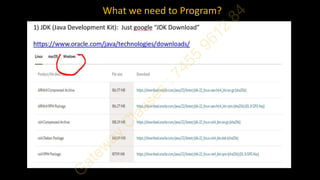
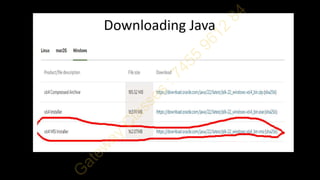
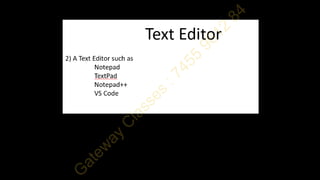
What we need to Program?
Practical Demonstration of
 Creating
 Compiling
 Running the Program
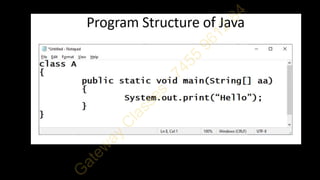
Program to Understand Print
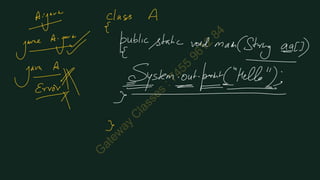
class A
{
public static void main(String aa[])
{
System.out.print("Henllo Java
1n"); System.out.println("Hello
Java 2");
System.out.print("Hello Java 3");
}
}
Program to Understand Print
class A2
{
public static void main(String aa[])
{
int a=45; System.out.println("Hello");
System.out.println(154);
System.out.println(52.64);
System.out.println('A');
System.out.println(152*10+85);
double b=213.67;
System.out.println(a);
System.out.println(b);
}
}
Program to Understand Print with Concatenation
class A3
{
public static void main(String aa[])
{
int a=56;
double b=23.68; System.out.println("Hello");
System.out.println(10+65);
System.out.println("Hello"+"ABC");
System.out.println("A="+a);
System.out.println("Value of B is "+b);
System.out.println("A="+a+" B="+b);
System.out.printf("A=%d",a);
}
}
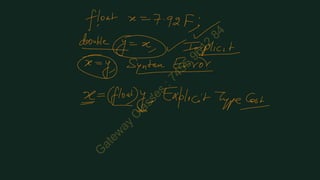
Program to Understand Type Casting
class A4
{
public static void main(String aa[])
{
float x=23.67F;
double y;
y=x; x=(float)y;
System.out.println(x);
System.out.println(y);
}
}
Program to Understand Typecasting
class A5
{
public static void main(String aa[])
{
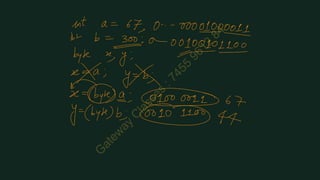
int a=100; int b=320;
byte x,y; x=(byte)a;
y=(byte)b;
System.out.println(x);
System.out.println(y);
}
}
Use of Suffix ‘L’
class A6
{
public static void main(String aa[])
{
long x=3000000000L;
System.out.println(x);
}
}
Arithmetic Operators
class A7
{
public static void main(String aa[])
{
int a=56; int b=10;
System.out.println(a+b);
System.out.println(a-b);
System.out.println(a*b);
System.out.println(a/b);
System.out.println(a%b);
}
}
Using “Scanner” to input
import java.util.Scanner;
class A8
{
public static void main(String aa[])
{
Scanner sc=new Scanner(System.in);
System.out.print("Enter a Number:");
int a=sc.nextInt();
System.out.print("Enter 2nd Number:");
int b=sc.nextInt();
int c=a+b;
System.out.println("Sum="+c);
}
}
If statement in Java
import java.util.Scanner;
class A9
{
public static void main(String aa[])
{
Scanner sc=new Scanner(System.in);
System.out.print("Enter a Number:");
int a=sc.nextInt();
if(a%2==0)
{
System.out.println("Even");
}
else
{
System.out.println("Odd");
}
}
}
For Loop in Java
import java.util.Scanner;
class A10
{
public static void main(String aa[])
{
Scanner sc=new Scanner(System.in);
System.out.print("Enter a Number:");
int a=sc.nextInt();
for(int i=1;i<=10;i++)
{
int b=a*i;
System.out.println(a+"X"+i+"="+b);
}
}
}
If-else if in Java
import java.util.Scanner;
class A11
{
publicstatic void main(String aa[])
{
Scanner sc=new Scanner(System.in);
System.out.print("Enter 3 Numbers:");
int a=sc.nextInt();
int b=sc.nextInt();
int c=sc.nextInt();
if(a>b && a>c)
{
System.out.println("Ais Largest");
}
else if(b>c)
{
System.out.println("B is Largest");
}
else
{
System.out.println("C is Largest");
}
}
}
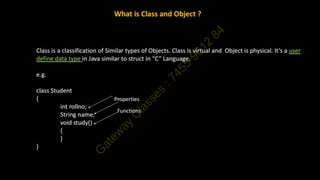
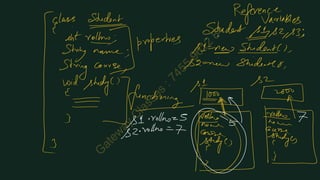
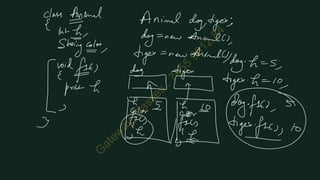
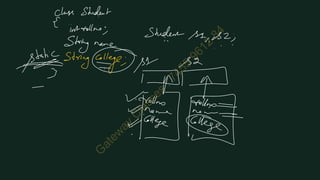
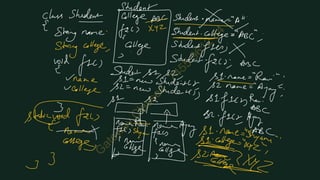
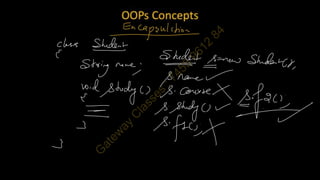
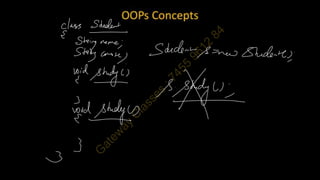
Example of Class and Static
import java.util.Scanner; class Student
{
String name;
static String college;
}
class A12
{
public static void main(String aa[])
{
Student s1,s2; s1=new Student(); s2=new
Student();
Student s3=new Student(); Student.college="ABC";
s1.name="Rajat"; s2.name="Amit"; s3.name="Sumit";
System.out.println(s1.name);
System.out.println(s1.college);
System.out.println(s2.name);
System.out.println(s2.college);
System.out.println(s3.name);
System.out.println(s3.college);
}
}
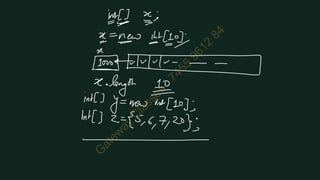
class A16
{
public static void main(String aa[])
{
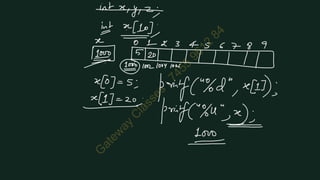
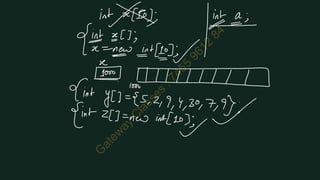
int x[];
x=new int[10];
int y[]=new int[17];
int z[]=new int[]{123,45,67,879,67,23,56};
int w[]={123,45,67,879,67,23,56};
System.out.println(x.length);
System.out.println(y.length);
System.out.println(z.length);
System.out.println(w.length);
}
}
-----------------------------------------------------------------------------------------------------
---
class A17
{
public static void main(String[] aa)
{
int[] x;
x=new int[10];
int[] y=new int[17];
int[] z=new int[]{123,45,67,879,67,23,56};
int[] w={123,45,67,879,67,23,56};
System.out.println(x.length);
System.out.println(y.length);
System.out.println(z.length);
System.out.println(w.length);
}
}
-----------------------------------------------------------------------------------------------------
--
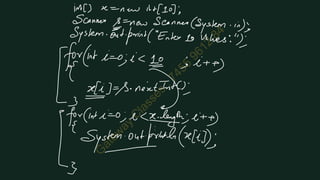
import java.util.Scanner;
class A18
{
public static void main(String[] aa)
{
int[] x=new int[10];
Scanner sc=new Scanner(System.in);
System.out.print("Enter 10 values:");
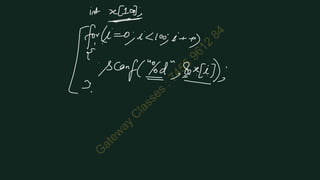
for(int i=0;i<x.length;i++)
{
x[i]=sc.nextInt();
}
System.out.println("nValues are:");
for(int i=0;i<x.length;i++)
{
System.out.print(x[i]+" ");
}
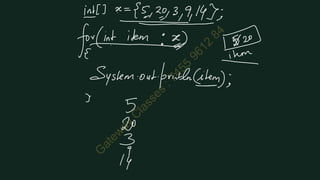
System.out.println("nValues are:");
for(int item:x)
{
System.out.print(item+" ");
}
}
}
-------------------------------------------------------------------------
import java.util.Scanner;
class A19
{
public static void main(String[] aa)
{
int[] x=new int[10];
Scanner sc=new Scanner(System.in);
System.out.print("Enter 10 values:");
for(int i=0;i<x.length;i++)
{
x[i]=sc.nextInt();
}
int min=x[0];
for(int item:x)
{
if(min>item)
min=item;
}
System.out.println("Min:"+min);
}
}
------------------------------------------------------------------------
import java.util.Scanner;
class A20
{
public static void main(String[] aa)
{
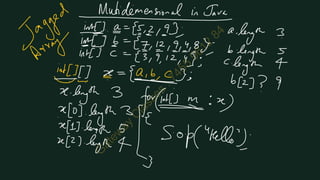
int[] a={12,345,6,6};
int[] b={23,45,67,213,12,46};
int[] c={23,67,67,34,2};
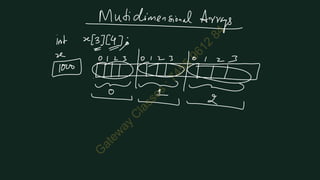
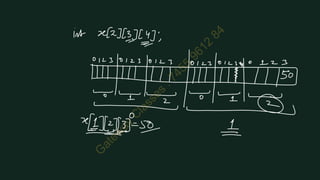
int[][] x={a,b,c};
System.out.println(x.length);
System.out.println(x[0].length);
System.out.println(x[1].length);
System.out.println(x[2].length);
System.out.println(x[1][3]);
System.out.println();
for(int i=0;i<x.length;i++)
{
for(int j=0;j<x[i].length;j++)
{
System.out.print(x[i][j]+" ");
}
System.out.println();
}
System.out.println();
for(int[] m:x)
{
for(int item:m)
{
System.out.print(item+" ");
}
System.out.println();
}
}
}
--------------------------------------------------------------------------------
import java.util.Scanner;
class A21
{
public static void main(String[] aa)
{
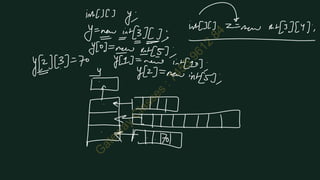
int[][] arr=new int[3][5];
Scanner sc=new Scanner(System.in);
System.out.println("Enter matrix of 3x5:");
for(int i=0;i<arr.length;i++)
{
for(int j=0;j<arr[i].length;j++)
{
arr[i][j]=sc.nextInt();
}
}
System.out.println("matrix of 3x5:");
for(int i=0;i<3;i++)
{
for(int j=0;j<5;j++)
{
System.out.print(arr[i][j]+" ");
}
System.out.println();
}
}
}
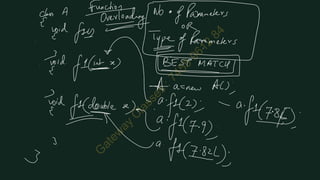
class Emp
{
int eid;
String name;
String department;
//Function Overloading
void f1()
{
System.out.println("Zero");
}
void f1(int a)
{
System.out.println("1 Integer");
}
void f1(double b)
{
System.out.println("1 Double");
}
void f1(float b)
{
System.out.println("1 Float");
}
}
class A25
{
public static void main(String[] ar)
{
byte x1=43;
short x2=34;
int x3=45;
long x4=56;
float x5=23;
double x6=23;
String x7="ABC";
boolean x8=true;
char x9='A';
Emp e=new Emp();
e.f1();
e.f1(x1);
e.f1(x2);
e.f1(x3);
e.f1(x4);
e.f1(x5);
e.f1(x6);
//e.f1(x7);
//e.f1(x8);
e.f1(x9);
}
}
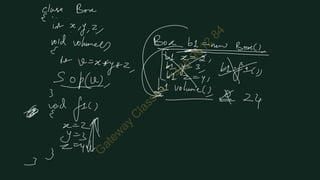
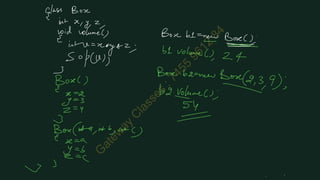
//Example of Constructor
class Emp
{
int eid;
String name;
String department;
Emp(String nm)
{
name=nm;
}
Emp(int id,String nm)
{
eid=id;
name=nm;
}
}
class A26
{
public static void main(String[] ar)
{
Emp e1=new Emp("Ravi");
System.out.println(e1.eid);
System.out.println(e1.name);
Emp e2=new Emp(45,"Amit");
System.out.println(e2.eid);
System.out.println(e2.name);
}
}
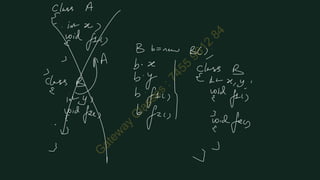
// Memory Allocated to Super then Sub
class Person
{
Person()
{
System.out.println("Person");
}
}
class Student extends Person
{
Student()
{
System.out.println("Student");
}
}
class A27
{
public static void main(String[] ar)
{
Student s=new Student();
}
}
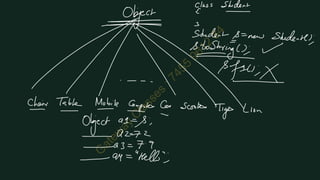
// Generalization
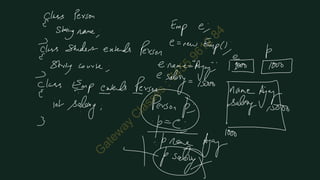
class Person
{
String name;
}
class Student extends Person
{
String course;
}
class Emp extends Person
{
int salary;
}
class A28
{
public static void main(String[] ar)
{
Student s1=new Student();
s1.name="Abhay";
s1.course="B.Tech";
System.out.println(s1.name);
System.out.println(s1.course);
System.out.println();
Person p=s1;
System.out.println(p.name);
//System.out.println(p.course);
}
}
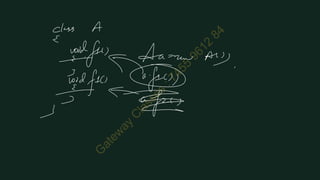
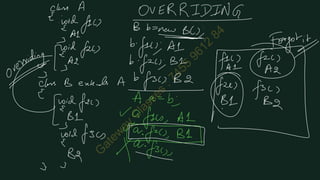
//Function Overriding
class Person
{
void f1()
{
System.out.println("Person F1");
}
void f2()
{
System.out.println("Person F2");
}
}
class Student extends Person
{
void f3()
{
System.out.println("Student F3");
}
void f2() // function overriding
{
System.out.println("Student F2");
}
}
class A29
{
public static void main(String[] ar)
{
Student s=new Student();
s.f1();
s.f2();
s.f3();
Person p=s;
p.f1();
p.f2();
//p.f3();
}
}
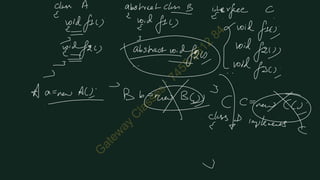
abstract class A
{
abstract void f1();
void f2()
{
System.out.println("F2 in A");
}
}
interface B
{
void f1();
void f2();
}
class C
{
void f1()
{
}
void f2()
{
}
}
class D implements B
{
public void f2()
{
}
}
class A30
{
public static void main(String[] ar)
{
}
}
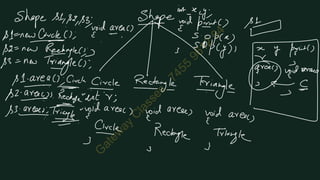
// Polymorphism
class Shape
{
int x;
int y;
void print()
{
System.out.println(x);
System.out.println(y);
}
void area()
{
}
}
class Circle extends Shape
{
int r;
void area()
{
System.out.println("Circle");
}
}
class Triangle extends Shape
{
void area()
{
System.out.println("Triangle");
}
}
class Ellipse extends Shape
{
int r1,r2;
void area()
{
System.out.println("Ellipse");
}
}
class A31
{
public static void main(String[] ar)
{
Shape s1,s2,s3;
s1=new Circle();
s2=new Ellipse();
s3=new Triangle();
s1.area();
s2.area();
s3.area();
}
}
------------------------------------------------------------
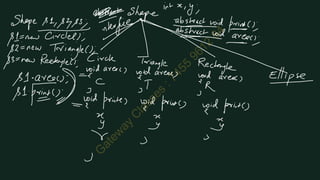
// Polymorphism with Abstraction
abstract class Shape
{
int x;
int y;
void print()
{
System.out.println(x);
System.out.println(y);
}
abstract void area();
}
class Circle extends Shape
{
int r;
void area()
{
System.out.println("Circle");
}
}
class Triangle extends Shape
{
void area()
{
System.out.println("Triangle");
}
}
class Ellipse extends Shape
{
int r1,r2;
void area()
{
System.out.println("Ellipse");
}
}
class Rectangle extends Shape
{
}
class A32
{
public static void main(String[] ar)
{
Shape s1,s2,s3;
s1=new Circle();
s2=new Ellipse();
s3=new Triangle();
s1.area();
s2.area();
s3.area();
Shape s=new Shape();
}
}
----------------------------------------------------------------------------
// Polymorphism with Abstraction using Interface
interface Shape
{
void print();
abstract void area();
}
class Circle implements Shape
{
int r;
public void print()
{
}
public void area()
{
System.out.println("Circle");
}
}
class Triangle implements Shape
{
public void print()
{
}
public void area()
{
System.out.println("Triangle");
}
}
class Ellipse implements Shape
{
int r1,r2;
public void print()
{
}
public void area()
{
System.out.println("Ellipse");
}
}
class Rectangle implements Shape
{
}
class A33
{
public static void main(String[] ar)
{
Shape s1,s2,s3;
s1=new Circle();
s2=new Ellipse();
s3=new Triangle();
s1.area();
s2.area();
s3.area();
Shape s=new Shape();
}
}
-------------------------------------------------------------------------
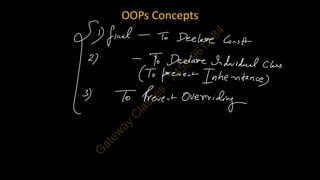
//Use of "final" keyword
final class A
{
}
//class B extends A
//{
//}
class C
{
void f1()
{
}
final void f2()
{
}
}
class D extends C
{
void f1()
{
}
//void f2()
//{
//}
}
class A34
{
public static void main(String[] ar)
{
final int x=23;
//x=789;
}
}
--------------------------------------------------------------------------
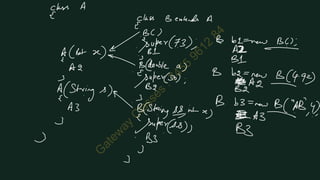
//use of "super" keyword with constructor
class A
{
//A()
//{
// System.out.println("A1");
//}
A(int x)
{
System.out.println("A2");
}
A(String s)
{
System.out.println("A3");
}
}
class B extends A
{
B()
{
super(100);
System.out.println("B1");
}
B(double a)
{
super(20);
System.out.println("B2");
}
B(String s,int a)
{
super(s);
System.out.println("B3");
}
}
class A35
{
public static void main(String[] ar)
{
B b1=new B();
System.out.println();
B b2=new B(23.567);
System.out.println();
B b3=new B("ABC",55);
}
}
-----------------------------------------------------------
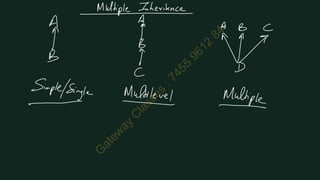
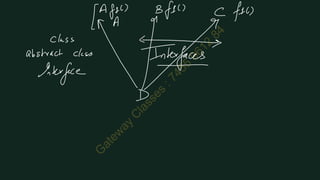
// Multiple Inheritance using Interfaces
class A
{
}
interface B
{
}
interface C
{
}
class D extends A implements B,C
{
}
class A35
{
public static void main(String[] ar)
{
}
}
JAVA U-1 Combined Notes_34691272.pdf Java

JAVA U-1 Combined Notes_34691272.pdf Java

  • 2.
    Basic to Advance TheoryConcepts with Practical Examples DPP (Exercise/ Assignments) Placement Oriented Subject
  • 3.
    Unit – 1 Introduction:Why Java, History of Java, JVM, JRE, Java Environment, Java Source File Structure, and Compilation. Fundamental, Programming Structures in Java: Defining Classes in Java, Constructors, Methods, Access Specifies, Static Members, Final Members, Comments, Data types, Variables, Operators, Control Flow, Arrays & String. Object Oriented Programming: Class, Object, Inheritance Super Class, Sub Class, Overriding, Overloading, Encapsulation, Polymorphism, Abstraction, Interfaces, and Abstract Class. Packages: Defining Package, CLASSPATH Setting for Packages, Making JAR Files for Library Packages, Import and Static Import Naming Convention For Packages processor evolution and types, microprocessor architecture and operation of its components, addressing modes, interrupts, data transfer schemes, instruction and data flow, timer and timing diagram, Interfacing devices. Object Oriented Programming with Java SYLLABUS
  • 4.
    Unit – 2 ExceptionHandling: The Idea behind Exception, Exceptions & Errors, Types of Exception, Control Flow in Exceptions, JVM Reaction to Exceptions, Use of try, catch, finally, throw, throws in Exception Handling, In-built and User Defined Exceptions, Checked and Un-Checked Exceptions. Input /Output Basics: Byte Streams and Character Streams, Reading and Writing File in Java. Multithreading: Thread, Thread Life Cycle, Creating Threads, Thread Priorities, Synchronizing Threads, Inter-thread Communication. Object Oriented Programming with Java SYLLABUS
  • 5.
    Unit – 3 JavaNew Features: Functional Interfaces, Lambda Expression, Method References, Stream API, Default Methods, Static Method, Base64 Encode and Decode, ForEach Method, Try-with resources, Type Annotations, Repeating Annotations, Java Module System, Diamond Syntax with 08 Inner Anonymous Class, Local Variable Type Inference, Switch Expressions, Yield Keyword, Text Blocks, Records, Sealed Classes. Object Oriented Programming with Java SYLLABUS
  • 6.
    Unit – 4 JavaCollections Framework: Collection in Java, Collection Framework in Java, Hierarchy of Collection Framework, Iterator Interface, Collection Interface, List Interface, ArrayList, LinkedList, Vector, Stack, Queue Interface, Set Interface, HashSet, LinkedHashSet, SortedSet Interface, TreeSet, Map Interface, HashMap Class, LinkedHashMap Class, TreeMap Class, Hashtable Class, Sorting, Comparable Interface, Comparator Interface, Properties Class in Java. Object Oriented Programming with Java SYLLABUS
  • 7.
    Unit – 5 SpringFramework: Spring Core Basics-Spring Dependency Injection concepts, Spring Inversion of Control, AOP, Bean Scopes- Singleton, Prototype, Request, Session, Application, Web Socket, Auto wiring, Annotations, Life Cycle Call backs, Bean Configuration styles Spring Boot: Spring Boot Build Systems, Spring Boot Code Structure, Spring Boot Runners, Logger, BUILDING RESTFUL WEB SERVICES, Rest Controller, Request Mapping, Request Body, Path Variable, Request Parameter, GET, POST, PUT, DELETE APIs, Build Web Applications Object Oriented Programming with Java SYLLABUS
  • 8.
    Java was originallydeveloped by James Gosling at Sun Microsystems. It was released in May 1995 as a core component of Sun's Java platform. The language was initially called Oak after an oak tree that stood outside Gosling's office. Later the project went by the name Green and was finally renamed Java, from Java coffee, a type of coffee from Indonesia. Gosling designed Java with a C/C++-style syntax that system and application programmers would find familiar. Java gained popularity shortly after its release and has been a very popular programming language since then. Java was the third most popular programming language in 2022 according to GitHub. As of March 2024, Java 22 is the latest version. Java 8, 11, 17, and 21 are previous LTS versions still officially supported. History of Java
  • 9.
  • 10.
  • 11.
  • 12.
    What we cando with Java? Standalone Applications:  Java standalone applications use GUI  Components such as AWT, Swing, and JavaFX.  These components contain buttons, list, menu, scroll panel, etc.  It is also known as desktop alienations. Enterprise Applications:  An application which is distributed in nature is called an enterprise applications. Web Applications:  An applications that run on the server is called a web applications.  We use JSP, Servlet, Spring, and Hibernate technologies for creating web applications. Mobile Applications:  Java ME is a cross-platform to develop mobile Applications which run across smartphones.  Java is a platform for App Development in Android.
  • 13.
    What we needto Program?
  • 17.
    Practical Demonstration of Creating  Compiling  Running the Program
  • 50.
    Program to UnderstandPrint class A { public static void main(String aa[]) { System.out.print("Henllo Java 1n"); System.out.println("Hello Java 2"); System.out.print("Hello Java 3"); } }
  • 51.
    Program to UnderstandPrint class A2 { public static void main(String aa[]) { int a=45; System.out.println("Hello"); System.out.println(154); System.out.println(52.64); System.out.println('A'); System.out.println(152*10+85); double b=213.67; System.out.println(a); System.out.println(b); } }
  • 52.
    Program to UnderstandPrint with Concatenation class A3 { public static void main(String aa[]) { int a=56; double b=23.68; System.out.println("Hello"); System.out.println(10+65); System.out.println("Hello"+"ABC"); System.out.println("A="+a); System.out.println("Value of B is "+b); System.out.println("A="+a+" B="+b); System.out.printf("A=%d",a); } }
  • 53.
    Program to UnderstandType Casting class A4 { public static void main(String aa[]) { float x=23.67F; double y; y=x; x=(float)y; System.out.println(x); System.out.println(y); } }
  • 54.
    Program to UnderstandTypecasting class A5 { public static void main(String aa[]) { int a=100; int b=320; byte x,y; x=(byte)a; y=(byte)b; System.out.println(x); System.out.println(y); } }
  • 55.
    Use of Suffix‘L’ class A6 { public static void main(String aa[]) { long x=3000000000L; System.out.println(x); } }
  • 56.
    Arithmetic Operators class A7 { publicstatic void main(String aa[]) { int a=56; int b=10; System.out.println(a+b); System.out.println(a-b); System.out.println(a*b); System.out.println(a/b); System.out.println(a%b); } }
  • 57.
    Using “Scanner” toinput import java.util.Scanner; class A8 { public static void main(String aa[]) { Scanner sc=new Scanner(System.in); System.out.print("Enter a Number:"); int a=sc.nextInt(); System.out.print("Enter 2nd Number:"); int b=sc.nextInt(); int c=a+b; System.out.println("Sum="+c); } }
  • 58.
    If statement inJava import java.util.Scanner; class A9 { public static void main(String aa[]) { Scanner sc=new Scanner(System.in); System.out.print("Enter a Number:"); int a=sc.nextInt(); if(a%2==0) { System.out.println("Even"); } else { System.out.println("Odd"); } } }
  • 59.
    For Loop inJava import java.util.Scanner; class A10 { public static void main(String aa[]) { Scanner sc=new Scanner(System.in); System.out.print("Enter a Number:"); int a=sc.nextInt(); for(int i=1;i<=10;i++) { int b=a*i; System.out.println(a+"X"+i+"="+b); } } }
  • 60.
    If-else if inJava import java.util.Scanner; class A11 { publicstatic void main(String aa[]) { Scanner sc=new Scanner(System.in); System.out.print("Enter 3 Numbers:"); int a=sc.nextInt(); int b=sc.nextInt(); int c=sc.nextInt(); if(a>b && a>c) { System.out.println("Ais Largest"); } else if(b>c) { System.out.println("B is Largest"); } else { System.out.println("C is Largest"); } } }
  • 61.
    Example of Classand Static import java.util.Scanner; class Student { String name; static String college; } class A12 { public static void main(String aa[]) { Student s1,s2; s1=new Student(); s2=new Student(); Student s3=new Student(); Student.college="ABC"; s1.name="Rajat"; s2.name="Amit"; s3.name="Sumit"; System.out.println(s1.name); System.out.println(s1.college); System.out.println(s2.name); System.out.println(s2.college); System.out.println(s3.name); System.out.println(s3.college); } }
  • 75.
    class A16 { public staticvoid main(String aa[]) { int x[]; x=new int[10]; int y[]=new int[17]; int z[]=new int[]{123,45,67,879,67,23,56}; int w[]={123,45,67,879,67,23,56}; System.out.println(x.length); System.out.println(y.length); System.out.println(z.length); System.out.println(w.length); } }
  • 76.
    ----------------------------------------------------------------------------------------------------- --- class A17 { public staticvoid main(String[] aa) { int[] x; x=new int[10]; int[] y=new int[17]; int[] z=new int[]{123,45,67,879,67,23,56}; int[] w={123,45,67,879,67,23,56}; System.out.println(x.length); System.out.println(y.length); System.out.println(z.length); System.out.println(w.length); } }
  • 77.
    ----------------------------------------------------------------------------------------------------- -- import java.util.Scanner; class A18 { publicstatic void main(String[] aa) { int[] x=new int[10]; Scanner sc=new Scanner(System.in); System.out.print("Enter 10 values:"); for(int i=0;i<x.length;i++) { x[i]=sc.nextInt(); } System.out.println("nValues are:"); for(int i=0;i<x.length;i++) { System.out.print(x[i]+" "); } System.out.println("nValues are:"); for(int item:x) { System.out.print(item+" "); } } }
  • 78.
    ------------------------------------------------------------------------- import java.util.Scanner; class A19 { publicstatic void main(String[] aa) { int[] x=new int[10]; Scanner sc=new Scanner(System.in); System.out.print("Enter 10 values:"); for(int i=0;i<x.length;i++) { x[i]=sc.nextInt(); } int min=x[0]; for(int item:x) { if(min>item) min=item; } System.out.println("Min:"+min); } }
  • 79.
    ------------------------------------------------------------------------ import java.util.Scanner; class A20 { publicstatic void main(String[] aa) { int[] a={12,345,6,6}; int[] b={23,45,67,213,12,46}; int[] c={23,67,67,34,2}; int[][] x={a,b,c}; System.out.println(x.length); System.out.println(x[0].length); System.out.println(x[1].length); System.out.println(x[2].length); System.out.println(x[1][3]); System.out.println(); for(int i=0;i<x.length;i++) { for(int j=0;j<x[i].length;j++) { System.out.print(x[i][j]+" "); } System.out.println(); } System.out.println(); for(int[] m:x) { for(int item:m) { System.out.print(item+" "); } System.out.println(); } } }
  • 80.
    -------------------------------------------------------------------------------- import java.util.Scanner; class A21 { publicstatic void main(String[] aa) { int[][] arr=new int[3][5]; Scanner sc=new Scanner(System.in); System.out.println("Enter matrix of 3x5:"); for(int i=0;i<arr.length;i++) { for(int j=0;j<arr[i].length;j++) { arr[i][j]=sc.nextInt(); } } System.out.println("matrix of 3x5:"); for(int i=0;i<3;i++) { for(int j=0;j<5;j++) { System.out.print(arr[i][j]+" "); } System.out.println(); } } }
  • 101.
    class Emp { int eid; Stringname; String department; //Function Overloading void f1() { System.out.println("Zero"); } void f1(int a) { System.out.println("1 Integer"); } void f1(double b) { System.out.println("1 Double"); } void f1(float b) { System.out.println("1 Float"); } } class A25 { public static void main(String[] ar) { byte x1=43; short x2=34; int x3=45; long x4=56; float x5=23; double x6=23; String x7="ABC"; boolean x8=true; char x9='A'; Emp e=new Emp(); e.f1(); e.f1(x1); e.f1(x2); e.f1(x3); e.f1(x4); e.f1(x5); e.f1(x6); //e.f1(x7); //e.f1(x8); e.f1(x9); } }
  • 102.
    //Example of Constructor classEmp { int eid; String name; String department; Emp(String nm) { name=nm; } Emp(int id,String nm) { eid=id; name=nm; } } class A26 { public static void main(String[] ar) { Emp e1=new Emp("Ravi"); System.out.println(e1.eid); System.out.println(e1.name); Emp e2=new Emp(45,"Amit"); System.out.println(e2.eid); System.out.println(e2.name); } }
  • 108.
    // Memory Allocatedto Super then Sub class Person { Person() { System.out.println("Person"); } } class Student extends Person { Student() { System.out.println("Student"); } } class A27 { public static void main(String[] ar) { Student s=new Student(); } }
  • 109.
    // Generalization class Person { Stringname; } class Student extends Person { String course; } class Emp extends Person { int salary; } class A28 { public static void main(String[] ar) { Student s1=new Student(); s1.name="Abhay"; s1.course="B.Tech"; System.out.println(s1.name); System.out.println(s1.course); System.out.println(); Person p=s1; System.out.println(p.name); //System.out.println(p.course); } }
  • 110.
    //Function Overriding class Person { voidf1() { System.out.println("Person F1"); } void f2() { System.out.println("Person F2"); } } class Student extends Person { void f3() { System.out.println("Student F3"); } void f2() // function overriding { System.out.println("Student F2"); } } class A29 { public static void main(String[] ar) { Student s=new Student(); s.f1(); s.f2(); s.f3(); Person p=s; p.f1(); p.f2(); //p.f3(); }
  • 111.
  • 113.
    abstract class A { abstractvoid f1(); void f2() { System.out.println("F2 in A"); } } interface B { void f1(); void f2(); } class C { void f1() { } void f2() { } } class D implements B { public void f2() { } } class A30 { public static void main(String[] ar) { } }
  • 124.
    // Polymorphism class Shape { intx; int y; void print() { System.out.println(x); System.out.println(y); } void area() { } } class Circle extends Shape { int r; void area() { System.out.println("Circle"); } } class Triangle extends Shape { void area() { System.out.println("Triangle"); } } class Ellipse extends Shape { int r1,r2; void area() { System.out.println("Ellipse"); } } class A31 { public static void main(String[] ar) { Shape s1,s2,s3; s1=new Circle(); s2=new Ellipse();
  • 125.
    s3=new Triangle(); s1.area(); s2.area(); s3.area(); } } ------------------------------------------------------------ // Polymorphismwith Abstraction abstract class Shape { int x; int y; void print() { System.out.println(x); System.out.println(y); } abstract void area(); } class Circle extends Shape { int r; void area() { System.out.println("Circle"); } } class Triangle extends Shape { void area() { System.out.println("Triangle"); } } class Ellipse extends Shape { int r1,r2; void area() { System.out.println("Ellipse"); } } class Rectangle extends Shape {
  • 126.
    } class A32 { public staticvoid main(String[] ar) { Shape s1,s2,s3; s1=new Circle(); s2=new Ellipse(); s3=new Triangle(); s1.area(); s2.area(); s3.area(); Shape s=new Shape(); } } ---------------------------------------------------------------------------- // Polymorphism with Abstraction using Interface interface Shape { void print(); abstract void area(); } class Circle implements Shape { int r; public void print() { } public void area() { System.out.println("Circle"); } } class Triangle implements Shape { public void print() { } public void area() { System.out.println("Triangle"); } }
  • 127.
    class Ellipse implementsShape { int r1,r2; public void print() { } public void area() { System.out.println("Ellipse"); } } class Rectangle implements Shape { } class A33 { public static void main(String[] ar) { Shape s1,s2,s3; s1=new Circle(); s2=new Ellipse(); s3=new Triangle(); s1.area(); s2.area(); s3.area(); Shape s=new Shape(); } } ------------------------------------------------------------------------- //Use of "final" keyword final class A { } //class B extends A //{ //} class C { void f1() { } final void f2() {
  • 128.
    } } class D extendsC { void f1() { } //void f2() //{ //} } class A34 { public static void main(String[] ar) { final int x=23; //x=789; } } -------------------------------------------------------------------------- //use of "super" keyword with constructor class A { //A() //{ // System.out.println("A1"); //} A(int x) { System.out.println("A2"); } A(String s) { System.out.println("A3"); } } class B extends A { B() { super(100); System.out.println("B1"); } B(double a)
  • 129.
    { super(20); System.out.println("B2"); } B(String s,int a) { super(s); System.out.println("B3"); } } classA35 { public static void main(String[] ar) { B b1=new B(); System.out.println(); B b2=new B(23.567); System.out.println(); B b3=new B("ABC",55); } } ----------------------------------------------------------- // Multiple Inheritance using Interfaces class A { } interface B { } interface C { } class D extends A implements B,C { } class A35 { public static void main(String[] ar) { } }