BY : ABISHEK V
DEPT : CSE
YR : 3RD
SEC : “A”
Introduction to Java Programming:
Java is a powerful and widely-used programming
language that was developed by Sun Microsystems
(now owned by Oracle). It was designed to be platform-
independent, which means that Java programs can run
on any system that has a Java Virtual Machine (JVM)
installed. This makes Java a popular choice for
developing applications ranging from simple desktop
programs to complex enterprise systems
Basic Concepts in Java:
Variables and Data Types
Classes and Objects:
Control Flow Statements
Methods
Inheritance and Polymorphism
Exception Handling
TASK-01:
Create a simple "Hello World" program written in Java:
Program:
public class HelloWorld {
public static void main(String[] args) {
System.out.println("Hello, world!");
}
}
Task-02 :
To create check if a Number is Prime:
program;
public class PrimeChecker {
public static void main(String[] args) {
int number = 7;
boolean isPrime = true;
if (number <= 1) {
isPrime = false;
} else {
for (int i = 2; i <= Math.sqrt(number); i++) {
if (number % i == 0) {
isPrime = false;
break;
}
}
}
if (isPrime) {
System.out.println(number + " is a prime number.");
} else {
System.out.println(number + " is not a prime number.");
}
}
}
Task-03:
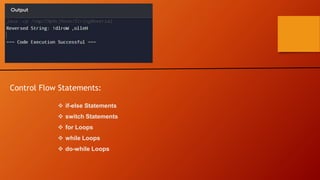
To create a Reverse a String:
Program:
public class StringReversal {
public static void main(String[] args) {
String str = "Hello, World!";
StringBuilder reversed = new StringBuilder(str).reverse();
System.out.println("Reversed String: " + reversed);
}
}
Control Flow Statements:
 if-else Statements
 switch Statements
 for Loops
 while Loops
 do-while Loops
OOPS CONCEPT:
OOP stands for Object-Oriented Programming. Procedural programming is about writing procedures or
methods that perform operations on the data, while object- oriented programming is about creating objects that
contain both data and methods.
It simplifies software development and maintenance by providing some concepts:
•Object
•Class
•Inheritance
•Polymorphism
•Abstraction
•Encapsulation
JAVA IDEs:
Java Integrated Development Environments (IDEs) are
powerful tools that facilitate Java development by providing
features such as code editing, debugging, compilation, and
project management in an integrated environment. Here are
some popular Java IDEs widely used by developers.
1. Android Studio
2. Eclipse
3. Apache NetBeans
4. Visual Studio Code (VSCode)
5. Android Studio etc,.
ARRAY IN JAVA :
Arrays in Java are used to store multiple values of the same data type
under a single variable name. They provide a way to efficiently manage
collections of elements and are widely used in Java programming for
various tasks.
Here's an overview of arrays in Java.
1. Declaration and Initialization
2. Accessing Array Elements
3. Array Length
4. Multidimensional Arrays:
1.Declaration and Initialization:
To declare an array variable in Java, you specify the element
type followed by square brackets (“[]”).
SYNTAX:
dataType[] arrayName; // Array declaration
2. Accessing Array Elements:
Array elements are accessed using an index, which starts
from 0 for the first element.
Syntax:
arrayName[index]; // Accessing the element at the specified index
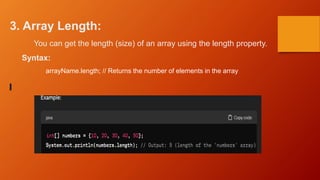
3. Array Length:
You can get the length (size) of an array using the length property.
Syntax:
arrayName.length; // Returns the number of elements in the array
5. Multidimensional Arrays:
Java also supports multidimensional arrays, which are arrays of arrays.
Syntax:
dataType[][] arrayName; // Declaration of a 2D array
public class ArrayOperationsExample {
public static void main(String[] args) {
// Initialize an array of strings (names)
String[] names = {"Alice", "Bob", "Charlie", "David", "Emma"};
// Display all names in the array
System.out.println("All names in the array:");
for (String name : names) {
System.out.println(name);
}
// Find the longest name in the array
String longestName = findLongestName(names);
System.out.println("nThe longest name in the array is: " + longestName);
// Display all names in uppercase
System.out.println("nAll names in uppercase:");
for (String name : names) {
System.out.println(name.toUpperCase());
}
}
// Method to find the longest name in an array of strings
public static String findLongestName(String[] names) {
String longestName = "";
for (String name : names) {
if (name.length() > longestName.length()) {
longestName = name;
}
}
return longestName;
}
}
JAVA INETRNSHIP1 made with simple topics.ppt.pptx

JAVA INETRNSHIP1 made with simple topics.ppt.pptx

  • 1.
    BY : ABISHEKV DEPT : CSE YR : 3RD SEC : “A”
  • 2.
    Introduction to JavaProgramming: Java is a powerful and widely-used programming language that was developed by Sun Microsystems (now owned by Oracle). It was designed to be platform- independent, which means that Java programs can run on any system that has a Java Virtual Machine (JVM) installed. This makes Java a popular choice for developing applications ranging from simple desktop programs to complex enterprise systems
  • 3.
    Basic Concepts inJava: Variables and Data Types Classes and Objects: Control Flow Statements Methods Inheritance and Polymorphism Exception Handling
  • 4.
    TASK-01: Create a simple"Hello World" program written in Java: Program: public class HelloWorld { public static void main(String[] args) { System.out.println("Hello, world!"); } }
  • 5.
    Task-02 : To createcheck if a Number is Prime: program;
  • 6.
    public class PrimeChecker{ public static void main(String[] args) { int number = 7; boolean isPrime = true; if (number <= 1) { isPrime = false; } else { for (int i = 2; i <= Math.sqrt(number); i++) { if (number % i == 0) { isPrime = false; break; } } } if (isPrime) { System.out.println(number + " is a prime number."); } else { System.out.println(number + " is not a prime number."); } } }
  • 7.
    Task-03: To create aReverse a String: Program: public class StringReversal { public static void main(String[] args) { String str = "Hello, World!"; StringBuilder reversed = new StringBuilder(str).reverse(); System.out.println("Reversed String: " + reversed); } }
  • 8.
    Control Flow Statements: if-else Statements  switch Statements  for Loops  while Loops  do-while Loops
  • 9.
    OOPS CONCEPT: OOP standsfor Object-Oriented Programming. Procedural programming is about writing procedures or methods that perform operations on the data, while object- oriented programming is about creating objects that contain both data and methods. It simplifies software development and maintenance by providing some concepts: •Object •Class •Inheritance •Polymorphism •Abstraction •Encapsulation
  • 10.
    JAVA IDEs: Java IntegratedDevelopment Environments (IDEs) are powerful tools that facilitate Java development by providing features such as code editing, debugging, compilation, and project management in an integrated environment. Here are some popular Java IDEs widely used by developers. 1. Android Studio 2. Eclipse 3. Apache NetBeans 4. Visual Studio Code (VSCode) 5. Android Studio etc,.
  • 11.
    ARRAY IN JAVA: Arrays in Java are used to store multiple values of the same data type under a single variable name. They provide a way to efficiently manage collections of elements and are widely used in Java programming for various tasks. Here's an overview of arrays in Java. 1. Declaration and Initialization 2. Accessing Array Elements 3. Array Length 4. Multidimensional Arrays:
  • 12.
    1.Declaration and Initialization: Todeclare an array variable in Java, you specify the element type followed by square brackets (“[]”). SYNTAX: dataType[] arrayName; // Array declaration
  • 13.
    2. Accessing ArrayElements: Array elements are accessed using an index, which starts from 0 for the first element. Syntax: arrayName[index]; // Accessing the element at the specified index
  • 14.
    3. Array Length: Youcan get the length (size) of an array using the length property. Syntax: arrayName.length; // Returns the number of elements in the array
  • 15.
    5. Multidimensional Arrays: Javaalso supports multidimensional arrays, which are arrays of arrays. Syntax: dataType[][] arrayName; // Declaration of a 2D array
  • 16.
    public class ArrayOperationsExample{ public static void main(String[] args) { // Initialize an array of strings (names) String[] names = {"Alice", "Bob", "Charlie", "David", "Emma"}; // Display all names in the array System.out.println("All names in the array:"); for (String name : names) { System.out.println(name); } // Find the longest name in the array String longestName = findLongestName(names); System.out.println("nThe longest name in the array is: " + longestName); // Display all names in uppercase System.out.println("nAll names in uppercase:"); for (String name : names) { System.out.println(name.toUpperCase()); } }
  • 17.
    // Method tofind the longest name in an array of strings public static String findLongestName(String[] names) { String longestName = ""; for (String name : names) { if (name.length() > longestName.length()) { longestName = name; } } return longestName; } }