1º  IMÁGENES EN MOVIMIENTO    <SCRIPT LANGUAGE="JavaScript">varcurElement;functiondoMouseMove() {varnewleft=0, newTop = 0if ((event.button==1) && (curElement!=null)) {newleft=event.clientX-document.all.OuterDiv.offsetLeft-(curElement.offsetWidth/2)if (newleft<0) newleft=0curElement.style.pixelLeft= newleftnewtop=event.clientY -document.all.OuterDiv.offsetTop-(curElement.offsetHeight/2)if (newtop<0) newtop=0curElement.style.pixelTop= newtopevent.returnValue = falseevent.cancelBubble = true        }      }
functiondoDragStart() {        // Don't do default dragoperation.if ("IMG"==event.srcElement.tagName)event.returnValue=false;      }functiondoMouseDown() {if ((event.button==1) && (event.srcElement.tagName=="IMG"))curElement = event.srcElement      }document.ondragstart = doDragStart;document.onmousedown = doMouseDown;document.onmousemove = doMouseMove;document.onmouseup = new Function("curElement=null")</SCRIPT>    <SCRIPT FOR="MovingPictures" EVENT="onmousedown" LANGUAGE="JavaScript">
event.cancelBubble=true</SCRIPT></HEAD><BODY bgcolor="white"><DIV id=OuterDivstyle="position:relative;width:100%;height:250">    <img ID="Pic1" STYLE="position:relative;TOP:80pt;LEFT:0pt;WIDTH:150;HEIGHT:50;Z-INDEX:22;" src="html_point_3kb.gif">      </DIV></body></html>
2º  TEXTO DINAMICO<TITLE>Ejemplos Javascript: ejemplo práctico </TITLE>      <script language="JavaScript"><!--// ByJariAarniala [foo@mbnet.fi]if(navigator.appName == "Microsoft Internet Explorer" &&parseInt(navigator.appVersion) >= 4){	ie4 = true;}else {	ie4 = false;}functionchangeColor(){if(ie4){
what = window.event.srcElement;if(what.className == "link"){if(what.style.color == "green"){what.style.color = "lime";			}else {what.style.color = "green";			}		}else {}	}}document.onmouseover = changeColor;document.onmouseout = changeColor;// --></script>
</HEAD><BODY bgcolor="white"><a href="http://www.htmlpoint.com" style="color: green; text-decoration: none;font-family: Verdana, Arial; font-weight: 700" class="link">HTMLpoint</a></body></html>HTML POINTHTMLPOINT
3º  IMÁGENES CON ONMOUSEOVER<TITLE>Ejemplos Javascript: ejemplo práctico </TITLE>      <script language="JavaScript">//This script changesthegraphicon mouse over and a graphic in//anotherpart of thescreen{alt0 = new Image();alt0.src = "white.jpg";alt1 = new Image();alt1.src = "java97_a.jpg";alt2 = new Image();alt2.src = "java97.jpg";</script>
graphic1= new Image();graphic1.src = "but1.gif";graphic1on = new Image();graphic1on.src = "but1b.gif";graphic2= new Image();graphic2.src = "but2.gif";graphic2on = new Image();graphic2on.src = "but2b.gif";}functionimageChange(imageID,imageName,imageID2,imageName2) {{document.images[imageID].src = eval(imageName + ".src");document.images[imageID2].src = eval(imageName2 + ".src");}}
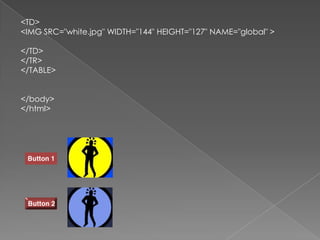
</HEAD><BODY bgcolor="white"><TABLE><TR><TD><A HREF="mylink"  ONMOUSEOVER="imageChange('global','alt1','one','graphic1on')" ONMOUSEOUT="imageChange('global','alt0','one','graphic1')"><IMG SRC="but1.gif" BORDER="0" NAME="one"><BR><BR><A HREF="mylink" ONMOUSEOVER="imageChange('global','alt2','two','graphic2on')" ONMOUSEOUT="imageChange('global','alt0','two','graphic2')"><IMG SRC="but2.gif" BORDER="0" NAME="two">                                </TD>
<TD><IMG SRC="white.jpg" WIDTH="144" HEIGHT="127" NAME="global" ></TD></TR></TABLE></body></html>

Java

  • 2.
    1º IMÁGENESEN MOVIMIENTO <SCRIPT LANGUAGE="JavaScript">varcurElement;functiondoMouseMove() {varnewleft=0, newTop = 0if ((event.button==1) && (curElement!=null)) {newleft=event.clientX-document.all.OuterDiv.offsetLeft-(curElement.offsetWidth/2)if (newleft<0) newleft=0curElement.style.pixelLeft= newleftnewtop=event.clientY -document.all.OuterDiv.offsetTop-(curElement.offsetHeight/2)if (newtop<0) newtop=0curElement.style.pixelTop= newtopevent.returnValue = falseevent.cancelBubble = true } }
  • 3.
    functiondoDragStart() { // Don't do default dragoperation.if ("IMG"==event.srcElement.tagName)event.returnValue=false; }functiondoMouseDown() {if ((event.button==1) && (event.srcElement.tagName=="IMG"))curElement = event.srcElement }document.ondragstart = doDragStart;document.onmousedown = doMouseDown;document.onmousemove = doMouseMove;document.onmouseup = new Function("curElement=null")</SCRIPT> <SCRIPT FOR="MovingPictures" EVENT="onmousedown" LANGUAGE="JavaScript">
  • 4.
    event.cancelBubble=true</SCRIPT></HEAD><BODY bgcolor="white"><DIV id=OuterDivstyle="position:relative;width:100%;height:250"> <img ID="Pic1" STYLE="position:relative;TOP:80pt;LEFT:0pt;WIDTH:150;HEIGHT:50;Z-INDEX:22;" src="html_point_3kb.gif"> </DIV></body></html>
  • 5.
    2º TEXTODINAMICO<TITLE>Ejemplos Javascript: ejemplo práctico </TITLE> <script language="JavaScript"><!--// ByJariAarniala [foo@mbnet.fi]if(navigator.appName == "Microsoft Internet Explorer" &&parseInt(navigator.appVersion) >= 4){ ie4 = true;}else { ie4 = false;}functionchangeColor(){if(ie4){
  • 6.
    what = window.event.srcElement;if(what.className== "link"){if(what.style.color == "green"){what.style.color = "lime"; }else {what.style.color = "green"; } }else {} }}document.onmouseover = changeColor;document.onmouseout = changeColor;// --></script>
  • 7.
    </HEAD><BODY bgcolor="white"><a href="http://www.htmlpoint.com"style="color: green; text-decoration: none;font-family: Verdana, Arial; font-weight: 700" class="link">HTMLpoint</a></body></html>HTML POINTHTMLPOINT
  • 8.
    3º IMÁGENESCON ONMOUSEOVER<TITLE>Ejemplos Javascript: ejemplo práctico </TITLE> <script language="JavaScript">//This script changesthegraphicon mouse over and a graphic in//anotherpart of thescreen{alt0 = new Image();alt0.src = "white.jpg";alt1 = new Image();alt1.src = "java97_a.jpg";alt2 = new Image();alt2.src = "java97.jpg";</script>
  • 9.
    graphic1= new Image();graphic1.src= "but1.gif";graphic1on = new Image();graphic1on.src = "but1b.gif";graphic2= new Image();graphic2.src = "but2.gif";graphic2on = new Image();graphic2on.src = "but2b.gif";}functionimageChange(imageID,imageName,imageID2,imageName2) {{document.images[imageID].src = eval(imageName + ".src");document.images[imageID2].src = eval(imageName2 + ".src");}}
  • 10.
    </HEAD><BODY bgcolor="white"><TABLE><TR><TD><A HREF="mylink" ONMOUSEOVER="imageChange('global','alt1','one','graphic1on')" ONMOUSEOUT="imageChange('global','alt0','one','graphic1')"><IMG SRC="but1.gif" BORDER="0" NAME="one"><BR><BR><A HREF="mylink" ONMOUSEOVER="imageChange('global','alt2','two','graphic2on')" ONMOUSEOUT="imageChange('global','alt0','two','graphic2')"><IMG SRC="but2.gif" BORDER="0" NAME="two"> </TD>
  • 11.
    <TD><IMG SRC="white.jpg" WIDTH="144"HEIGHT="127" NAME="global" ></TD></TR></TABLE></body></html>