IIslandora and Omeka: 
Building Digital Collections 
and Exhibits at U of T 
Kelli Babcock, Digital Initiatives Librarian - kelli.babcock@utoronto.ca 
Leslie Barnes, Digital Scholarship Librarian - leslie.barnes@utoronto.ca
Presentation Overview 
1. Use cases for Islandora 
2. Use cases for Omeka 
3. Introducing Islandora http://collections.library.utoronto.ca/ 
4. Introducing Omeka - http://exhibits.library.utoronto.ca/ 
5. Islandora and Omeka Together 
6. Contact Us!
Why would you use 
Collections UofT? (Islandora) 
http://collections.library.utoronto.ca/ 
I need to… 
● preserve a digital collection (images, data, audio, 
video) in an institutional repository 
● create a digital collection with permanent 
identifiers 
● create a digital collections to be harvested through 
OAI-PMH 
Or: tell us how you might use Collections UofT?
Why would you use 
Omeka 
http://collections.library.utoronto.ca/ 
I need to… 
● create online exhibits that integrate text and 
images, video, or audio 
● little to no need to rely on developers: Omeka 
has an easy-to-use, intuitive interface 
Or: tell us how you might use Omeka?
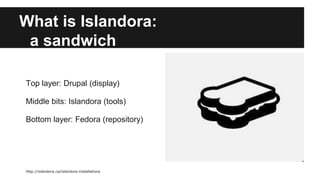
What is Islandora: 
a sandwich 
Top layer: Drupal (display) 
Middle bits: Islandora (tools) 
Bottom layer: Fedora (repository) 
http://islandora.ca/islandora-installations
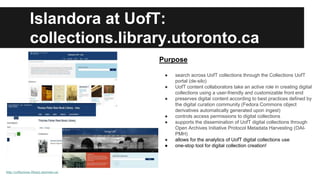
Islandora at UofT: 
collections.library.utoronto.ca 
http://collections.library.utoronto.ca/ 
Purpose 
● search across UofT collections through the Collections UofT 
portal (de-silo) 
● UofT content collaborators take an active role in creating digital 
collections using a user-friendly and customizable front end 
● preserves digital content according to best practices defined by 
the digital curation community (Fedora Commons object 
derivatives automatically generated upon ingest) 
● controls access permissions to digital collections 
● supports the dissemination of UofT digital collections through 
Open Archives Initiative Protocol Metadata Harvesting (OAI-PMH) 
● allows for the analytics of UofT digital collections use 
● one-stop tool for digital collection creation!
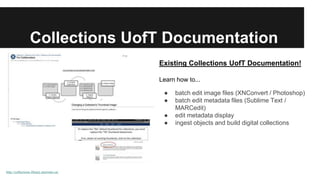
Collections UofT Documentation 
http://collections.library.utoronto.ca/ 
Existing Collections UofT Documentation! 
Learn how to... 
● batch edit image files (XNConvert / Photoshop) 
● batch edit metadata files (Sublime Text / 
MARCedit) 
● edit metadata display 
● ingest objects and build digital collections
Why Omeka? Exhibit Builder! 
Omeka is a Content Management System (CMS): it can store, collect, and 
present collections of digital objects 
Islandora does all of this too and is a more robust preservation platform… 
Omeka’s Exhibit Builder plugin makes it incredibly easy to make context rich, 
digital exhibits that integrate images, video, audio, and text
Islandora and Omeka together... 
● Connector plugin, which allows you to pull Islandora objects into Omeka 
● Currently researching workflow for batch uploading directly from Islandora 
to Omeka - 
○ One-time ingest: can import objects from Islandora into Omeka 
○ Collections sites and Omeka Exhibits don’t duplicate storage 
● De-silo digital collections across U of T 
● Visual consistency across platforms, using coordinated U of T web 
templates for collections and exhibits
Contact Us! 
● Kelli Babcock, Digital Initiatives Librarian - kelli.babcock@utoronto.ca 
● Leslie Barnes, Digital Scholarship Librarian - leslie.barnes@utoronto.ca

Islandora and omeka

  • 1.
    IIslandora and Omeka: Building Digital Collections and Exhibits at U of T Kelli Babcock, Digital Initiatives Librarian - kelli.babcock@utoronto.ca Leslie Barnes, Digital Scholarship Librarian - leslie.barnes@utoronto.ca
  • 2.
    Presentation Overview 1.Use cases for Islandora 2. Use cases for Omeka 3. Introducing Islandora http://collections.library.utoronto.ca/ 4. Introducing Omeka - http://exhibits.library.utoronto.ca/ 5. Islandora and Omeka Together 6. Contact Us!
  • 3.
    Why would youuse Collections UofT? (Islandora) http://collections.library.utoronto.ca/ I need to… ● preserve a digital collection (images, data, audio, video) in an institutional repository ● create a digital collection with permanent identifiers ● create a digital collections to be harvested through OAI-PMH Or: tell us how you might use Collections UofT?
  • 4.
    Why would youuse Omeka http://collections.library.utoronto.ca/ I need to… ● create online exhibits that integrate text and images, video, or audio ● little to no need to rely on developers: Omeka has an easy-to-use, intuitive interface Or: tell us how you might use Omeka?
  • 5.
    What is Islandora: a sandwich Top layer: Drupal (display) Middle bits: Islandora (tools) Bottom layer: Fedora (repository) http://islandora.ca/islandora-installations
  • 6.
    Islandora at UofT: collections.library.utoronto.ca http://collections.library.utoronto.ca/ Purpose ● search across UofT collections through the Collections UofT portal (de-silo) ● UofT content collaborators take an active role in creating digital collections using a user-friendly and customizable front end ● preserves digital content according to best practices defined by the digital curation community (Fedora Commons object derivatives automatically generated upon ingest) ● controls access permissions to digital collections ● supports the dissemination of UofT digital collections through Open Archives Initiative Protocol Metadata Harvesting (OAI-PMH) ● allows for the analytics of UofT digital collections use ● one-stop tool for digital collection creation!
  • 7.
    Collections UofT Documentation http://collections.library.utoronto.ca/ Existing Collections UofT Documentation! Learn how to... ● batch edit image files (XNConvert / Photoshop) ● batch edit metadata files (Sublime Text / MARCedit) ● edit metadata display ● ingest objects and build digital collections
  • 8.
    Why Omeka? ExhibitBuilder! Omeka is a Content Management System (CMS): it can store, collect, and present collections of digital objects Islandora does all of this too and is a more robust preservation platform… Omeka’s Exhibit Builder plugin makes it incredibly easy to make context rich, digital exhibits that integrate images, video, audio, and text
  • 9.
    Islandora and Omekatogether... ● Connector plugin, which allows you to pull Islandora objects into Omeka ● Currently researching workflow for batch uploading directly from Islandora to Omeka - ○ One-time ingest: can import objects from Islandora into Omeka ○ Collections sites and Omeka Exhibits don’t duplicate storage ● De-silo digital collections across U of T ● Visual consistency across platforms, using coordinated U of T web templates for collections and exhibits
  • 10.
    Contact Us! ●Kelli Babcock, Digital Initiatives Librarian - kelli.babcock@utoronto.ca ● Leslie Barnes, Digital Scholarship Librarian - leslie.barnes@utoronto.ca

Editor's Notes

  • #3 Kelli
  • #4 Kelli - growing need for more and more capacity to support digital collections and exhibitions - needed to build a scalable digital repository collection repository service that would allow for multiple types of file formats to be ingested, preserved and displayed; ingest with permanent identifiers (Fedoria PIDs) and allow for sharing our digital collections through OAI-PMH - ITS has developed documentation around Collections UofT so that content collaborators can learn how to batch edit image and metadata files before ingesting them to build digital collections - documentation enables content collaborators to take the lead in building digital collections - also offer support through training sessions with Digital Initiatives and Digital Scholarship librarians - in the midst of developing templates for content collaborators to select their site design, based on existing UofT Drupal themes… this process involves having a clear discussion between ITS and content collaborators around the intended design of the project (there is a cost factor in building design and ITS can also can offer design suggestions)
  • #5 Leslie
  • #6 Kelli - Top layer = Drupal - leverages existing resources and expertise at UofT by using Drupal as front-end display - Middle layer = Islandora - suite of digital curation tools, including OCR-upon-ingest using Tesseract, customizable metadata display options with built in support for MODS and Dublin Core out-of-the-box; Solr for advanced and faceted searching. It’s an open source software, developed at UPEI with growing number of international users, including Caltech, York University, Delft University of Technology, McMaster, the Smithsonian, UCLA, University of Hamburg, University of Manitoba, and more. (http://islandora.ca/islandora-installations) - Bottom layer = Fedora Commons - scalable preservation platform that can store any type of content (images, video, sound, data) with RDF support and ability to offer OAI-PMH harvesting of repository content (http://www.fedora-commons.org/about/features)
  • #7 Kelli - how to leverage existing resources to build increasing number of digital collections? - Islandora multi-site approach! - portal site = collections.library.utoronto.ca (currently in beta with some design work to be completed before launching in Fall 2014) - intended to enable search across all collections (de-siloing digital collections) at UofT ; can control access to digital content ; can enable analytics for content ; can accomodate multiple types of collection objects - multi-sites = examples are samizdatcollections.library.utoronto.ca ; utarmscollections.library.utoronto.ca ; fishercollections.library.utoronto.ca - enables content collaborators to set up their own domain, own site, determine look and feel, customize metadata display while still drawing from the same Fedora repository and Islandora install! Greatly reduces amount of time to create site for content collaborators. - one of the Collections UofT sites is also Heritage UofT - can share your multi-site collections with Heritage UofT if your digital content is associated with the history of UofT
  • #8 Kelli - as mentioned previously, ITS has developed existing Collections UofT documentation so that content collaborators can learn how to batch edit image and metadata files before ingesting them to build digital collections - documentation enables content collaborators to take the lead in building digital collections - also offer support through training sessions with Digital Initiatives and Digital Scholarship librarians
  • #9 Leslie
  • #10 Leslie
  • #11 Leslie