Jannatul Ferdous Ruma
Introduction to
Programming
Why Program?
Computer – Programmable machine designed to follow instructions
Instructed by programs.
Program - A set of instructions that a computer follows to perform a
task. Commonly referred to as software (e.g., word, power point).
Programmer – person who writes programs. Without programmers, no
programs; Without programs, a computer does nothing
Computer System
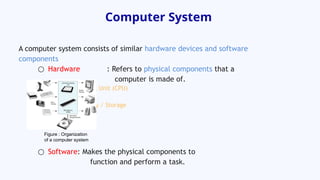
A computer system consists of similar hardware devices and software
components
○ Hardware : Refers to physical components that a
computer is made of.
- Central Processing Unit (CPU)
- Main Memory
- Secondary Memory / Storage
- Input Devices
- Output Devices
○ Software: Makes the physical components to
function and perform a task.
Figure : Organization
of a computer system
Central Processing Unit (CPU)
The CPU (Brain of a computer) is the part of a computer
that actually runs programs.
○ Fetch Instructions
○ Follow instructions
○ Produce some results
Comprised of:
○ Control Unit
Retrieves and decodes program instructions
Coordinates activities of all other parts of computer
○ Arithmetic & Logic Unit
It is designed to perform mathematical operations
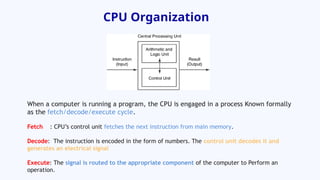
CPU Organization
When a computer is running a program, the CPU is engaged in a process Known formally
as the fetch/decode/execute cycle.
Fetch : CPU’s control unit fetches the next instruction from main memory.
Decode: The instruction is encoded in the form of numbers. The control unit decodes it and
generates an electrical signal
Execute: The signal is routed to the appropriate component of the computer to Perform an
operation.
Main Memory
Random Access Memory (RAM) - Computer’s work area.
This is where the computer stores program and data while the program is
running.
It is volatile. Main memory is erased when program terminates or
computer is turned off.
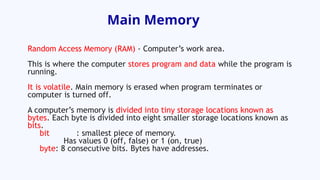
A computer’s memory is divided into tiny storage locations known as
bytes. Each byte is divided into eight smaller storage locations known as
bits.
bit : smallest piece of memory.
Has values 0 (off, false) or 1 (on, true)
byte: 8 consecutive bits. Bytes have addresses.
Main Memory
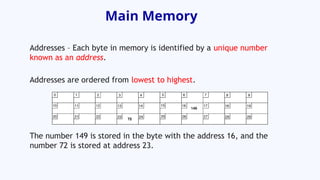
Addresses – Each byte in memory is identified by a unique number
known as an address.
Addresses are ordered from lowest to highest.
The number 149 is stored in the byte with the address 16, and the
number 72 is stored at address 23.
Software
Categories of software:
System software: programs that manage the computer hardware and
the programs that run on them.
Examples: operating systems, utility programs, software development
tools
Application software: programs that provide services to the user.
Examples : word processing, games, programs to solve specific
problems
Programs and Programming
Languages
To solve a problem using a computer, one must express the solution to the
problem in terms of the instructions of the particular computer.
A computer program is just a collection of the instructions necessary to
solve a specific problem. The approach or method that is used to solve the
problem is known as an algorithm. An algorithm is a set of well-defined
steps.
A Programming language is a special language used to write computer
programs.
Machine Language
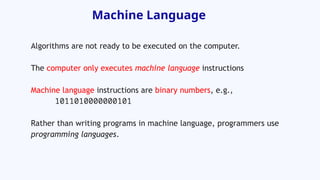
Algorithms are not ready to be executed on the computer.
The computer only executes machine language instructions
Machine language instructions are binary numbers, e.g.,
1011010000000101
Rather than writing programs in machine language, programmers use
programming languages.
Types of languages
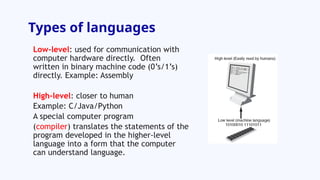
Low-level: used for communication with
computer hardware directly. Often
written in binary machine code (0’s/1’s)
directly. Example: Assembly
High-level: closer to human
Example: C/Java/Python
A special computer program
(compiler) translates the statements of the
program developed in the higher-level
language into a form that the computer
can understand language.
Structured Programming
Structured language: uses structured constructs of selection
(if/then/else) and repetition (while and for).
Suggested by Corrado Bohm and Guiseppe Jacopini that any computer
program can be written with just three structures: decisions, sequences,
and loops.
Non-structured language:
○ A program in a non-structured language uses unstructured jumps to labels
(Goto) or instruction addresses.
○ The lines are usually numbered or may have labels: this allows the flow of
execution to jump to any line in the program.
○ Example: JOSS, FOCAL, TELCOMP
, Assembly Languages, early versions of
BASIC, Fortran, COBOL

Introduction to Programming Lecture Material 1

  • 1.
  • 2.
    Why Program? Computer –Programmable machine designed to follow instructions Instructed by programs. Program - A set of instructions that a computer follows to perform a task. Commonly referred to as software (e.g., word, power point). Programmer – person who writes programs. Without programmers, no programs; Without programs, a computer does nothing
  • 3.
    Computer System A computersystem consists of similar hardware devices and software components ○ Hardware : Refers to physical components that a computer is made of. - Central Processing Unit (CPU) - Main Memory - Secondary Memory / Storage - Input Devices - Output Devices ○ Software: Makes the physical components to function and perform a task. Figure : Organization of a computer system
  • 4.
    Central Processing Unit(CPU) The CPU (Brain of a computer) is the part of a computer that actually runs programs. ○ Fetch Instructions ○ Follow instructions ○ Produce some results Comprised of: ○ Control Unit Retrieves and decodes program instructions Coordinates activities of all other parts of computer ○ Arithmetic & Logic Unit It is designed to perform mathematical operations
  • 5.
    CPU Organization When acomputer is running a program, the CPU is engaged in a process Known formally as the fetch/decode/execute cycle. Fetch : CPU’s control unit fetches the next instruction from main memory. Decode: The instruction is encoded in the form of numbers. The control unit decodes it and generates an electrical signal Execute: The signal is routed to the appropriate component of the computer to Perform an operation.
  • 6.
    Main Memory Random AccessMemory (RAM) - Computer’s work area. This is where the computer stores program and data while the program is running. It is volatile. Main memory is erased when program terminates or computer is turned off. A computer’s memory is divided into tiny storage locations known as bytes. Each byte is divided into eight smaller storage locations known as bits. bit : smallest piece of memory. Has values 0 (off, false) or 1 (on, true) byte: 8 consecutive bits. Bytes have addresses.
  • 7.
    Main Memory Addresses –Each byte in memory is identified by a unique number known as an address. Addresses are ordered from lowest to highest. The number 149 is stored in the byte with the address 16, and the number 72 is stored at address 23.
  • 8.
    Software Categories of software: Systemsoftware: programs that manage the computer hardware and the programs that run on them. Examples: operating systems, utility programs, software development tools Application software: programs that provide services to the user. Examples : word processing, games, programs to solve specific problems
  • 9.
    Programs and Programming Languages Tosolve a problem using a computer, one must express the solution to the problem in terms of the instructions of the particular computer. A computer program is just a collection of the instructions necessary to solve a specific problem. The approach or method that is used to solve the problem is known as an algorithm. An algorithm is a set of well-defined steps. A Programming language is a special language used to write computer programs.
  • 10.
    Machine Language Algorithms arenot ready to be executed on the computer. The computer only executes machine language instructions Machine language instructions are binary numbers, e.g., 1011010000000101 Rather than writing programs in machine language, programmers use programming languages.
  • 11.
    Types of languages Low-level:used for communication with computer hardware directly. Often written in binary machine code (0’s/1’s) directly. Example: Assembly High-level: closer to human Example: C/Java/Python A special computer program (compiler) translates the statements of the program developed in the higher-level language into a form that the computer can understand language.
  • 12.
    Structured Programming Structured language:uses structured constructs of selection (if/then/else) and repetition (while and for). Suggested by Corrado Bohm and Guiseppe Jacopini that any computer program can be written with just three structures: decisions, sequences, and loops. Non-structured language: ○ A program in a non-structured language uses unstructured jumps to labels (Goto) or instruction addresses. ○ The lines are usually numbered or may have labels: this allows the flow of execution to jump to any line in the program. ○ Example: JOSS, FOCAL, TELCOMP , Assembly Languages, early versions of BASIC, Fortran, COBOL

Editor's Notes

  • #2 nowadays computer has become a part and parcel of our daily life, whether it is Desktop, To solve a problem using a computer, you must express the solution to the problem in terms of the instructions of the particular computer.
  • #6 Include CSE 101
  • #11 Higher-Level Languages When computers were first developed, the only way they could be programmed was in terms of binary numbers that corresponded directly to specific machine instructions and locations in the computer’s memory.The next technological software advance occurred in the development of assembly languages, which enabled the programmer to work with the machine on a slightly higher level. Instead of having to specify sequences of binary numbers to carry out particular tasks, the assembly language permits the programmer to use symbolic names to perform various operations and to refer to specific memory loca- tions. A special program, known as an assembler, translates the assembly language program from its symbolic format into the specific machine instructions of the computer system. Because a one-to-one correspondence still exists between each assembly language statement and a specific machine instruction, assembly languages are regarded as low- level languages.The programmer must still learn the instruction set of the particular computer system to write a program in assembly language, and the resulting program is not portable; that is, the program will not run on a different processor type without being rewritten.This is because different processor types have different instruction sets, and because assembly language programs are written in terms of these instruction sets, they are machine dependent. Then, along came the so-called higher-level languages, of which the FORTRAN (FORmula TRANslation) language was one of the first. Programmers developing pro- grams in FORTRAN no longer had to concern themselves with the architecture of the particular computer, and operations performed in FORTRAN were of a much more sophisticated or higher level, far removed from the instruction set of the particular machine. One FORTRAN instruction or statement resulted in many different machine instructions being executed, unlike the one-to-one correspondence found between assembly language statements and machine instructions. Standardization of the syntax of a higher-level language meant that a program could be written in the language to be machine independent.That is, a program could run on any machine that supported the language with few or no changes. To support a higher-level language, a special computer program must be developed that translates the statements of the program developed in the higher-level language into a form that the computer can understand—in other words, into the particular instruc- tions of the computer. Such a program is known as a compiler.
  • #12 Sequence - One of the three basic logic structures in computer programming. The other two logic structures are selection and loop. In a sequence structure, an action, or event, leads to the next ordered action in a predetermined order. The sequence can contain any number of actions, but no actions can be skipped in the sequence. The program, when run, must perform each action in order with no possibility of skipping an action or branching off to another action. All logic problems in programming can be solved by forming algorithms using only the three logic structures, and they can be combined in an infinite number of ways. The more complex the computing need, the more complex the combination of structures.