Silberschatz and Galvin 1999
1.1
Operating System Concepts
Module 1: Introduction
• What is an operating system?
• Simple Batch Systems
• Multiprogramming Batched Systems
• Time-Sharing Systems
• Personal-Computer Systems
• Parallel Systems
• Distributed Systems
• Real -Time Systems
Silberschatz and Galvin 1999
1.2
Operating System Concepts
What is an Operating System?
• A program that acts as an intermediary between a user of a
computer and the computer hardware.
• Operating system goals:
– Execute user programs and make solving user problems
easier.
– Make the computer system convenient to use.
• Use the computer hardware in an efficient manner.
Silberschatz and Galvin 1999
1.3
Operating System Concepts
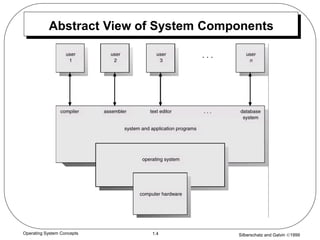
Computer System Components
1. Hardware – provides basic computing resources (CPU, memory,
I/O devices).
2. Operating system – controls and coordinates the use of the
hardware among the various application programs for the various
users.
3. Applications programs – define the ways in which the system
resources are used to solve the computing problems of the users
(compilers, database systems, video games, business
programs).
4. Users (people, machines, other computers).
Silberschatz and Galvin 1999
1.4
Operating System Concepts
Abstract View of System Components
Silberschatz and Galvin 1999
1.5
Operating System Concepts
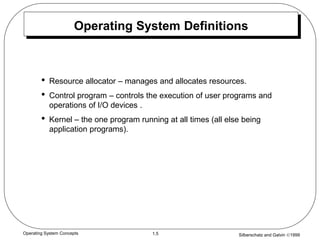
Operating System Definitions
• Resource allocator – manages and allocates resources.
• Control program – controls the execution of user programs and
operations of I/O devices .
• Kernel – the one program running at all times (all else being
application programs).
Silberschatz and Galvin 1999
1.6
Operating System Concepts
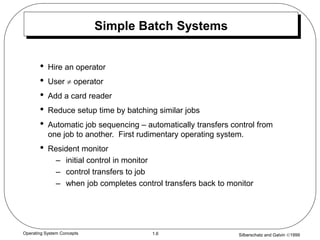
Simple Batch Systems
• Hire an operator
• User  operator
• Add a card reader
• Reduce setup time by batching similar jobs
• Automatic job sequencing – automatically transfers control from
one job to another. First rudimentary operating system.
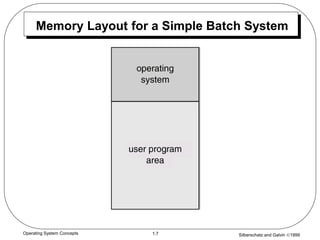
• Resident monitor
– initial control in monitor
– control transfers to job
– when job completes control transfers back to monitor
Silberschatz and Galvin 1999
1.7
Operating System Concepts
Memory Layout for a Simple Batch System
Silberschatz and Galvin 1999
1.8
Operating System Concepts
Control Cards
• Problems
1. How does the monitor know about the nature of the job
(e.g., Fortran versus Assembly) or which program to
execute?
2. How does the monitor distinguish
(a) job from job?
(b) data from program?
• Solution
– Introduce control cards
Silberschatz and Galvin 1999
1.9
Operating System Concepts
Control Cards (Cont.)
• Special cards that tell the resident monitor which programs to run
$JOB
$FTN
$RUN
$DATA
$END
• Special characters distinguish control cards from data or program
cards:
$ in column 1
// in column 1 and 2
709 in column1
Silberschatz and Galvin 1999
1.10
Operating System Concepts
Control Cards (Cont.)
• Parts of resident monitor
– Control card interpreter – responsible for reading and
carrying out instructions on the cards.
– Loader – loads systems programs and applications
programs into memory.
– Device drivers – know special characteristics and properties
for each of the system’s I/O devices.
• Problem: Slow Performance – I/O and CPU could not overlap ;
card reader very slow.
• Solution: Off-line operation – speed up computation by loading
jobs into memory from tapes and card reading and line printing
done off-line.
Silberschatz and Galvin 1999
1.11
Operating System Concepts
Spooling
• Overlap I/O of one job with computation of another job. While
executing one job, the OS.
– Reads next job from card reader into a storage area on the
disk (job queue).
– Outputs printout of previous job from disk to printer.
• Job pool – data structure that allows the OS to select which job to
run next in order to increase CPU utilization.
Silberschatz and Galvin 1999
1.12
Operating System Concepts
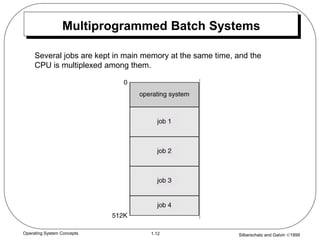
Multiprogrammed Batch Systems
Several jobs are kept in main memory at the same time, and the
CPU is multiplexed among them.
Silberschatz and Galvin 1999
1.13
Operating System Concepts
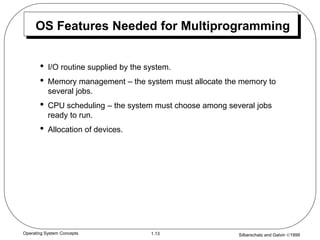
OS Features Needed for Multiprogramming
• I/O routine supplied by the system.
• Memory management – the system must allocate the memory to
several jobs.
• CPU scheduling – the system must choose among several jobs
ready to run.
• Allocation of devices.
Silberschatz and Galvin 1999
1.14
Operating System Concepts
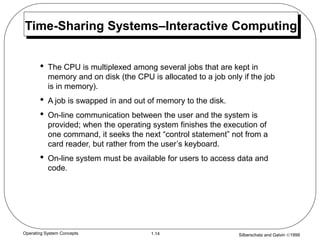
Time-Sharing Systems–Interactive Computing
• The CPU is multiplexed among several jobs that are kept in
memory and on disk (the CPU is allocated to a job only if the job
is in memory).
• A job is swapped in and out of memory to the disk.
• On-line communication between the user and the system is
provided; when the operating system finishes the execution of
one command, it seeks the next “control statement” not from a
card reader, but rather from the user’s keyboard.
• On-line system must be available for users to access data and
code.
Silberschatz and Galvin 1999
1.15
Operating System Concepts
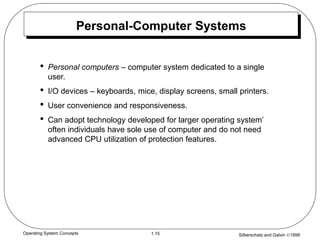
Personal-Computer Systems
• Personal computers – computer system dedicated to a single
user.
• I/O devices – keyboards, mice, display screens, small printers.
• User convenience and responsiveness.
• Can adopt technology developed for larger operating system’
often individuals have sole use of computer and do not need
advanced CPU utilization of protection features.
Silberschatz and Galvin 1999
1.16
Operating System Concepts
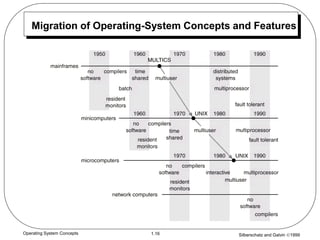
Migration of Operating-System Concepts and Features
Silberschatz and Galvin 1999
1.17
Operating System Concepts
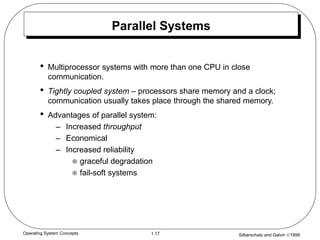
Parallel Systems
• Multiprocessor systems with more than one CPU in close
communication.
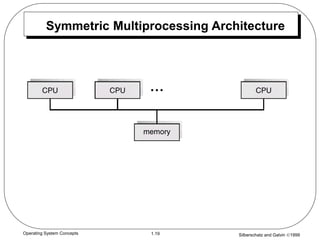
• Tightly coupled system – processors share memory and a clock;
communication usually takes place through the shared memory.
• Advantages of parallel system:
– Increased throughput
– Economical
– Increased reliability
 graceful degradation
 fail-soft systems
Silberschatz and Galvin 1999
1.18
Operating System Concepts
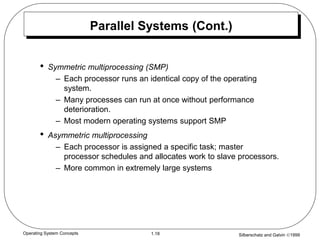
Parallel Systems (Cont.)
• Symmetric multiprocessing (SMP)
– Each processor runs an identical copy of the operating
system.
– Many processes can run at once without performance
deterioration.
– Most modern operating systems support SMP
• Asymmetric multiprocessing
– Each processor is assigned a specific task; master
processor schedules and allocates work to slave processors.
– More common in extremely large systems
Silberschatz and Galvin 1999
1.19
Operating System Concepts
Symmetric Multiprocessing Architecture
Silberschatz and Galvin 1999
1.20
Operating System Concepts
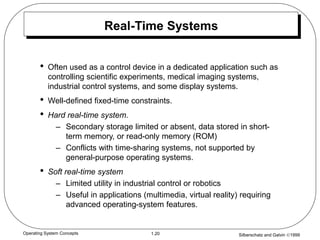
Real-Time Systems
• Often used as a control device in a dedicated application such as
controlling scientific experiments, medical imaging systems,
industrial control systems, and some display systems.
• Well-defined fixed-time constraints.
• Hard real-time system.
– Secondary storage limited or absent, data stored in short-
term memory, or read-only memory (ROM)
– Conflicts with time-sharing systems, not supported by
general-purpose operating systems.
• Soft real-time system
– Limited utility in industrial control or robotics
– Useful in applications (multimedia, virtual reality) requiring
advanced operating-system features.
Silberschatz and Galvin 1999
1.21
Operating System Concepts
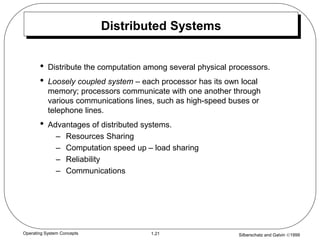
Distributed Systems
• Distribute the computation among several physical processors.
• Loosely coupled system – each processor has its own local
memory; processors communicate with one another through
various communications lines, such as high-speed buses or
telephone lines.
• Advantages of distributed systems.
– Resources Sharing
– Computation speed up – load sharing
– Reliability
– Communications
Silberschatz and Galvin 1999
1.22
Operating System Concepts
Distributed Systems (Cont.)
• Network Operating System
– provides file sharing
– provides communication scheme
– runs independently from other computers on the network
• Distributed Operating System
– less autonomy between computers
– gives the impression there is a single operating system
controlling the network.

Introduction to operating systems and its components.pdf

  • 1.
    Silberschatz and Galvin1999 1.1 Operating System Concepts Module 1: Introduction • What is an operating system? • Simple Batch Systems • Multiprogramming Batched Systems • Time-Sharing Systems • Personal-Computer Systems • Parallel Systems • Distributed Systems • Real -Time Systems
  • 2.
    Silberschatz and Galvin1999 1.2 Operating System Concepts What is an Operating System? • A program that acts as an intermediary between a user of a computer and the computer hardware. • Operating system goals: – Execute user programs and make solving user problems easier. – Make the computer system convenient to use. • Use the computer hardware in an efficient manner.
  • 3.
    Silberschatz and Galvin1999 1.3 Operating System Concepts Computer System Components 1. Hardware – provides basic computing resources (CPU, memory, I/O devices). 2. Operating system – controls and coordinates the use of the hardware among the various application programs for the various users. 3. Applications programs – define the ways in which the system resources are used to solve the computing problems of the users (compilers, database systems, video games, business programs). 4. Users (people, machines, other computers).
  • 4.
    Silberschatz and Galvin1999 1.4 Operating System Concepts Abstract View of System Components
  • 5.
    Silberschatz and Galvin1999 1.5 Operating System Concepts Operating System Definitions • Resource allocator – manages and allocates resources. • Control program – controls the execution of user programs and operations of I/O devices . • Kernel – the one program running at all times (all else being application programs).
  • 6.
    Silberschatz and Galvin1999 1.6 Operating System Concepts Simple Batch Systems • Hire an operator • User  operator • Add a card reader • Reduce setup time by batching similar jobs • Automatic job sequencing – automatically transfers control from one job to another. First rudimentary operating system. • Resident monitor – initial control in monitor – control transfers to job – when job completes control transfers back to monitor
  • 7.
    Silberschatz and Galvin1999 1.7 Operating System Concepts Memory Layout for a Simple Batch System
  • 8.
    Silberschatz and Galvin1999 1.8 Operating System Concepts Control Cards • Problems 1. How does the monitor know about the nature of the job (e.g., Fortran versus Assembly) or which program to execute? 2. How does the monitor distinguish (a) job from job? (b) data from program? • Solution – Introduce control cards
  • 9.
    Silberschatz and Galvin1999 1.9 Operating System Concepts Control Cards (Cont.) • Special cards that tell the resident monitor which programs to run $JOB $FTN $RUN $DATA $END • Special characters distinguish control cards from data or program cards: $ in column 1 // in column 1 and 2 709 in column1
  • 10.
    Silberschatz and Galvin1999 1.10 Operating System Concepts Control Cards (Cont.) • Parts of resident monitor – Control card interpreter – responsible for reading and carrying out instructions on the cards. – Loader – loads systems programs and applications programs into memory. – Device drivers – know special characteristics and properties for each of the system’s I/O devices. • Problem: Slow Performance – I/O and CPU could not overlap ; card reader very slow. • Solution: Off-line operation – speed up computation by loading jobs into memory from tapes and card reading and line printing done off-line.
  • 11.
    Silberschatz and Galvin1999 1.11 Operating System Concepts Spooling • Overlap I/O of one job with computation of another job. While executing one job, the OS. – Reads next job from card reader into a storage area on the disk (job queue). – Outputs printout of previous job from disk to printer. • Job pool – data structure that allows the OS to select which job to run next in order to increase CPU utilization.
  • 12.
    Silberschatz and Galvin1999 1.12 Operating System Concepts Multiprogrammed Batch Systems Several jobs are kept in main memory at the same time, and the CPU is multiplexed among them.
  • 13.
    Silberschatz and Galvin1999 1.13 Operating System Concepts OS Features Needed for Multiprogramming • I/O routine supplied by the system. • Memory management – the system must allocate the memory to several jobs. • CPU scheduling – the system must choose among several jobs ready to run. • Allocation of devices.
  • 14.
    Silberschatz and Galvin1999 1.14 Operating System Concepts Time-Sharing Systems–Interactive Computing • The CPU is multiplexed among several jobs that are kept in memory and on disk (the CPU is allocated to a job only if the job is in memory). • A job is swapped in and out of memory to the disk. • On-line communication between the user and the system is provided; when the operating system finishes the execution of one command, it seeks the next “control statement” not from a card reader, but rather from the user’s keyboard. • On-line system must be available for users to access data and code.
  • 15.
    Silberschatz and Galvin1999 1.15 Operating System Concepts Personal-Computer Systems • Personal computers – computer system dedicated to a single user. • I/O devices – keyboards, mice, display screens, small printers. • User convenience and responsiveness. • Can adopt technology developed for larger operating system’ often individuals have sole use of computer and do not need advanced CPU utilization of protection features.
  • 16.
    Silberschatz and Galvin1999 1.16 Operating System Concepts Migration of Operating-System Concepts and Features
  • 17.
    Silberschatz and Galvin1999 1.17 Operating System Concepts Parallel Systems • Multiprocessor systems with more than one CPU in close communication. • Tightly coupled system – processors share memory and a clock; communication usually takes place through the shared memory. • Advantages of parallel system: – Increased throughput – Economical – Increased reliability  graceful degradation  fail-soft systems
  • 18.
    Silberschatz and Galvin1999 1.18 Operating System Concepts Parallel Systems (Cont.) • Symmetric multiprocessing (SMP) – Each processor runs an identical copy of the operating system. – Many processes can run at once without performance deterioration. – Most modern operating systems support SMP • Asymmetric multiprocessing – Each processor is assigned a specific task; master processor schedules and allocates work to slave processors. – More common in extremely large systems
  • 19.
    Silberschatz and Galvin1999 1.19 Operating System Concepts Symmetric Multiprocessing Architecture
  • 20.
    Silberschatz and Galvin1999 1.20 Operating System Concepts Real-Time Systems • Often used as a control device in a dedicated application such as controlling scientific experiments, medical imaging systems, industrial control systems, and some display systems. • Well-defined fixed-time constraints. • Hard real-time system. – Secondary storage limited or absent, data stored in short- term memory, or read-only memory (ROM) – Conflicts with time-sharing systems, not supported by general-purpose operating systems. • Soft real-time system – Limited utility in industrial control or robotics – Useful in applications (multimedia, virtual reality) requiring advanced operating-system features.
  • 21.
    Silberschatz and Galvin1999 1.21 Operating System Concepts Distributed Systems • Distribute the computation among several physical processors. • Loosely coupled system – each processor has its own local memory; processors communicate with one another through various communications lines, such as high-speed buses or telephone lines. • Advantages of distributed systems. – Resources Sharing – Computation speed up – load sharing – Reliability – Communications
  • 22.
    Silberschatz and Galvin1999 1.22 Operating System Concepts Distributed Systems (Cont.) • Network Operating System – provides file sharing – provides communication scheme – runs independently from other computers on the network • Distributed Operating System – less autonomy between computers – gives the impression there is a single operating system controlling the network.