Monthly Features: Technical ShowcaseWhat is LINQ to XML?Microsoft says:“LINQ to XML provides an in-memory XML programming interface that leverages the .NET Language-Integrated Query (LINQ) Framework. LINQ to XML uses the latest .NET Framework language capabilities and is comparable to an updated, redesigned Document Object Model (DOM) XML programming interface.”
Monthly Features: Technical ShowcaseWhat is LINQ to XML?Alternative to using XPathUses anonymous types to provide strongly typed access to XML elements and attributes.Not a replacement for XSLT
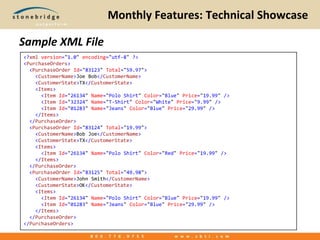
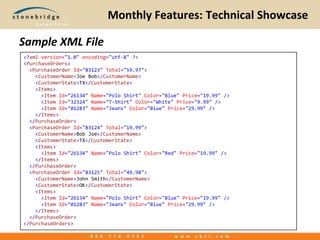
Monthly Features: Technical ShowcaseSample XML File<?xmlversion="1.0"encoding="utf-8" ?><PurchaseOrders>  <PurchaseOrderId="83123"Total="59.97">    <CustomerName>Joe Bob</CustomerName>    <CustomerState>TX</CustomerState>    <Items>      <ItemId="26134"Name="Polo Shirt"Color="Blue"Price="19.99" />      <ItemId="32324"Name="T-Shirt"Color="White"Price="9.99" />      <ItemId="01283"Name="Jeans"Color="Blue"Price="29.99" />    </Items>  </PurchaseOrder>  <PurchaseOrderId="83124"Total="19.99">    <CustomerName>Bob Joe</CustomerName>    <CustomerState>TX</CustomerState>    <Items>      <ItemId="26134"Name="Polo Shirt"Color="Red"Price="19.99" />    </Items>  </PurchaseOrder>  <PurchaseOrderId="83125"Total="49.98">    <CustomerName>John Smith</CustomerName>    <CustomerState>OK</CustomerState>    <Items>      <ItemId="26134"Name="Polo Shirt"Color="Blue"Price="19.99" />      <ItemId="01283"Name="Jeans"Color="Blue"Price="29.99" />    </Items>  </PurchaseOrder></PurchaseOrders>
Monthly Features: Technical ShowcaseGet PurchaseIds of orders greater than $40.00ReturnsXDocumentpurchaseOrderXml = XDocument.Load("PurchaseOrder.xml"); varpurchaseIds = frompurchaseOrderinpurchaseOrderXml.Root.Elements("PurchaseOrder")                  wherefloat.Parse(purchaseOrder.Attribute("Total").Value) > 40.00f                  selectpurchaseOrder.Attribute("Id").Value; foreach (varpurchaseIdinpurchaseIds)  Console.WriteLine("PurchaseId: {0}", purchaseId);Order Ids Greater than $40.00PurchaseId: 83123PurchaseId: 83125
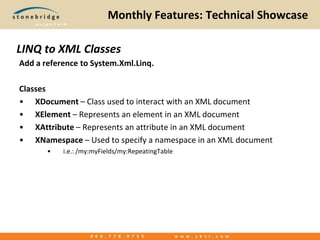
Monthly Features: Technical ShowcaseAdd a reference to System.Xml.Linq.ClassesXDocument– Class used to interact with an XML documentXElement– Represents an element in an XML documentXAttribute– Represents an attribute in an XML documentXNamespace – Used to specify a namespace in an XML document i.e.: /my:myFields/my:RepeatingTableLINQ to XML Classes
Monthly Features: Technical ShowcaseMethods and PropertiesXDocument.Root– Returns the root XElement of the XML documentXContainer.Elements() – Returns an IEnumberable<XElement> of all matching elements Example: myDocument.Root.Elements(“PurchaseOrders”);XContainer.Attributes() – Returns an IEnumerable<XAttribute>XContainer.Element() – Returns a single XElementExample: purchaseOrderElement.Element(“CustomerName”).Value;XContainer.Attribute() – Returns a single XAttribute.Any() Extension Method – Returns true if items exist in a IEnumerable<>.First() Extension Method – Returns first item in an IEnumberable<>LINQ to XML Methods and Properties
Monthly Features: Technical ShowcaseSample XML File<?xmlversion="1.0"encoding="utf-8" ?><PurchaseOrders>  <PurchaseOrderId="83123"Total="59.97">    <CustomerName>Joe Bob</CustomerName>    <CustomerState>TX</CustomerState>    <Items>      <ItemId="26134"Name="Polo Shirt"Color="Blue"Price="19.99" />      <ItemId="32324"Name="T-Shirt"Color="White"Price="9.99" />      <ItemId="01283"Name="Jeans"Color="Blue"Price="29.99" />    </Items>  </PurchaseOrder>  <PurchaseOrderId="83124"Total="19.99">    <CustomerName>Bob Joe</CustomerName>    <CustomerState>TX</CustomerState>    <Items>      <ItemId="26134"Name="Polo Shirt"Color="Red"Price="19.99" />    </Items>  </PurchaseOrder>  <PurchaseOrderId="83125"Total="49.98">    <CustomerName>John Smith</CustomerName>    <CustomerState>OK</CustomerState>    <Items>      <ItemId="26134"Name="Polo Shirt"Color="Blue"Price="19.99" />      <ItemId="01283"Name="Jeans"Color="Blue"Price="29.99" />    </Items>  </PurchaseOrder></PurchaseOrders>
Monthly Features: Technical ShowcaseGet Purchase Orders greater than $40.00ReturnsXDocumentpurchaseOrderXml = XDocument.Load("PurchaseOrder.xml"); varpurchaseOrders = frompurchaseOrderinpurchaseOrderXml.Root.Elements("PurchaseOrder")                     wherefloat.Parse(purchaseOrder.Attribute("Total").Value) > 40.00f                     selectnew                     {                       Id = purchaseOrder.Attribute("Id").Value,                       Total = float.Parse(purchaseOrder.Attribute("Total").Value),                       CustomerName = purchaseOrder.Element("CustomerName").Value,                       CustomerState = purchaseOrder.Element("CustomerState").Value                     }; foreach (varpurchaseOrderinpurchaseOrders)  Console.WriteLine("PurchaseId: {0}: {1} ({2}) - {3}",      purchaseOrder.Id,      purchaseOrder.CustomerName,      purchaseOrder.CustomerState,      purchaseOrder.Total);ReturnsOrders Greater than $40.00PurchaseId: 83123: Joe Bob (TX) - 59.97PurchaseId: 83125: John Smith (OK) - 49.98
Monthly Features: Technical ShowcaseSample XML File<?xmlversion="1.0"encoding="utf-8" ?><PurchaseOrders>  <PurchaseOrderId="83123"Total="59.97">    <CustomerName>Joe Bob</CustomerName>    <CustomerState>TX</CustomerState>    <Items>      <ItemId="26134"Name="Polo Shirt"Color="Blue"Price="19.99" />      <ItemId="32324"Name="T-Shirt"Color="White"Price="9.99" />      <ItemId="01283"Name="Jeans"Color="Blue"Price="29.99" />    </Items>  </PurchaseOrder>  <PurchaseOrderId="83124"Total="19.99">    <CustomerName>Bob Joe</CustomerName>    <CustomerState>TX</CustomerState>    <Items>      <ItemId="26134"Name="Polo Shirt"Color="Red"Price="19.99" />    </Items>  </PurchaseOrder>  <PurchaseOrderId="83125"Total="49.98">    <CustomerName>John Smith</CustomerName>    <CustomerState>OK</CustomerState>    <Items>      <ItemId="26134"Name="Polo Shirt"Color="Blue"Price="19.99" />      <ItemId="01283"Name="Jeans"Color="Blue"Price="29.99" />    </Items>  </PurchaseOrder></PurchaseOrders>
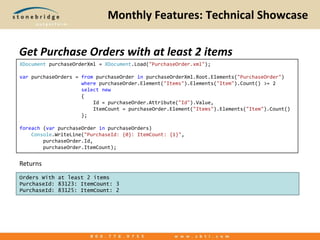
Monthly Features: Technical ShowcaseGet Purchase Orders with at least 2 itemsReturnsXDocumentpurchaseOrderXml = XDocument.Load("PurchaseOrder.xml"); varpurchaseOrders = frompurchaseOrderinpurchaseOrderXml.Root.Elements("PurchaseOrder")                     wherepurchaseOrder.Element("Items").Elements("Item").Count() >= 2                     selectnew                     {                         Id = purchaseOrder.Attribute("Id").Value,                         ItemCount = purchaseOrder.Element("Items").Elements("Item").Count()                     }; foreach (varpurchaseOrderinpurchaseOrders)    Console.WriteLine("PurchaseId: {0}: ItemCount: {1}",        purchaseOrder.Id,        purchaseOrder.ItemCount);ReturnsOrders With at least 2 itemsPurchaseId: 83123: ItemCount: 3PurchaseId: 83125: ItemCount: 2
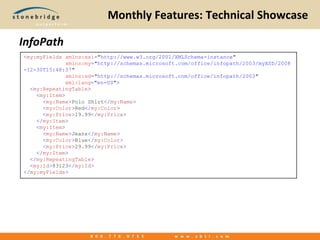
Monthly Features: Technical ShowcaseInfoPath<my:myFieldsxmlns:xsi="http://www.w3.org/2001/XMLSchema-instance"             xmlns:my="http://schemas.microsoft.com/office/infopath/2003/myXSD/2008-12-30T15:48:37"             xmlns:xd="http://schemas.microsoft.com/office/infopath/2003"xml:lang="en-US">  <my:RepeatingTable>    <my:Item>      <my:Name>Polo Shirt</my:Name>      <my:Color>Red</my:Color>      <my:Price>19.99</my:Price>    </my:Item>    <my:Item>      <my:Name>Jeans</my:Name>      <my:Color>Blue</my:Color>      <my:Price>29.99</my:Price>    </my:Item>  </my:RepeatingTable>  <my:Id>83123</my:Id></my:myFields>
Monthly Features: Technical ShowcaseQuerying a repeating table in InfoPathReference System.Linq (contained in System.Core)Reference System.Xml.Linq (contained in System.Xml.Linq)Returns// use the MainDataSource to read the XML of the InfoPath FormXDocumentinfoPathDocument = XDocument.Load(newSystem.IO.StringReader(MainDataSource.CreateNavigator().OuterXml)); // required to access my: namespaceXNamespacemyNamespace = "http://schemas.microsoft.com/office/infopath/2003/myXSD/2008-12-30T15:48:37"; // use descendants node to find any element with the name Item in the treevar items = from item ininfoPathDocument.Descendants(myNamespace + "Item")            selectnew            {                Name = item.Element(myNamespace + "Name").Value,                Color = item.Element(myNamespace + “Color").Value,                Price = item.Element(myNamespace + "Price").Value            }; foreach (var item in items){    // do something}
Monthly Features: Technical ShowcaseQuestions?Code Samples available at www.dotnetmafia.com.

Introduction to LINQ To XML

  • 1.
    Monthly Features: TechnicalShowcaseWhat is LINQ to XML?Microsoft says:“LINQ to XML provides an in-memory XML programming interface that leverages the .NET Language-Integrated Query (LINQ) Framework. LINQ to XML uses the latest .NET Framework language capabilities and is comparable to an updated, redesigned Document Object Model (DOM) XML programming interface.”
  • 2.
    Monthly Features: TechnicalShowcaseWhat is LINQ to XML?Alternative to using XPathUses anonymous types to provide strongly typed access to XML elements and attributes.Not a replacement for XSLT
  • 3.
    Monthly Features: TechnicalShowcaseSample XML File<?xmlversion="1.0"encoding="utf-8" ?><PurchaseOrders>  <PurchaseOrderId="83123"Total="59.97">    <CustomerName>Joe Bob</CustomerName>    <CustomerState>TX</CustomerState>    <Items>      <ItemId="26134"Name="Polo Shirt"Color="Blue"Price="19.99" />      <ItemId="32324"Name="T-Shirt"Color="White"Price="9.99" />      <ItemId="01283"Name="Jeans"Color="Blue"Price="29.99" />    </Items>  </PurchaseOrder>  <PurchaseOrderId="83124"Total="19.99">    <CustomerName>Bob Joe</CustomerName>    <CustomerState>TX</CustomerState>    <Items>      <ItemId="26134"Name="Polo Shirt"Color="Red"Price="19.99" />    </Items>  </PurchaseOrder>  <PurchaseOrderId="83125"Total="49.98">    <CustomerName>John Smith</CustomerName>    <CustomerState>OK</CustomerState>    <Items>      <ItemId="26134"Name="Polo Shirt"Color="Blue"Price="19.99" />      <ItemId="01283"Name="Jeans"Color="Blue"Price="29.99" />    </Items>  </PurchaseOrder></PurchaseOrders>
  • 4.
    Monthly Features: TechnicalShowcaseGet PurchaseIds of orders greater than $40.00ReturnsXDocumentpurchaseOrderXml = XDocument.Load("PurchaseOrder.xml"); varpurchaseIds = frompurchaseOrderinpurchaseOrderXml.Root.Elements("PurchaseOrder")                  wherefloat.Parse(purchaseOrder.Attribute("Total").Value) > 40.00f                  selectpurchaseOrder.Attribute("Id").Value; foreach (varpurchaseIdinpurchaseIds)  Console.WriteLine("PurchaseId: {0}", purchaseId);Order Ids Greater than $40.00PurchaseId: 83123PurchaseId: 83125
  • 5.
    Monthly Features: TechnicalShowcaseAdd a reference to System.Xml.Linq.ClassesXDocument– Class used to interact with an XML documentXElement– Represents an element in an XML documentXAttribute– Represents an attribute in an XML documentXNamespace – Used to specify a namespace in an XML document i.e.: /my:myFields/my:RepeatingTableLINQ to XML Classes
  • 6.
    Monthly Features: TechnicalShowcaseMethods and PropertiesXDocument.Root– Returns the root XElement of the XML documentXContainer.Elements() – Returns an IEnumberable<XElement> of all matching elements Example: myDocument.Root.Elements(“PurchaseOrders”);XContainer.Attributes() – Returns an IEnumerable<XAttribute>XContainer.Element() – Returns a single XElementExample: purchaseOrderElement.Element(“CustomerName”).Value;XContainer.Attribute() – Returns a single XAttribute.Any() Extension Method – Returns true if items exist in a IEnumerable<>.First() Extension Method – Returns first item in an IEnumberable<>LINQ to XML Methods and Properties
  • 7.
    Monthly Features: TechnicalShowcaseSample XML File<?xmlversion="1.0"encoding="utf-8" ?><PurchaseOrders>  <PurchaseOrderId="83123"Total="59.97">    <CustomerName>Joe Bob</CustomerName>    <CustomerState>TX</CustomerState>    <Items>      <ItemId="26134"Name="Polo Shirt"Color="Blue"Price="19.99" />      <ItemId="32324"Name="T-Shirt"Color="White"Price="9.99" />      <ItemId="01283"Name="Jeans"Color="Blue"Price="29.99" />    </Items>  </PurchaseOrder>  <PurchaseOrderId="83124"Total="19.99">    <CustomerName>Bob Joe</CustomerName>    <CustomerState>TX</CustomerState>    <Items>      <ItemId="26134"Name="Polo Shirt"Color="Red"Price="19.99" />    </Items>  </PurchaseOrder>  <PurchaseOrderId="83125"Total="49.98">    <CustomerName>John Smith</CustomerName>    <CustomerState>OK</CustomerState>    <Items>      <ItemId="26134"Name="Polo Shirt"Color="Blue"Price="19.99" />      <ItemId="01283"Name="Jeans"Color="Blue"Price="29.99" />    </Items>  </PurchaseOrder></PurchaseOrders>
  • 8.
    Monthly Features: TechnicalShowcaseGet Purchase Orders greater than $40.00ReturnsXDocumentpurchaseOrderXml = XDocument.Load("PurchaseOrder.xml"); varpurchaseOrders = frompurchaseOrderinpurchaseOrderXml.Root.Elements("PurchaseOrder")                     wherefloat.Parse(purchaseOrder.Attribute("Total").Value) > 40.00f                     selectnew                     {                       Id = purchaseOrder.Attribute("Id").Value,                       Total = float.Parse(purchaseOrder.Attribute("Total").Value),                       CustomerName = purchaseOrder.Element("CustomerName").Value,                       CustomerState = purchaseOrder.Element("CustomerState").Value                     }; foreach (varpurchaseOrderinpurchaseOrders)  Console.WriteLine("PurchaseId: {0}: {1} ({2}) - {3}",      purchaseOrder.Id,      purchaseOrder.CustomerName,      purchaseOrder.CustomerState,      purchaseOrder.Total);ReturnsOrders Greater than $40.00PurchaseId: 83123: Joe Bob (TX) - 59.97PurchaseId: 83125: John Smith (OK) - 49.98
  • 9.
    Monthly Features: TechnicalShowcaseSample XML File<?xmlversion="1.0"encoding="utf-8" ?><PurchaseOrders>  <PurchaseOrderId="83123"Total="59.97">    <CustomerName>Joe Bob</CustomerName>    <CustomerState>TX</CustomerState>    <Items>      <ItemId="26134"Name="Polo Shirt"Color="Blue"Price="19.99" />      <ItemId="32324"Name="T-Shirt"Color="White"Price="9.99" />      <ItemId="01283"Name="Jeans"Color="Blue"Price="29.99" />    </Items>  </PurchaseOrder>  <PurchaseOrderId="83124"Total="19.99">    <CustomerName>Bob Joe</CustomerName>    <CustomerState>TX</CustomerState>    <Items>      <ItemId="26134"Name="Polo Shirt"Color="Red"Price="19.99" />    </Items>  </PurchaseOrder>  <PurchaseOrderId="83125"Total="49.98">    <CustomerName>John Smith</CustomerName>    <CustomerState>OK</CustomerState>    <Items>      <ItemId="26134"Name="Polo Shirt"Color="Blue"Price="19.99" />      <ItemId="01283"Name="Jeans"Color="Blue"Price="29.99" />    </Items>  </PurchaseOrder></PurchaseOrders>
  • 10.
    Monthly Features: TechnicalShowcaseGet Purchase Orders with at least 2 itemsReturnsXDocumentpurchaseOrderXml = XDocument.Load("PurchaseOrder.xml"); varpurchaseOrders = frompurchaseOrderinpurchaseOrderXml.Root.Elements("PurchaseOrder")                     wherepurchaseOrder.Element("Items").Elements("Item").Count() >= 2                     selectnew                     {                         Id = purchaseOrder.Attribute("Id").Value,                         ItemCount = purchaseOrder.Element("Items").Elements("Item").Count()                     }; foreach (varpurchaseOrderinpurchaseOrders)    Console.WriteLine("PurchaseId: {0}: ItemCount: {1}",        purchaseOrder.Id,        purchaseOrder.ItemCount);ReturnsOrders With at least 2 itemsPurchaseId: 83123: ItemCount: 3PurchaseId: 83125: ItemCount: 2
  • 11.
    Monthly Features: TechnicalShowcaseInfoPath<my:myFieldsxmlns:xsi="http://www.w3.org/2001/XMLSchema-instance"             xmlns:my="http://schemas.microsoft.com/office/infopath/2003/myXSD/2008-12-30T15:48:37"             xmlns:xd="http://schemas.microsoft.com/office/infopath/2003"xml:lang="en-US">  <my:RepeatingTable>    <my:Item>      <my:Name>Polo Shirt</my:Name>      <my:Color>Red</my:Color>      <my:Price>19.99</my:Price>    </my:Item>    <my:Item>      <my:Name>Jeans</my:Name>      <my:Color>Blue</my:Color>      <my:Price>29.99</my:Price>    </my:Item>  </my:RepeatingTable>  <my:Id>83123</my:Id></my:myFields>
  • 12.
    Monthly Features: TechnicalShowcaseQuerying a repeating table in InfoPathReference System.Linq (contained in System.Core)Reference System.Xml.Linq (contained in System.Xml.Linq)Returns// use the MainDataSource to read the XML of the InfoPath FormXDocumentinfoPathDocument = XDocument.Load(newSystem.IO.StringReader(MainDataSource.CreateNavigator().OuterXml)); // required to access my: namespaceXNamespacemyNamespace = "http://schemas.microsoft.com/office/infopath/2003/myXSD/2008-12-30T15:48:37"; // use descendants node to find any element with the name Item in the treevar items = from item ininfoPathDocument.Descendants(myNamespace + "Item")            selectnew            {                Name = item.Element(myNamespace + "Name").Value,                Color = item.Element(myNamespace + “Color").Value,                Price = item.Element(myNamespace + "Price").Value            }; foreach (var item in items){    // do something}
  • 13.
    Monthly Features: TechnicalShowcaseQuestions?Code Samples available at www.dotnetmafia.com.

Editor's Notes

  • #4 Talk about demo of purchase orders over $40.00
  • #8 Talk about the anonymous type we will be creating.
  • #10 Item Count
  • #12 Item Count