Introduction to JAVA
1 Infobizzs.com
Introduction
 History
 Java is related to C++, which is a direct
descendent of C. Much of the character of Java is
inherited from these two languages.
 From C, Java derives its syntax. Many of Java’s
object-oriented features were determined by C++.
 Java was developed by James Gosling, Patrick
Naughton, Chris Warth, Ed Frank, and Mike
Sheridan at Sun Microsystems, Inc.in 1991. It
took 18 months to develop the first working
version. This language was initially called “Oak”
but was renamed “Java” in 1995.
2 Infobizzs.com
Comparison between OOP and
pure OOP
 Unlike C++, java is pure object oriented
programming language.
 Pure OOP organizes a program around its data
(i.e. objects) and set of well defined interfaces
(i.e. methods) to that data.
 Pure OOP means all of the data types in the
language are objects and all of the operations on
those objects are methods.
 You can’t code anything in java without declaring
classes and objects.
 Everything in java is an object. All the program
codes and data resides within classes and
objects.3 Infobizzs.com
Advantages of java
 Simple:
 If you already understand the basic concepts of
object-oriented programming, moving to Java will
require very little effort because Java inherits the
C/C++ syntax and many of the object-oriented
features of C++.
 Java was designed to be easy to use and is
therefore easy to write, compile, debug, and learn
than other programming languages.
4 Infobizzs.com
Continue…
 Secure:
 When you use a Java-compatible Web browser,
you can safely download Java applets without
fear of viral infection.
 Java achieves this protection by providing a
“firewall” between a networked application and
your computer.
 Java system not only verify all memory access
but also ensure that no viruses are
communicated with an applet.
 The absence of pointers in java ensures that
programs cannot gain access to memory5 Infobizzs.com
Continue…
 Portable and Platform Independent:
 One of the most significant advantages of Java is
its ability to move easily from one computer
system to another.
 Today many types of computers and operating
systems are in used throughout the world and
many are connected to the Internet.
 We can download a java applet from a remote
computer onto our local system via internet and
execute it locally.
 You can run java program on any type of
operating system because of its portability.6 Infobizzs.com
Continue…
 Object- Oriented:
 One of the most key features of java is Object
Oriented.
 Java is object-oriented because programming in
Java is centered on creating objects,
manipulating objects, and making objects work
together. This allows you to create modular
programs and reusable code.
7 Infobizzs.com
Continue…
 Robust:
 Robust means reliable.
 It provides many safeguards to ensure reliable
code.
 It has strict compile time and runtime checking
for data types.
 In C/C++, the programmer must manually allocate
and free all dynamic memory. This sometimes
leads to problems, because programmers will
either forget to free memory that has been
previously allocated or, worse, try to free some
memory that another part of their code is still8 Infobizzs.com
Continue…
 Java virtually eliminates these problems by
managing memory allocation and deallocation.
 Deallocation is completely automatic, because
Java provides garbage collection for unused
objects.
 Java also incorporates the concept of exception
handling which captures serious errors and
eliminates any risk of crashing the system.
9 Infobizzs.com
Continue…
 Multithreaded:
 Java supports multithreaded programming, which
allows you to write programs that do many things
simultaneously.
 Architecture-Neutral:
 Nowadays Operating system upgrades,
processor upgrades, and changes in core system
resources can all combine that make a program
failure and doesn’t work properly.
 Once you written a java program, you can run this
program anywhere, anytime forever.
10 Infobizzs.com
Continue…
 Interpreted and High Performance:
 The output of a Java compiler is not executable
code. Rather, it is bytecode.
 The Java bytecode was carefully designed so
that it would be easy to translate directly into
native machine code for very high performance
by using a just-in-time compiler.
11 Infobizzs.com
Continue…
 Compiled and Interpreted:
Usually, a computer language is either compiled
or interpreted. Java combines both these
approaches. Thus making java a two stage
system.
 First, java compiler translates source code into
bytecode. Bytecodes are not machine instructions
and therefore, in the second stage, java
interpreter generates machine code that can be
directly executed by the machine that is running
the java program. We can thus say that java is
both a compiled and an interpreted language.
12 Infobizzs.com
Continue…
 Distributed:
 Distributed computing involves several computers
on a network working together. Java is designed
to make distributed computing easy with the
networking capability that is inherently integrated
into it.
 Writing network programs in Java is like sending
and receiving data to and from a file. For
example, three programs running on three
different systems, communicating with each other
to perform a joint task.
13 Infobizzs.com
Continue…
 Dynamic:
 Java programs carry with them substantial
amounts of run-time type information that is used
to verify and resolve accesses to objects at run
time. This makes it possible to dynamically link
code in a safe manner.
14 Infobizzs.com
Features of java
 Encapsulation
Encapsulation is the mechanism that binds
together code and the data it manipulates, and
keeps both safe from outside interference and
misuse.
Or
The wrapping up of data and methods into single
unit is known as encapsulation.
15 Infobizzs.com
Continue…
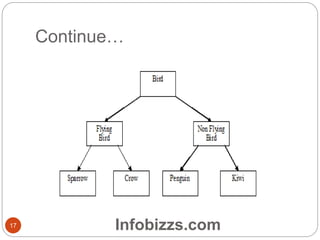
 Inheritance
Inheritance is the process by which one object
acquires the properties of another object. This is
important because it supports the concept of
hierarchical classification.
 For example, the bird sparrow is a part of the
class flying bird, which is again a part of the class
bird.
16 Infobizzs.com
Continue…
17 Infobizzs.com
Continue…
 Polymorphism
 Polymorphism is a feature that allows one
interface to be used for a general class of actions.
 The concept of polymorphism is often expressed
by the phrase “one interface, multiple methods.”
This means that it is possible to design a generic
interface to a group of related activities.
18 Infobizzs.com
What is byte code?
 The output of a Java compiler is not executable code.
it is bytecode.
 Bytecode is a highly optimized set of instructions to
be executed by the Java run-time system, which is
called the Java Virtual Machine (JVM). JVM is an
interpreter for Bytecode.
 Bytecodes are a set of instructions that is not specific
to any one processor.
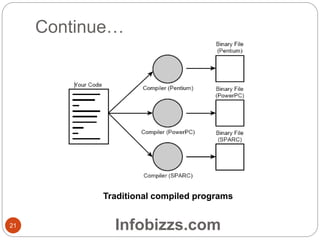
 When we compile a program written in C or in most
other languages, the compiler translates our program
into machine codes. Those instructions are specific to
the processor your computer is running.
19 Infobizzs.com
Continue…
 So, for example, if you compile your code on a
Pentium system, the resulting program will run
only on other Pentium systems. If you want to use
the same program on another system, you have
to go back to your original source, get a compiler
for that system, and recompile your code.
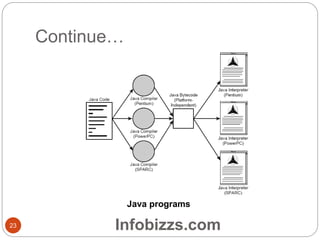
 Things are different when you write code in Java.
The Java development environment has two
parts: a Java compiler and a Java interpreter. The
Java compiler takes your Java program and
instead of generating machine codes from your
source files, it generates bytecodes.
20 Infobizzs.com
Continue…
Traditional compiled programs
21 Infobizzs.com
Continue…
 To run a java program, you run a program called
a bytecode interpreter, which in turn executes
your Java program.
 Having your Java programs in bytecode form
means that instead of being specific to any one
system, your programs can be run on any
platform and any operating or window system as
long as the Java interpreter is available.
 Only the JVM needs to be implemented for each
platform. once the run-time package exists for a
given system, any Java program can run on it.
22 Infobizzs.com
Continue…
Java programs
23 Infobizzs.com
Applications of java
 To develop web browser
 To enhance capabilities of web browser.
 To develop web server
 To enhance capabilities of web server
 To develop protocols
 Java encryption/decryption algorithm
implementation enables security on the internet.
24 Infobizzs.com
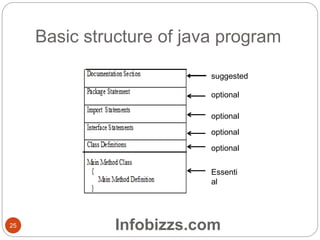
Basic structure of java program
suggested
optional
optional
optional
optional
Essenti
al
25 Infobizzs.com
Continue…
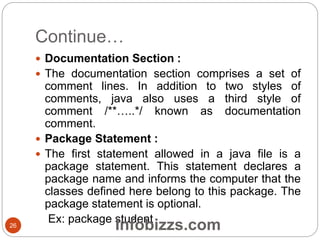
 Documentation Section :
 The documentation section comprises a set of
comment lines. In addition to two styles of
comments, java also uses a third style of
comment /**…..*/ known as documentation
comment.
 Package Statement :
 The first statement allowed in a java file is a
package statement. This statement declares a
package name and informs the computer that the
classes defined here belong to this package. The
package statement is optional.
Ex: package student26 Infobizzs.com
Continue…
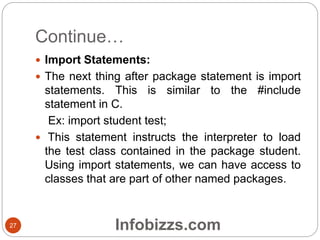
 Import Statements:
 The next thing after package statement is import
statements. This is similar to the #include
statement in C.
Ex: import student test;
 This statement instructs the interpreter to load
the test class contained in the package student.
Using import statements, we can have access to
classes that are part of other named packages.
27 Infobizzs.com
Continue…
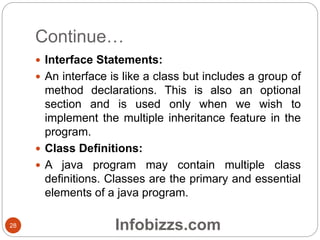
 Interface Statements:
 An interface is like a class but includes a group of
method declarations. This is also an optional
section and is used only when we wish to
implement the multiple inheritance feature in the
program.
 Class Definitions:
 A java program may contain multiple class
definitions. Classes are the primary and essential
elements of a java program.
28 Infobizzs.com
First simple program
29
Example.java
class Example
{
public static void main (String args [])
{
System.out.println ("Hello World.");
}
}
Infobizzs.com
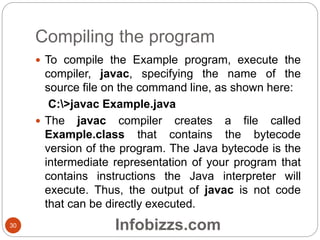
Compiling the program
30
 To compile the Example program, execute the
compiler, javac, specifying the name of the
source file on the command line, as shown here:
C:>javac Example.java
 The javac compiler creates a file called
Example.class that contains the bytecode
version of the program. The Java bytecode is the
intermediate representation of your program that
contains instructions the Java interpreter will
execute. Thus, the output of javac is not code
that can be directly executed.
Infobizzs.com
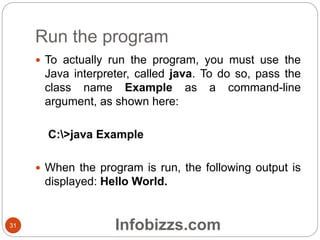
Run the program
31
 To actually run the program, you must use the
Java interpreter, called java. To do so, pass the
class name Example as a command-line
argument, as shown here:
C:>java Example
 When the program is run, the following output is
displayed: Hello World.
Infobizzs.com
Continue…
32
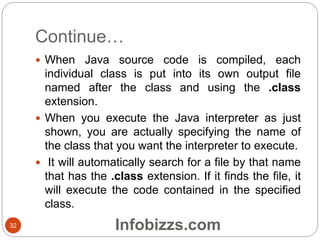
 When Java source code is compiled, each
individual class is put into its own output file
named after the class and using the .class
extension.
 When you execute the Java interpreter as just
shown, you are actually specifying the name of
the class that you want the interpreter to execute.
 It will automatically search for a file by that name
that has the .class extension. If it finds the file, it
will execute the code contained in the specified
class.
Infobizzs.com
Description
33
 class Example
 This line uses the keyword class to declare that a
new class is being defined. Example is an
identifier that is the name of the class.
 public static void main (String args [])
 This line begins the main ( ) method. This is the
line at which the program will begin executing. All
Java applications begin execution by calling main
( ).
Infobizzs.com
Continue…
34
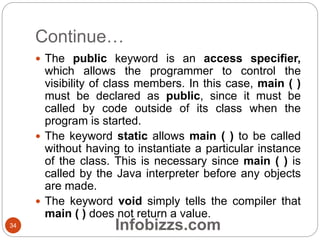
 The public keyword is an access specifier,
which allows the programmer to control the
visibility of class members. In this case, main ( )
must be declared as public, since it must be
called by code outside of its class when the
program is started.
 The keyword static allows main ( ) to be called
without having to instantiate a particular instance
of the class. This is necessary since main ( ) is
called by the Java interpreter before any objects
are made.
 The keyword void simply tells the compiler that
main ( ) does not return a value.
Infobizzs.com
Continue…
35
 In main ( ), there is only one parameter, String
args [ ], which declares a parameter named
args, which is an array of instances of the class
String. In this case, args receives any command-
line arguments present when the program is
executed.
 System.out.println ("Hello World.");
 This line outputs the string “hello World.” followed
by a new line on the screen. Output is actually
accomplished by the built-in println ( ) method.In
this case,println( ) displays the string which is
passed to it.
Infobizzs.com
Continue…
36
 System is a predefined class that provides
access to the system, and out is the output
stream that is connected to the console.
Infobizzs.com
Java input output operators
37
 I/O streams
 A stream in java is a path along which data flows.
 It has a source and destination.
 Input stream reads the data from source and
pass the data to program.
 Output stream writes the data from program to
destination.
Infobizzs.com
Java stream classes
38
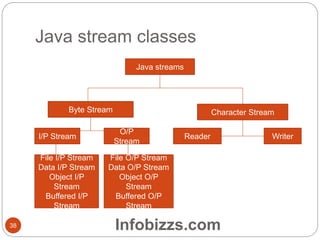
Java streams
Byte Stream Character Stream
I/P Stream
O/P
Stream
Reader Writer
File I/P Stream
Data I/P Stream
Object I/P
Stream
Buffered I/P
Stream
File O/P Stream
Data O/P Stream
Object O/P
Stream
Buffered O/P
Stream
Infobizzs.com
Continue…
39
 The most basic java I/O is writing to and reading
from console.
 Java contains the built-in system, input stream
and print stream classes to perform these
operations.
 To read from the keyboard, the statement
 System.in.read();
 It will read a sequence of characters until the end
of stream, i.e.the enter key has been detected or
an exception has been thrown.
 To write data to the screen,
 Sytem.out.println(“hi”);
Infobizzs.com
Reading a data from keyboard
40
import java.io.*;
public class Echo
{
public static void main(String args[]) throws IOException
{
InputStreamReader reader;
BufferedReader bufReader;
reader=new InputStreamReader(System.in);
bufReader=new BufferedReader(reader);
String s;
while(null!=(s=bufReader.readLine()))
System.out.println(s);
}
}
Output:
Hello world
Hello world
Infobizzs.com

Introduction to java

  • 1.
  • 2.
    Introduction  History  Javais related to C++, which is a direct descendent of C. Much of the character of Java is inherited from these two languages.  From C, Java derives its syntax. Many of Java’s object-oriented features were determined by C++.  Java was developed by James Gosling, Patrick Naughton, Chris Warth, Ed Frank, and Mike Sheridan at Sun Microsystems, Inc.in 1991. It took 18 months to develop the first working version. This language was initially called “Oak” but was renamed “Java” in 1995. 2 Infobizzs.com
  • 3.
    Comparison between OOPand pure OOP  Unlike C++, java is pure object oriented programming language.  Pure OOP organizes a program around its data (i.e. objects) and set of well defined interfaces (i.e. methods) to that data.  Pure OOP means all of the data types in the language are objects and all of the operations on those objects are methods.  You can’t code anything in java without declaring classes and objects.  Everything in java is an object. All the program codes and data resides within classes and objects.3 Infobizzs.com
  • 4.
    Advantages of java Simple:  If you already understand the basic concepts of object-oriented programming, moving to Java will require very little effort because Java inherits the C/C++ syntax and many of the object-oriented features of C++.  Java was designed to be easy to use and is therefore easy to write, compile, debug, and learn than other programming languages. 4 Infobizzs.com
  • 5.
    Continue…  Secure:  Whenyou use a Java-compatible Web browser, you can safely download Java applets without fear of viral infection.  Java achieves this protection by providing a “firewall” between a networked application and your computer.  Java system not only verify all memory access but also ensure that no viruses are communicated with an applet.  The absence of pointers in java ensures that programs cannot gain access to memory5 Infobizzs.com
  • 6.
    Continue…  Portable andPlatform Independent:  One of the most significant advantages of Java is its ability to move easily from one computer system to another.  Today many types of computers and operating systems are in used throughout the world and many are connected to the Internet.  We can download a java applet from a remote computer onto our local system via internet and execute it locally.  You can run java program on any type of operating system because of its portability.6 Infobizzs.com
  • 7.
    Continue…  Object- Oriented: One of the most key features of java is Object Oriented.  Java is object-oriented because programming in Java is centered on creating objects, manipulating objects, and making objects work together. This allows you to create modular programs and reusable code. 7 Infobizzs.com
  • 8.
    Continue…  Robust:  Robustmeans reliable.  It provides many safeguards to ensure reliable code.  It has strict compile time and runtime checking for data types.  In C/C++, the programmer must manually allocate and free all dynamic memory. This sometimes leads to problems, because programmers will either forget to free memory that has been previously allocated or, worse, try to free some memory that another part of their code is still8 Infobizzs.com
  • 9.
    Continue…  Java virtuallyeliminates these problems by managing memory allocation and deallocation.  Deallocation is completely automatic, because Java provides garbage collection for unused objects.  Java also incorporates the concept of exception handling which captures serious errors and eliminates any risk of crashing the system. 9 Infobizzs.com
  • 10.
    Continue…  Multithreaded:  Javasupports multithreaded programming, which allows you to write programs that do many things simultaneously.  Architecture-Neutral:  Nowadays Operating system upgrades, processor upgrades, and changes in core system resources can all combine that make a program failure and doesn’t work properly.  Once you written a java program, you can run this program anywhere, anytime forever. 10 Infobizzs.com
  • 11.
    Continue…  Interpreted andHigh Performance:  The output of a Java compiler is not executable code. Rather, it is bytecode.  The Java bytecode was carefully designed so that it would be easy to translate directly into native machine code for very high performance by using a just-in-time compiler. 11 Infobizzs.com
  • 12.
    Continue…  Compiled andInterpreted: Usually, a computer language is either compiled or interpreted. Java combines both these approaches. Thus making java a two stage system.  First, java compiler translates source code into bytecode. Bytecodes are not machine instructions and therefore, in the second stage, java interpreter generates machine code that can be directly executed by the machine that is running the java program. We can thus say that java is both a compiled and an interpreted language. 12 Infobizzs.com
  • 13.
    Continue…  Distributed:  Distributedcomputing involves several computers on a network working together. Java is designed to make distributed computing easy with the networking capability that is inherently integrated into it.  Writing network programs in Java is like sending and receiving data to and from a file. For example, three programs running on three different systems, communicating with each other to perform a joint task. 13 Infobizzs.com
  • 14.
    Continue…  Dynamic:  Javaprograms carry with them substantial amounts of run-time type information that is used to verify and resolve accesses to objects at run time. This makes it possible to dynamically link code in a safe manner. 14 Infobizzs.com
  • 15.
    Features of java Encapsulation Encapsulation is the mechanism that binds together code and the data it manipulates, and keeps both safe from outside interference and misuse. Or The wrapping up of data and methods into single unit is known as encapsulation. 15 Infobizzs.com
  • 16.
    Continue…  Inheritance Inheritance isthe process by which one object acquires the properties of another object. This is important because it supports the concept of hierarchical classification.  For example, the bird sparrow is a part of the class flying bird, which is again a part of the class bird. 16 Infobizzs.com
  • 17.
  • 18.
    Continue…  Polymorphism  Polymorphismis a feature that allows one interface to be used for a general class of actions.  The concept of polymorphism is often expressed by the phrase “one interface, multiple methods.” This means that it is possible to design a generic interface to a group of related activities. 18 Infobizzs.com
  • 19.
    What is bytecode?  The output of a Java compiler is not executable code. it is bytecode.  Bytecode is a highly optimized set of instructions to be executed by the Java run-time system, which is called the Java Virtual Machine (JVM). JVM is an interpreter for Bytecode.  Bytecodes are a set of instructions that is not specific to any one processor.  When we compile a program written in C or in most other languages, the compiler translates our program into machine codes. Those instructions are specific to the processor your computer is running. 19 Infobizzs.com
  • 20.
    Continue…  So, forexample, if you compile your code on a Pentium system, the resulting program will run only on other Pentium systems. If you want to use the same program on another system, you have to go back to your original source, get a compiler for that system, and recompile your code.  Things are different when you write code in Java. The Java development environment has two parts: a Java compiler and a Java interpreter. The Java compiler takes your Java program and instead of generating machine codes from your source files, it generates bytecodes. 20 Infobizzs.com
  • 21.
  • 22.
    Continue…  To runa java program, you run a program called a bytecode interpreter, which in turn executes your Java program.  Having your Java programs in bytecode form means that instead of being specific to any one system, your programs can be run on any platform and any operating or window system as long as the Java interpreter is available.  Only the JVM needs to be implemented for each platform. once the run-time package exists for a given system, any Java program can run on it. 22 Infobizzs.com
  • 23.
  • 24.
    Applications of java To develop web browser  To enhance capabilities of web browser.  To develop web server  To enhance capabilities of web server  To develop protocols  Java encryption/decryption algorithm implementation enables security on the internet. 24 Infobizzs.com
  • 25.
    Basic structure ofjava program suggested optional optional optional optional Essenti al 25 Infobizzs.com
  • 26.
    Continue…  Documentation Section:  The documentation section comprises a set of comment lines. In addition to two styles of comments, java also uses a third style of comment /**…..*/ known as documentation comment.  Package Statement :  The first statement allowed in a java file is a package statement. This statement declares a package name and informs the computer that the classes defined here belong to this package. The package statement is optional. Ex: package student26 Infobizzs.com
  • 27.
    Continue…  Import Statements: The next thing after package statement is import statements. This is similar to the #include statement in C. Ex: import student test;  This statement instructs the interpreter to load the test class contained in the package student. Using import statements, we can have access to classes that are part of other named packages. 27 Infobizzs.com
  • 28.
    Continue…  Interface Statements: An interface is like a class but includes a group of method declarations. This is also an optional section and is used only when we wish to implement the multiple inheritance feature in the program.  Class Definitions:  A java program may contain multiple class definitions. Classes are the primary and essential elements of a java program. 28 Infobizzs.com
  • 29.
    First simple program 29 Example.java classExample { public static void main (String args []) { System.out.println ("Hello World."); } } Infobizzs.com
  • 30.
    Compiling the program 30 To compile the Example program, execute the compiler, javac, specifying the name of the source file on the command line, as shown here: C:>javac Example.java  The javac compiler creates a file called Example.class that contains the bytecode version of the program. The Java bytecode is the intermediate representation of your program that contains instructions the Java interpreter will execute. Thus, the output of javac is not code that can be directly executed. Infobizzs.com
  • 31.
    Run the program 31 To actually run the program, you must use the Java interpreter, called java. To do so, pass the class name Example as a command-line argument, as shown here: C:>java Example  When the program is run, the following output is displayed: Hello World. Infobizzs.com
  • 32.
    Continue… 32  When Javasource code is compiled, each individual class is put into its own output file named after the class and using the .class extension.  When you execute the Java interpreter as just shown, you are actually specifying the name of the class that you want the interpreter to execute.  It will automatically search for a file by that name that has the .class extension. If it finds the file, it will execute the code contained in the specified class. Infobizzs.com
  • 33.
    Description 33  class Example This line uses the keyword class to declare that a new class is being defined. Example is an identifier that is the name of the class.  public static void main (String args [])  This line begins the main ( ) method. This is the line at which the program will begin executing. All Java applications begin execution by calling main ( ). Infobizzs.com
  • 34.
    Continue… 34  The publickeyword is an access specifier, which allows the programmer to control the visibility of class members. In this case, main ( ) must be declared as public, since it must be called by code outside of its class when the program is started.  The keyword static allows main ( ) to be called without having to instantiate a particular instance of the class. This is necessary since main ( ) is called by the Java interpreter before any objects are made.  The keyword void simply tells the compiler that main ( ) does not return a value. Infobizzs.com
  • 35.
    Continue… 35  In main( ), there is only one parameter, String args [ ], which declares a parameter named args, which is an array of instances of the class String. In this case, args receives any command- line arguments present when the program is executed.  System.out.println ("Hello World.");  This line outputs the string “hello World.” followed by a new line on the screen. Output is actually accomplished by the built-in println ( ) method.In this case,println( ) displays the string which is passed to it. Infobizzs.com
  • 36.
    Continue… 36  System isa predefined class that provides access to the system, and out is the output stream that is connected to the console. Infobizzs.com
  • 37.
    Java input outputoperators 37  I/O streams  A stream in java is a path along which data flows.  It has a source and destination.  Input stream reads the data from source and pass the data to program.  Output stream writes the data from program to destination. Infobizzs.com
  • 38.
    Java stream classes 38 Javastreams Byte Stream Character Stream I/P Stream O/P Stream Reader Writer File I/P Stream Data I/P Stream Object I/P Stream Buffered I/P Stream File O/P Stream Data O/P Stream Object O/P Stream Buffered O/P Stream Infobizzs.com
  • 39.
    Continue… 39  The mostbasic java I/O is writing to and reading from console.  Java contains the built-in system, input stream and print stream classes to perform these operations.  To read from the keyboard, the statement  System.in.read();  It will read a sequence of characters until the end of stream, i.e.the enter key has been detected or an exception has been thrown.  To write data to the screen,  Sytem.out.println(“hi”); Infobizzs.com
  • 40.
    Reading a datafrom keyboard 40 import java.io.*; public class Echo { public static void main(String args[]) throws IOException { InputStreamReader reader; BufferedReader bufReader; reader=new InputStreamReader(System.in); bufReader=new BufferedReader(reader); String s; while(null!=(s=bufReader.readLine())) System.out.println(s); } } Output: Hello world Hello world Infobizzs.com