LOW LEVEL PROGRAMMING
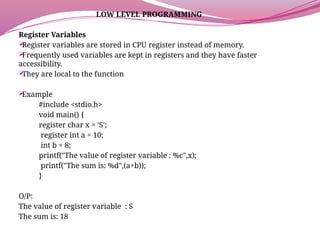
RegisterVariables
Register variables are stored in CPU register instead of memory.
Frequently used variables are kept in registers and they have faster
accessibility.
They are local to the function
Example
#include <stdio.h>
void main() {
register char x = 'S';
register int a = 10;
int b = 8;
printf("The value of register variable : %c",x);
printf("The sum is: %d",(a+b));
}
O/P:
The value of register variable : S
The sum is: 18
2.
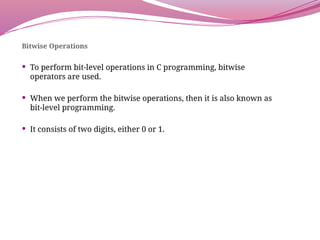
Bitwise Operations
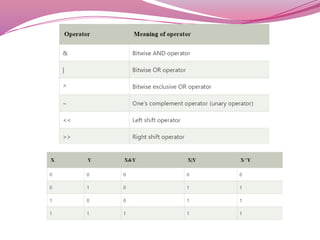
Toperform bit-level operations in C programming, bitwise
operators are used.
When we perform the bitwise operations, then it is also known as
bit-level programming.
It consists of two digits, either 0 or 1.
4.
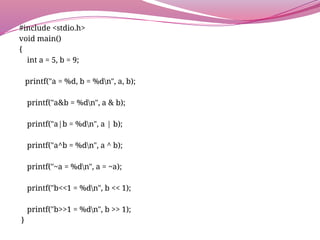
#include <stdio.h>
void main()
{
inta = 5, b = 9;
printf("a = %d, b = %dn", a, b);
printf("a&b = %dn", a & b);
printf("a|b = %dn", a | b);
printf("a^b = %dn", a ^ b);
printf("~a = %dn", a = ~a);
printf("b<<1 = %dn", b << 1);
printf("b>>1 = %dn", b >> 1);
}
5.
Bit Fields
struct
{data - type[nameofmember]: width_of_Bit - field; };
struct example1
{
int val1;
int val2;
};
struct example2
{
int val1: 1;
int val2: 1;
};
void main()
{
printf(“ Size of memory engaged by example_bitField : %u ", sizeof(struct example1));
printf(“ Size of memory engaged by example_bitField2: %u ", sizeof(example2));
}
Output:
Size of memory engaged by example1 : 8
Size of memory engaged by example2 : 4
6.
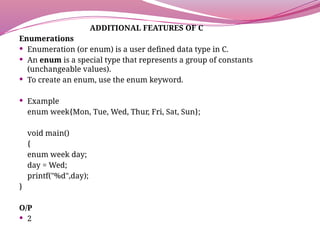
ADDITIONAL FEATURES OFC
Enumerations
Enumeration (or enum) is a user defined data type in C.
An enum is a special type that represents a group of constants
(unchangeable values).
To create an enum, use the enum keyword.
Example
enum week{Mon, Tue, Wed, Thur, Fri, Sat, Sun};
void main()
{
enum week day;
day = Wed;
printf("%d",day);
}
O/P
2
7.
Command Line Parameters
The arguments passed from command line are called
command line arguments.
These arguments are handled by main() function.
The structure of main() function as given below.
int main(int argc, char *argv[] )
Here, argc counts the number of arguments.
It counts the file name as the first argument.
The argv[] contains the total number of arguments. The first
argument is the file name always.
8.
#include <stdio.h>
int main(int argc, char *argv[] )
{
printf("Program name %sn", argv[0]);
if( argc == 2 )
{
printf("The argument supplied is %sn", argv[1]);
}
else if( argc > 2 )
{
printf("Too many arguments supplied.n");
}
}
9.
STRINGS
Defining a String
A string is a collection of characters (i.e.,
letters, numerals, symbols, and punctuation
marks) in a linear sequence.
A String in C is an array with character as a
data type.
The syntax of declaring a string in C is:
char variable[array_size];
Ex.
char str[5];
char str2[50];
10.
NULL Character
Stringsare actually one-dimensional array of characters
terminated by a null character '0'.
Ex.
char arr[6] = {'H', 'e', 'l', 'l', 'o', '0'};
You can write the above statement as follows −
char arr[] = "Hello";
#include <stdio.h>
void main ()
{
char arr[6] = {'H', 'e', 'l', 'l', 'o', '0'};
printf("%s", arr );
}
11.
Initialization of Strings
1.Assigning a string literal without size
String literals can be assigned without size.
char str[] = “Jhon";
2. Assigning a string literal with a predefined size
String literals can be assigned with a predefined size.
If we want to store a string of size n then we should always declare a
string with a size equal to or greater than n+1.
char str[5] = " Jhon";
3. Assigning character by character with size
We can also assign a string character by character.
But we should remember to set the end character as ‘0’ which is a null
character.
char str[5] = { ‘J’,‘h’,‘o’,‘n’,'0'};
4. Assigning character by character without size
We can assign character by character without size with the NULL
character at the end.
The size of the string is determined by the compiler automatically.
char str[] = { ‘J’,‘h’,‘o’,‘n’,'0'};
12.
Reading and Writinga String
scanf() and printf() functions
#include<stdio.h>
void main()
{
char str[50];
printf("Enter the string? ");
scanf("%s",str);
printf("%s",str);
}
gets() and puts() functions
#include<stdio.h>
void main ()
{
char s[30];
printf("Enter the string? ");
gets(s);
puts(s);
}
13.
Processing a String
#include<stdio.h>
#include <stdlib.h>
void main()
{
char str[100];
int l= 0;
printf("Find the length of a string :n");
printf("Input the string : ");
scanf(“%s”,str);
while(str[l]!='0')
{
l++;
}
printf("Length of the string is : %d", l-1);
}
![Bit Fields
struct
{ data - type[nameofmember]: width_of_Bit - field; };
struct example1
{
int val1;
int val2;
};
struct example2
{
int val1: 1;
int val2: 1;
};
void main()
{
printf(“ Size of memory engaged by example_bitField : %u ", sizeof(struct example1));
printf(“ Size of memory engaged by example_bitField2: %u ", sizeof(example2));
}
Output:
Size of memory engaged by example1 : 8
Size of memory engaged by example2 : 4](https://image.slidesharecdn.com/c-250613152005-541b2b57/85/Introduction-about-Low-Level-Programming-using-C-5-320.jpg)
![Command Line Parameters
The arguments passed from command line are called
command line arguments.
These arguments are handled by main() function.
The structure of main() function as given below.
int main(int argc, char *argv[] )
Here, argc counts the number of arguments.
It counts the file name as the first argument.
The argv[] contains the total number of arguments. The first
argument is the file name always.](https://image.slidesharecdn.com/c-250613152005-541b2b57/85/Introduction-about-Low-Level-Programming-using-C-7-320.jpg)
![#include <stdio.h>
int main( int argc, char *argv[] )
{
printf("Program name %sn", argv[0]);
if( argc == 2 )
{
printf("The argument supplied is %sn", argv[1]);
}
else if( argc > 2 )
{
printf("Too many arguments supplied.n");
}
}](https://image.slidesharecdn.com/c-250613152005-541b2b57/85/Introduction-about-Low-Level-Programming-using-C-8-320.jpg)
![STRINGS
Defining a String
A string is a collection of characters (i.e.,
letters, numerals, symbols, and punctuation
marks) in a linear sequence.
A String in C is an array with character as a
data type.
The syntax of declaring a string in C is:
char variable[array_size];
Ex.
char str[5];
char str2[50];](https://image.slidesharecdn.com/c-250613152005-541b2b57/85/Introduction-about-Low-Level-Programming-using-C-9-320.jpg)
![NULL Character
Strings are actually one-dimensional array of characters
terminated by a null character '0'.
Ex.
char arr[6] = {'H', 'e', 'l', 'l', 'o', '0'};
You can write the above statement as follows −
char arr[] = "Hello";
#include <stdio.h>
void main ()
{
char arr[6] = {'H', 'e', 'l', 'l', 'o', '0'};
printf("%s", arr );
}](https://image.slidesharecdn.com/c-250613152005-541b2b57/85/Introduction-about-Low-Level-Programming-using-C-10-320.jpg)
![Initialization of Strings
1. Assigning a string literal without size
String literals can be assigned without size.
char str[] = “Jhon";
2. Assigning a string literal with a predefined size
String literals can be assigned with a predefined size.
If we want to store a string of size n then we should always declare a
string with a size equal to or greater than n+1.
char str[5] = " Jhon";
3. Assigning character by character with size
We can also assign a string character by character.
But we should remember to set the end character as ‘0’ which is a null
character.
char str[5] = { ‘J’,‘h’,‘o’,‘n’,'0'};
4. Assigning character by character without size
We can assign character by character without size with the NULL
character at the end.
The size of the string is determined by the compiler automatically.
char str[] = { ‘J’,‘h’,‘o’,‘n’,'0'};](https://image.slidesharecdn.com/c-250613152005-541b2b57/85/Introduction-about-Low-Level-Programming-using-C-11-320.jpg)
![Reading and Writing a String
scanf() and printf() functions
#include<stdio.h>
void main()
{
char str[50];
printf("Enter the string? ");
scanf("%s",str);
printf("%s",str);
}
gets() and puts() functions
#include<stdio.h>
void main ()
{
char s[30];
printf("Enter the string? ");
gets(s);
puts(s);
}](https://image.slidesharecdn.com/c-250613152005-541b2b57/85/Introduction-about-Low-Level-Programming-using-C-12-320.jpg)
![Processing a String
#include <stdio.h>
#include <stdlib.h>
void main()
{
char str[100];
int l= 0;
printf("Find the length of a string :n");
printf("Input the string : ");
scanf(“%s”,str);
while(str[l]!='0')
{
l++;
}
printf("Length of the string is : %d", l-1);
}](https://image.slidesharecdn.com/c-250613152005-541b2b57/85/Introduction-about-Low-Level-Programming-using-C-13-320.jpg)
![Sorting
#include <stdio.h>
#include <string.h>
void main ()
{
char string[] = “efacbd";
char temp;
int i, j;
int n = strlen(string);
printf("String before sorting - %s n", string);
for (i = 0; i < n-1; i++) {
for (j = i+1; j < n; j++) {
if (string[i] > string[j]) {
temp = string[i];
string[i] = string[j];
string[j] = temp;
} } }
printf("String after sorting - %s n", string);
}](https://image.slidesharecdn.com/c-250613152005-541b2b57/85/Introduction-about-Low-Level-Programming-using-C-15-320.jpg)
![Searching
#include <string.h>
void main()
{
char s[100],c;
int i;
printf("Enter the string : ");
gets(s);
printf("Enter character to be searched: ");
c=getchar();
for(i=0;s[i];i++)
{
if(s[i]==c)
{
printf("character '%c' found at location: %dn ",c,i);
}
}
}](https://image.slidesharecdn.com/c-250613152005-541b2b57/85/Introduction-about-Low-Level-Programming-using-C-16-320.jpg)

![[ITP - Lecture 17] Strings in C/C++](https://cdn.slidesharecdn.com/ss_thumbnails/lecture-2627strings-171215173858-thumbnail.jpg?width=640&height=640&fit=bounds)


