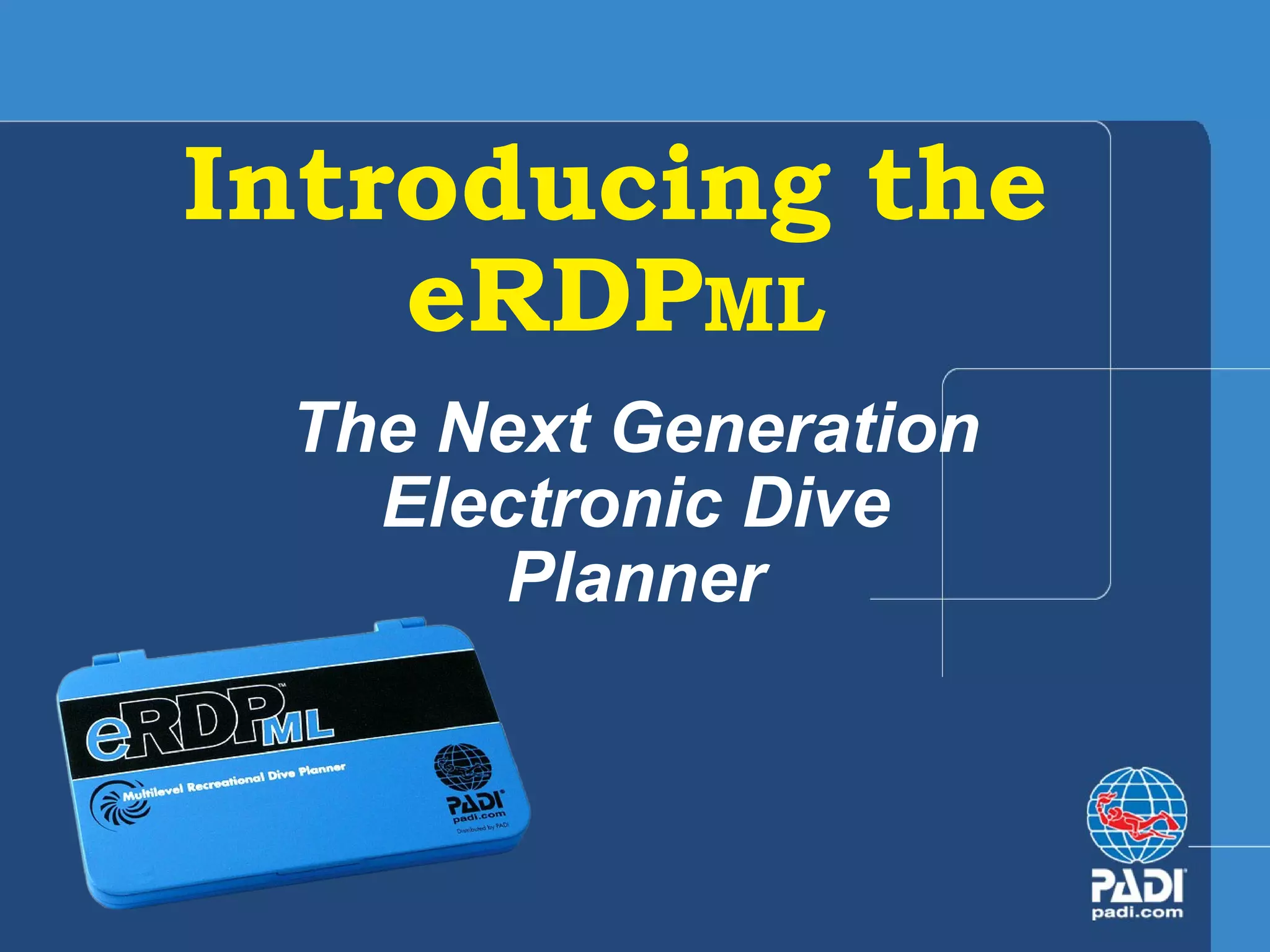
Introducing the eRDP ML The Next Generation Electronic Dive Planner
We’ll answer. . . What is the eRDP ML ? What can the eRDP ML  do? How do you use the eRDP ML ?
What is the eRDP ML ?  An electronic dive table Another version of the world’s most popular dive table, the Recreational Dive Planner (RDP)  Provides the same maximum dive times, surface interval information and pressure groups as the RDP – table and The Wheel
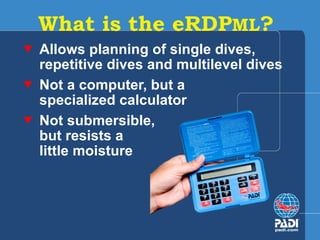
What is the eRDP ML ?  Allows planning of single dives, repetitive dives and multilevel dives  Not a computer, but a  specialized calculator Not submersible,  but resists a  little moisture
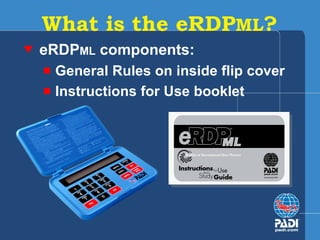
eRDP ML  components: General Rules on inside flip cover Instructions for Use booklet What is the eRDP ML ?
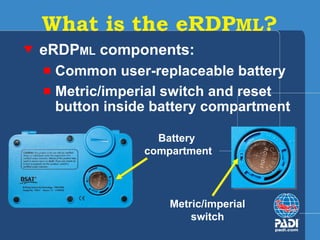
eRDP ML  components: Common user-replaceable battery Metric/imperial switch and reset button inside battery compartment What is the eRDP ML ? Battery  compartment Metric/imperial switch
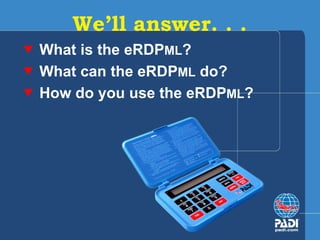
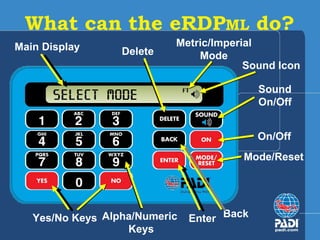
What can the eRDP ML  do?   On/Off Mode/Reset Metric/Imperial Mode Alpha/Numeric  Keys Yes/No Keys Delete Main Display Sound Icon Sound  On/Off  Enter Back
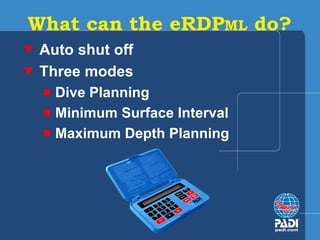
What can the eRDP ML  do? Auto shut off Three modes Dive Planning Minimum Surface Interval Maximum Depth Planning
Dive Planning mode Multilevel – Yes or No First dive – Yes or No Enter depth to find no decompression limit (NDL) Enter time to find Pressure Group (PG) What can the eRDP ML  do?
Dive Planning mode Multilevel – Yes or No First dive – Yes or No Enter depth for levels as prompted (Lvl1, Lvl2, Lvl3) to find no decompression limit (NDL or ANDL) for each level Enter time for each level to find Pressure Group (PG) What can the eRDP ML  do?
Dive Planning mode Additional dives: Before surface interval, enter PG after previous dive  After a surface interval, enter PG after surface interval What can the eRDP ML  do?
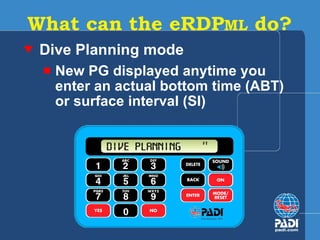
Dive Planning mode New PG displayed anytime you enter an actual bottom time (ABT)  or surface interval (SI) What can the eRDP ML  do?
Minimum Surface Interval mode Enter depths and times for two dives and get required minimum surface interval Enter the PG after previous dive, then enter depth and time for next dive and get required minimum surface interval What can the eRDP ML  do?
Maximum Depth mode Plan first dive – enter desired dive time, get maximum allowed depth After planning a dive, enter desired time for next dive – get the maximum depth for that time Enter PG after surface interval, then desired time – get maximum  depth for that time What can the eRDP ML  do?
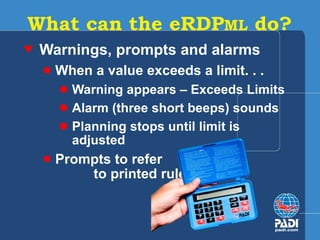
Warnings, prompts and alarms When a value exceeds a limit. . . Warning appears – Exceeds Limits Alarm (three short beeps) sounds Planning stops until limit is adjusted Prompts to refer  to printed rules What can the eRDP ML  do?
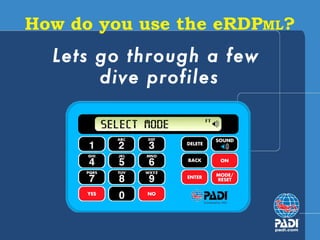
How do you use the eRDP ML ? Lets go through a few  dive profiles
You can now answer. . . What is the eRDP ML ? What can the eRDP ML  do? How do you use the eRDP ML ?

Introducing The E R

  • 1.
    Introducing the eRDPML The Next Generation Electronic Dive Planner
  • 2.
    We’ll answer. .. What is the eRDP ML ? What can the eRDP ML do? How do you use the eRDP ML ?
  • 3.
    What is theeRDP ML ? An electronic dive table Another version of the world’s most popular dive table, the Recreational Dive Planner (RDP) Provides the same maximum dive times, surface interval information and pressure groups as the RDP – table and The Wheel
  • 4.
    What is theeRDP ML ? Allows planning of single dives, repetitive dives and multilevel dives Not a computer, but a specialized calculator Not submersible, but resists a little moisture
  • 5.
    eRDP ML components: General Rules on inside flip cover Instructions for Use booklet What is the eRDP ML ?
  • 6.
    eRDP ML components: Common user-replaceable battery Metric/imperial switch and reset button inside battery compartment What is the eRDP ML ? Battery compartment Metric/imperial switch
  • 7.
    What can theeRDP ML do? On/Off Mode/Reset Metric/Imperial Mode Alpha/Numeric Keys Yes/No Keys Delete Main Display Sound Icon Sound On/Off Enter Back
  • 8.
    What can theeRDP ML do? Auto shut off Three modes Dive Planning Minimum Surface Interval Maximum Depth Planning
  • 9.
    Dive Planning modeMultilevel – Yes or No First dive – Yes or No Enter depth to find no decompression limit (NDL) Enter time to find Pressure Group (PG) What can the eRDP ML do?
  • 10.
    Dive Planning modeMultilevel – Yes or No First dive – Yes or No Enter depth for levels as prompted (Lvl1, Lvl2, Lvl3) to find no decompression limit (NDL or ANDL) for each level Enter time for each level to find Pressure Group (PG) What can the eRDP ML do?
  • 11.
    Dive Planning modeAdditional dives: Before surface interval, enter PG after previous dive After a surface interval, enter PG after surface interval What can the eRDP ML do?
  • 12.
    Dive Planning modeNew PG displayed anytime you enter an actual bottom time (ABT) or surface interval (SI) What can the eRDP ML do?
  • 13.
    Minimum Surface Intervalmode Enter depths and times for two dives and get required minimum surface interval Enter the PG after previous dive, then enter depth and time for next dive and get required minimum surface interval What can the eRDP ML do?
  • 14.
    Maximum Depth modePlan first dive – enter desired dive time, get maximum allowed depth After planning a dive, enter desired time for next dive – get the maximum depth for that time Enter PG after surface interval, then desired time – get maximum depth for that time What can the eRDP ML do?
  • 15.
    Warnings, prompts andalarms When a value exceeds a limit. . . Warning appears – Exceeds Limits Alarm (three short beeps) sounds Planning stops until limit is adjusted Prompts to refer to printed rules What can the eRDP ML do?
  • 16.
    How do youuse the eRDP ML ? Lets go through a few dive profiles
  • 17.
    You can nowanswer. . . What is the eRDP ML ? What can the eRDP ML do? How do you use the eRDP ML ?

Editor's Notes

  • #2 [NOTE TO PRESENTER: Use this presentation to introduce the eRDPML to new divers, experienced divers and dive professionals.] Introducing the eRDP ML - The Next Generation Electronic Dive Planner
  • #3 We’ll answer the following questions: What is the eRDP ML ? We’ll discuss what it is and what it’s not. What can the eRDP ML do? We’ll identify all the eRDP ML features and discuss how it functions. How do you use the eRDP? We’ll show you a few examples and you’ll see how easy it is to use.
  • #4 What is the eRDP ML ? The eRDP ML is an electronic dive table. It’s an easy to use version of the world’s most popular dive table, the Recreational Dive Planner (RDP) – The Wheel. Since the RDP was introduced in 1988, both the table and The Wheel versions have been used by millions of recreational divers. The eRDP ML is designed to give you the same maximum dive times, surface interval information and pressure groups as the RDP– table version and allows for multilevel dive planning like The Wheel.
  • #5 What is the eRDP ML ? The eRDP ML is the next generation of the original eRDP. The eRDP ML retained the features of the original and incorporated some new ones. The eRDP ML also allows you to enter dive times, dive depths and surface intervals so you can plan single, repetitive dives and multilevel dives, just as you would with The Wheel. The eRDP ML uses the same data tables as The Wheel, allowing the user to plan single depth dives and multilevel dives using 2 metre/5 foot increments. We’ll review the eRDP ML ’s three modes - Dive Planning, Minimum Surface Interval and Maximum Depth - later in this presentation. Like the original eRDP, the eRDP ML is not a computer, but a specialized calculator that makes planning and tracking dives simpler. Just as using a calculator to balance your checkbook is easier than adding and subtracting by hand, calculating dive profiles using the eRDP ML is quicker than figuring out profiles using the RDP table or The Wheel. Although it resists moisture, the eRDP ML is not submersible. Just like a standard calculator, the eRDP ML is not waterproof. It’s designed for use on the surface and can’t be taken underwater. Keep in mind that you can plan your dive with the eRDP ML , write the information on a slate to take underwater and have your eRDP ML waiting on the surface to calculate your dives during a surface interval or when logging dives in your log book.
  • #6 What is the eRDP ML ? eRDPML components: General Rules displayed on inside flip cover The RDP table and The Wheel have the general rules for use printed on them. Those same rules and guidelines apply to the eRDP ML . The rules are printed on the inside flip cover of the unit, which allows for quick reference while dive planning. You’ll see how the eRDP ML actually prompts the user to refer to specific rules when certain dive planning circumstances occur. You’ll see a new abbreviation specific to the eRDP ML . Look in the right corner and you’ll see “ML.” This refers to the multilevel limit on a multilevel dive. Instructions For Use booklet includes both metric and imperial information and examples .
  • #7 What is the eRDP ML ? eRDP ML components: Common user-replaceable battery located in the back of the calculator. The eRDP ML uses a common 3.0 volt #2032 calculator battery that’s user-replaceable. The battery has an estimated life of one year with an average use of 10 minutes per day. When the display dims, the battery should be replaced. Before using a new eRDP ML , you must remove the plastic protecting the battery. (Note to presenter: the following item requires a mouse or keyboard click to show the photo and label) Metric/Imperial switch is inside the battery compartment. The default for the eRDP ML is metric. To change it to imperial, open the battery compartment and flip the switch to imperial. Be sure to use an appropriate size coin to open the compartment. Open carefully to avoid damage to the battery compartment cover. Once set, you probably won’t need to switch from one measuring system to the other. If you do, use the switch inside the battery compartment. Moving the switch between metric and imperial is easier to accomplish when the battery is removed. If you leave the battery in place, be sure to also push the reset button (also located in the rim of the battery compartment) to reset to the new measuring system.
  • #8 What can the eRDP ML do? Let’s take quick look at the eRDP ML ’s function keys and display. (Note to presenter: each bullet item requires a mouse or keyboard click to show the label) Main Display – Displays alpha/numeric information. Metric/Imperial Mode – Shows whether the eRDP ML is being used in metric (M) or imperial (FT) mode. ON – Press and hold the ON key for two seconds to turn the unit on and off . (New feature) SOUND – The Sound key allows the user to turn sound off and on. (New feature) The sound is on when you see the sound icon in the display window ENTER – Press the Enter key after entering alpha or numeric data. BACK - Takes you back to the previous step, though this is not possible in all modes. DELETE - Deletes digits/letters before pressing Enter key. MODE/RESET - Used to select the eRDP ML Dive Planning, Surface Interval and Maximum Depth Modes. Press and hold for 2 seconds to reset the eRDP ML . Alpha/Numeric - Used to enter numbers and letters. YES/NO - Used to answer Yes/No questions.
  • #9 What can the eRDP ML do? Auto shut off If you leave the eRDP ML idle for more than five minutes without entering information, it will shut itself off to conserve the battery. There are three modes that correspond to the eRDP ML functions. We’ll look at each of these in detail next: Dive Planning (allows planning single depth or multilevel dives) Minimum Surface Interval Maximum Depth Planning
  • #10 What can the eRDP ML do? Use the Dive Planning mode to not only plan single depth and multilevel dives, but also calculate your pressure group after a dive or after a surface interval. After entering the Dive Planning mode, the eRDP ML will ask if this is a multilevel dive. Answer NO if you want to plan a single depth dive. You’ll then see a prompt asking if this is your first dive YES or NO. Answer YES and you’ll receive a prompt to enter a depth to find the no decompression limit. Enter a time and you’ll get your PG for that depth.
  • #11 What can the eRDP ML do? Use the Dive Planning mode to not only plan single depth and multilevel dives, but also calculate your pressure group after a dive or after a surface interval. After entering the Dive Planning mode, the eRDP ML will ask if this is a multilevel dive. Answer YES if you want to plan a two- or three-level dive. Let’s select First Dive and follow the steps for multilevel dive planning: You receive the prompts– Enter LVL 1, Enter LVL 2 and Enter LVL 3 Enter a depth for each LVL and you’ll get your NDL or ANDL for each level. Enter a time for each level and you’ll get your PG for that depth and time If you want to plan a two-level dive, simply press the Enter key when prompted for LVL 3. To locate the next acceptable depth for the multilevel dive, refer to Section Four in the Instructions for Use booklet. You may also enter the planning process at other points: Before a surface interval, you enter your PG after a previous dive After a surface interval, you enter your PG after your surface interval This features means that you can continue dive planning at any point, as long as you know your pressure group. You don’t have to always start from the beginning by re-entering data from previous dives .
  • #12 What can the eRDP ML do? Use the Dive Planning mode to not only plan single depth and multilevel dives, but also calculate your pressure group after a dive or after a surface interval. You may also enter the planning process at other points: Before a surface interval, you enter your PG after a previous dive After a surface interval, you enter your PG after your surface interval This feature means that you can continue dive planning at any point, as long as you know your pressure group. You don’t have to always start from the beginning by re-entering data from previous dives.
  • #13 Dive Planning mode Two of the great advantages of the eRDP ML is that 1) it eliminates the need for you to perform the calculation of adding Residual Nitrogen Time (RNT) to Actual Bottom Time (ABT) to get Total Bottom Time (TBT) in order to find your PG after a repetitive dive, and 2) it eliminates individual interpretation of arrows touching or piercing, or the curve covering the hatch mark on the Surface Interval side. This eliminates the most common source of error when using the RDP table or The Wheel. After you enter your depth and time for a repetitive dive, the eRDP ML displays your PG after the dive. After you enter your depth level for a multilevel dive and a time, the eRDP ML displays your PG for that level. This is also true when starting with a PG, then entering a surface interval – you get your new PG.
  • #14 Minimum Surface Interval mode The eRDP ML allows you to plan two dives and find the required minimum surface interval. You enter the depths and times for both dives and the eRDP ML displays the required minimum surface interval. You can also find minimum surface interval after any dive when planning your next dive. First enter the PG after a previous dive. Next enter the depth and time for the next dive and the eRDP ML displays the required minimum surface interval.
  • #15 What else can the eRDP ML do? Maximum Depth mode The eRDP ML allows you to plan your first dive by entering a desired dive time. It will give you the maximum allowed depth based on that time. After planning a dive, you can enter a desired time for the next dive and find the maximum depth you can dive to for that time. If you know your PG after a surface interval, you can enter a desired dive time and the eRDP ML displays the maximum depth you can dive to for that time.
  • #16 What can the eRDP ML do? The eRDP ML has built in safety warnings, prompts and alarms. During use, the eRDP ML warns you when a value exceeds a limit. Warnings and prompts are accompanied by an alarm (three short beeps). For example, when you enter a time that exceeds the NDL or ANDL, the eRDP ML displays “Exceeds Limit” and emits an alarm. OR, when you enter a depth for a multilevel dive that exceeds the next acceptable depth, the eRDP ML display “Exceeds ML Depth Limit.” The eRDP ML will not allow you to enter a time that exceeds the NDL or ANDL. After displaying the “Exceeds Limit” or warning, it shows the NDL or ANDL once more and prompts you to enter your dive time again. When an RDP/eRDP ML rule applies, you are prompted to refer to rules printed on the inside of the flip cover. When using The Wheel (or the table), you have to remember when to apply the rules, this is no longer necessary with the eRDP ML . For example, when you enter a depth greater than 40 metres/130 feet, the eRDP ML displays “Exceeds Limits – See Rule 10” and emits an audible alarm. You cannot plan dives that exceed these depths. The eRDP ML reminds you that a safety stop for 3 minutes is required any time the pressure group of the profile you’ve entered comes within 3 pressure groups of a no-decompression limit, and for any dive to a depth of 30 metres/100 feet or greater. “See Rule 2 – Safety Stop 3 Min” When your PG after a dive is W,X,Y or Z, the eRDP ML displays “WXYZ Rule – See Rule 6” and emits an audible alarm.
  • #17 How do you use the eRDP ML ? Lets take the eRDP ML for a few test dives. [NOTE TO PRESENTER: Either launch the eRDP ML desktop to work through sample dive profiles or use an actual eRDP ML . Have divers (or candidates) follow along on their personal eRDP M Ls.] Demonstrate Dive Planning for Single Depth Dive and a Multilevel dive: For Multilevel diving, demonstrate planning a two and three level dive. Finding NDL or ANDL. Exceeding NDL or ANDL. Enter a dive depth to display NDL or ANDL. Then enter a dive time that exceeds the NDL to display the “Exceeds Limits” warning. Finding PG after a dive. Exceeding recreational depth. Enter a dive depth that exceeds 40 metres/130 feet to display the “Exceeds Limits” warning. Plan a 2-dive profile starting with the first dive. Plan a 2-dive profile by entering the PG after the first dive. Safety Stop prompt. Enter a dive depth of 30 meters/100 feet to display the “Safety Stop 3 min” warning. Calculate the maximum depth for a first dive. Calculate the maximum depth for a repetitive dive, entering the PG before the dive.
  • #18 Now you can answer the following questions: What is the eRDP ML ? What can the eRDP ML do? How do you use the eRDP ML ?