Introduction to PHP
October 9, 2013
Oscar Merida & Sandy Smith
2 Introduction to PHP
In the beginning
"Personal Home Page" - Perl
PHP/FI - written in C,
• v1 - released 1995
• v2 - released 1997
PHP3 - "PHP: Hypertext Processor"
• Rewritten Parser, launched 1998
PHP4
• Introduces basic OOP, May 2000
3 Introduction to PHP
PHP today
5.0 • Public/private/protected class methods &
propertiesExceptions
5.1 • PDO: common database interface
PDO: common database interface
5.2 • DateTime classes
DateTime classes
5.3 • NamespacesLambda/Anonymous functions
NamespacesLambda/Anonymous functions
5.4 • TraitsShort array syntax [ ]
TraitsShort array syntax [ ]
5.5 • GeneratorsNative password hashing
GeneratorsNative password hashing
4 Introduction to PHP
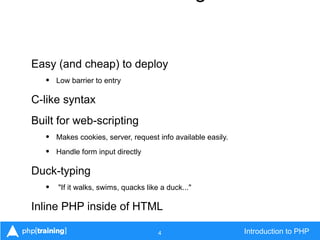
Easy (and cheap) to deploy
• Low barrier to entry
C-like syntax
Built for web-scripting
• Makes cookies, server, request info available easily.
• Handle form input directly
Duck-typing
• "If it walks, swims, quacks like a duck..."
Inline PHP inside of HTML
5 Introduction to PHP
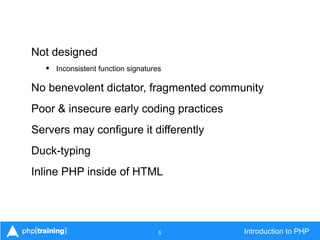
Not designed
• Inconsistent function signatures
No benevolent dictator, fragmented community
Poor & insecure early coding practices
Servers may configure it differently
Duck-typing
Inline PHP inside of HTML
6 Introduction to PHP
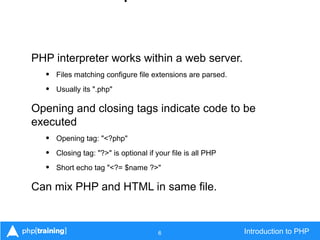
PHP interpreter works within a web server.
• Files matching configure file extensions are parsed.
• Usually its ".php"
Opening and closing tags indicate code to be
executed
• Opening tag: "<?php"
• Closing tag: "?>" is optional if your file is all PHP
• Short echo tag "<?= $name ?>"
Can mix PHP and HTML in same file.
7 Introduction to PHP
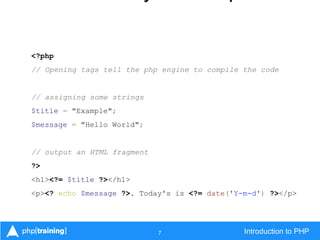
<?php
// Opening tags tell the php engine to compile the code
// assigning some strings
$title = "Example";
$message = "Hello World";
// output an HTML fragment
?>
<h1><?= $title ?></h1>
<p><? echo $message ?>. Today's is <?= date('Y-m-d') ?></p>
8 Introduction to PHP
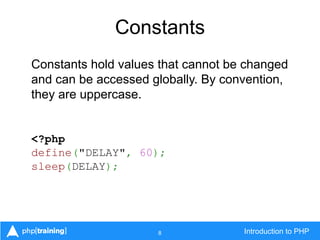
Constants
Constants hold values that cannot be changed
and can be accessed globally. By convention,
they are uppercase.
<?php
define("DELAY", 60);
sleep(DELAY);
9 Introduction to PHP
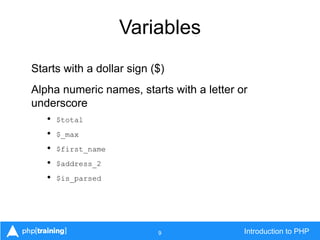
Variables
Starts with a dollar sign ($)
Alpha numeric names, starts with a letter or
underscore
• $total
• $_max
• $first_name
• $address_2
• $is_parsed
10 Introduction to PHP
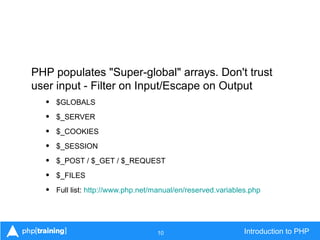
PHP populates "Super-global" arrays. Don't trust
user input - Filter on Input/Escape on Output
• $GLOBALS
• $_SERVER
• $_COOKIES
• $_SESSION
• $_POST / $_GET / $_REQUEST
• $_FILES
• Full list: http://www.php.net/manual/en/reserved.variables.php
11 Introduction to PHP
Single Quotes
$color = 'Green';
Double Quotes
// outputs Green Eggs and Ham
$food = "$color Eggs and Ham";
echo $food;
12 Introduction to PHP
Basic String Manipulation
Concatenate:
$color = 'Yellow' . '+' . 'Blue';
Contains:
Yellow+Blue
Concatenate variables:
$color .= ' make Green';
// contains Yellow+Blue make Green
13 Introduction to PHP
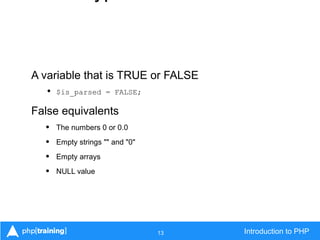
A variable that is TRUE or FALSE
• $is_parsed = FALSE;
False equivalents
• The numbers 0 or 0.0
• Empty strings "" and "0"
• Empty arrays
• NULL value
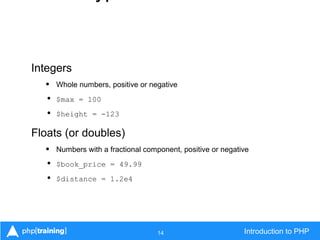
14 Introduction to PHP
Integers
• Whole numbers, positive or negative
• $max = 100
• $height = -123
Floats (or doubles)
• Numbers with a fractional component, positive or negative
• $book_price = 49.99
• $distance = 1.2e4
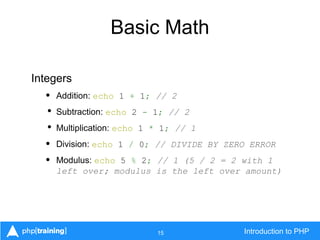
15 Introduction to PHP
Basic Math
Integers
• Addition: echo 1 + 1; // 2
• Subtraction: echo 2 - 1; // 2
• Multiplication: echo 1 * 1; // 1
• Division: echo 1 / 0; // DIVIDE BY ZERO ERROR
• Modulus: echo 5 % 2; // 1 (5 / 2 = 2 with 1
left over; modulus is the left over amount)
16 Introduction to PHP
Types - Arrays
Numerically indexed, starting at 0
$zoo = array('Lion', 'Tiger', 'Bear');
echo $zoo[0]; // outputs Lion
Elements within an array can be any type.
$bag = [5, 3.2, 'Banana'];
echo $bag[2]; // outputs 'Banana'
17 Introduction to PHP
Like plain arrays, but specify keys and values. Keys
can be strings or integers.
// short array syntax
$address = ['city' => 'Fairfax', 'state' => 'VA'];
// adding a new key, value pair
$address['country'] = 'United States';
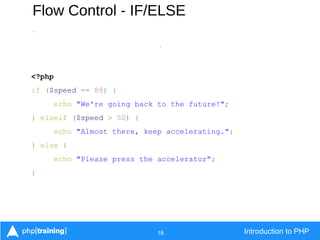
18 Introduction to PHP
Flow Control - IF/ELSE
-
-
<?php
if ($speed == 88) {
echo "We're going back to the future!";
} elseif ($speed > 50) {
echo "Almost there, keep accelerating.";
} else {
echo "Please press the accelerator";
}
19 Introduction to PHP
Flow Control - Switch
<?php
switch ($color) {
case "blue":
$turtle = "Leonardo";
break;
case "orange":
$turtle = "Michelangelo";
break;
case "purple":
$turtle = "Donatello";
break;
case "red":
$turtle = "Raphael";
break;
default:
$turtle = "Unknown";
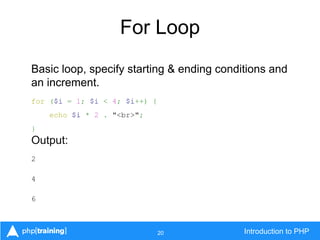
20 Introduction to PHP
For Loop
Basic loop, specify starting & ending conditions and
an increment.
for ($i = 1; $i < 4; $i++) {
echo $i * 2 . "<br>";
}
Output:
2
4
6
21 Introduction to PHP
Foreach loop
Useful for traversing associative arrays and using
keys & values within the loop.
$zoo = ["Lions" => 3, "Tigers" => 2, "Bears" => 5];
foreach ($zoo as $animal => $count) {
echo $animal . ": " . $count . "<br>";
}
Output:
Lions: 3
Tigers: 2
Bears: 5
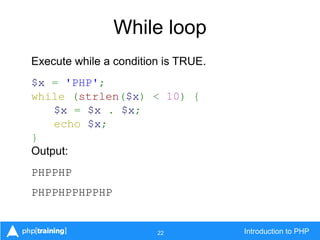
22 Introduction to PHP
While loop
Execute while a condition is TRUE.
$x = 'PHP';
while (strlen($x) < 10) {
$x = $x . $x;
echo $x;
}
Output:
PHPPHP
PHPPHPPHPPHP
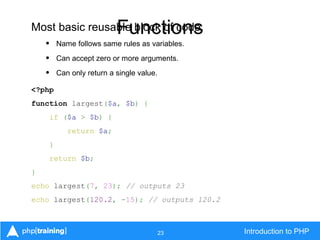
23 Introduction to PHP
FunctionsMost basic reusable block of code.
• Name follows same rules as variables.
• Can accept zero or more arguments.
• Can only return a single value.
<?php
function largest($a, $b) {
if ($a > $b) {
return $a;
}
return $b;
}
echo largest(7, 23); // outputs 23
echo largest(120.2, -15); // outputs 120.2
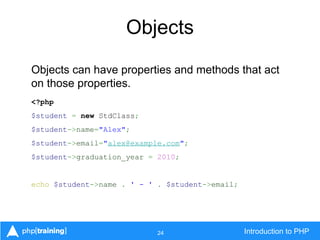
24 Introduction to PHP
Objects
Objects can have properties and methods that act
on those properties.
<?php
$student = new StdClass;
$student->name="Alex";
$student->email="alex@example.com";
$student->graduation_year = 2010;
echo $student->name . ' - ' . $student->email;
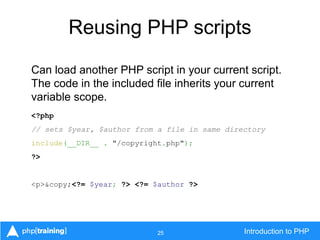
25 Introduction to PHP
Reusing PHP scripts
Can load another PHP script in your current script.
The code in the included file inherits your current
variable scope.
<?php
// sets $year, $author from a file in same directory
include(__DIR__ . "/copyright.php");
?>
<p>&copy;<?= $year; ?> <?= $author ?>
26 Introduction to PHP
Include versus Requires
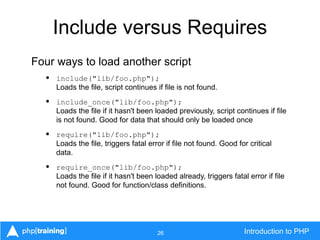
Four ways to load another script
• include("lib/foo.php");
Loads the file, script continues if file is not found.
• include_once("lib/foo.php");
Loads the file if it hasn't been loaded previously, script continues if file
is not found. Good for data that should only be loaded once
• require("lib/foo.php");
Loads the file, triggers fatal error if file not found. Good for critical
data.
• require_once("lib/foo.php");
Loads the file if it hasn't been loaded already, triggers fatal error if file
not found. Good for function/class definitions.
27 Introduction to PHP
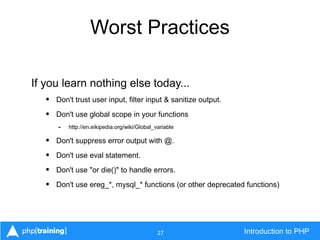
Worst Practices
If you learn nothing else today...
• Don't trust user input, filter input & sanitize output.
• Don't use global scope in your functions
- http://en.eikipedia.org/wiki/Global_variable
• Don't suppress error output with @.
• Don't use eval statement.
• Don't use "or die()" to handle errors.
• Don't use ereg_*, mysql_* functions (or other deprecated functions)
28 Introduction to PHP
Handling form input
<input type="text" name="name" placeholder="Your Name" required="required" />
<input type="email" name="email" placeholder="Your e-mail" required="required" />
<p><b>Check each animal to visit at the zoo:</b></p>
<label><input type="checkbox" name="animals[]" value="lions" />Lions</label>
<label><input type="checkbox" name="animals[]" value="tigers" />Tigers</label>
<label><input type="checkbox" name="animals[]" value="bears" />Bears</label>
<label><input type="checkbox" name="animals[]" value="zebras" />Zebras</label>
<label><input type="checkbox" name="animals[]" value="monkeys" />Monkeys</label>
<div><input type="submit" value="Save" /></div>
</form>
29 Introduction to PHP
Handling form input
<?php
// sanitize incoming name and email
$name = filter_var($_POST['name'],
FILTER_SANITIZE_STRING);
$email = filter_var($_POST['email'],
FILTER_SANITIZE_EMAIL);
if (!filter_var($email, FILTER_VALIDATE_EMAIL)) {
trigger_error('Invalid email address',
E_USER_ERROR);
}
30 Introduction to PHP
Handling form input
// ensure animal options are valid
$valid = ['lions', 'tigers', 'bears', 'zebras', 'monkeys'];
// Filter by looping through the array
$animals = [];
foreach ($_POST['animals'] as $test) {
if (in_array($test, $valid)) {
array_push($animals, $test);
}
}
// OR filter with an array_* function,
// keep the ones in common
$animals = array_intersect($_POST['animals'], $valid);
31 Introduction to PHP
Making an HTTP request
<?php
// get the weather based on a city name
// name is supplied via query string parameter "city"
$city = null;
if (isset($_GET['city'])) {
$city = filter_var($_GET['city'], FILTER_SANITIZE_STRING);
}
if (empty($city)) {
trigger_error('City must be specified', E_USER_ERROR);
}
// build URL to query weather
$params = ['q' => $city ];
$url = 'http://api.openweathermap.org/data/2.5/weather'?' . http_build_query($params);
// make the request and decode the response, assumes allow_url_fopen is enabled
if ($result = file_get_contents($url)) {
$weather = json_decode($result);
var_dump($weather);
}
32 Introduction to PHP
Making an HTTP request
stdClass Object
(
[coord] => stdClass Object
(
[lon] => -77.031997680664
[lat] => 38.890399932861
)
[sys] => stdClass Object
(
[country] => United States of America
[sunrise] => 1378723498
[sunset] => 1378769117
)
[weather] => Array
(
[0] => stdClass Object
(
[id] => 802
[main] => Clouds
[description] => scattered clouds
[icon] => 03d
)
)
[base] => gdps stations
[main] => stdClass Object
(
[temp] => 295.46
[humidity] => 63
[pressure] => 1021
[temp_min] => 293.71
[temp_max] => 297.15
)
[wind] => stdClass Object
(
[speed] => 1.54
[gust] => 1.54
[deg] => 360
)
[clouds] => stdClass Object
(
[all] => 32
)
[dt] => 1378743982
[id] => 4140963
[name] => Washington
[cod] => 200
)
33 Introduction to PHP
Output a result set
<?php
// $dbh is a connection to our database
$sth = $dbh->prepare("SELECT name, email, room, phone, fax, photo FROM employees");
$sth->execute();
// Return next row as an array indexed by column name
while ($row = $sth->fetch(PDO::FETCH_ASSOC)) {
include('card.php');
}
card.php:
<dl class="staff">
<dt>Name</dt>
<dd><?= $row['name'] ?></dd>
<dt>E-mail</dt>
<dd><?= $row['email'] ?></dd>
<dt>Room</dt>
<dd><?= $row['room'] ?></dd>
<dt>Phone</dt>
<dd><?= $row['phone'] ?></dd>
<dt>Fax</dt>
<dd><?= (!empty($row['fax']) ? $row['fax'] : '-' ?></dd>
<dt>Photo</dt>
<img src="/images/staff/<?= $row['photo'] ?>" alt="<?= $row['name'] ?>/>
</dl>
34 Introduction to PHP
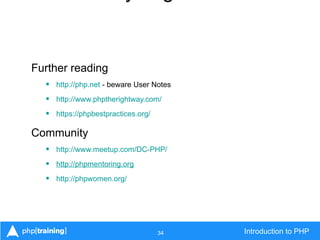
Further reading
• http://php.net - beware User Notes
• http://www.phptherightway.com/
• https://phpbestpractices.org/
Community
• http://www.meetup.com/DC-PHP/
• http://phpmentoring.org
• http://phpwomen.org/
35 Introduction to PHP
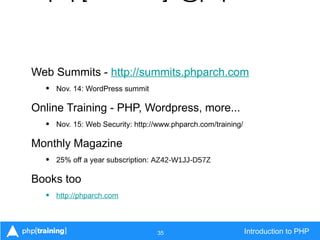
Web Summits - http://summits.phparch.com
• Nov. 14: WordPress summit
Online Training - PHP, Wordpress, more...
• Nov. 15: Web Security: http://www.phparch.com/training/
Monthly Magazine
• 25% off a year subscription: AZ42-W1JJ-D57Z
Books too
• http://phparch.com
36 Introduction to PHP
Hands on exercise
1. Create a webpage where users can enter a
search term.
2. Take the search term and query the Flickr API to
find matching images.
• API KEY: '2440cff21ebfb3a866bb5057bd123a3'
3. Display images to the user.
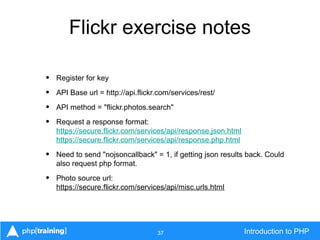
37 Introduction to PHP
Flickr exercise notes
• Register for key
• API Base url = http://api.flickr.com/services/rest/
• API method = "flickr.photos.search"
• Request a response format:
https://secure.flickr.com/services/api/response.json.html
https://secure.flickr.com/services/api/response.php.html
• Need to send "nojsoncallback" = 1, if getting json results back. Could
also request php format.
• Photo source url:
https://secure.flickr.com/services/api/misc.urls.html

Intro to PHP

  • 1.
    Introduction to PHP October9, 2013 Oscar Merida & Sandy Smith
  • 2.
    2 Introduction toPHP In the beginning "Personal Home Page" - Perl PHP/FI - written in C, • v1 - released 1995 • v2 - released 1997 PHP3 - "PHP: Hypertext Processor" • Rewritten Parser, launched 1998 PHP4 • Introduces basic OOP, May 2000
  • 3.
    3 Introduction toPHP PHP today 5.0 • Public/private/protected class methods & propertiesExceptions 5.1 • PDO: common database interface PDO: common database interface 5.2 • DateTime classes DateTime classes 5.3 • NamespacesLambda/Anonymous functions NamespacesLambda/Anonymous functions 5.4 • TraitsShort array syntax [ ] TraitsShort array syntax [ ] 5.5 • GeneratorsNative password hashing GeneratorsNative password hashing
  • 4.
    4 Introduction toPHP Easy (and cheap) to deploy • Low barrier to entry C-like syntax Built for web-scripting • Makes cookies, server, request info available easily. • Handle form input directly Duck-typing • "If it walks, swims, quacks like a duck..." Inline PHP inside of HTML
  • 5.
    5 Introduction toPHP Not designed • Inconsistent function signatures No benevolent dictator, fragmented community Poor & insecure early coding practices Servers may configure it differently Duck-typing Inline PHP inside of HTML
  • 6.
    6 Introduction toPHP PHP interpreter works within a web server. • Files matching configure file extensions are parsed. • Usually its ".php" Opening and closing tags indicate code to be executed • Opening tag: "<?php" • Closing tag: "?>" is optional if your file is all PHP • Short echo tag "<?= $name ?>" Can mix PHP and HTML in same file.
  • 7.
    7 Introduction toPHP <?php // Opening tags tell the php engine to compile the code // assigning some strings $title = "Example"; $message = "Hello World"; // output an HTML fragment ?> <h1><?= $title ?></h1> <p><? echo $message ?>. Today's is <?= date('Y-m-d') ?></p>
  • 8.
    8 Introduction toPHP Constants Constants hold values that cannot be changed and can be accessed globally. By convention, they are uppercase. <?php define("DELAY", 60); sleep(DELAY);
  • 9.
    9 Introduction toPHP Variables Starts with a dollar sign ($) Alpha numeric names, starts with a letter or underscore • $total • $_max • $first_name • $address_2 • $is_parsed
  • 10.
    10 Introduction toPHP PHP populates "Super-global" arrays. Don't trust user input - Filter on Input/Escape on Output • $GLOBALS • $_SERVER • $_COOKIES • $_SESSION • $_POST / $_GET / $_REQUEST • $_FILES • Full list: http://www.php.net/manual/en/reserved.variables.php
  • 11.
    11 Introduction toPHP Single Quotes $color = 'Green'; Double Quotes // outputs Green Eggs and Ham $food = "$color Eggs and Ham"; echo $food;
  • 12.
    12 Introduction toPHP Basic String Manipulation Concatenate: $color = 'Yellow' . '+' . 'Blue'; Contains: Yellow+Blue Concatenate variables: $color .= ' make Green'; // contains Yellow+Blue make Green
  • 13.
    13 Introduction toPHP A variable that is TRUE or FALSE • $is_parsed = FALSE; False equivalents • The numbers 0 or 0.0 • Empty strings "" and "0" • Empty arrays • NULL value
  • 14.
    14 Introduction toPHP Integers • Whole numbers, positive or negative • $max = 100 • $height = -123 Floats (or doubles) • Numbers with a fractional component, positive or negative • $book_price = 49.99 • $distance = 1.2e4
  • 15.
    15 Introduction toPHP Basic Math Integers • Addition: echo 1 + 1; // 2 • Subtraction: echo 2 - 1; // 2 • Multiplication: echo 1 * 1; // 1 • Division: echo 1 / 0; // DIVIDE BY ZERO ERROR • Modulus: echo 5 % 2; // 1 (5 / 2 = 2 with 1 left over; modulus is the left over amount)
  • 16.
    16 Introduction toPHP Types - Arrays Numerically indexed, starting at 0 $zoo = array('Lion', 'Tiger', 'Bear'); echo $zoo[0]; // outputs Lion Elements within an array can be any type. $bag = [5, 3.2, 'Banana']; echo $bag[2]; // outputs 'Banana'
  • 17.
    17 Introduction toPHP Like plain arrays, but specify keys and values. Keys can be strings or integers. // short array syntax $address = ['city' => 'Fairfax', 'state' => 'VA']; // adding a new key, value pair $address['country'] = 'United States';
  • 18.
    18 Introduction toPHP Flow Control - IF/ELSE - - <?php if ($speed == 88) { echo "We're going back to the future!"; } elseif ($speed > 50) { echo "Almost there, keep accelerating."; } else { echo "Please press the accelerator"; }
  • 19.
    19 Introduction toPHP Flow Control - Switch <?php switch ($color) { case "blue": $turtle = "Leonardo"; break; case "orange": $turtle = "Michelangelo"; break; case "purple": $turtle = "Donatello"; break; case "red": $turtle = "Raphael"; break; default: $turtle = "Unknown";
  • 20.
    20 Introduction toPHP For Loop Basic loop, specify starting & ending conditions and an increment. for ($i = 1; $i < 4; $i++) { echo $i * 2 . "<br>"; } Output: 2 4 6
  • 21.
    21 Introduction toPHP Foreach loop Useful for traversing associative arrays and using keys & values within the loop. $zoo = ["Lions" => 3, "Tigers" => 2, "Bears" => 5]; foreach ($zoo as $animal => $count) { echo $animal . ": " . $count . "<br>"; } Output: Lions: 3 Tigers: 2 Bears: 5
  • 22.
    22 Introduction toPHP While loop Execute while a condition is TRUE. $x = 'PHP'; while (strlen($x) < 10) { $x = $x . $x; echo $x; } Output: PHPPHP PHPPHPPHPPHP
  • 23.
    23 Introduction toPHP FunctionsMost basic reusable block of code. • Name follows same rules as variables. • Can accept zero or more arguments. • Can only return a single value. <?php function largest($a, $b) { if ($a > $b) { return $a; } return $b; } echo largest(7, 23); // outputs 23 echo largest(120.2, -15); // outputs 120.2
  • 24.
    24 Introduction toPHP Objects Objects can have properties and methods that act on those properties. <?php $student = new StdClass; $student->name="Alex"; $student->email="alex@example.com"; $student->graduation_year = 2010; echo $student->name . ' - ' . $student->email;
  • 25.
    25 Introduction toPHP Reusing PHP scripts Can load another PHP script in your current script. The code in the included file inherits your current variable scope. <?php // sets $year, $author from a file in same directory include(__DIR__ . "/copyright.php"); ?> <p>&copy;<?= $year; ?> <?= $author ?>
  • 26.
    26 Introduction toPHP Include versus Requires Four ways to load another script • include("lib/foo.php"); Loads the file, script continues if file is not found. • include_once("lib/foo.php"); Loads the file if it hasn't been loaded previously, script continues if file is not found. Good for data that should only be loaded once • require("lib/foo.php"); Loads the file, triggers fatal error if file not found. Good for critical data. • require_once("lib/foo.php"); Loads the file if it hasn't been loaded already, triggers fatal error if file not found. Good for function/class definitions.
  • 27.
    27 Introduction toPHP Worst Practices If you learn nothing else today... • Don't trust user input, filter input & sanitize output. • Don't use global scope in your functions - http://en.eikipedia.org/wiki/Global_variable • Don't suppress error output with @. • Don't use eval statement. • Don't use "or die()" to handle errors. • Don't use ereg_*, mysql_* functions (or other deprecated functions)
  • 28.
    28 Introduction toPHP Handling form input <input type="text" name="name" placeholder="Your Name" required="required" /> <input type="email" name="email" placeholder="Your e-mail" required="required" /> <p><b>Check each animal to visit at the zoo:</b></p> <label><input type="checkbox" name="animals[]" value="lions" />Lions</label> <label><input type="checkbox" name="animals[]" value="tigers" />Tigers</label> <label><input type="checkbox" name="animals[]" value="bears" />Bears</label> <label><input type="checkbox" name="animals[]" value="zebras" />Zebras</label> <label><input type="checkbox" name="animals[]" value="monkeys" />Monkeys</label> <div><input type="submit" value="Save" /></div> </form>
  • 29.
    29 Introduction toPHP Handling form input <?php // sanitize incoming name and email $name = filter_var($_POST['name'], FILTER_SANITIZE_STRING); $email = filter_var($_POST['email'], FILTER_SANITIZE_EMAIL); if (!filter_var($email, FILTER_VALIDATE_EMAIL)) { trigger_error('Invalid email address', E_USER_ERROR); }
  • 30.
    30 Introduction toPHP Handling form input // ensure animal options are valid $valid = ['lions', 'tigers', 'bears', 'zebras', 'monkeys']; // Filter by looping through the array $animals = []; foreach ($_POST['animals'] as $test) { if (in_array($test, $valid)) { array_push($animals, $test); } } // OR filter with an array_* function, // keep the ones in common $animals = array_intersect($_POST['animals'], $valid);
  • 31.
    31 Introduction toPHP Making an HTTP request <?php // get the weather based on a city name // name is supplied via query string parameter "city" $city = null; if (isset($_GET['city'])) { $city = filter_var($_GET['city'], FILTER_SANITIZE_STRING); } if (empty($city)) { trigger_error('City must be specified', E_USER_ERROR); } // build URL to query weather $params = ['q' => $city ]; $url = 'http://api.openweathermap.org/data/2.5/weather'?' . http_build_query($params); // make the request and decode the response, assumes allow_url_fopen is enabled if ($result = file_get_contents($url)) { $weather = json_decode($result); var_dump($weather); }
  • 32.
    32 Introduction toPHP Making an HTTP request stdClass Object ( [coord] => stdClass Object ( [lon] => -77.031997680664 [lat] => 38.890399932861 ) [sys] => stdClass Object ( [country] => United States of America [sunrise] => 1378723498 [sunset] => 1378769117 ) [weather] => Array ( [0] => stdClass Object ( [id] => 802 [main] => Clouds [description] => scattered clouds [icon] => 03d ) ) [base] => gdps stations [main] => stdClass Object ( [temp] => 295.46 [humidity] => 63 [pressure] => 1021 [temp_min] => 293.71 [temp_max] => 297.15 ) [wind] => stdClass Object ( [speed] => 1.54 [gust] => 1.54 [deg] => 360 ) [clouds] => stdClass Object ( [all] => 32 ) [dt] => 1378743982 [id] => 4140963 [name] => Washington [cod] => 200 )
  • 33.
    33 Introduction toPHP Output a result set <?php // $dbh is a connection to our database $sth = $dbh->prepare("SELECT name, email, room, phone, fax, photo FROM employees"); $sth->execute(); // Return next row as an array indexed by column name while ($row = $sth->fetch(PDO::FETCH_ASSOC)) { include('card.php'); } card.php: <dl class="staff"> <dt>Name</dt> <dd><?= $row['name'] ?></dd> <dt>E-mail</dt> <dd><?= $row['email'] ?></dd> <dt>Room</dt> <dd><?= $row['room'] ?></dd> <dt>Phone</dt> <dd><?= $row['phone'] ?></dd> <dt>Fax</dt> <dd><?= (!empty($row['fax']) ? $row['fax'] : '-' ?></dd> <dt>Photo</dt> <img src="/images/staff/<?= $row['photo'] ?>" alt="<?= $row['name'] ?>/> </dl>
  • 34.
    34 Introduction toPHP Further reading • http://php.net - beware User Notes • http://www.phptherightway.com/ • https://phpbestpractices.org/ Community • http://www.meetup.com/DC-PHP/ • http://phpmentoring.org • http://phpwomen.org/
  • 35.
    35 Introduction toPHP Web Summits - http://summits.phparch.com • Nov. 14: WordPress summit Online Training - PHP, Wordpress, more... • Nov. 15: Web Security: http://www.phparch.com/training/ Monthly Magazine • 25% off a year subscription: AZ42-W1JJ-D57Z Books too • http://phparch.com
  • 36.
    36 Introduction toPHP Hands on exercise 1. Create a webpage where users can enter a search term. 2. Take the search term and query the Flickr API to find matching images. • API KEY: '2440cff21ebfb3a866bb5057bd123a3' 3. Display images to the user.
  • 37.
    37 Introduction toPHP Flickr exercise notes • Register for key • API Base url = http://api.flickr.com/services/rest/ • API method = "flickr.photos.search" • Request a response format: https://secure.flickr.com/services/api/response.json.html https://secure.flickr.com/services/api/response.php.html • Need to send "nojsoncallback" = 1, if getting json results back. Could also request php format. • Photo source url: https://secure.flickr.com/services/api/misc.urls.html