






Researching on the Internet You  can  get there from here!
In this class we will: Review Internet Terminology Explore Search Engines Use Search Techniques But first….
Review Internet Terminology
Internet Terminology List URL Link/ Hyperlink Browser Window Address Bar Web Page Web Site Domain Search Engine Boolean Search
Search Techniques Lab
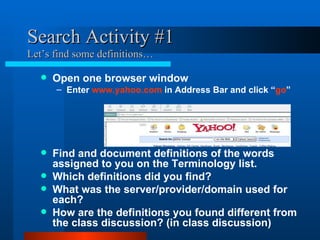
Search Activity #1 Let’s find some definitions… Open one browser window Enter  www.yahoo.com  in Address Bar and click “ go ” Find and document definitions of the words assigned to you on the Terminology list. Which definitions did you find? What was the server/provider/domain used for each? How are the definitions you found different from the class discussion? (in class discussion)
Search Engines
Why Use a Search Engine? Find definitions Research topics ?
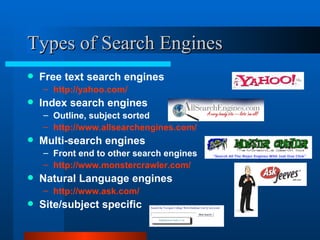
Types of Search Engines Free text search engines http://yahoo.com/ Index search engines  Outline, subject sorted http://www.allsearchengines.com/ Multi-search engines Front end to other search engines http://www.monstercrawler.com/ Natural Language engines  http://www.ask.com/ Site/subject specific
A Sampling of Search Engines Metacrawler http://www.metacrawler.com/ Google http://www.google.com/ Yahoo http://dir.yahoo.com/ About.com http://about.com/ Teoma http://www.teoma.com/
Search Strategies Think wide and narrow down Try not to be too limiting at first Exceptions to this recommendation? Start with one or two words or phrases add as needed to focus results  ?
Limiting your search To a single site  site:prescottaz.com classifieds To a web domain site:edu  Yavapai  Yavapai  site:edu   OR  site:gov To page title, URL, etc. By file format filetype:pdf   Use commands or  “Advanced Search” Table of search engines lists all options
Tips for the Best Results from Search Engines Match words in pages  Be as specific as you can search on distinctive words employment, job search put “phrases in quotes”   “ legal assistant” scan your question for good search terms Where can I  find  a  job  opening as a ( ****** )?
Search Techniques Lab
Search Activity #2 Check out the want ads… Enter  “ www.prescottaz.com  ” Find the employment section  (hint: look for the Classified link in the left frame, then “browse all”) How many total listings? How many listings for Admin - Professional? What is the largest category? What is the smallest category? What position does the Salvation Army want to fill?
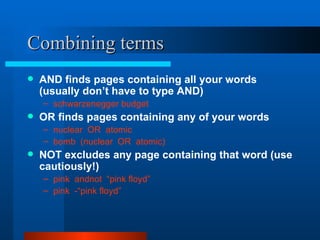
Combining terms AND finds pages containing all your words (usually don’t have to type AND) schwarzenegger budget   OR finds pages containing any of your words nuclear  OR  atomic bomb  (nuclear  OR  atomic)   NOT excludes any page containing that word (use cautiously!) pink  andnot  “pink floyd” pink  -“pink floyd”
Search Techniques Lab
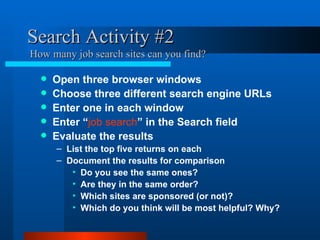
Search Activity #2  How many job search sites can you find? Open three browser windows Choose three different search engine URLs Enter one in each window Enter “ job search ” in the Search field Evaluate the results List the top five returns on each Document the results for comparison Do you see the same ones?  Are they in the same order?  Which sites are sponsored (or not)? Which do you think will be most helpful? Why?
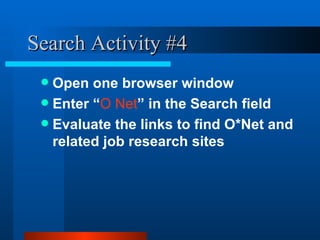
Search Activity #4 Open one browser window Enter “ O Net ” in the Search field Evaluate the links to find O*Net and related job research sites
In this class we: Reviewed Internet Terminology Explored Search Engines Experimented with Search Techniques
Where to get help http://www2.yc.edu/content/careerskills/  Contact Us: 717.7920 (in Yavapai County) - or - 1.877.772.5701 ext. 7920
Wrap up Questions?
Congratulations!
Appendix
Definition List use this page to record definitions of each word URL: Link/HyperLink: Browser Window: Address Bar: Web Page: Web Site: Domain: Search Engine: Boolean:
Search Engines Reference for search activities Metacrawler http://www.metacrawler.com/ Google http://www.google.com/ Yahoo http://dir.yahoo.com/ About.com http://about.com/ Teoma http://www.teoma.com/ Yahoo http://yahoo.com/ AllSearch http://www.allsearchengines.com/ MonsterCrawler http://www.monstercrawler.com/ AskJeeves  http://www.ask.com/
Definitions URL- Universal Resource Locator Link/HyperLink- (computing) an instruction that connects one part of a program or an element on a list to another program or list Browser Window- The window on your screen in which the browser displays its information. One browser may have several windows "open" at once. You can click between them by clicking on the taskbar.  Address Bar- Displays URL for current Web page, and allows entry of a URL to open in the document window. Web Page- A document written in HTML that can be accessed on the Internet. Every Web page has a unique address called a URL. Web pages can contain text, graphics, and hyperlinks to other web pages and files.  Web Site- A collection of "pages" or files linked together and available on the World Wide Web. Web sites are provided by companies, organizations and individuals.  Domain- Segment of an address that specifies an organization, its type, or its country of origin. Search Engine- A tool that enables users to locate information on the World Wide Web. Search engines use keywords entered by users to find Web sites which contain the information sought. Some search engines are specifically designed to find Web sites intended for children.  Boolean Search - A search allowing the inclusion or exclusion of documents containing certain words through the use of operators such as AND, NOT and OR.
URL Universal Resource Locator
Browser Window The window on your screen in which the browser displays its information. One browser may have several windows "open" at once. You can click between them by clicking on the taskbar.
Address Bar  Displays URL for current Web page, and allows entry of a URL to open in the document window.
Link/HyperLink (computing) an instruction that connects one part of a program or an element on a list to another program or list
Web Page A document written in HTML that can be accessed on the Internet. Every Web page has a unique address called a URL. Web pages can contain text, graphics, and hyperlinks to other web pages and files.
Web Site A collection of "pages" or files linked together and available on the World Wide Web. Web sites are provided by companies, organizations and individuals.
Search Engine A tool that enables users to locate information on the World Wide Web. Search engines use keywords entered by users to find Web sites which contain the information sought. Some search engines are specifically designed to find Web sites intended for children
Domain Segment of an address that specifies an organization, its type, or its country of origin.
Boolean Search A search allowing the inclusion or exclusion of documents containing certain words through the use of operators such as AND, NOT and OR.
References PPT download site http://www.geocities.com/lindsayhenning/CareerSkills.ppt Barker, J. and Kupersmith, J. (2004). Spring.  Research-Quality Web Searching.  In The Teaching Library UC Berkeley. Retrieved on November 24, 2004 from  http://www.lib.berkeley.edu/TeachingLib/Guides/Internet/2004-ResearchQualitySearching.ppt  in ( http://www.lib.berkeley.edu/TeachingLib/Guides/Internet/Handouts.html ) Bradley, P. (2003. February 25).  Comparing Search Engines .  Retrieved on November 26, 2004 from  http://www.philb.com/compare.htm
Author Information Lindsay A Henning 1700 E. Verde Ranch Rd Paulden, AZ  86334 928.583.0588 [email_address]

Internet Search

  • 1.
    Researching on theInternet You can get there from here!
  • 2.
    In this classwe will: Review Internet Terminology Explore Search Engines Use Search Techniques But first….
  • 3.
  • 4.
    Internet Terminology ListURL Link/ Hyperlink Browser Window Address Bar Web Page Web Site Domain Search Engine Boolean Search
  • 5.
  • 6.
    Search Activity #1Let’s find some definitions… Open one browser window Enter www.yahoo.com in Address Bar and click “ go ” Find and document definitions of the words assigned to you on the Terminology list. Which definitions did you find? What was the server/provider/domain used for each? How are the definitions you found different from the class discussion? (in class discussion)
  • 7.
  • 8.
    Why Use aSearch Engine? Find definitions Research topics ?
  • 9.
    Types of SearchEngines Free text search engines http://yahoo.com/ Index search engines Outline, subject sorted http://www.allsearchengines.com/ Multi-search engines Front end to other search engines http://www.monstercrawler.com/ Natural Language engines http://www.ask.com/ Site/subject specific
  • 10.
    A Sampling ofSearch Engines Metacrawler http://www.metacrawler.com/ Google http://www.google.com/ Yahoo http://dir.yahoo.com/ About.com http://about.com/ Teoma http://www.teoma.com/
  • 11.
    Search Strategies Thinkwide and narrow down Try not to be too limiting at first Exceptions to this recommendation? Start with one or two words or phrases add as needed to focus results ?
  • 12.
    Limiting your searchTo a single site site:prescottaz.com classifieds To a web domain site:edu Yavapai Yavapai site:edu OR site:gov To page title, URL, etc. By file format filetype:pdf Use commands or “Advanced Search” Table of search engines lists all options
  • 13.
    Tips for theBest Results from Search Engines Match words in pages Be as specific as you can search on distinctive words employment, job search put “phrases in quotes” “ legal assistant” scan your question for good search terms Where can I find a job opening as a ( ****** )?
  • 14.
  • 15.
    Search Activity #2Check out the want ads… Enter “ www.prescottaz.com ” Find the employment section (hint: look for the Classified link in the left frame, then “browse all”) How many total listings? How many listings for Admin - Professional? What is the largest category? What is the smallest category? What position does the Salvation Army want to fill?
  • 16.
    Combining terms ANDfinds pages containing all your words (usually don’t have to type AND) schwarzenegger budget OR finds pages containing any of your words nuclear OR atomic bomb (nuclear OR atomic) NOT excludes any page containing that word (use cautiously!) pink andnot “pink floyd” pink -“pink floyd”
  • 17.
  • 18.
    Search Activity #2 How many job search sites can you find? Open three browser windows Choose three different search engine URLs Enter one in each window Enter “ job search ” in the Search field Evaluate the results List the top five returns on each Document the results for comparison Do you see the same ones? Are they in the same order? Which sites are sponsored (or not)? Which do you think will be most helpful? Why?
  • 19.
    Search Activity #4Open one browser window Enter “ O Net ” in the Search field Evaluate the links to find O*Net and related job research sites
  • 20.
    In this classwe: Reviewed Internet Terminology Explored Search Engines Experimented with Search Techniques
  • 21.
    Where to gethelp http://www2.yc.edu/content/careerskills/ Contact Us: 717.7920 (in Yavapai County) - or - 1.877.772.5701 ext. 7920
  • 22.
  • 23.
  • 24.
  • 25.
    Definition List usethis page to record definitions of each word URL: Link/HyperLink: Browser Window: Address Bar: Web Page: Web Site: Domain: Search Engine: Boolean:
  • 26.
    Search Engines Referencefor search activities Metacrawler http://www.metacrawler.com/ Google http://www.google.com/ Yahoo http://dir.yahoo.com/ About.com http://about.com/ Teoma http://www.teoma.com/ Yahoo http://yahoo.com/ AllSearch http://www.allsearchengines.com/ MonsterCrawler http://www.monstercrawler.com/ AskJeeves http://www.ask.com/
  • 27.
    Definitions URL- UniversalResource Locator Link/HyperLink- (computing) an instruction that connects one part of a program or an element on a list to another program or list Browser Window- The window on your screen in which the browser displays its information. One browser may have several windows "open" at once. You can click between them by clicking on the taskbar. Address Bar- Displays URL for current Web page, and allows entry of a URL to open in the document window. Web Page- A document written in HTML that can be accessed on the Internet. Every Web page has a unique address called a URL. Web pages can contain text, graphics, and hyperlinks to other web pages and files. Web Site- A collection of "pages" or files linked together and available on the World Wide Web. Web sites are provided by companies, organizations and individuals. Domain- Segment of an address that specifies an organization, its type, or its country of origin. Search Engine- A tool that enables users to locate information on the World Wide Web. Search engines use keywords entered by users to find Web sites which contain the information sought. Some search engines are specifically designed to find Web sites intended for children. Boolean Search - A search allowing the inclusion or exclusion of documents containing certain words through the use of operators such as AND, NOT and OR.
  • 28.
  • 29.
    Browser Window Thewindow on your screen in which the browser displays its information. One browser may have several windows "open" at once. You can click between them by clicking on the taskbar.
  • 30.
    Address Bar Displays URL for current Web page, and allows entry of a URL to open in the document window.
  • 31.
    Link/HyperLink (computing) aninstruction that connects one part of a program or an element on a list to another program or list
  • 32.
    Web Page Adocument written in HTML that can be accessed on the Internet. Every Web page has a unique address called a URL. Web pages can contain text, graphics, and hyperlinks to other web pages and files.
  • 33.
    Web Site Acollection of "pages" or files linked together and available on the World Wide Web. Web sites are provided by companies, organizations and individuals.
  • 34.
    Search Engine Atool that enables users to locate information on the World Wide Web. Search engines use keywords entered by users to find Web sites which contain the information sought. Some search engines are specifically designed to find Web sites intended for children
  • 35.
    Domain Segment ofan address that specifies an organization, its type, or its country of origin.
  • 36.
    Boolean Search Asearch allowing the inclusion or exclusion of documents containing certain words through the use of operators such as AND, NOT and OR.
  • 37.
    References PPT downloadsite http://www.geocities.com/lindsayhenning/CareerSkills.ppt Barker, J. and Kupersmith, J. (2004). Spring. Research-Quality Web Searching. In The Teaching Library UC Berkeley. Retrieved on November 24, 2004 from http://www.lib.berkeley.edu/TeachingLib/Guides/Internet/2004-ResearchQualitySearching.ppt in ( http://www.lib.berkeley.edu/TeachingLib/Guides/Internet/Handouts.html ) Bradley, P. (2003. February 25). Comparing Search Engines . Retrieved on November 26, 2004 from http://www.philb.com/compare.htm
  • 38.
    Author Information LindsayA Henning 1700 E. Verde Ranch Rd Paulden, AZ 86334 928.583.0588 [email_address]

Editor's Notes

  • #4 Some students will know these terms, others won’t. Need to establish a common base of knowledge before beginning class. Go ahead and ask if anyone knows, then regardless of who answers- whether they are correct or not- review the definition for each word.
  • #5 URL - Universal Resource Locator Link/ Hyperlink - (computing) an instruction that connects one part of a program or an element on a list to another program or list Browser Window - The window on your screen in which the browser displays its information. One browser may have several windows "open" at once. You can click between them by clicking on the taskbar. Address Bar - Displays URL for current Web page, and allows entry of a URL to open in the document window. Web Page - A document written in HTML that can be accessed on the Internet. Every Web page has a unique address called a URL. Web pages can contain text, graphics, and hyperlinks to other web pages and files. Web Site - A collection of "pages" or files linked together and available on the World Wide Web. Web sites are provided by companies, organizations and individuals. Domain- Segment of an address that specifies an organization, its type, or its country of origin. Search Engine - A tool that enables users to locate information on the World Wide Web. Search engines use keywords entered by users to find Web sites which contain the information sought. Some search engines are specifically designed to find Web sites intended for children. Boolean Search - A search allowing the inclusion or exclusion of documents (finds) containing certain words through the use of operators such as AND, NOT and OR. Boolean logic refers to the logical relationship among search terms, and is named for the British-born Irish mathematician George Boole.
  • #7 Create two or three person teams so you have at least 4 teams. Assign the list to each team but have two teams starting at the top of the list and the other two start at the bottom. Ask class for one of the words on the list to use as demonstration. “Which one do you want me to look up?” Check for understanding. Then ask class to continue with exercise.
  • #8 Draw 2 large spider webs of search engines intersecting some strands but not others. Name one web Google, the other Yahoo. Draw spider at apex of each web and talk about how search engines work. (Basically, they are programs that are written by people to determine how to send the ‘bots’ (spiders) out into the ‘web’ to capture information at a predetermined interval that is then brought back to its web /company database). Draw large dots on some intersections of the webs and explain that these are the pages common to both search engines’ databases. Point out the strands that don’t intersect and draw large dots, explaining that these are the pages that are unique to that search engine- it was not captured by both…
  • #10 Briefly go to the links to show view of how these engines appear. (Bradley, 2003) Free text search engines- simply type in any term, phrase or word which takes your fancy Index search engines: These engines will guide you through your search by providing you with a series of headings, and subheadings until you finally reach a list of sites. Very useful if you want a broad overview of what is available within a specific subject area, although you are constrained by the classification scheme which is in use, so you may have to go up and down the subject trees a few times until you find exactly what it is that you're after. (example- http://www.allsearchengines.com/) Multi-search engines: These search engines are bolted on front ends to a number of other Internet search engines. Natural Language engines: They take the natural language query, and run searches on those words and other related words Site/subject specific : These are appropriate to either a specific site or to a specific database, and they will only search that specific data. Different search engines rank their results based on different criteria. Some engines will show you the percentage of similarity between your search terms and their results. Others will rank their results based on how many people go to that page. Discuss sponsored vs. non-sponsored links.
  • #11 Who knows these sites? What types do you think they are? Metacrawler; multi-search Google- free text Yahoo- directory About.com- Index Ask.com/Teoma free text Subject- Specific Popularity (Subject-Specific Popularity ranks a site based on the number of same-subject pages that reference it, not just general popularity.)
  • #12 Elicit conversation and input from class
  • #13 Enter site:prescottaz.com classifieds into search window site:edu Yavapai Yavapai site:edu OR site:gov Add filetype:pdf These could be entered at the same time into your search engine
  • #14 Talk about how search engines work on key terms. Example: searching for pink floyd will bring up pages with not only ‘pink floyd’, but also all those that have just ‘pink’ and just ‘floyd’ or any combination. Using quotes tells the search engine that you want pages that contain all the words enclosed in the quotes as one phrase and together.
  • #16 Searching in a site specific search engine Limiting search to one site Analyze results…
  • #17 To use Boolean terms, go to advanced search- look for Boolean search field and enter search criteria there. Review quotes
  • #19 Open 3 browser windows: Start Internet Explorer Go to and then select File--> New Window Repeat Go to and then select File--> New Window without closing any windows You will now have three windows open at the same time Enter 3 different search engine URLs Choose from (or select your own) Metacrawler http://www.metacrawler.com/ Google http://www.google.com/ Yahoo http://dir.yahoo.com/ About.com http://about.com/ Teoma http://www.teoma.com/ Statistics say no search engine has it all: Only about 60% of pages in Google are also in other search engines Only 50% of pages in any search engine database are also found in all others www.searchengineshowdown.com/stats/ Use another large search engine
  • #20 Open 3 browser windows: Start Internet Explorer Go to and then select File--> New Window Repeat Go to and then select File--> New Window without closing any windows You will now have three windows open at the same time Enter 3 different search engine URLs Choose from (or select your own) Metacrawler http://www.metacrawler.com/ Google http://www.google.com/ Yahoo http://dir.yahoo.com/ About.com http://about.com/ Teoma http://www.teoma.com/ Statistics say no search engine has it all: Only about 60% of pages in Google are also in other search engines Only 50% of pages in any search engine database are also found in all others www.searchengineshowdown.com/stats/ Use another large search engine
  • #23 Career Skills Program http://www2.yc.edu/content/careerskills/ Contact Us: 717.7920 (in Yavapai County) - or - 1.877.772.5701 ext. 7920