Ken Lim | Sam Shaik
Systems Integration Architect | Technical Application Architect
Tuesday, October 9th 2018
Integrating Cerner Millennium with surgical
imaging vendors
© Cerner Corporation. All rights reserved.2
Learning objectives
• Evaluate the financial cost benefit and ROI
(physician satisfaction) for using Cerner surgical and
endoscopy imaging solution.
• Determine what the implementation and integration project will
entail, what to anticipate and plan.
• Implement lessons learned from Torrance's project.
© Cerner Corporation. All rights reserved.3
Introduction – Torrance Memorial Medical Center
• Torrance, CA
• 445-bed, non-profit medical center serving South Bay, Peninsula, and Harbor communities
of Los Angeles County for 90+ years.
• Magnet Facility
• Affiliated with Cedars Sinai in 2018
• U.S. News & World Report Best Regional Hospitals
• #21 in California
• #10 in LA metro
• High Performing: 7 Adult Procedures/Conditions.
• HIMMS Level 7
• Early Cerner Millennium Adopter (2001)
• Code Level 2015.01.19
• 2 Surgical Tower Suites (20+ ORs Operational)
2017 Surgical Statistics
Inpatient: 8913
Outpatient: 7860
Total: 16773
© Cerner Corporation. All rights reserved.4
Surgical Imaging
• Intra-procedure pictures into the health record
• Take pictures during the procedure
• Pictures automatically saved to patient’s chart
• Embed to Powernote + Dynamic Documentation
(2015.01.22 or higher; 2018 code level)
• View procedure pictures in PowerChart
• BYOD (digital camera, iPhone, thumb drive, etc.)
• Print in the Operating Room, burning CDs
• Replace printer ink and paper
• HIM scan procedure pictures
© Cerner Corporation. All rights reserved.5
Benefits
• Improve Turnover Time
• Supports the elimination of the need for nurses or physicians to spend time
exporting images and entering patient data by integrating devices.
• Protects Patient Data
• Provides physicians with a system that automatically saves pictures digitally
as part of the patient’s EHR.
• Eliminates BYOD compromised PHI via pictures on personal devices/paper
• Sustain Perioperative Excellence
• Helps eliminate the need for in-room medical grade photo printers.
• Images can be shared with the patient at the bedside from a computer or via
Cerner direct physician to physician or patient by patient portal.
© Cerner Corporation. All rights reserved.6
Stryker SDC / Endoscopic / Surgical in-light camera
© Cerner Corporation. All rights reserved.7
Cerner CareAware MultiMedia Manager
© Cerner Corporation. All rights reserved.8
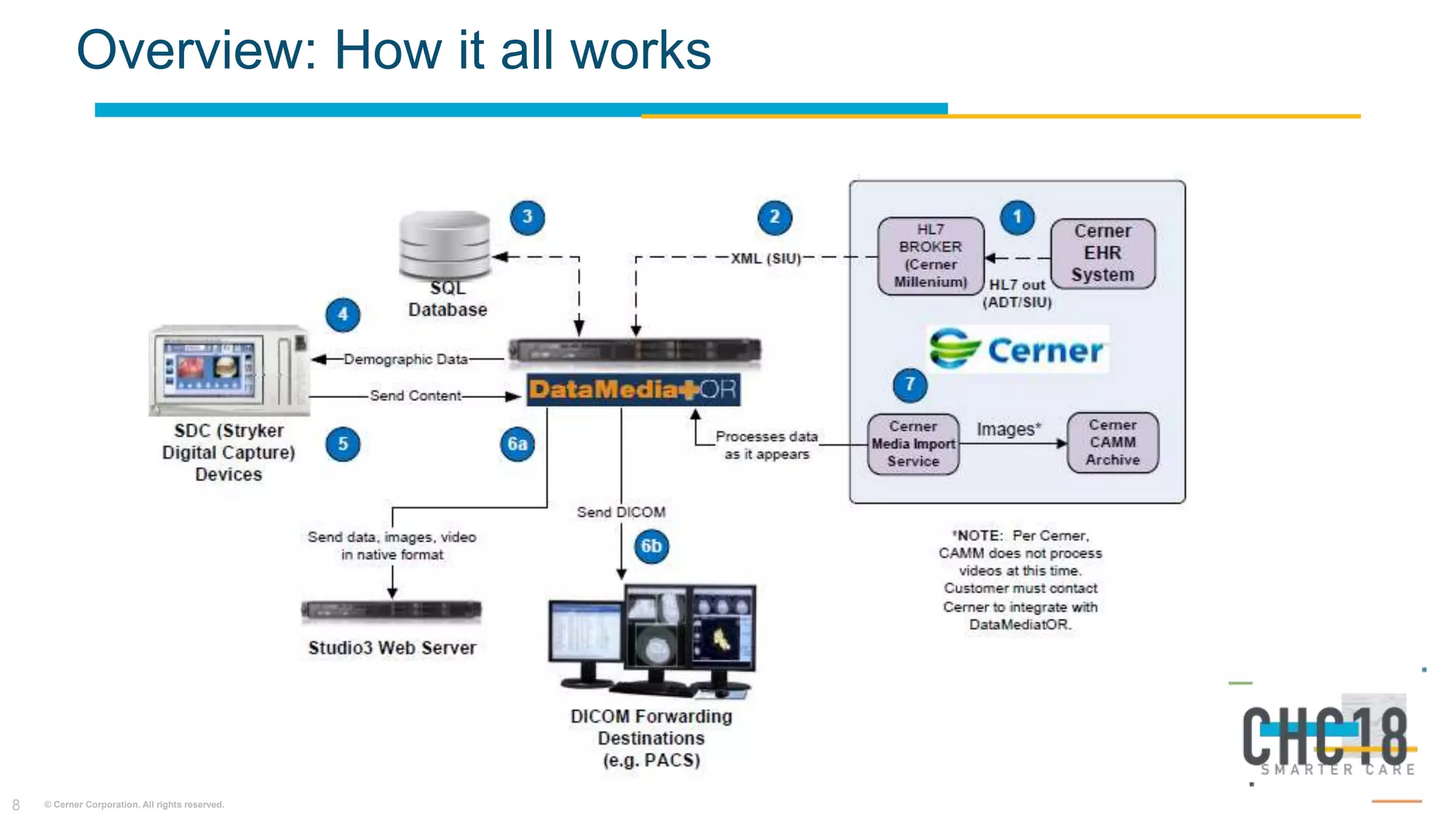
Overview: How it all works
© Cerner Corporation. All rights reserved.9
Cerner media import process
1. Images from DataMediatOR goes to file share directory.
2. Batch prep service run pickups the images and archive the images
in CAMM.
• CWx will configure this build (CDI Batch Prep)
3. Images viewable in Cerner Mutimedia Manager section in
Powerchart
© Cerner Corporation. All rights reserved.10
Ports and protocol diagram
© Cerner Corporation. All rights reserved.11
Scope
Interface to DatamediatOR server.
• HL7 Specs: XML schema review.
• Filter and route ADT A01 (mrn, fin#, case #, OR#, patient type), A08 (A01 updates) message parameters.
Media Import Process
• Configure media import (batchprep) on client VM or CernerWorks VM
• Evaluate image hosting memory bandwidth.
CareAware MultiMedia
• Configure existing CAMM with new “content type”
• Validate storage repository configuration
License Install / SDC + OR Network Validation:
• SDC / OR network validation; IP address, subnet mask, gateway, MAC Address, Multicast IP, cat5 cable inspection.
• SDC License install and production image testing.
Training
• Stryker rep train surgical techs on SDC functionality.
• Clinical informatics train surgeons/circulators on ‘MultiMedia Manager functionality.
Go-Live
© Cerner Corporation. All rights reserved.12
Project timeline
Kick-Off Requirements
•OR Network specs
•Infrastructure creation
(file share, media
import server, Stryker
DatamediatOR
system server)
Build
•Interface build
•CAMM build
•Millennium build if
applicable
Testing Training
•Stryker in-house
training
•Cerner end-user
training
Conversion
•Go Live
• Project Personnel:
• Integration architect / Project manager
• Technical application architect
• Network engineer
• CWx and Stryker project manager, network/systems engineer
• OR Educator / Clinical informatics
• SDC/OR Network
Validation
• Production image
testing hardware
(SDC)/software
(Cerner; Mutimedia
Manager)
© Cerner Corporation. All rights reserved.13
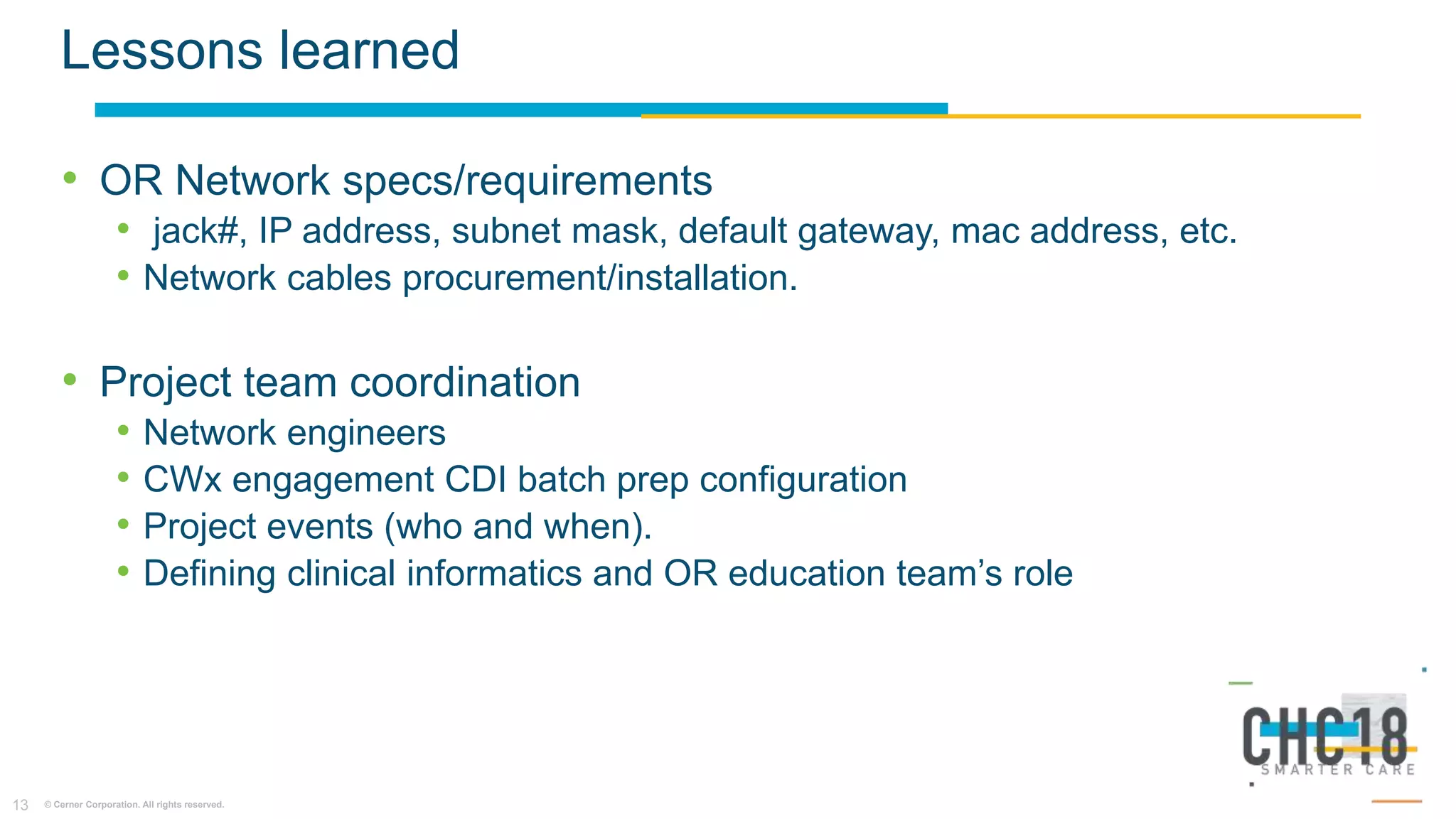
Lessons learned
• OR Network specs/requirements
• jack#, IP address, subnet mask, default gateway, mac address, etc.
• Network cables procurement/installation.
• Project team coordination
• Network engineers
• CWx engagement CDI batch prep configuration
• Project events (who and when).
• Defining clinical informatics and OR education team’s role
Open Forum (Q&A)

Integrating Cerner Millennium w/Stryker surgical imaging system

  • 2.
    Ken Lim |Sam Shaik Systems Integration Architect | Technical Application Architect Tuesday, October 9th 2018 Integrating Cerner Millennium with surgical imaging vendors
  • 3.
    © Cerner Corporation.All rights reserved.2 Learning objectives • Evaluate the financial cost benefit and ROI (physician satisfaction) for using Cerner surgical and endoscopy imaging solution. • Determine what the implementation and integration project will entail, what to anticipate and plan. • Implement lessons learned from Torrance's project.
  • 4.
    © Cerner Corporation.All rights reserved.3 Introduction – Torrance Memorial Medical Center • Torrance, CA • 445-bed, non-profit medical center serving South Bay, Peninsula, and Harbor communities of Los Angeles County for 90+ years. • Magnet Facility • Affiliated with Cedars Sinai in 2018 • U.S. News & World Report Best Regional Hospitals • #21 in California • #10 in LA metro • High Performing: 7 Adult Procedures/Conditions. • HIMMS Level 7 • Early Cerner Millennium Adopter (2001) • Code Level 2015.01.19 • 2 Surgical Tower Suites (20+ ORs Operational) 2017 Surgical Statistics Inpatient: 8913 Outpatient: 7860 Total: 16773
  • 5.
    © Cerner Corporation.All rights reserved.4 Surgical Imaging • Intra-procedure pictures into the health record • Take pictures during the procedure • Pictures automatically saved to patient’s chart • Embed to Powernote + Dynamic Documentation (2015.01.22 or higher; 2018 code level) • View procedure pictures in PowerChart • BYOD (digital camera, iPhone, thumb drive, etc.) • Print in the Operating Room, burning CDs • Replace printer ink and paper • HIM scan procedure pictures
  • 6.
    © Cerner Corporation.All rights reserved.5 Benefits • Improve Turnover Time • Supports the elimination of the need for nurses or physicians to spend time exporting images and entering patient data by integrating devices. • Protects Patient Data • Provides physicians with a system that automatically saves pictures digitally as part of the patient’s EHR. • Eliminates BYOD compromised PHI via pictures on personal devices/paper • Sustain Perioperative Excellence • Helps eliminate the need for in-room medical grade photo printers. • Images can be shared with the patient at the bedside from a computer or via Cerner direct physician to physician or patient by patient portal.
  • 7.
    © Cerner Corporation.All rights reserved.6 Stryker SDC / Endoscopic / Surgical in-light camera
  • 8.
    © Cerner Corporation.All rights reserved.7 Cerner CareAware MultiMedia Manager
  • 9.
    © Cerner Corporation.All rights reserved.8 Overview: How it all works
  • 10.
    © Cerner Corporation.All rights reserved.9 Cerner media import process 1. Images from DataMediatOR goes to file share directory. 2. Batch prep service run pickups the images and archive the images in CAMM. • CWx will configure this build (CDI Batch Prep) 3. Images viewable in Cerner Mutimedia Manager section in Powerchart
  • 11.
    © Cerner Corporation.All rights reserved.10 Ports and protocol diagram
  • 12.
    © Cerner Corporation.All rights reserved.11 Scope Interface to DatamediatOR server. • HL7 Specs: XML schema review. • Filter and route ADT A01 (mrn, fin#, case #, OR#, patient type), A08 (A01 updates) message parameters. Media Import Process • Configure media import (batchprep) on client VM or CernerWorks VM • Evaluate image hosting memory bandwidth. CareAware MultiMedia • Configure existing CAMM with new “content type” • Validate storage repository configuration License Install / SDC + OR Network Validation: • SDC / OR network validation; IP address, subnet mask, gateway, MAC Address, Multicast IP, cat5 cable inspection. • SDC License install and production image testing. Training • Stryker rep train surgical techs on SDC functionality. • Clinical informatics train surgeons/circulators on ‘MultiMedia Manager functionality. Go-Live
  • 13.
    © Cerner Corporation.All rights reserved.12 Project timeline Kick-Off Requirements •OR Network specs •Infrastructure creation (file share, media import server, Stryker DatamediatOR system server) Build •Interface build •CAMM build •Millennium build if applicable Testing Training •Stryker in-house training •Cerner end-user training Conversion •Go Live • Project Personnel: • Integration architect / Project manager • Technical application architect • Network engineer • CWx and Stryker project manager, network/systems engineer • OR Educator / Clinical informatics • SDC/OR Network Validation • Production image testing hardware (SDC)/software (Cerner; Mutimedia Manager)
  • 14.
    © Cerner Corporation.All rights reserved.13 Lessons learned • OR Network specs/requirements • jack#, IP address, subnet mask, default gateway, mac address, etc. • Network cables procurement/installation. • Project team coordination • Network engineers • CWx engagement CDI batch prep configuration • Project events (who and when). • Defining clinical informatics and OR education team’s role
  • 15.