Deborah
Morley Charles
15th
Edition
Understanding
Computers
Copyright 2015 Cengage
Learning
Input and
Output
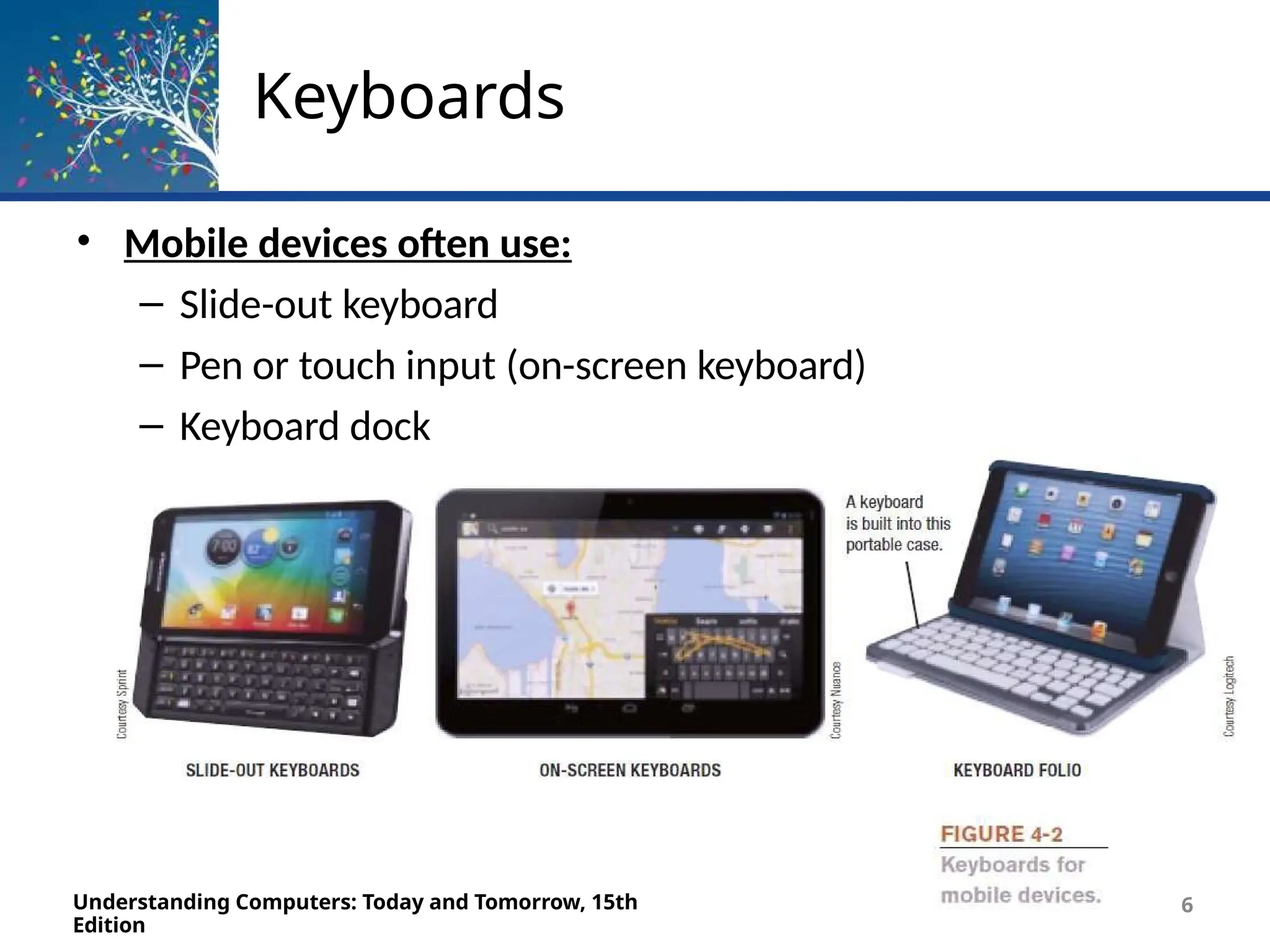
Keyboards
Understanding Computers: Today and Tomorrow, 15th
Edition
4
• An input device used to enter characters at the location
marked by the insertion point or cursor
– Can be wired or wireless
– Typically contains:
• Standard alphanumeric keys
• Numeric keypad
• Function keys
• Delete and Backspace keys
• Control and Alternate keys
• Arrow directional keys and special keys
Keyboards
Understanding Computers: Today and Tomorrow, 15th
Edition
5
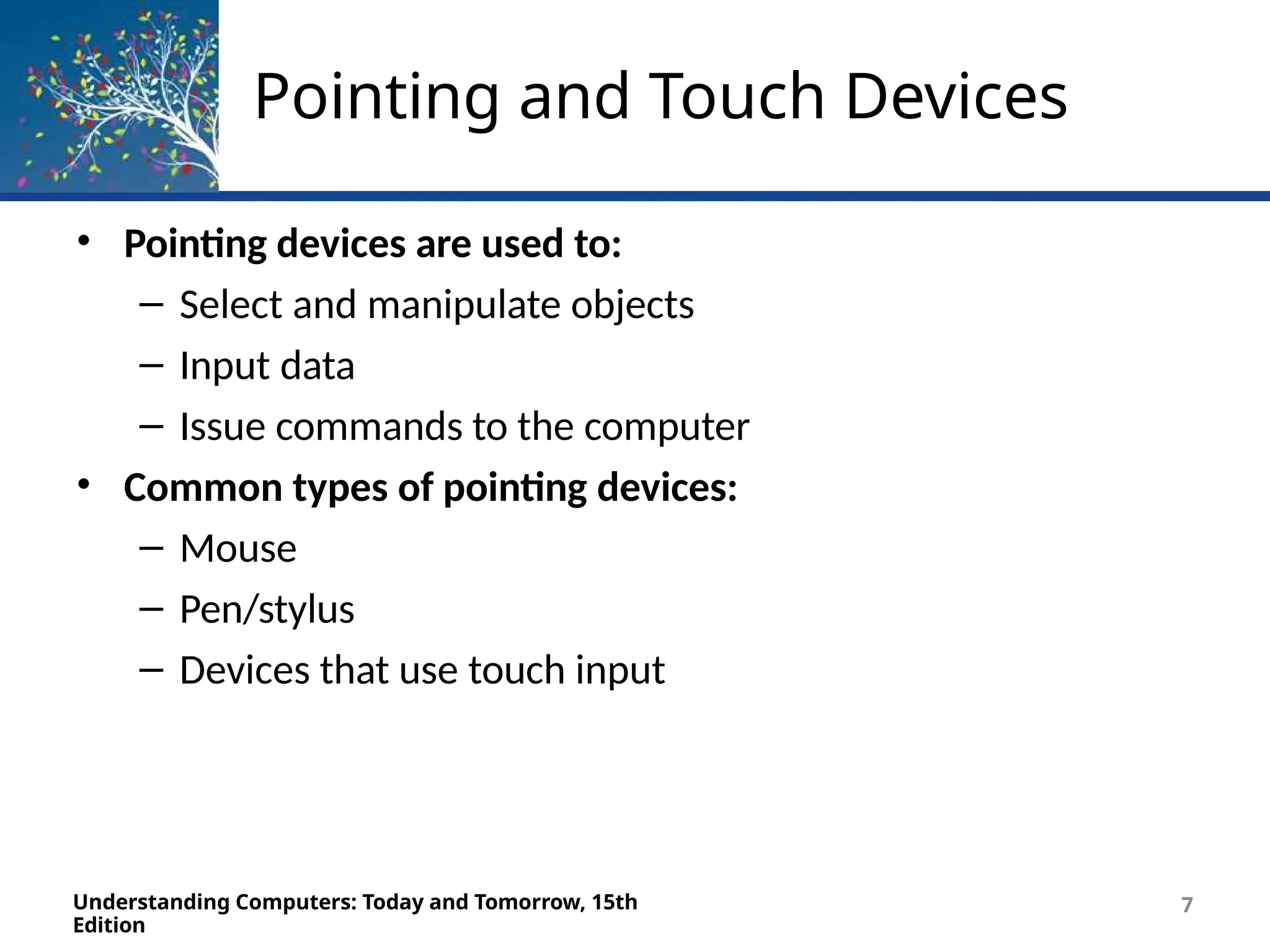
Keyboards
• Mobile devices often use:
– Slide-out keyboard
– Pen or touch input (on-screen keyboard)
– Keyboard dock
Understanding Computers: Today and Tomorrow, 15th
Edition
6
Pointing and Touch Devices
Understanding Computers: Today and Tomorrow, 15th
Edition
7
• Pointing devices are used to:
– Select and manipulate objects
– Input data
– Issue commands to the computer
• Common types of pointing devices:
– Mouse
– Pen/stylus
– Devices that use touch input
Mice
Understanding Computers: Today and Tomorrow, 15th
Edition
8
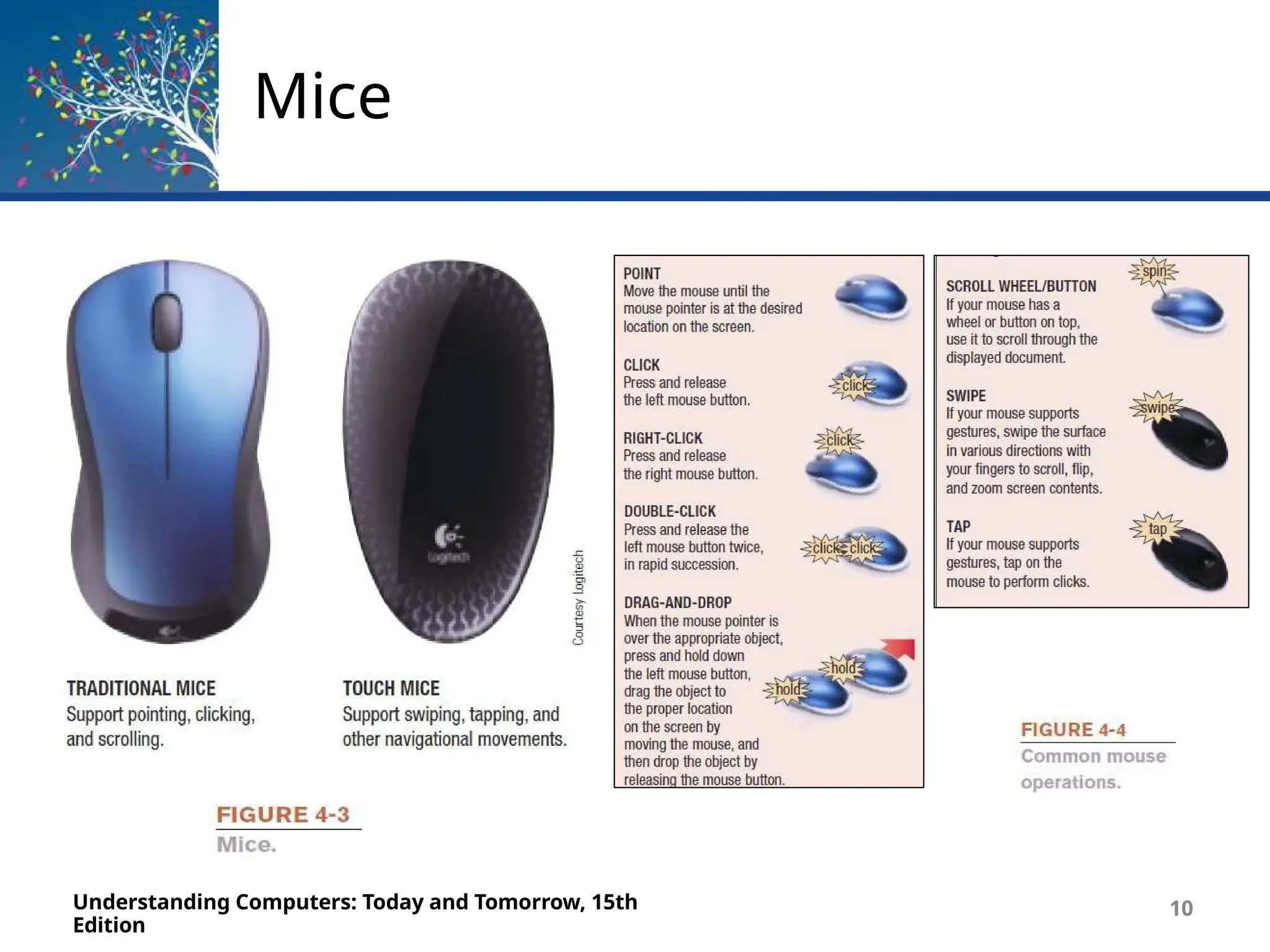
• Mouse
– Common pointing device that the user slides along a flat
surface to move a pointer around the screen and clicks
its buttons to make selections
– Older mechanical mice use a ball
– Touch mice support two-dimensional gestures
Mice
Understanding Computers: Today and Tomorrow, 15th
Edition
10
Pens/Styluses
Understanding Computers: Today and Tomorrow, 15th
Edition
11
• Stylus
– Pen-like device used to draw or write electronically on the
screen
– Also called digital pen, electronic pen, tablet pen
– Pen input is being used for:
• Photography, graphic design, animation
• Industrial design, document processing, and healthcare
applications
• Navigating through a document
• Issuing commands
Pens/Styluses
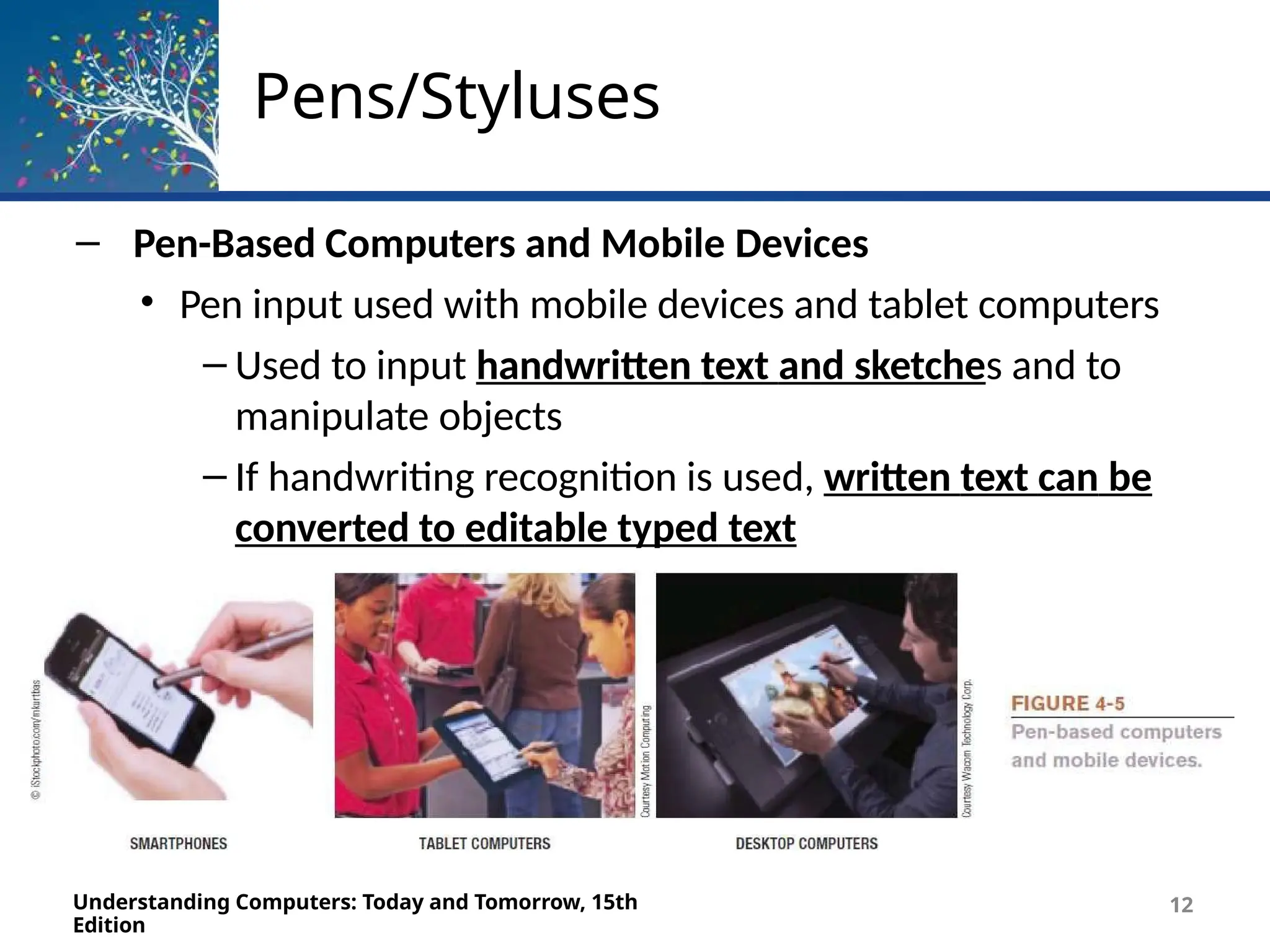
– Pen-Based Computers and Mobile Devices
• Pen input used with mobile devices and tablet computers
– Used to input handwritten text and sketches and to
manipulate objects
– If handwriting recognition is used, written text can be
converted to editable typed text
Understanding Computers: Today and Tomorrow, 15th
Edition
12
Pens/Styluses
Understanding Computers: Today and Tomorrow, 15th
Edition
13
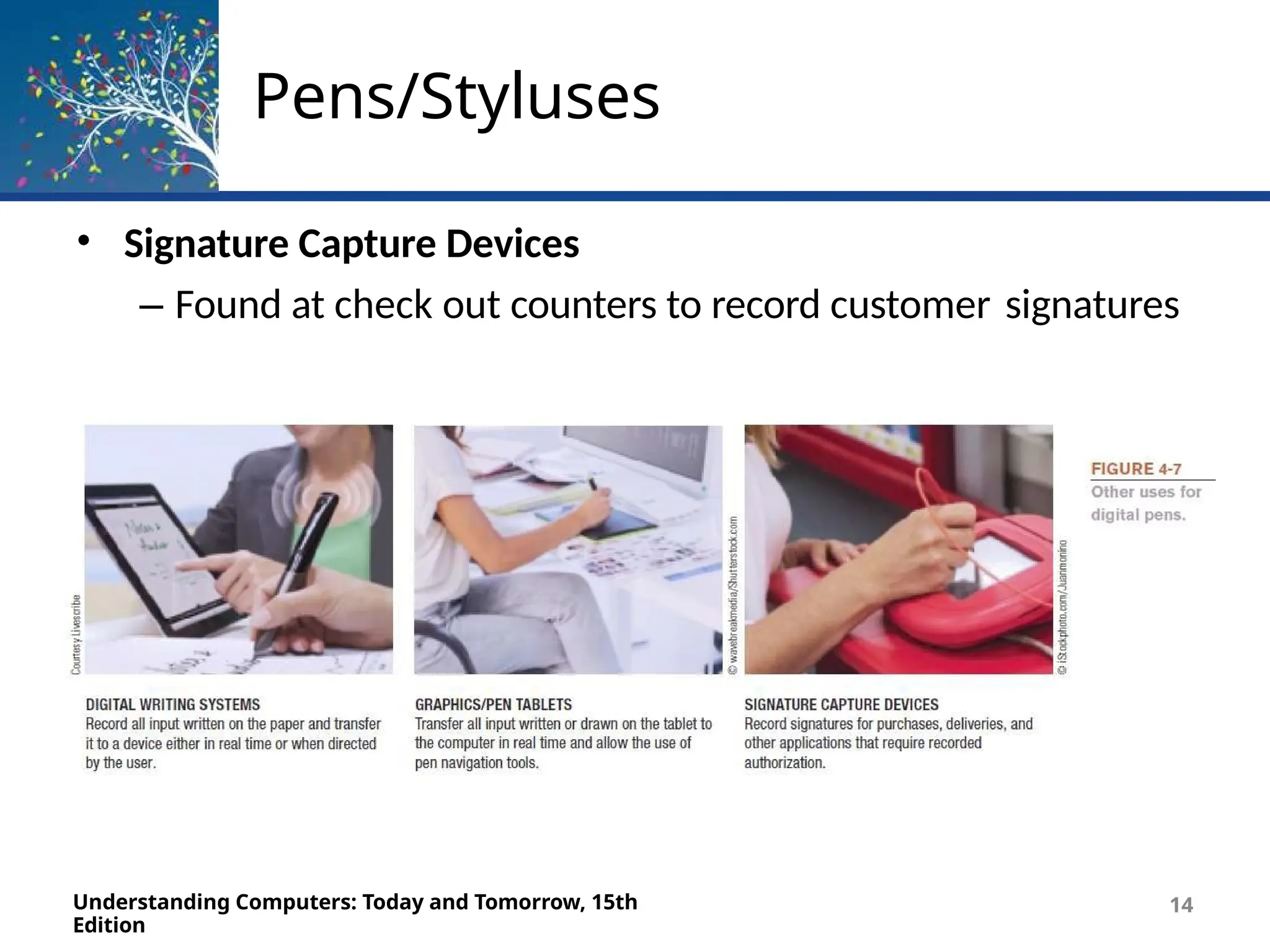
• Digital Writing Systems
– Pen-based systems that capture handwritten input as it
is
being written
– Handwritten input can be transferred to computer
• Graphics Tablets
– Pen tablets or digitizing devices
– Flat, touch sensitive tablet typically connected to
computer using a USB port
Pens/Styluses
• Signature Capture Devices
– Found at check out counters to record customer signatures
Understanding Computers: Today and Tomorrow, 15th
Edition
14
Touch Screens
Understanding Computers: Today and Tomorrow, 15th
Edition
15
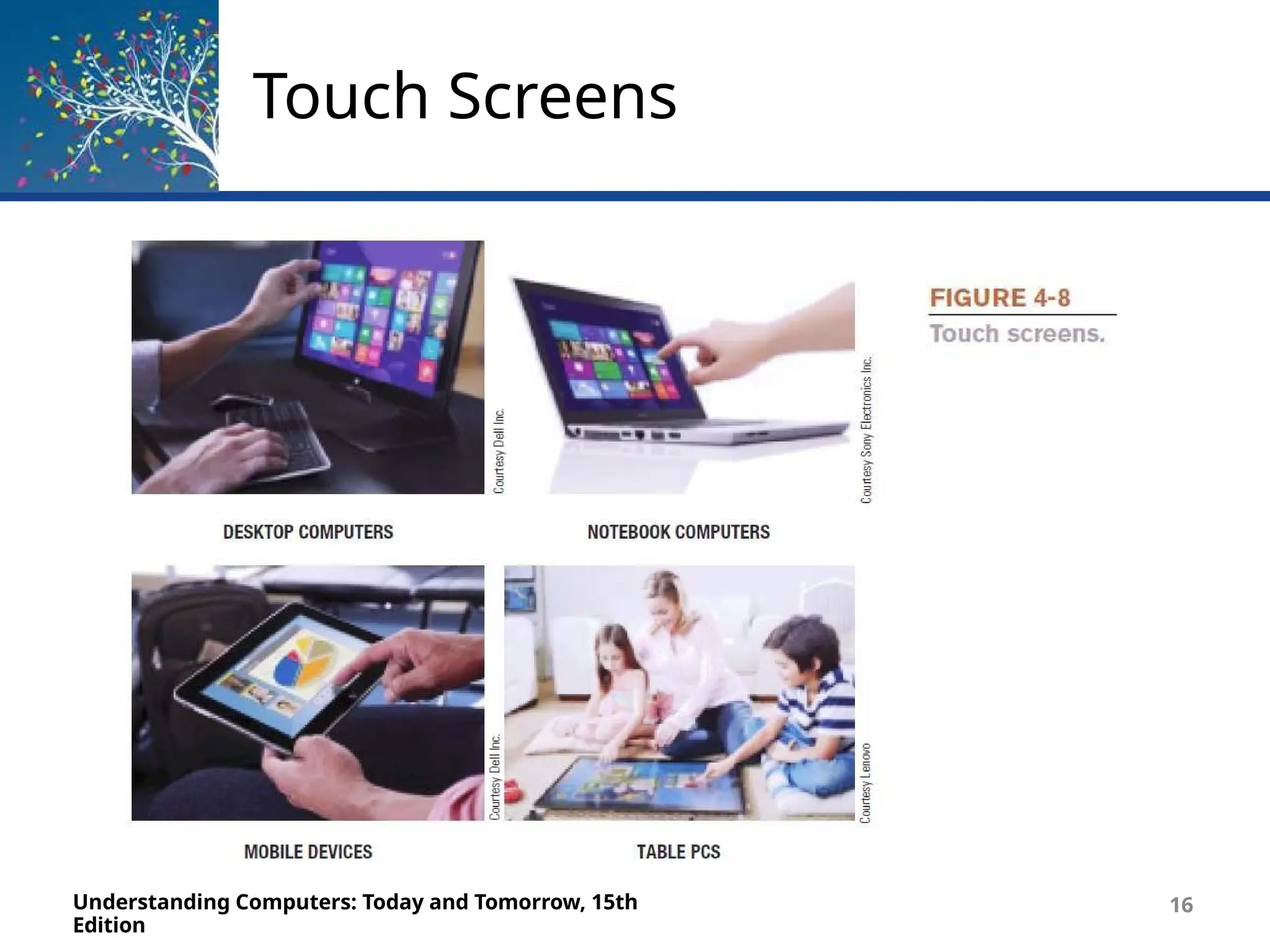
• Touch Screens
– Display devices that are touched with the finger to select
commands or otherwise provide input to the computer
– Common on portable computers, smartphones, and other
mobile devices
– Multi-touch
• Can recognize input from more than one finger at a
time
– Table PC
• Large screen computer either built into a table or
designed to be used on a table
Touch Screens
Understanding Computers: Today and Tomorrow, 15th
Edition
16
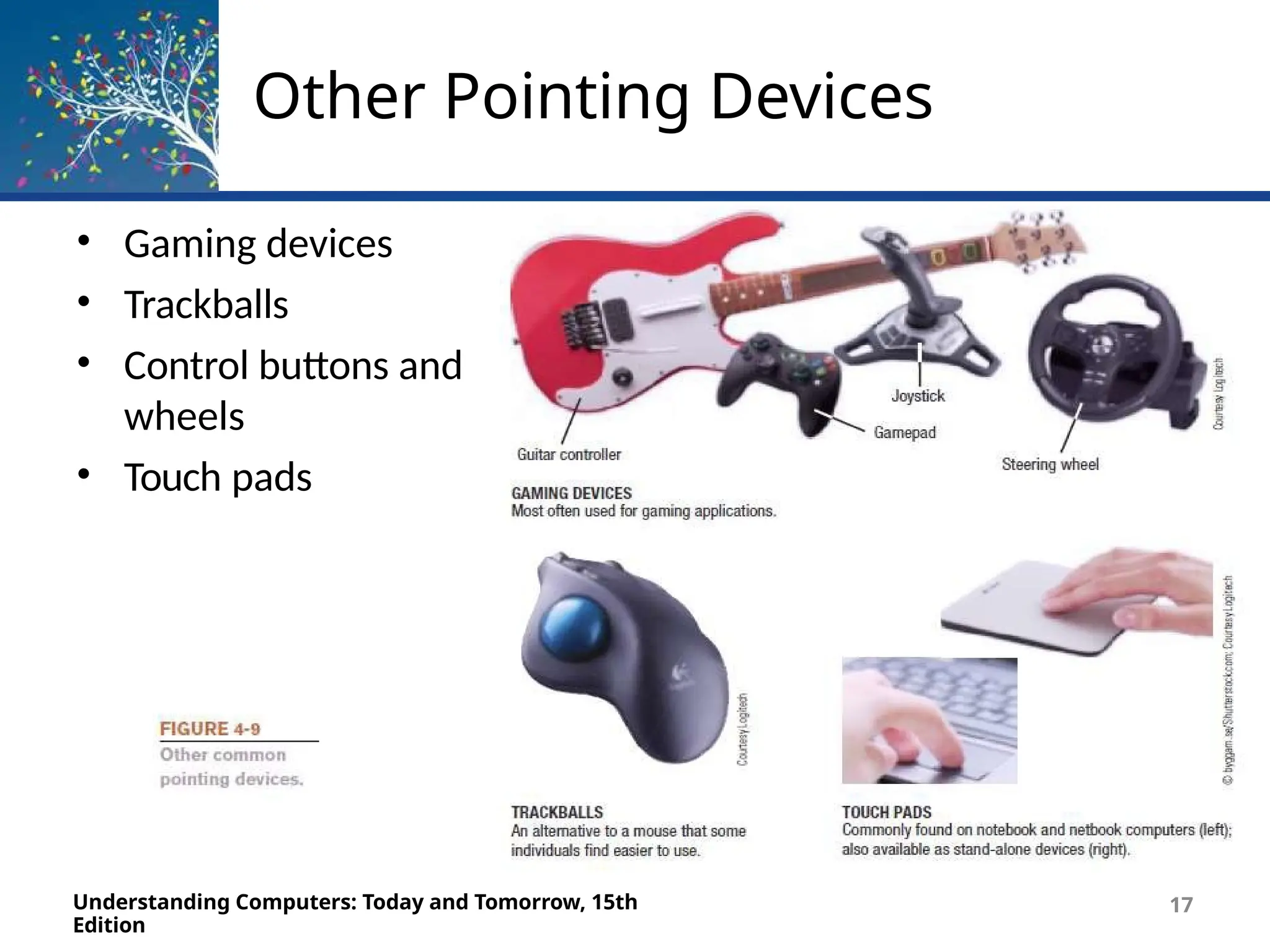
Other Pointing Devices
• Gaming devices
• Trackballs
• Control buttons and
wheels
• Touch pads
Understanding Computers: Today and Tomorrow, 15th
Edition
17
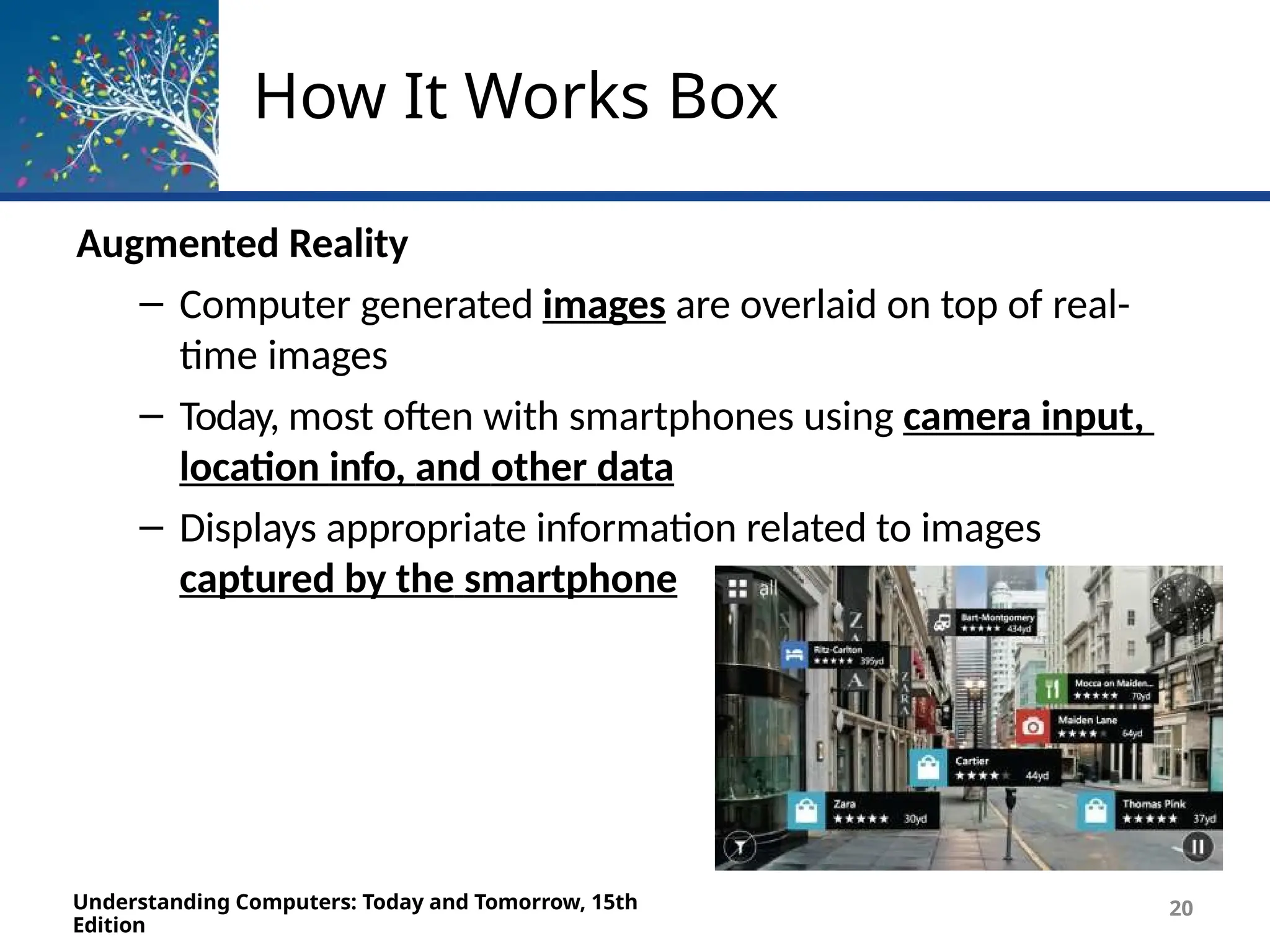
How It Works Box
Augmented Reality
– Computer generated images are overlaid on top of real-
time images
– Today, most often with smartphones using camera input,
location info, and other data
– Displays appropriate information related to images
captured by the smartphone
Understanding Computers: Today and Tomorrow, 15th
Edition
20
Scanners
Understanding Computers: Today and Tomorrow, 15th
Edition
20
• Scanners
– Input devices that read printed text and graphics and
transfers them to a computer in digital form
– Data is typically input as a single image
– Can scan photos, documents, images
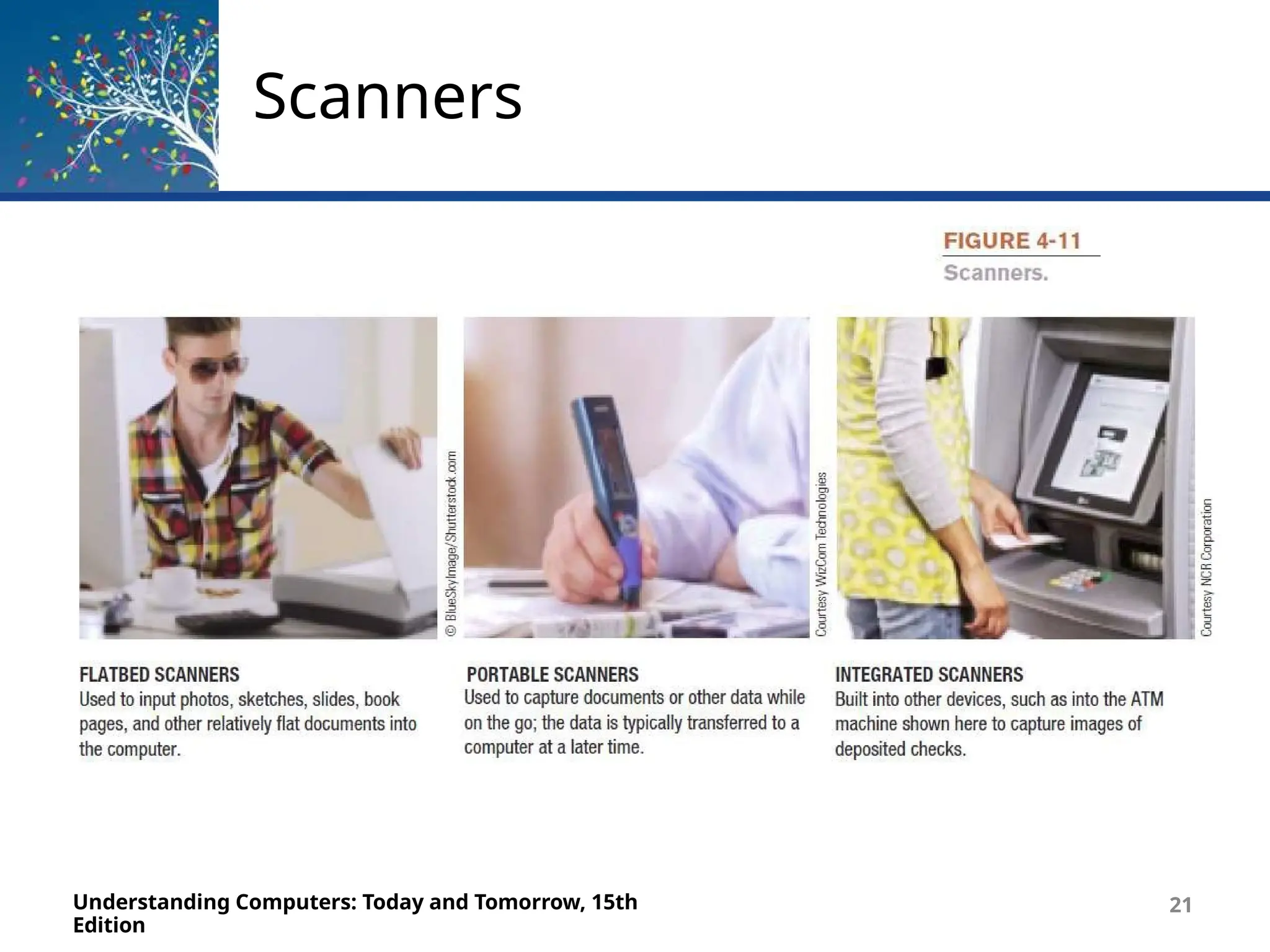
– Types of scanners
• Flatbed
• Portable
• 3D
• Receipt and business card scanners
Scanners
Understanding Computers: Today and Tomorrow, 15th
Edition
21
Readers
Understanding Computers: Today and Tomorrow, 15th
Edition
23
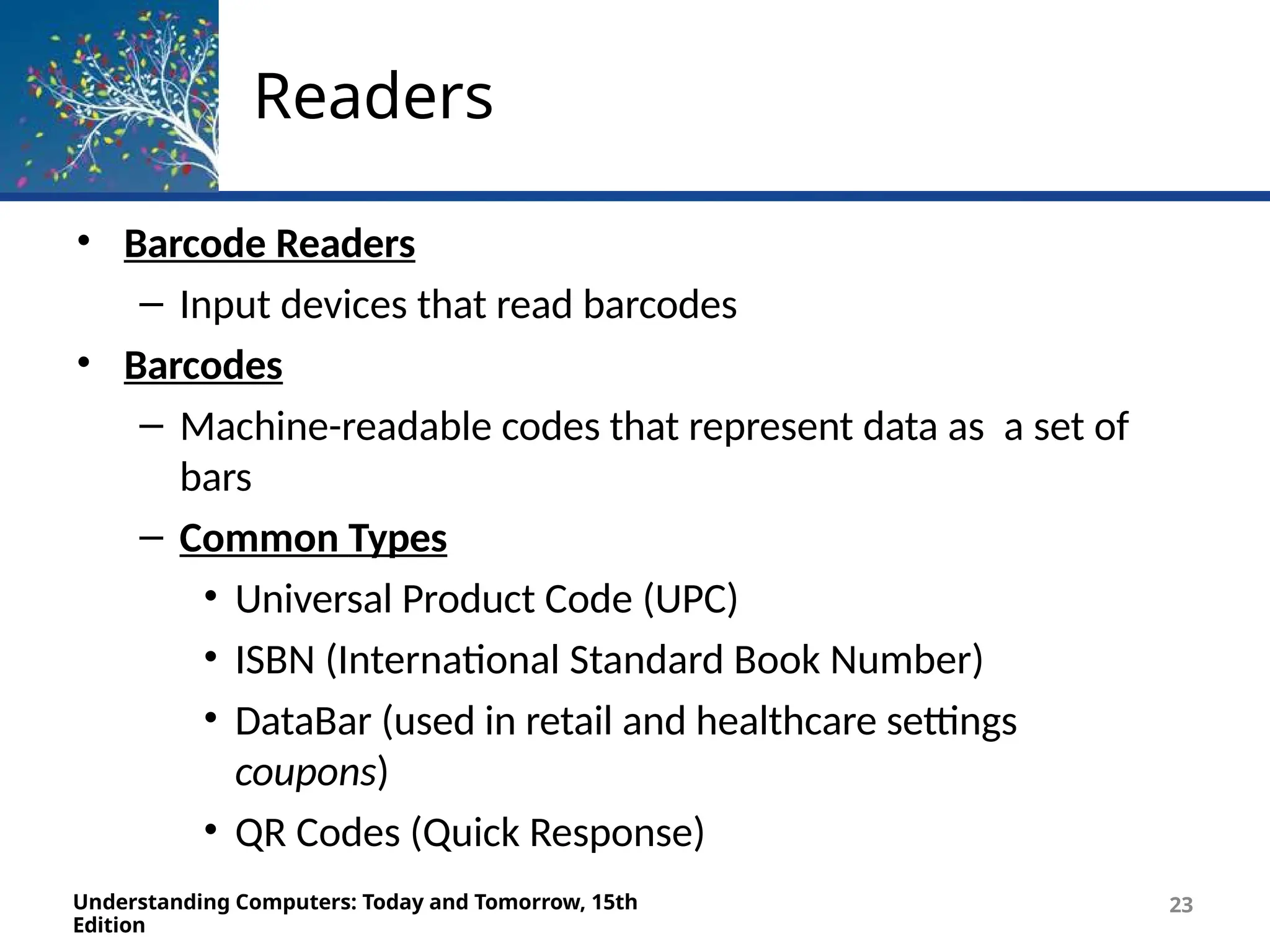
• Barcode Readers
– Input devices that read barcodes
• Barcodes
– Machine-readable codes that represent data as a set of
bars
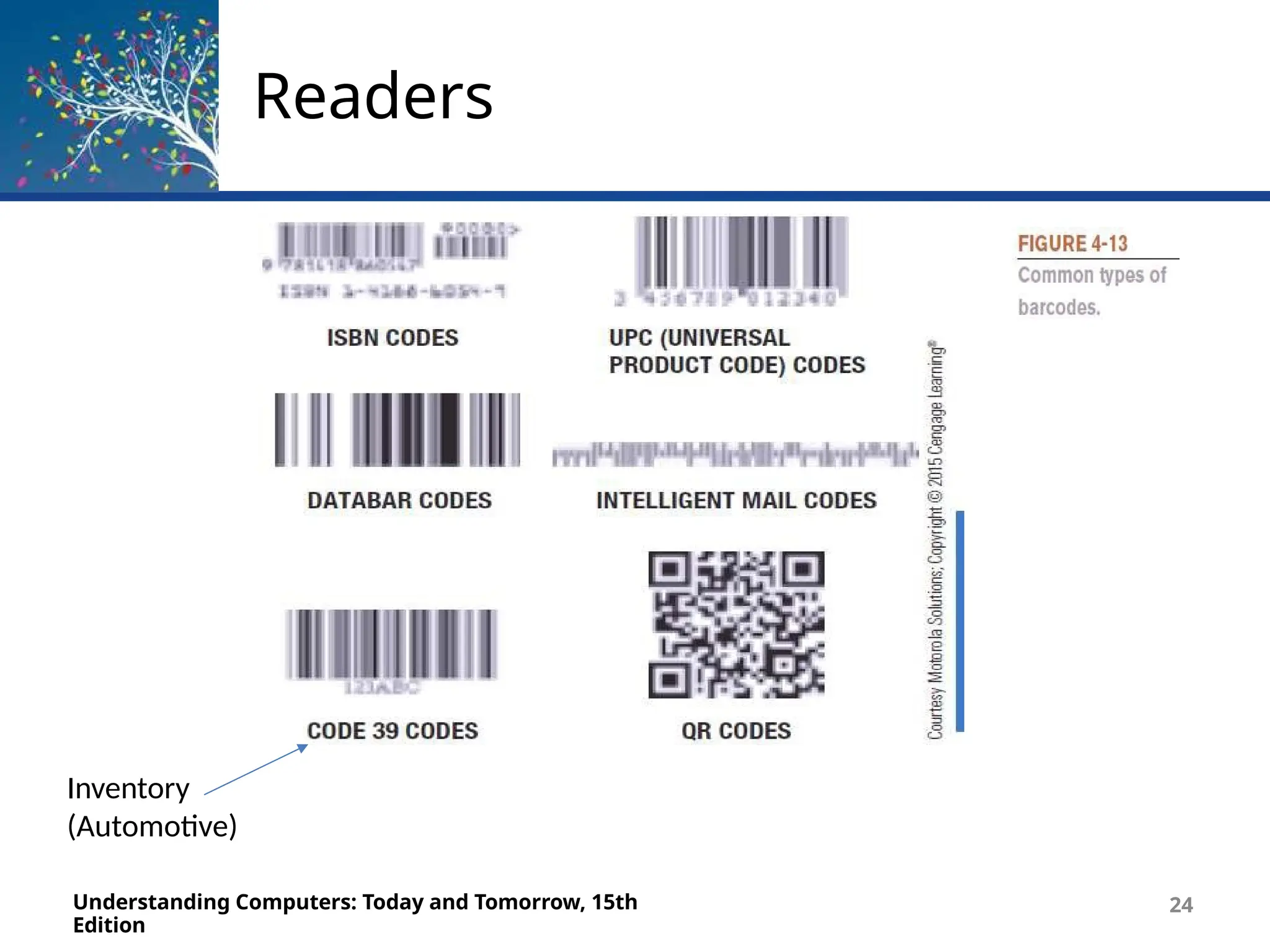
– Common Types
• Universal Product Code (UPC)
• ISBN (International Standard Book Number)
• DataBar (used in retail and healthcare settings
coupons)
• QR Codes (Quick Response)
Readers
Understanding Computers: Today and Tomorrow, 15th
Edition
24
Inventory
(Automotive)
Readers
Understanding Computers: Today and Tomorrow, 15th
Edition
30
Readers
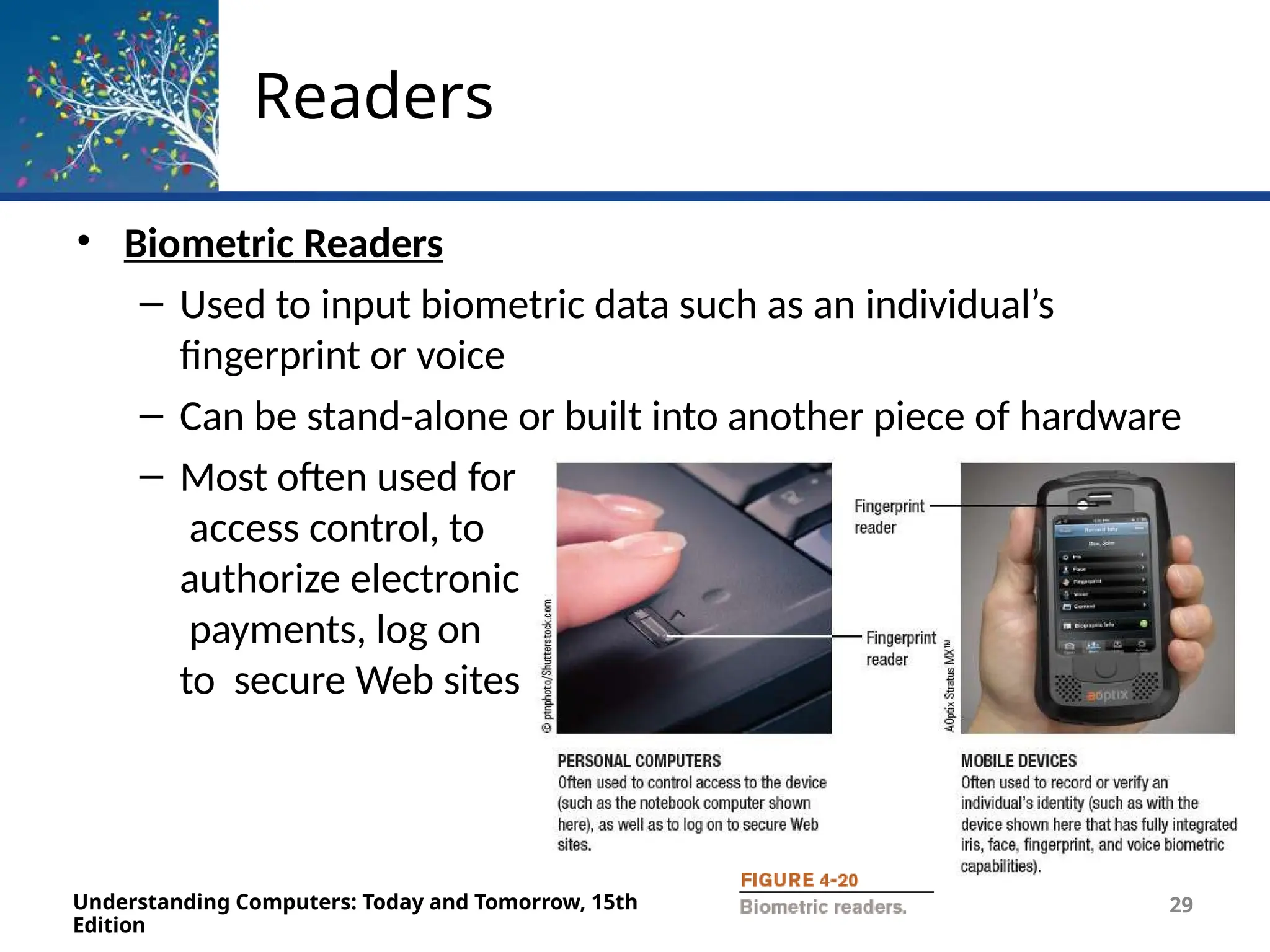
• Biometric Readers
– Used to input biometric data such as an individual’s
fingerprint or voice
– Can be stand-alone or built into another piece of hardware
– Most often used for
access control, to
authorize electronic
payments, log on
to secure Web sites
Understanding Computers: Today and Tomorrow, 15th
Edition
29
Digital Cameras
Understanding Computers: Today and Tomorrow, 15th
Edition
31
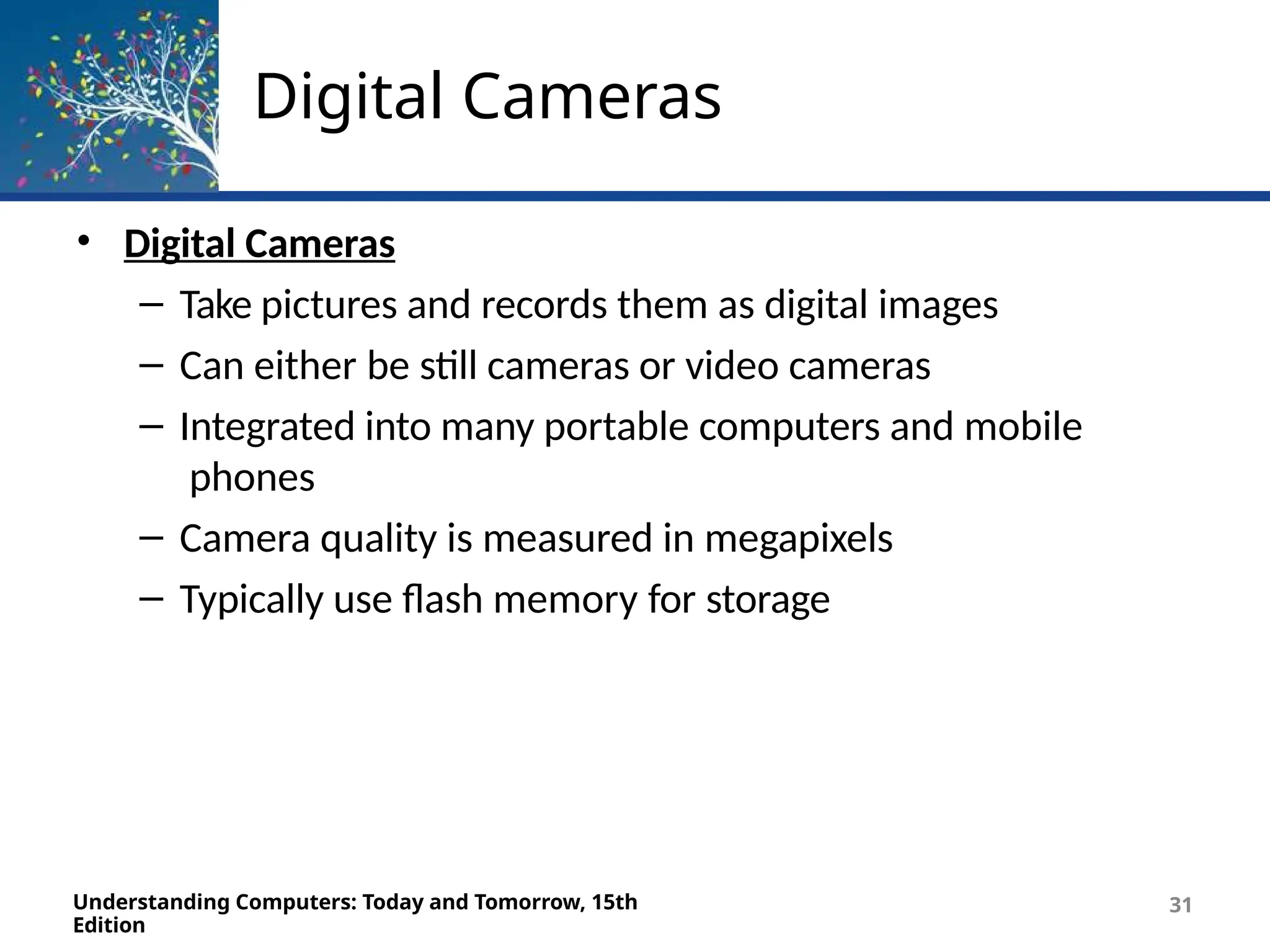
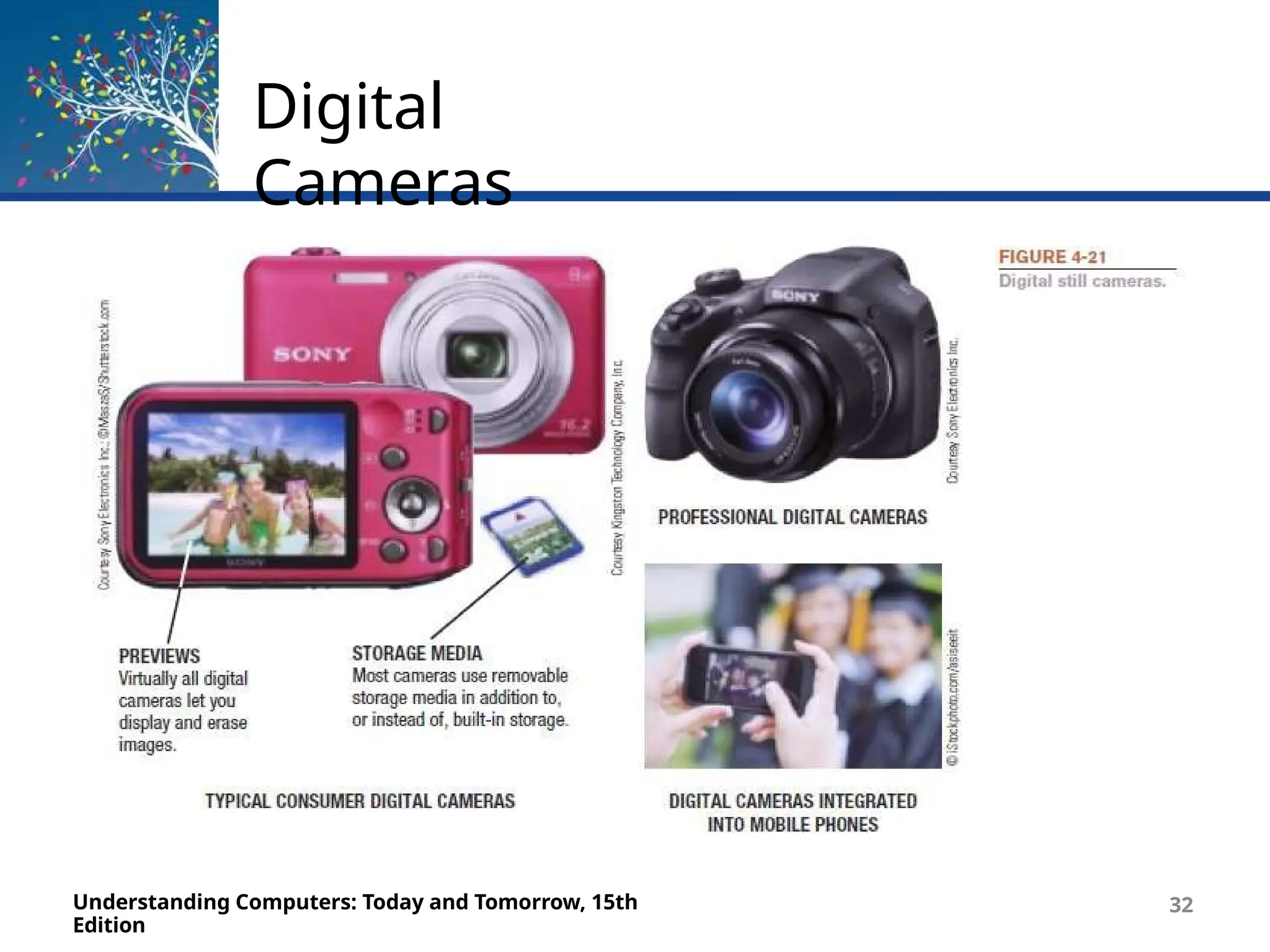
• Digital Cameras
– Take pictures and records them as digital images
– Can either be still cameras or video cameras
– Integrated into many portable computers and mobile
phones
– Camera quality is measured in megapixels
– Typically use flash memory for storage
Digital
Cameras
Understanding Computers: Today and Tomorrow, 15th
Edition
32
Digital Cameras
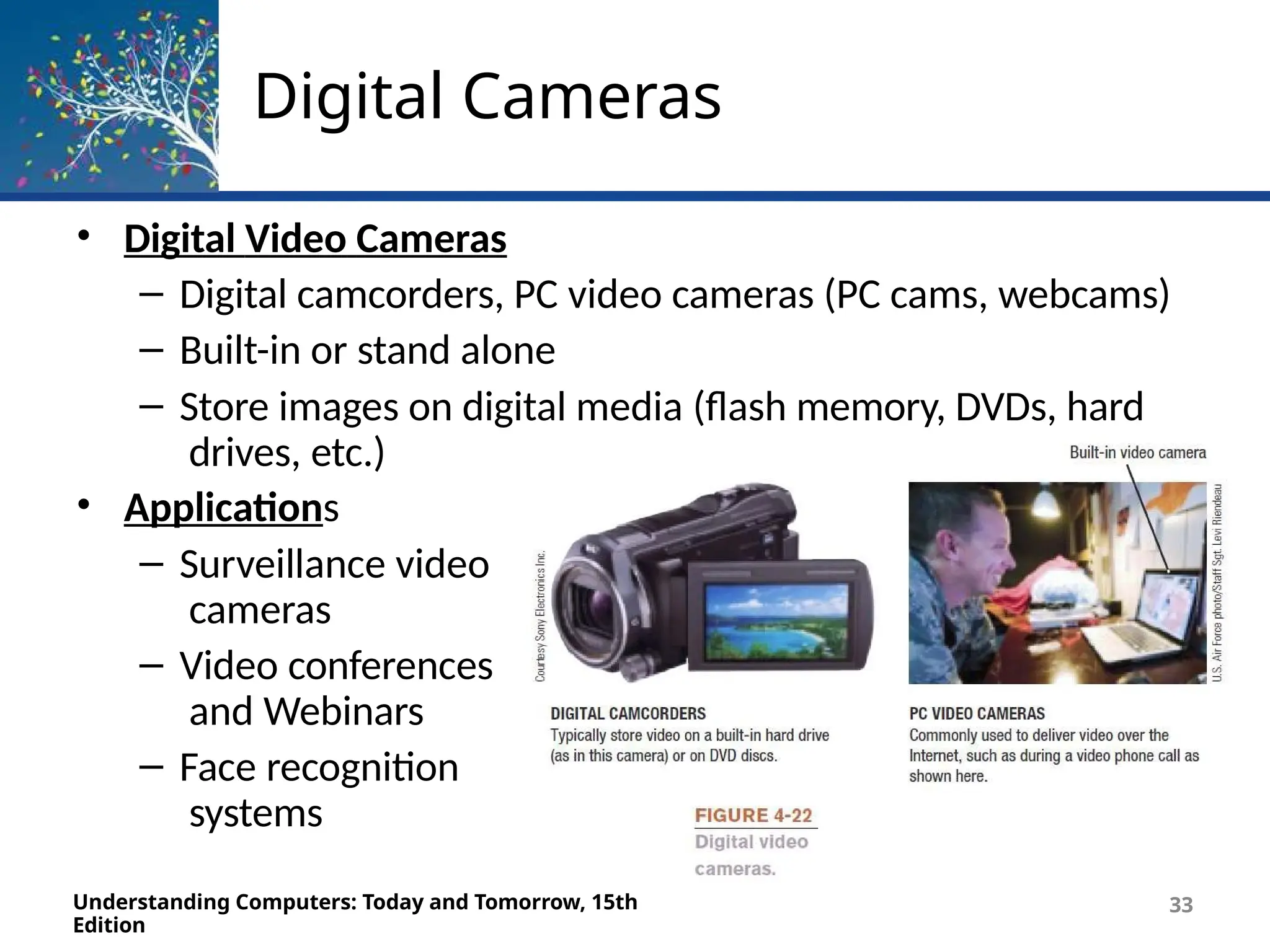
• Digital Video Cameras
– Digital camcorders, PC video cameras (PC cams, webcams)
– Built-in or stand alone
– Store images on digital media (flash memory, DVDs, hard
drives, etc.)
• Applications
– Surveillance video
cameras
– Video conferences
and Webinars
– Face recognition
systems
Understanding Computers: Today and Tomorrow, 15th
Edition
33
Audio Input
Understanding Computers: Today and Tomorrow, 15th
Edition
34
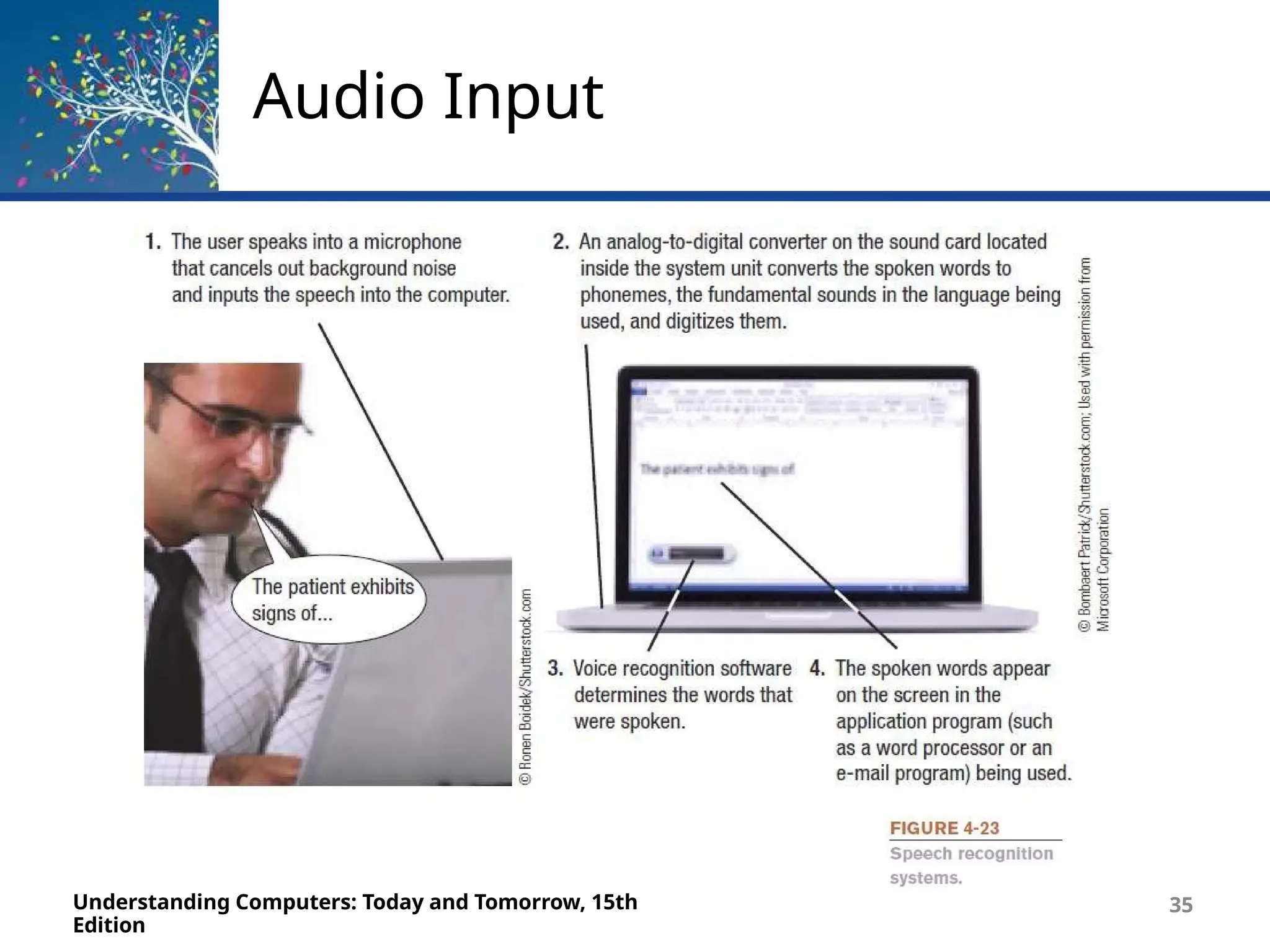
• Voice Input and Speech Recognition Systems
– Audio Input
• The process of entering audio data into the computer
– Voice Input
• Inputting spoken words and converting them to digital
form via microphone or headset
• Can be used for podcasts and with VoIP (Voice over IP)
systems
• Provides spoken instructions to computer when used
with speech recognition systems
Audio Input
Understanding Computers: Today and Tomorrow, 15th
Edition
35
Audio Input
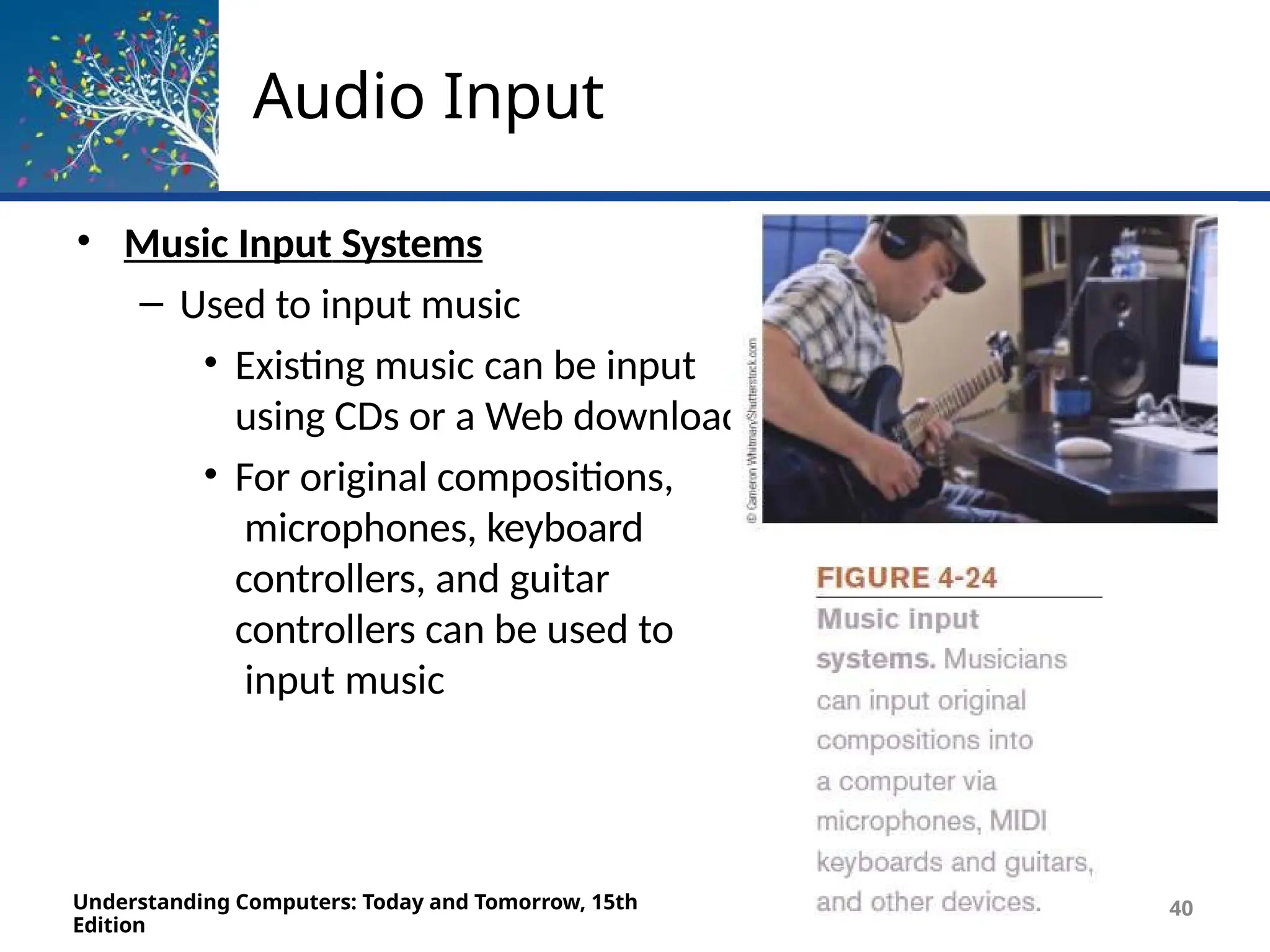
• Music Input Systems
– Used to input music
• Existing music can be input
using CDs or a Web download
• For original compositions,
microphones, keyboard
controllers, and guitar
controllers can be used to
input music
Understanding Computers: Today and Tomorrow, 15th
Edition
40
Display Devices
Understanding Computers: Today and Tomorrow, 15th
Edition
37
• Display Device
– Presents output visually on some type of screen
– Monitor
• Display device for a desktop computer
– Display Screen
• Screen built into a variety of devices
– Notebook and other portable computers
– Mobile phones and mobile devices
– Handheld gaming devices, home entertainment
devices, kitchen appliances
– Digital photo frames, e-book readers, smart
watches
– Digital signage systems, digital billboards
Display Devices
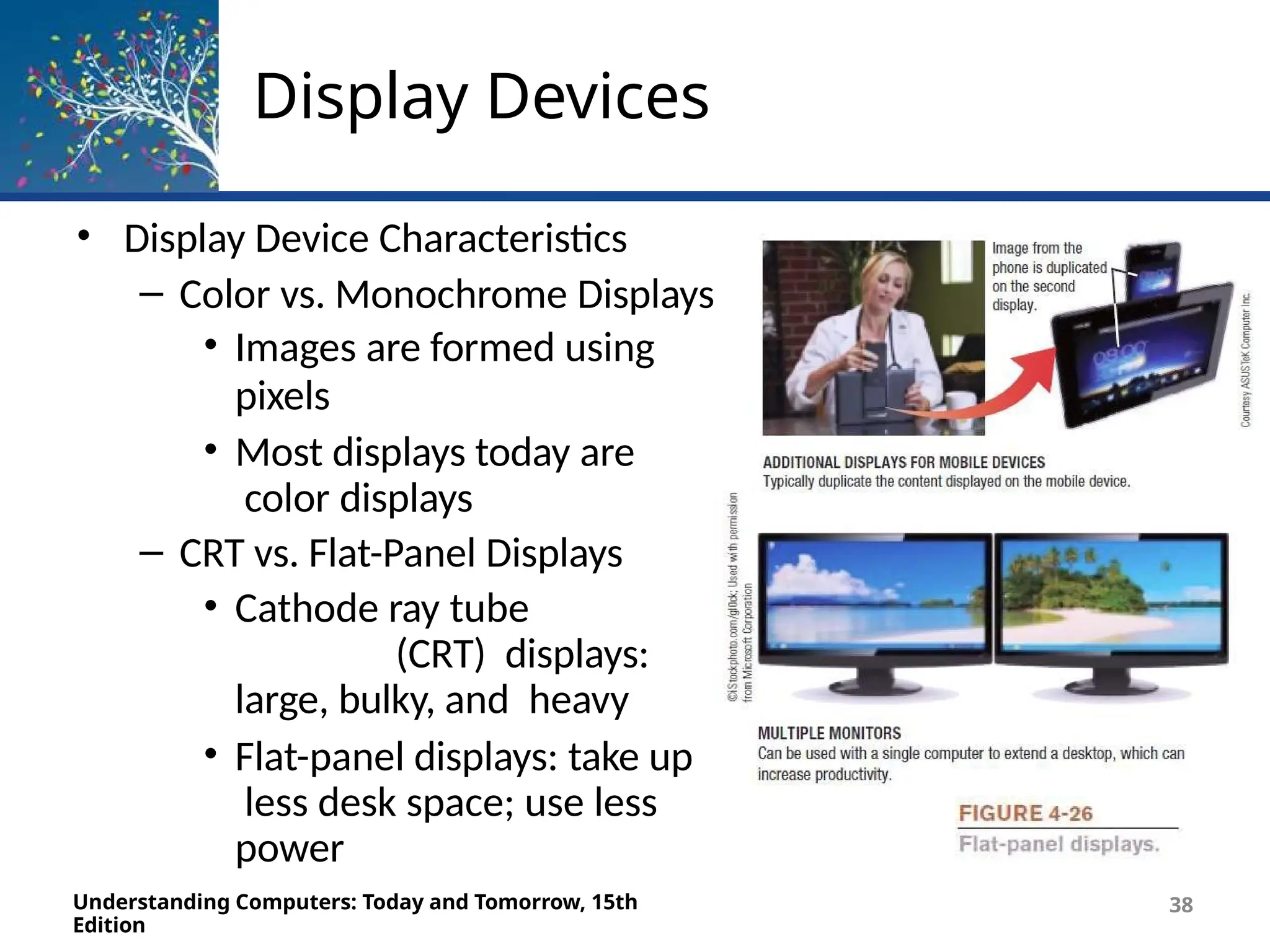
• Display Device Characteristics
– Color vs. Monochrome Displays
• Images are formed using
pixels
• Most displays today are
color displays
– CRT vs. Flat-Panel Displays
• Cathode ray tube
(CRT) displays:
large, bulky, and heavy
• Flat-panel displays: take up
less desk space; use less
power
Understanding Computers: Today and Tomorrow, 15th
Edition
38
Display Devices
Understanding Computers: Today and Tomorrow, 15th
Edition
41
• Wired vs. Wireless Displays
– Wired display are physically connected to the system via a
cable
– Wireless displays connect using a wireless network
connection (Wi-Fi, Bluetooth)
• 2D vs. 3D Displays
– Most displays are 2D
– 3D displays use filters, prisms, and multiple lenses
to
create the 3D effects
Display Devices
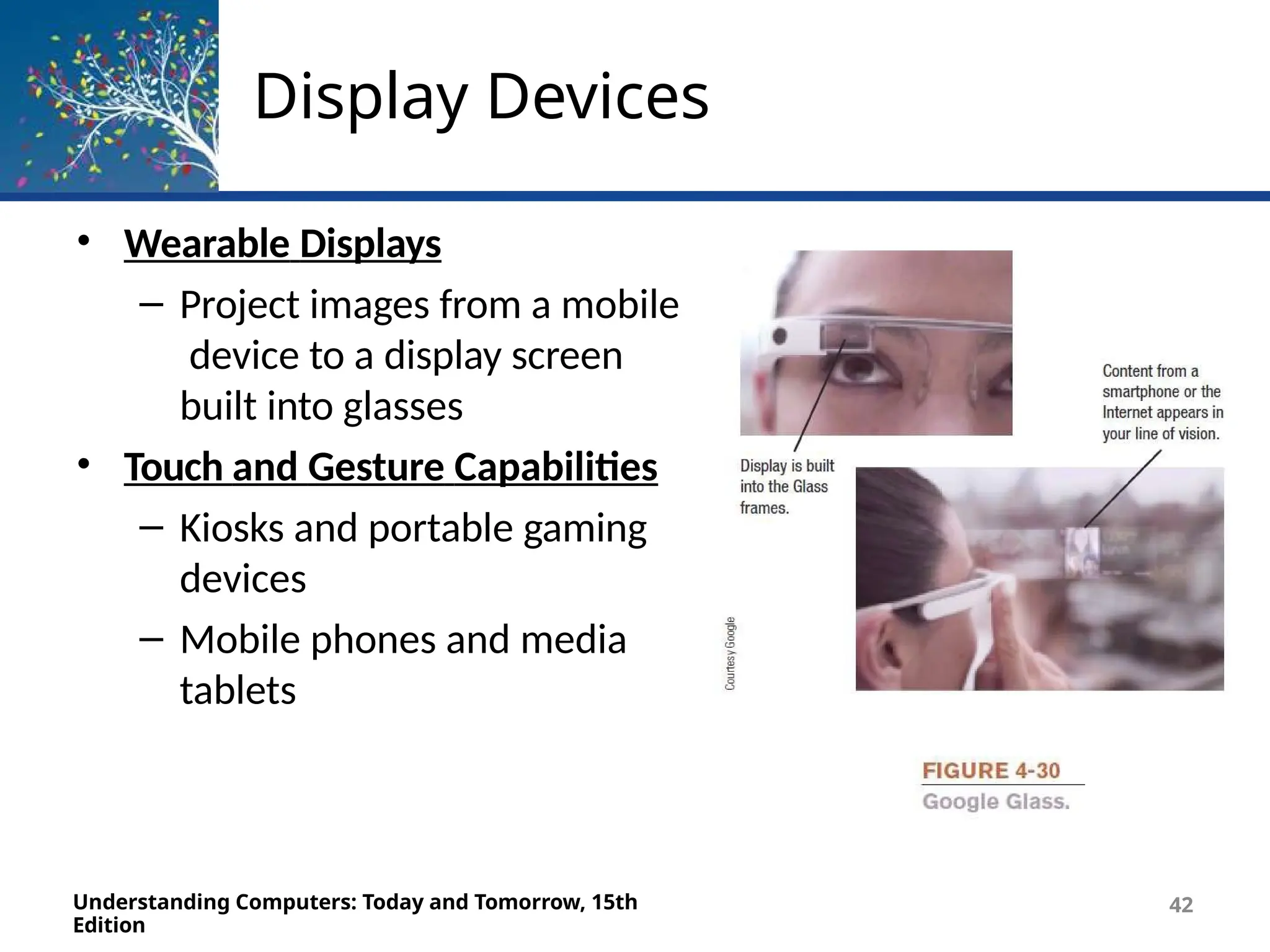
• Wearable Displays
– Project images from a mobile
device to a display screen
built into glasses
• Touch and Gesture Capabilities
– Kiosks and portable gaming
devices
– Mobile phones and media
tablets
Understanding Computers: Today and Tomorrow, 15th
Edition
42
Inside the Industry Box
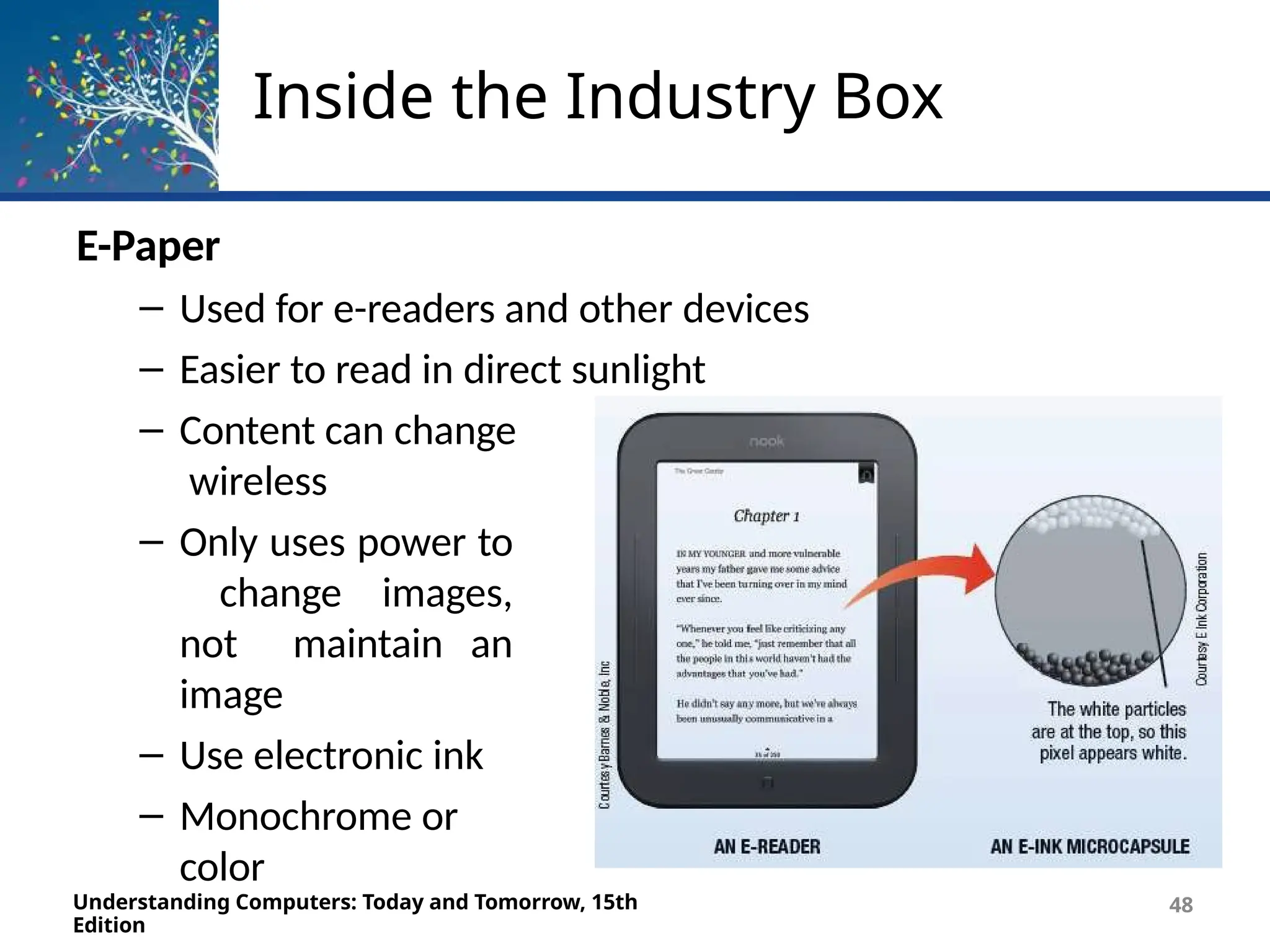
E-Paper
– Used for e-readers and other devices
– Easier to read in direct sunlight
– Content can change
wireless
– Only uses power to
change images,
not maintain an
image
– Use electronic ink
– Monochrome or
color
Understanding Computers: Today and Tomorrow, 15th
Edition
48
Data and Multimedia
Projectors
Understanding Computers: Today and Tomorrow, 15th
Edition
49
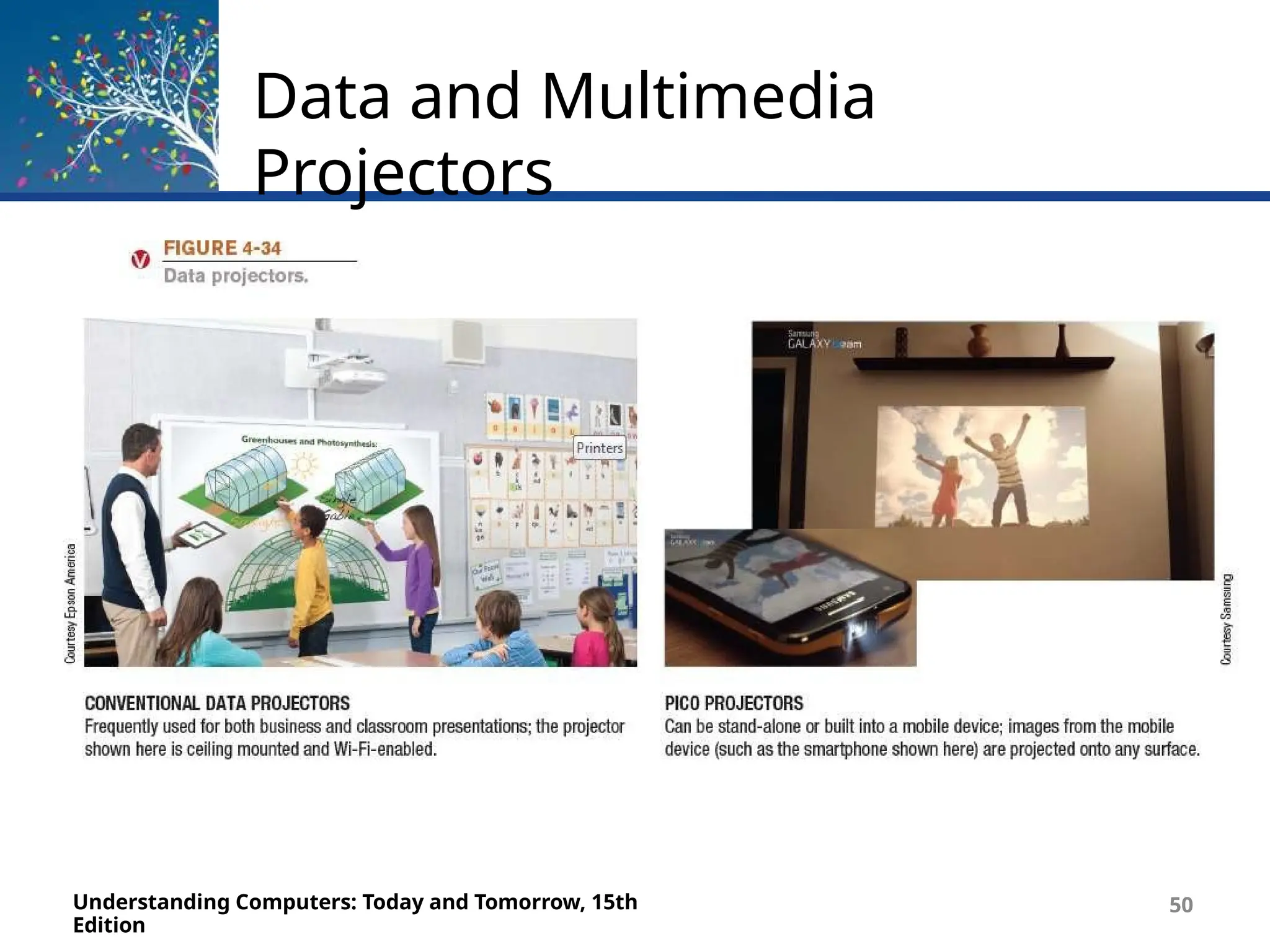
• Display output from a computer to a wall or projection screen
• Found in classrooms and conference rooms
• Can be wireless or integrated into devices
• Mini projectors are pocket-size and connect mobile and
portable devices
• Hologram projectors used to display 3D images
• 3D projectors are designed to project 3D images that are
viewed with 3D glasses
Data and Multimedia
Projectors
Understanding Computers: Today and Tomorrow, 15th
Edition
50
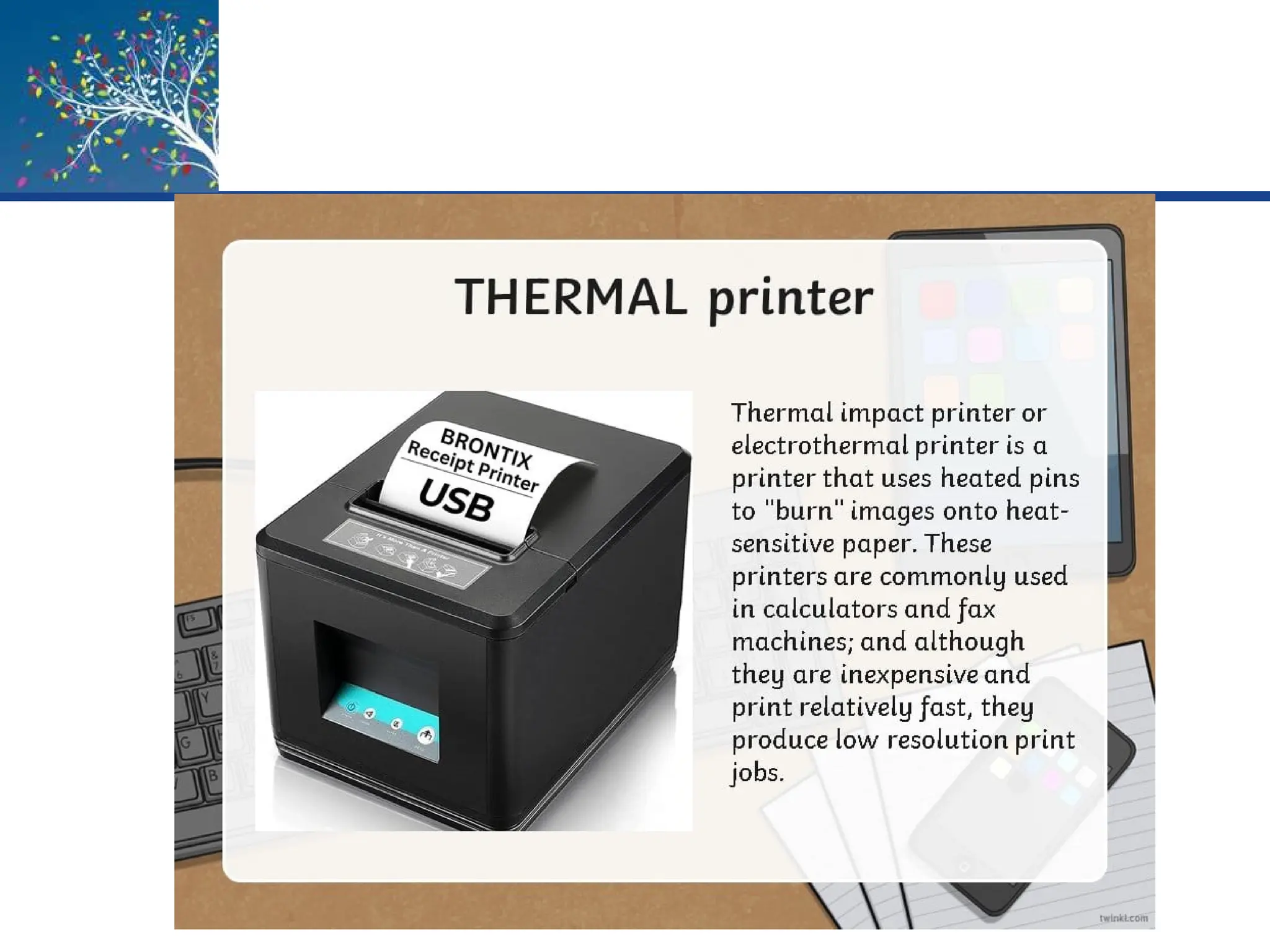
Printers
• Printing Technology
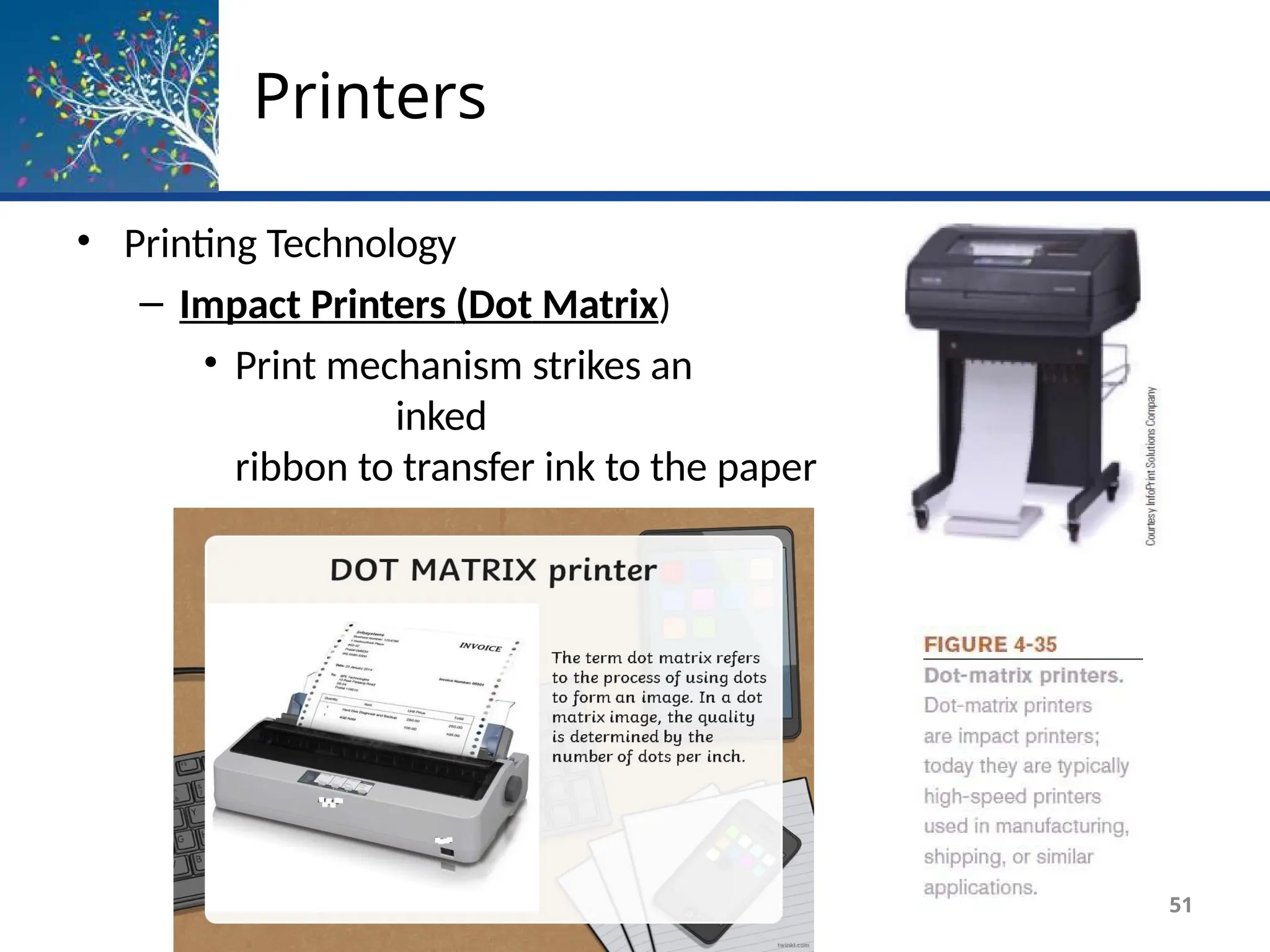
– Impact Printers (Dot Matrix)
• Print mechanism strikes an
inked
ribbon to transfer ink to the paper
• Used to produce multipart forms
51
Printers
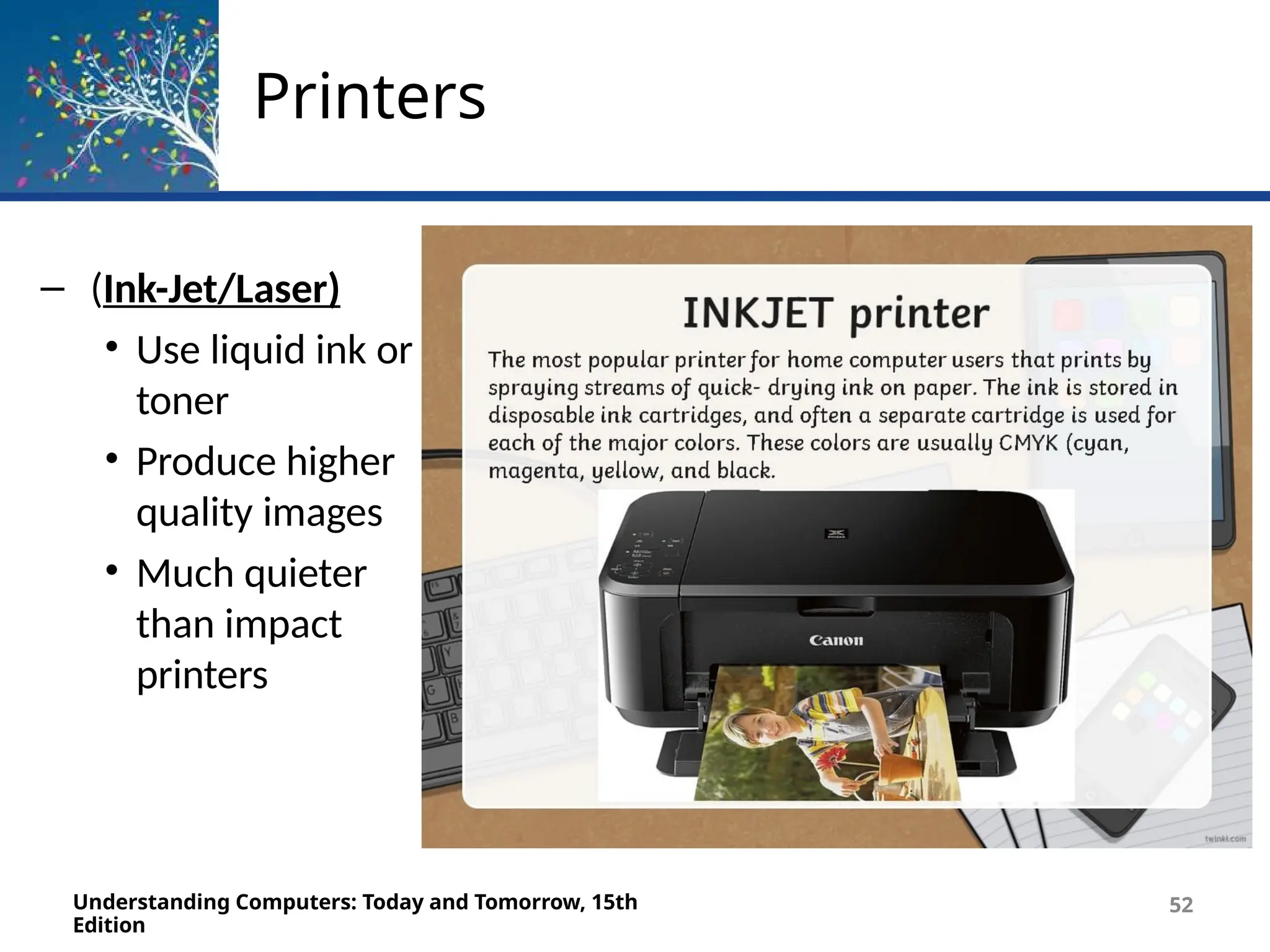
– (Ink-Jet/Laser)
• Use liquid ink or
toner
• Produce higher
quality images
• Much quieter
than impact
printers
Understanding Computers: Today and Tomorrow, 15th
Edition
52
Ink-Jet Printers
Understanding Computers: Today and Tomorrow, 15th
Edition
60
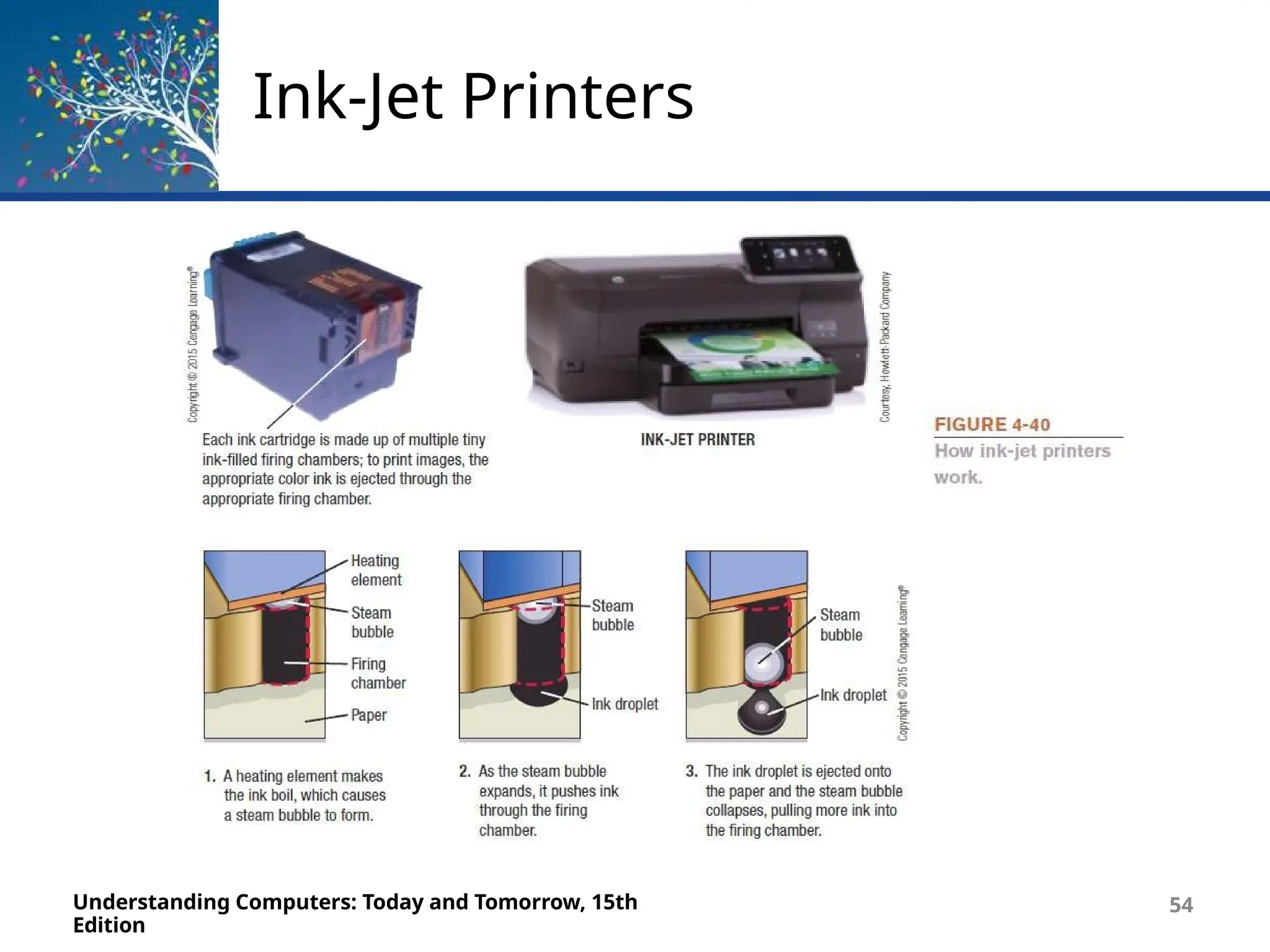
• Sprays droplets of ink to produce images on paper
• Use ink cartridges
• Usually print in color
• Often the choice for home use
• Relatively inexpensive with good-quality output
• Print more slowly than laser printers
• Potential applications for the future
– Dispensing liquid metal, aromas, computer chips and other
circuitry, “printing” human tissue
Ink-Jet Printers
Understanding Computers: Today and Tomorrow, 15th
Edition
54
Laser Printers
Understanding Computers: Today and Tomorrow, 15th
Edition
55
• Use toner powder and technology similar to that of a
photocopier to produce images on paper
• The standard for business documents
• Print one entire page at a time
• Generally faster and have better quality output than
ink-jet
printers
• Can be black and white or color
• Common print resolution for laser printers is
between 600
and 2,400 dpi
• Use toner cartridges
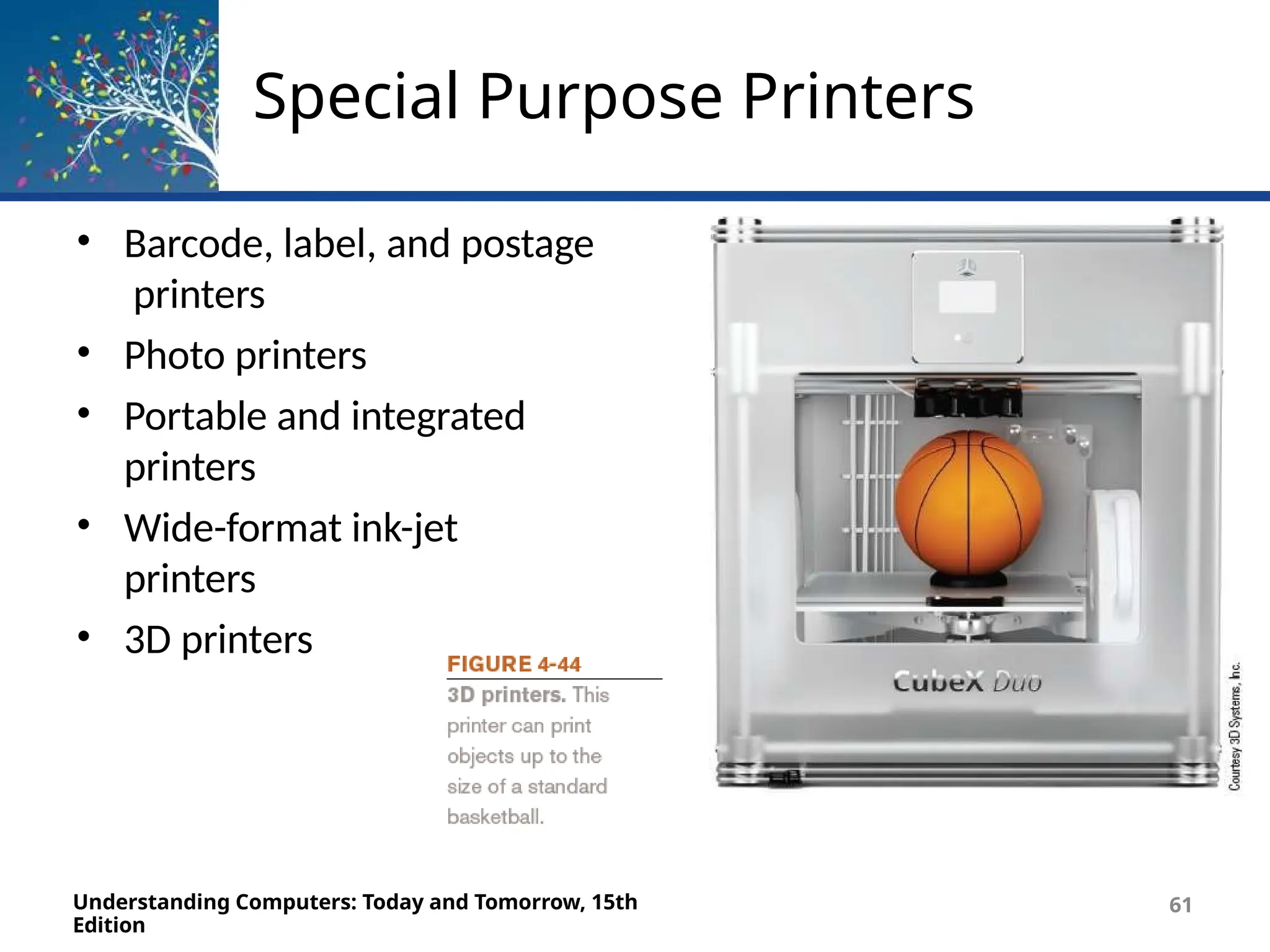
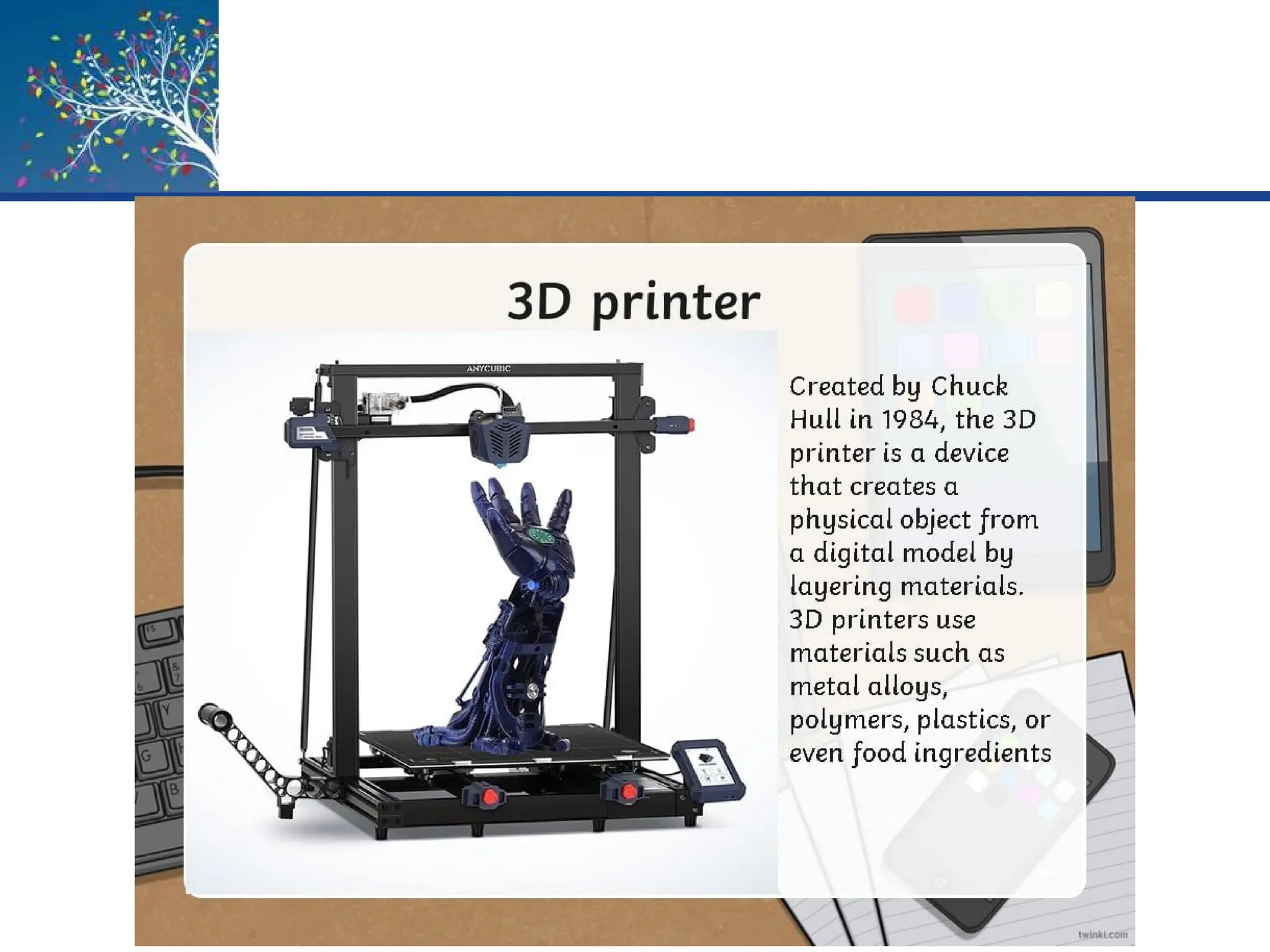
Special Purpose Printers
• Barcode, label, and postage
printers
• Photo printers
• Portable and integrated
printers
• Wide-format ink-jet
printers
• 3D printers
Understanding Computers: Today and Tomorrow, 15th
Edition
61
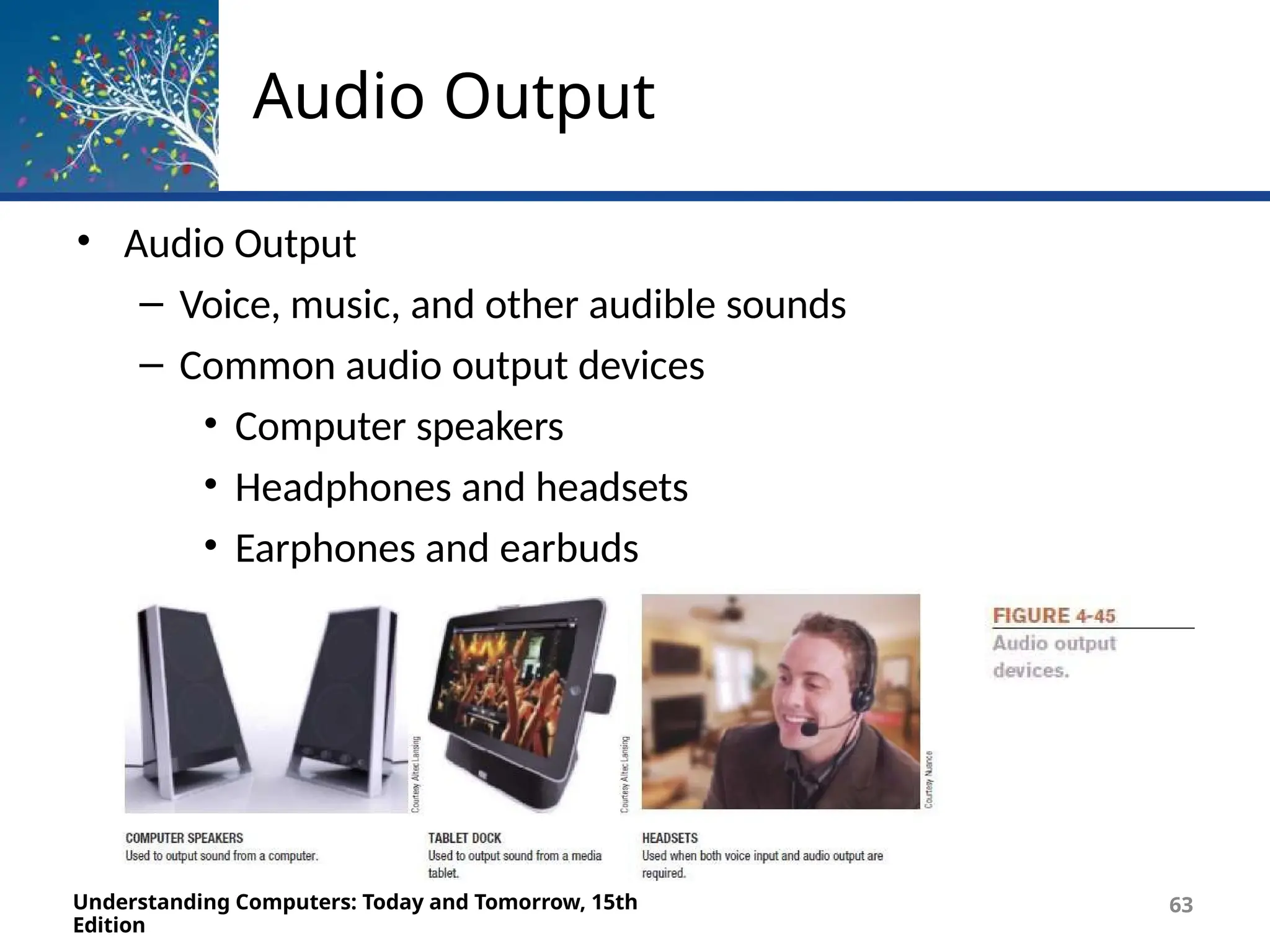
Audio Output
• Audio Output
– Voice, music, and other audible sounds
– Common audio output devices
• Computer speakers
• Headphones and headsets
• Earphones and earbuds
Understanding Computers: Today and Tomorrow, 15th
Edition
63
QUIZ # 2
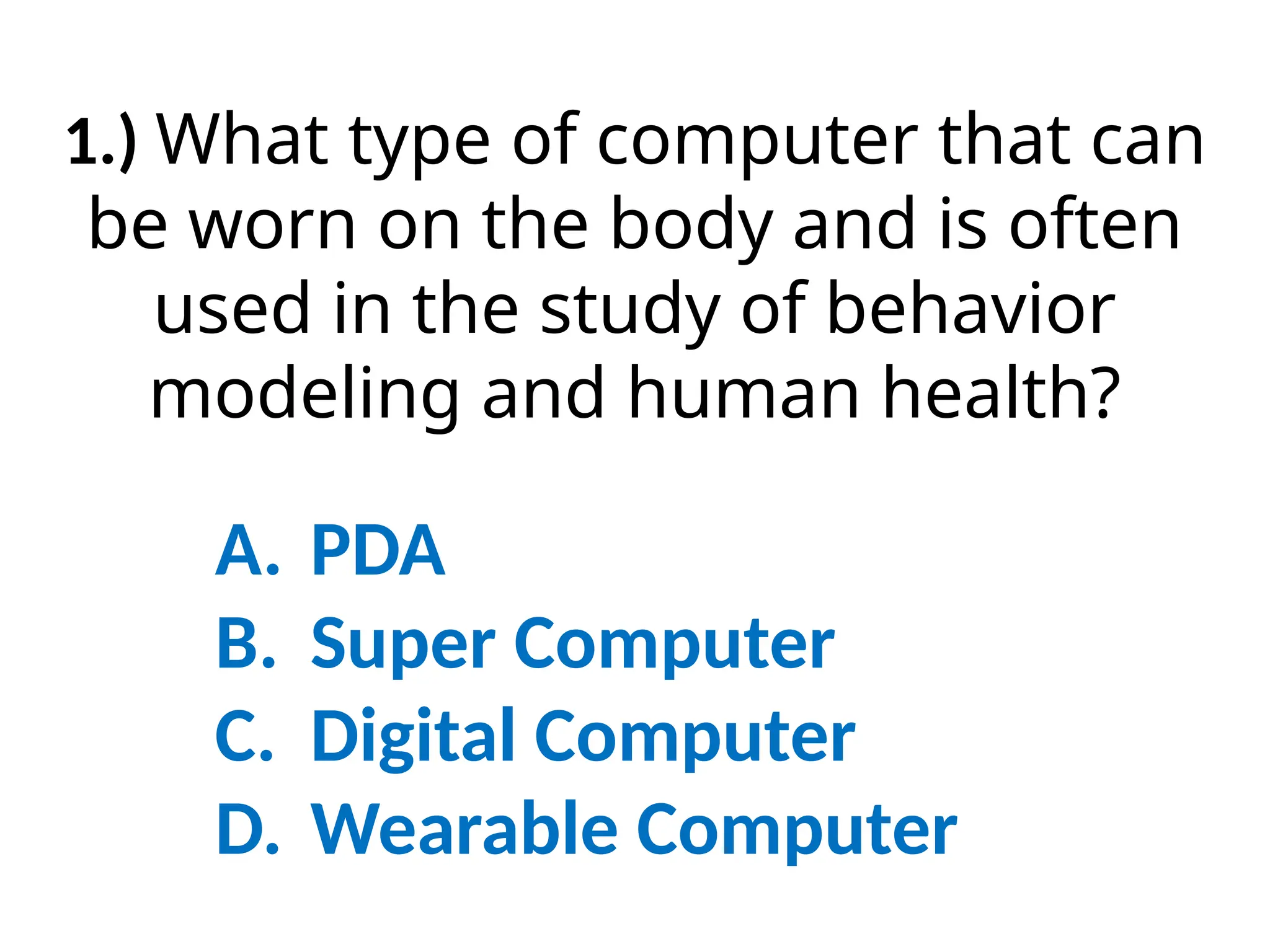
1.) What type of computer that can
be worn on the body and is often
used in the study of behavior
modeling and human health?
A. PDA
B. Super Computer
C. Digital Computer
D. Wearable Computer
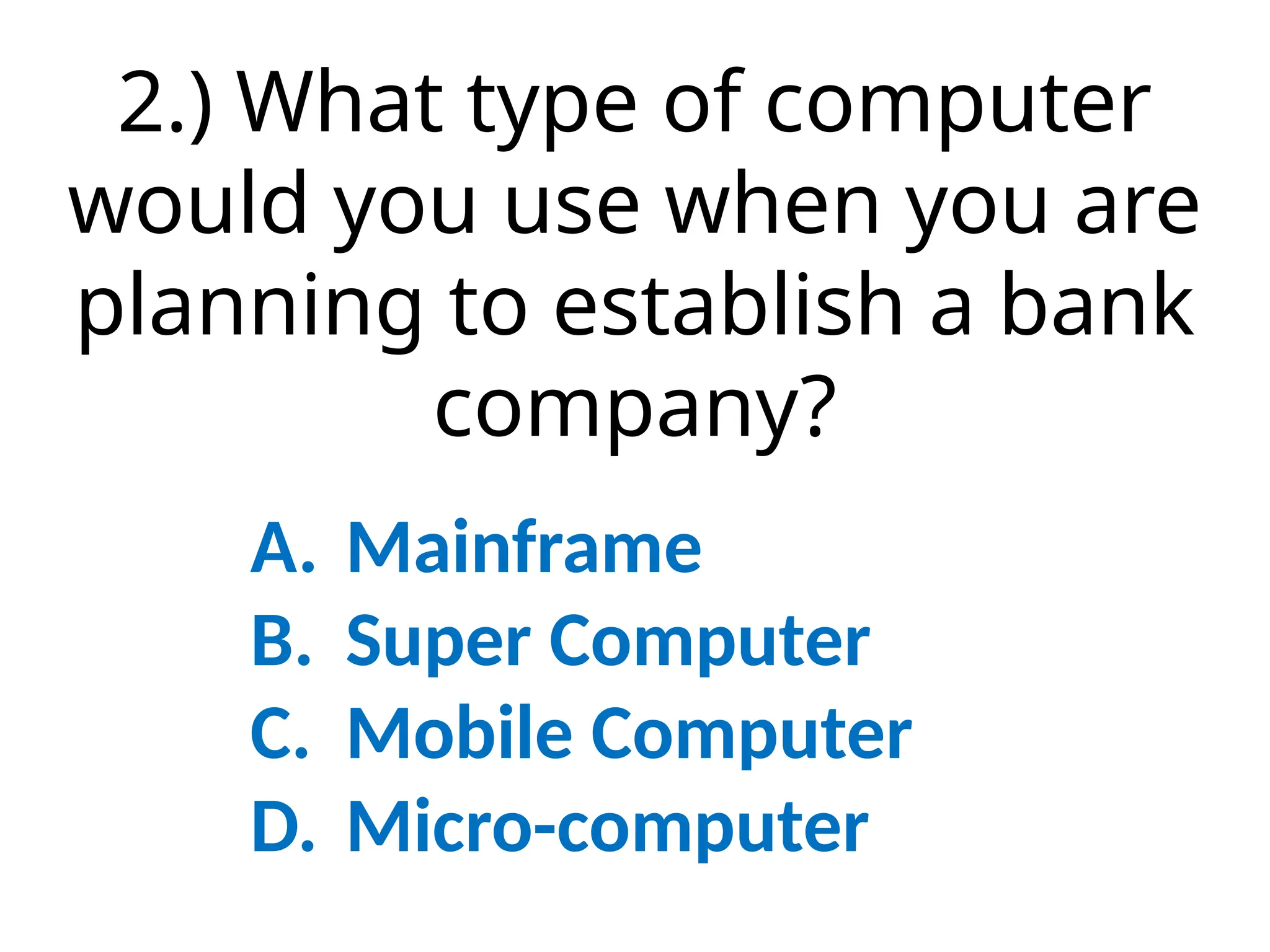
2.) What type of computer
would you use when you are
planning to establish a bank
company?
A. Mainframe
B. Super Computer
C. Mobile Computer
D. Micro-computer
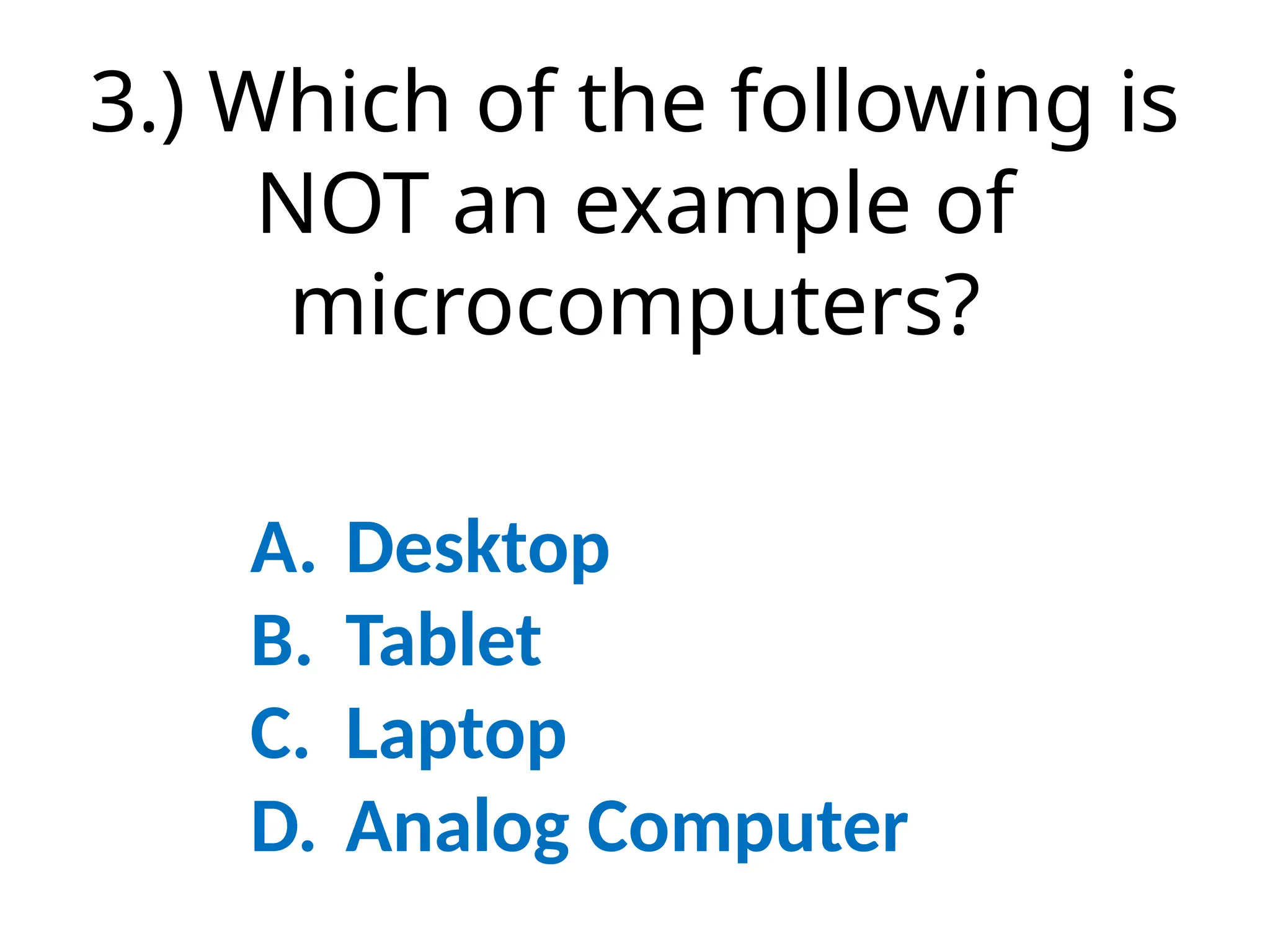
3.) Which of the following is
NOT an example of
microcomputers?
A. Desktop
B. Tablet
C. Laptop
D. Analog Computer
4.) What type of computer are
cheapest and widely used and
designed for general usage such
as entertainment, education and
work purposes?
A. Mainframe
B. Super Computer
C. Mini Computer
D. Micro-computer
5.) These computers are usually
used in petrol pumps to convert the
measurement of fuel flowing into
quantity and price which user can
see on screen.
A. Digital Computer
B. Super Computer
C. Hybrid Computer
D. Digital Computer
6.) The following are uses of
Super Computer. Except ______.
A. Earthquake Studies
B. Entertainment
C. Space Exploration
D. Weather Forecating
7.) What do you call a device that
accepts/enters data and
instruction from the user or
from another computer system?
A. Input Device
B. Output Device
C. Analog Computer
D. Digital Computer
8.) Which of the following
devices is used to produce
sound, music and audios?
A. Monitor
B. Microphone
C. Digital Camera
D. Speaker
9.) What is the first input device
developed for PC?
A. Mouse
B. Monitor
C. Keyboard
D. Camera
10.) A type of scanner used to
capture documents or other data
while ON THE GO; the data is
typically transferred to a computer
at a later time.
A. Potable scanner
B. Flatbed scanner
C. Integrated scanner
D. Analog scanner
11.) What does “QR” in QR code
stands for?
A. Quick Read
B. Quick Render
C. Quick Response
D. Quick Received
12.) A type of reader whereby code
numbers are assigned to books for
easy identification and speedy
exchange of information.
A. UPB
B. DataBar
C. QR code
D. ISBN
13.) What type of keyboard is
used on smart and mobile
phones today?
A. On-screen keyboard
B. Portable Keyboard
C. Keyboard Folio
D. Slide-out keyboard
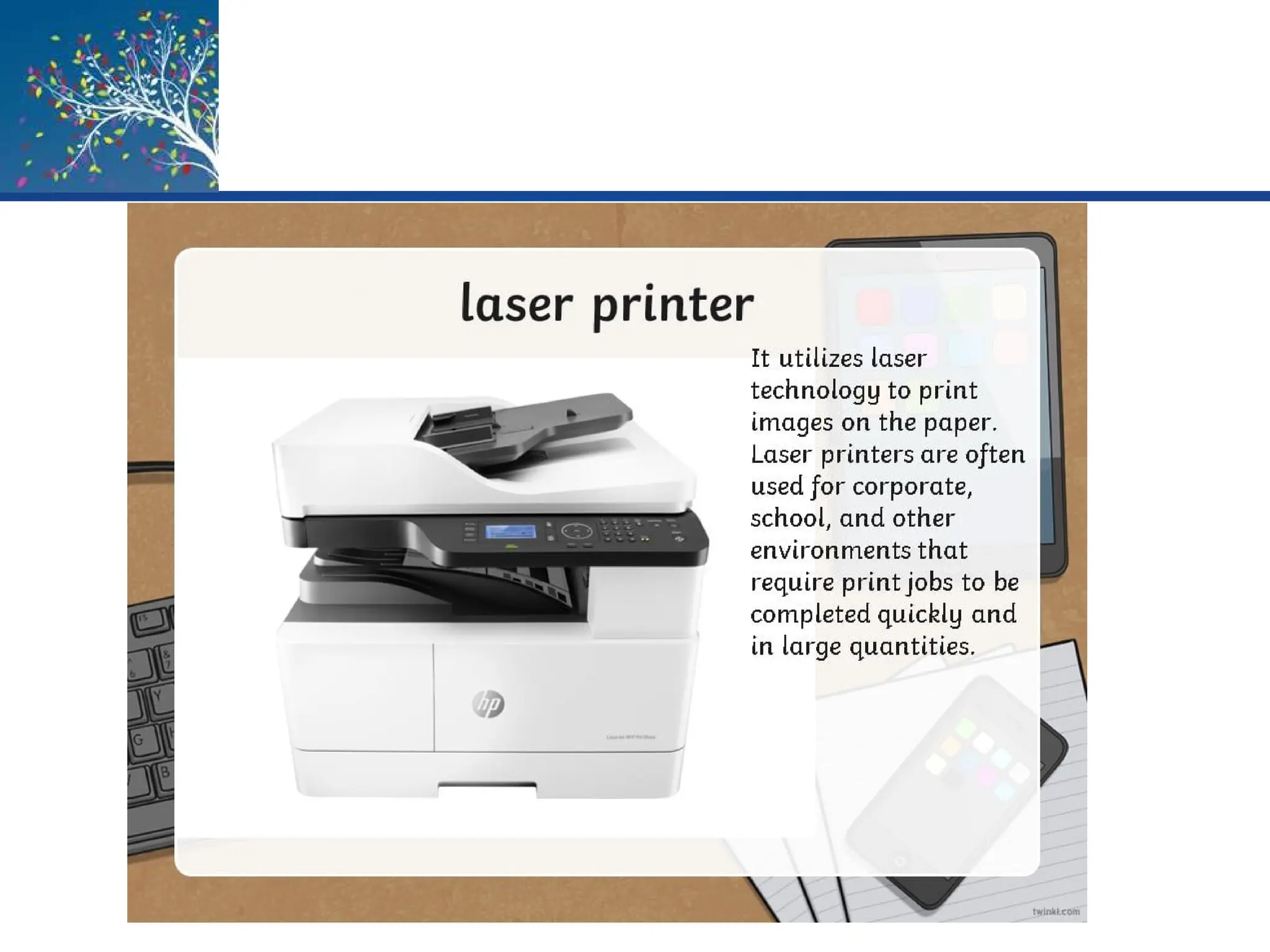
14.) What type of printer are often
used for corporate, school, offices
that require print jobs to be
completed quickly and large in
quantities?
A. Thermal printer
B. Inkjet Printer
C. Laser Printer
D. 3D Printer
15.) What type of display
monitor/TV is often used
today for home-based used?
A. Cathode ray tube
B. Flat panel
C. 3D display
D. Slide-out keyboard
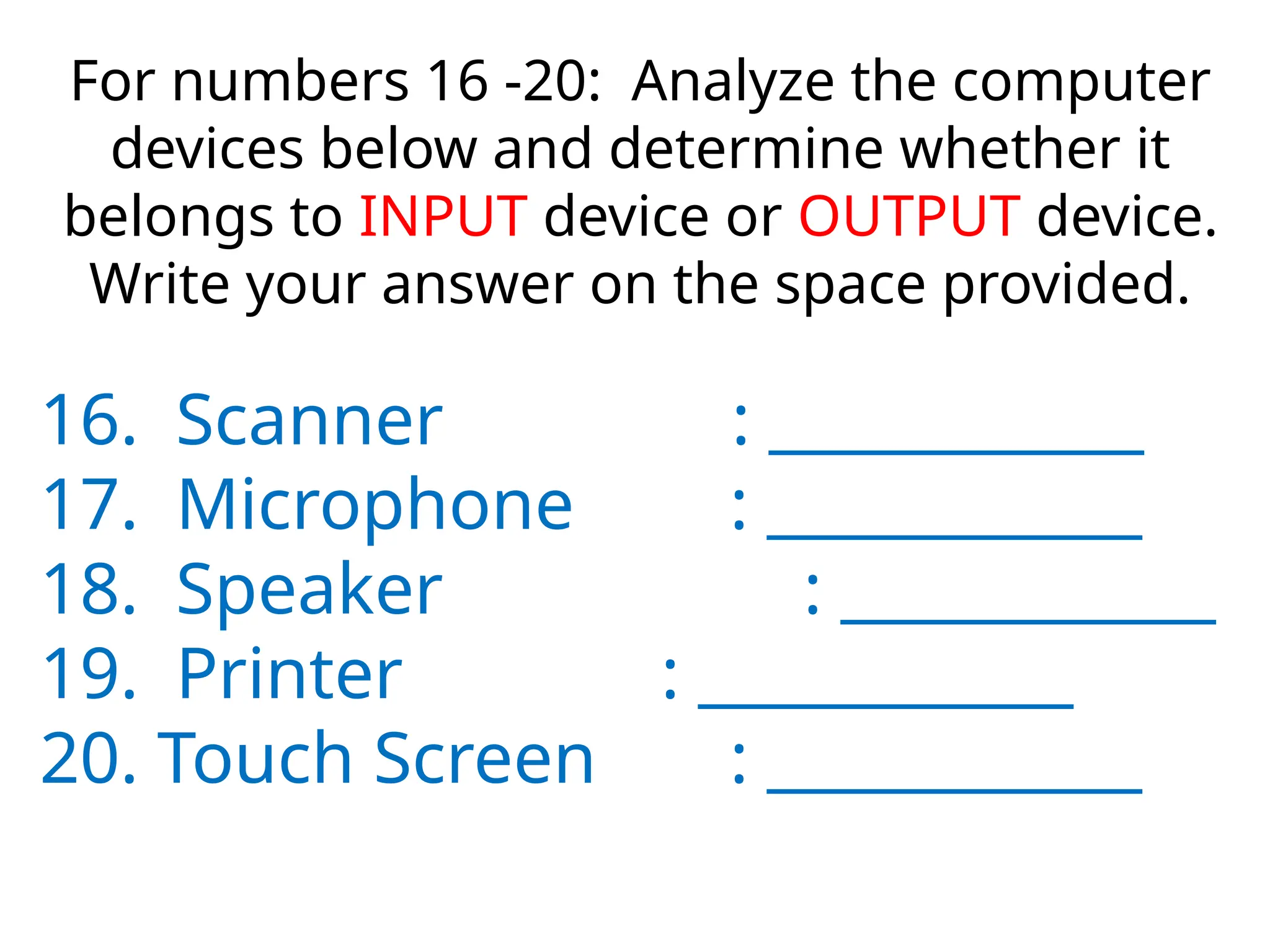
For numbers 16 -20: Analyze the computer
devices below and determine whether it
belongs to INPUT device or OUTPUT device.
Write your answer on the space provided.
16. Scanner : ____________
17. Microphone : ____________
18. Speaker : ____________
19. Printer : ____________
20. Touch Screen : ____________
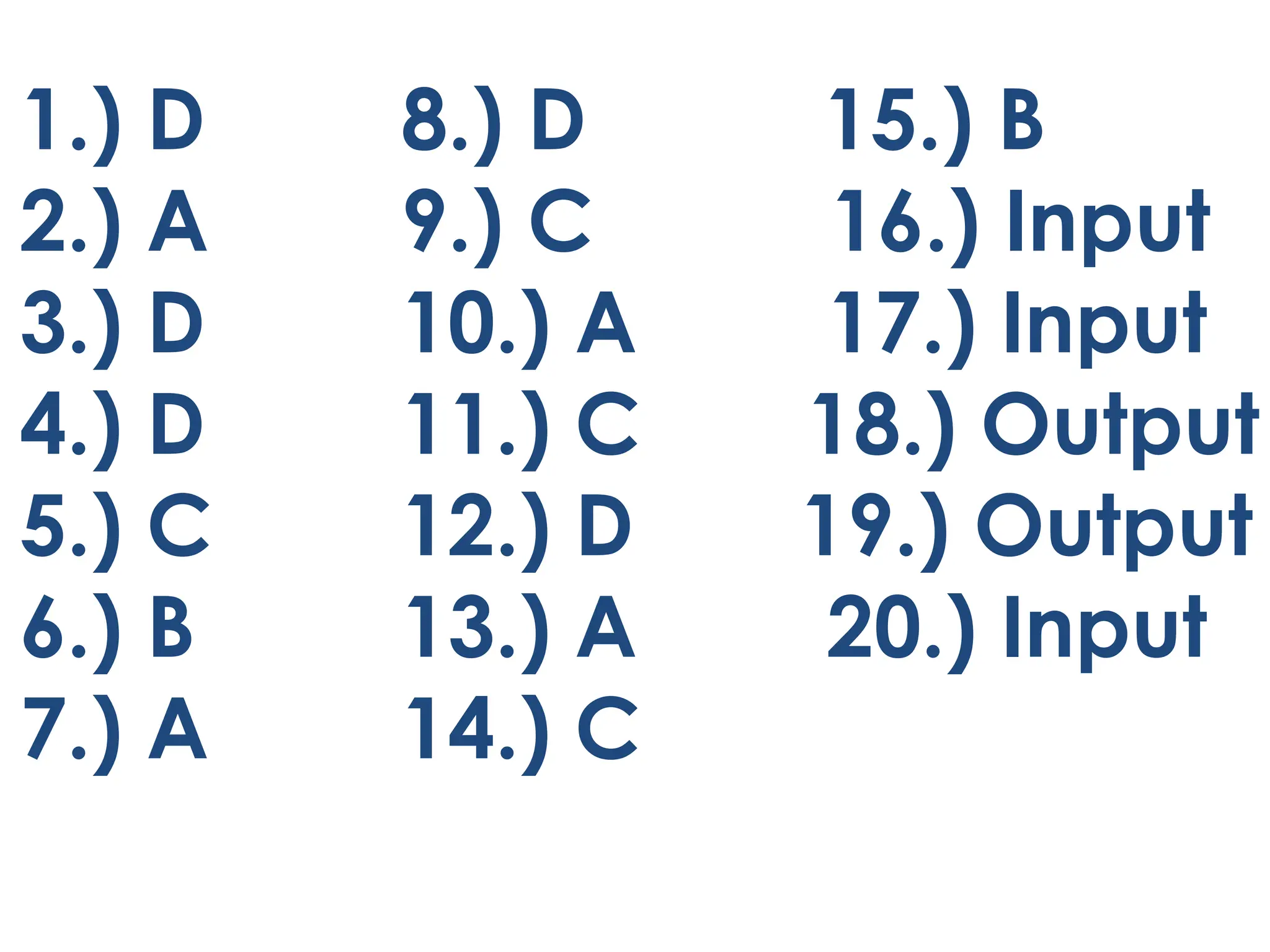
LET’S CHECK!
1.) D 8.) D 15.) B
2.) A 9.) C 16.) Input
3.) D 10.) A 17.) Input
4.) D 11.) C 18.) Output
5.) C 12.) D 19.) Output
6.) B 13.) A 20.) Input
7.) A 14.) C
Input and Output DEVICES PERIPHERALS.pptx

  • 2.
  • 3.
    Keyboards Understanding Computers: Todayand Tomorrow, 15th Edition 4 • An input device used to enter characters at the location marked by the insertion point or cursor – Can be wired or wireless – Typically contains: • Standard alphanumeric keys • Numeric keypad • Function keys • Delete and Backspace keys • Control and Alternate keys • Arrow directional keys and special keys
  • 4.
    Keyboards Understanding Computers: Todayand Tomorrow, 15th Edition 5
  • 5.
    Keyboards • Mobile devicesoften use: – Slide-out keyboard – Pen or touch input (on-screen keyboard) – Keyboard dock Understanding Computers: Today and Tomorrow, 15th Edition 6
  • 6.
    Pointing and TouchDevices Understanding Computers: Today and Tomorrow, 15th Edition 7 • Pointing devices are used to: – Select and manipulate objects – Input data – Issue commands to the computer • Common types of pointing devices: – Mouse – Pen/stylus – Devices that use touch input
  • 7.
    Mice Understanding Computers: Todayand Tomorrow, 15th Edition 8 • Mouse – Common pointing device that the user slides along a flat surface to move a pointer around the screen and clicks its buttons to make selections – Older mechanical mice use a ball – Touch mice support two-dimensional gestures
  • 8.
    Mice Understanding Computers: Todayand Tomorrow, 15th Edition 10
  • 9.
    Pens/Styluses Understanding Computers: Todayand Tomorrow, 15th Edition 11 • Stylus – Pen-like device used to draw or write electronically on the screen – Also called digital pen, electronic pen, tablet pen – Pen input is being used for: • Photography, graphic design, animation • Industrial design, document processing, and healthcare applications • Navigating through a document • Issuing commands
  • 10.
    Pens/Styluses – Pen-Based Computersand Mobile Devices • Pen input used with mobile devices and tablet computers – Used to input handwritten text and sketches and to manipulate objects – If handwriting recognition is used, written text can be converted to editable typed text Understanding Computers: Today and Tomorrow, 15th Edition 12
  • 11.
    Pens/Styluses Understanding Computers: Todayand Tomorrow, 15th Edition 13 • Digital Writing Systems – Pen-based systems that capture handwritten input as it is being written – Handwritten input can be transferred to computer • Graphics Tablets – Pen tablets or digitizing devices – Flat, touch sensitive tablet typically connected to computer using a USB port
  • 12.
    Pens/Styluses • Signature CaptureDevices – Found at check out counters to record customer signatures Understanding Computers: Today and Tomorrow, 15th Edition 14
  • 13.
    Touch Screens Understanding Computers:Today and Tomorrow, 15th Edition 15 • Touch Screens – Display devices that are touched with the finger to select commands or otherwise provide input to the computer – Common on portable computers, smartphones, and other mobile devices – Multi-touch • Can recognize input from more than one finger at a time – Table PC • Large screen computer either built into a table or designed to be used on a table
  • 14.
    Touch Screens Understanding Computers:Today and Tomorrow, 15th Edition 16
  • 15.
    Other Pointing Devices •Gaming devices • Trackballs • Control buttons and wheels • Touch pads Understanding Computers: Today and Tomorrow, 15th Edition 17
  • 16.
    How It WorksBox Augmented Reality – Computer generated images are overlaid on top of real- time images – Today, most often with smartphones using camera input, location info, and other data – Displays appropriate information related to images captured by the smartphone Understanding Computers: Today and Tomorrow, 15th Edition 20
  • 17.
    Scanners Understanding Computers: Todayand Tomorrow, 15th Edition 20 • Scanners – Input devices that read printed text and graphics and transfers them to a computer in digital form – Data is typically input as a single image – Can scan photos, documents, images – Types of scanners • Flatbed • Portable • 3D • Receipt and business card scanners
  • 18.
    Scanners Understanding Computers: Todayand Tomorrow, 15th Edition 21
  • 19.
    Readers Understanding Computers: Todayand Tomorrow, 15th Edition 23 • Barcode Readers – Input devices that read barcodes • Barcodes – Machine-readable codes that represent data as a set of bars – Common Types • Universal Product Code (UPC) • ISBN (International Standard Book Number) • DataBar (used in retail and healthcare settings coupons) • QR Codes (Quick Response)
  • 20.
    Readers Understanding Computers: Todayand Tomorrow, 15th Edition 24 Inventory (Automotive)
  • 21.
    Readers Understanding Computers: Todayand Tomorrow, 15th Edition 30
  • 22.
    Readers • Biometric Readers –Used to input biometric data such as an individual’s fingerprint or voice – Can be stand-alone or built into another piece of hardware – Most often used for access control, to authorize electronic payments, log on to secure Web sites Understanding Computers: Today and Tomorrow, 15th Edition 29
  • 23.
    Digital Cameras Understanding Computers:Today and Tomorrow, 15th Edition 31 • Digital Cameras – Take pictures and records them as digital images – Can either be still cameras or video cameras – Integrated into many portable computers and mobile phones – Camera quality is measured in megapixels – Typically use flash memory for storage
  • 24.
  • 25.
    Digital Cameras • DigitalVideo Cameras – Digital camcorders, PC video cameras (PC cams, webcams) – Built-in or stand alone – Store images on digital media (flash memory, DVDs, hard drives, etc.) • Applications – Surveillance video cameras – Video conferences and Webinars – Face recognition systems Understanding Computers: Today and Tomorrow, 15th Edition 33
  • 26.
    Audio Input Understanding Computers:Today and Tomorrow, 15th Edition 34 • Voice Input and Speech Recognition Systems – Audio Input • The process of entering audio data into the computer – Voice Input • Inputting spoken words and converting them to digital form via microphone or headset • Can be used for podcasts and with VoIP (Voice over IP) systems • Provides spoken instructions to computer when used with speech recognition systems
  • 27.
    Audio Input Understanding Computers:Today and Tomorrow, 15th Edition 35
  • 28.
    Audio Input • MusicInput Systems – Used to input music • Existing music can be input using CDs or a Web download • For original compositions, microphones, keyboard controllers, and guitar controllers can be used to input music Understanding Computers: Today and Tomorrow, 15th Edition 40
  • 29.
    Display Devices Understanding Computers:Today and Tomorrow, 15th Edition 37 • Display Device – Presents output visually on some type of screen – Monitor • Display device for a desktop computer – Display Screen • Screen built into a variety of devices – Notebook and other portable computers – Mobile phones and mobile devices – Handheld gaming devices, home entertainment devices, kitchen appliances – Digital photo frames, e-book readers, smart watches – Digital signage systems, digital billboards
  • 30.
    Display Devices • DisplayDevice Characteristics – Color vs. Monochrome Displays • Images are formed using pixels • Most displays today are color displays – CRT vs. Flat-Panel Displays • Cathode ray tube (CRT) displays: large, bulky, and heavy • Flat-panel displays: take up less desk space; use less power Understanding Computers: Today and Tomorrow, 15th Edition 38
  • 31.
    Display Devices Understanding Computers:Today and Tomorrow, 15th Edition 41 • Wired vs. Wireless Displays – Wired display are physically connected to the system via a cable – Wireless displays connect using a wireless network connection (Wi-Fi, Bluetooth) • 2D vs. 3D Displays – Most displays are 2D – 3D displays use filters, prisms, and multiple lenses to create the 3D effects
  • 32.
    Display Devices • WearableDisplays – Project images from a mobile device to a display screen built into glasses • Touch and Gesture Capabilities – Kiosks and portable gaming devices – Mobile phones and media tablets Understanding Computers: Today and Tomorrow, 15th Edition 42
  • 33.
    Inside the IndustryBox E-Paper – Used for e-readers and other devices – Easier to read in direct sunlight – Content can change wireless – Only uses power to change images, not maintain an image – Use electronic ink – Monochrome or color Understanding Computers: Today and Tomorrow, 15th Edition 48
  • 34.
    Data and Multimedia Projectors UnderstandingComputers: Today and Tomorrow, 15th Edition 49 • Display output from a computer to a wall or projection screen • Found in classrooms and conference rooms • Can be wireless or integrated into devices • Mini projectors are pocket-size and connect mobile and portable devices • Hologram projectors used to display 3D images • 3D projectors are designed to project 3D images that are viewed with 3D glasses
  • 35.
    Data and Multimedia Projectors UnderstandingComputers: Today and Tomorrow, 15th Edition 50
  • 36.
    Printers • Printing Technology –Impact Printers (Dot Matrix) • Print mechanism strikes an inked ribbon to transfer ink to the paper • Used to produce multipart forms 51
  • 37.
    Printers – (Ink-Jet/Laser) • Useliquid ink or toner • Produce higher quality images • Much quieter than impact printers Understanding Computers: Today and Tomorrow, 15th Edition 52
  • 38.
    Ink-Jet Printers Understanding Computers:Today and Tomorrow, 15th Edition 60 • Sprays droplets of ink to produce images on paper • Use ink cartridges • Usually print in color • Often the choice for home use • Relatively inexpensive with good-quality output • Print more slowly than laser printers • Potential applications for the future – Dispensing liquid metal, aromas, computer chips and other circuitry, “printing” human tissue
  • 39.
    Ink-Jet Printers Understanding Computers:Today and Tomorrow, 15th Edition 54
  • 40.
    Laser Printers Understanding Computers:Today and Tomorrow, 15th Edition 55 • Use toner powder and technology similar to that of a photocopier to produce images on paper • The standard for business documents • Print one entire page at a time • Generally faster and have better quality output than ink-jet printers • Can be black and white or color • Common print resolution for laser printers is between 600 and 2,400 dpi • Use toner cartridges
  • 44.
    Special Purpose Printers •Barcode, label, and postage printers • Photo printers • Portable and integrated printers • Wide-format ink-jet printers • 3D printers Understanding Computers: Today and Tomorrow, 15th Edition 61
  • 46.
    Audio Output • AudioOutput – Voice, music, and other audible sounds – Common audio output devices • Computer speakers • Headphones and headsets • Earphones and earbuds Understanding Computers: Today and Tomorrow, 15th Edition 63
  • 47.
  • 48.
    1.) What typeof computer that can be worn on the body and is often used in the study of behavior modeling and human health? A. PDA B. Super Computer C. Digital Computer D. Wearable Computer
  • 49.
    2.) What typeof computer would you use when you are planning to establish a bank company? A. Mainframe B. Super Computer C. Mobile Computer D. Micro-computer
  • 50.
    3.) Which ofthe following is NOT an example of microcomputers? A. Desktop B. Tablet C. Laptop D. Analog Computer
  • 51.
    4.) What typeof computer are cheapest and widely used and designed for general usage such as entertainment, education and work purposes? A. Mainframe B. Super Computer C. Mini Computer D. Micro-computer
  • 52.
    5.) These computersare usually used in petrol pumps to convert the measurement of fuel flowing into quantity and price which user can see on screen. A. Digital Computer B. Super Computer C. Hybrid Computer D. Digital Computer
  • 53.
    6.) The followingare uses of Super Computer. Except ______. A. Earthquake Studies B. Entertainment C. Space Exploration D. Weather Forecating
  • 54.
    7.) What doyou call a device that accepts/enters data and instruction from the user or from another computer system? A. Input Device B. Output Device C. Analog Computer D. Digital Computer
  • 55.
    8.) Which ofthe following devices is used to produce sound, music and audios? A. Monitor B. Microphone C. Digital Camera D. Speaker
  • 56.
    9.) What isthe first input device developed for PC? A. Mouse B. Monitor C. Keyboard D. Camera
  • 57.
    10.) A typeof scanner used to capture documents or other data while ON THE GO; the data is typically transferred to a computer at a later time. A. Potable scanner B. Flatbed scanner C. Integrated scanner D. Analog scanner
  • 58.
    11.) What does“QR” in QR code stands for? A. Quick Read B. Quick Render C. Quick Response D. Quick Received
  • 59.
    12.) A typeof reader whereby code numbers are assigned to books for easy identification and speedy exchange of information. A. UPB B. DataBar C. QR code D. ISBN
  • 60.
    13.) What typeof keyboard is used on smart and mobile phones today? A. On-screen keyboard B. Portable Keyboard C. Keyboard Folio D. Slide-out keyboard
  • 61.
    14.) What typeof printer are often used for corporate, school, offices that require print jobs to be completed quickly and large in quantities? A. Thermal printer B. Inkjet Printer C. Laser Printer D. 3D Printer
  • 62.
    15.) What typeof display monitor/TV is often used today for home-based used? A. Cathode ray tube B. Flat panel C. 3D display D. Slide-out keyboard
  • 63.
    For numbers 16-20: Analyze the computer devices below and determine whether it belongs to INPUT device or OUTPUT device. Write your answer on the space provided. 16. Scanner : ____________ 17. Microphone : ____________ 18. Speaker : ____________ 19. Printer : ____________ 20. Touch Screen : ____________
  • 64.
  • 65.
    1.) D 8.)D 15.) B 2.) A 9.) C 16.) Input 3.) D 10.) A 17.) Input 4.) D 11.) C 18.) Output 5.) C 12.) D 19.) Output 6.) B 13.) A 20.) Input 7.) A 14.) C