INFRASTRUCTURE AS CODE
Srinivas Kantipudi
• Agile, DevOps, CI/CD and IaC
• Introduction to Infrastructure as Code
• Tools
• Framework
• Details on the tools
• Q&A
Agenda
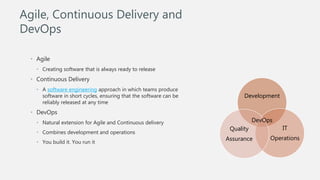
• Agile
• Creating software that is always ready to release
• Continuous Delivery
• A software engineering approach in which teams produce
software in short cycles, ensuring that the software can be
reliably released at any time
• DevOps
• Natural extension for Agile and Continuous delivery
• Combines development and operations
• You build it. You run it
Development
IT
Operations
Quality
Assurance
DevOps
Agile, Continuous Delivery and
DevOps
• Faster feedback
• Should be Reliable
• Tests
• Infrastructure
• Third part applications
Continuous Delivery
Mutable
• Same servers used again and
again
• Multiple patches on same server
• Manual process, can lead to
differences
Immutable
• Done through code
Mutable Vs Immutable
infrastructure
• Process of managing and provisioning of infrastructure with software
• Automate the creation and maintenance of servers
• No manual intervention
• Advantages
• Immutable infrastructure
• Speed
• Efficiency
• Accountability
Martin Fowler:
A server should be like a phoenix, regularly rising from the ashes.[1]
The primary advantage of using phoenix servers is to avoid configuration drift: ad
hoc changes to a systems configuration that go unrecorded.
Infrastructure as Code
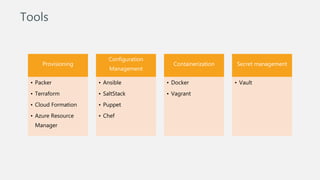
Provisioning
• Packer
• Terraform
• Cloud Formation
• Azure Resource
Manager
Configuration
Management
• Ansible
• SaltStack
• Puppet
• Chef
Containerization
• Docker
• Vagrant
Secret management
• Vault
Tools
Playbooks
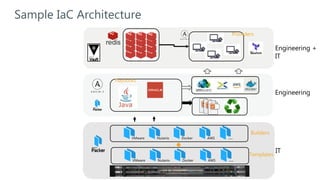
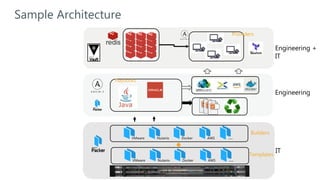
IT
Engineering
Engineering +
IT
Providers
VMware DockerNutanix AWS …
Builders
Templates
VMware DockerNutanix AWS …
Sample IaC Architecture
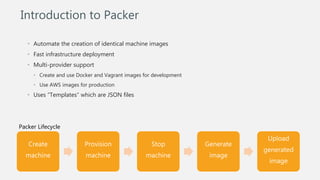
• Automate the creation of identical machine images
• Fast infrastructure deployment
• Multi-provider support
• Create and use Docker and Vagrant images for development
• Use AWS images for production
• Uses “Templates” which are JSON files
Introduction to Packer
Create
machine
Provision
machine
Stop
machine
Generate
image
Upload
generated
image
Packer Lifecycle
Create
machine
Provision
machine
Stop machine
Generate
image
Upload
generated
image
Packer Lifecycle
"builders": [
{
"type": "vsphere-clone",
"vcenter_server": "{{ user `vcenter_server`}}",
"username": "{{user `username`}}",
"password": "{{user `password`}}",
"insecure_connection": "{{user `insecure_conn`}}",
"vm_name": "{{user `vmname_prefix`}}-{{user
`component`}}",
"datacenter": "{{user `datacenter`}}",
"host": "{{user `host`}}",
"datastore": "{{user `datastore`}}",
"ssh_username": "{{user `ssh_username`}}",
"ssh_password": "{{user `ssh_password`}}",
"communicator": "ssh",
"CPUs": "{{user `CPUs`}}",
"RAM": "{{user `RAM`}}",
"RAM_reserve_all": "{{user `RAM_reserve_all`}}",
"linked_clone": true,
"create_snapshot": true,
"convert_to_template": true
}
• Builders turn template into a machine and
then an image
• Can have multiple builders in a template
"variables": {
"username": "{{env `VSPHERE_USER`}}",
"password": "{{env `VSPHERE_PASSWORD`}}",
"ssh_username": "{{env `SSH_USERNAME`}}",
"ssh_password": "{{env `SSH_PASSWORD`}}",
"vcenter_server": "ntvcenter02.abc.com",
},
Create
machine
Provision
machine
Stop machine
Generate
image
Upload
generated
image
Packer Lifecycle
"provisioners": [
{
"type": "ansible",
"user": "root",
"host_alias": "all",
"playbook_file": "./ansible/playbook.yml",
}
{
"type": "shell",
"inline": [
"sleep 30",
"sudo apt-get update",
"sudo apt-get install -y redis-server"
]
}
]
• Configure the booted image
• Examples
• Install Java
• Install products that we are working on
Create
machine
Provision
machine
Stop machine
Generate
image
Upload
generated
image
Packer Lifecycle
“post-processors": [
{
"type": “compress",
“output": filename.zip",
}
{
"type": “vagrant",
“outpute": “vagrantbox.box”
}
]
• Optional
• Runs after build and provision
• Used to upload artifacts or re-package
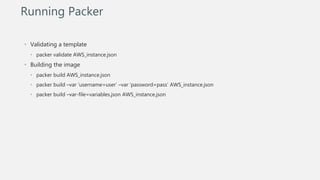
• Validating a template
• packer validate AWS_instance.json
• Building the image
• packer build AWS_instance.json
• packer build –var ‘username=user’ –var ‘password=pass’ AWS_instance.json
• packer build –var-file=variables.json AWS_instance.json
Running Packer
Playbooks
IT
Engineering
Engineering +
IT
Providers
VMware DockerNutanix AWS …
Builders
Templates
VMware DockerNutanix AWS …
Sample Architecture
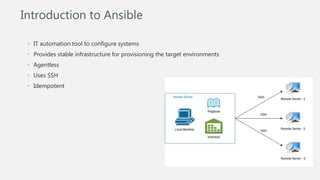
• IT automation tool to configure systems
• Provides stable infrastructure for provisioning the target environments
• Agentless
• Uses SSH
• Idempotent
Introduction to Ansible
• Modules
• Stand alone scripts
• Hundreds of modules available
• Users can write their own
modules
• Playbooks
• Written in YAML
• Set of instructions
• Contains one or more plays
Ansible – Modules & Playbooks
---
- hosts: webservers
remote_user: root
tasks:
- name: ensure apache is at the latest version
yum:
name: httpd
state: latest
- name: write the apache config file
template:
src: /srv/httpd.j2
dest: /etc/httpd.conf
notify:
- restart apache
- name: ensure apache is running
service:
name: httpd
state: started
Playbook
Playbooks
IT
Engineering
Engineering +
IT
Providers
VMware DockerNutanix AWS …
Builders
Templates
VMware DockerNutanix AWS …
Sample Architecture
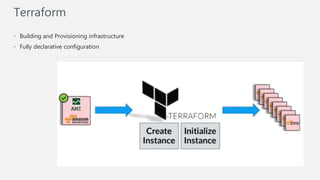
Terraform
• Building and Provisioning infrastructure
• Fully declarative configuration
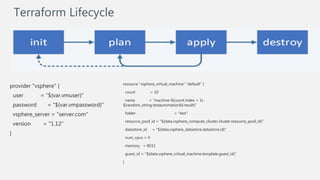
Terraform Lifecycle
provider "vsphere" {
user = "${var.vmuser}"
password = "${var.vmpassword}"
vsphere_server = “server.com"
version = "1.12"
}
resource "vsphere_virtual_machine" "default" {
count = 10
name = “machine-${count.index + 1}-
${random_string.testautomationId.result}"
folder = “test"
resource_pool_id = "${data.vsphere_compute_cluster.cluster.resource_pool_id}"
datastore_id = "${data.vsphere_datastore.datastore.id}"
num_cpus = 4
memory = 8032
guest_id = "${data.vsphere_virtual_machine.template.guest_id}“
}
Q&A

Infrastructure as Code (IaC)

  • 1.
  • 2.
    • Agile, DevOps,CI/CD and IaC • Introduction to Infrastructure as Code • Tools • Framework • Details on the tools • Q&A Agenda
  • 3.
    • Agile • Creatingsoftware that is always ready to release • Continuous Delivery • A software engineering approach in which teams produce software in short cycles, ensuring that the software can be reliably released at any time • DevOps • Natural extension for Agile and Continuous delivery • Combines development and operations • You build it. You run it Development IT Operations Quality Assurance DevOps Agile, Continuous Delivery and DevOps
  • 4.
    • Faster feedback •Should be Reliable • Tests • Infrastructure • Third part applications Continuous Delivery
  • 5.
    Mutable • Same serversused again and again • Multiple patches on same server • Manual process, can lead to differences Immutable • Done through code Mutable Vs Immutable infrastructure
  • 6.
    • Process ofmanaging and provisioning of infrastructure with software • Automate the creation and maintenance of servers • No manual intervention • Advantages • Immutable infrastructure • Speed • Efficiency • Accountability Martin Fowler: A server should be like a phoenix, regularly rising from the ashes.[1] The primary advantage of using phoenix servers is to avoid configuration drift: ad hoc changes to a systems configuration that go unrecorded. Infrastructure as Code
  • 7.
    Provisioning • Packer • Terraform •Cloud Formation • Azure Resource Manager Configuration Management • Ansible • SaltStack • Puppet • Chef Containerization • Docker • Vagrant Secret management • Vault Tools
  • 8.
    Playbooks IT Engineering Engineering + IT Providers VMware DockerNutanixAWS … Builders Templates VMware DockerNutanix AWS … Sample IaC Architecture
  • 9.
    • Automate thecreation of identical machine images • Fast infrastructure deployment • Multi-provider support • Create and use Docker and Vagrant images for development • Use AWS images for production • Uses “Templates” which are JSON files Introduction to Packer Create machine Provision machine Stop machine Generate image Upload generated image Packer Lifecycle
  • 10.
    Create machine Provision machine Stop machine Generate image Upload generated image Packer Lifecycle "builders":[ { "type": "vsphere-clone", "vcenter_server": "{{ user `vcenter_server`}}", "username": "{{user `username`}}", "password": "{{user `password`}}", "insecure_connection": "{{user `insecure_conn`}}", "vm_name": "{{user `vmname_prefix`}}-{{user `component`}}", "datacenter": "{{user `datacenter`}}", "host": "{{user `host`}}", "datastore": "{{user `datastore`}}", "ssh_username": "{{user `ssh_username`}}", "ssh_password": "{{user `ssh_password`}}", "communicator": "ssh", "CPUs": "{{user `CPUs`}}", "RAM": "{{user `RAM`}}", "RAM_reserve_all": "{{user `RAM_reserve_all`}}", "linked_clone": true, "create_snapshot": true, "convert_to_template": true } • Builders turn template into a machine and then an image • Can have multiple builders in a template "variables": { "username": "{{env `VSPHERE_USER`}}", "password": "{{env `VSPHERE_PASSWORD`}}", "ssh_username": "{{env `SSH_USERNAME`}}", "ssh_password": "{{env `SSH_PASSWORD`}}", "vcenter_server": "ntvcenter02.abc.com", },
  • 11.
    Create machine Provision machine Stop machine Generate image Upload generated image Packer Lifecycle "provisioners":[ { "type": "ansible", "user": "root", "host_alias": "all", "playbook_file": "./ansible/playbook.yml", } { "type": "shell", "inline": [ "sleep 30", "sudo apt-get update", "sudo apt-get install -y redis-server" ] } ] • Configure the booted image • Examples • Install Java • Install products that we are working on
  • 12.
    Create machine Provision machine Stop machine Generate image Upload generated image Packer Lifecycle “post-processors":[ { "type": “compress", “output": filename.zip", } { "type": “vagrant", “outpute": “vagrantbox.box” } ] • Optional • Runs after build and provision • Used to upload artifacts or re-package
  • 13.
    • Validating atemplate • packer validate AWS_instance.json • Building the image • packer build AWS_instance.json • packer build –var ‘username=user’ –var ‘password=pass’ AWS_instance.json • packer build –var-file=variables.json AWS_instance.json Running Packer
  • 14.
    Playbooks IT Engineering Engineering + IT Providers VMware DockerNutanixAWS … Builders Templates VMware DockerNutanix AWS … Sample Architecture
  • 15.
    • IT automationtool to configure systems • Provides stable infrastructure for provisioning the target environments • Agentless • Uses SSH • Idempotent Introduction to Ansible
  • 16.
    • Modules • Standalone scripts • Hundreds of modules available • Users can write their own modules • Playbooks • Written in YAML • Set of instructions • Contains one or more plays Ansible – Modules & Playbooks --- - hosts: webservers remote_user: root tasks: - name: ensure apache is at the latest version yum: name: httpd state: latest - name: write the apache config file template: src: /srv/httpd.j2 dest: /etc/httpd.conf notify: - restart apache - name: ensure apache is running service: name: httpd state: started Playbook
  • 17.
    Playbooks IT Engineering Engineering + IT Providers VMware DockerNutanixAWS … Builders Templates VMware DockerNutanix AWS … Sample Architecture
  • 18.
    Terraform • Building andProvisioning infrastructure • Fully declarative configuration
  • 19.
    Terraform Lifecycle provider "vsphere"{ user = "${var.vmuser}" password = "${var.vmpassword}" vsphere_server = “server.com" version = "1.12" } resource "vsphere_virtual_machine" "default" { count = 10 name = “machine-${count.index + 1}- ${random_string.testautomationId.result}" folder = “test" resource_pool_id = "${data.vsphere_compute_cluster.cluster.resource_pool_id}" datastore_id = "${data.vsphere_datastore.datastore.id}" num_cpus = 4 memory = 8032 guest_id = "${data.vsphere_virtual_machine.template.guest_id}“ }
  • 20.