


Image Processing
Introduction
Mr. A. B. Shinde
A. B. Shinde
Contents…
• What is Image?
• Concept of digital image processing,
• Steps in image processing,
• Components of image processing
system,
• Applications areas
• Research Topics
2
A. B. Shinde
What is Image?
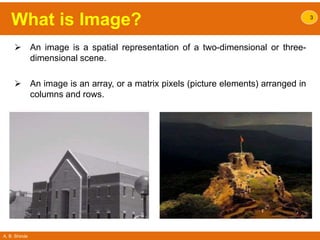
 An image is a spatial representation of a two-dimensional or three-
dimensional scene.
 An image is an array, or a matrix pixels (picture elements) arranged in
columns and rows.
3
A. B. Shinde
Digital Image Processing…Why?
• Interest in digital image processing methods stems from two principal
application areas:
1. Improvement of pictorial information for human interpretation
2. Processing of image data for storage, transmission, and representation
for autonomous machine perception
4
A. B. Shinde
Digital Image Processing
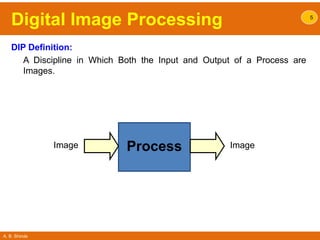
DIP Definition:
A Discipline in Which Both the Input and Output of a Process are
Images.
5
ProcessImage Image
A. B. Shinde
What is Digital Image…?
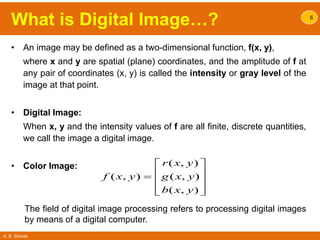
• An image may be defined as a two-dimensional function, f(x, y),
where x and y are spatial (plane) coordinates, and the amplitude of f at
any pair of coordinates (x, y) is called the intensity or gray level of the
image at that point.
• Digital Image:
When x, y and the intensity values of f are all finite, discrete quantities,
we call the image a digital image.
• Color Image:
6
( , )
( , ) ( , )
( , )
r x y
f x y g x y
b x y
 
 
 
  
The field of digital image processing refers to processing digital images
by means of a digital computer.
A. B. Shinde
What is Digital Image…?
• An Image:
7
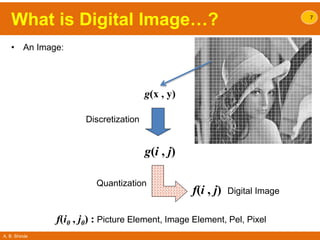
Discretization
Quantization
g(x , y)
g(i , j)
f(i , j) Digital Image
f(i0 , j0) : Picture Element, Image Element, Pel, Pixel
A. B. Shinde
Digital Image Processing 8
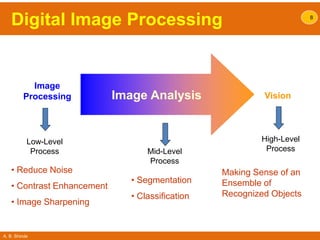
Image
Processing Vision
Low-Level
Process Mid-Level
Process
High-Level
Process
• Reduce Noise
• Contrast Enhancement
• Image Sharpening
• Segmentation
• Classification
Making Sense of an
Ensemble of
Recognized Objects
Image Analysis
A. B. Shinde
Origins of Digital Image
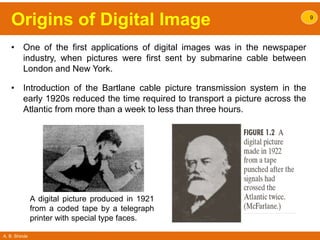
• One of the first applications of digital images was in the newspaper
industry, when pictures were first sent by submarine cable between
London and New York.
• Introduction of the Bartlane cable picture transmission system in the
early 1920s reduced the time required to transport a picture across the
Atlantic from more than a week to less than three hours.
9
A digital picture produced in 1921
from a coded tape by a telegraph
printer with special type faces.
A. B. Shinde
10
Steps in
Digital Image Processing
A. B. Shinde
Steps in DIP 11
A. B. Shinde
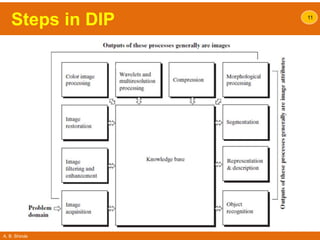
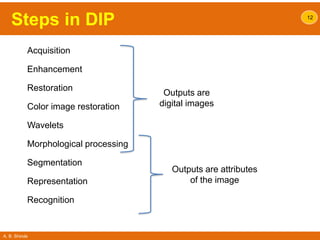
Steps in DIP 12
Acquisition
Enhancement
Restoration
Color image restoration
Wavelets
Morphological processing
Segmentation
Representation
Recognition
Outputs are
digital images
Outputs are attributes
of the image
A. B. Shinde
Steps in DIP
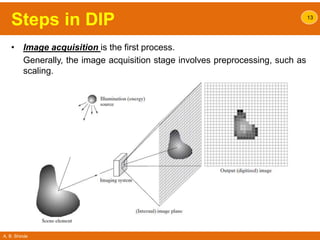
• Image acquisition is the first process.
Generally, the image acquisition stage involves preprocessing, such as
scaling.
13
A. B. Shinde
Steps in DIP
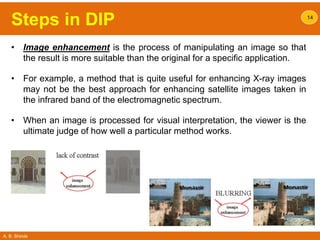
• Image enhancement is the process of manipulating an image so that
the result is more suitable than the original for a specific application.
• For example, a method that is quite useful for enhancing X-ray images
may not be the best approach for enhancing satellite images taken in
the infrared band of the electromagnetic spectrum.
• When an image is processed for visual interpretation, the viewer is the
ultimate judge of how well a particular method works.
14
A. B. Shinde
Steps in DIP
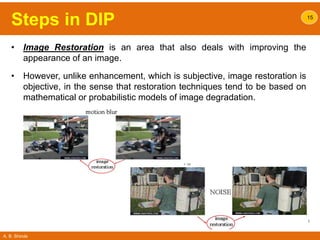
• Image Restoration is an area that also deals with improving the
appearance of an image.
• However, unlike enhancement, which is subjective, image restoration is
objective, in the sense that restoration techniques tend to be based on
mathematical or probabilistic models of image degradation.
15
A. B. Shinde
Steps in DIP
• Color Image Processing is an area that has been gaining in
importance because of the significant increase in the use of digital
images over the Internet.
• Wavelets are the foundation for representing images in various
degrees of resolution.
• Morphological processing deals with tools for extracting image
components that are useful in the representation and description of
shape.
16
A. B. Shinde
Steps in DIP
• Compression, as the name implies, deals with techniques for reducing
the storage required to save an image, or the bandwidth required to
transmit it.
• This is true particularly in uses of the Internet.
• Segmentation procedures partition an image into its constituent parts
or objects.
• A segmentation procedure brings the process a long way toward
successful solution of imaging problems that require objects to be
identified individually.
• In general, the more accurate the segmentation, the more likely
recognition is to succeed.
17
A. B. Shinde
Steps in DIP
• Representation and description almost always follow the output of a
segmentation stage, which usually is raw pixel data.
 Boundary representation is appropriate when the focus is on
external shape characteristics, such as corners and inflections.
 Regional representation is appropriate when the focus is on internal
properties, such as texture or skeletal shape.
Description, also called feature selection, deals with extracting
attributes that result in some quantitative information of interest or are
basic for differentiating one class of objects from another.
• Recognition is the process that assigns a label (e.g., “vehicle”) to an
object based on its descriptors. Digital image processing with the
development of methods for recognition of individual objects.
18
A. B. Shinde
Steps in DIP
• Knowledge Base: Knowledge about a problem domain is coded into
an image processing system in the form of a knowledge database.
• This knowledge may be as simple as detailing regions of an image
where the information of interest is known to be Located.
• The knowledge base can also be complex, such as an interrelated list
of all major possible defects in a materials inspection problem.
• In addition to guiding the operation of each processing module, the
knowledge base also controls the interaction between modules.
19
A. B. Shinde
20
Components of
Digital Image Processing
A. B. Shinde
Components of DIP 21
A. B. Shinde
Components of DIP
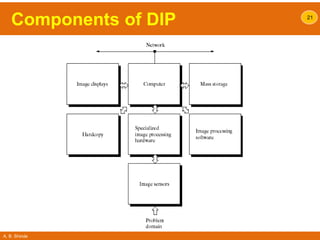
• Specialized image processing hardware usually consists of the
digitizer, plus hardware that performs other primitive operations, such
as an arithmetic logic unit (ALU), that performs arithmetic and logical
operations in parallel on entire images.
• This type of hardware sometimes is called a front-end subsystem, and
its most distinguishing characteristic is speed.
22
A. B. Shinde
Components of DIP
• The Computer in an image processing system is a general-purpose
computer and can range from a PC to a supercomputer.
• In dedicated applications, sometimes custom computers are used to
achieve a required level of performance, but our interest here is on
general-purpose image processing systems.
• In these systems, almost any well-equipped PC-type machine is
suitable for off-line image processing tasks.
23
A. B. Shinde
Components of DIP
• Software for image processing consists of specialized modules that
perform specific tasks.
• More sophisticated software packages allow the integration of those
modules and general-purpose software commands from at least one
computer language.
24
A. B. Shinde
Components of DIP
• Mass storage capability is a must in image processing applications.
• An image of size 1024 * 1024 pixels, in which the intensity of each pixel
is an 8-bit quantity, requires one megabyte of storage space if the
image is not compressed.
• Digital storage for image processing applications falls into three
principal categories:
– Short-term storage for use during processing,
– On-line storage for relatively fast recall, and
– Archival storage, characterized by infrequent access.
• Storage is measured in:
– bytes,
– Kbytes,
– Mbytes,
– Gbytes, and
– Tbytes.
25
A. B. Shinde
Components of DIP
• Image Displays in use today are mainly color (preferably flat screen)
TV monitors.
• Monitors are driven by the outputs of image and graphics display cards
that are an integral part of the computer system.
• In some cases, it is necessary to have stereo displays, and these are
implemented in the form of headgear containing two small displays
embedded in goggles worn by the user.
26
A. B. Shinde
Components of DIP
• Hardcopy devices for recording images include laser printers, film
cameras, heat-sensitive devices, inkjet units, and digital units, such as
optical and CDROM disks.
• Networking is almost a default function in any computer system in use
today.
In dedicated networks, this typically is not a problem, but
communications with remote sites via the Internet are not always as
efficient.
27
A. B. Shinde
28
Application Areas of
Digital Image Processing
A. B. Shinde
Application Areas of DIP
• Today, there is almost no area of technical endeavor that is not
impacted in some way by digital image processing.
• Gamma-Ray Imaging
• X-Ray Imaging
• Imaging in the Ultraviolet Band
• Imaging in the Visible and Infrared Bands
• Imaging in the Microwave Band
• Imaging in the Radio Band
29
A. B. Shinde
Application Areas of DIP
• Gamma-Ray Imaging
• Major uses of imaging based on gamma rays include nuclear medicine.
• In nuclear medicine, the approach is to inject a patient with a
radioactive isotope that emits gamma rays as it decays.
• Images are produced from the emissions collected by gamma ray
detectors.
30
A. B. Shinde
Application Areas of DIP
• Gamma-Ray Imaging
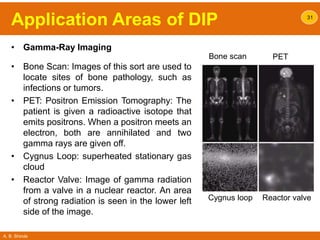
• Bone Scan: Images of this sort are used to
locate sites of bone pathology, such as
infections or tumors.
• PET: Positron Emission Tomography: The
patient is given a radioactive isotope that
emits positrons. When a positron meets an
electron, both are annihilated and two
gamma rays are given off.
• Cygnus Loop: superheated stationary gas
cloud
• Reactor Valve: Image of gamma radiation
from a valve in a nuclear reactor. An area
of strong radiation is seen in the lower left
side of the image.
31
Bone scan PET
Cygnus loop Reactor valve
A. B. Shinde
Application Areas of DIP 32
• X-Ray Imaging:
• X-rays are oldest source of EM radiation used for imaging.
• X-rays are used in medical diagnostics, industry and other areas, like
astronomy.
• X-rays for medical and industrial imaging are generated using an X-ray
tube. The cathode is heated, causing free electrons to be released.
These electrons flow at high speed to the positively charged anode.
When the electrons strike a nucleus, energy is released in the form of X-
ray radiation.
• The energy (penetrating power) of X-rays is controlled by a voltage
applied across the anode and by a current applied to the filament in the
cathode.
A. B. Shinde
Application Areas of DIP 33
Cygnus loop
PCB
Chest
X-Ray
Head CT
Angiogram
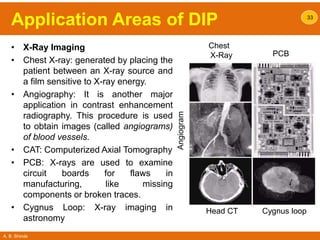
• X-Ray Imaging
• Chest X-ray: generated by placing the
patient between an X-ray source and
a film sensitive to X-ray energy.
• Angiography: It is another major
application in contrast enhancement
radiography. This procedure is used
to obtain images (called angiograms)
of blood vessels.
• CAT: Computerized Axial Tomography
• PCB: X-rays are used to examine
circuit boards for flaws in
manufacturing, like missing
components or broken traces.
• Cygnus Loop: X-ray imaging in
astronomy
A. B. Shinde
Application Areas of DIP
• Imaging in the Ultraviolet Band
• Ultraviolet light is used in fluorescence microscopy.
• The ultraviolet light is not visible, but when a photon of ultraviolet
collides with an electron of a fluorescent material, it elevates the
electron to a higher energy level.
• Excited electron relaxes to a lower level and emits light in the form of a
lower-energy photon in the visible (red) light region.
• Thus, only the emission light reaches the eye or other detector.
• The resulting fluorescing areas shine against a dark background with
sufficient contrast to permit detection.
34
A. B. Shinde
Application Areas of DIP
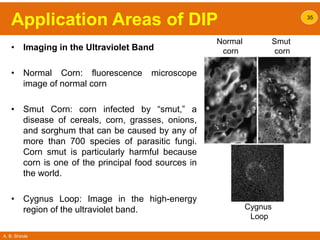
• Imaging in the Ultraviolet Band
• Normal Corn: fluorescence microscope
image of normal corn
• Smut Corn: corn infected by “smut,” a
disease of cereals, corn, grasses, onions,
and sorghum that can be caused by any of
more than 700 species of parasitic fungi.
Corn smut is particularly harmful because
corn is one of the principal food sources in
the world.
• Cygnus Loop: Image in the high-energy
region of the ultraviolet band.
35
Normal
corn
Smut
corn
Cygnus
Loop
A. B. Shinde
Application Areas of DIP
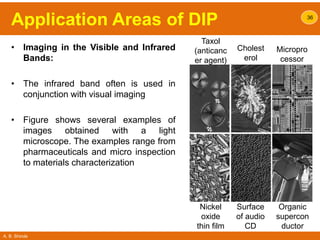
• Imaging in the Visible and Infrared
Bands:
• The infrared band often is used in
conjunction with visual imaging
• Figure shows several examples of
images obtained with a light
microscope. The examples range from
pharmaceuticals and micro inspection
to materials characterization
36
Taxol
(anticanc
er agent)
Cholest
erol
Micropro
cessor
Nickel
oxide
thin film
Surface
of audio
CD
Organic
supercon
ductor
A. B. Shinde
Application Areas of DIP
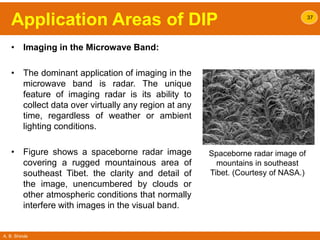
• Imaging in the Microwave Band:
• The dominant application of imaging in the
microwave band is radar. The unique
feature of imaging radar is its ability to
collect data over virtually any region at any
time, regardless of weather or ambient
lighting conditions.
• Figure shows a spaceborne radar image
covering a rugged mountainous area of
southeast Tibet. the clarity and detail of
the image, unencumbered by clouds or
other atmospheric conditions that normally
interfere with images in the visual band.
37
Spaceborne radar image of
mountains in southeast
Tibet. (Courtesy of NASA.)
A. B. Shinde
Application Areas of DIP
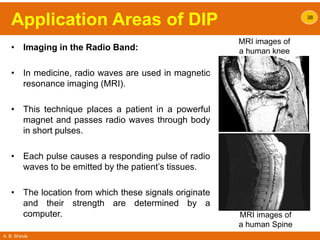
• Imaging in the Radio Band:
• In medicine, radio waves are used in magnetic
resonance imaging (MRI).
• This technique places a patient in a powerful
magnet and passes radio waves through body
in short pulses.
• Each pulse causes a responding pulse of radio
waves to be emitted by the patient’s tissues.
• The location from which these signals originate
and their strength are determined by a
computer.
38
MRI images of
a human knee
MRI images of
a human Spine
A. B. Shinde
39
Applications & Research Topics in
Digital Image Processing
A. B. Shinde
Applications & Research Topics
• Document Handling
40
A. B. Shinde
Applications & Research Topics
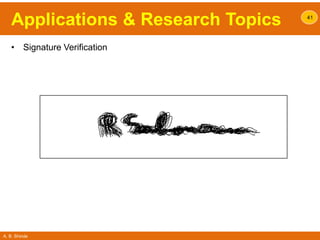
• Signature Verification
41
A. B. Shinde
Applications & Research Topics
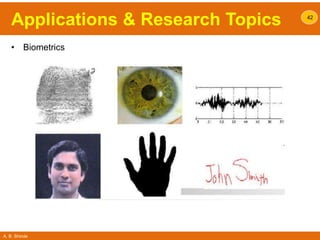
• Biometrics
42
A. B. Shinde
Applications & Research Topics
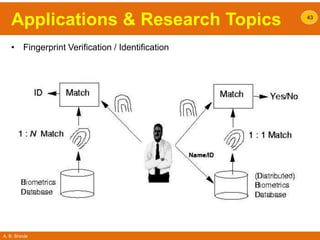
• Fingerprint Verification / Identification
43
A. B. Shinde
Applications & Research Topics
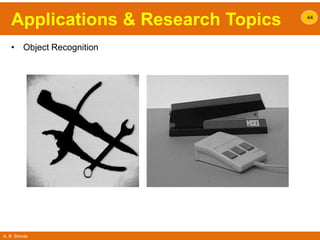
• Object Recognition
44
A. B. Shinde
Applications & Research Topics
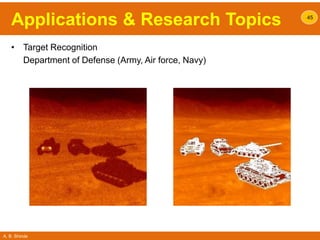
• Target Recognition
Department of Defense (Army, Air force, Navy)
45
A. B. Shinde
Applications & Research Topics
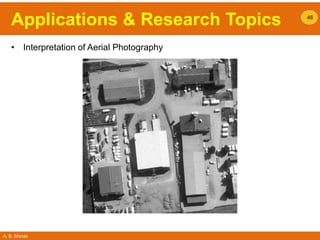
• Interpretation of Aerial Photography
46
A. B. Shinde
Applications & Research Topics
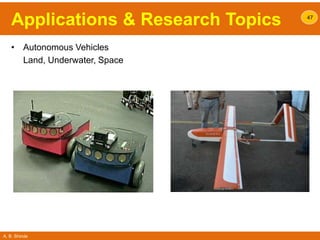
• Autonomous Vehicles
Land, Underwater, Space
47
A. B. Shinde
Applications & Research Topics
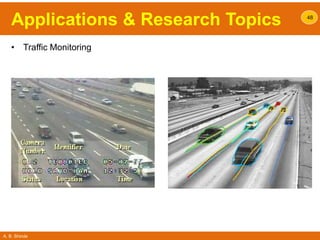
• Traffic Monitoring
48
A. B. Shinde
Applications & Research Topics
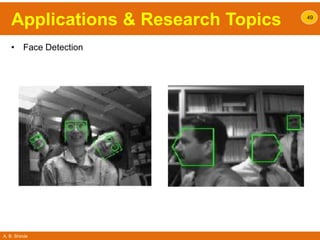
• Face Detection
49
A. B. Shinde
Applications & Research Topics
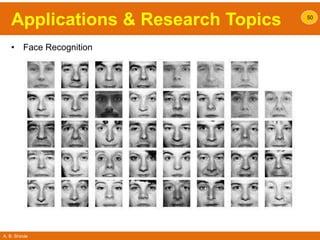
• Face Recognition
50
A. B. Shinde
Applications & Research Topics
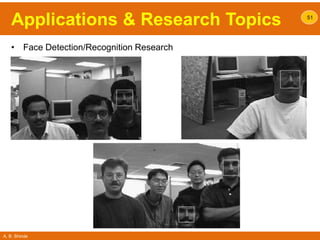
• Face Detection/Recognition Research
51
A. B. Shinde
Applications & Research Topics
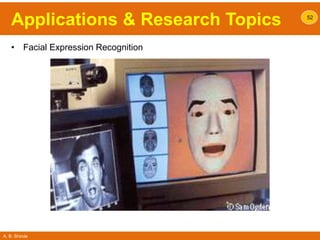
• Facial Expression Recognition
52
A. B. Shinde
Applications & Research Topics
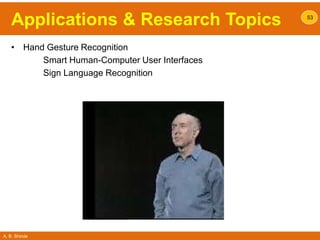
• Hand Gesture Recognition
Smart Human-Computer User Interfaces
Sign Language Recognition
53
A. B. Shinde
Applications & Research Topics
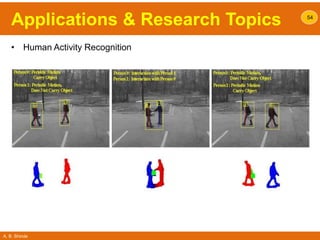
• Human Activity Recognition
54
A. B. Shinde
Applications & Research Topics
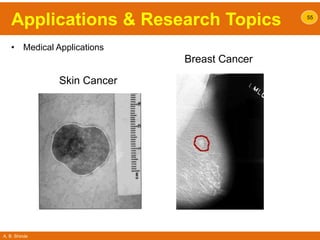
• Medical Applications
55
Breast Cancer
Skin Cancer
A. B. Shinde
Applications & Research Topics
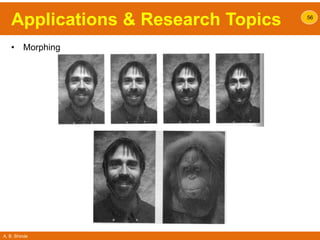
• Morphing
56
A. B. Shinde
Applications & Research Topics
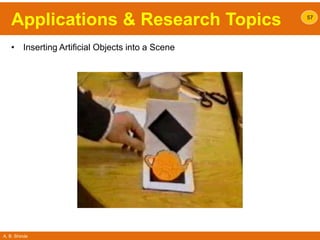
• Inserting Artificial Objects into a Scene
57
This presentation is published only for educational purpose
abshinde.eln@gmail.com

Image Processing Basics

  • 1.
  • 2.
    A. B. Shinde Contents… •What is Image? • Concept of digital image processing, • Steps in image processing, • Components of image processing system, • Applications areas • Research Topics 2
  • 3.
    A. B. Shinde Whatis Image?  An image is a spatial representation of a two-dimensional or three- dimensional scene.  An image is an array, or a matrix pixels (picture elements) arranged in columns and rows. 3
  • 4.
    A. B. Shinde DigitalImage Processing…Why? • Interest in digital image processing methods stems from two principal application areas: 1. Improvement of pictorial information for human interpretation 2. Processing of image data for storage, transmission, and representation for autonomous machine perception 4
  • 5.
    A. B. Shinde DigitalImage Processing DIP Definition: A Discipline in Which Both the Input and Output of a Process are Images. 5 ProcessImage Image
  • 6.
    A. B. Shinde Whatis Digital Image…? • An image may be defined as a two-dimensional function, f(x, y), where x and y are spatial (plane) coordinates, and the amplitude of f at any pair of coordinates (x, y) is called the intensity or gray level of the image at that point. • Digital Image: When x, y and the intensity values of f are all finite, discrete quantities, we call the image a digital image. • Color Image: 6 ( , ) ( , ) ( , ) ( , ) r x y f x y g x y b x y          The field of digital image processing refers to processing digital images by means of a digital computer.
  • 7.
    A. B. Shinde Whatis Digital Image…? • An Image: 7 Discretization Quantization g(x , y) g(i , j) f(i , j) Digital Image f(i0 , j0) : Picture Element, Image Element, Pel, Pixel
  • 8.
    A. B. Shinde DigitalImage Processing 8 Image Processing Vision Low-Level Process Mid-Level Process High-Level Process • Reduce Noise • Contrast Enhancement • Image Sharpening • Segmentation • Classification Making Sense of an Ensemble of Recognized Objects Image Analysis
  • 9.
    A. B. Shinde Originsof Digital Image • One of the first applications of digital images was in the newspaper industry, when pictures were first sent by submarine cable between London and New York. • Introduction of the Bartlane cable picture transmission system in the early 1920s reduced the time required to transport a picture across the Atlantic from more than a week to less than three hours. 9 A digital picture produced in 1921 from a coded tape by a telegraph printer with special type faces.
  • 10.
    A. B. Shinde 10 Stepsin Digital Image Processing
  • 11.
  • 12.
    A. B. Shinde Stepsin DIP 12 Acquisition Enhancement Restoration Color image restoration Wavelets Morphological processing Segmentation Representation Recognition Outputs are digital images Outputs are attributes of the image
  • 13.
    A. B. Shinde Stepsin DIP • Image acquisition is the first process. Generally, the image acquisition stage involves preprocessing, such as scaling. 13
  • 14.
    A. B. Shinde Stepsin DIP • Image enhancement is the process of manipulating an image so that the result is more suitable than the original for a specific application. • For example, a method that is quite useful for enhancing X-ray images may not be the best approach for enhancing satellite images taken in the infrared band of the electromagnetic spectrum. • When an image is processed for visual interpretation, the viewer is the ultimate judge of how well a particular method works. 14
  • 15.
    A. B. Shinde Stepsin DIP • Image Restoration is an area that also deals with improving the appearance of an image. • However, unlike enhancement, which is subjective, image restoration is objective, in the sense that restoration techniques tend to be based on mathematical or probabilistic models of image degradation. 15
  • 16.
    A. B. Shinde Stepsin DIP • Color Image Processing is an area that has been gaining in importance because of the significant increase in the use of digital images over the Internet. • Wavelets are the foundation for representing images in various degrees of resolution. • Morphological processing deals with tools for extracting image components that are useful in the representation and description of shape. 16
  • 17.
    A. B. Shinde Stepsin DIP • Compression, as the name implies, deals with techniques for reducing the storage required to save an image, or the bandwidth required to transmit it. • This is true particularly in uses of the Internet. • Segmentation procedures partition an image into its constituent parts or objects. • A segmentation procedure brings the process a long way toward successful solution of imaging problems that require objects to be identified individually. • In general, the more accurate the segmentation, the more likely recognition is to succeed. 17
  • 18.
    A. B. Shinde Stepsin DIP • Representation and description almost always follow the output of a segmentation stage, which usually is raw pixel data.  Boundary representation is appropriate when the focus is on external shape characteristics, such as corners and inflections.  Regional representation is appropriate when the focus is on internal properties, such as texture or skeletal shape. Description, also called feature selection, deals with extracting attributes that result in some quantitative information of interest or are basic for differentiating one class of objects from another. • Recognition is the process that assigns a label (e.g., “vehicle”) to an object based on its descriptors. Digital image processing with the development of methods for recognition of individual objects. 18
  • 19.
    A. B. Shinde Stepsin DIP • Knowledge Base: Knowledge about a problem domain is coded into an image processing system in the form of a knowledge database. • This knowledge may be as simple as detailing regions of an image where the information of interest is known to be Located. • The knowledge base can also be complex, such as an interrelated list of all major possible defects in a materials inspection problem. • In addition to guiding the operation of each processing module, the knowledge base also controls the interaction between modules. 19
  • 20.
    A. B. Shinde 20 Componentsof Digital Image Processing
  • 21.
  • 22.
    A. B. Shinde Componentsof DIP • Specialized image processing hardware usually consists of the digitizer, plus hardware that performs other primitive operations, such as an arithmetic logic unit (ALU), that performs arithmetic and logical operations in parallel on entire images. • This type of hardware sometimes is called a front-end subsystem, and its most distinguishing characteristic is speed. 22
  • 23.
    A. B. Shinde Componentsof DIP • The Computer in an image processing system is a general-purpose computer and can range from a PC to a supercomputer. • In dedicated applications, sometimes custom computers are used to achieve a required level of performance, but our interest here is on general-purpose image processing systems. • In these systems, almost any well-equipped PC-type machine is suitable for off-line image processing tasks. 23
  • 24.
    A. B. Shinde Componentsof DIP • Software for image processing consists of specialized modules that perform specific tasks. • More sophisticated software packages allow the integration of those modules and general-purpose software commands from at least one computer language. 24
  • 25.
    A. B. Shinde Componentsof DIP • Mass storage capability is a must in image processing applications. • An image of size 1024 * 1024 pixels, in which the intensity of each pixel is an 8-bit quantity, requires one megabyte of storage space if the image is not compressed. • Digital storage for image processing applications falls into three principal categories: – Short-term storage for use during processing, – On-line storage for relatively fast recall, and – Archival storage, characterized by infrequent access. • Storage is measured in: – bytes, – Kbytes, – Mbytes, – Gbytes, and – Tbytes. 25
  • 26.
    A. B. Shinde Componentsof DIP • Image Displays in use today are mainly color (preferably flat screen) TV monitors. • Monitors are driven by the outputs of image and graphics display cards that are an integral part of the computer system. • In some cases, it is necessary to have stereo displays, and these are implemented in the form of headgear containing two small displays embedded in goggles worn by the user. 26
  • 27.
    A. B. Shinde Componentsof DIP • Hardcopy devices for recording images include laser printers, film cameras, heat-sensitive devices, inkjet units, and digital units, such as optical and CDROM disks. • Networking is almost a default function in any computer system in use today. In dedicated networks, this typically is not a problem, but communications with remote sites via the Internet are not always as efficient. 27
  • 28.
    A. B. Shinde 28 ApplicationAreas of Digital Image Processing
  • 29.
    A. B. Shinde ApplicationAreas of DIP • Today, there is almost no area of technical endeavor that is not impacted in some way by digital image processing. • Gamma-Ray Imaging • X-Ray Imaging • Imaging in the Ultraviolet Band • Imaging in the Visible and Infrared Bands • Imaging in the Microwave Band • Imaging in the Radio Band 29
  • 30.
    A. B. Shinde ApplicationAreas of DIP • Gamma-Ray Imaging • Major uses of imaging based on gamma rays include nuclear medicine. • In nuclear medicine, the approach is to inject a patient with a radioactive isotope that emits gamma rays as it decays. • Images are produced from the emissions collected by gamma ray detectors. 30
  • 31.
    A. B. Shinde ApplicationAreas of DIP • Gamma-Ray Imaging • Bone Scan: Images of this sort are used to locate sites of bone pathology, such as infections or tumors. • PET: Positron Emission Tomography: The patient is given a radioactive isotope that emits positrons. When a positron meets an electron, both are annihilated and two gamma rays are given off. • Cygnus Loop: superheated stationary gas cloud • Reactor Valve: Image of gamma radiation from a valve in a nuclear reactor. An area of strong radiation is seen in the lower left side of the image. 31 Bone scan PET Cygnus loop Reactor valve
  • 32.
    A. B. Shinde ApplicationAreas of DIP 32 • X-Ray Imaging: • X-rays are oldest source of EM radiation used for imaging. • X-rays are used in medical diagnostics, industry and other areas, like astronomy. • X-rays for medical and industrial imaging are generated using an X-ray tube. The cathode is heated, causing free electrons to be released. These electrons flow at high speed to the positively charged anode. When the electrons strike a nucleus, energy is released in the form of X- ray radiation. • The energy (penetrating power) of X-rays is controlled by a voltage applied across the anode and by a current applied to the filament in the cathode.
  • 33.
    A. B. Shinde ApplicationAreas of DIP 33 Cygnus loop PCB Chest X-Ray Head CT Angiogram • X-Ray Imaging • Chest X-ray: generated by placing the patient between an X-ray source and a film sensitive to X-ray energy. • Angiography: It is another major application in contrast enhancement radiography. This procedure is used to obtain images (called angiograms) of blood vessels. • CAT: Computerized Axial Tomography • PCB: X-rays are used to examine circuit boards for flaws in manufacturing, like missing components or broken traces. • Cygnus Loop: X-ray imaging in astronomy
  • 34.
    A. B. Shinde ApplicationAreas of DIP • Imaging in the Ultraviolet Band • Ultraviolet light is used in fluorescence microscopy. • The ultraviolet light is not visible, but when a photon of ultraviolet collides with an electron of a fluorescent material, it elevates the electron to a higher energy level. • Excited electron relaxes to a lower level and emits light in the form of a lower-energy photon in the visible (red) light region. • Thus, only the emission light reaches the eye or other detector. • The resulting fluorescing areas shine against a dark background with sufficient contrast to permit detection. 34
  • 35.
    A. B. Shinde ApplicationAreas of DIP • Imaging in the Ultraviolet Band • Normal Corn: fluorescence microscope image of normal corn • Smut Corn: corn infected by “smut,” a disease of cereals, corn, grasses, onions, and sorghum that can be caused by any of more than 700 species of parasitic fungi. Corn smut is particularly harmful because corn is one of the principal food sources in the world. • Cygnus Loop: Image in the high-energy region of the ultraviolet band. 35 Normal corn Smut corn Cygnus Loop
  • 36.
    A. B. Shinde ApplicationAreas of DIP • Imaging in the Visible and Infrared Bands: • The infrared band often is used in conjunction with visual imaging • Figure shows several examples of images obtained with a light microscope. The examples range from pharmaceuticals and micro inspection to materials characterization 36 Taxol (anticanc er agent) Cholest erol Micropro cessor Nickel oxide thin film Surface of audio CD Organic supercon ductor
  • 37.
    A. B. Shinde ApplicationAreas of DIP • Imaging in the Microwave Band: • The dominant application of imaging in the microwave band is radar. The unique feature of imaging radar is its ability to collect data over virtually any region at any time, regardless of weather or ambient lighting conditions. • Figure shows a spaceborne radar image covering a rugged mountainous area of southeast Tibet. the clarity and detail of the image, unencumbered by clouds or other atmospheric conditions that normally interfere with images in the visual band. 37 Spaceborne radar image of mountains in southeast Tibet. (Courtesy of NASA.)
  • 38.
    A. B. Shinde ApplicationAreas of DIP • Imaging in the Radio Band: • In medicine, radio waves are used in magnetic resonance imaging (MRI). • This technique places a patient in a powerful magnet and passes radio waves through body in short pulses. • Each pulse causes a responding pulse of radio waves to be emitted by the patient’s tissues. • The location from which these signals originate and their strength are determined by a computer. 38 MRI images of a human knee MRI images of a human Spine
  • 39.
    A. B. Shinde 39 Applications& Research Topics in Digital Image Processing
  • 40.
    A. B. Shinde Applications& Research Topics • Document Handling 40
  • 41.
    A. B. Shinde Applications& Research Topics • Signature Verification 41
  • 42.
    A. B. Shinde Applications& Research Topics • Biometrics 42
  • 43.
    A. B. Shinde Applications& Research Topics • Fingerprint Verification / Identification 43
  • 44.
    A. B. Shinde Applications& Research Topics • Object Recognition 44
  • 45.
    A. B. Shinde Applications& Research Topics • Target Recognition Department of Defense (Army, Air force, Navy) 45
  • 46.
    A. B. Shinde Applications& Research Topics • Interpretation of Aerial Photography 46
  • 47.
    A. B. Shinde Applications& Research Topics • Autonomous Vehicles Land, Underwater, Space 47
  • 48.
    A. B. Shinde Applications& Research Topics • Traffic Monitoring 48
  • 49.
    A. B. Shinde Applications& Research Topics • Face Detection 49
  • 50.
    A. B. Shinde Applications& Research Topics • Face Recognition 50
  • 51.
    A. B. Shinde Applications& Research Topics • Face Detection/Recognition Research 51
  • 52.
    A. B. Shinde Applications& Research Topics • Facial Expression Recognition 52
  • 53.
    A. B. Shinde Applications& Research Topics • Hand Gesture Recognition Smart Human-Computer User Interfaces Sign Language Recognition 53
  • 54.
    A. B. Shinde Applications& Research Topics • Human Activity Recognition 54
  • 55.
    A. B. Shinde Applications& Research Topics • Medical Applications 55 Breast Cancer Skin Cancer
  • 56.
    A. B. Shinde Applications& Research Topics • Morphing 56
  • 57.
    A. B. Shinde Applications& Research Topics • Inserting Artificial Objects into a Scene 57
  • 58.
    This presentation ispublished only for educational purpose abshinde.eln@gmail.com