HTTP HEADERS 與 CACHE 機制
陳振揚(ANSON CHEN)
ABOUT
陳振揚 Anson Chen
Android、ASP.NET-MVC Developer
• Blog : https://anson-programming.blogspot.tw (安森瓦舍)
• 個人作品:http://play.google.com/store/apps/developer?id=CityOne
AGENDA
1. 常見的 Http Headers
2. Cache 的使用情境與最佳化
3. Code example (.NET MVC - Web API)
Code example (Android - okhttp)
https://github.com/
 Http Header 是我們在向目標 Server要求或取得內容時,依附在上
面的一些屬性或參數
 不管是使用哪一種 method,GET.POST.DELETE 還是 PUT 等等….
都可以使用 Header 來傳遞資料
 Header 分為三種-Request(請求)、Response(回應)、General(通
用)
WHAT ARE HTTP HEADERS?
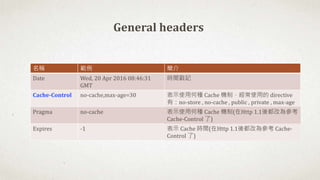
名稱 範例 簡介
Date Wed, 20 Apr 2016 08:46:31
GMT
時間戳記
Cache-Control no-cache,max-age=30 表示使用何種 Cache 機制,經常使用的 directive
有:no-store , no-cache , public , private , max-age
Pragma no-cache 表示使用何種 Cache 機制(在Http 1.1後都改為參考
Cache-Control 了)
Expires -1 表示 Cache 時間(在Http 1.1後都改為參考 Cache-
Control 了)
General headers
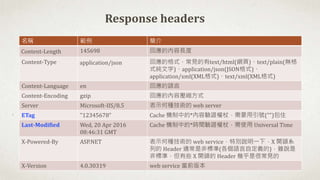
名稱 範例 簡介
Content-Length 145698 回應的內容長度
Content-Type application/json 回應的格式,常見的有text/html(網頁)、text/plain(無格
式純文字)、application/json(JSON格式)、
application/xml(XML格式)、text/xml(XML格式)
Content-Language en 回應的語言
Content-Encoding gzip 回應的內容壓縮方式
Server Microsoft-IIS/8.5 表示何種技術的 web server
ETag "12345678" Cache 機制中的*內容驗證權杖,需要用引號("")包住
Last-Modified Wed, 20 Apr 2016
08:46:31 GMT
Cache 機制中的*時間驗證權杖,需使用 Universal Time
X-Powered-By ASP.NET 表示何種技術的 web service,特別說明一下,X 開頭系
列的 Header 通常是非標準(各個語言自定義的),雖說是
非標準,但有些 X 開頭的 Header 幾乎是很常見的
X-Version 4.0.30319 web service 當前版本
Response headers
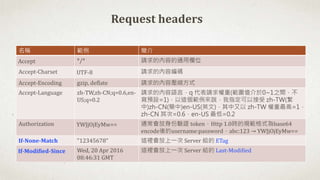
名稱 範例 簡介
Accept */* 請求的內容的通用欄位
Accept-Charset UTF-8 請求的內容編碼
Accept-Encoding gzip, deflate 請求的內容壓縮方式
Accept-Language zh-TW,zh-CN;q=0.6,en-
US;q=0.2
請求的內容語言,q 代表請求權重(範圍值介於0~1之間,不
寫預設=1),以這個範例來說,我指定可以接受 zh-TW(繁
中)zh-CN(簡中)en-US(英文),其中又以 zh-TW 權重最高=1,
zh-CN 其次=0.6,en-US 最低=0.2
Authorization YWJjOjEyMw== 通常會放身份驗證 token,Http 1.0時的規範格式為base64
encode後的username:password,abc:123 → YWJjOjEyMw==
If-None-Match "12345678" 這裡會放上一次 Server 給的 ETag
If-Modified-Since Wed, 20 Apr 2016
08:46:31 GMT
這裡會放上一次 Server 給的 Last-Modified
Request headers
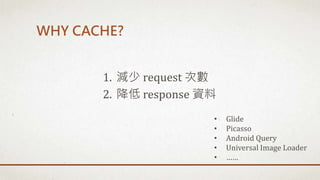
WHY CACHE?
1. 減少 request 次數
2. 降低 response 資料
• Glide
• Picasso
• Android Query
• Universal Image Loader
• ……
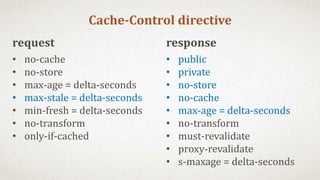
request
• no-cache
• no-store
• max-age = delta-seconds
• max-stale = delta-seconds
• min-fresh = delta-seconds
• no-transform
• only-if-cached
response
• public
• private
• no-store
• no-cache
• max-age = delta-seconds
• no-transform
• must-revalidate
• proxy-revalidate
• s-maxage = delta-seconds
Cache-Control directive
CACHE 的使用情境
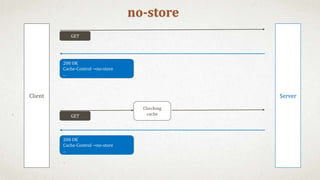
no-store
Client Server
200 OK
Cache-Control →no-store
...
200 OK
Cache-Control →no-store
...
GET
Checking
cache
GET
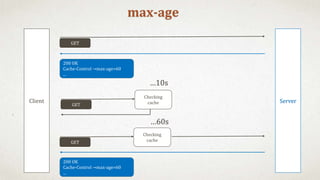
max-age
Client Server
200 OK
Cache-Control →max-age=60
...
…10s
…60s
GET
Checking
cache
GET
Checking
cache
200 OK
Cache-Control →max-age=60
...
GET
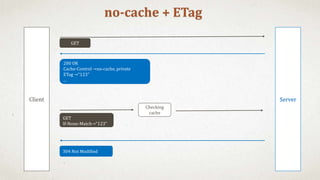
no-cache + ETag
Client Server
GET
200 OK
Cache-Control →no-cache, private
ETag →“123"
...
GET
If-None-Match→“123"
Checking
cache
304 Not Modified
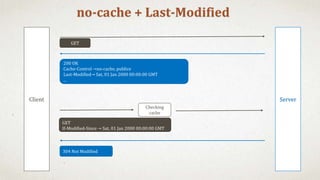
no-cache + Last-Modified
Client Server
GET
200 OK
Cache-Control →no-cache, publice
Last-Modified→ Sat, 01 Jan 2000 00:00:00 GMT
...
GET
If-Modified-Since → Sat, 01 Jan 2000 00:00:00 GMT
Checking
cache
304 Not Modified
CODE EXAMPLE - BACKEND
Demo code : https://bitbucket.org/ct7ct7ct7/demo-mvc_testcache
Demo page: http://demo-test-cache.azurewebsites.net
public class UserMaxAgeController : ApiController {
public HttpResponseMessage Get() {
User user = TestCacheHelper.getUser();
HttpResponseMessage response = Request.CreateResponse(HttpStatusCode.OK, user);
response.Headers.CacheControl = new CacheControlHeaderValue() {
Private = true,
MaxAge = TimeSpan.FromSeconds(10)
};
return response;
}
}
ONLY MAX-AGE
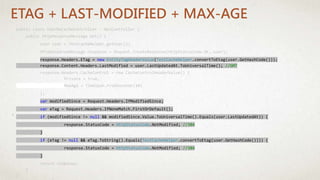
public class UserNoCacheController : ApiController {
public HttpResponseMessage Get() {
User user = TestCacheHelper.getUser();
HttpResponseMessage response = Request.CreateResponse(HttpStatusCode.OK, user);
response.Headers.ETag = new EntityTagHeaderValue(TestCacheHelper.convertToEtag(user.GetHashCode()));
response.Content.Headers.LastModified = user.LastUpdatedAt.ToUniversalTime(); //GMT
response.Headers.CacheControl = new CacheControlHeaderValue() {
Private = true,
MaxAge = TimeSpan.FromSeconds(10)
};
var modifiedSince = Request.Headers.IfModifiedSince;
var eTag = Request.Headers.IfNoneMatch.FirstOrDefault();
if (modifiedSince != null && modifiedSince.Value.ToUniversalTime().Equals(user.LastUpdatedAt)) {
response.StatusCode = HttpStatusCode.NotModified; //304
}
if (eTag != null && eTag.ToString().Equals(TestCacheHelper.convertToEtag(user.GetHashCode()))) {
response.StatusCode = HttpStatusCode.NotModified; //304
}
return response;
}
}
ETAG + LAST-MODIFIED + MAX-AGE
CODE EXAMPLE - ANDROID
Demo code : https://bitbucket.org/ct7ct7ct7/demo-android_test_cache

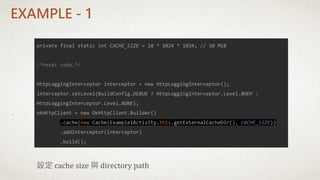
private final static int CACHE_SIZE = 10 * 1024 * 1024; // 10 MiB
/*reset code…*/
HttpLoggingInterceptor interceptor = new HttpLoggingInterceptor();
interceptor.setLevel(BuildConfig.DEBUG ? HttpLoggingInterceptor.Level.BODY :
HttpLoggingInterceptor.Level.NONE);
okHttpClient = new OkHttpClient.Builder()
.cache(new Cache(Example1Activity.this.getExternalCacheDir(), CACHE_SIZE))
.addInterceptor(interceptor)
.build();
設定 cache size 與 directory path
EXAMPLE - 1
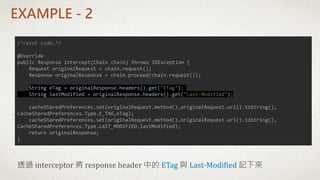
EXAMPLE - 2
/*reset code…*/
@Override
public Response intercept(Chain chain) throws IOException {
Request originalRequest = chain.request();
Response originalResponse = chain.proceed(chain.request());
String eTag = originalResponse.headers().get("ETag");
String lastModified = originalResponse.headers().get("Last-Modified");
cacheSharedPreferences.set(originalRequest.method(),originalRequest.url().toString(),
CacheSharedPreferences.Type.E_TAG,eTag);
cacheSharedPreferences.set(originalRequest.method(),originalRequest.url().toString(),
CacheSharedPreferences.Type.LAST_MODIFIED,lastModified);
return originalResponse;
}
透過 interceptor 將 response header 中的 ETag 與 Last-Modified 記下來
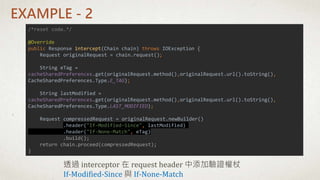
EXAMPLE - 2
/*reset code…*/
@Override
public Response intercept(Chain chain) throws IOException {
Request originalRequest = chain.request();
String eTag =
cacheSharedPreferences.get(originalRequest.method(),originalRequest.url().toString(),
CacheSharedPreferences.Type.E_TAG);
String lastModified =
cacheSharedPreferences.get(originalRequest.method(),originalRequest.url().toString(),
CacheSharedPreferences.Type.LAST_MODIFIED);
Request compressedRequest = originalRequest.newBuilder()
.header("If-Modified-Since", lastModified)
.header("If-None-Match", eTag)
.build();
return chain.proceed(compressedRequest);
}
透過 interceptor 在 request header 中添加驗證權杖
If-Modified-Since 與 If-None-Match
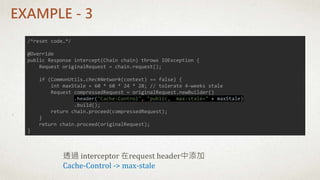
EXAMPLE - 3
透過 interceptor 在request header中添加
Cache-Control -> max-stale
/*reset code…*/
@Override
public Response intercept(Chain chain) throws IOException {
Request originalRequest = chain.request();
if (CommonUtils.checkNetwork(context) == false) {
int maxStale = 60 * 60 * 24 * 28; // tolerate 4-weeks stale
Request compressedRequest = originalRequest.newBuilder()
.header("Cache-Control", "public, max-stale=" + maxStale)
.build();
return chain.proceed(compressedRequest);
}
return chain.proceed(originalRequest);
}
OKHTTP - INTERCEPTOR
Application Interceptor
• Log handler
• Exception error handler
• Cache handler
• …..
Network Interceptor
• Log handler
• Header or parameter handler
• Exception error handler
• ……
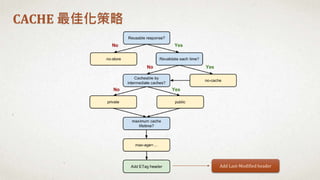
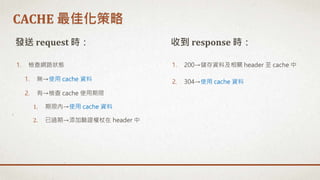
CACHE 最佳化策略
Add Last-Modified header
1. 檢查網路狀態
1. 無→使用 cache 資料
2. 有→檢查 cache 使用期限
1. 期限內→使用 cache 資料
2. 已過期→添加驗證權杖在 header 中
發送 request 時: 收到 response 時:
1. 200→儲存資料及相關 header 至 cache 中
2. 304→使用 cache 資料
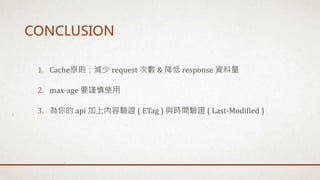
CACHE 最佳化策略
1. Cache原則:減少 request 次數 & 降低 response 資料量
2. max-age 要謹慎使用
3. 為你的 api 加上內容驗證 ( ETag ) 與時間驗證 ( Last-Modified )
CONCLUSION
• Google Developer – HTTP caching
• O3noBLOG - Cache Control 與 ETag
• HTTP 1.1 RFC 2616 - 13 Caching in HTTP
• HTTP 1.1 RFC 2616 – 14 Header Field Definitions
• Soul & Shell Blog - 初探 HTTP 1.1 Cache 機制
• Okhttp - Wiki
REFERENCE
• Email: ct7ct7ct7@gmail.com
• Facebook:https://www.facebook.com/profile.php?id=100000140471745
• LinkedIn:https://goo.gl/j2bPIl
• Blog:https://anson-programming.blogspot.tw (安森瓦舍)
• 個人作品:https://play.google.com/store/apps/developer?id=CityOne

Http Headers 與 Cache 機制(2016)

  • 1.
    HTTP HEADERS 與CACHE 機制 陳振揚(ANSON CHEN)
  • 2.
    ABOUT 陳振揚 Anson Chen Android、ASP.NET-MVCDeveloper • Blog : https://anson-programming.blogspot.tw (安森瓦舍) • 個人作品:http://play.google.com/store/apps/developer?id=CityOne
  • 3.
    AGENDA 1. 常見的 HttpHeaders 2. Cache 的使用情境與最佳化 3. Code example (.NET MVC - Web API) Code example (Android - okhttp)
  • 4.
  • 6.
     Http Header是我們在向目標 Server要求或取得內容時,依附在上 面的一些屬性或參數  不管是使用哪一種 method,GET.POST.DELETE 還是 PUT 等等…. 都可以使用 Header 來傳遞資料  Header 分為三種-Request(請求)、Response(回應)、General(通 用) WHAT ARE HTTP HEADERS?
  • 7.
    名稱 範例 簡介 DateWed, 20 Apr 2016 08:46:31 GMT 時間戳記 Cache-Control no-cache,max-age=30 表示使用何種 Cache 機制,經常使用的 directive 有:no-store , no-cache , public , private , max-age Pragma no-cache 表示使用何種 Cache 機制(在Http 1.1後都改為參考 Cache-Control 了) Expires -1 表示 Cache 時間(在Http 1.1後都改為參考 Cache- Control 了) General headers
  • 8.
    名稱 範例 簡介 Content-Length145698 回應的內容長度 Content-Type application/json 回應的格式,常見的有text/html(網頁)、text/plain(無格 式純文字)、application/json(JSON格式)、 application/xml(XML格式)、text/xml(XML格式) Content-Language en 回應的語言 Content-Encoding gzip 回應的內容壓縮方式 Server Microsoft-IIS/8.5 表示何種技術的 web server ETag "12345678" Cache 機制中的*內容驗證權杖,需要用引號("")包住 Last-Modified Wed, 20 Apr 2016 08:46:31 GMT Cache 機制中的*時間驗證權杖,需使用 Universal Time X-Powered-By ASP.NET 表示何種技術的 web service,特別說明一下,X 開頭系 列的 Header 通常是非標準(各個語言自定義的),雖說是 非標準,但有些 X 開頭的 Header 幾乎是很常見的 X-Version 4.0.30319 web service 當前版本 Response headers
  • 9.
    名稱 範例 簡介 Accept*/* 請求的內容的通用欄位 Accept-Charset UTF-8 請求的內容編碼 Accept-Encoding gzip, deflate 請求的內容壓縮方式 Accept-Language zh-TW,zh-CN;q=0.6,en- US;q=0.2 請求的內容語言,q 代表請求權重(範圍值介於0~1之間,不 寫預設=1),以這個範例來說,我指定可以接受 zh-TW(繁 中)zh-CN(簡中)en-US(英文),其中又以 zh-TW 權重最高=1, zh-CN 其次=0.6,en-US 最低=0.2 Authorization YWJjOjEyMw== 通常會放身份驗證 token,Http 1.0時的規範格式為base64 encode後的username:password,abc:123 → YWJjOjEyMw== If-None-Match "12345678" 這裡會放上一次 Server 給的 ETag If-Modified-Since Wed, 20 Apr 2016 08:46:31 GMT 這裡會放上一次 Server 給的 Last-Modified Request headers
  • 10.
    WHY CACHE? 1. 減少request 次數 2. 降低 response 資料 • Glide • Picasso • Android Query • Universal Image Loader • ……
  • 11.
    request • no-cache • no-store •max-age = delta-seconds • max-stale = delta-seconds • min-fresh = delta-seconds • no-transform • only-if-cached response • public • private • no-store • no-cache • max-age = delta-seconds • no-transform • must-revalidate • proxy-revalidate • s-maxage = delta-seconds Cache-Control directive
  • 12.
  • 13.
    no-store Client Server 200 OK Cache-Control→no-store ... 200 OK Cache-Control →no-store ... GET Checking cache GET
  • 14.
    max-age Client Server 200 OK Cache-Control→max-age=60 ... …10s …60s GET Checking cache GET Checking cache 200 OK Cache-Control →max-age=60 ... GET
  • 15.
    no-cache + ETag ClientServer GET 200 OK Cache-Control →no-cache, private ETag →“123" ... GET If-None-Match→“123" Checking cache 304 Not Modified
  • 16.
    no-cache + Last-Modified ClientServer GET 200 OK Cache-Control →no-cache, publice Last-Modified→ Sat, 01 Jan 2000 00:00:00 GMT ... GET If-Modified-Since → Sat, 01 Jan 2000 00:00:00 GMT Checking cache 304 Not Modified
  • 17.
    CODE EXAMPLE -BACKEND Demo code : https://bitbucket.org/ct7ct7ct7/demo-mvc_testcache Demo page: http://demo-test-cache.azurewebsites.net
  • 18.
    public class UserMaxAgeController: ApiController { public HttpResponseMessage Get() { User user = TestCacheHelper.getUser(); HttpResponseMessage response = Request.CreateResponse(HttpStatusCode.OK, user); response.Headers.CacheControl = new CacheControlHeaderValue() { Private = true, MaxAge = TimeSpan.FromSeconds(10) }; return response; } } ONLY MAX-AGE
  • 19.
    public class UserNoCacheController: ApiController { public HttpResponseMessage Get() { User user = TestCacheHelper.getUser(); HttpResponseMessage response = Request.CreateResponse(HttpStatusCode.OK, user); response.Headers.ETag = new EntityTagHeaderValue(TestCacheHelper.convertToEtag(user.GetHashCode())); response.Content.Headers.LastModified = user.LastUpdatedAt.ToUniversalTime(); //GMT response.Headers.CacheControl = new CacheControlHeaderValue() { Private = true, MaxAge = TimeSpan.FromSeconds(10) }; var modifiedSince = Request.Headers.IfModifiedSince; var eTag = Request.Headers.IfNoneMatch.FirstOrDefault(); if (modifiedSince != null && modifiedSince.Value.ToUniversalTime().Equals(user.LastUpdatedAt)) { response.StatusCode = HttpStatusCode.NotModified; //304 } if (eTag != null && eTag.ToString().Equals(TestCacheHelper.convertToEtag(user.GetHashCode()))) { response.StatusCode = HttpStatusCode.NotModified; //304 } return response; } } ETAG + LAST-MODIFIED + MAX-AGE
  • 20.
    CODE EXAMPLE -ANDROID Demo code : https://bitbucket.org/ct7ct7ct7/demo-android_test_cache

  • 21.
    private final staticint CACHE_SIZE = 10 * 1024 * 1024; // 10 MiB /*reset code…*/ HttpLoggingInterceptor interceptor = new HttpLoggingInterceptor(); interceptor.setLevel(BuildConfig.DEBUG ? HttpLoggingInterceptor.Level.BODY : HttpLoggingInterceptor.Level.NONE); okHttpClient = new OkHttpClient.Builder() .cache(new Cache(Example1Activity.this.getExternalCacheDir(), CACHE_SIZE)) .addInterceptor(interceptor) .build(); 設定 cache size 與 directory path EXAMPLE - 1
  • 22.
    EXAMPLE - 2 /*resetcode…*/ @Override public Response intercept(Chain chain) throws IOException { Request originalRequest = chain.request(); Response originalResponse = chain.proceed(chain.request()); String eTag = originalResponse.headers().get("ETag"); String lastModified = originalResponse.headers().get("Last-Modified"); cacheSharedPreferences.set(originalRequest.method(),originalRequest.url().toString(), CacheSharedPreferences.Type.E_TAG,eTag); cacheSharedPreferences.set(originalRequest.method(),originalRequest.url().toString(), CacheSharedPreferences.Type.LAST_MODIFIED,lastModified); return originalResponse; } 透過 interceptor 將 response header 中的 ETag 與 Last-Modified 記下來
  • 23.
    EXAMPLE - 2 /*resetcode…*/ @Override public Response intercept(Chain chain) throws IOException { Request originalRequest = chain.request(); String eTag = cacheSharedPreferences.get(originalRequest.method(),originalRequest.url().toString(), CacheSharedPreferences.Type.E_TAG); String lastModified = cacheSharedPreferences.get(originalRequest.method(),originalRequest.url().toString(), CacheSharedPreferences.Type.LAST_MODIFIED); Request compressedRequest = originalRequest.newBuilder() .header("If-Modified-Since", lastModified) .header("If-None-Match", eTag) .build(); return chain.proceed(compressedRequest); } 透過 interceptor 在 request header 中添加驗證權杖 If-Modified-Since 與 If-None-Match
  • 24.
    EXAMPLE - 3 透過interceptor 在request header中添加 Cache-Control -> max-stale /*reset code…*/ @Override public Response intercept(Chain chain) throws IOException { Request originalRequest = chain.request(); if (CommonUtils.checkNetwork(context) == false) { int maxStale = 60 * 60 * 24 * 28; // tolerate 4-weeks stale Request compressedRequest = originalRequest.newBuilder() .header("Cache-Control", "public, max-stale=" + maxStale) .build(); return chain.proceed(compressedRequest); } return chain.proceed(originalRequest); }
  • 25.
    OKHTTP - INTERCEPTOR ApplicationInterceptor • Log handler • Exception error handler • Cache handler • ….. Network Interceptor • Log handler • Header or parameter handler • Exception error handler • ……
  • 26.
  • 27.
    1. 檢查網路狀態 1. 無→使用cache 資料 2. 有→檢查 cache 使用期限 1. 期限內→使用 cache 資料 2. 已過期→添加驗證權杖在 header 中 發送 request 時: 收到 response 時: 1. 200→儲存資料及相關 header 至 cache 中 2. 304→使用 cache 資料 CACHE 最佳化策略
  • 28.
    1. Cache原則:減少 request次數 & 降低 response 資料量 2. max-age 要謹慎使用 3. 為你的 api 加上內容驗證 ( ETag ) 與時間驗證 ( Last-Modified ) CONCLUSION
  • 29.
    • Google Developer– HTTP caching • O3noBLOG - Cache Control 與 ETag • HTTP 1.1 RFC 2616 - 13 Caching in HTTP • HTTP 1.1 RFC 2616 – 14 Header Field Definitions • Soul & Shell Blog - 初探 HTTP 1.1 Cache 機制 • Okhttp - Wiki REFERENCE
  • 30.
    • Email: ct7ct7ct7@gmail.com •Facebook:https://www.facebook.com/profile.php?id=100000140471745 • LinkedIn:https://goo.gl/j2bPIl • Blog:https://anson-programming.blogspot.tw (安森瓦舍) • 個人作品:https://play.google.com/store/apps/developer?id=CityOne