Http Cache 的優化
Anson Chen 陳振揚
Android / Asp.net MVC developer
陳振揚 Anson Chen
Android、ASP.NET-MVC Developer
• Blog : http://anson-site.blogspot.tw (安森瓦舍)
• 個人作品:http://play.google.com/store/apps/developer?id=CityOne
About
Agenda
1. Http 如何運作
2. 常見的 Headers
3. Cache 的使用情境
4. OkHttp Interceptor
5. Code Example
6. Cache 的最佳化策略
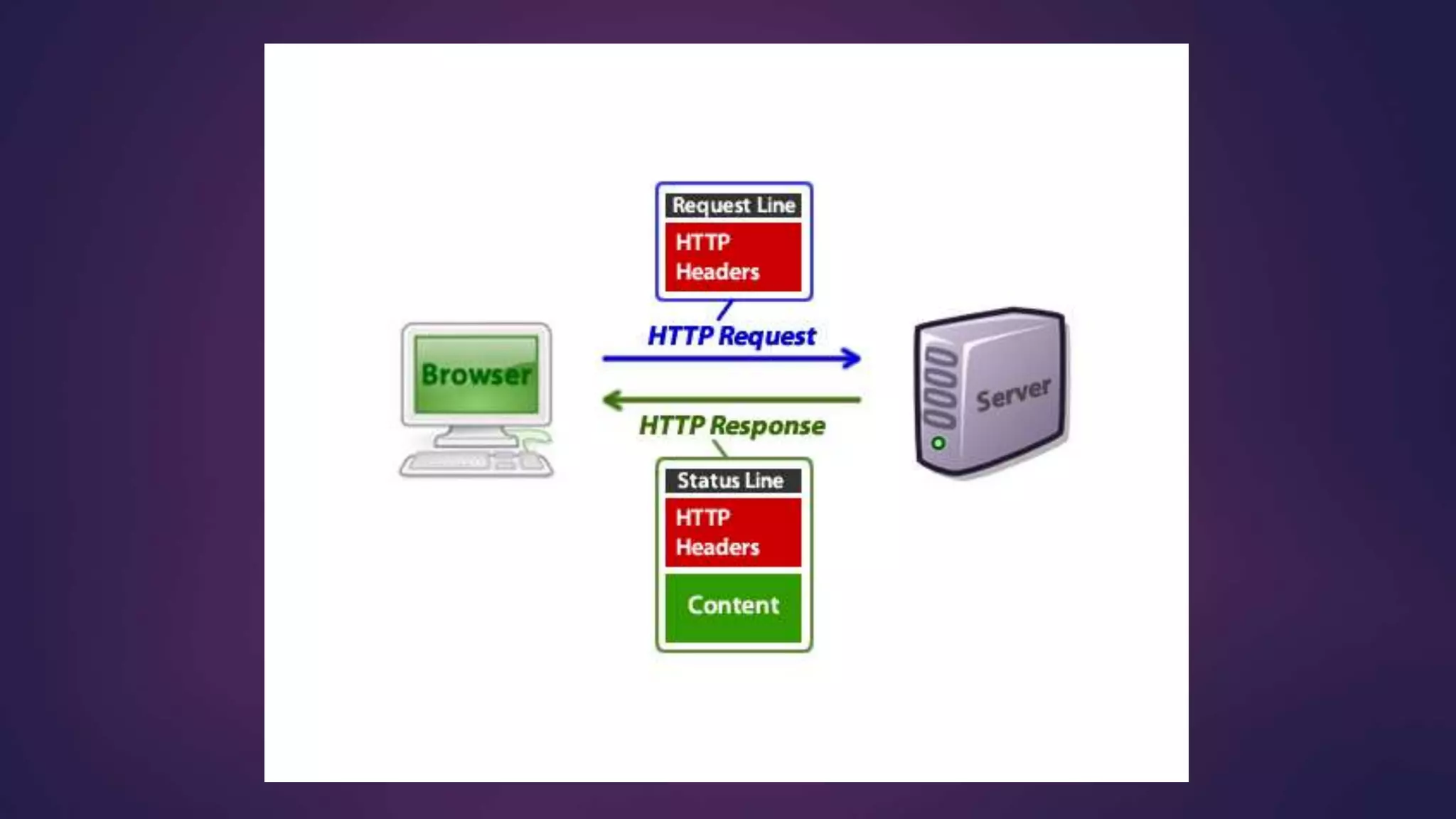
Http 如何運作
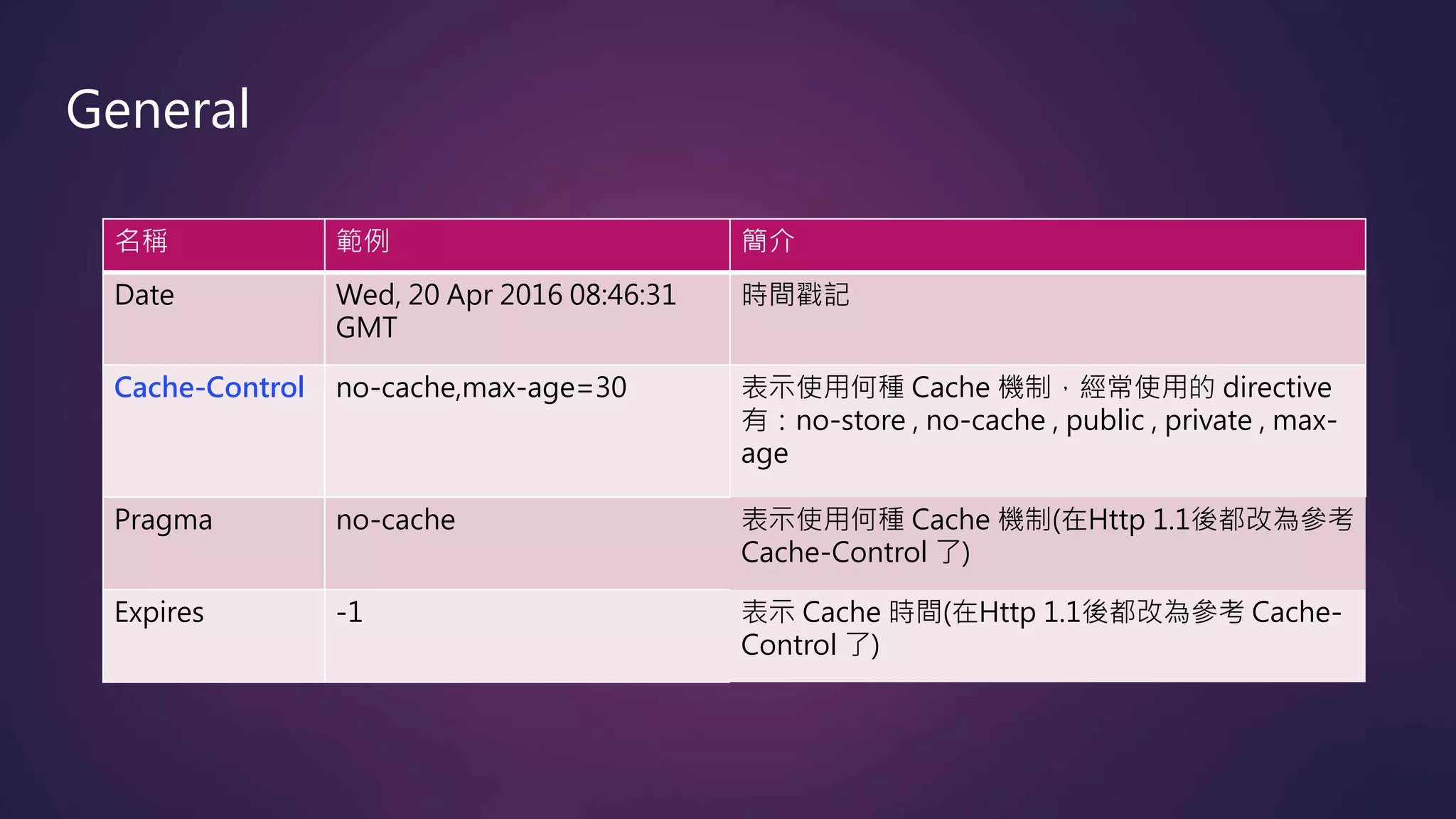
常見的 Headers
名稱 範例 簡介
Date Wed, 20 Apr 2016 08:46:31
GMT
時間戳記
Cache-Control no-cache,max-age=30 表示使用何種 Cache 機制,經常使用的 directive
有:no-store , no-cache , public , private , max-
age
Pragma no-cache 表示使用何種 Cache 機制(在Http 1.1後都改為參考
Cache-Control 了)
Expires -1 表示 Cache 時間(在Http 1.1後都改為參考 Cache-
Control 了)
General
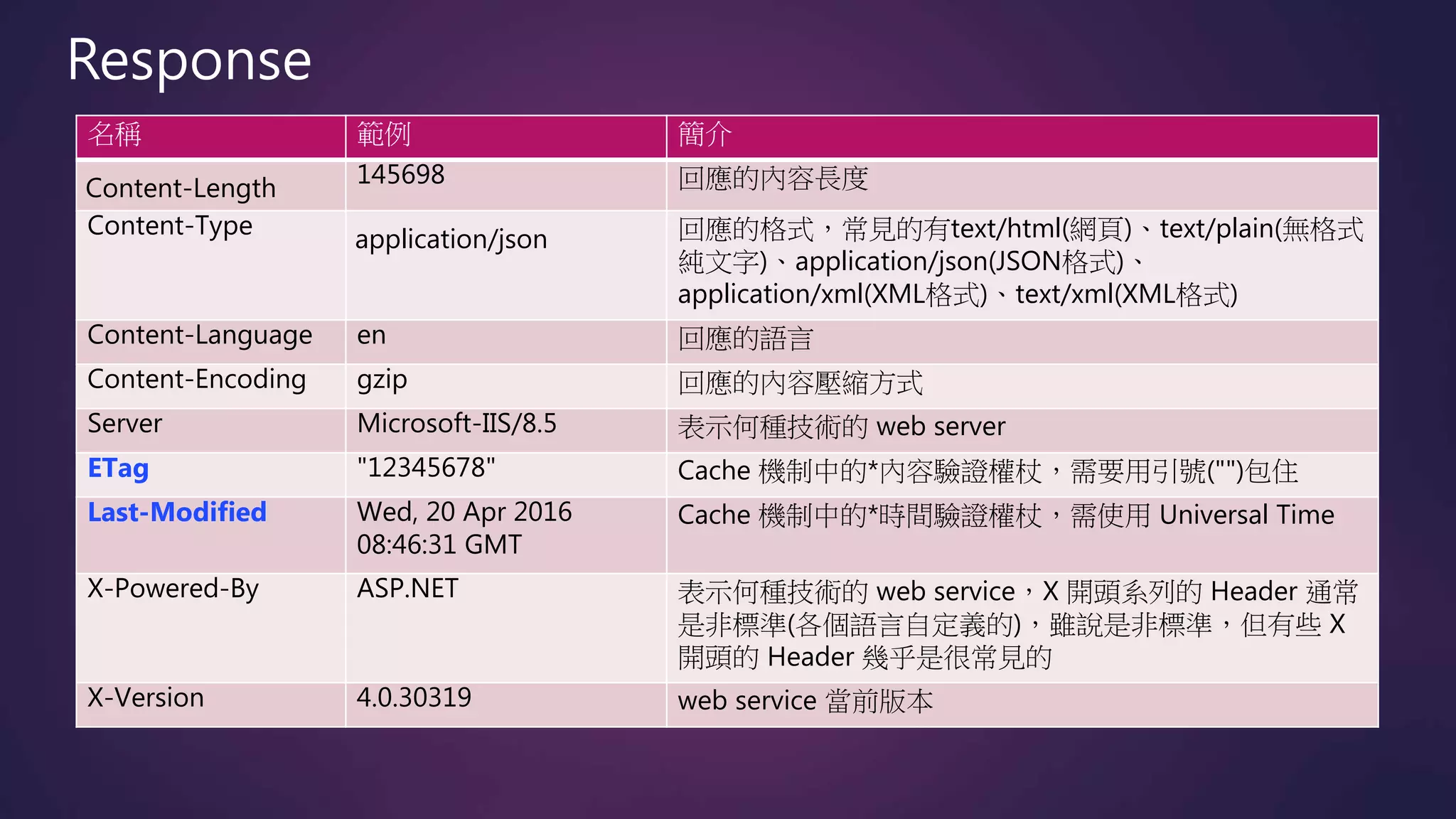
名稱 範例 簡介
Content-Length
145698 回應的內容長度
Content-Type
application/json 回應的格式,常見的有text/html(網頁)、text/plain(無格式
純文字)、application/json(JSON格式)、
application/xml(XML格式)、text/xml(XML格式)
Content-Language en 回應的語言
Content-Encoding gzip 回應的內容壓縮方式
Server Microsoft-IIS/8.5 表示何種技術的 web server
ETag "12345678" Cache 機制中的*內容驗證權杖,需要用引號("")包住
Last-Modified Wed, 20 Apr 2016
08:46:31 GMT
Cache 機制中的*時間驗證權杖,需使用 Universal Time
X-Powered-By ASP.NET 表示何種技術的 web service,X 開頭系列的 Header 通常
是非標準(各個語言自定義的),雖說是非標準,但有些 X
開頭的 Header 幾乎是很常見的
X-Version 4.0.30319 web service 當前版本
Response
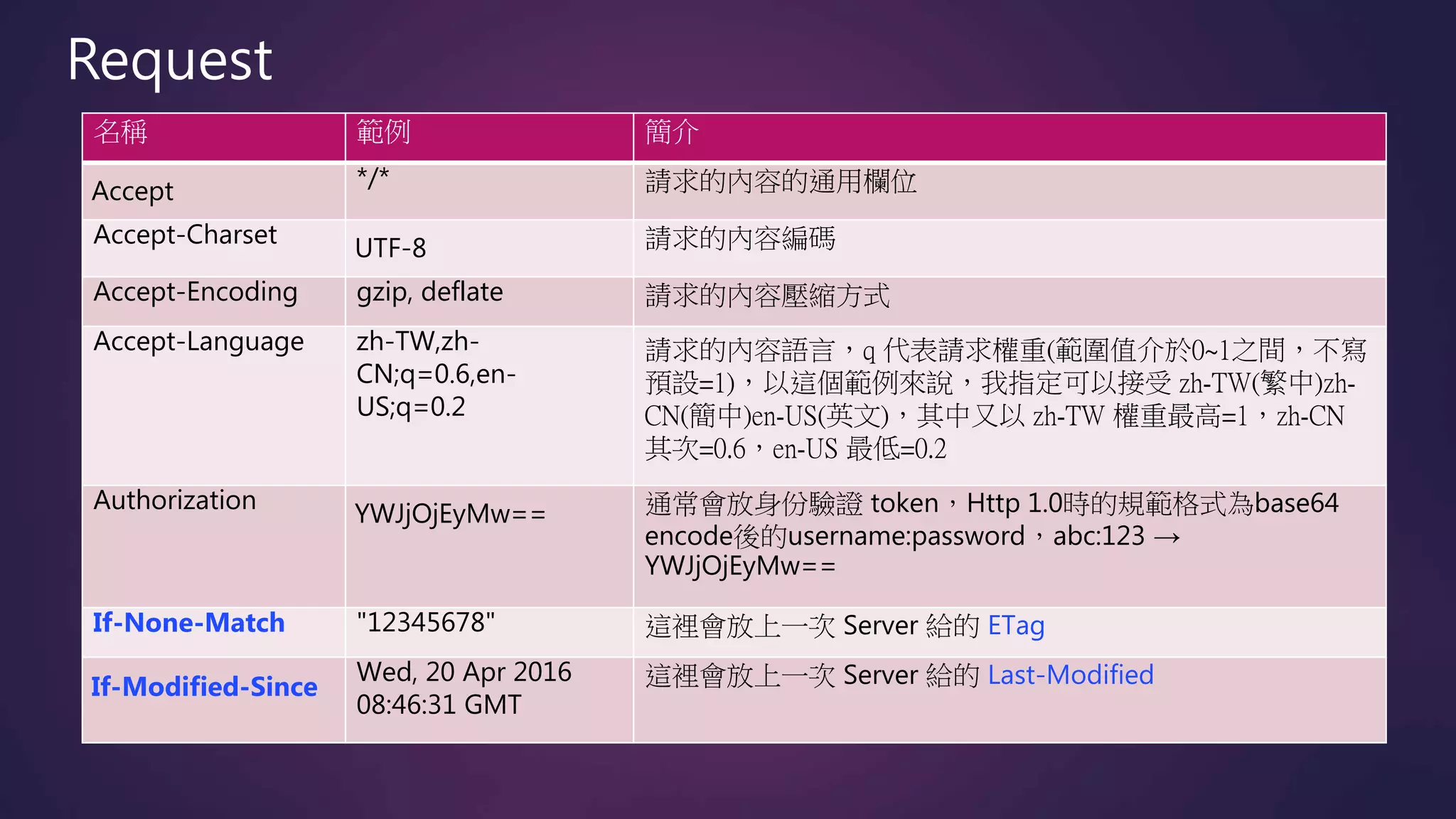
名稱 範例 簡介
Accept */* 請求的內容的通用欄位
Accept-Charset
UTF-8 請求的內容編碼
Accept-Encoding gzip, deflate 請求的內容壓縮方式
Accept-Language zh-TW,zh-
CN;q=0.6,en-
US;q=0.2
請求的內容語言,q 代表請求權重(範圍值介於0~1之間,不寫
預設=1),以這個範例來說,我指定可以接受 zh-TW(繁中)zh-
CN(簡中)en-US(英文),其中又以 zh-TW 權重最高=1,zh-CN
其次=0.6,en-US 最低=0.2
Authorization YWJjOjEyMw== 通常會放身份驗證 token,Http 1.0時的規範格式為base64
encode後的username:password,abc:123 →
YWJjOjEyMw==
If-None-Match "12345678" 這裡會放上一次 Server 給的 ETag
If-Modified-Since
Wed, 20 Apr 2016
08:46:31 GMT
這裡會放上一次 Server 給的 Last-Modified
Request
Cache 的使用情境
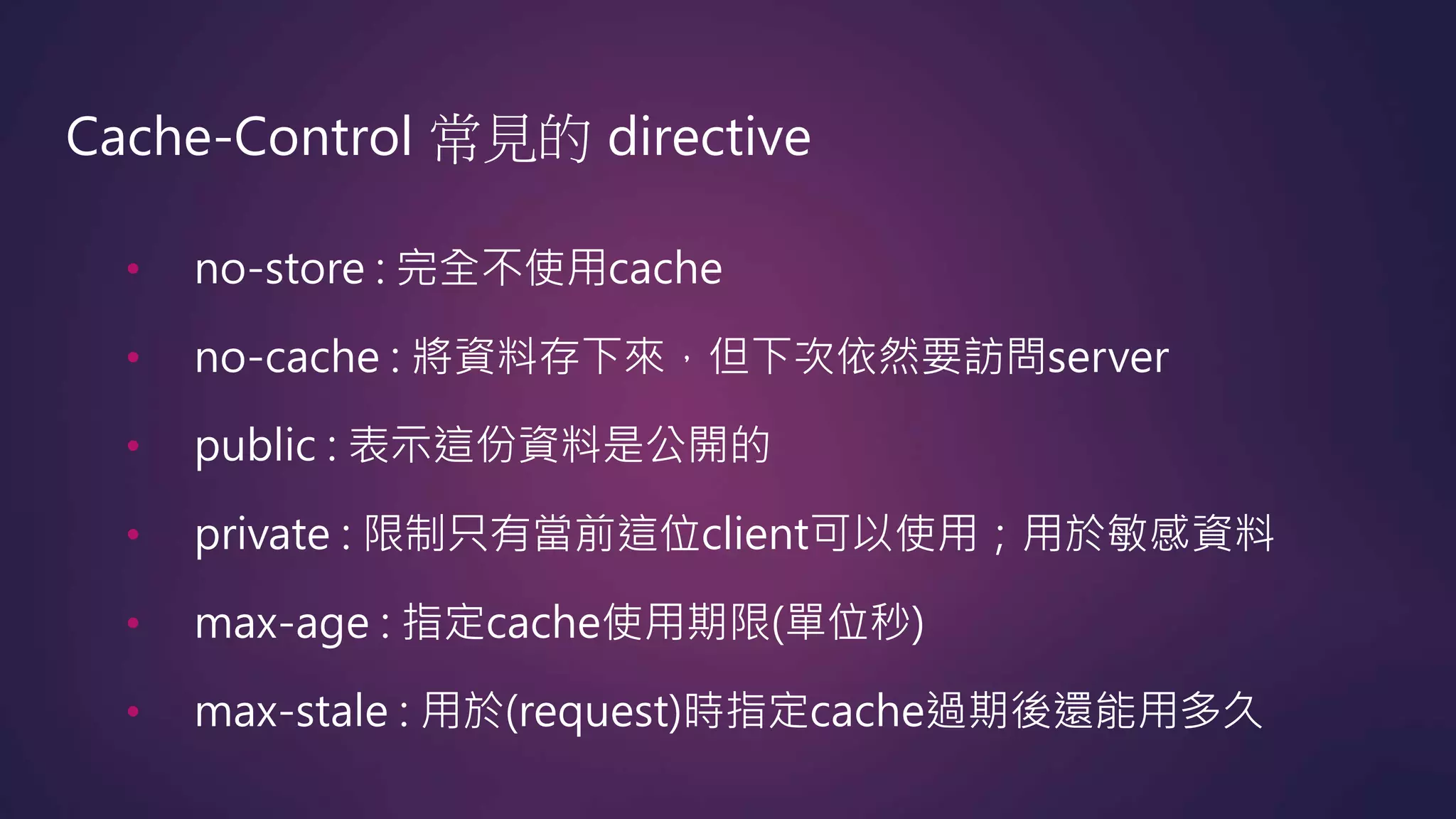
Cache-Control 常見的 directive
• no-store : 完全不使用cache
• no-cache : 將資料存下來,但下次依然要訪問server
• public : 表示這份資料是公開的
• private : 限制只有當前這位client可以使用;用於敏感資料
• max-age : 指定cache使用期限(單位秒)
• max-stale : 用於(request)時指定cache過期後還能用多久
no-store
Client Server
200 OK
Cache-Control →no-store
...
[Content data]
200 OK
Cache-Control →no-store
...
[Content data]
GET
Checking
cache
GET
max-age
Client Server
200 OK
Cache-Control →max-age=60
...
[Content data] …10s
…60s
GET
Checking
cache
GET
Checking
cache
200 OK
Cache-Control →max-age=60
...
[Content data]
GET
no-cache + ETag
Client Server
GET
200 OK
Cache-Control →no-cache, private
ETag →“123"
...
[Content data]
GET
If-None-Match→ "123"
Checking
cache
304 Not Modified
Cache-Control →no-cache, private
ETag →“123"
...
no-cache + Last-Modified
Client Server
GET
200 OK
Cache-Control →no-cache, public
Last-Modified→ Sat, 01 Jan 2000 00:00:00 GMT
...
[Content data]
GET
If-Modified-Since → Sat, 01 Jan 2000 00:00:00 GMT
Checking
cache
304 Not Modified
Cache-Control →no-cache, public
Last-Modified→ Sat, 01 Jan 2000 00:00:00 GMT
...

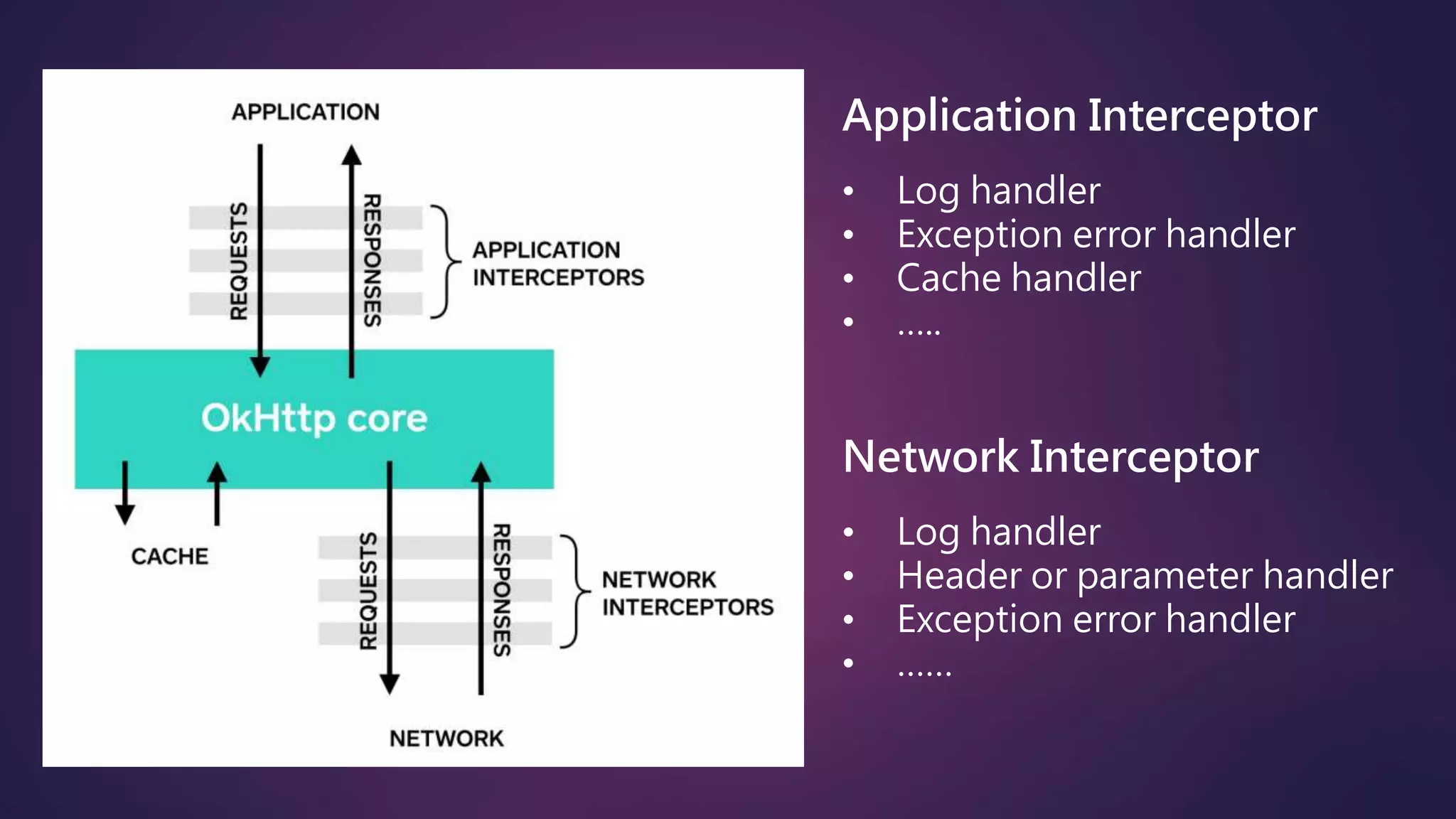
OkHttp Interceptor
Application Interceptor
• Log handler
• Exception error handler
• Cache handler
• …..
Network Interceptor
• Log handler
• Header or parameter handler
• Exception error handler
• ……
Code Example
Asp.net : https://github.com/ct7ct7ct7/Demo-MVC_TestCache
Page :http://demo-test-cache.azurewebsites.net
Android : https://github.com/ct7ct7ct7/Demo-Android_TestCache
Demo :
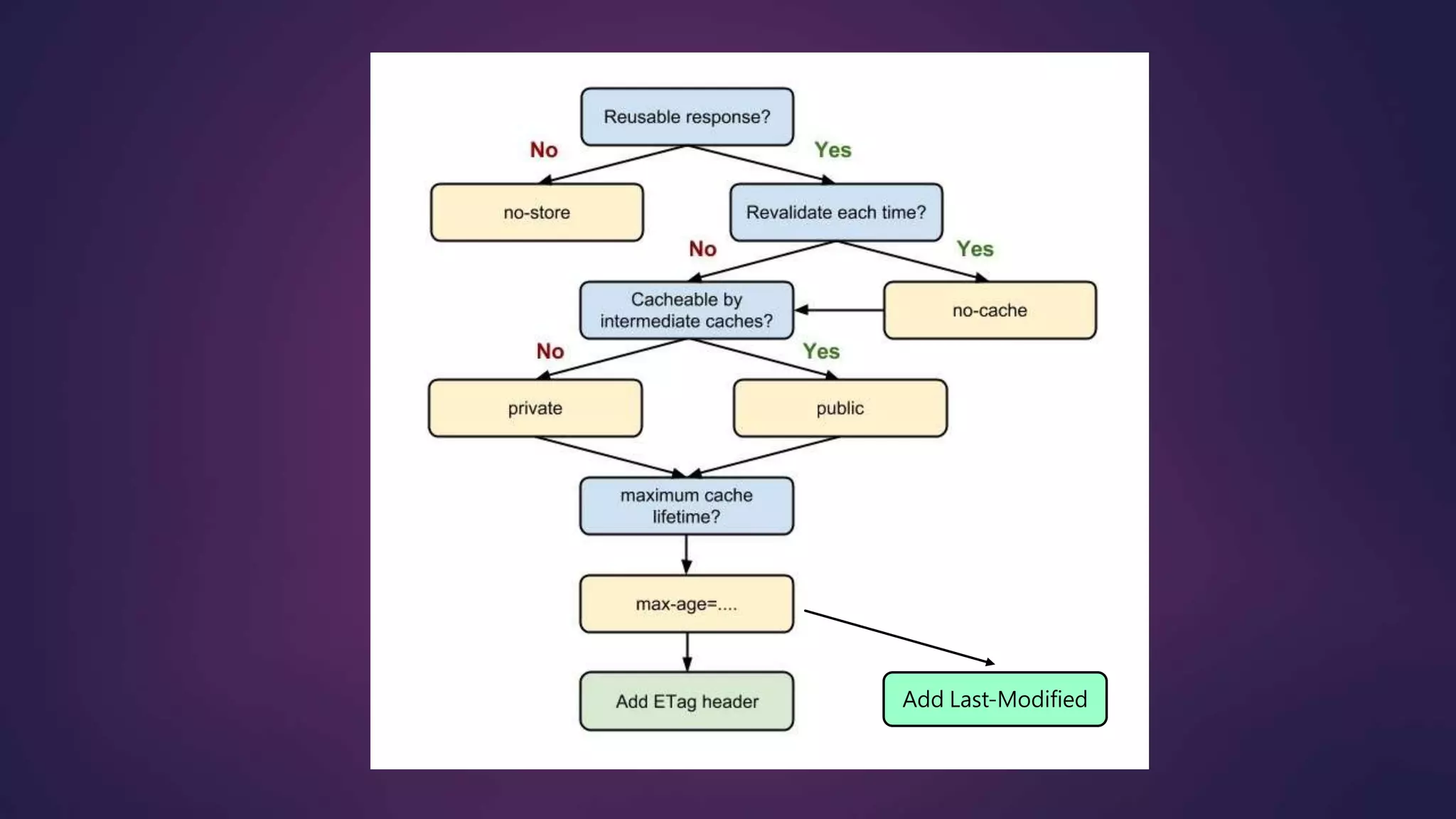
Cache 的最佳化策略
Add Last-Modified
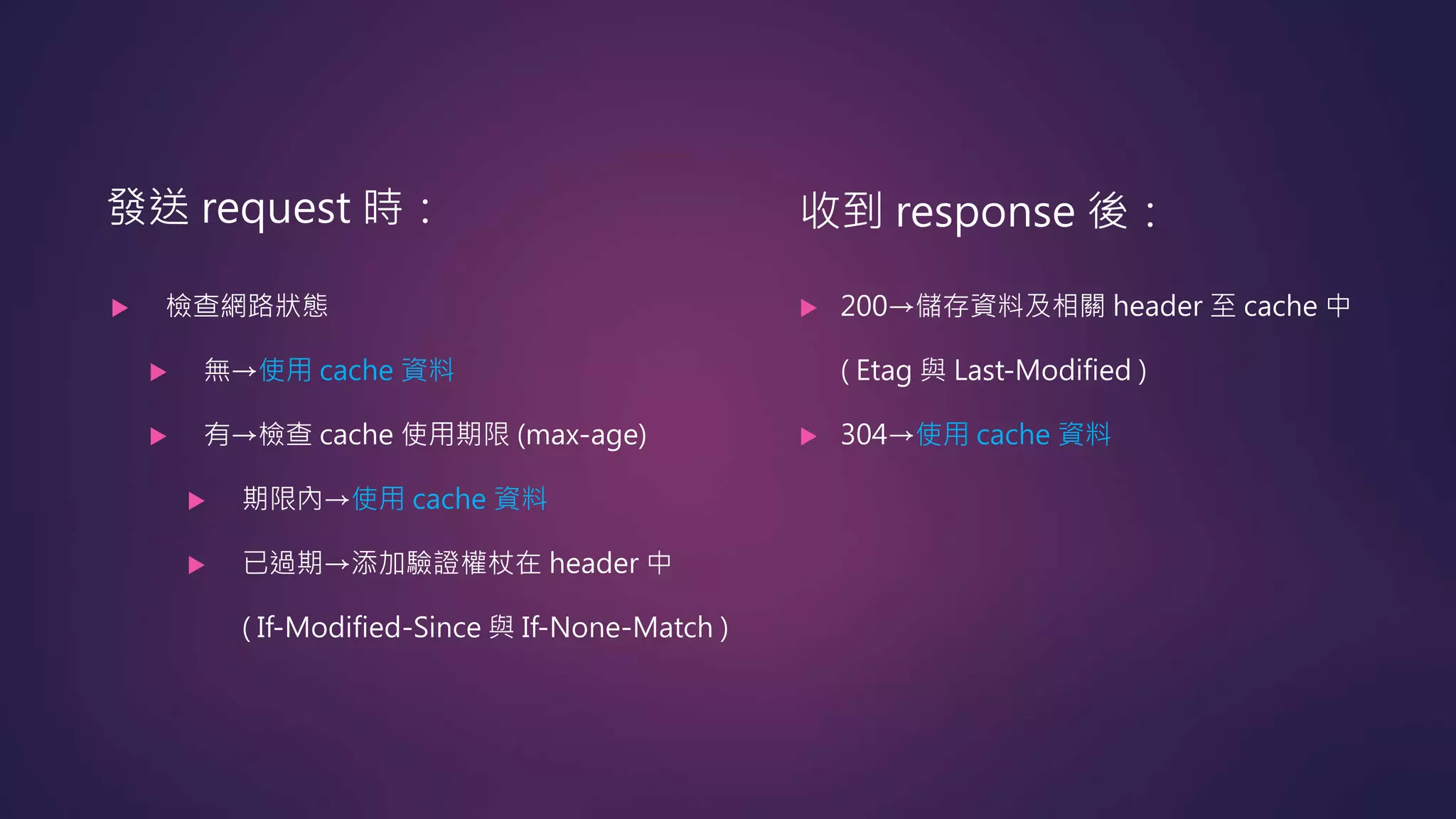
 檢查網路狀態
 無→使用 cache 資料
 有→檢查 cache 使用期限 (max-age)
 期限內→使用 cache 資料
 已過期→添加驗證權杖在 header 中
( If-Modified-Since 與 If-None-Match )
發送 request 時: 收到 response 後:
 200→儲存資料及相關 header 至 cache 中
( Etag 與 Last-Modified )
 304→使用 cache 資料
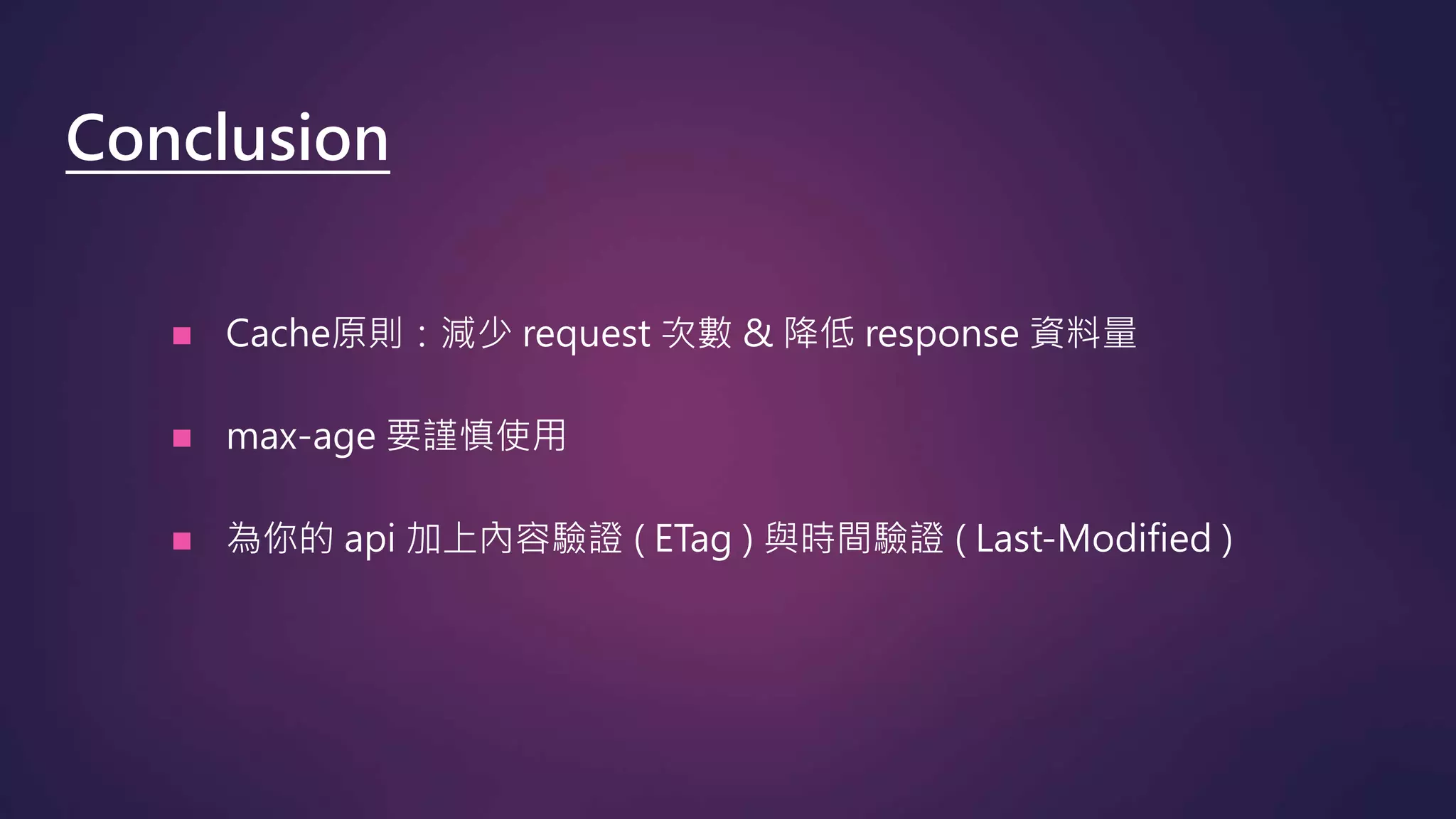
 Cache原則:減少 request 次數 & 降低 response 資料量
 max-age 要謹慎使用
 為你的 api 加上內容驗證 ( ETag ) 與時間驗證 ( Last-Modified )
Conclusion
 Google Developer – HTTP caching
 O3noBLOG - Cache Control 與 ETag
 HTTP 1.1 RFC 2616 - 13 Caching in HTTP
 HTTP 1.1 RFC 2616 – 14 Header Field Definitions
 Soul & Shell Blog - 初探 HTTP 1.1 Cache 機制
 Okhttp - Wiki
Reference

Http cache 的優化

  • 1.
    Http Cache 的優化 AnsonChen 陳振揚 Android / Asp.net MVC developer
  • 2.
    陳振揚 Anson Chen Android、ASP.NET-MVCDeveloper • Blog : http://anson-site.blogspot.tw (安森瓦舍) • 個人作品:http://play.google.com/store/apps/developer?id=CityOne About
  • 3.
    Agenda 1. Http 如何運作 2.常見的 Headers 3. Cache 的使用情境 4. OkHttp Interceptor 5. Code Example 6. Cache 的最佳化策略
  • 4.
  • 6.
  • 7.
    名稱 範例 簡介 DateWed, 20 Apr 2016 08:46:31 GMT 時間戳記 Cache-Control no-cache,max-age=30 表示使用何種 Cache 機制,經常使用的 directive 有:no-store , no-cache , public , private , max- age Pragma no-cache 表示使用何種 Cache 機制(在Http 1.1後都改為參考 Cache-Control 了) Expires -1 表示 Cache 時間(在Http 1.1後都改為參考 Cache- Control 了) General
  • 8.
    名稱 範例 簡介 Content-Length 145698回應的內容長度 Content-Type application/json 回應的格式,常見的有text/html(網頁)、text/plain(無格式 純文字)、application/json(JSON格式)、 application/xml(XML格式)、text/xml(XML格式) Content-Language en 回應的語言 Content-Encoding gzip 回應的內容壓縮方式 Server Microsoft-IIS/8.5 表示何種技術的 web server ETag "12345678" Cache 機制中的*內容驗證權杖,需要用引號("")包住 Last-Modified Wed, 20 Apr 2016 08:46:31 GMT Cache 機制中的*時間驗證權杖,需使用 Universal Time X-Powered-By ASP.NET 表示何種技術的 web service,X 開頭系列的 Header 通常 是非標準(各個語言自定義的),雖說是非標準,但有些 X 開頭的 Header 幾乎是很常見的 X-Version 4.0.30319 web service 當前版本 Response
  • 9.
    名稱 範例 簡介 Accept*/* 請求的內容的通用欄位 Accept-Charset UTF-8 請求的內容編碼 Accept-Encoding gzip, deflate 請求的內容壓縮方式 Accept-Language zh-TW,zh- CN;q=0.6,en- US;q=0.2 請求的內容語言,q 代表請求權重(範圍值介於0~1之間,不寫 預設=1),以這個範例來說,我指定可以接受 zh-TW(繁中)zh- CN(簡中)en-US(英文),其中又以 zh-TW 權重最高=1,zh-CN 其次=0.6,en-US 最低=0.2 Authorization YWJjOjEyMw== 通常會放身份驗證 token,Http 1.0時的規範格式為base64 encode後的username:password,abc:123 → YWJjOjEyMw== If-None-Match "12345678" 這裡會放上一次 Server 給的 ETag If-Modified-Since Wed, 20 Apr 2016 08:46:31 GMT 這裡會放上一次 Server 給的 Last-Modified Request
  • 10.
  • 11.
    Cache-Control 常見的 directive •no-store : 完全不使用cache • no-cache : 將資料存下來,但下次依然要訪問server • public : 表示這份資料是公開的 • private : 限制只有當前這位client可以使用;用於敏感資料 • max-age : 指定cache使用期限(單位秒) • max-stale : 用於(request)時指定cache過期後還能用多久
  • 12.
    no-store Client Server 200 OK Cache-Control→no-store ... [Content data] 200 OK Cache-Control →no-store ... [Content data] GET Checking cache GET
  • 13.
    max-age Client Server 200 OK Cache-Control→max-age=60 ... [Content data] …10s …60s GET Checking cache GET Checking cache 200 OK Cache-Control →max-age=60 ... [Content data] GET
  • 14.
    no-cache + ETag ClientServer GET 200 OK Cache-Control →no-cache, private ETag →“123" ... [Content data] GET If-None-Match→ "123" Checking cache 304 Not Modified Cache-Control →no-cache, private ETag →“123" ...
  • 15.
    no-cache + Last-Modified ClientServer GET 200 OK Cache-Control →no-cache, public Last-Modified→ Sat, 01 Jan 2000 00:00:00 GMT ... [Content data] GET If-Modified-Since → Sat, 01 Jan 2000 00:00:00 GMT Checking cache 304 Not Modified Cache-Control →no-cache, public Last-Modified→ Sat, 01 Jan 2000 00:00:00 GMT ...

  • 16.
  • 17.
    Application Interceptor • Loghandler • Exception error handler • Cache handler • ….. Network Interceptor • Log handler • Header or parameter handler • Exception error handler • ……
  • 18.
    Code Example Asp.net :https://github.com/ct7ct7ct7/Demo-MVC_TestCache Page :http://demo-test-cache.azurewebsites.net Android : https://github.com/ct7ct7ct7/Demo-Android_TestCache Demo :
  • 19.
  • 20.
  • 21.
     檢查網路狀態  無→使用cache 資料  有→檢查 cache 使用期限 (max-age)  期限內→使用 cache 資料  已過期→添加驗證權杖在 header 中 ( If-Modified-Since 與 If-None-Match ) 發送 request 時: 收到 response 後:  200→儲存資料及相關 header 至 cache 中 ( Etag 與 Last-Modified )  304→使用 cache 資料
  • 22.
     Cache原則:減少 request次數 & 降低 response 資料量  max-age 要謹慎使用  為你的 api 加上內容驗證 ( ETag ) 與時間驗證 ( Last-Modified ) Conclusion
  • 23.
     Google Developer– HTTP caching  O3noBLOG - Cache Control 與 ETag  HTTP 1.1 RFC 2616 - 13 Caching in HTTP  HTTP 1.1 RFC 2616 – 14 Header Field Definitions  Soul & Shell Blog - 初探 HTTP 1.1 Cache 機制  Okhttp - Wiki Reference