 
BASIC HTML 
Lesson 11 
1. Create a New Folder in your documents: Name it HTML_Lesson11 
1. Inside that folder create another folder name it… images 
1. Go to your Chef image and Red Square image in Bb. Save as 
instructed in the HTML_Lesson11/images folder. 
1. Open TextWrangler create a new file name it HTMLLesson11.html. 
Save the file in the HTML_Lesson11 folder
alt attribute 
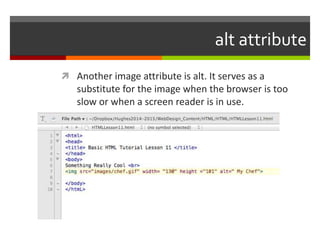
 Another image attribute is alt. It serves as a 
substitute for the image when the browser is too 
slow or when a screen reader is in use.
No Attributes 
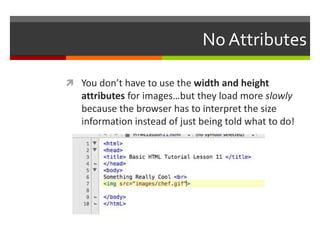
 You don’t have to use the width and height 
attributes for images…but they load more slowly 
because the browser has to interpret the size 
information instead of just being told what to do!
Using images to your advantage 
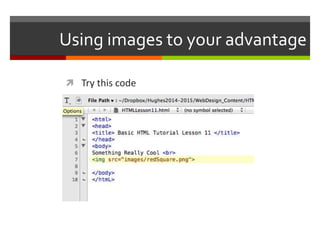
 Try this code
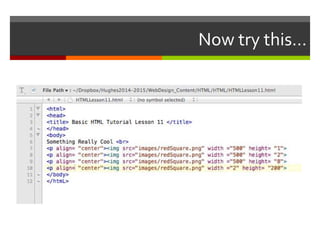
Now try this…
Upload your assignment 
 Take a screenshot of your code and upload to 
HTML_Tutorial11 Assignment in Bb

Html tutorial.lesson11

  • 1.
     BASIC HTML Lesson 11 1. Create a New Folder in your documents: Name it HTML_Lesson11 1. Inside that folder create another folder name it… images 1. Go to your Chef image and Red Square image in Bb. Save as instructed in the HTML_Lesson11/images folder. 1. Open TextWrangler create a new file name it HTMLLesson11.html. Save the file in the HTML_Lesson11 folder
  • 2.
    alt attribute Another image attribute is alt. It serves as a substitute for the image when the browser is too slow or when a screen reader is in use.
  • 3.
    No Attributes You don’t have to use the width and height attributes for images…but they load more slowly because the browser has to interpret the size information instead of just being told what to do!
  • 4.
    Using images toyour advantage  Try this code
  • 5.
  • 6.
    Upload your assignment  Take a screenshot of your code and upload to HTML_Tutorial11 Assignment in Bb