High performance computing for
Designing, Modelling and simulation
software
REVIEWED BY KIRUBEL.A
First Book
Autor
Jeff Beisheim
ANSYS, Inc
Second Book
Autor
Atsushi Itou
Toshikazu Nakanishi
Takashi Mizuguchi
Masatake Yoshida
Tei Saburi
Presentation outline
 Introduction
 High-Performance Computing
 High‐Performance Computing for Engineers
 Computer Aided Designing Softwares
 Simulation
 The science behind simulation FEM (finite element method)
 ANSYS
 Why (HPC) For ANSYS
 HPC Revolution
 Ansys in SMP and DMP
 HPC for Computational Fluid Dynamics (CFD)
 Why(HPC) For (CFD)
 BAKOO Vs KHPC on (CFD)
 Sample Analysis
 Steps and Result
 Conclusion and Remark of the study
High-Performance Computing
 High-performance computing (HPC) is the use of parallel processing for
running advanced application programs efficiently, reliably and quickly.
 The term applies especially to systems that function above a teraflop or
1012 floating-point operations per second. The term HPC is occasionally
used as a synonym for supercomputing, although technically a
supercomputer is a system that performs at or near the currently highest
operational rate for computers.
 Some supercomputers work at more than a petaflop or 1015 floating-
point operations per second.
Application Area of HPC Technology
 Construction
 architects to design comfortable and safe living environments
 Automotive Industry
 designers of vehicles to improve the aerodynamic characteristics
 Chemical production industry
 chemical engineers to maximize the yield from their equipment
 Resource usage like mining
 petroleum engineers to devise optimal oil recovery strategies
 Health
 surgeons to cure arterial diseases (computational hemodynamics)
 Metrology
 meteorologists to forecast the weather and warn of natural disasters
 Aviation and Military Organization
 military organizations to develop weapons and estimate the damage
High‐Performance Computing for
Engineers
 When it comes to engineering uses for HPC, the most obvious answer is, of course,
simulation.
 Computer simulation is a numbers game in which digital models are pitted against
simulated physics to determine the model's viability. Of course, many calculations have
to be solved for a simulation to be valid, making simulation a prime candidate for
HPC.
 What is Computer Aided Engineering (CAE)?
 CAE is the broad usage of computer software to aid in engineering analysis tasks. It includes
finite element analysis (FEA), computational fluid dynamics (CFD), multibody dynamics (MBD),
and optimization. [Wikipedia]
 Computer aided Engineering is a very big concept.
 Any Engineering Field of Study needs support from computers in order to study, Analyze,
optimize, Design, calculate, visualize, interpret, simulate and other many tasks.
 Due to this there are Softwares used to implement or operate the above tasks. This softwares
used to operate this tasks, known as Computer Aided Designing Softwares.
Computer Aided Designing Softwares
Computer Aided Designing
 Computer Aided Designing Softwares are
considered as Base or fundamental for any
Engineering Field of study, (Entertainment
and media centers), Graphics Designers and
others.
Main focusing Area
 Finite Element Analysis Softwares for simulation
 Ansys
 Computational Fluid Dynamics
What do we mean by Simulation?
 Definition Imitation of a situation or process (or) the action of pretending.
(Oxford dictionaries).
 Simulation is the imitation of the operation of a real-world process or
system over time.
 The act of simulating something first requires that a model be developed;
this model represents the key characteristics, behaviors and functions of
the selected physical or abstract system or process.
 The model represents the system itself, whereas the simulation represents
the operation of the system over time.
Advantage and How
 Experiments Simulations
• expensive • cheap(er)
• slow • fast(er)
• sequential • parallel
• single-purpose • multiple-purpose
 The human being (analyst) who states the problem to be solved
 scientific knowledge (models, methods) expressed mathematically
 The computer code (software) which embodies this knowledge and provides
detailed instructions (algorithms) for
 The computer hardware which performs the actual calculations
 The human being who inspects and interprets the simulation results
The science behind Simulation
FEM (finite element method)
 Introduction to FEM
 Analysis required to find many physical quantities which are to be calculated are;
1. Displacement, Velocity, Acceleration of a Moving object
2. Deformations, Stress distribution
3. Natural Frequencies
4. Critical buckling Loads
5. Pressure, Velocity and temperature distribution
6. Crack Growth and Fatigue Life and others
 Method of Analysis
a. Experimental Method
 Prototype is required for testing. Needs More Manpower, Materials, Time consuming and costly.
b. Analytical or Theoretical Method
 Problems are expressed by Mathematical differential Equation solution that gives the unknown physical
quantities. But it is only applicable for simple Geometry, known loading and Material Condition.
c. Numerical Method or approximation Method
 Numerical Method is suitable for Complex geometry and Material properties. It also gives an approximate
and acceptable solution. This leads us to FEM (Finite Element Method).
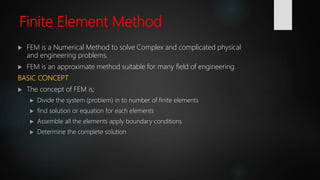
Finite Element Method
 FEM is a Numerical Method to solve Complex and complicated physical
and engineering problems.
 FEM is an approximate method suitable for many field of engineering.
BASIC CONCEPT
 The concept of FEM is;
 Divide the system (problem) in to number of finite elements
 find solution or equation for each elements
 Assemble all the elements apply boundary conditions
 Determine the complete solution
Cont.
Basic Simulation software
 Ansys was founded in 1970 by John Swanson. [Wikipedia]
 Ansys software is used to design products and
semiconductors, as well as to create simulations that test a
product's durability, temperature distribution, fluid
movements, and electromagnetic properties.
 Ansys can work together with other modelling softwares like
AutoCAD, SolidWorks, Catia, ArchiCAD, Rviet, Autodesk
Inventor, DYNA-3D, CAD-CAM and other softwares.
Why High Performance Computing
(HPC) For ANSYS:
 An ongoing effort designed to remove
computing limitations from engineers who
use computer aided engineering in all phases
of design, analysis, and testing.
 Need for :
 Speed for large and extended Designs.
 Multi‐core processors
 Large amounts of RAM
 Graphics processing Unit (GPUs)
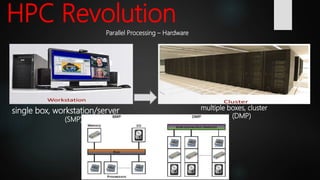
HPC Revolution
single box, workstation/server
(SMP)
multiple boxes, cluster
(DMP)
Parallel Processing – Hardware
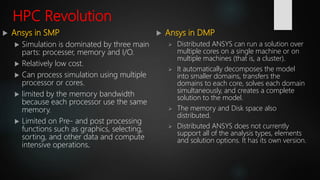
HPC Revolution
 Ansys in SMP
 Simulation is dominated by three main
parts: processer, memory and I/O.
 Relatively low cost.
 Can process simulation using multiple
processor or cores.
 limited by the memory bandwidth
because each processor use the same
memory.
 Limited on Pre- and post processing
functions such as graphics, selecting,
sorting, and other data and compute
intensive operations.
 Ansys in DMP
 Distributed ANSYS can run a solution over
multiple cores on a single machine or on
multiple machines (that is, a cluster).
 It automatically decomposes the model
into smaller domains, transfers the
domains to each core, solves each domain
simultaneously, and creates a complete
solution to the model.
 The memory and Disk space also
distributed.
 Distributed ANSYS does not currently
support all of the analysis types, elements
and solution options. It has its own version.
HPC Revolution
Distributed ANSYS Design
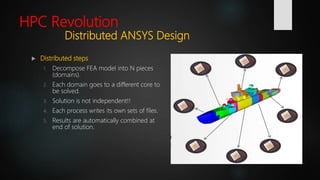
 Distributed steps
1. Decompose FEA model into N pieces
(domains).
2. Each domain goes to a different core to
be solved.
3. Solution is not independent!!
4. Each process writes its own sets of files.
5. Results are automatically combined at
end of solution.
HPC Revolution
Distributed ANSYS Benefits
 Better architecture
More computations performed in parallel faster solution time
 Better speedups than SMP
 Can be used for jobs running on 1000+ CPU cores
 Can take advantage of resources on multiple machines
Every simulation in ANSYS can benefit from
parallel processing
High performance parallel computing for
Computational Fluid Dynamics (CFD)
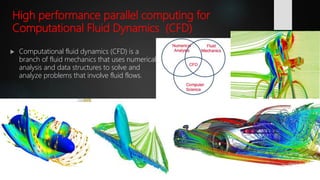
 Computational fluid dynamics (CFD) is a
branch of fluid mechanics that uses numerical
analysis and data structures to solve and
analyze problems that involve fluid flows.
Why High Performance Computing
(HPC) For (CFD):
 Based on
 In particular, computational fluid dynamics (CFD) is a technology that can be
used in forecasting the dispersion of flying objects, in studying the impact of
air blasts or explosive and for other purposes.
 In addition to problems faced in turning physical phenomena into numerical
models on CFD there will be several millions of meshes will be derived.
Therefore Computational time takes several tens of hours to several hundred
hours using computers that are normally available for computations, and this is
not practical in many cases.
Therefore CFD needs HPC.
Parallel Computer in this Study
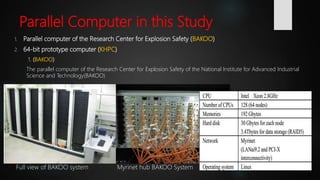
1. Parallel computer of the Research Center for Explosion Safety (BAKOO)
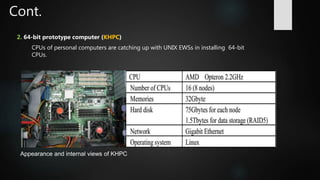
2. 64-bit prototype computer (KHPC)
1. (BAKOO)
The parallel computer of the Research Center for Explosion Safety of the National Institute for Advanced Industrial
Science and Technology(BAKOO)
Full view of BAKOO system Myrinet hub BAKOO System
Cont.
2. 64-bit prototype computer (KHPC)
CPUs of personal computers are catching up with UNIX EWSs in installing 64-bit
CPUs.
Appearance and internal views of KHPC
BAKOO Vs KHPC on (CFD)
Sample Analysis
 Themes of Analysis
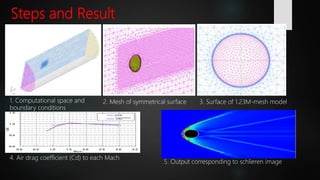
This study focuses on two problems in the safety of explosion. The first problem
is how far flying objects in an explosion would fly, and the second problem, what
impact an air blast by an explosion would have.
 Analysis model
A sphere of 14 mm in diameter was used in the calculations as the
shape of the flying objects. Calculations for each Mach number
were performed under conditions in which flying objects fly above
the ground (pressure 101325 Pa, temperature 288.15 K, air density
1.225 kg/m3).
Steps and Result
1. Computational space and
boundary conditions
2. Mesh of symmetrical surface 3. Surface of 1.23M-mesh model
4. Air drag coefficient (Cd) to each Mach
5. Output corresponding to schlieren image
Cont.
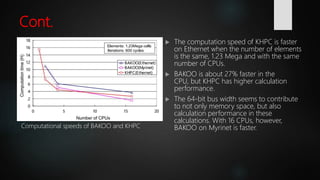
 The computation speed of KHPC is faster
on Ethernet when the number of elements
is the same, 1.23 Mega and with the same
number of CPUs.
 BAKOO is about 27% faster in the
CPU, but KHPC has higher calculation
performance.
 The 64-bit bus width seems to contribute
to not only memory space, but also
calculation performance in these
calculations. With 16 CPUs, however,
BAKOO on Myrinet is faster.Computational speeds of BAKOO and KHPC
Conclusion of the study
 A self-made parallel computer assembled by using components for
general-purpose personal computers reduces computation time.
 A high-speed communication device to replace Ethernet is mandatory
and is an important key technology for parallel computation.
 Myrinet was promoted as having lower protocol overhead than
standards such as Ethernet, and therefore better throughput, less
interference, and lower latency while using the host CPU.
 Ethernet is a family of computer networking technologies commonly
used in local area networks (LAN), metropolitan area networks
(MAN) and wide area networks (WAN). [Wikipedia].
 A system with a good cost vs. performance ratio need to be used for
suiting application of advanced work.
Remark
 The machine (KHPC)may have maintenance servicing problems because
it is a self-made computer. Even though the hardware cost is dramatically
low, the software license cost relatively increases for parallel use.
 However, the fact that computation can be performed in several tens of
hours instead of several hundred hours will drastically change thinking
toward simulations and simulation targets. This technology must be
observed by machinery manufacturers such as Komatsu.
Thanks For Listening

HPC and Simulation

  • 1.
    High performance computingfor Designing, Modelling and simulation software REVIEWED BY KIRUBEL.A First Book Autor Jeff Beisheim ANSYS, Inc Second Book Autor Atsushi Itou Toshikazu Nakanishi Takashi Mizuguchi Masatake Yoshida Tei Saburi
  • 2.
    Presentation outline  Introduction High-Performance Computing  High‐Performance Computing for Engineers  Computer Aided Designing Softwares  Simulation  The science behind simulation FEM (finite element method)  ANSYS  Why (HPC) For ANSYS  HPC Revolution  Ansys in SMP and DMP  HPC for Computational Fluid Dynamics (CFD)  Why(HPC) For (CFD)  BAKOO Vs KHPC on (CFD)  Sample Analysis  Steps and Result  Conclusion and Remark of the study
  • 3.
    High-Performance Computing  High-performancecomputing (HPC) is the use of parallel processing for running advanced application programs efficiently, reliably and quickly.  The term applies especially to systems that function above a teraflop or 1012 floating-point operations per second. The term HPC is occasionally used as a synonym for supercomputing, although technically a supercomputer is a system that performs at or near the currently highest operational rate for computers.  Some supercomputers work at more than a petaflop or 1015 floating- point operations per second.
  • 4.
    Application Area ofHPC Technology  Construction  architects to design comfortable and safe living environments  Automotive Industry  designers of vehicles to improve the aerodynamic characteristics  Chemical production industry  chemical engineers to maximize the yield from their equipment  Resource usage like mining  petroleum engineers to devise optimal oil recovery strategies  Health  surgeons to cure arterial diseases (computational hemodynamics)  Metrology  meteorologists to forecast the weather and warn of natural disasters  Aviation and Military Organization  military organizations to develop weapons and estimate the damage
  • 5.
    High‐Performance Computing for Engineers When it comes to engineering uses for HPC, the most obvious answer is, of course, simulation.  Computer simulation is a numbers game in which digital models are pitted against simulated physics to determine the model's viability. Of course, many calculations have to be solved for a simulation to be valid, making simulation a prime candidate for HPC.  What is Computer Aided Engineering (CAE)?  CAE is the broad usage of computer software to aid in engineering analysis tasks. It includes finite element analysis (FEA), computational fluid dynamics (CFD), multibody dynamics (MBD), and optimization. [Wikipedia]  Computer aided Engineering is a very big concept.  Any Engineering Field of Study needs support from computers in order to study, Analyze, optimize, Design, calculate, visualize, interpret, simulate and other many tasks.  Due to this there are Softwares used to implement or operate the above tasks. This softwares used to operate this tasks, known as Computer Aided Designing Softwares.
  • 6.
  • 7.
    Computer Aided Designing Computer Aided Designing Softwares are considered as Base or fundamental for any Engineering Field of study, (Entertainment and media centers), Graphics Designers and others. Main focusing Area  Finite Element Analysis Softwares for simulation  Ansys  Computational Fluid Dynamics
  • 8.
    What do wemean by Simulation?  Definition Imitation of a situation or process (or) the action of pretending. (Oxford dictionaries).  Simulation is the imitation of the operation of a real-world process or system over time.  The act of simulating something first requires that a model be developed; this model represents the key characteristics, behaviors and functions of the selected physical or abstract system or process.  The model represents the system itself, whereas the simulation represents the operation of the system over time.
  • 10.
    Advantage and How Experiments Simulations • expensive • cheap(er) • slow • fast(er) • sequential • parallel • single-purpose • multiple-purpose  The human being (analyst) who states the problem to be solved  scientific knowledge (models, methods) expressed mathematically  The computer code (software) which embodies this knowledge and provides detailed instructions (algorithms) for  The computer hardware which performs the actual calculations  The human being who inspects and interprets the simulation results
  • 11.
    The science behindSimulation FEM (finite element method)  Introduction to FEM  Analysis required to find many physical quantities which are to be calculated are; 1. Displacement, Velocity, Acceleration of a Moving object 2. Deformations, Stress distribution 3. Natural Frequencies 4. Critical buckling Loads 5. Pressure, Velocity and temperature distribution 6. Crack Growth and Fatigue Life and others  Method of Analysis a. Experimental Method  Prototype is required for testing. Needs More Manpower, Materials, Time consuming and costly. b. Analytical or Theoretical Method  Problems are expressed by Mathematical differential Equation solution that gives the unknown physical quantities. But it is only applicable for simple Geometry, known loading and Material Condition. c. Numerical Method or approximation Method  Numerical Method is suitable for Complex geometry and Material properties. It also gives an approximate and acceptable solution. This leads us to FEM (Finite Element Method).
  • 12.
    Finite Element Method FEM is a Numerical Method to solve Complex and complicated physical and engineering problems.  FEM is an approximate method suitable for many field of engineering. BASIC CONCEPT  The concept of FEM is;  Divide the system (problem) in to number of finite elements  find solution or equation for each elements  Assemble all the elements apply boundary conditions  Determine the complete solution
  • 13.
  • 14.
    Basic Simulation software Ansys was founded in 1970 by John Swanson. [Wikipedia]  Ansys software is used to design products and semiconductors, as well as to create simulations that test a product's durability, temperature distribution, fluid movements, and electromagnetic properties.  Ansys can work together with other modelling softwares like AutoCAD, SolidWorks, Catia, ArchiCAD, Rviet, Autodesk Inventor, DYNA-3D, CAD-CAM and other softwares.
  • 15.
    Why High PerformanceComputing (HPC) For ANSYS:  An ongoing effort designed to remove computing limitations from engineers who use computer aided engineering in all phases of design, analysis, and testing.  Need for :  Speed for large and extended Designs.  Multi‐core processors  Large amounts of RAM  Graphics processing Unit (GPUs)
  • 16.
    HPC Revolution single box,workstation/server (SMP) multiple boxes, cluster (DMP) Parallel Processing – Hardware
  • 17.
    HPC Revolution  Ansysin SMP  Simulation is dominated by three main parts: processer, memory and I/O.  Relatively low cost.  Can process simulation using multiple processor or cores.  limited by the memory bandwidth because each processor use the same memory.  Limited on Pre- and post processing functions such as graphics, selecting, sorting, and other data and compute intensive operations.  Ansys in DMP  Distributed ANSYS can run a solution over multiple cores on a single machine or on multiple machines (that is, a cluster).  It automatically decomposes the model into smaller domains, transfers the domains to each core, solves each domain simultaneously, and creates a complete solution to the model.  The memory and Disk space also distributed.  Distributed ANSYS does not currently support all of the analysis types, elements and solution options. It has its own version.
  • 18.
    HPC Revolution Distributed ANSYSDesign  Distributed steps 1. Decompose FEA model into N pieces (domains). 2. Each domain goes to a different core to be solved. 3. Solution is not independent!! 4. Each process writes its own sets of files. 5. Results are automatically combined at end of solution.
  • 19.
    HPC Revolution Distributed ANSYSBenefits  Better architecture More computations performed in parallel faster solution time  Better speedups than SMP  Can be used for jobs running on 1000+ CPU cores  Can take advantage of resources on multiple machines Every simulation in ANSYS can benefit from parallel processing
  • 20.
    High performance parallelcomputing for Computational Fluid Dynamics (CFD)  Computational fluid dynamics (CFD) is a branch of fluid mechanics that uses numerical analysis and data structures to solve and analyze problems that involve fluid flows.
  • 21.
    Why High PerformanceComputing (HPC) For (CFD):  Based on  In particular, computational fluid dynamics (CFD) is a technology that can be used in forecasting the dispersion of flying objects, in studying the impact of air blasts or explosive and for other purposes.  In addition to problems faced in turning physical phenomena into numerical models on CFD there will be several millions of meshes will be derived. Therefore Computational time takes several tens of hours to several hundred hours using computers that are normally available for computations, and this is not practical in many cases. Therefore CFD needs HPC.
  • 22.
    Parallel Computer inthis Study 1. Parallel computer of the Research Center for Explosion Safety (BAKOO) 2. 64-bit prototype computer (KHPC) 1. (BAKOO) The parallel computer of the Research Center for Explosion Safety of the National Institute for Advanced Industrial Science and Technology(BAKOO) Full view of BAKOO system Myrinet hub BAKOO System
  • 23.
    Cont. 2. 64-bit prototypecomputer (KHPC) CPUs of personal computers are catching up with UNIX EWSs in installing 64-bit CPUs. Appearance and internal views of KHPC
  • 24.
    BAKOO Vs KHPCon (CFD) Sample Analysis  Themes of Analysis This study focuses on two problems in the safety of explosion. The first problem is how far flying objects in an explosion would fly, and the second problem, what impact an air blast by an explosion would have.  Analysis model A sphere of 14 mm in diameter was used in the calculations as the shape of the flying objects. Calculations for each Mach number were performed under conditions in which flying objects fly above the ground (pressure 101325 Pa, temperature 288.15 K, air density 1.225 kg/m3).
  • 25.
    Steps and Result 1.Computational space and boundary conditions 2. Mesh of symmetrical surface 3. Surface of 1.23M-mesh model 4. Air drag coefficient (Cd) to each Mach 5. Output corresponding to schlieren image
  • 26.
    Cont.  The computationspeed of KHPC is faster on Ethernet when the number of elements is the same, 1.23 Mega and with the same number of CPUs.  BAKOO is about 27% faster in the CPU, but KHPC has higher calculation performance.  The 64-bit bus width seems to contribute to not only memory space, but also calculation performance in these calculations. With 16 CPUs, however, BAKOO on Myrinet is faster.Computational speeds of BAKOO and KHPC
  • 27.
    Conclusion of thestudy  A self-made parallel computer assembled by using components for general-purpose personal computers reduces computation time.  A high-speed communication device to replace Ethernet is mandatory and is an important key technology for parallel computation.  Myrinet was promoted as having lower protocol overhead than standards such as Ethernet, and therefore better throughput, less interference, and lower latency while using the host CPU.  Ethernet is a family of computer networking technologies commonly used in local area networks (LAN), metropolitan area networks (MAN) and wide area networks (WAN). [Wikipedia].  A system with a good cost vs. performance ratio need to be used for suiting application of advanced work.
  • 28.
    Remark  The machine(KHPC)may have maintenance servicing problems because it is a self-made computer. Even though the hardware cost is dramatically low, the software license cost relatively increases for parallel use.  However, the fact that computation can be performed in several tens of hours instead of several hundred hours will drastically change thinking toward simulations and simulation targets. This technology must be observed by machinery manufacturers such as Komatsu.
  • 29.

Editor's Notes

  • #8 Primarily this softwares are user for designing, modelling, simulating and finally to give the design in the form of 2D and 3D presentation format such as; PDF, DWG, JPG, mp4 and others. This softwares are used in Manufacturing and production industry, scientists, Machinery Designers, Structural Designers, Automotive Design and testing companies.