How to write an application
and not roll down to 1 fps
by Maksim Yakusik
PART 1. Introduction
In the projects I have participated recently, there were some problems with
performance.
Why such performance problems arise in application ?
Yes, this happens due to ignorance of how the browser works:
- structures
- algorithms
- frameworks
Ignorance of the browser api leads to the fact that incorrect approaches are used
in the development. Browsers work slower because they were not designed for the
tasks for which they are used now. That's why you need to know some details
about a browser, at least the most basic ones.
Why is this happens?
Ignorance of frameworks leads to the fact that some features are used
excessively, which leads to inevitable drops in performance.
Without knowledge of the basic algorithms and data structures, it's hard to get
used to the principle of frameworks work. In this case, there are
misunderstandings of where there can be a gap for a fast code work.
Also, frameworks are not always able to solve set tasks without performance
drawdown. Sometimes they can completely reduce it to zero. You need to go
beyond the framework, in order to solve the problem. You will not succeed without
clear understanding of the algorithms of data structures and browser api.
PART 2. How does the browser work? (very briefly)
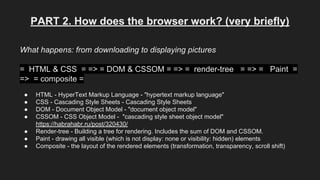
What happens: from downloading to displaying pictures
= HTML & CSS = => = DOM & CSSOM = => = render-tree = => = Paint =
=> = composite =
● HTML - HyperText Markup Language - "hypertext markup language"
● CSS - Cascading Style Sheets - Cascading Style Sheets
● DOM - Document Object Model - "document object model"
● CSSOM - CSS Object Model - "cascading style sheet object model"
https://habrahabr.ru/post/320430/
● Render-tree - Building a tree for rendering. Includes the sum of DOM and CSSOM.
● Paint - drawing all visible (which is not display: none or visibility: hidden) elements
● Composite - the layout of the rendered elements (transformation, transparency, scroll shift)
PART 3. What can be optimized?
1) Keep HTML clean. If you can make it without an element - do that. This will relieve the load on the
browser when manipulating the DOM. For this purpose you can apply modern layout approaches (e.g.
grid)
2) Do not overload with heavy styles. Some of them can actually spoil the browser's work. For example, a
translucent shadow from a large number of elements, which in such case will be scrolled relatively to other
elements. Such a set will squander any browser on fps.
Also pay attention to the styles naming. For example:
.my-app> .footer> .item
.my-app> .header> .item
and
.my-app> .footer> .footer__item
.my-app> .header> .header__item
will affect the rendering performance of the tree in different ways, since the styles are recognized from the
right to the left.
3) Do not use synchronous requests in the script. All the time, while your script is
running, fps will be zero.
Also, the script itself can be loaded asynchronously, when allowing the browser to
parse all css and html while the script is loaded (in case with a template or in a
server side rendering it can be very useful).
4) Any change to the DOM or the injection of style sheets calls the full drawing
way for a part or for all elements. Depending on whether this is a part or all of the
elements, the rendering time can be shortened or prolonged. That's why you must
avoid frequent intervention in the DOM. E.g.: if each scroll event will cause the
browser to redraw all the elements. Because of this, the speed of updating the
image will tend to zero!
5) Ignorance of frameworks and their "magic" leads to the features misuse that eat
up all the CPU time. As a result, the battery is discharged, the device is boiling,
and fps is 3-5, even though the task is simply to output some text (ummm, what's
the matter and what to do about it?).
PART 4. What to do with not well-known browsers?
1) Do not write the production code for them! You cannot just take it and write an average-sized project
on an unknown framework.
2) If you started coding, then you should know that they are very insidious. Add 30-40% of the time for
corrections before deadline, stress, sleepless nights =)
3) Find a person who knows what to do with it and will revise the code 2 hours a day and give you
some good advice. It's important! A thoughtful analysis by a specialist can bring the project to the right
direction!)
4) Willingness to deal with code profilers, as this will substantially simplify the search task.
(I also wanted to tell you about the top problems with some frameworks, but this topic deserves another
report.) =))
PART 5. Chrome Performance
The Performance tab is our eyes and ears in the process of looking for a reason of
the poor performance of the application.
● Capabilities:Slowing down the execution of the script (CPU) (To emulate the
work of IE)
● Network restrictions, widths and delays (Network)
● Watch FPS, CPU load and network requests
● View the call tree from the top to the bottom (Call Tree), from the bottom to
the top (Buttom-Up) and Event Log
etc.
Thank you for attention!

How to write an application and not roll down to 1 fps

  • 1.
    How to writean application and not roll down to 1 fps by Maksim Yakusik
  • 2.
    PART 1. Introduction Inthe projects I have participated recently, there were some problems with performance. Why such performance problems arise in application ? Yes, this happens due to ignorance of how the browser works: - structures - algorithms - frameworks Ignorance of the browser api leads to the fact that incorrect approaches are used in the development. Browsers work slower because they were not designed for the tasks for which they are used now. That's why you need to know some details about a browser, at least the most basic ones.
  • 3.
    Why is thishappens? Ignorance of frameworks leads to the fact that some features are used excessively, which leads to inevitable drops in performance. Without knowledge of the basic algorithms and data structures, it's hard to get used to the principle of frameworks work. In this case, there are misunderstandings of where there can be a gap for a fast code work. Also, frameworks are not always able to solve set tasks without performance drawdown. Sometimes they can completely reduce it to zero. You need to go beyond the framework, in order to solve the problem. You will not succeed without clear understanding of the algorithms of data structures and browser api.
  • 4.
    PART 2. Howdoes the browser work? (very briefly) What happens: from downloading to displaying pictures = HTML & CSS = => = DOM & CSSOM = => = render-tree = => = Paint = => = composite = ● HTML - HyperText Markup Language - "hypertext markup language" ● CSS - Cascading Style Sheets - Cascading Style Sheets ● DOM - Document Object Model - "document object model" ● CSSOM - CSS Object Model - "cascading style sheet object model" https://habrahabr.ru/post/320430/ ● Render-tree - Building a tree for rendering. Includes the sum of DOM and CSSOM. ● Paint - drawing all visible (which is not display: none or visibility: hidden) elements ● Composite - the layout of the rendered elements (transformation, transparency, scroll shift)
  • 5.
    PART 3. Whatcan be optimized? 1) Keep HTML clean. If you can make it without an element - do that. This will relieve the load on the browser when manipulating the DOM. For this purpose you can apply modern layout approaches (e.g. grid) 2) Do not overload with heavy styles. Some of them can actually spoil the browser's work. For example, a translucent shadow from a large number of elements, which in such case will be scrolled relatively to other elements. Such a set will squander any browser on fps. Also pay attention to the styles naming. For example: .my-app> .footer> .item .my-app> .header> .item and .my-app> .footer> .footer__item .my-app> .header> .header__item will affect the rendering performance of the tree in different ways, since the styles are recognized from the right to the left.
  • 6.
    3) Do notuse synchronous requests in the script. All the time, while your script is running, fps will be zero. Also, the script itself can be loaded asynchronously, when allowing the browser to parse all css and html while the script is loaded (in case with a template or in a server side rendering it can be very useful). 4) Any change to the DOM or the injection of style sheets calls the full drawing way for a part or for all elements. Depending on whether this is a part or all of the elements, the rendering time can be shortened or prolonged. That's why you must avoid frequent intervention in the DOM. E.g.: if each scroll event will cause the browser to redraw all the elements. Because of this, the speed of updating the image will tend to zero! 5) Ignorance of frameworks and their "magic" leads to the features misuse that eat up all the CPU time. As a result, the battery is discharged, the device is boiling, and fps is 3-5, even though the task is simply to output some text (ummm, what's the matter and what to do about it?).
  • 7.
    PART 4. Whatto do with not well-known browsers? 1) Do not write the production code for them! You cannot just take it and write an average-sized project on an unknown framework. 2) If you started coding, then you should know that they are very insidious. Add 30-40% of the time for corrections before deadline, stress, sleepless nights =) 3) Find a person who knows what to do with it and will revise the code 2 hours a day and give you some good advice. It's important! A thoughtful analysis by a specialist can bring the project to the right direction!) 4) Willingness to deal with code profilers, as this will substantially simplify the search task. (I also wanted to tell you about the top problems with some frameworks, but this topic deserves another report.) =))
  • 8.
    PART 5. ChromePerformance The Performance tab is our eyes and ears in the process of looking for a reason of the poor performance of the application. ● Capabilities:Slowing down the execution of the script (CPU) (To emulate the work of IE) ● Network restrictions, widths and delays (Network) ● Watch FPS, CPU load and network requests ● View the call tree from the top to the bottom (Call Tree), from the bottom to the top (Buttom-Up) and Event Log etc.
  • 9.
    Thank you forattention!