HOW	
  TO	
  VISTIT	
  MY	
  SOCIAL	
  RESOURCE	


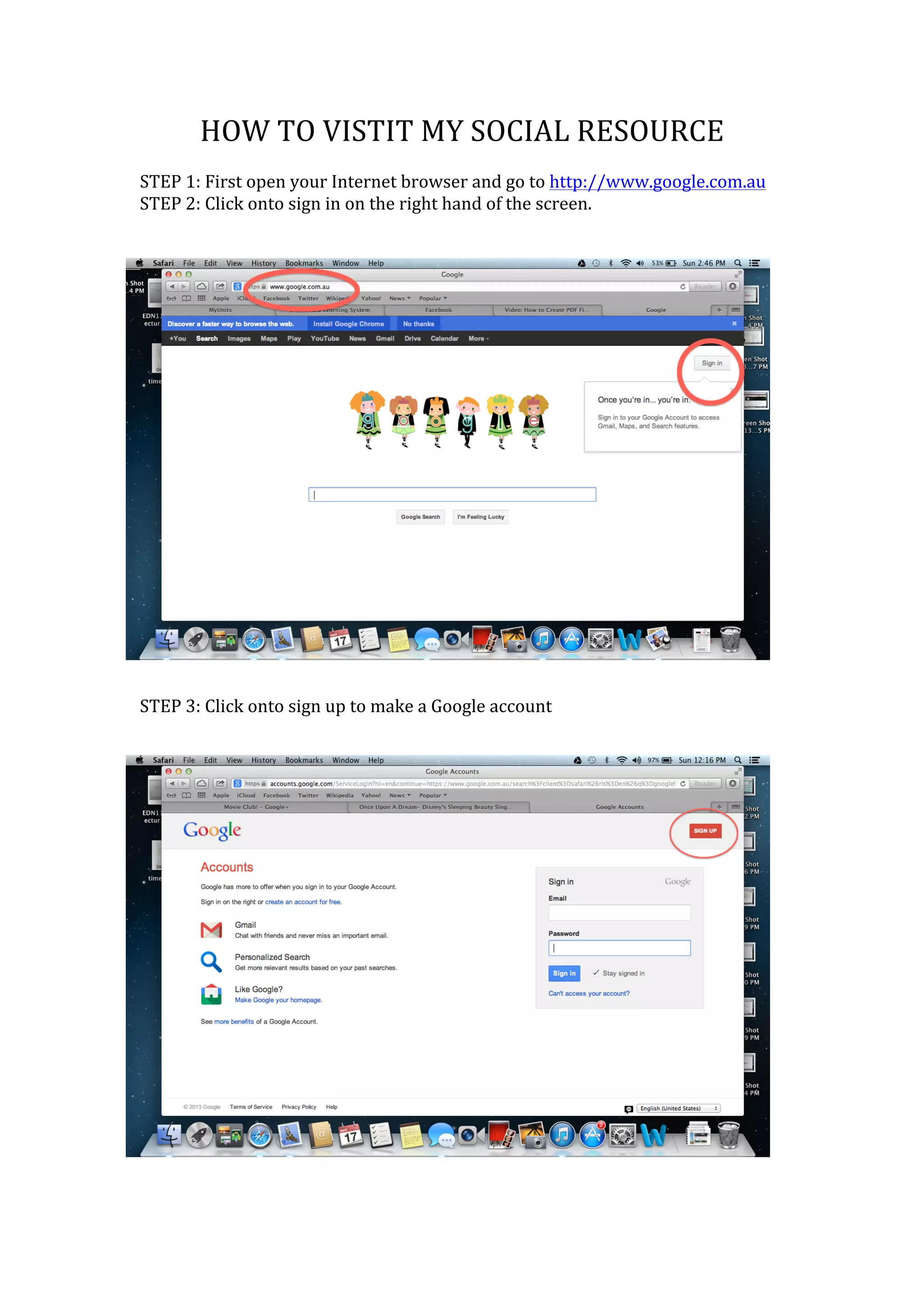
STEP	
  1:	
  First	
  open	
  your	
  Internet	
  browser	
  and	
  go	
  to	
  http://www.google.com.au	
  
STEP	
  2:	
  Click	
  onto	
  sign	
  in	
  on	
  the	
  right	
  hand	
  of	
  the	
  screen.	


STEP	
  3:	
  Click	
  onto	
  sign	
  up	
  to	
  make	
  a	
  Google	
  account	


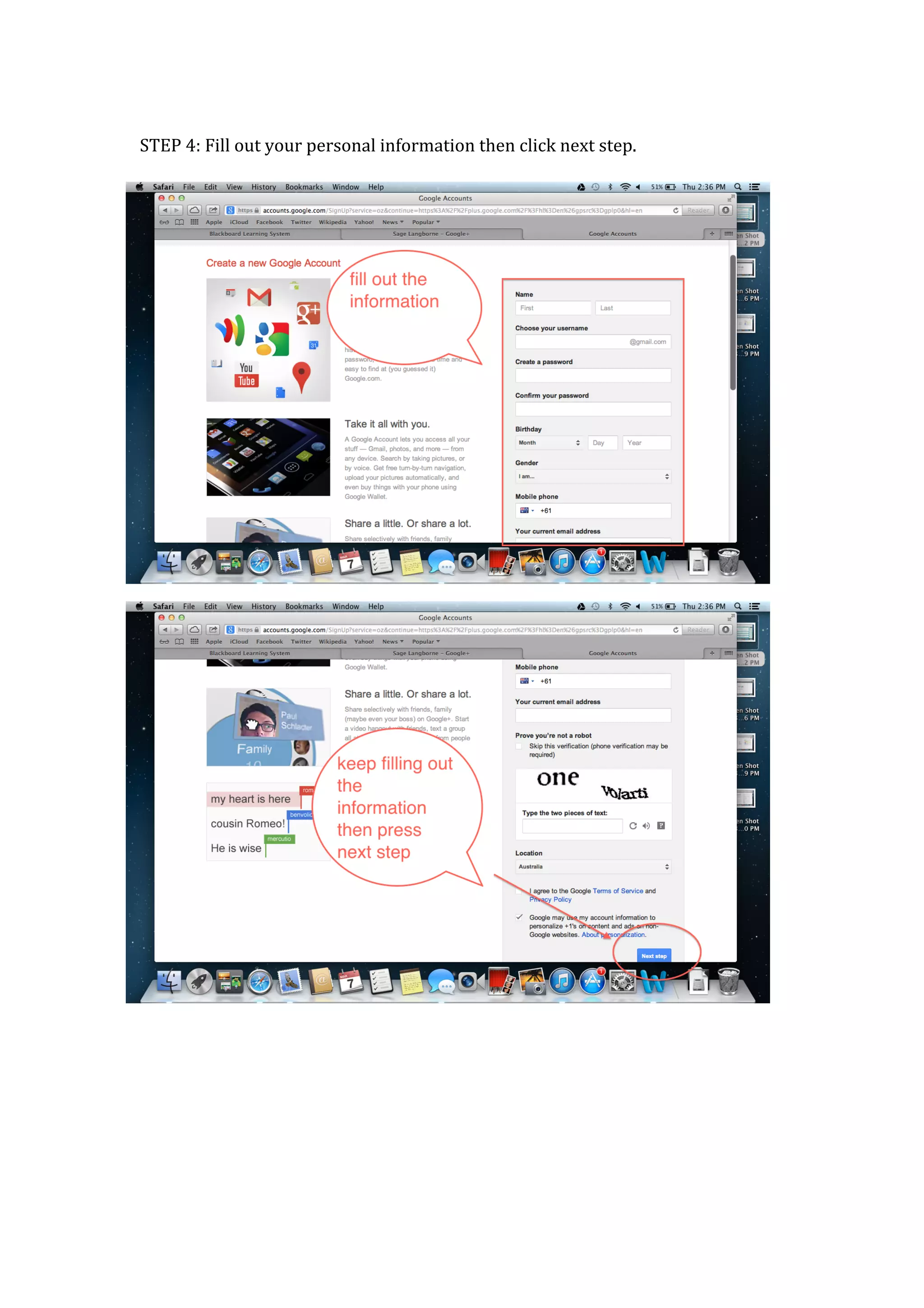
STEP	
  4:	
  Fill	
  out	
  your	
  personal	
  information	
  then	
  click	
  next	
  step.	


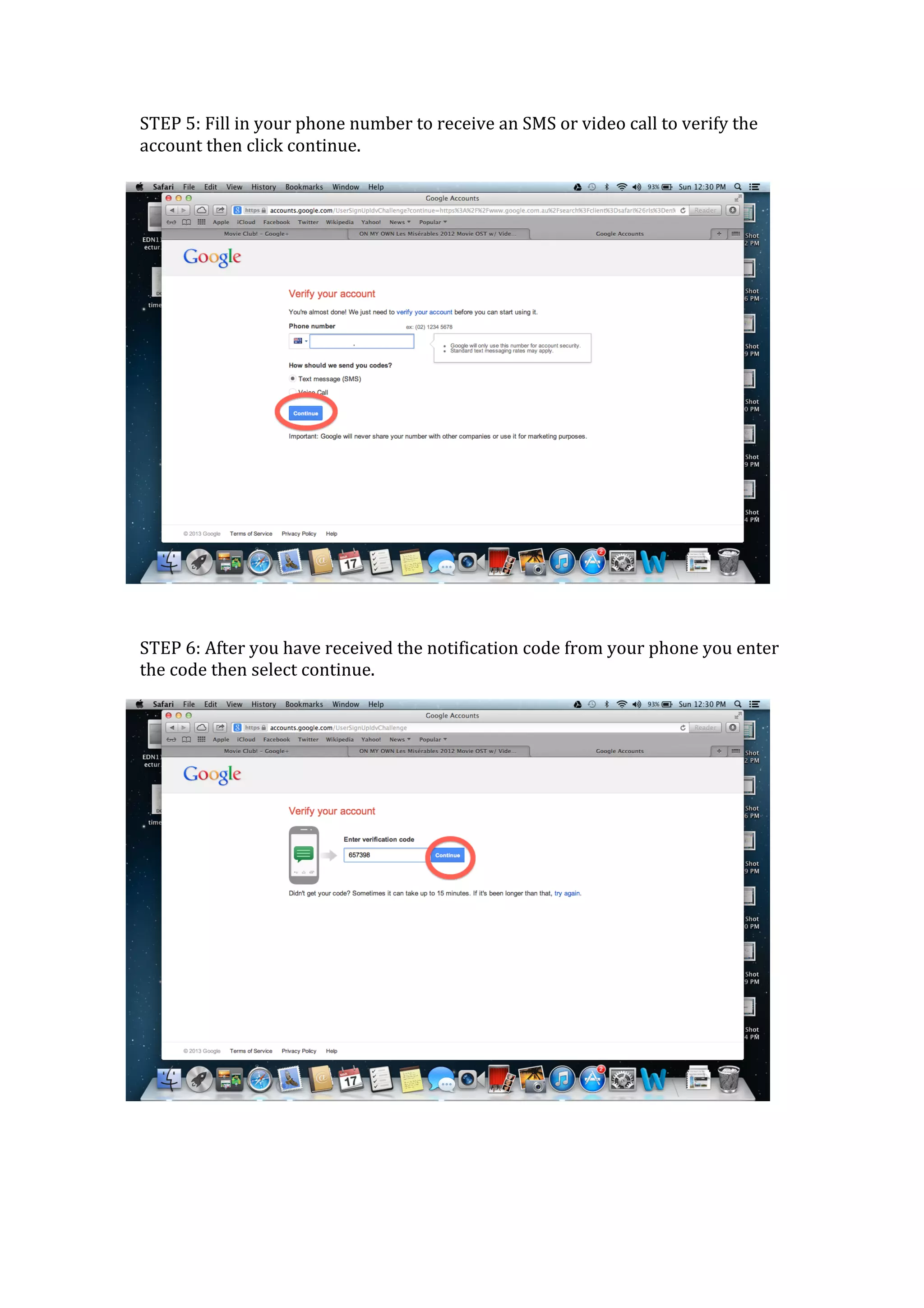
STEP	
  5:	
  Fill	
  in	
  your	
  phone	
  number	
  to	
  receive	
  an	
  SMS	
  or	
  video	
  call	
  to	
  verify	
  the	
  
account	
  then	
  click	
  continue.	


STEP	
  6:	
  After	
  you	
  have	
  received	
  the	
  notification	
  code	
  from	
  your	
  phone	
  you	
  enter	
  
the	
  code	
  then	
  select	
  continue.	


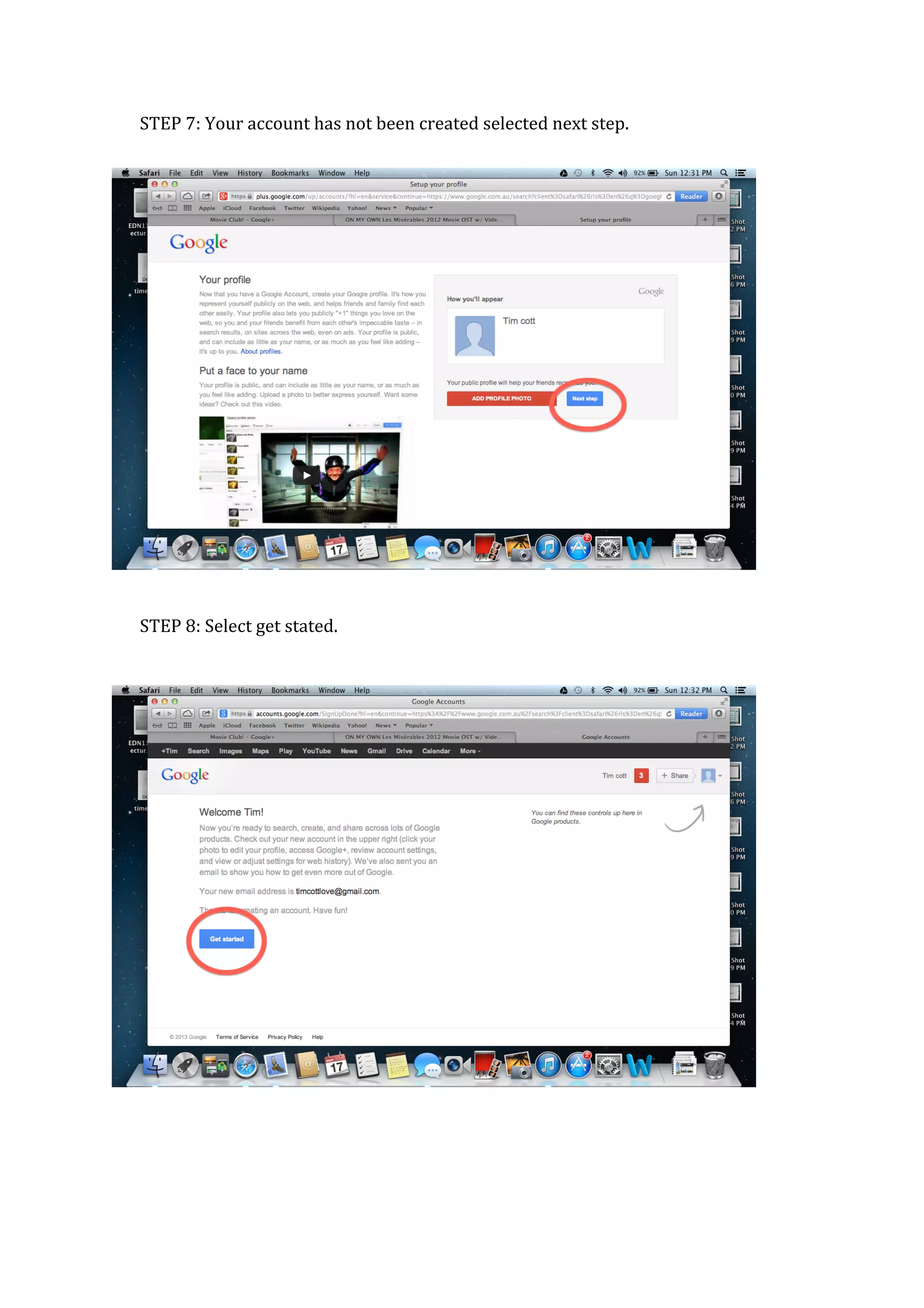
STEP	
  7:	
  Your	
  account	
  has	
  not	
  been	
  created	
  selected	
  next	
  step.	


STEP	
  8:	
  Select	
  get	
  stated.	


STEP	
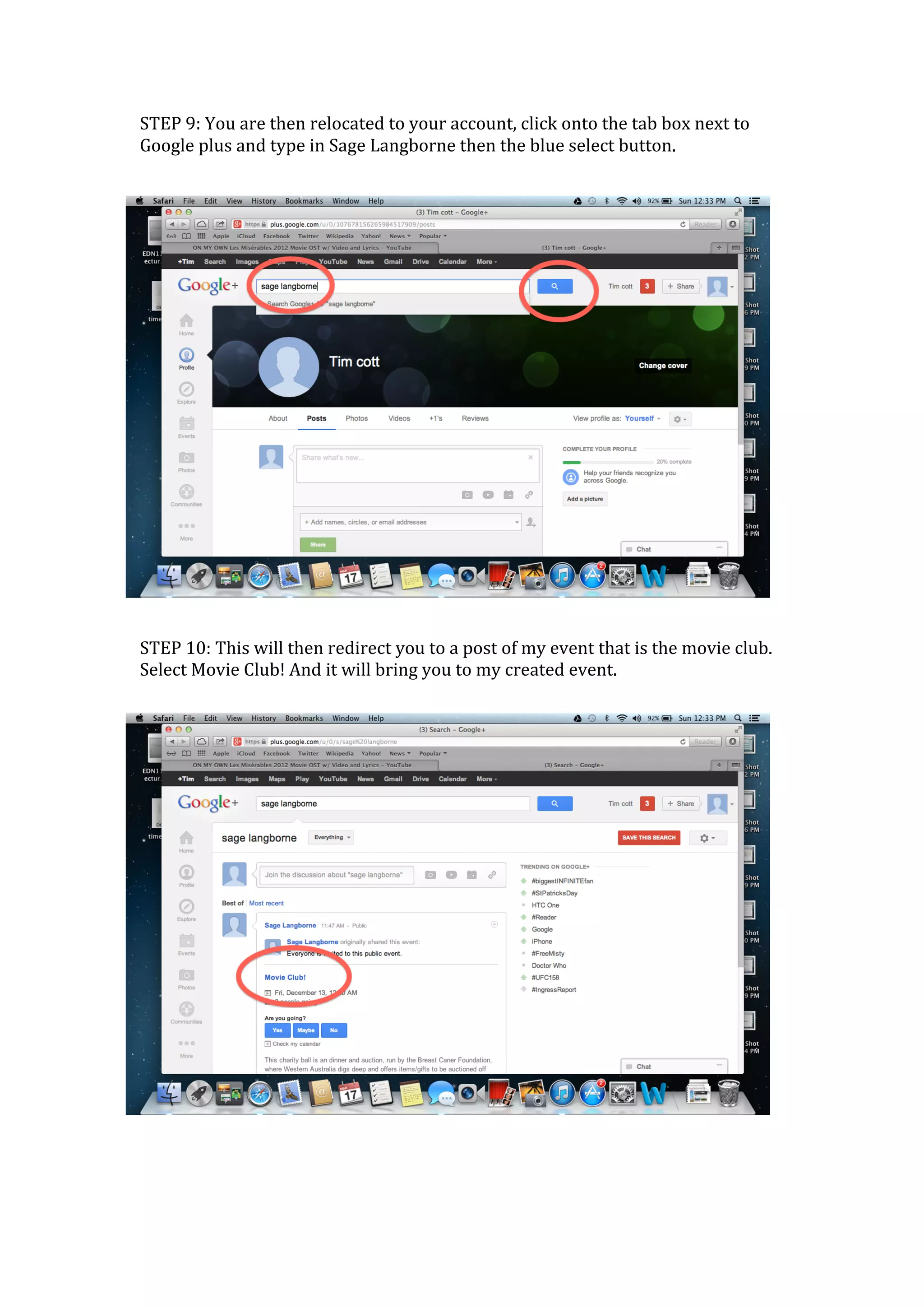
  9:	
  You	
  are	
  then	
  relocated	
  to	
  your	
  account,	
  click	
  onto	
  the	
  tab	
  box	
  next	
  to	
  
Google	
  plus	
  and	
  type	
  in	
  Sage	
  Langborne	
  then	
  the	
  blue	
  select	
  button.	


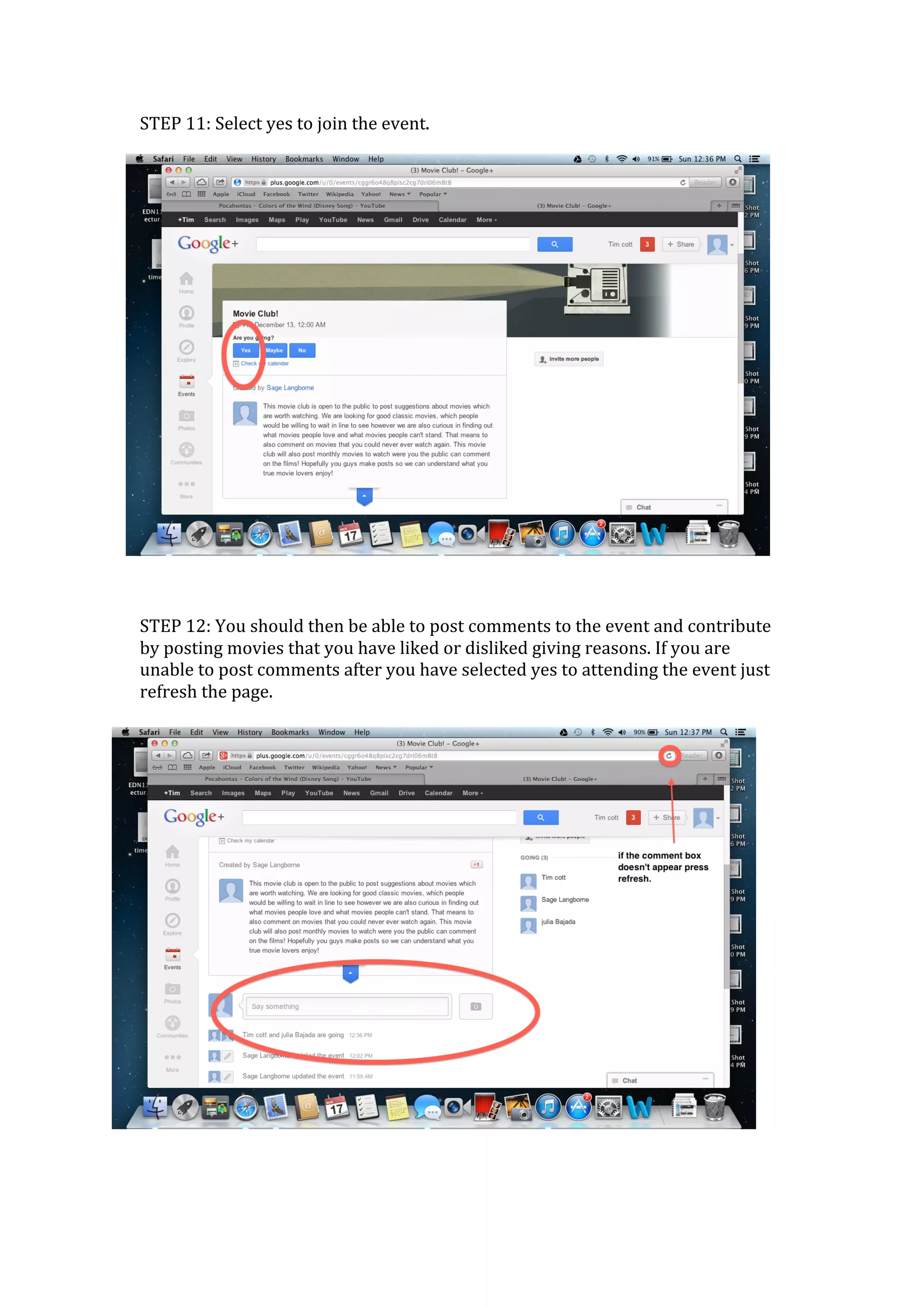
STEP	
  10:	
  This	
  will	
  then	
  redirect	
  you	
  to	
  a	
  post	
  of	
  my	
  event	
  that	
  is	
  the	
  movie	
  club.	
  
Select	
  Movie	
  Club!	
  And	
  it	
  will	
  bring	
  you	
  to	
  my	
  created	
  event.	


STEP	
  11:	
  Select	
  yes	
  to	
  join	
  the	
  event.	


STEP	
  12:	
  You	
  should	
  then	
  be	
  able	
  to	
  post	
  comments	
  to	
  the	
  event	
  and	
  contribute	
  
by	
  posting	
  movies	
  that	
  you	
  have	
  liked	
  or	
  disliked	
  giving	
  reasons.	
  If	
  you	
  are	
  
unable	
  to	
  post	
  comments	
  after	
  you	
  have	
  selected	
  yes	
  to	
  attending	
  the	
  event	
  just	
  
refresh	
  the	
  page.	


How to vistit my social resource

  • 1.
    HOW  TO  VISTIT  MY  SOCIAL  RESOURCE     STEP  1:  First  open  your  Internet  browser  and  go  to  http://www.google.com.au   STEP  2:  Click  onto  sign  in  on  the  right  hand  of  the  screen.           STEP  3:  Click  onto  sign  up  to  make  a  Google  account      
  • 2.
      STEP  4:  Fill  out  your  personal  information  then  click  next  step.                    
  • 3.
    STEP  5:  Fill  in  your  phone  number  to  receive  an  SMS  or  video  call  to  verify  the   account  then  click  continue.           STEP  6:  After  you  have  received  the  notification  code  from  your  phone  you  enter   the  code  then  select  continue.        
  • 4.
    STEP  7:  Your  account  has  not  been  created  selected  next  step.                                                 STEP  8:  Select  get  stated.                                                      
  • 5.
    STEP  9:  You  are  then  relocated  to  your  account,  click  onto  the  tab  box  next  to   Google  plus  and  type  in  Sage  Langborne  then  the  blue  select  button.         STEP  10:  This  will  then  redirect  you  to  a  post  of  my  event  that  is  the  movie  club.   Select  Movie  Club!  And  it  will  bring  you  to  my  created  event.          
  • 6.
    STEP  11:  Select  yes  to  join  the  event.         STEP  12:  You  should  then  be  able  to  post  comments  to  the  event  and  contribute   by  posting  movies  that  you  have  liked  or  disliked  giving  reasons.  If  you  are   unable  to  post  comments  after  you  have  selected  yes  to  attending  the  event  just   refresh  the  page.