How To Make Good
                         Presentations
                       and how to make sure your audience
                             doesn’t fall asleep...


                                  Ine Dehandschutter
                                       @matuvu
                                    www.matuvu.nu

                                        2012


Wednesday 11 July 12
@matuvu


                                Hi,
                                I’m Ine,
                       a designer & photographer
                                @ matuvu


Wednesday 11 July 12
@matuvu


                       I Learned A Thing.
                             Or 2...
                        (Which I want to share with you!)


Wednesday 11 July 12
@matuvu


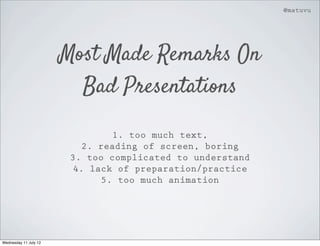
                       Most Made Remarks On
                         Bad Presentations

                                 1. too much text,
                           2. reading of screen, boring
                        3. too complicated to understand
                         4. lack of preparation/practice
                               5. too much animation


Wednesday 11 July 12
@matuvu


                       Basics

Wednesday 11 July 12
@matuvu


                       Know Your Audience

Wednesday 11 July 12
@matuvu


                       Outline Your Content

Wednesday 11 July 12
@matuvu


                       Blahblahblah


                       Add The Story

Wednesday 11 July 12
@matuvu


                       Add A Sauce Of Design

Wednesday 11 July 12
@matuvu


                       Make It Sharable

Wednesday 11 July 12
@matuvu


                       1/ Audience

Wednesday 11 July 12
@matuvu


                         Know It Before
                       You Enter The Stage
                          It saves your day.


Wednesday 11 July 12
@matuvu


                       2/ Outlines

Wednesday 11 July 12
@matuvu


                              K.I.S.S
                       Keep it STRAIGHT & SIMPLE!


Wednesday 11 July 12
@matuvu


                       Most Of Us Remember
                          Only 3 Things
                        So don’t try to fit in 30...


Wednesday 11 July 12
@matuvu


                            1 Slide = 1 Idea
                          You’re giving a presentation,
                       you’re not handing out a document!


Wednesday 11 July 12
@matuvu


                          The 10-20-30 Rule
                               Guy Kawasaki says:
                       10 slides, 20 minutes, 30 fontsize


Wednesday 11 July 12
@matuvu


                       This Is A 72point
                            Fontsize
                        This is a 30 fontsize


Wednesday 11 July 12
@matuvu


                       This Forces You To Think
                         In Billboards Terms
                           You’re giving a presentation,
                        you’re not handing out a document!


Wednesday 11 July 12
@matuvu


                       Stick To Your Time
                             Always
                        If you get a 20min talk
                            prepare for 18.


Wednesday 11 July 12
@matuvu


                       3/ The Story

Wednesday 11 July 12
@matuvu


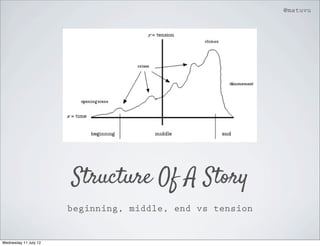
                       Structure Of A Story
                       beginning, middle, end vs tension


Wednesday 11 July 12
@matuvu


                       Basically Your Story Needs:
                                 1. a problem
                                2. a solution

                             inbeween some crises
                              and atleast 1 joke


Wednesday 11 July 12
@matuvu


  Use This Structure For Your Outline
                       It works faster


Wednesday 11 July 12
@matuvu


                       The Joke Is Essential!
                       You can drop all the other stuff.


Wednesday 11 July 12
@matuvu


                              On The Jokes
                           3 ways to integrate jokes:

                                     1. Tell it
                       2. Integrate it in the slide + talk
                           3. Only show it in your slide
                         and have the audience notice it.


Wednesday 11 July 12
@matuvu


                       Connect With The Audience
                       You you need to make a personal connection
                                   with the audience.

                                  A joke is a good way.
                             Asking interaction is another.
                                    (Hard in Belgium!)

                        Add eye contact, don’t read your slides


Wednesday 11 July 12
@matuvu


                       4/ Design

Wednesday 11 July 12
@matuvu


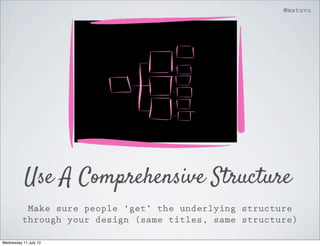
           Use A Comprehensive Structure
           Make sure people ‘get’ the underlying structure
          through your design (same titles, same structure)

Wednesday 11 July 12
@matuvu


                               Align!


                Make sure everything is aligned the same way.


Wednesday 11 July 12
@matuvu


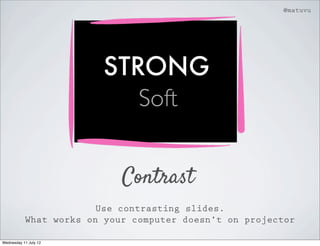
                        STRONG
                           Soft


                            Contrast
                        Use contrasting slides.
           What works on your computer doesn’t on projector

Wednesday 11 July 12
@matuvu


                           Add A Nice Touch
                                    Not Only

                                    Arial
                                 Helvetica
                              Times New Roman


                       Use 1 Or 2 Personal Fonts
                               It shows emotion.
                            Use it for your titles.

Wednesday 11 July 12
@matuvu


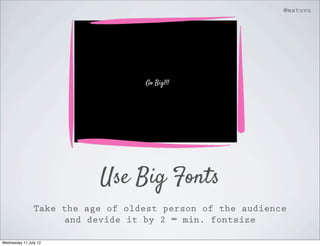
                                   Go Big!!!


                           Use Big Fonts
                Take the age of oldest person of the audience
                      and devide it by 2 = min. fontsize

Wednesday 11 July 12
@matuvu


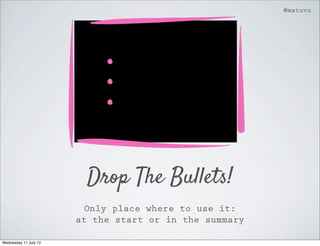
                         Drop The Bullets!
                         Only place where to use it:
                       at the start or in the summary

Wednesday 11 July 12
@matuvu


                  Use Images To Tell The Story
                          They add emotion to your story
                   iStockphotography.com, Flickr.com, Veer.com

Wednesday 11 July 12
@matuvu


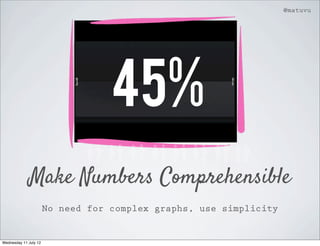
                                   45%
             Make Numbers Comprehensible
                       No need for complex graphs, use simplicity


Wednesday 11 July 12
@matuvu


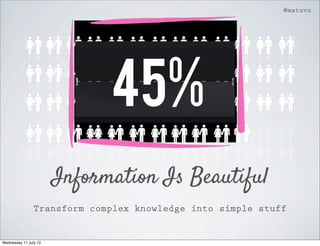
                             45%
                       Information Is Beautiful
                Transform complex knowledge into simple stuff


Wednesday 11 July 12
@matuvu


                       Drop The Animation
                         Use it scarcely.
        It takes time in the making, and doesn’t add much.

Wednesday 11 July 12
@matuvu


                        No To Animation


                       Drop The Animation
                         Use it scarcely.
        It takes time in the making, and doesn’t add much.

Wednesday 11 July 12
@matuvu


                       Drop The Animation
                         Use it scarcely.
        It takes time in the making, and doesn’t add much.

Wednesday 11 July 12
@matuvu


                                K.I.S.S
                       Keep it simple. Really simple.


Wednesday 11 July 12
@matuvu


                             Yes To Subtle


                                K.I.S.S
                       Keep it simple. Really simple.


Wednesday 11 July 12
@matuvu


                                K.I.S.S
                       Keep it simple. Really simple.


Wednesday 11 July 12
@matuvu


                       5/ Share

Wednesday 11 July 12
@matuvu


                                   PR-aspect
                       Every presentation has a big PR purpose
                                  for your company.

                                 1. Tell who you are
                                   2. Don’t overdo
                                3. Add share elements


Wednesday 11 July 12
@matuvu


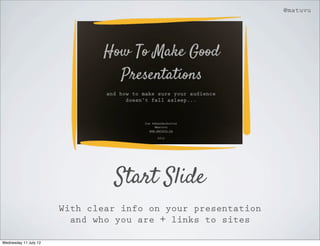
                                Start Slide
                       With clear info on your presentation
                         and who you are + links to sites

Wednesday 11 July 12
@matuvu


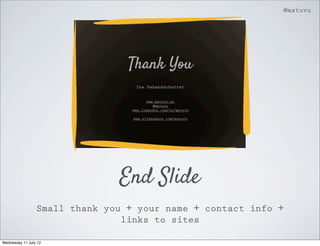
                               End Slide
                 Small thank you + your name + contact info +
                                links to sites

Wednesday 11 July 12
@matuvu


                         Twitter
     If you have an internet savvy audience or it’s a key
        conference: add your twitter name on all slides

Wednesday 11 July 12
@matuvu


                       Share Afterwards
        Share your presentation afterwards, make sure your
           links are clickable. ( Check slideshare.com)

Wednesday 11 July 12
@matuvu


                       Mistakes

Wednesday 11 July 12
@matuvu


                       What Are The Biggest
                            Mistakes?
                               Too many words
                                 No practice
                              Technical hassle
                         (bad internet connection,
                              missing adaptor)

                              Be prepared :)


Wednesday 11 July 12
@matuvu


                       Recap...

Wednesday 11 July 12
@matuvu


                         Remember
                         Know your audience
                        Outline the content
                            Add the story
                       Add a sauce of design
                                Share


Wednesday 11 July 12
@matuvu


                       Rock Those Stages!


Wednesday 11 July 12
Thank You
                        Ine Dehandschutter


                             www.matuvu.nu
                                @matuvu
                       www.linkedin.com/in/matuvu

                       www.slideshare.com/matuvu


Wednesday 11 July 12

How to make good presentations

  • 1.
    How To MakeGood Presentations and how to make sure your audience doesn’t fall asleep... Ine Dehandschutter @matuvu www.matuvu.nu 2012 Wednesday 11 July 12
  • 2.
    @matuvu Hi, I’m Ine, a designer & photographer @ matuvu Wednesday 11 July 12
  • 3.
    @matuvu I Learned A Thing. Or 2... (Which I want to share with you!) Wednesday 11 July 12
  • 4.
    @matuvu Most Made Remarks On Bad Presentations 1. too much text, 2. reading of screen, boring 3. too complicated to understand 4. lack of preparation/practice 5. too much animation Wednesday 11 July 12
  • 5.
    @matuvu Basics Wednesday 11 July 12
  • 6.
    @matuvu Know Your Audience Wednesday 11 July 12
  • 7.
    @matuvu Outline Your Content Wednesday 11 July 12
  • 8.
    @matuvu Blahblahblah Add The Story Wednesday 11 July 12
  • 9.
    @matuvu Add A Sauce Of Design Wednesday 11 July 12
  • 10.
    @matuvu Make It Sharable Wednesday 11 July 12
  • 11.
    @matuvu 1/ Audience Wednesday 11 July 12
  • 12.
    @matuvu Know It Before You Enter The Stage It saves your day. Wednesday 11 July 12
  • 13.
    @matuvu 2/ Outlines Wednesday 11 July 12
  • 14.
    @matuvu K.I.S.S Keep it STRAIGHT & SIMPLE! Wednesday 11 July 12
  • 15.
    @matuvu Most Of Us Remember Only 3 Things So don’t try to fit in 30... Wednesday 11 July 12
  • 16.
    @matuvu 1 Slide = 1 Idea You’re giving a presentation, you’re not handing out a document! Wednesday 11 July 12
  • 17.
    @matuvu The 10-20-30 Rule Guy Kawasaki says: 10 slides, 20 minutes, 30 fontsize Wednesday 11 July 12
  • 18.
    @matuvu This Is A 72point Fontsize This is a 30 fontsize Wednesday 11 July 12
  • 19.
    @matuvu This Forces You To Think In Billboards Terms You’re giving a presentation, you’re not handing out a document! Wednesday 11 July 12
  • 20.
    @matuvu Stick To Your Time Always If you get a 20min talk prepare for 18. Wednesday 11 July 12
  • 21.
    @matuvu 3/ The Story Wednesday 11 July 12
  • 22.
    @matuvu Structure Of A Story beginning, middle, end vs tension Wednesday 11 July 12
  • 23.
    @matuvu Basically Your Story Needs: 1. a problem 2. a solution inbeween some crises and atleast 1 joke Wednesday 11 July 12
  • 24.
    @matuvu UseThis Structure For Your Outline It works faster Wednesday 11 July 12
  • 25.
    @matuvu The Joke Is Essential! You can drop all the other stuff. Wednesday 11 July 12
  • 26.
    @matuvu On The Jokes 3 ways to integrate jokes: 1. Tell it 2. Integrate it in the slide + talk 3. Only show it in your slide and have the audience notice it. Wednesday 11 July 12
  • 27.
    @matuvu Connect With The Audience You you need to make a personal connection with the audience. A joke is a good way. Asking interaction is another. (Hard in Belgium!) Add eye contact, don’t read your slides Wednesday 11 July 12
  • 28.
    @matuvu 4/ Design Wednesday 11 July 12
  • 29.
    @matuvu Use A Comprehensive Structure Make sure people ‘get’ the underlying structure through your design (same titles, same structure) Wednesday 11 July 12
  • 30.
    @matuvu Align! Make sure everything is aligned the same way. Wednesday 11 July 12
  • 31.
    @matuvu STRONG Soft Contrast Use contrasting slides. What works on your computer doesn’t on projector Wednesday 11 July 12
  • 32.
    @matuvu Add A Nice Touch Not Only Arial Helvetica Times New Roman Use 1 Or 2 Personal Fonts It shows emotion. Use it for your titles. Wednesday 11 July 12
  • 33.
    @matuvu Go Big!!! Use Big Fonts Take the age of oldest person of the audience and devide it by 2 = min. fontsize Wednesday 11 July 12
  • 34.
    @matuvu Drop The Bullets! Only place where to use it: at the start or in the summary Wednesday 11 July 12
  • 35.
    @matuvu Use Images To Tell The Story They add emotion to your story iStockphotography.com, Flickr.com, Veer.com Wednesday 11 July 12
  • 36.
    @matuvu 45% Make Numbers Comprehensible No need for complex graphs, use simplicity Wednesday 11 July 12
  • 37.
    @matuvu 45% Information Is Beautiful Transform complex knowledge into simple stuff Wednesday 11 July 12
  • 38.
    @matuvu Drop The Animation Use it scarcely. It takes time in the making, and doesn’t add much. Wednesday 11 July 12
  • 39.
    @matuvu No To Animation Drop The Animation Use it scarcely. It takes time in the making, and doesn’t add much. Wednesday 11 July 12
  • 40.
    @matuvu Drop The Animation Use it scarcely. It takes time in the making, and doesn’t add much. Wednesday 11 July 12
  • 41.
    @matuvu K.I.S.S Keep it simple. Really simple. Wednesday 11 July 12
  • 42.
    @matuvu Yes To Subtle K.I.S.S Keep it simple. Really simple. Wednesday 11 July 12
  • 43.
    @matuvu K.I.S.S Keep it simple. Really simple. Wednesday 11 July 12
  • 44.
    @matuvu 5/ Share Wednesday 11 July 12
  • 45.
    @matuvu PR-aspect Every presentation has a big PR purpose for your company. 1. Tell who you are 2. Don’t overdo 3. Add share elements Wednesday 11 July 12
  • 46.
    @matuvu Start Slide With clear info on your presentation and who you are + links to sites Wednesday 11 July 12
  • 47.
    @matuvu End Slide Small thank you + your name + contact info + links to sites Wednesday 11 July 12
  • 48.
    @matuvu Twitter If you have an internet savvy audience or it’s a key conference: add your twitter name on all slides Wednesday 11 July 12
  • 49.
    @matuvu Share Afterwards Share your presentation afterwards, make sure your links are clickable. ( Check slideshare.com) Wednesday 11 July 12
  • 50.
    @matuvu Mistakes Wednesday 11 July 12
  • 51.
    @matuvu What Are The Biggest Mistakes? Too many words No practice Technical hassle (bad internet connection, missing adaptor) Be prepared :) Wednesday 11 July 12
  • 52.
    @matuvu Recap... Wednesday 11 July 12
  • 53.
    @matuvu Remember Know your audience Outline the content Add the story Add a sauce of design Share Wednesday 11 July 12
  • 54.
    @matuvu Rock Those Stages! Wednesday 11 July 12
  • 55.
    Thank You Ine Dehandschutter www.matuvu.nu @matuvu www.linkedin.com/in/matuvu www.slideshare.com/matuvu Wednesday 11 July 12