HOW TO
INSERT A
CHART IN
M I C R O S O F T W O R D
2 0 1 6
BEH HUEY LIN
BG17110255
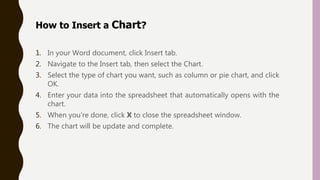
1. In your Word document, click Insert tab.
2. Navigate to the Insert tab, then select the Chart.
3. Select the type of chart you want, such as column or pie chart, and click
OK.
4. Enter your data into the spreadsheet that automatically opens with the
chart.
5. When you're done, click X to close the spreadsheet window.
6. The chart will be update and complete.
How to Insert a Chart?
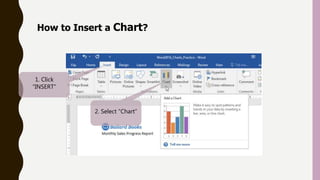
1. Click
“INSERT”
2. Select “Chart”
How to Insert a Chart?
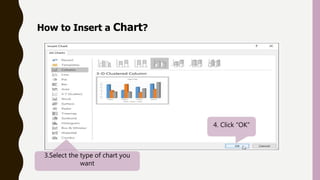
3.Select the type of chart you
want
4. Click “OK”
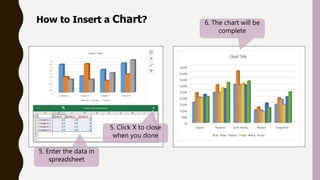
5. Enter the data in
spreadsheet
How to Insert a Chart?
5. Click X to close
when you done
6. The chart will be
complete

How to insert a chart in microsoft word 2016

  • 1.
    HOW TO INSERT A CHARTIN M I C R O S O F T W O R D 2 0 1 6 BEH HUEY LIN BG17110255
  • 2.
    1. In yourWord document, click Insert tab. 2. Navigate to the Insert tab, then select the Chart. 3. Select the type of chart you want, such as column or pie chart, and click OK. 4. Enter your data into the spreadsheet that automatically opens with the chart. 5. When you're done, click X to close the spreadsheet window. 6. The chart will be update and complete. How to Insert a Chart?
  • 3.
    How to Inserta Chart? 1. Click “INSERT” 2. Select “Chart”
  • 4.
    How to Inserta Chart? 3.Select the type of chart you want 4. Click “OK”
  • 5.
    5. Enter thedata in spreadsheet How to Insert a Chart? 5. Click X to close when you done 6. The chart will be complete