How to Configure Sales
Team & Team Members in
Odoo 17 Sales
Enterprise
Introduction
Enterprise
In Odoo 17, the Sales module provides tools to manage sales teams
and team members effectively. Sales teams in Odoo are designed to
organize and manage groups of salespeople. The team leader is
usually the manager or the head of the sales team who oversees the
operations and performance. Team members are the salespeople
assigned to the team. They will be responsible for handling sales
orders, leads, and opportunities within their team.
Enterprise
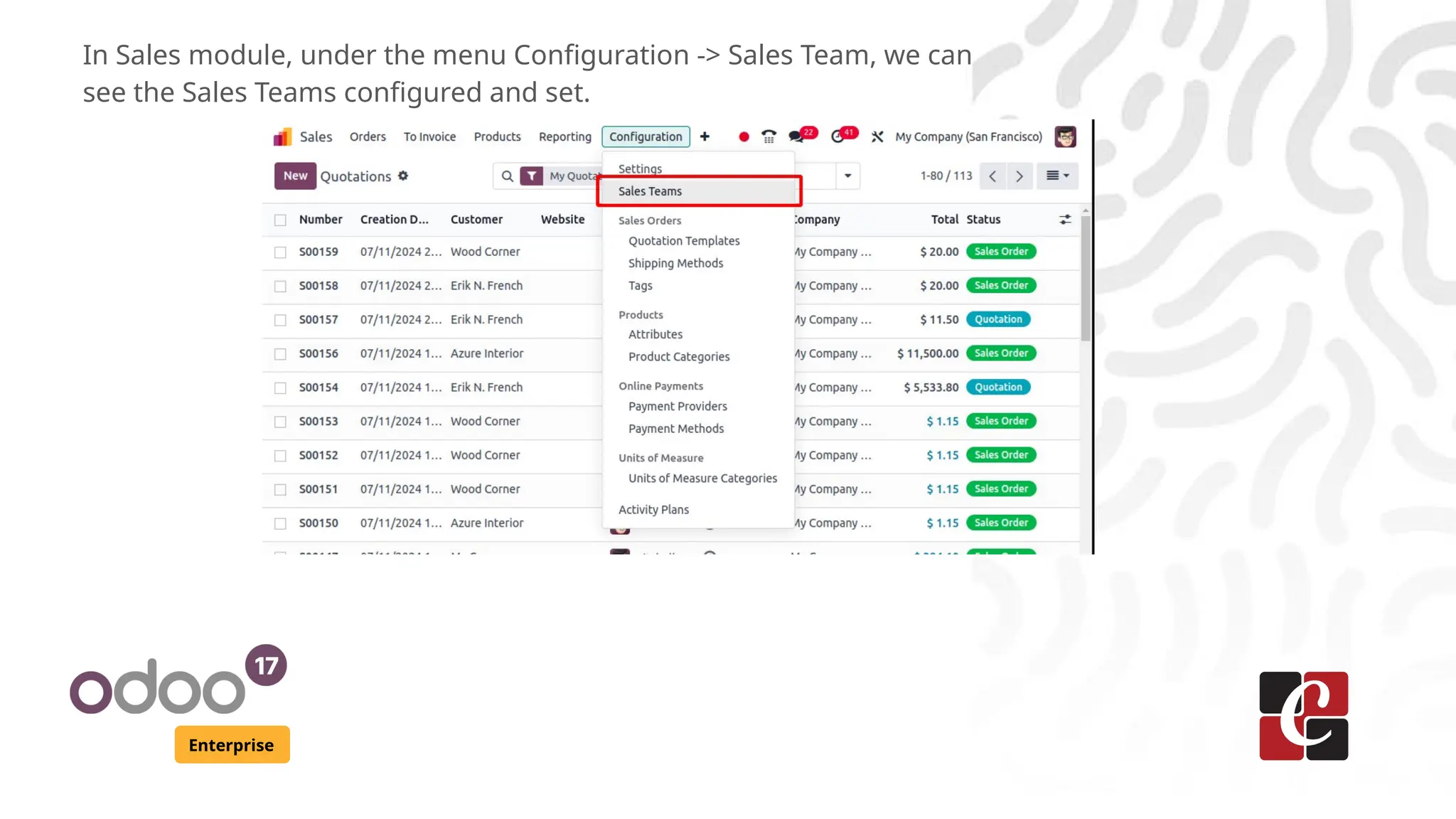
In Sales module, under the menu Configuration -> Sales Team, we can
see the Sales Teams configured and set.
Enterprise
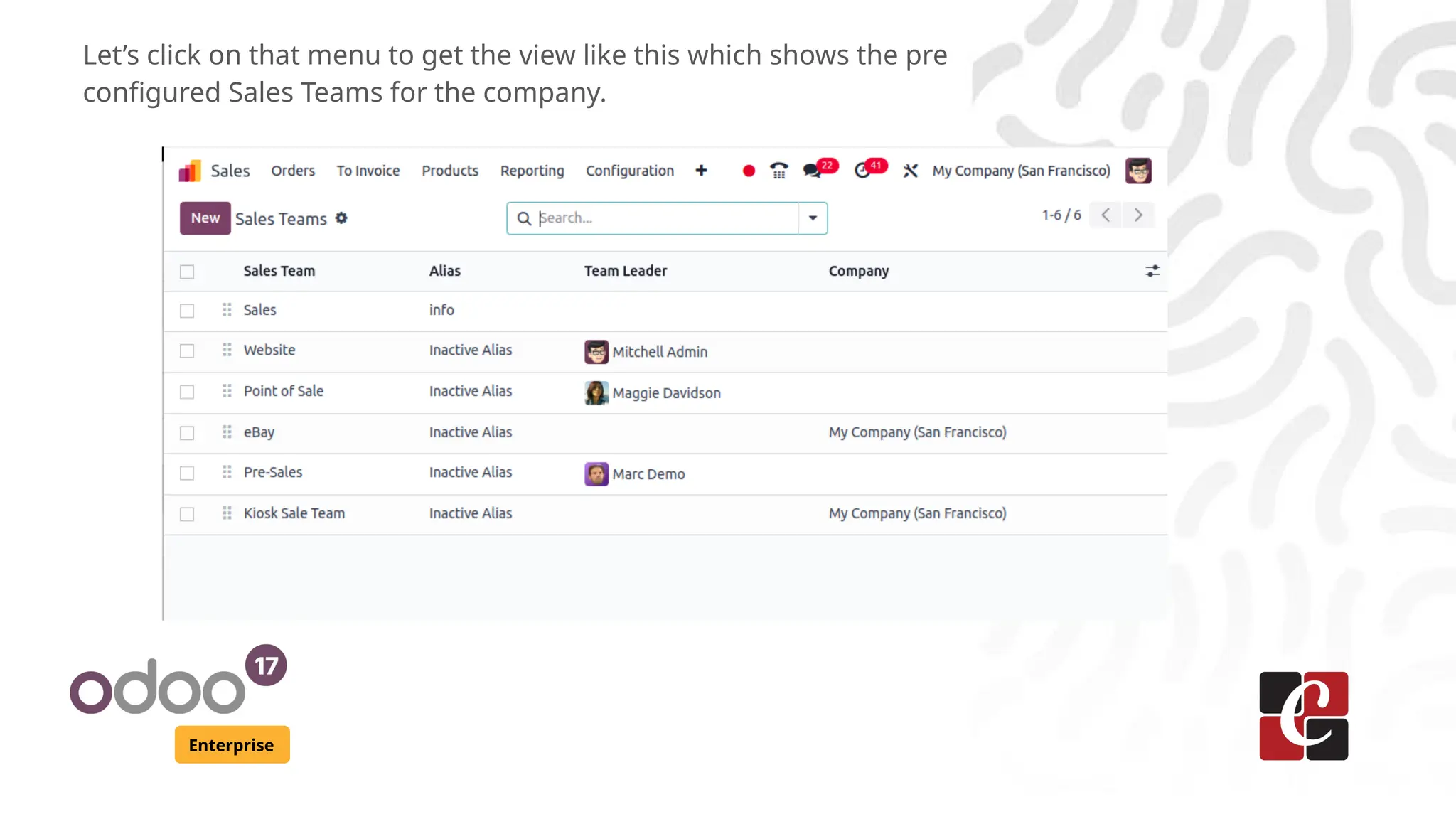
Let’s click on that menu to get the view like this which shows the pre
configured Sales Teams for the company.
Enterprise
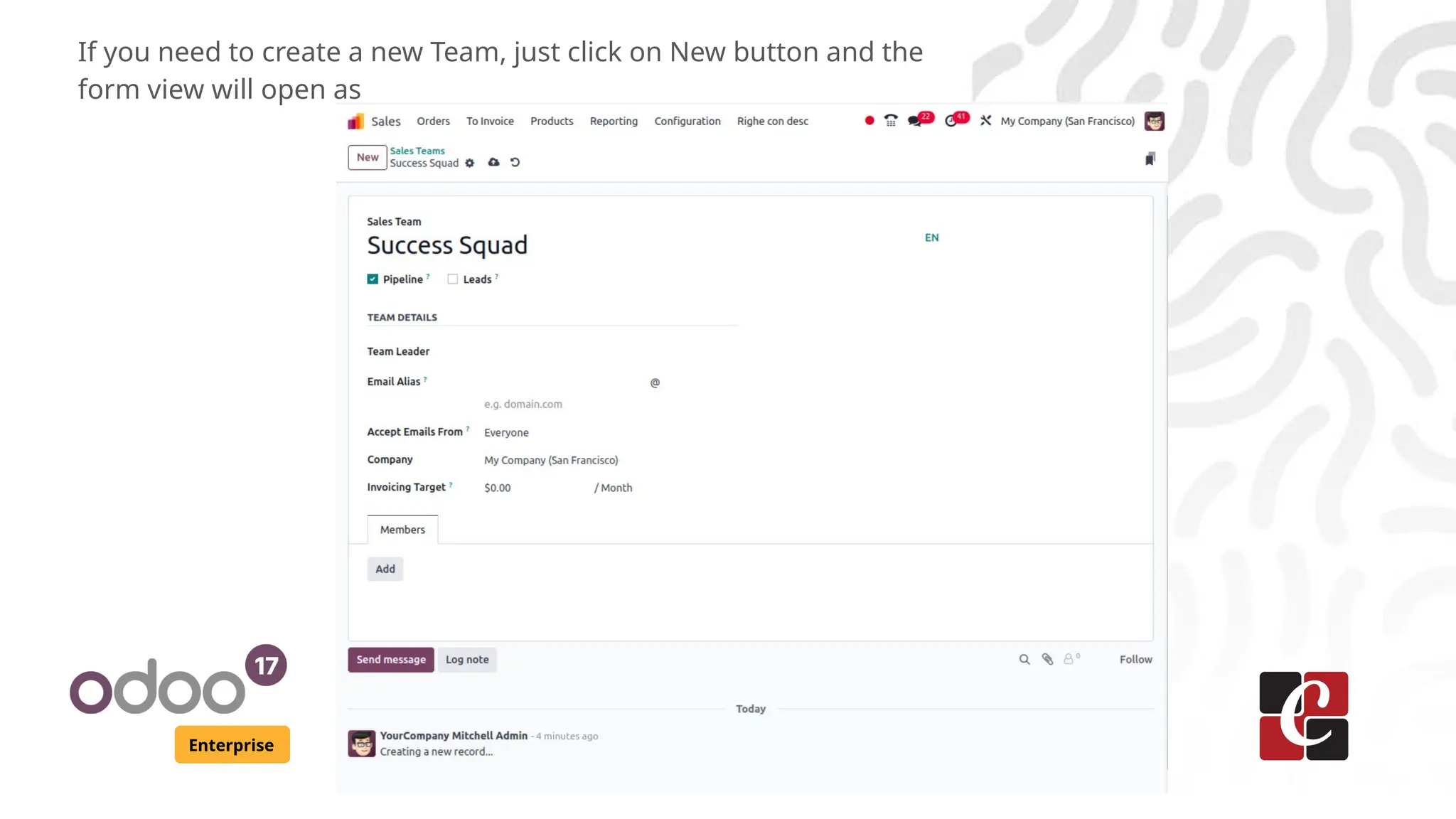
If you need to create a new Team, just click on New button and the
form view will open as
Enterprise
Here, I’m giving the Team name as ‘Success Squad’ just as an example. Apart
from the name, the other fields available to fill are
● Boolean field Pipeline which allows to manage pre sales operations with
opportunities in CRM
● Boolean field Leads which makes every request as a lead before converting
as an opportunity.
● Team Leader can be set choosing from the user’s list
● Email alias can be given to catch the emails
● Selection field Accept Emails from which sets a policy on document while
using mails
● Company name can be set. If it is left as blank, the Team will be applied for
all the branches of the company
● Invoicing Target amount can be configured which is the revenue of the
current month
● And at last, Team members can be added from the user list of the
company
Enterprise
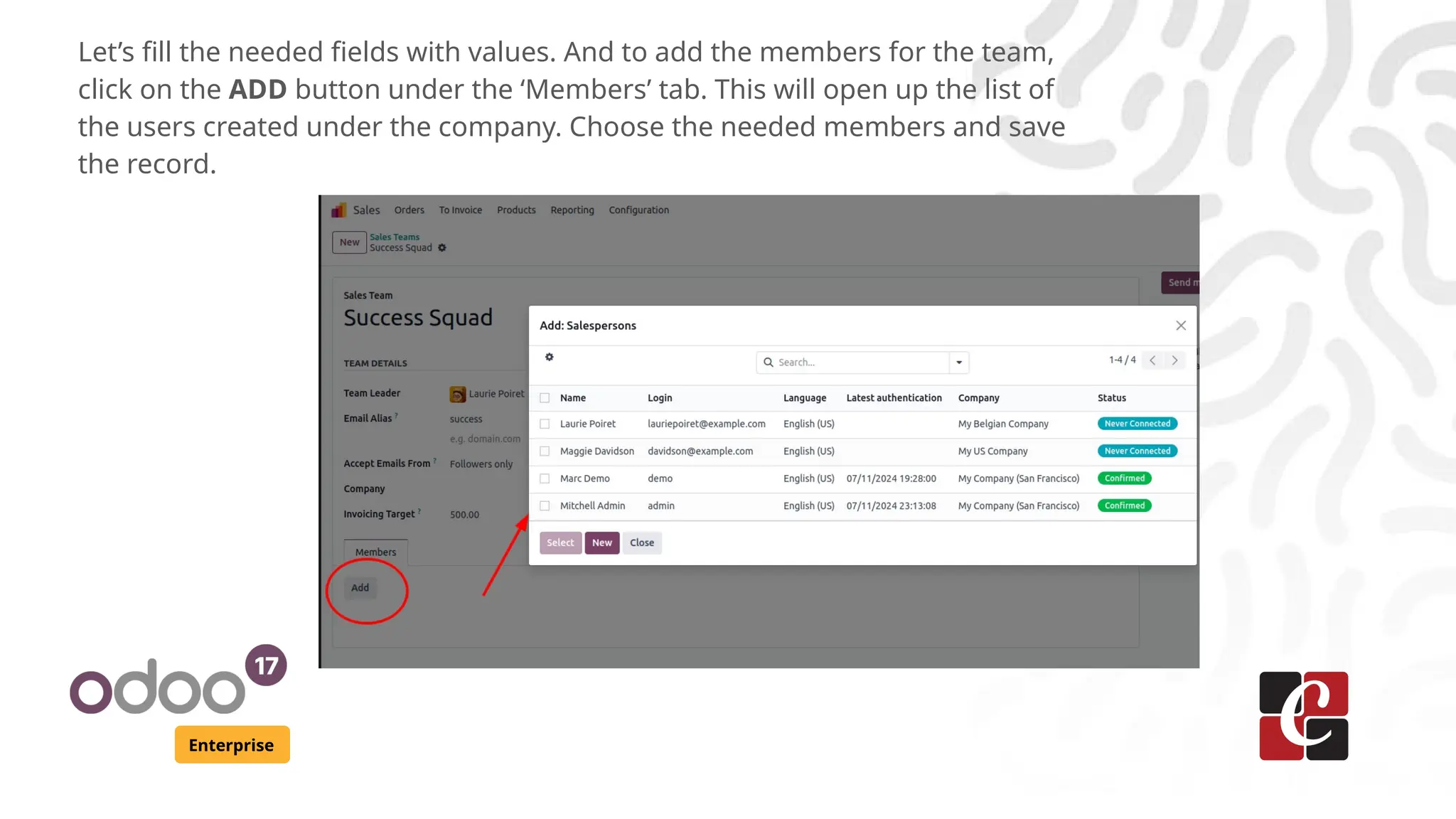
Let’s fill the needed fields with values. And to add the members for the team,
click on the ADD button under the ‘Members’ tab. This will open up the list of
the users created under the company. Choose the needed members and save
the record.
Enterprise
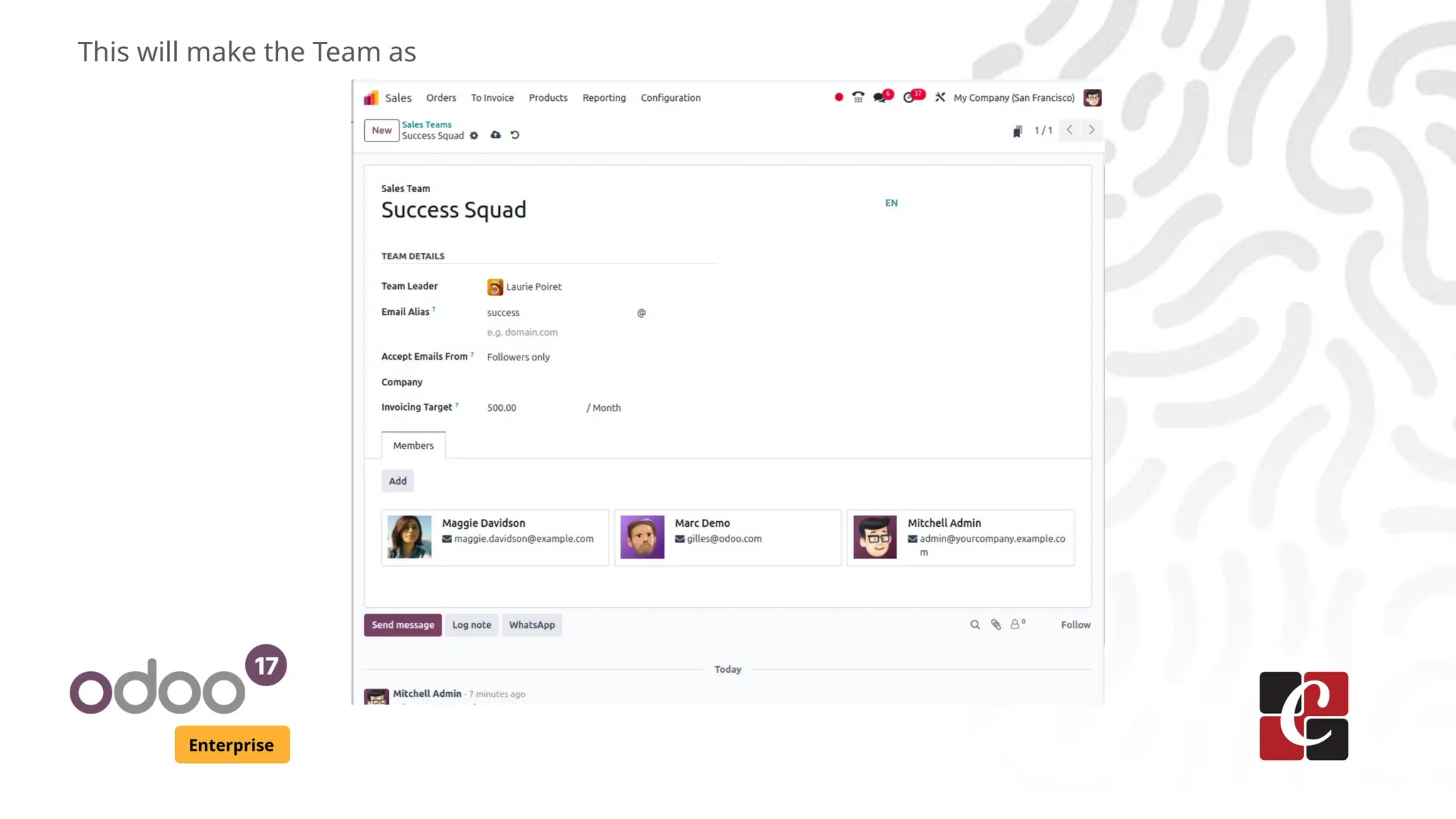
This will make the Team as
Enterprise
The speciality is that, we can add the same members in different Sales
teams simultaneously and they can work with the teams and manage
through Odoo. The concept of Multi Teams is the one that allows
this.
By effectively utilizing these features, we can enhance the
performance and management of our sales teams and team
members in Odoo 17.
For More Info.
Check our company website for related blogs
and Odoo book.
Check our YouTube channel for
functional and technical videos in Odoo.
Enterprise
www.cybrosys.com

How to Configure Sales Team & Team Members in Odoo 17 Sales

  • 1.
    How to ConfigureSales Team & Team Members in Odoo 17 Sales Enterprise
  • 2.
    Introduction Enterprise In Odoo 17,the Sales module provides tools to manage sales teams and team members effectively. Sales teams in Odoo are designed to organize and manage groups of salespeople. The team leader is usually the manager or the head of the sales team who oversees the operations and performance. Team members are the salespeople assigned to the team. They will be responsible for handling sales orders, leads, and opportunities within their team.
  • 3.
    Enterprise In Sales module,under the menu Configuration -> Sales Team, we can see the Sales Teams configured and set.
  • 4.
    Enterprise Let’s click onthat menu to get the view like this which shows the pre configured Sales Teams for the company.
  • 5.
    Enterprise If you needto create a new Team, just click on New button and the form view will open as
  • 6.
    Enterprise Here, I’m givingthe Team name as ‘Success Squad’ just as an example. Apart from the name, the other fields available to fill are ● Boolean field Pipeline which allows to manage pre sales operations with opportunities in CRM ● Boolean field Leads which makes every request as a lead before converting as an opportunity. ● Team Leader can be set choosing from the user’s list ● Email alias can be given to catch the emails ● Selection field Accept Emails from which sets a policy on document while using mails ● Company name can be set. If it is left as blank, the Team will be applied for all the branches of the company ● Invoicing Target amount can be configured which is the revenue of the current month ● And at last, Team members can be added from the user list of the company
  • 7.
    Enterprise Let’s fill theneeded fields with values. And to add the members for the team, click on the ADD button under the ‘Members’ tab. This will open up the list of the users created under the company. Choose the needed members and save the record.
  • 8.
  • 9.
    Enterprise The speciality isthat, we can add the same members in different Sales teams simultaneously and they can work with the teams and manage through Odoo. The concept of Multi Teams is the one that allows this. By effectively utilizing these features, we can enhance the performance and management of our sales teams and team members in Odoo 17.
  • 10.
    For More Info. Checkour company website for related blogs and Odoo book. Check our YouTube channel for functional and technical videos in Odoo. Enterprise www.cybrosys.com